
Did you know that users send over 500 million tweets every day, but the best time to post on Twitter is different for everyone?
And why wouldn’t it be different? Everyone has a different set of audience, different industry, and different demographics! Even though Twitter’s algorithm influences what appears on feeds, timing still plays a big role in visibility and interaction.
The key is to find the best time to tweet according to your needs, and there are a few ways to do that!
To uncover the ideal posting times, we analyzed 3.5 million posts and conducted deep research to understand when users are most active and engaged.
So in this blog, I’m going to share the best times to post on Twitter (according to our research) and also tell you how you can find your own best time.
Short Summary
- Twitter users send over 500 million tweets daily, making timing and audience demographics key factors for visibility and engagement.
- Based on an analysis of 3.5 million posts, the overall best time to post on Twitter/X is Sunday from 9 AM–10 AM (highest engagement), followed by Monday from 12 PM–1 PM, and Tuesday/Wednesday from 8 PM–9 PM.
- Daily peak engagement windows vary across the week: Thursday (7 AM–8 AM), Friday (4 PM–5 PM), and Saturday (5 AM–6 AM).
- Optimal posting times differ by industry; for instance, Tech performs best from 8 AM–10 AM (Tue–Thu), while Entertainment performs best from 6 PM–10 PM (Thu–Sun).
- Regional time zones and habits impact active hours, with North America peaking from 8 AM–2 PM (Tue–Thu) and South Asia peaking from 9 AM–11 AM and 6 PM–9 PM (Mon–Fri).
- Finding your personal best time requires either manual A/B testing or using a Twitter tool with AI-suggested timing to analyze historical audience performance.
- Social Champ simplifies this process by allowing users to schedule tweets automatically during AI-recommended peak activity windows.
Best Time to Post on Twitter/X
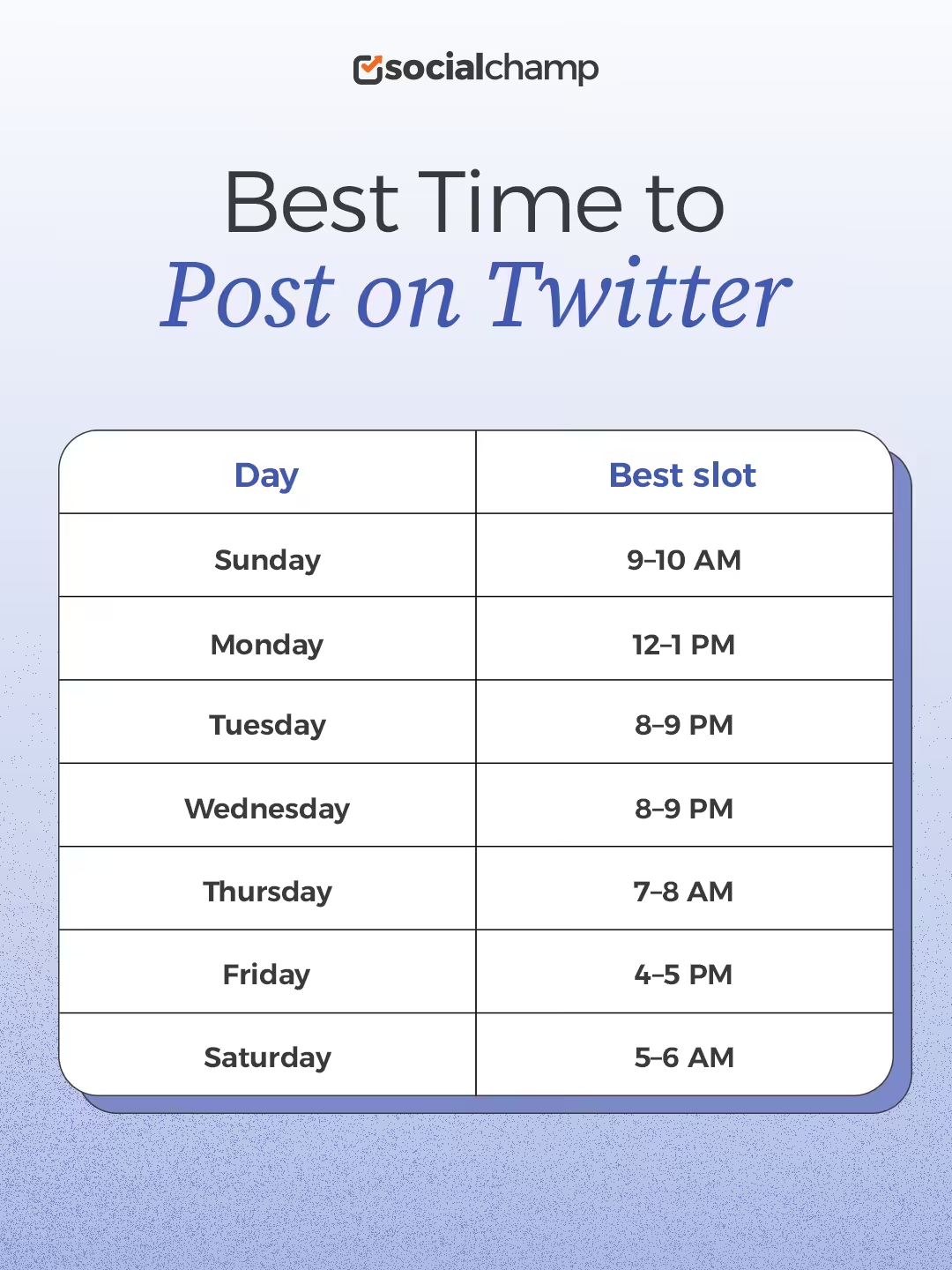
To find the best time to post on Twitter, we analyzed when our users post the most on X and how each of their posts perform. The information I’m providing in this blog is based on that research, and based on that, we found that Sundays from 9 AM- 10 AM is the best time to post your tweets, closely followed by Monday from 12- 1 PM.
Tuesday 8 PM to 9 PM is the third-best window if you miss the first two but still wish for good engagement. These top three slots garner the maximum attention on Twitter through various industries, but that is not all.
Other days also have their peak timings; you can see each of their best times below!
Featured Article: 400+ Twitter Bio Ideas for Everyone
What Are the Best Days and Times to Post on Twitter?
We studied engagement data across 3.5 million posts and created a simple day-by-day guide below. This breakdown shows the best times to post on X for each day of the week, so you can plan your tweets smartly and reach more people.
Best Time to Post on Twitter Each Day
| Day | Best slot | Engagement |
|---|---|---|
| Sunday | 9–10 AM | Highest |
| Monday | 12–1 PM | High |
| Tuesday | 8–9 PM | High |
| Wednesday | 8–9 PM | Moderate |
| Thursday | 7–8 AM | Moderate |
| Friday | 4–5 PM | Moderate |
| Saturday | 5–6 AM | High |
When Is the Best Time to Post on Twitter on Monday?
Mondays are great for reaching people early in the day. The best time to post on Twitter is between 12 PM and 1 PM, when most users are checking updates during their lunch break. People often scroll through their feeds to catch up on news, making it a good time for brands to share new announcements or blog links.
When Is the Best Time to Post on Twitter on Tuesday?
Tuesdays have one of a high engagement rates on Twitter. Posting between 8 PM and 9 PM works best. Many marketers call Tuesday the best day to post on Twitter since people are fully back in their work routine and more likely to interact with content. It’s one of the best times to post on X.
When Is the Best Time to Post on Twitter on Wednesday?
Wednesdays are moderate for visibility and engagement. The best posting window is from 8 PM to 9 PM, when the midweek energy is high and people are browsing more often. It’s a great day to share important updates, polls, or engaging visuals since users are active after working hours.
When Is the Best Time to Post on Twitter on Thursday?
On Thursdays, engagement remains steady from 7 AM to 8 AM. People tend to scroll through social media before heading into work, making it ideal for sharing promotional posts, brand news, or interactive tweets.
When Is the Best Time to Post on Twitter on Friday?
Fridays show a small dip in engagement as people start planning for the weekend. However, posting between 4 PM and 5 PM still helps your content reach an active audience. Try sharing lighter, entertaining, or fun posts that match the relaxed Friday mood to keep your followers engaged.
When Is the Best Time to Post on Twitter on Saturday?
Saturdays bring a more relaxed audience online. The best time to post is between 5 AM and 6 AM, when people scroll while having breakfast or coffee. It’s perfect for posting lifestyle content, weekend promotions, or visuals that grab quick attention without feeling too formal.
When Is the Best Time to Post on Twitter on Sunday?
According to our data, Sundays usually have the highest engagement on Twitter! You can post between 9-10 AM to reach users who check social media after breakfast. Keep your content soft and simple, such as reminders, quotes, or casual updates that fit the easy weekend pace.
Featured Article: How to Find Old Tweets on Twitter?
Best Times to Post on X (Twitter) by Industry
The best time to post on Twitter (X) is not the same for everyone. It depends a lot on your industry and what type of people follow you. People in different fields use Twitter at different times of the day. Some check updates early in the morning, while others scroll at night. This means the perfect time to post for a tech company may not work for a travel or entertainment brand.
When you understand your industry and your audience’s routine, you can post tweets when they are most active. This helps you get more likes, replies, and retweets. For example, if your followers are professionals who work in offices, they might check Twitter in the morning before work or during lunch breaks. But if you are in the entertainment industry, people might engage more in the evening when they are relaxing at home.
Here is a simple table that shows the best and worst times to post for different industries:
| Industry | Best Time to Post (Local Time) | Best Days | Times to Avoid |
|---|---|---|---|
| Technology | 8 AM to 10 AM | Tuesday to Thursday | Weekends, Late Nights |
| Entertainment | 6 PM to 10 PM | Thursday to Sunday | Early Mornings |
| Healthcare | 9 AM to 11 AM | Monday to Friday | Evenings, Weekends |
| Retail and E-Commerce | 12 PM to 3 PM | Wednesday to Friday | Monday Mornings |
| Finance | 7 AM to 10 AM | Tuesday to Thursday | Weekends, After 5 PM |
| Education | 10 AM to 1 PM | Monday to Thursday | Late Nights, Saturdays |
| Travel and Hospitality | 9 AM to 12 PM | Friday to Sunday | Mondays, Late Evenings |
| Media and News | 6 AM to 9 AM | Monday to Friday | Afternoons, Weekends |
These times are only general guidelines. Your followers may behave differently based on their location and daily routine. For example, people in one country may be active early, while others may use Twitter late at night. That is why it is always good to keep testing and changing your posting times until you find what works best.
Best Time to Post on Twitter (X) by Region
The best time to post on Twitter (X) changes from one region to another because of time zones, lifestyles, and cultural habits. For example, people in the US scroll through Twitter during work breaks, while users in Asia are more active at night. Knowing when your audience is online helps you post at the right time and get more engagement.
To make it simple, here is a list of the best times to post in different regions based on our research and engagement data from over 1 million tweets.
| Region | Best Time to Post (Local Time) | Best Days | Times to Avoid |
|---|---|---|---|
| North America (Eastern/Central) | 8 AM – 2 PM | Tuesday to Thursday | Late evenings and weekends |
| West Coast (Pacific) | 7 AM – 1 PM | Monday to Friday | After 6 PM |
| United Kingdom / Europe | 7 AM – 4 PM | Monday to Friday | Late nights |
| South Asia (India, Pakistan, Bangladesh) | 9 AM – 11 AM, 6 PM – 9 PM | Monday to Friday | Mid-afternoons |
| Australia / New Zealand | 10 AM – 2 PM | Wednesday to Friday | Early mornings |
| Middle East / Africa | 9 AM – 12 PM | Monday to Thursday | Evenings |
| Southeast Asia (Philippines, Indonesia, Malaysia) | 9 AM – 1 PM | Monday to Friday | Late nights |
Featured Article: How to Embed Video on Twitter/X?
How to Find Your Own Absolute Best Times to Post on Twitter (X)
There’s no single best time on social media. You might get a lot of the information from data like ours, but that doesn’t mean that it will work for you the same way it did for others. The best time to post on Twitter depends on many factors, including your industry, region, and audience.
Which is why it is important to find the best time to post for your audience, so you can publish your content when they’re active. There are two ways you can do this! First is to A/B test your timing. This is manual effort; you need to create content and experiment with posting it at different times and see which time it performs best. That might be your best time to post.
However, this first method requires a lot of time and effort. The easier and much more efficient way is to get a Twitter tool that tells you the best time to post for your audience. These tools have AI-suggested times that analyze your data from previous posts and, based on that, recommend the best time to post. This has a much better chance of success, and it also saves you so much effort and time.
Trust me, relying on Twitter marketing tools is the best option between the two!
My Recommendation
Social Champ is one such tool that gives you the option to let AI suggest the best time to post on Twitter. It analyzes your audience’s past behavior with your content and then suggests the right time to post. This is the single easiest way to get your posts live at the right time.
Here’s how you can schedule Twitter posts through Social Champ for the best time:
- Sign in to your Social Champ account; if you’re new, please sign up!
- Connect your Twitter profile and select Twitter from the “select social accounts” tab.
- Create your post and check the preview.
- Select “AI suggested time” at the “when to post” tab at the bottom of the screen.
- Select “Go for it” and hit schedule.
Hit Peak Engagement Every Single Time!
Boost Engagement on Twitter in 2026
In a nutshell, determining the best time to post on Twitter (X) is a process that requires a combination of data analysis, experimentation, and industry knowledge.
With Twitter Analytics, third-party tools, and understanding your audience’s behavior, you can identify the optimal times to maximize engagement.
Whether you’re posting for your business, brand, or personal account, aligning your content with your audience’s peak activity hours is crucial for success.
As Twitter/X continues to evolve, adapting and fine-tuning your posting strategy over time will help you stay visible and relevant.
This approach also strengthens audience connections, leading to better engagement and more meaningful results.