Have you ever scrolled through TikTok and seen those duets that instantly grab your attention and thought, “I want that kind of engagement on my TikTok videos too”?
I remember the first time when I tried to duet on TikTok, which felt tricky at first.
Short Summary
- Duets let you appear side by side with another creator’s video for reactions or commentary.
- Choose videos that fit your niche and will engage your audience.
- Pick the right layout to make your Duet clear and visually appealing.
- Avoid mistakes like poor audio, irrelevant content, or disabled Duet permissions.
- Use trending sounds, hashtags, and captions to boost visibility and engagement.
But when I dug into the numbers, I realized that around 43% of TikTok users have uploaded a Duet at least once.
That shows how popular this feature is and how many people are already using it to get more visibility.
So, if you’re here to learn how to duet on TikTok, you’re at the right place!
In this blog, I’m going to show you the step-by-step process for confidently creating TikTok Duets that connect with your audience.

Use Social Champ’s TikTok scheduler to plan and post your duets at the perfect time for maximum reach.
What Is a Duet on TikTok?
Let me take you back to the first time I noticed a TikTok Duet.
I was scrolling late at night, half paying attention, when a split screen stopped me cold.
One creator told a story. The other reacted in real time. It felt less like a video and more like a conversation. That was my “okay, this is different” moment.
If you are learning how to duet on TikTok, this is the feature you will use the most.
So, What Exactly Is a TikTok Duet?
A Duet lets you record your own video while another creator’s video plays next to yours.
Both videos appear on the screen at the same time. You can react, explain, agree, or add your own point of view.
I like to think of it as joining someone else’s post without stepping on their message.
This is why Duets feel more human than regular posts. You’re not talking into the void. You’re talking with someone.
Duet vs Stitch: What’s the Difference?
Many people get confused between Duet and Stitch, and this confused me too early on, so let’s clear it up.
Duet and Stitch serve different purposes, even though people mix them up all the time.
- Duet keeps both videos on screen from start to finish.
- Stitch pulls a short clip from another video and places it at the beginning of yours.
If you want a live reaction or side-by-side commentary, Duet makes sense. If you only need a moment to respond, Stitch works better.
Here is a simple way to look at it:
| Feature | Description | Best Use Case |
|---|---|---|
| Duet | Records your video next to another user’s video | Reactions, side-by-side commentary, collaborations |
| Stitch | Uses a short clip from another video in yours | Responding to a specific moment or quote |
Once you understand this difference, you can easily choose the right format. Duet works best when you want to be part of the moment, not just comment on it.
Featured Article: How to Change Your Name on Instagram in 2026: Complete Guide
Why Should You Duet on TikTok?
Have you ever posted a TikTok video that you think is good, but then watched it barely move?
That’s when individuals start doubting their content. However, it’s not the idea itself. Sometimes, it’s visibility.
This is where you can quietly change the game with Duets.
-
You Borrow Attention Without Stealing It
When you make a Duet, your content appears next to something people already care about.
You are not interrupting their scroll. You are joining it. That matters
TikTok’s own usage data indicate that the interactive features, such as Duets and Stitches, drive higher watch time because viewers stay longer to see both perspectives.
That extra watch time helps your video travel further.
So, if you’re learning how to duet on TikTok, think of it as entering a room where people already gather.
-
You Reach New Audiences Faster
Let me tell you something that I noticed.
When I dueted a trending video, I started seeing comments from people who had never seen my content before.
That happened because my video appeared in front of the original creator’s audience. It’s one of the easiest ways to expand your reach without paid promotion.
-
You Stay Relevant Without Chasing Ideas
You all know that trends move fast. Duets allow you to react instead of starting from zero.
Some creators often duet to react to news, sounds, or challenges. Brands use them to add commentary or context.
Both methods work when done properly.
-
You Build Real Engagement
When you duet, it feels human. People comment more, compare reactions, and tag friends.
And as a result, your content feels less like a post and more like a conversation.
If growth feels slow right now, skipping Duets means missing one of TikTok’s most social features.
Featured Article: How to Report a TikTok Account
How to Duet on TikTok: Step by Step (Mobile and Web)
The first time I tried a Duet, I overthought it.
I assumed there were hidden steps or settings I would mess up. Turns out, TikTok made this part refreshingly simple.
If you’re here to learn how to duet on TikTok, let me tell you the same way I learned it.
How to Duet on TikTok Using Your Phone
Most Duets happen on mobile, and for good reason. Here is the exact flow:
- Find the video you want to Duet with
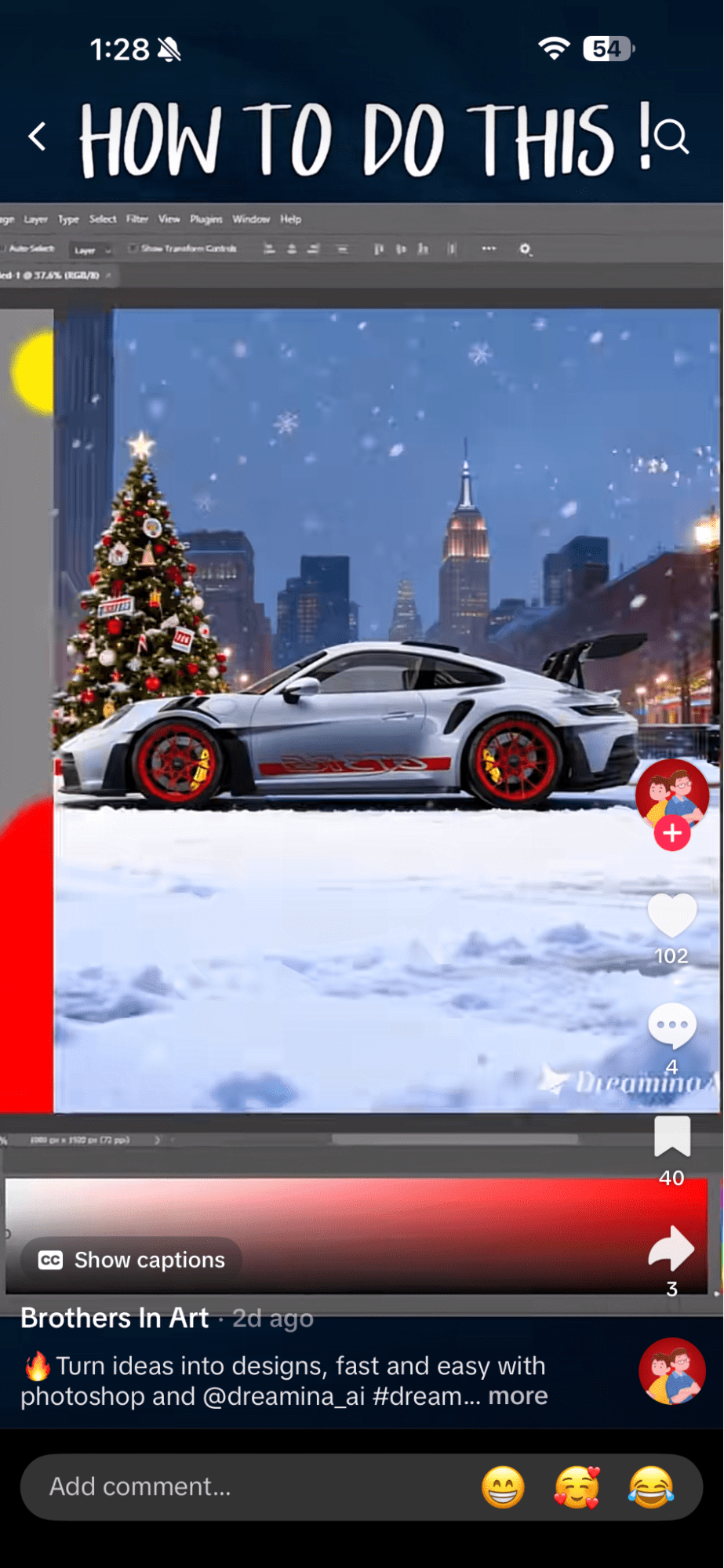
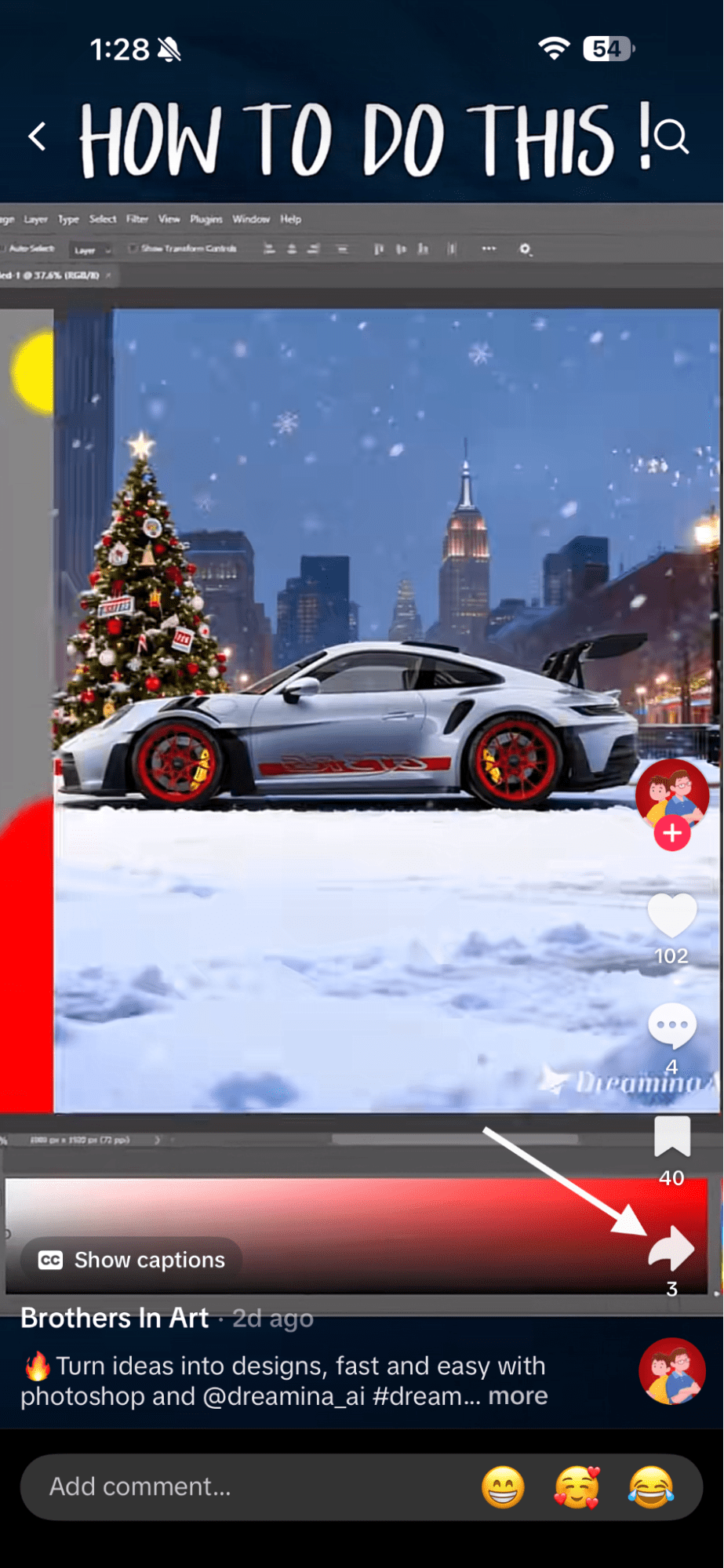
Find the Video You Want to Duet With - Tap the “Share” arrow on the right
Tap the “Share” Option - Select “Duet” from the menu
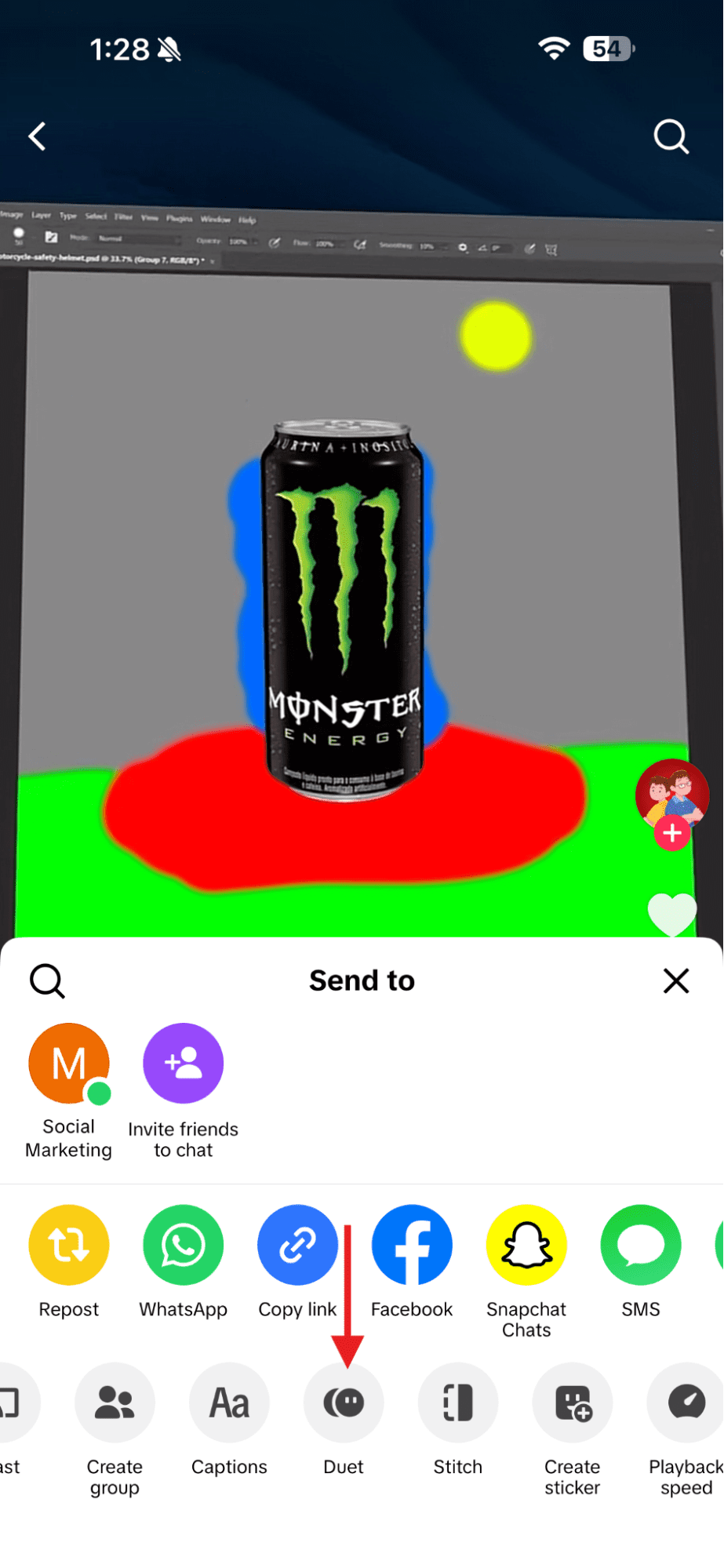
Select the “Duet” Option - Choose your layout side by side, top and bottom, or green screen
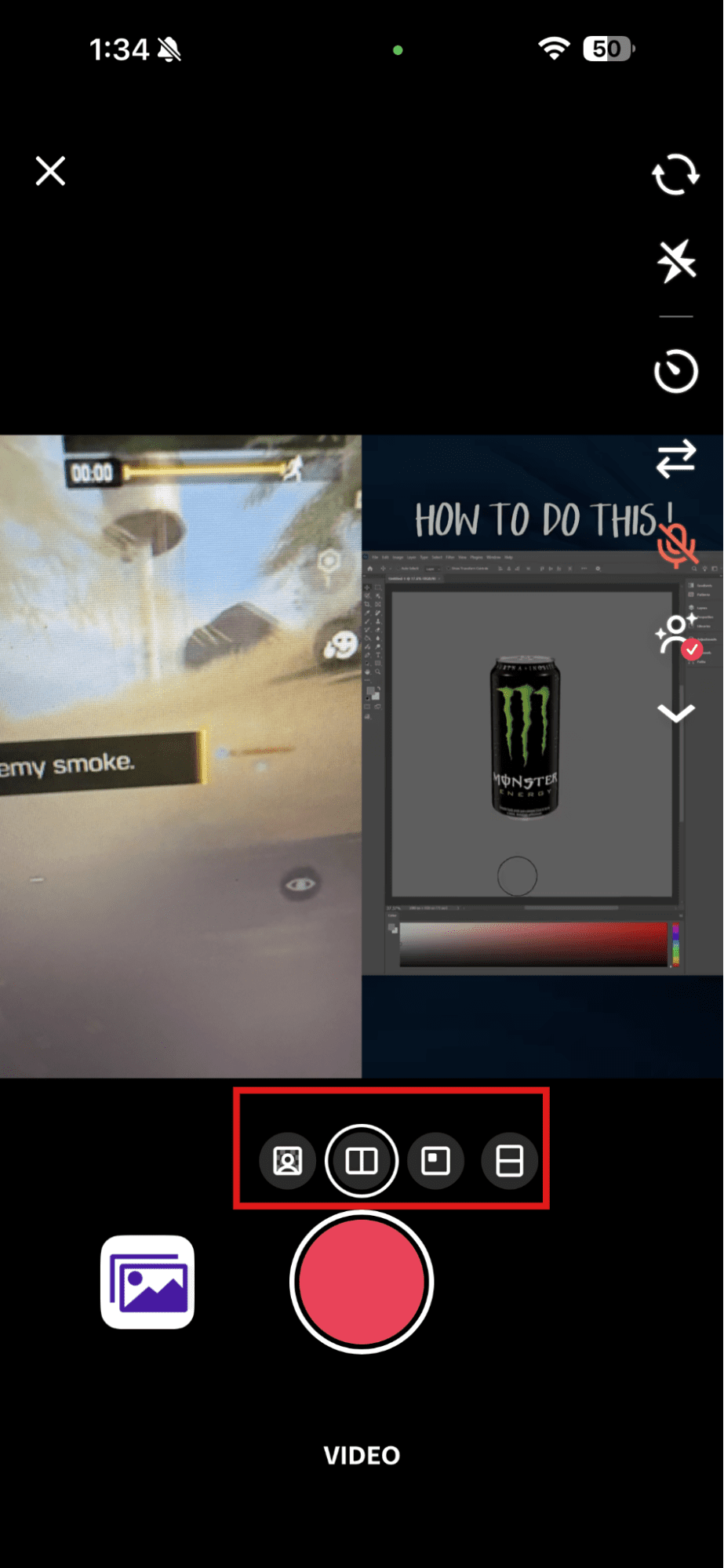
Choose the Layout - Record your video
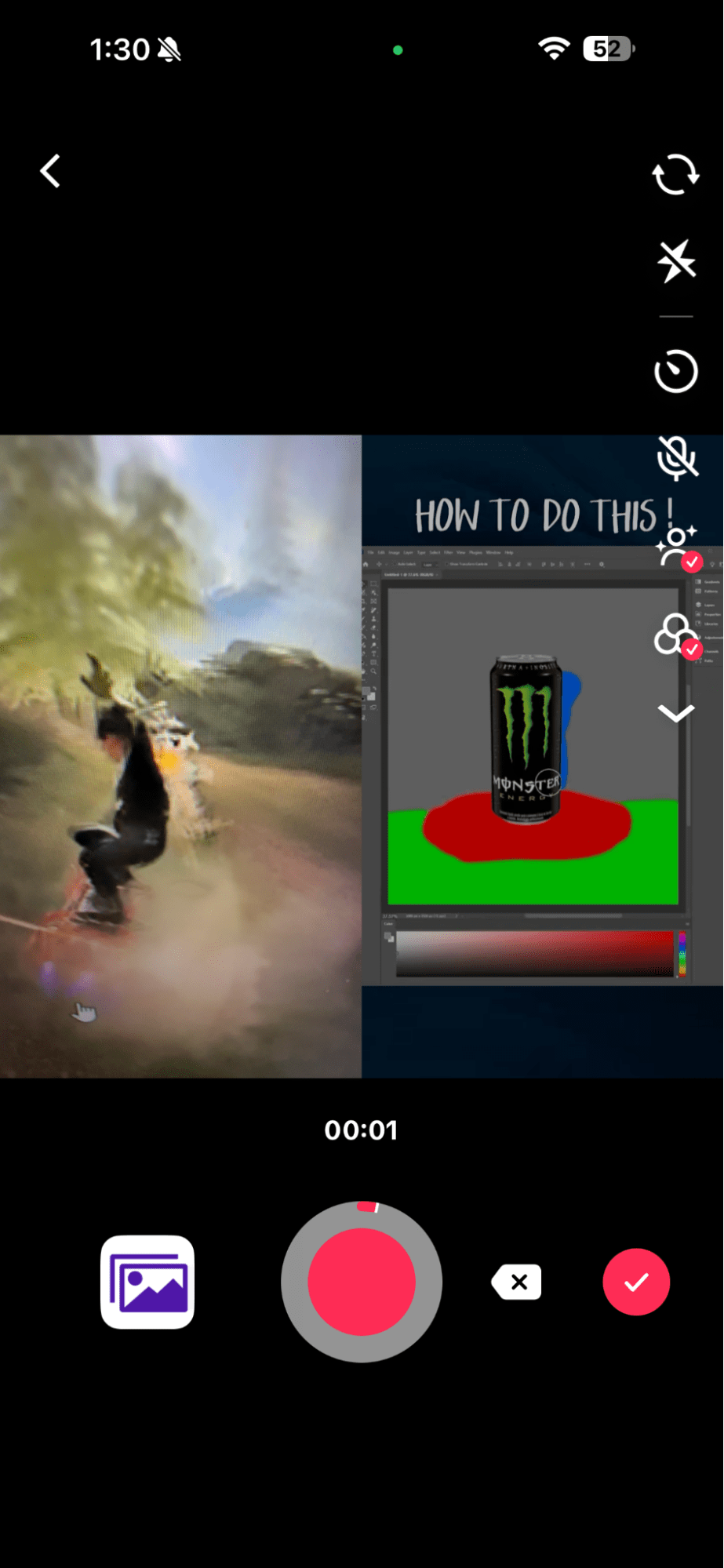
Record Your Video - Edit text, volume, or effects

Write the Caption - Tap “Post”
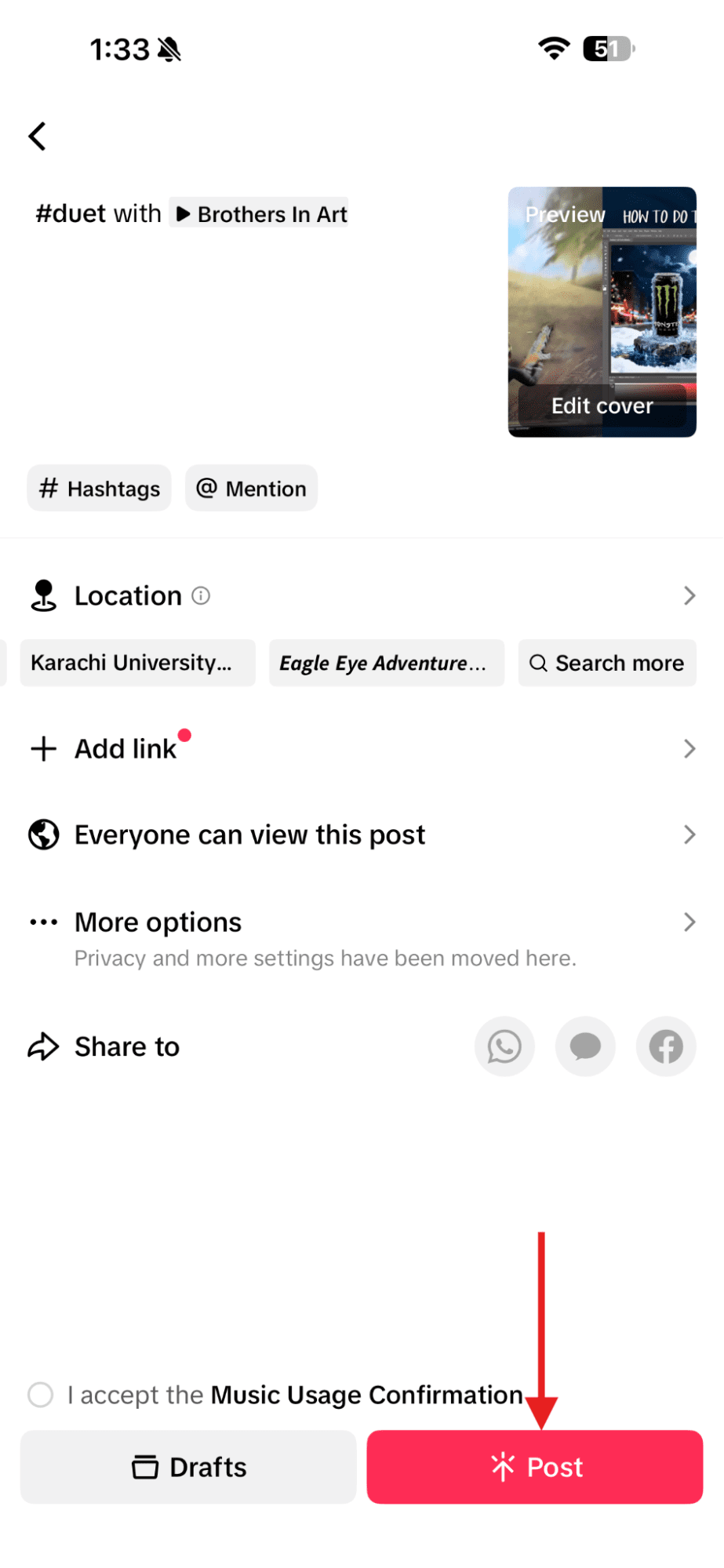
Tap “Post”
It’s that simple, and there’s no learning curve.
That is it. No extra setup. No learning curve. This is also where people ask how to duet on TikTok with sound.
TikTok automatically keeps the original audio, but you can adjust the volume before posting so your voice stays clear.
Can You Duet on Desktop?
The answer is: not fully. TikTok’s desktop version allows you to upload and publish videos, but if you want to duet, it works best on mobile.
If you try this on the desktop version, you may not see the Duet option at all.
Quick Tip Before You Hit Record!
Always check permissions that the original video must allow Duets. Once your video is ready, timing still matters. Posting at the best time to post on TikTok can help your Duet get early traction and stronger reach.
Don’t let your Duets go unnoticed. Schedule with Social Champ and grab your audience’s attention before someone else does.
Featured Article: Social Media Crisis Management in 2026: Strategy, Tools & Recovery
How to Choose the Right Video to Duet With
Now, let’s discuss the most important step that most people think is not necessary.
Let me tell you one of my experiences.
Once, I dueted on a random video just because it looked popular, because the views were fine. But the engagement was flat.
That taught me that not every video deserves your time!
If you want to know how to duet on TikTok to actually work for you, the video you choose sets the tone.
Start With Relevance
First, ask yourself a simple question. Does this video fit your niche or your message?
If you duet on a trending clip and your audience doesn’t care about that trend, they won’t engage with it.
The best Duets feel natural, not forced.
Check If Duet Is Allowed
This sounds obvious, but it trips people up all the time. If the creator has Duet turned off, you cannot use it. Always check before you plan your post.
Think About Timing
You know that trends move fast. A Duet works best when the original video is still gaining traction.
If you jump in too late, the moment passes.
Here is a quick checklist you can use before hitting record:
- The topic matches your content
- The creator allows Duets
- The video is already getting attention
- The layout fits your idea
To make this easier for you, here is a simple breakdown:
| Criteria | Why It Matters |
|---|---|
| Relevance | Keeps your audience interested |
| Audience overlap | Helps you reach the right people |
| Timing | Improves visibility and reach |
| Layout fit | Makes your reaction feel natural |
What Layouts and Effects Can You Use in a TikTok Duet?
When I opened the layout options for the first time, I paused.
That’s because there are too many options, and they can slow you down. Once you understand what each layout does, you can easily choose the right one.
The design you choose shapes how people read your Duet in the first few seconds.
Common Duet Layout Options
TikTok offers a few layout styles. Each one fits a different goal.
- Side by side: This is the classic look. It works best for reactions, opinions, and direct commentary.
- Top and bottom: This is used in cases where facial expression is important. It keeps both videos easy to follow.
- Green screen: This places the original video behind you. It works well when you want to explain or add context.
Effects and Editing Tips That Actually Help
Effects should support your point, not steal attention. You can keep it simple.
- Match your timing with the original audio
- Lower the original sound if you are speaking
- Add short on-screen text for clarity
- Keep edits clean and easy to follow
If you already know how to post on TikTok, these steps will feel familiar. The difference is how your video shares the screen.
Pro Tip for Creative Duets!
Decide your role before you record. Are you reacting, explaining, or adding insight? Reaction style duets move fast. Collaboration style duets build trust. Once your role is clear, the layout choice becomes obvious.
What Are Common Mistakes When Dueting on TikTok and How to Avoid Them?
Sometimes creators make common mistakes, and they don’t even realize it. I’ve made most of these mistakes myself.
That’s how I know they hurt reach. Duets look simple, but small missteps can stop a good idea from landing.
Common Duet Mistakes to Watch Out For
Here are some issues I see people run into again and again:
- The Duet option is disabled on the original video
- Audio feels out of sync or too loud
- The original video has no apparent connection to your niche
- The Duet adds no new value
- Every post becomes a Duet instead of a mix
Do’s vs Don’ts
| Do | Don’t |
|---|---|
| Add context or opinion | Repeat the original video |
| Check Duet permissions first | Assume every video allows Duet |
| Adjust audio levels | Let sound overpower your voice |
| Choose relevant content | Duet only because it’s trending |
Easy Fixes That Save Your Video
Most problems have simple solutions.
- If the Duet button is missing, the creator turned it off
- If audio feels messy, lower the original volume before posting
- If engagement is low, ask a question or share your point of view
- If Duets feel repetitive, mix them with original posts
How to Optimize Your TikTok Duets for Maximum Engagement
You can make the best Duet, but if no one sees it, what’s the point? I’ve learned that small tweaks can completely change how your videos perform.
Use Trending Sounds and Hashtags
If you add a trending sound or the right hashtags, your Duet has a much better chance of performing. I like checking TikTok stats first to see what’s currently popular before I post.
Write a Simple Caption and Call to Action
A short caption goes a long way. Ask a question or invite viewers to try a Duet themselves. Something like “What do you think?” or “Try this with me” makes people stop and interact.
Post at the Right Time
Timing matters more than you think. Even a great Duet can get lost if it goes up when your audience isn’t around. I usually post when my followers are most active to get early traction.
Quick Wins Checklist
- Pair your Duet with trending audio
- Keep captions short and clear
- Adjust audio so your voice comes through
- Use relevant hashtags
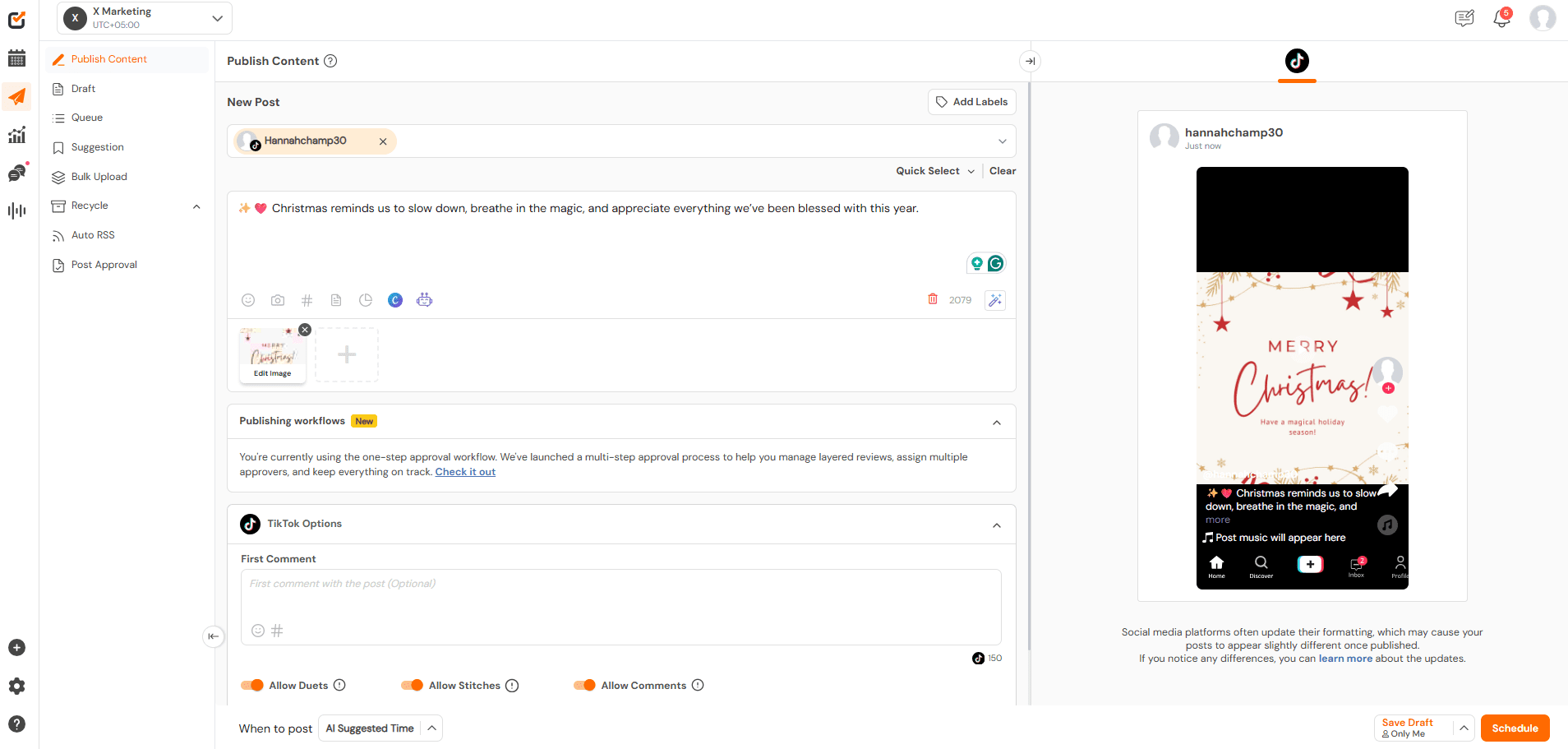
- Schedule posts with a tool like Social Champ to stay consistent
Did You Know?
Scheduling your Duets with a TikTok scheduler can increase visibility and save you hours each week.
Use Social Champ to schedule your Duets strategically and make sure your videos get seen by the right audience.
Conclusion
When you learn how to duet on TikTok, it can really change how your content performs.
I’ve learned that picking the right video, using the right layout, and keeping your audio and captions clear makes all the difference.
Duets aren’t just about jumping on trends, but they’re about joining a conversation and connecting with people.
When you do it thoughtfully, even a simple reaction can get noticed, spark engagement, and help your profile grow.