
If you’re weighing up Sprout Social vs Social Champ, you’re probably just trying to figure out which one actually makes sense for your team.
After all, both these tools help with scheduling, planning, and managing your content, but they go about it a little differently.
Sprout Social leans more toward larger teams that need layered workflows and detailed reports.
Short Summary
- Sprout Social and Social Champ both get the job done when it comes to posting content and tracking how it performs.
- Sprout Social tends to fit larger teams better, those that require tight processes and detailed reports that offer detailed data.
- Social Champ is more about keeping things straightforward for smaller teams who just want the essentials without paying for extra features.
- Sprout charges by user, while Social Champ keeps things simple with per-channel pricing.
- The right pick really depends on your team size, your budget, and how complex your day-to-day process is.
Whereas Social Champ keeps things simple with easy-to-understand workflows and simplified tools.
Honestly, it all comes down to how your team works, what features matter most to you, and how much support you expect along the way.
The comparison below breaks it all down to help you decide which one to go for!
Want a Social Media Workflow That Just Works?
Sprout Social vs Social Champ: Quick Snapshot of Key Differences
Choosing between Sprout Social and Social Champ usually comes down to specific team needs.
Both handle scheduling and content planning well, but they’re not exactly the same under the hood.
The thing is, they’re built for different types of users.
Sprout Social tends to make sense for bigger operations where you’ve got multiple approval steps. It also caters to brands that need advanced analytics reports and listening features.
On the other hand, Social Champ is more stripped down, with packages and features for businesses of all sizes. It offers different pricing tiers, each with specific features tailored to brands at various stages of growth.
Here’s the breakdown.
| Category | Social Champ | Sprout Social |
|---|---|---|
| Core Use Case | Daily publishing, AI content help, and simple team workflows | Advanced scheduling, approvals, and in-depth reporting |
| Supported Platforms | Instagram, Facebook, TikTok, LinkedIn, YouTube, Threads, Pinterest, X, Google Business Profile, Bluesky, Mastodon, and WhatsApp Business | Facebook, Instagram, X, LinkedIn, Pinterest, TikTok, YouTube, Threads, Bluesky, WhatsApp, Reddit, Tumblr, and Google Business Profile |
| Starting Price (Annually) | $4 | $79 |
Got a New Platform to Add?
Feature Deep-Dive: Sprout Social vs Social Champ
So, we’ve covered the basics, but most teams don’t make decisions based on surface-level information.
It’s the everyday features that really matter, the ones you’ll actually use.
That’s why we’re breaking down how Sprout Social vs Social Champ stack up when it comes to the tools and functions that impact your daily workflow.
To keep it simple, there’s a quick side-by-side table ahead that shows what each platform offers and why those differences could make all the difference for your team.
| Features | Social Champ | Sprout Social | Why It Matters |
|---|---|---|---|
| Social Networks | |||
| Facebook (Meta) | ✔️ | ✔️ | Covers one of the largest user bases globally |
| ✔️ | ✔️ | Essential for visual-first brands | |
| Threads | ✔️ | ✔️ | Useful for staying current with Meta’s ecosystem |
| YouTube | ✔️ | ✔️ | Great for video marketers and content creators |
| ✔️ | ✔️ | Key for ecommerce and lifestyle brands | |
| TikTok | ✔️ | ✔️ | Short-form video is a major engagement driver |
| ✔️ | ✔️ | Crucial for B2B brands and professional outreach | |
| Mastodon | ✔️ | ❌ | Good for reaching decentralized and open-source communities |
| Bluesky | ✔️ | ❌ | Supports early adopters in emerging social spaces |
| Google Business Profile | ✔️ | ❌ | Important for local SEO and visibility |
| X (Twitter) | ✔️ | ✔️ | Still relevant for news, trends, and quick engagement |
| WhatsApp Business | ✔️ | ✔️ | Offers direct communication with customers |
| Scheduling & Publishing | |||
| Bulk Schedule | ✔️ | ✔️ | Saves time when managing high-volume content |
| Social Media Calendar | ✔️ | ✔️ | Gives a visual overview of planned posts |
| Instagram Reels & Stories | ✔️ | ✔️ | Supports short-form video marketing |
| Save & Schedule Draft | ✔️ | ✔️ | Useful for planning posts in advance |
| First Comment Scheduling | ✔️ | ❌ | Adds hashtags or context in the first comment |
| Social Listening | |||
| Social Listening | ✔️ | ✔️ | Helps track mentions, trends, and sentiment |
| Analytics | |||
| Competitor Analysis | ✔️ | ✔️ | Gives insights into how your competitors are performing |
| Customizable Reports | ✔️ | ✔️ | Lets you report on the metrics that matter most |
| White-labeled Analytics Reports | ✔️ | ✔️ | Useful for agencies presenting to clients |
| Individual Posts Analytics | ✔️ | ✔️ | Helps assess what type of content performs best |
| AI Features | |||
| AI Image Generator | ✔️ | ❌ | Saves time creating on-brand visuals |
| AI Content Generator | ✔️ | ✔️ | Speeds up caption writing and idea generation |
| AI-Best Time to Post | ✔️ | ✔️ | Helps schedule content when your audience is most active |
| Sentiment Analysis | ✔️ | ✔️ | Gauges the tone of content before publishing |
| Content Creation | |||
| Media Library | ✔️ | ✔️ | Keeps brand assets organized |
| Royalty-Free Images | ✔️ | ❌ | Helps with finding legal visuals without extra tools |
| Shared Calendar | ✔️ | ✔️ | Keeps team visibility clear |
| Assign Access and Permissions | ✔️ | ✔️ | Important for managing team workflows |
| Auto RSS | ✔️ | ✔️ | Automates sharing of blog or news updates |
| Approval Workflow and Posts | ✔️ | ✔️ | Keeps content aligned before publishing |
| Content Suggestions | ✔️ | ✔️ | Helps maintain a steady stream of ideas |
| Integrations & Apps | |||
| Zapier | ✔️ | ✔️ | Connects your social tool with thousands of other apps |
| Bit.ly | ✔️ | ✔️ | Shortens and tracks link performance |
| Canva | ✔️ | ✔️ | Creates branded visuals directly from the platform |
| VistaCreate | ✔️ | ❌ | Another visual design option for Sprout users |
| OneDrive | ✔️ | ✔️ | Allows cloud-based media management |
| WordPress Plugin | ✔️ | ❌ | Helpful for auto-posting blog content |
| Chrome Browser Extension | ✔️ | ✔️ | Speeds up sharing directly from the browser |
| iOS & Android Apps | ✔️ | ✔️ | Gives mobile access for on-the-go scheduling |
| Google Drive Integration | ✔️ | ✔️ | Easily pull creative assets from your Drive |
| Dropbox | ✔️ | ✔️ | Another option for asset storage |
| Flickr | ✔️ | ❌ | Sprout Social supports more legacy media sources |
| Imgur | ✔️ | ❌ | Great for meme-based or visual-first content teams |
| WhatsApp Business | ✔️ | ✔️ | Offers real-time, direct communication on a platform millions already use daily |
| Google Analytics | ✔️ | ✔️ | Connects social activity to website traffic |
| Team Management | |||
| Shared Calendar | ✔️ | ✔️ | Keeps everyone aligned on what’s going live |
| Assign Posts to Team Members | ✔️ | ✔️ | Helps delegate work easily |
| Invite Additional Users | ✔️ | ✔️ | Scales as your team grows |
| Customer Support | |||
| Community Management | ✔️ | ✔️ | Engages with users and gathers feedback |
| Live Chat Support | ✔️ | ✔️ | Quick help when something goes wrong |
| Email Support | ✔️ | ✔️ | For more detailed troubleshooting or account issues |
| Live Demo | ✔️ | ✔️ | Helps you evaluate before you buy |
| Pricing | Starts at: $4 | Starts at: $79 | – |
| Free Plan | ✔️ | ❌ | – |
Featured Article: Buffer vs Hootsuite: Which Social Media Management Tool Fits Your Needs?
Pricing and ROI: Is Sprout Social Worth the Cost vs Social Champ?
Pricing can be tricky, right?
Some tools charge by the seat, others limit important features unless you upgrade, and then come the surprise add-ons you didn’t expect.
So before you decide, let’s break it down clearly.
Here’s how Social Champ vs Sprout Social compare in terms of cost, and the kind of value each one can actually bring to your team.
| Feature/Plan | Social Champ – Starter | Sprout Social – Essentials |
|---|---|---|
| Price (Annual Billing) | $4 | $79 |
| Free Trial | 7-Day Free Trial | 30-Day Free Trial |
| Social Accounts | 1 social accounts | 5 social accounts |
| Users | 1 user | 1 user |
| Post Scheduling | Unlimited Post Scheduling | Unlimited Post Scheduling |
| Reporting/Analytics | Analytics and Reporting | Analytics and Reporting |
| Inbox/Messaging | Social Inbox | Social Inbox |
| AI Features | AI Suggested Time, AI Imaginator, AI Content Wizard, Sentiment Analysis | Unlimited AI-Generated Alt Text |
| Customer Support | Email and Chat Support | Live Phone & Chat Support 24/5 |
| Collaborative Features | Team Collaboration, Approval Workflows, Collision Detection, Assign DMs to Teammates | Assign DMs to Teammates, Approval Workflows, Shared Calendar |
| Ads Management | Boost Posts | No |
Sprout Social’s Pricing
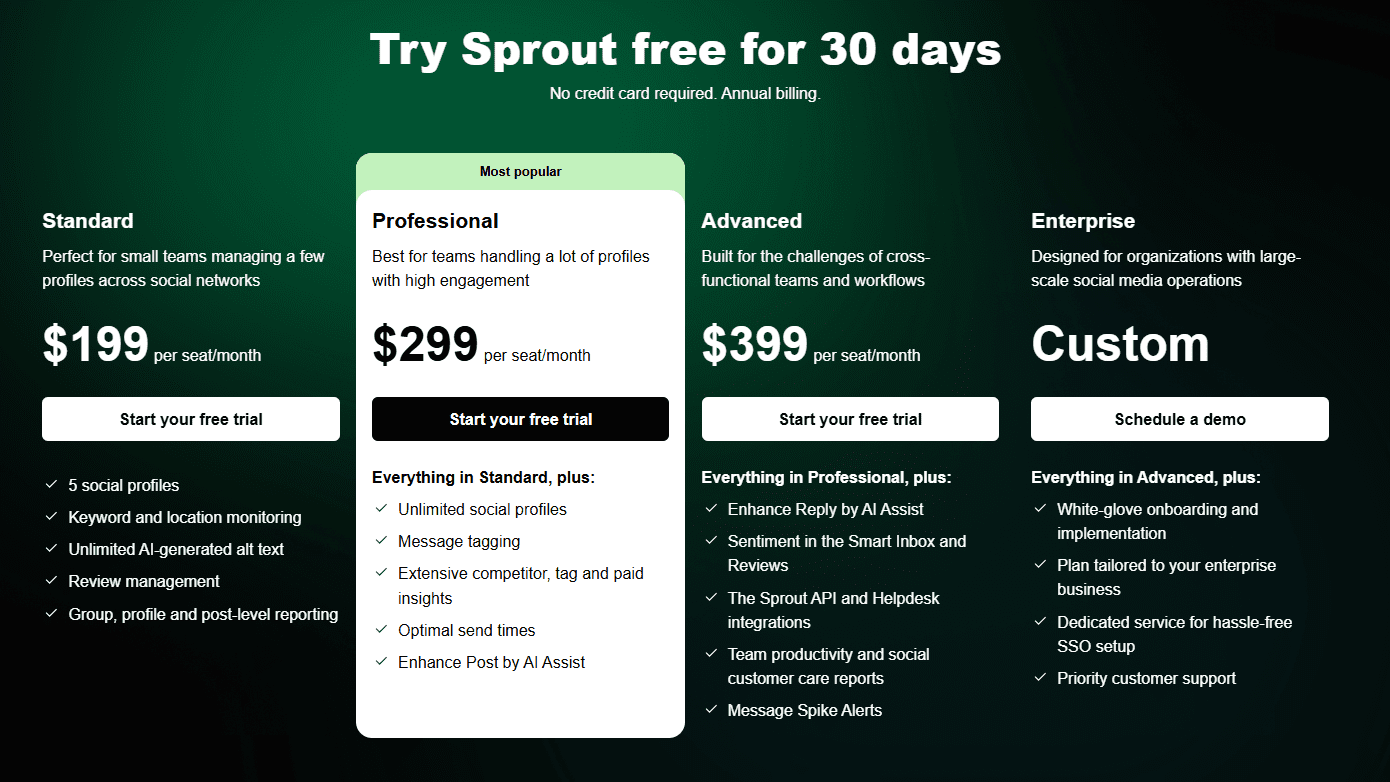
Sprout Social sits on the higher end of the pricing spectrum. It charges by seat, so every team member you add bumps up the monthly cost.
It also offers additional features and services at higher tiers.
Here’s how Sprout Social’s pricing breaks down:
- Essentials, which costs $79 and has 1 user. In this plan, you can manage 5 social accounts.
- Standard, which costs $199 and has 1 user. In this plan, you can manage 5 social accounts.
- Professional, which costs $299 and has 1 user. In this plan, you can manage unlimited social accounts.
- Advanced, which costs $399 and has 1 user. In this plan, you can manage unlimited social accounts.
- Enterprise, which is custom and has custom users. In this plan, you can manage unlimited social accounts.
Sprout Social also supports: Facebook, Instagram, X, LinkedIn, Pinterest, TikTok, YouTube, Threads, Bluesky, WhatsApp, Reddit, Tumblr, and Google Business Profile
Some features, like premium analytics, social listening, or certain integrations, may come as add-ons, depending on your plan.
Social Champ’s Pricing
Social Champ takes a flexible, channel-based pricing approach, which makes it easier to scale based on how many profiles you manage.
It also includes a free plan, something many tools in this space don’t offer.
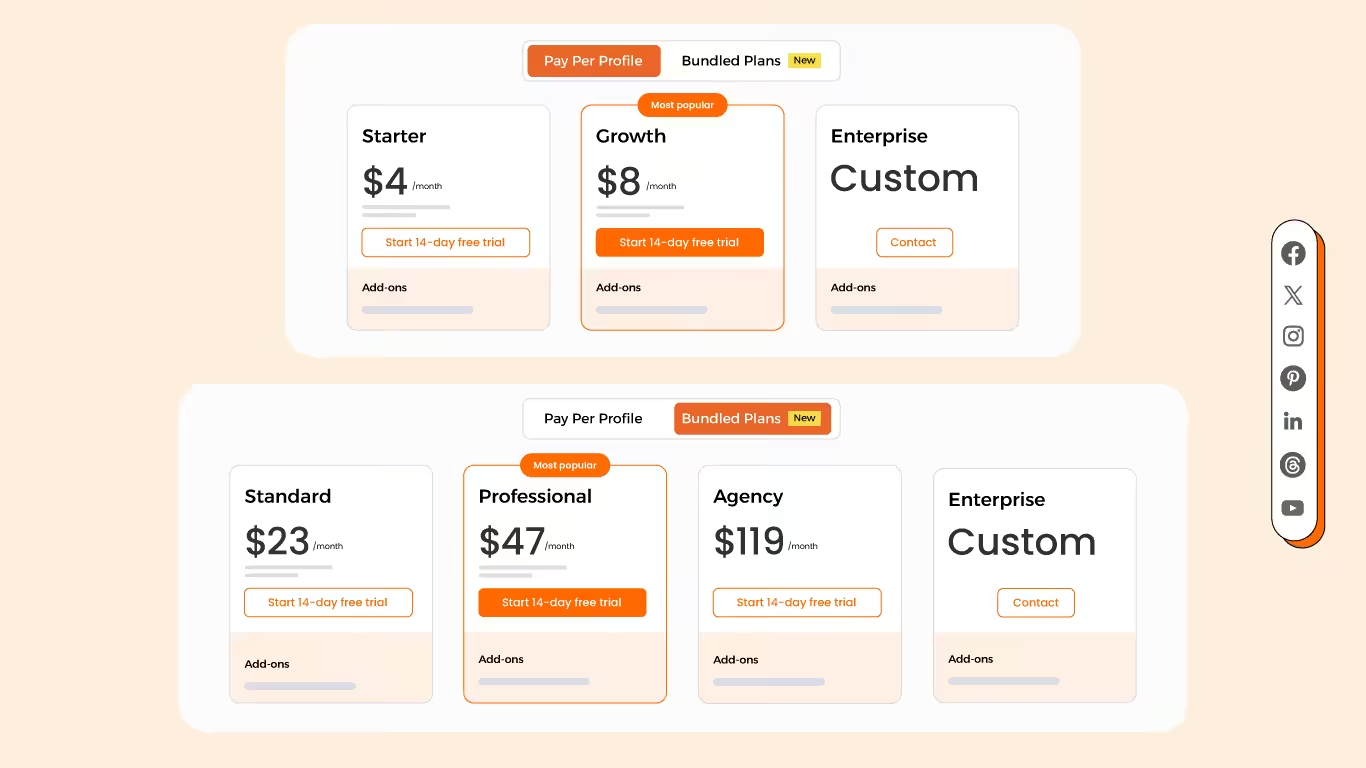
Social Champ comes with two pricing tiers, including a Pay-Per-Profile and a Flat-Rate model.
Here’s what you get in the Pay-Per-Profile:
- Starter, which costs $4 and has 1 user. In this plan, you can manage 1 social account.
- Growth, which costs $8 and has unlimited users. In this plan, you can manage 1 social account.
These plans also offer discounts as you scale. Here’s how much you can save in the Starter:
- For 1-10 social accounts: $4
- For 11-20 social accounts: $3
- For 21-40 social accounts: $2
- For 41+ social accounts: $0.50
Here’s how much you can save in the Growth:
- For 1-10 social accounts:$8
- For 11-20 social accounts:$3.50
- For 21-40 social accounts:$2.50
- For 41+ social accounts:$1
With Social Champ, you also get Flat-Rate bundles, which are:
- Free, which costs $0 and has 1 user. In this plan, you can manage 3 social account.
- Standard, which costs $23 and has 2 users. In this plan, you can manage 6 social accounts. This plan also comes with add-ons for accounts. You can add another account for $5/account
- Professional, which costs $47 and has 5 users. In this plan, you can manage 12 social accounts. This plan also comes with add-ons for accounts. You can add another account for $4/account and pay $8/user for another user.
- Agency, which costs $119 and has unlimited users. In this plan, you can manage 30 social accounts. This plan also comes with add-ons for accounts. You can add another account for $3/account
- Enterprise, which is Custom and has unlimited users. In this plan, you can manage unlimited social accounts.
Social Champ also supports: Instagram, Facebook, TikTok, LinkedIn, YouTube, Threads, Pinterest, X, Google Business Profile, Bluesky, Mastodon, and WhatsApp Business
Most key features, including scheduling, collaboration tools, and AI content support, are available across plans.
Teams can choose what fits best without committing to a high monthly cost per user.
So, What’s the Return?
If your team needs detailed reports, layered approvals, and a structured setup, Sprout Social might be the right fit.
Just keep in mind that the more users you add, the higher the cost.
On the flip side, Social Champ gives you a solid set of features at a predictable price, especially if you’re a smaller or mid-sized team.
Ultimately, it depends on how your team operates and what kind of value you expect from the tool.
Want to Switch Tools Without the Headache?
Featured Article: Sprout Social vs Social Champ – Detailed Comparison
Sprout Social vs Social Champ: Which Tool Scales Better for Growing Teams?
If your team’s expanding, your social media tool should keep pace, not hold you back.
More teammates mean more posts, more approvals, and more complexity.
So when you’re weighing Sprout Social vs Social Champ, it’s only natural to ask: which one’s built to grow with the way you work?
Scaling With Sprout Social
Sprout Social leans into structure. It is perfect if your team has multiple layers, like writers, editors, managers, or even clients.
It offers features that help you stay organized when things get a bit more complex.
With approval workflows, role-based permissions, and detailed reporting, it’s designed to support a more structured, collaborative setup.
Here’s what makes it stand out:
- You can assign tasks and control permissions
- It supports content review and approvals
- Reports give a detailed view across accounts
Just something to keep in mind, Sprout Social uses per-user pricing.
So as you add more teammates, your monthly cost increases. That works for some teams, but it’s worth considering if you’re scaling rapidly.
Scaling With Social Champ
Social Champ keeps things flexible.
Instead of charging for each user, it prices plans by the number of social channels you manage, so adding new team members doesn’t cost extra.
That makes it easier to scale without constantly adjusting your budget.
Here’s what makes it a solid option for growing teams:
- You’ll have bulk scheduling to save time when managing lots of content
- It offers AI tools to help with captions, post ideas, and timing
- There’s 24/7 support when your team needs quick answers
- Plus, unlimited users on higher-tier plans
This setup works well for teams that want room to grow without constantly adjusting the budget.
Trying to Keep Up With Content Deadlines?
Featured Article: Hootsuite vs Sprout Social: Which Social Media Tool Fits Your Strategy Best?
Conclusion
At the end of the day, choosing between Sprout Social vs Social Champ really depends on what your team needs.
If you’re dealing with layered approvals and need detailed reporting, Sprout Social might be a better fit.
But if you’re looking for flexibility, easier pricing, and something that scales without extra costs, Social Champ could be the smarter option.
Now that you’ve seen how they compare, you’re in a better spot to decide what works best for your workflow.
Featured Article: Sprout Social vs RecurPost
