
If you run a social media team, you probably don’t have time to waste on tools that don’t deliver results.
That’s why, if you’re comparing Hootsuite vs Social Champ, you might want to look into its features and pricing to find a platform that works best for your needs.
Short Summary
- Both Hootsuite and Social Champ offer solid social media management features for teams of various sizes.
- Hootsuite supports a wider range of integrations, which can be useful for enterprise setups.
- Social Champ offers modern tools, including AI support and bulk scheduling, at competitive prices.
- Each platform offers strengths in publishing, analytics, and team collaboration workflows.
- The best choice depends on your team’s needs, budget, and long-term social media goals.
In this guide, we will explore both tools in great detail so you can make the best decision for your business.
Let’s help you make it with confidence!
Need a Tool That Works For You?
Hootsuite vs Social Champ: A Quick Comparison
If you’re in search of the right social media management tool, it’s essential to find one that suits your budget, team, and workflow.
Here, we’re comparing Hootsuite vs. Social Champ to provide a quick overview and help you see where they stand.
While Hootsuite has been around longer and caters more to enterprise users, Social Champ is positioning itself as a lighter, faster solution for growing businesses and large organizations as well.
Let’s look at how the two stack up on paper.
Quick Snapshot: Social Champ vs Hootsuite
| Feature | Hootsuite | Social Champ |
| Key Use Case | Enterprise-level teams and larger organizations | Small to mid-sized teams, agencies, and large organizations |
| Free Plan | ❌ | ✔️ |
| Starting Price (Annually) | $99 | $4 |
| Scheduling & Publishing | ✔️ | ✔️ |
| Analytics & Reporting | ✔️ | ✔️ |
| Team Collaboration | ✔️ | ✔️ |
| Platform Simplicity | Feature-rich, but can feel complex | Clean UI, built for speed and clarity |
Need an Easier Way to Manage Multiple Profiles?
Featured Article: 15 Twitter Tips to Boost Engagement and Grow Your Brand
Feature Deep-Dive: Publishing, Analytics, and Collaboration
When it comes to choosing a social media management platform, the features that actually impact your day-to-day workflow matter most.
In this section, we’re breaking down the three core areas where teams spend the most time: Publishing, Analytics, and Collaboration.
Let’s break down each feature group.
-
Publishing and Scheduling
Both tools help you plan and publish across multiple platforms, but the experience and flexibility can differ.
Here’s what to look for:
- Visual content calendars
- Bulk scheduling support
- Platform-specific posting options
- Content queue or auto-posting
- Media library for reusing assets
-
Analytics and Reporting
Analytics is a must-have for any social media manager. You need to know what you’re doing right and what needs improvement.
Here’s what you need to look for:
- Platform-wide performance analytics
- Post-level engagement metrics
- Exportable reports (PDF, PPT)
- Sentiment tracking or trend insights
- Team performance metrics (if applicable)
-
Team Collaboration
If you’re an agency or you have a full team of social media managers, team collaboration tools should be at the top of your list.
Here are some features you need to look for:
- Role-based access
- Approval workflows
- Shared content calendar
- Notes or internal feedback options
- Team activity tracking
Side-By-Side Feature Comparison: Hootsuite vs Social Champ
| Features | Social Champ | Hootsuite | Why It Matters |
|---|---|---|---|
| Social Networks | |||
| ✔️ | ✔️ | Essential for managing business pages and maintaining brand visibility | |
| ✔️ | ✔️ | Key platform for visual content, engagement, and Reels | |
| Threads | ✔️ | ✔️ | Growing channel for real-time conversations and brand awareness |
| YouTube | ✔️ | ✔️ | Important for video-based content strategies and subscriber growth |
| ✔️ | ✔️ | Useful for brands targeting lifestyle, fashion, and visually driven audiences | |
| TikTok | ✔️ | ✔️ | Crucial for reaching younger audiences and short-form content marketing |
| ✔️ | ✔️ | Ideal for B2B marketing, hiring campaigns, and professional content sharing | |
| Mastodon | ✔️ | ❌ | A privacy-focused platform with a niche but growing user base |
| Bluesky | ✔️ | ❌ | Early-stage network support may help brands experiment with emerging channels |
| Google Business Profile | ✔️ | ❌ | Keeps your local business visible in search and maps with updated content |
| X (Twitter) | ✔️ | ✔️ | Real-time engagement, trending content, and direct customer interactions |
| WhatsApp Business | ✔️ | ✔️ | Useful for direct, personal customer communication, especially in emerging markets |
| Scheduling and Publishing | |||
| Bulk Schedule | ✔️ | ✔️ | Saves time by letting you queue multiple posts at once |
| Social Media Calendar | ✔️ | ✔️ | Gives you a clear view of your content schedule across channels |
| Instagram Reels & Stories | ✔️ | ✔️ | Boosts engagement through short-form, time-sensitive content |
| Save & Schedule Draft | ✔️ | ✔️ | Allows teams to work ahead without publishing right away |
| Social Listening | |||
| Social Listening | ✔️ | ✔️ | Helps track brand mentions and audience sentiment in real time |
| Analytics | |||
| Competitor Analysis | ✔️ | ✔️ | Gives insight into what’s working for others in your space |
| Customizable Reports | ✔️ | ✔️ | Lets you build reports based on the data your team or clients actually need |
| White-labeled Analytics Reports | ✔️ | ✔️ | Useful for agencies delivering branded reports to clients |
| Individual Posts Analytics | ✔️ | ✔️ | Helps you evaluate what types of posts perform best |
| AI Features | |||
| AI Image Generator | ✔️ | ❌ | Speeds up content creation without needing a designer |
| AI Content Generator | ✔️ | ✔️ | Assists in writing post captions faster when you’re low on ideas |
| AI-Best Time to Post | ✔️ | ✔️ | Suggests when to publish for maximum reach and engagement |
| Sentiment Analysis | ✔️ | ✔️ | Measures audience emotion to fine-tune messaging and campaigns |
| Content Creation | |||
| Media Library | ✔️ | ✔️ | Centralizes your assets for quicker, consistent content creation |
| Royalty-Free Images | ✔️ | ✔️ | Helps you create visually appealing posts without licensing concerns |
| Shared Calendar | ✔️ | ✔️ | Keeps everyone on the same page with a unified publishing schedule |
| Assign Access and Permissions | ✔️ | ✔️ | Lets you manage roles across team members with secure, tiered access |
| Auto RSS | ✔️ | ✔️ | Automates content posting from blogs or news feeds, saving manual effort |
| Approval Workflow and Posts | ✔️ | ✔️ | Ensures quality control with review steps before posts go live |
| Content Suggestions | ✔️ | ✔️ | Offers post ideas to keep your content fresh and engaging |
| Integrations and Apps | |||
| Zapier | ✔️ | ❌ | Connects your social tool with thousands of other apps for smoother automation |
| Bit.ly | ✔️ | ❌ | Shortens URLs for cleaner posts and easy link tracking |
| Canva | ✔️ | ✔️ | Simplifies design by letting you create graphics directly within the platform |
| VistaCreate | ✔️ | ❌ | Gives additional design options for quick, professional-looking visuals |
| OneDrive | ✔️ | ✔️ | Provides cloud-based access to media assets from your Microsoft account |
| WordPress Plugin | ✔️ | ✔️ | Lets you share blog content easily to social platforms from within WordPress |
| Chrome Browser Extension | ✔️ | ✔️ | Speeds up content sharing and scheduling straight from your browser |
| iOS & Android Apps | ✔️ | ✔️ | Gives you mobile control over your campaigns and scheduling on the go |
| Google Drive Integration | ✔️ | ✔️ | Simplifies file access and uploads from your Google account |
| Dropbox | ✔️ | ✔️ | Offers another convenient way to store and access visual assets |
| Flickr | ✔️ | ✔️ | Enables sourcing or repurposing image content directly from your Flickr library |
| Imgur | ✔️ | ✔️ | Useful for quick image sharing, especially with meme or GIF-heavy content |
| WhatsApp Business | ✔️ | ❌ | Helps businesses connect with customers through direct messaging |
| Google Analytics | ✔️ | ❌ | Provides deeper performance tracking by integrating with your website data |
| Team Management | |||
| Assign Posts to Team Members | ✔️ | ✔️ | Makes team collaboration easier by clearly defining who handles what |
| Invite Additional Users | ✔️ | ✔️ | Scales your account as your team or agency grows |
| Customer Support | |||
| Community Management | ✔️ | ✔️ | Helps you stay responsive to comments, messages, and mentions in one place |
| Live Chat Support | ✔️ | ❌ | Useful when you need immediate help without long response delays |
| Email Support | ✔️ | (*Enterprise plan only) | Standard for most tools, ideal for non-urgent queries |
| Live Demo | ✔️ | ✔️ | Helps you see the platform in action before committing to a plan |
| Pricing | Costs $4 | Costs $99 | Gives a quick idea of platform accessibility and fit for your budget |
Featured Article: How the YouTube Algorithm Works: A Comprehensive Guide to Boosting Your Channel’s Visibility
Hootsuite vs Social Champ Pricing & ROI Breakdown
Social media management can get expensive fast, especially when tools start charging by the user or limit essential features behind steep paywalls.
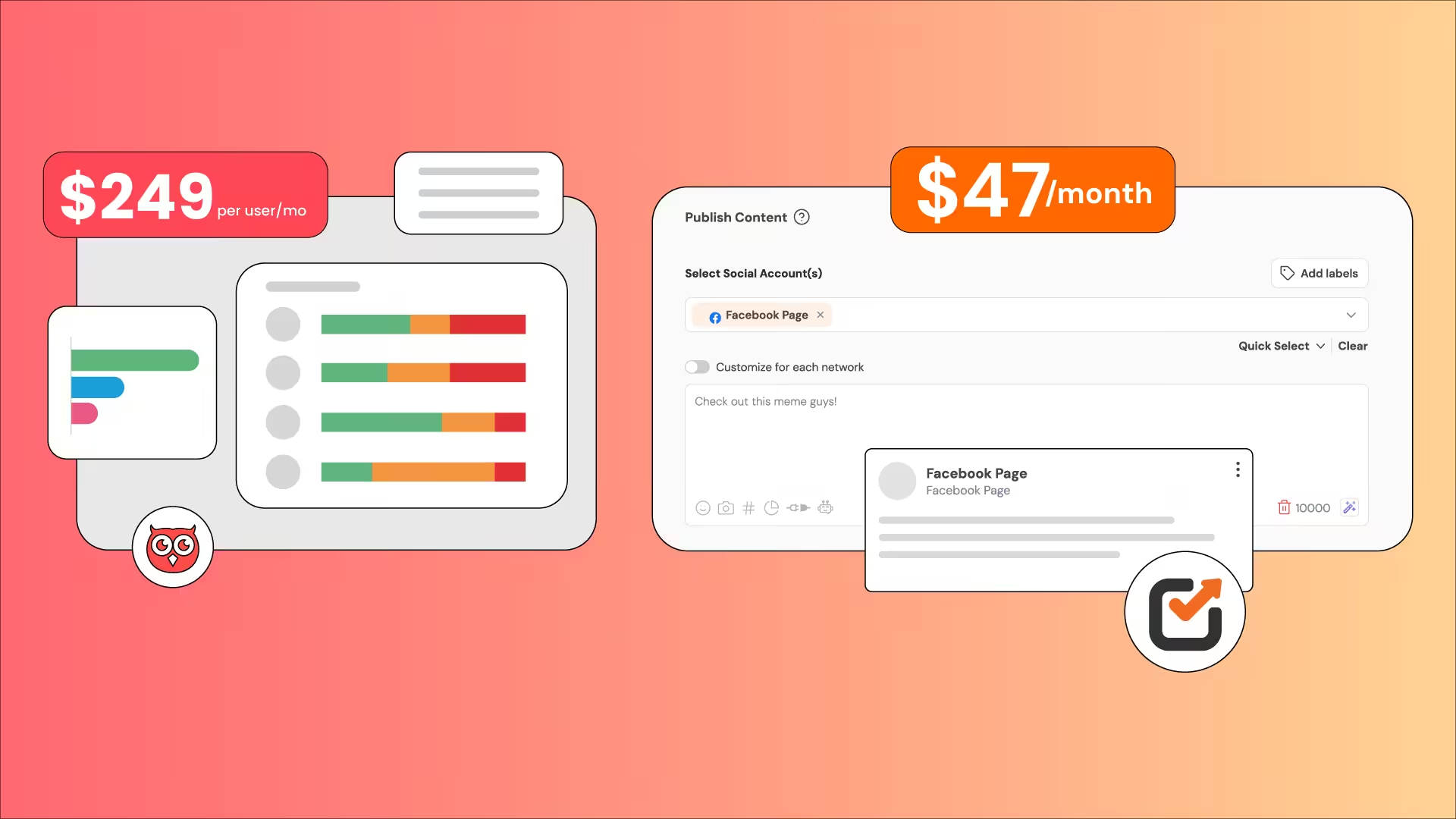
In the case of Hootsuite vs Social Champ, pricing is one of the most noticeable differences.
Social Champ offers a budget-friendly approach, while Hootsuite focuses on premium pricing for teams that require advanced capabilities.
Let’s break down what we get in each plan of both tools.
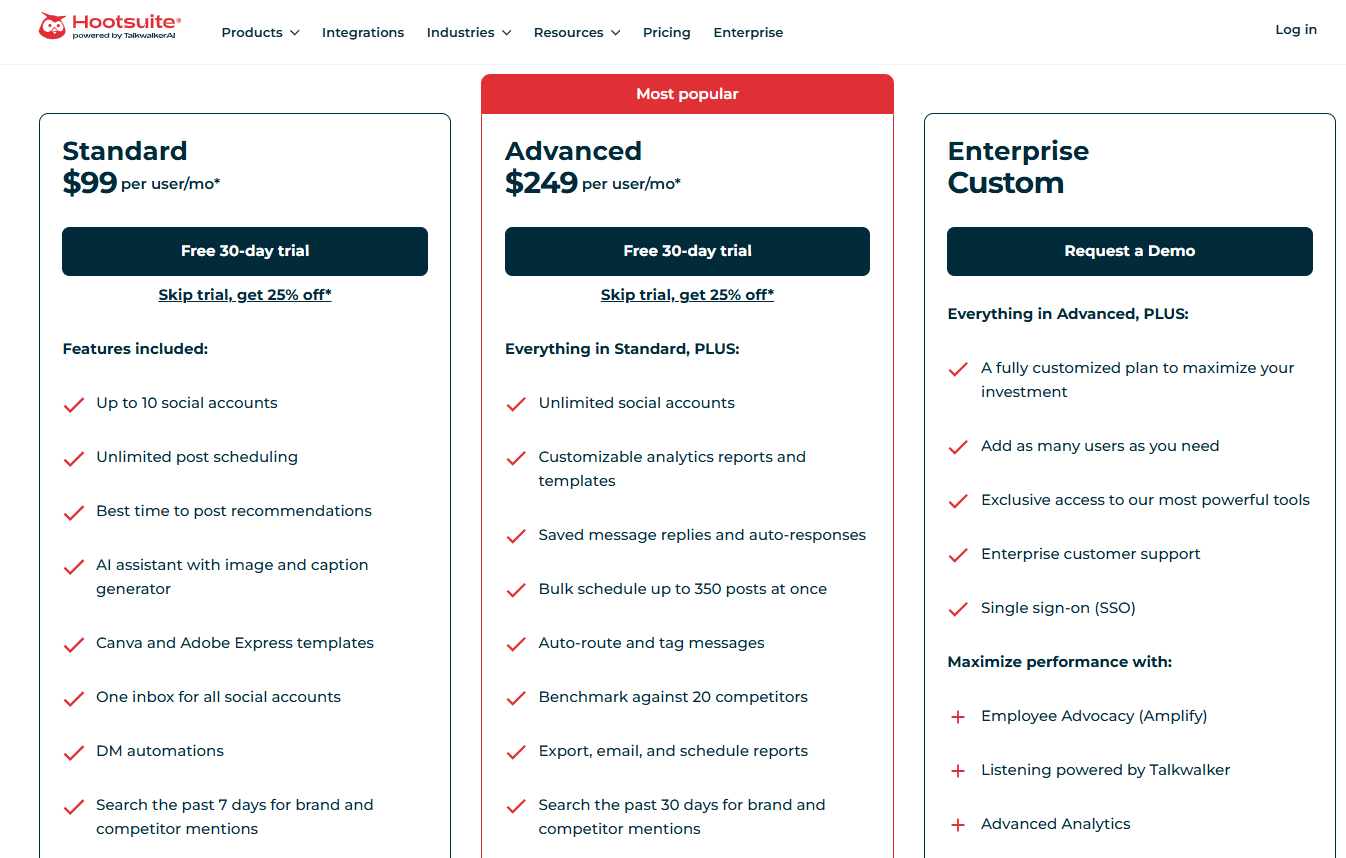
Here’s Hootsuite’s pricing plans:
Here’s Social Champ’s pricing plans:
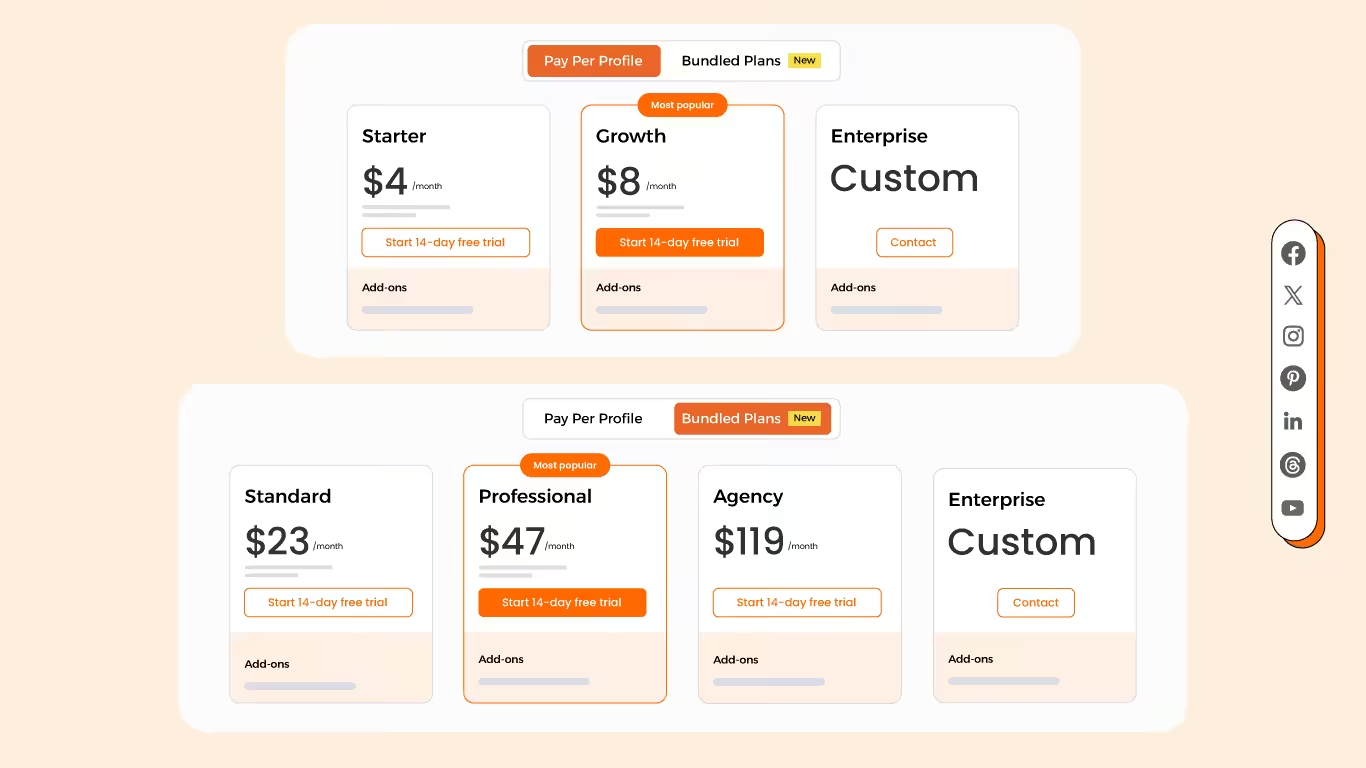
The pricing structures for Hootsuite and Social Champ offer different entry points and feature sets for managing social media. Hootsuite focuses on per-user pricing, while Social Champ provides both “Pay Per Profile” and “Bundled” options.
Hootsuite Pricing Plans
Hootsuite’s plans are billed per user per month and include a range of AI and automation tools.
- Standard: This entry-level plan allows for up to 10 social accounts and unlimited post scheduling. It includes an AI assistant for images and captions, Canva and Adobe Express templates, and a unified inbox for all accounts. Users also get DM automations, “best time to post” recommendations, and a 7-day search history for brand mentions.
- Advanced : This tier adds unlimited social accounts and customizable analytics reports. It increases brand mention search history to 30 days and adds features like saved message replies, bulk scheduling for up to 350 posts, and the ability to benchmark against 20 competitors.
- Enterprise: This is a fully customized plan that allows for unlimited users and provides access to Hootsuite’s most powerful tools, including single sign-on (SSO) and enterprise-level support. Performance can be further enhanced with add-ons like Employee Advocacy (Amplify) and Talkwalker-powered listening.
Social Champ Pricing Plans
Social Champ offers two distinct structures: “Pay Per Profile” for those with few accounts and “Bundled Plans” for larger operations.
Pay Per Profile Options:
- Starter: A low-cost entry point for very small-scale needs.
- Growth: Identified as the “Most popular” in this category, offering more flexibility than the Starter plan.
Social Champ Bundled Pricing Plans
Social Champ’s bundled plans offer a different approach, providing set numbers of accounts and users for a flat monthly fee.
- Standard: This plan includes 6 social accounts and 2 users. It features unlimited post scheduling, 1 workspace, a social inbox, boost ads, and standard analytics and reporting.
- Professional: Considered the “Most popular” bundled option, this increases limits to 12 social accounts and 5 users. It adds unlimited workspaces, advanced analytics, and priority email and chat support.
- Agency: Designed for larger teams, this tier supports 30 social accounts and unlimited users. It includes all Professional features with the addition of priority support.
- Enterprise: A tailored solution for organizations with specific needs, providing unlimited users and workspaces, advanced reporting, and 1-on-1 dedicated support.
Comparison of Tiers
Entry-Level Comparison Hootsuite’s Standard plan ($99/mo) is more than four times the cost of Social Champ’s Standard plan ($23/mo). While Hootsuite provides more social accounts (10 vs. 6) and sophisticated AI tools, Social Champ allows for 2 users, whereas Hootsuite’s price is strictly per single user.
Mid-Range Comparison The Hootsuite Advanced plan ($399/mo) offers unlimited social accounts for one user. In contrast, Social Champ’s Professional plan ($47/mo) limits users to 12 accounts but provides access for 5 different users. For a team of five, Hootsuite would cost over $1,200 per month, while Social Champ remains at $47, highlighting a significant price gap for collaborative teams.
High-End and Agency Comparison Social Champ’s Agency plan ($119/mo) is specifically built for multi-client management with 30 accounts and unlimited users. This is still priced lower than a single Hootsuite Advanced user. However, Hootsuite’s custom Enterprise tier offers deep technical integrations like SSO and Talkwalker listening that are geared toward large corporations requiring high-level security and data analysis.
Why Social Champ Beats Hootsuite for Growing Teams
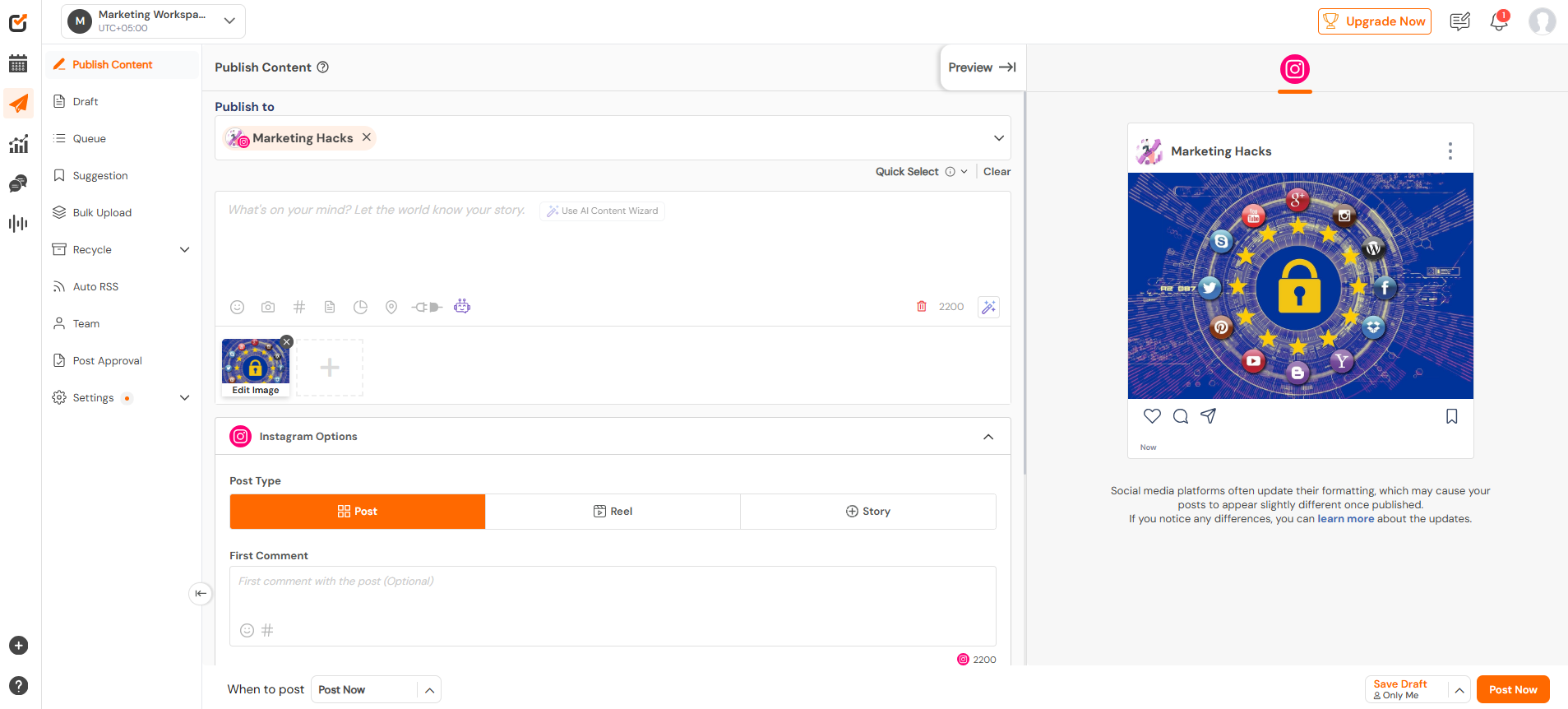
When your team is growing fast, you need flexibility, speed, and support that scales with you.
That’s where Social Champ quietly takes the edge in the Hootsuite vs Social Champ comparison.
Let’s look at what makes Social Champ a strong choice for expanding teams and agencies:
-
Bulk Scheduling That Saves Hours
Manually adding posts one by one? That doesn’t scale.
Social Champ’s bulk upload feature lets teams upload and schedule hundreds of posts at once using a simple CSV file.
Hootsuite offers this as well, but it’s only available on higher plans with tighter restrictions.
-
Smart AI Features to Speed Up Content Creation
Need content ideas or captions?
Social Champ’s AI suite helps you generate post captions, engaging visuals, and even suggest trending hashtags.Most of these tools are built directly into the composer, and you don’t have to jump between platforms.
-
White-Label Reports Without Enterprise Prices
Clients don’t want to see another tool’s branding on your reports.
Social Champ makes it easy to send out white-labeled analytics reports, branded with your logo and colors.
Hootsuite’s branded reporting is locked behind their higher-tiered plans, which cost significantly more than Social Champ.
-
Real-Time, 24/7 Live Chat Support
When something breaks or a client calls at midnight, you need support.
Social Champ offers 24/7 live chat support, even for smaller teams, so you’re never left waiting on a ticket or an email.
Meanwhile, Hootsuite only offers live support on higher-tier plans and often redirects basic users to the knowledge base.
Ready for a Tool That Scales With You?
Featured Article: Hootsuite Pricing and Plans: Is It Worth the Cost?
Final Verdict: Choosing the Right Tool in 2026
When it comes to Hootsuite vs Social Champ, your choice depends on your team’s size, goals, and budget.
Hootsuite works well for large enterprises with larger budgets, but its pricing can be a limitation for smaller teams.
Social Champ, on the other hand, offers similar features, including bulk scheduling, AI tools, white-label reports, and 24/7 support, at a significantly more affordable rate.
Both platforms bring value; it just comes down to what fits your workflow and growth plans best.
Consider starting with a free trial to explore the features firsthand and choose the tool that aligns with your goals.
