Let’s answer the big question: How to make a post shareable on Facebook?
If your post is not getting shared organically, you’ll likely assume your content is not resonating. But that’s not the only cause.
Sometimes, your posts don’t get enough shares because of their privacy settings, or you might just have a small audience.
Short Summary
- Use the Public setting so your post is visible and shareable by everyone.
- Posting from a Facebook Page or public group gives your content more reach.
- Content that’s helpful, emotional, or relatable gets shared the most.
- Videos, visuals, and clear captions make people stop and engage.
- Posting at peak activity times increases early engagement and shares.
But 32% of views come from posts shared in groups or feeds, which is exactly why having your posts shared is super important.
So, in this blog, I’m going to show you how to make Facebook post shareable so your content reaches the audience it deserves.
You’ll also learn how using a Facebook scheduler can help plan and post content at the best times for maximum shares.

Use Social Champ to make every Facebook post shareable and give your content the attention it deserves.
What Settings Control How Shareable a Facebook Post Is?
Have you ever posted on Facebook and thought it would reach tons of people, only to realize it hardly got any traction?
I know how frustrating it feels! But do you know the secret to making your post shareable? It’s to understand your Facebook privacy settings.
These settings determine who can see your content and who can share it.
Here’s a quick rundown:
- Public: Anyone on or off Facebook can see and share your post. This is the most shareable option.
- Friends: Only your friends can see it, and only they can share it. This limits reach.
- Custom: You pick specific people or lists who can view your post. Shares are restricted to that group.
- Only Me: No one else can see or share your post. This option may be perfect for personal notes, but not for engagement.
And if I talk about pages or groups, they work a bit differently.
Pages are public by default, so people can freely share your posts unless you restrict them.
And in public groups, people can share the posts outside, but posts in private groups can not be shared.
Here’s a handy table to visualize it:
| Privacy Setting | Who Can Share It |
|---|---|
| Public | Anyone |
| Friends | Friends Only |
| Custom | Selected People |
| Only Me | No One |
Facebook even allows you to change the privacy of your older posts. Just go to the post, click the three dots, select “Edit audience,” and update who can see it.
This way, you can turn your previously invisible posts into content that others can share.
If you want to learn how to make a post shareable on Facebook, these setting changes are the first step you should know, and they can make a huge difference in how far your content travels.
Featured Article: How to Unblock Someone on Facebook
How to Make a Post Shareable From Your Facebook Profile, Page, or Group?
So now that you know what controls who can see your post, let’s talk about how to make a Facebook post shareable.
The process is slightly different depending on whether you’re posting from your personal profile, a page, or a group.
How to Make a Post Shareable on Facebook From Your Profile
If you’re wondering how to make post shareable on Facebook from your profile, follow these steps:
- Start writing your post.
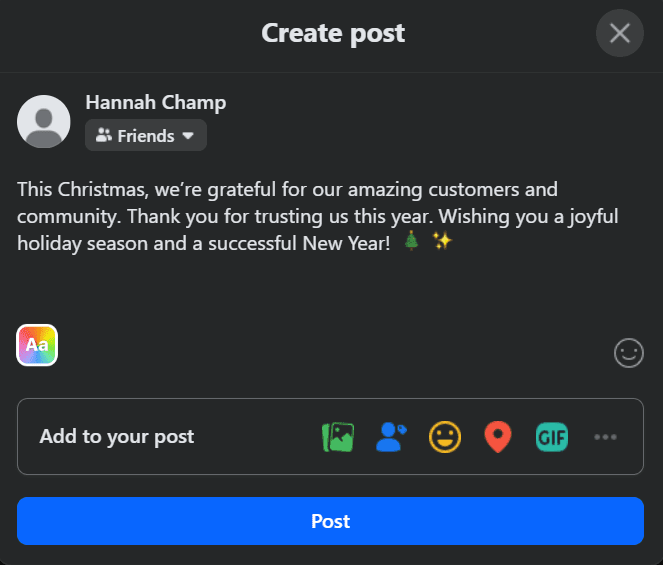
Write Your Post - Click the audience selector below your name.
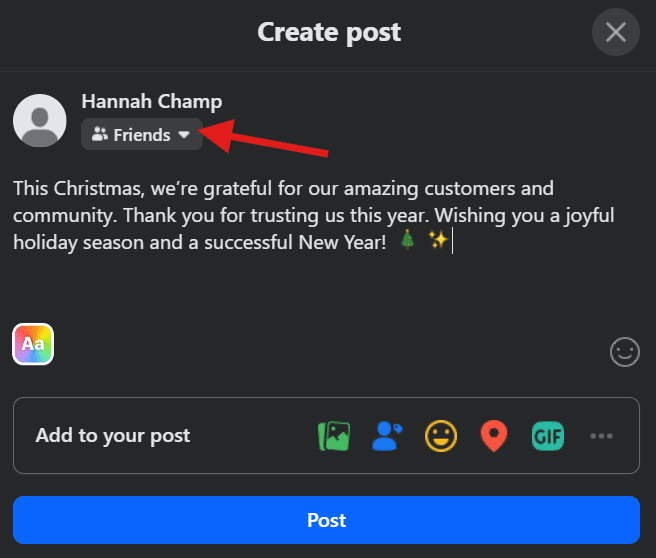
Click the Audience Selector - Choose “Public” if you want anyone to be able to share it.
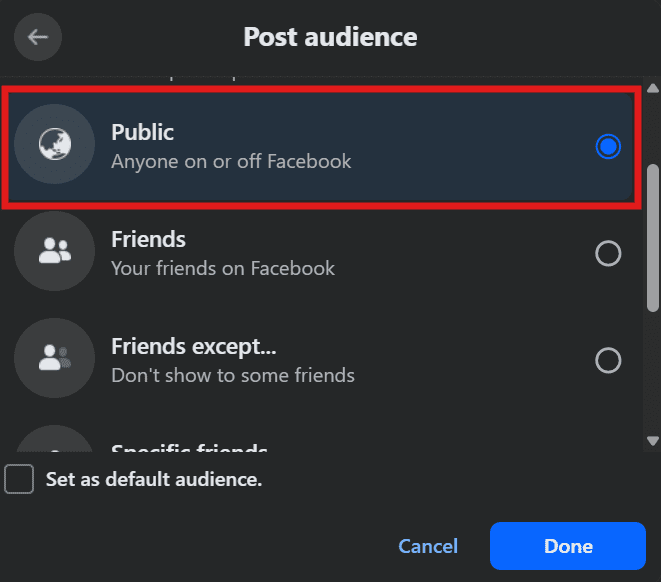
Click “Public” - Hit “Post.”
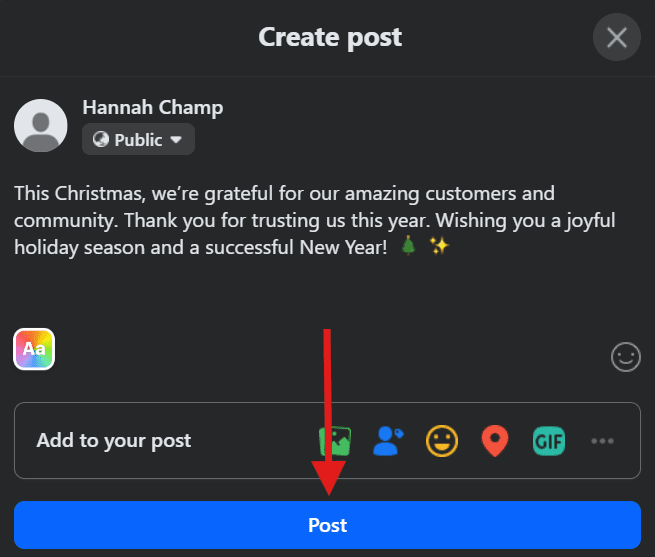
Click “Post”
How to Make Facebook Post Shareable From a Facebook Page
As you know, pages are public by default, which means your posts are automatically shareable. Just make sure you haven’t restricted the audience in post settings.
How to Make a Facebook Post Shareable From a Group
- Public Groups: Posts can be shared outside the group.
- Private Groups: Posts stay inside the group. You cannot make them shareable publicly.
Here’s a quick checklist to keep in mind before hitting “Post”:
- Is your post set to “Public” if you want it shared?
- Are you posting in a page or a public group for maximum reach?
- Does the content feel engaging and worth sharing?
One thing I’ve learned is that even if the settings are correct, posts still need to catch attention.
For this, I want to share a simple tip: include a question, an interesting fact, or an eye-catching image, because people mostly share posts when they resonate with them.
If you follow these steps, you can easily understand how to make a post shareable on Facebook, which is a small tweak that can dramatically increase your post’s reach.
Featured Article: Social Media Crisis Management in 2026: Strategy, Tools & Recovery
What Kind of Facebook Post Content Actually Gets Shared?
Now you know how to make a Facebook shareable, but if your post isn’t interesting, people simply won’t share it.
Let me tell you what I’ve learned from my experience.
Some of my posts had the correct “Public” setting, but barely got a single share, which means the people only shared those posts that looked interesting to them.
So, what kind of posts do people actually share?
Generally, people share content that is emotional, helpful, entertaining, or relatable.
Now think about what you shared the last time. Was it a funny video, a helpful tip, or a story that hit home?
Those are the types of posts that travel far.
Post formats that drive shares:
-
Videos
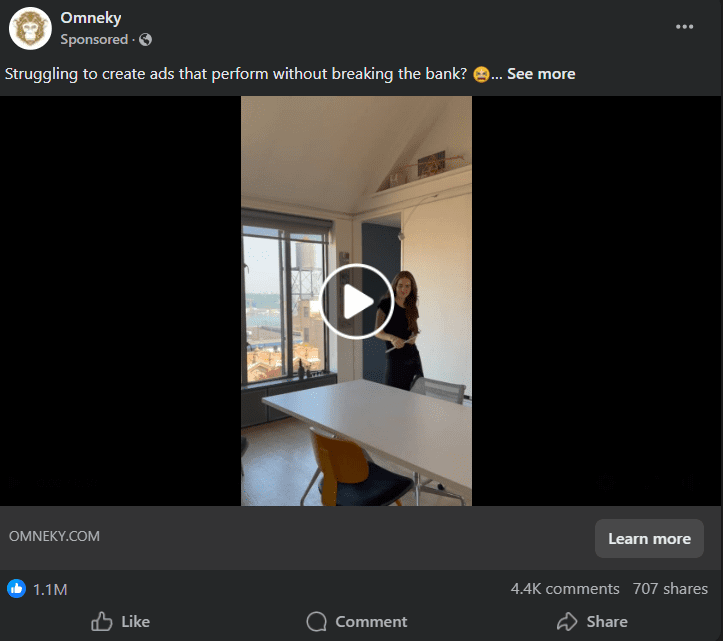
A Video Post on Facebook Video content has a 52% higher chance of being shared than other types.
If you post short, engaging video clips, they tend to get the most shares, likes, and comments as people love watching videos that entertain, inspire, or teach them quickly.
For instance, if you post a 30-second how-to video or a behind-the-scenes glimpse of your business, people will share it widely.
-
Infographics
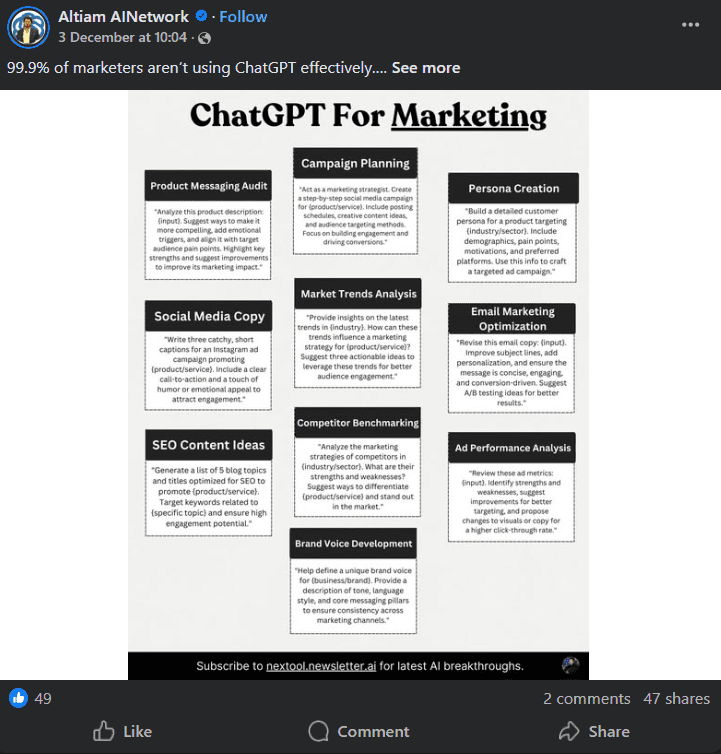
A Video Post on Facebook People connect more with visually present information or statistics and share it with their friends.
Infographics, in particular, are 30 times more likely to be read than a complete article, which makes them an incredibly effective way to engage with your audience.
You can present your content in a visually appealing way, such as charts, step-by-step guides, or quick facts.
-
Memes and Relatable Content
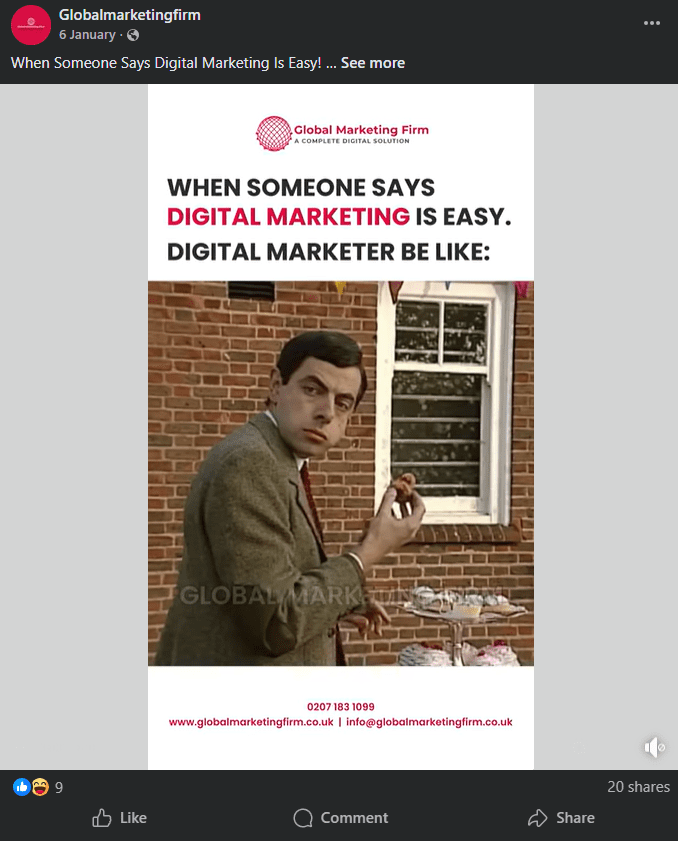
A Meme on Facebook Memes can generate higher reach and engagement, with some stats showing they achieved 10 times more reach and a 60% higher organic interaction rate than standard marketing visuals.
People like humor and relatability more, and tend to share funny posts and jokes about everyday experiences because they make people smile and feel connected.
-
User Stories and Testimonials
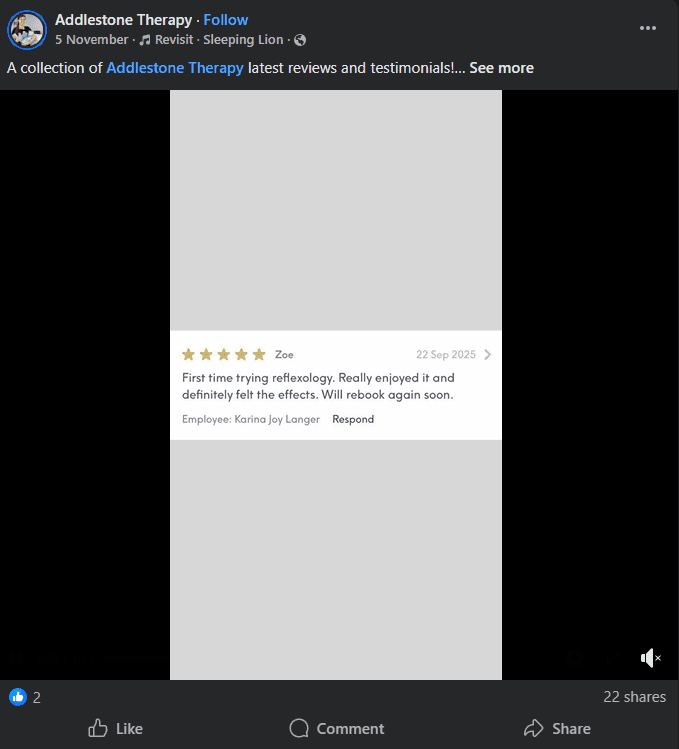
Testimonials on Facebook Real-life stories or customer success stories build trust and create an emotional connection.
When people relate to the story, they’re more likely to share it with their network.
-
Tips and How-To Guides
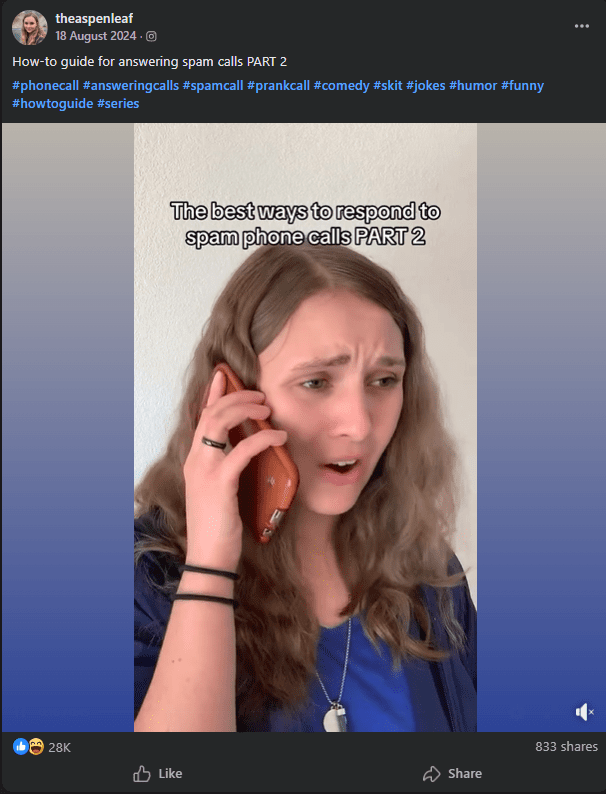
A How-To Guide Video on Facebook Practical, actionable advice is always shareable.
For instance, a list of quick social media hacks or time-saving business tips encourages people to share so others can benefit too.
Along with the type of posts, timing also plays a big role.
If you don’t publish your content during the peak activity hours, your content won’t reach the right audience, and you won’t get any likes, comments, or shares.
You should keep your posts concise, use captions that encourage sharing, and always include a visual element, as it makes your content stand out in crowded feeds.
| Post Type | Average Shares | Why It Works |
|---|---|---|
| Video | High | Engaging and Easy to Watch |
| Infographic | Medium-High | Provides Value at a Glance |
| Meme / Relatable Content | Medium | Funny and Relatable |
| User Story / Testimonial | Medium | Build Trust and Emotional Connection |
If you want to know how to make a post shareable on Facebook consistently, consider using Social Champ to schedule Facebook posts, as planning your posts at the right times increases visibility and naturally encourages shares.
Quick Tip: To get more shares on Facebook, focus on timing and consistency:
- How to post on Facebook for maximum visibility
- How often should you post on Facebook to keep your audience engaged
How to Set Up Your Future Facebook Posts for Automatic Shareability
Now you’ve learned how to make post shareable on Facebook, the next step is to make sure every future post follows the same rules.
I used to forget this part, and it showed. One post would take off, the next would sit there quietly because of a small setting I missed.
Let’s fix that.
Set Default Visibility to Public on Your Facebook Profile
When you create a post from your personal profile, Facebook lets you choose who can see it.
If you select “Public,” Facebook remembers that choice for future posts. This means your next posts stay shareable unless you change the audience manually.
This one setting saves time and avoids confusion. It also helps if you’re serious about learning how to make a Facebook post shareable without checking settings every time.
Understand Default Settings for Facebook Pages
Pages are much easier to manage. Posts from Pages are public by default, which makes them ideal for visibility and sharing. That said, it’s still worth checking your Page settings.
If you apply age or location restrictions, your post may not reach everyone.
Fewer eyes usually mean fewer shares. Keeping things open gives your content a better chance to spread.
Know How Group Settings Affect Shareability
Groups work differently. You can share your posts outside the group if they are in a public group, whereas posts in private groups stay locked inside.
If your goal is reach, choose the group type carefully before posting.
Once a post goes live in a private group, there’s no way to make it shareable publicly later.
Plan Posting Times for Better Share Potential
Even a public post can miss its moment if it goes live at the wrong time. Shares usually happen when people are active, scrolling, and ready to engage.
So, if you post at the best time to post on Facebook, it increases the chance that your content gets noticed and shared early.
This matters because early engagement often leads to more visibility.
Use Automation to Keep Posts Share-Ready
When you post manually, it may feel hard for you to stay consistent. That’s where automation can help you.
With Social Champ, you can plan Facebook posts ahead of time, keep visibility set to public, and publish when your audience is most active.
It also helps you stay consistent. When your posts go out on time and with the right settings, you don’t lose momentum.
If you’re serious about how to make a post shareable on Facebook without extra effort, setting this up once makes a long-term difference.
Your posts stay visible, shareable, and ready to perform without constant checking.
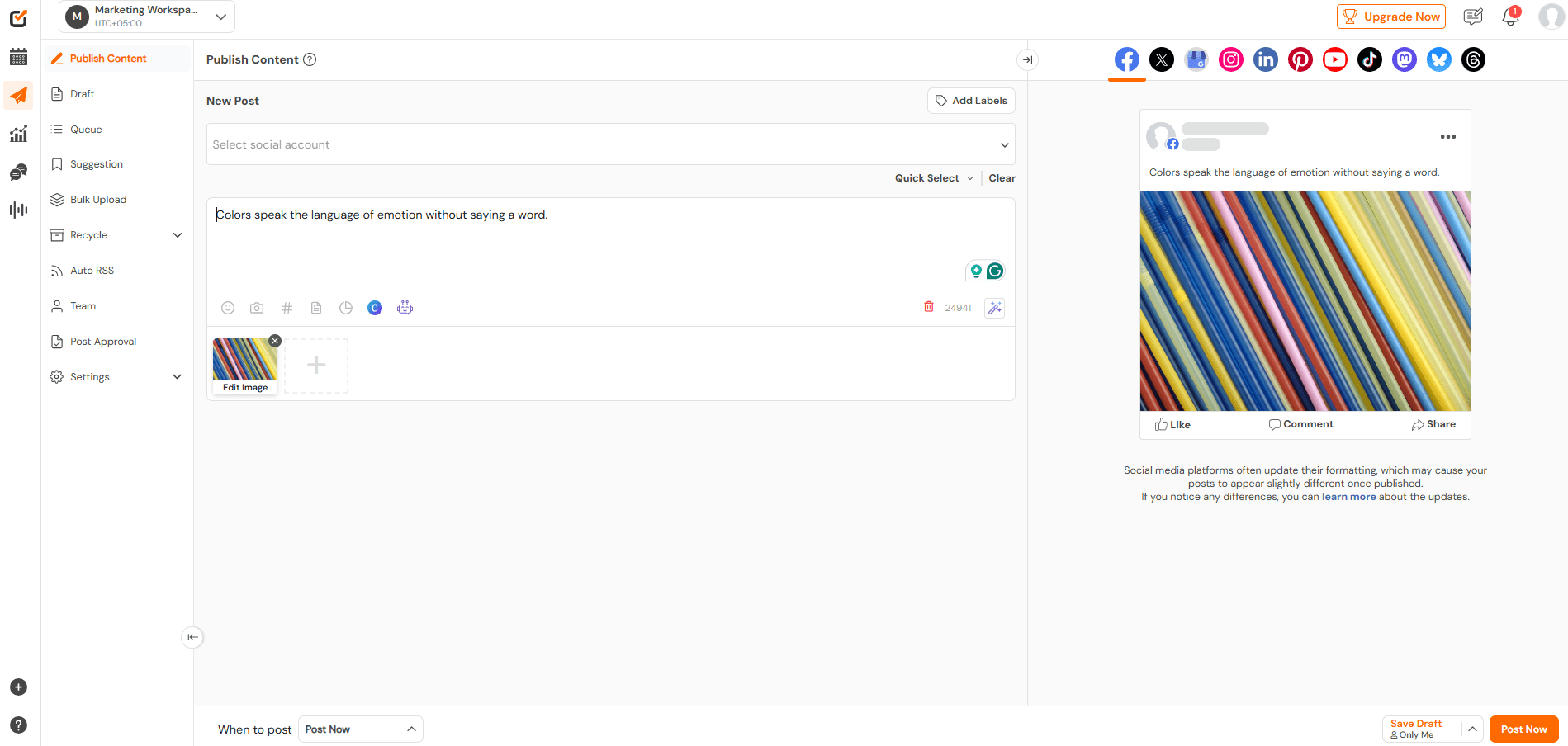
With Social Champ, you can plan ahead, stay consistent, and keep every post optimized for reach.
Featured Article: Best Time to Post on Bluesky: Insights From Analyzing 1 Million Posts
How Do You Monitor and Improve Facebook Post Share Performance?
Once you start focusing on how to make a post shareable on Facebook, tracking performance becomes just as important as posting itself.
Shares don’t happen by luck. They happen when something works, and data helps you spot what that is.
Focus on the Metrics That Actually Matter
It’s easy to get distracted by likes and comments, but shares tell a deeper story. These are the metrics worth watching:
- Shares: Shows how often people pass your post to others
- Reach: Tells you how many people actually saw the post
- Impressions: Indicates how often your post appeared on screens
- Engagement rate: Helps you understand overall interaction
If a post gets shared often, it usually means it connected with people on some level.
Use Facebook Insights to Track Post Performance
Facebook Insights gives you a clear view of what’s happening behind the scenes.
You can see which posts get shared, when your audience is active, and how far each post travels.
This is helpful when you’re trying to figure out how to make a Facebook post shareable on a consistent basis.
Patterns start to show up. Certain topics, formats, or posting times perform better than others.
Track Performance With Social Champ Analytics
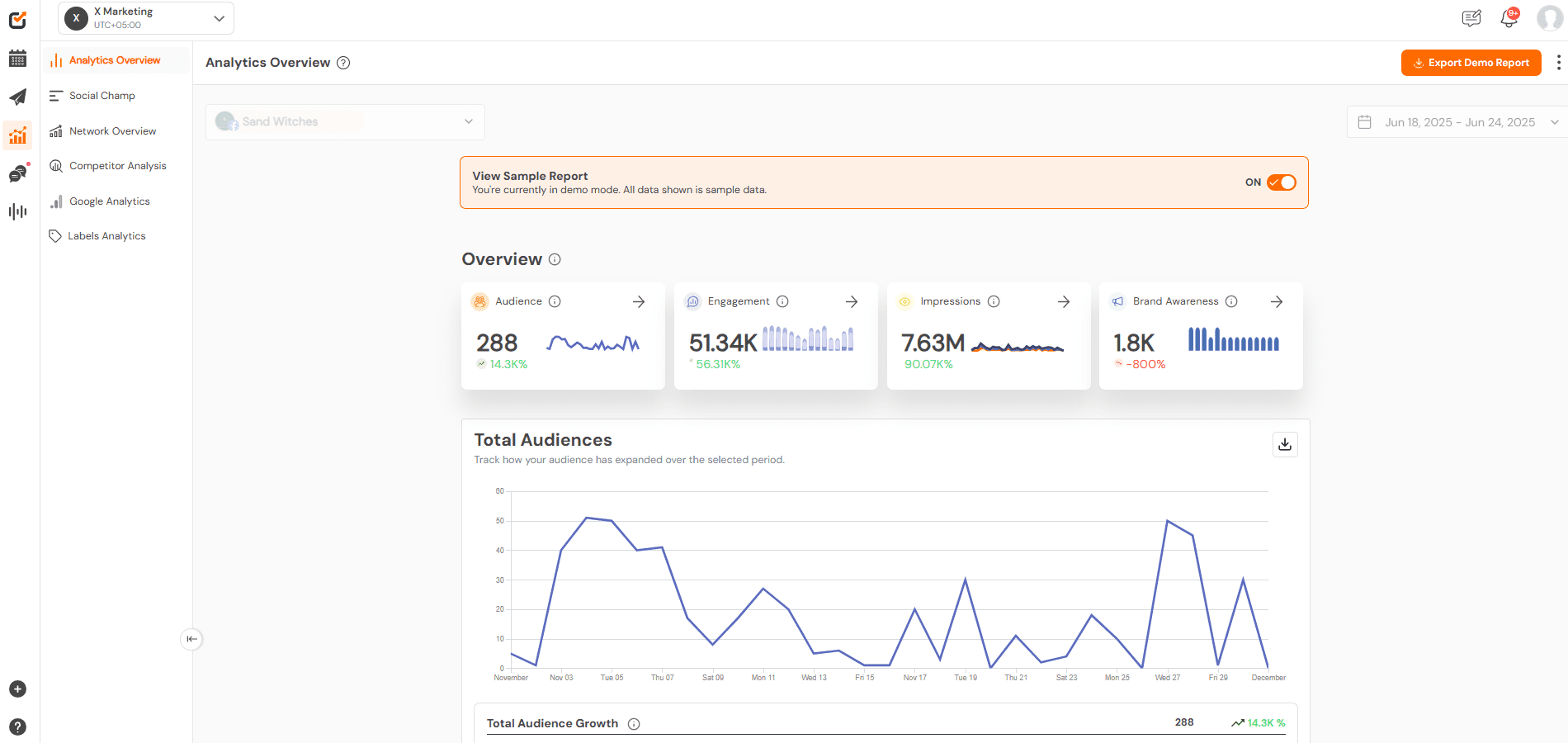
If you manage multiple posts or pages, built-in analytics can save time. Social Champ shows you post performance in one place, including engagement and reach.
This makes it easier to compare posts and understand what leads to more shares. Over time, this helps you refine what you post and when you post it.
Fix Underperforming Posts Quickly
Not every post will perform well, and that’s normal. When a post doesn’t get shared:
- Try changing the caption
- Add a stronger visual
- Repost it at a different time
- Adjust the message to be clearer or more relatable
Here’s a quick reference table:
| Metric | Why It Matters | Quick Fix |
|---|---|---|
| Low Shares | Content Didn’t Connect | Improve Message or Format |
| Low Reach | Poor Visibility | Post at a Better Time |
| Low Engagement | Weak Interest | Add a Question or Story |
Know When to Re-Share or Promote a Post
If a post performs well, don’t let it fade.
You can re-share it later or boost it to reach more people. Strong posts often perform well again when shown to a new audience.
Monitoring performance is how you close the loop.
When you track what works and adjust what doesn’t, learning how to make a post shareable on Facebook becomes much easier and much more predictable.
Plan posts ahead, stay visible, and focus on creating content people actually want to share with Social Champ.
Conclusion
At the end of the day, how to make a post shareable on Facebook comes down to a few simple habits.
Make sure your post is public, a post where sharing is actually allowed, and give people a real reason to hit that share button.
I’ve learned that even small tweaks, like adding a relatable line or posting at the right time, can change everything.
Not every post will take off, and that’s okay. Keep testing, pay attention to what people respond to, and adjust as you go.
Do that consistently, and sharing will stop feeling like a mystery and start feeling normal.