
I’ve managed Facebook groups for years, and a lot of people have asked me this question: “How do you get everyone’s attention without spamming the group or breaking rules?”
If you run a business or community, it’s important to get in front of your audience.
Short Summary
- @everyone notifies all members, but only admins and moderators can use it.
- Tag sparingly for important updates, events, or urgent announcements.
- Timing matters. Post when most members are active for better engagement.
- Plan and schedule posts to avoid overuse and keep notifications meaningful.
- Respect member preferences and set clear internal tagging guidelines to maintain group health.
Facebook reports that more than 1.8 billion people use Facebook Groups every month. That is a massive audience already gathered around shared interests.
Still, there’s no guarantee that your posts will reach the maximum number of people in groups because posting alone isn’t enough.
That’s exactly why you should learn how to tag everyone in a Facebook Group that everyone doesn’t know.
The Facebook algorithm decides who sees your post first. As a result, tagging the wrong way can limit reach rather than improve it.
Let’s walk through what actually works and what you should avoid.
![How To Tag Everyone in a Facebook Group in [current_year]: Complete Guide 4](https://www.socialchamp.com/wp-content/uploads/2024/07/Calendar-v2.png "How To Tag Everyone in a Facebook Group in [current_year]: Complete Guide 5")
Get More Eyes on Your Group Posts!
Most group members do not scroll every day. Social Champ helps you publish at consistent times so your posts stay visible longer.
What Does “Tag Everyone” Mean in a Facebook Group?
If you manage or participate in Facebook groups, you’ve probably seen posts where everyone seems to get notified at once.
Do you know why it happens? That happens when the admin or moderator of the group tags the whole group with the @everyone tag.
Still, many people don’t know how it actually works.
What Happens When You Use @Everyone
If you have any misunderstanding regarding this tag, let me clear it up here.
When an admin or moderator types @everyone in a post or comment, Facebook sends a notification to group members.
The idea is simple. Highlight an update that matters. This could be a rule change, an event reminder, or an urgent announcement.
This doesn’t mean every member will read the post. It only means Facebook alerts them, and the post reaches everyone through the notifications.
What they do next depends on interest, timing, and how often the feature gets used.
Who Can Use the “Tag Everyone” Feature
Everyone in a Facebook group doesn’t have this feature. Facebook restricts it to reduce misuse and notification overload.
In most groups, only admins and moderators can access it. Regular members usually never see the option.
Facebook also limits usage. Many groups can use @everyone once per day. Some groups have stricter limits depending on size or activity.
Here is a simple breakdown
| Role | Can Tag Everyone | Important Notes |
|---|---|---|
| Admin | Yes | Often limited to once per day |
| Moderator | Yes | Same limits as admins |
| Regular Member | No | The feature doesn’t appear |
Why Facebook Limits This Feature
Facebook prioritizes group health. Too many notifications can push members to mute or leave a group. That is why the platform controls who can use this feature and how often.
If you want to learn how to tag everyone in a Facebook group, it starts with understanding these limits.
Once you do, you can use the feature with purpose instead of frustration.
Featured Article: Everything You Need to Know About Facebook Business Accounts
How to Tag Everyone in a Facebook Group on Mobile and Desktop
If you have the right permissions, you can simply tag everyone in a Facebook group. Still, the steps look slightly different on mobile and desktop.
I’ll walk you through both so nothing feels confusing.
How to Tag Everyone in a Facebook Group on Mobile
Many people use Facebook on their phones, and they manage groups from their phones as well. So this is where questions usually come from.
Here’s how you can do it on your Mobile:
- Open the Facebook app
- Go to your Facebook group
- Tap Write something to create a post

Create a Post - Type @everyone in the post or comment
Type @Everyone - If the option appears, select it
Select @Everyone - Tap “Post” to publish the post
Tap “Post”
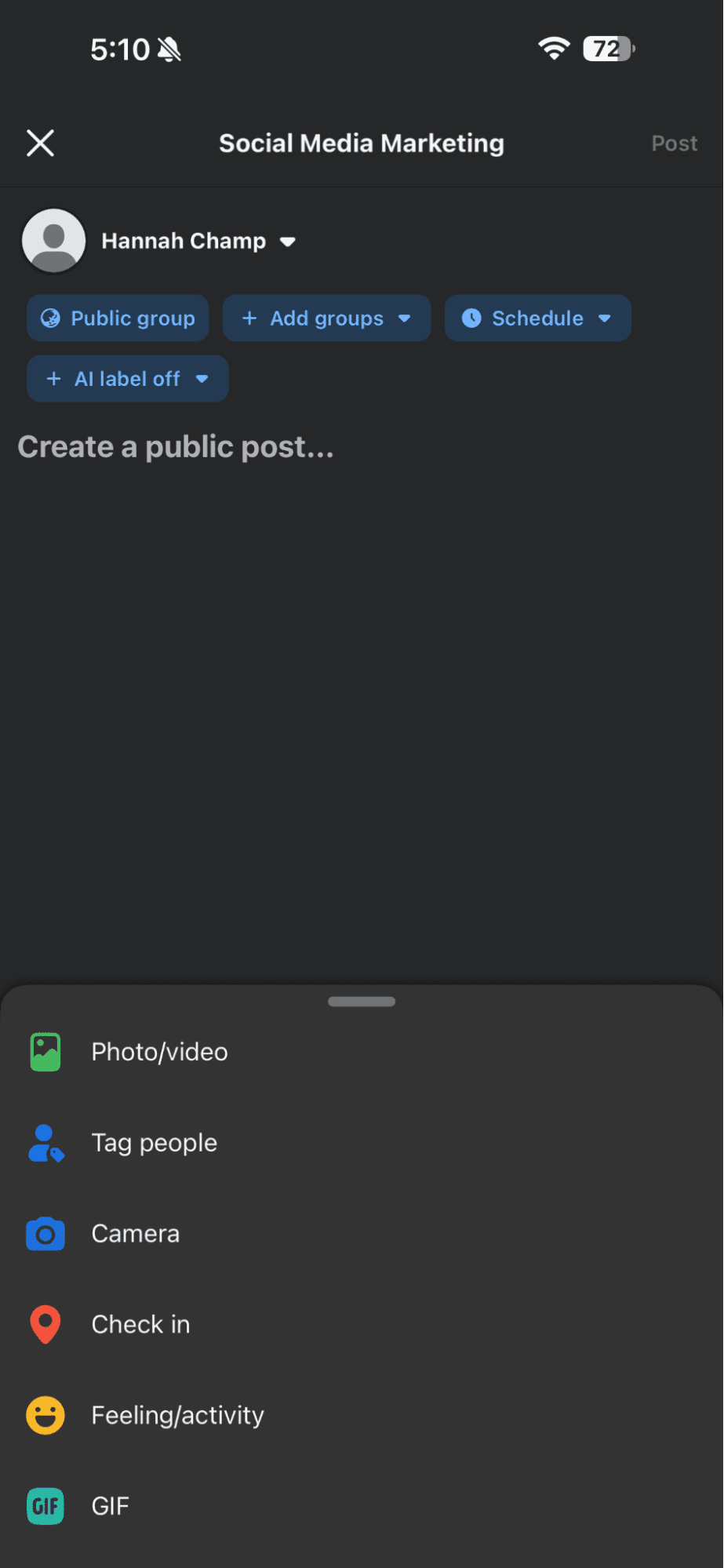
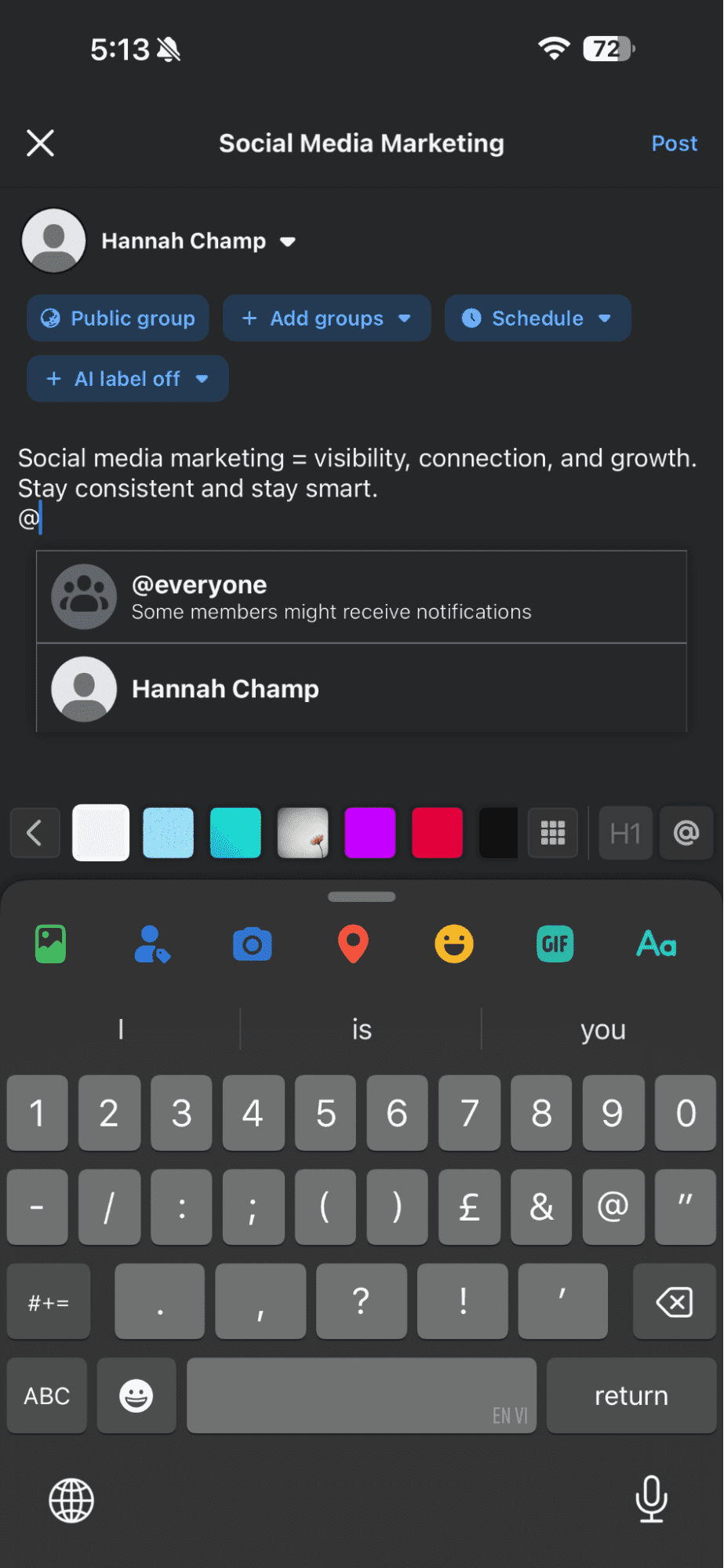
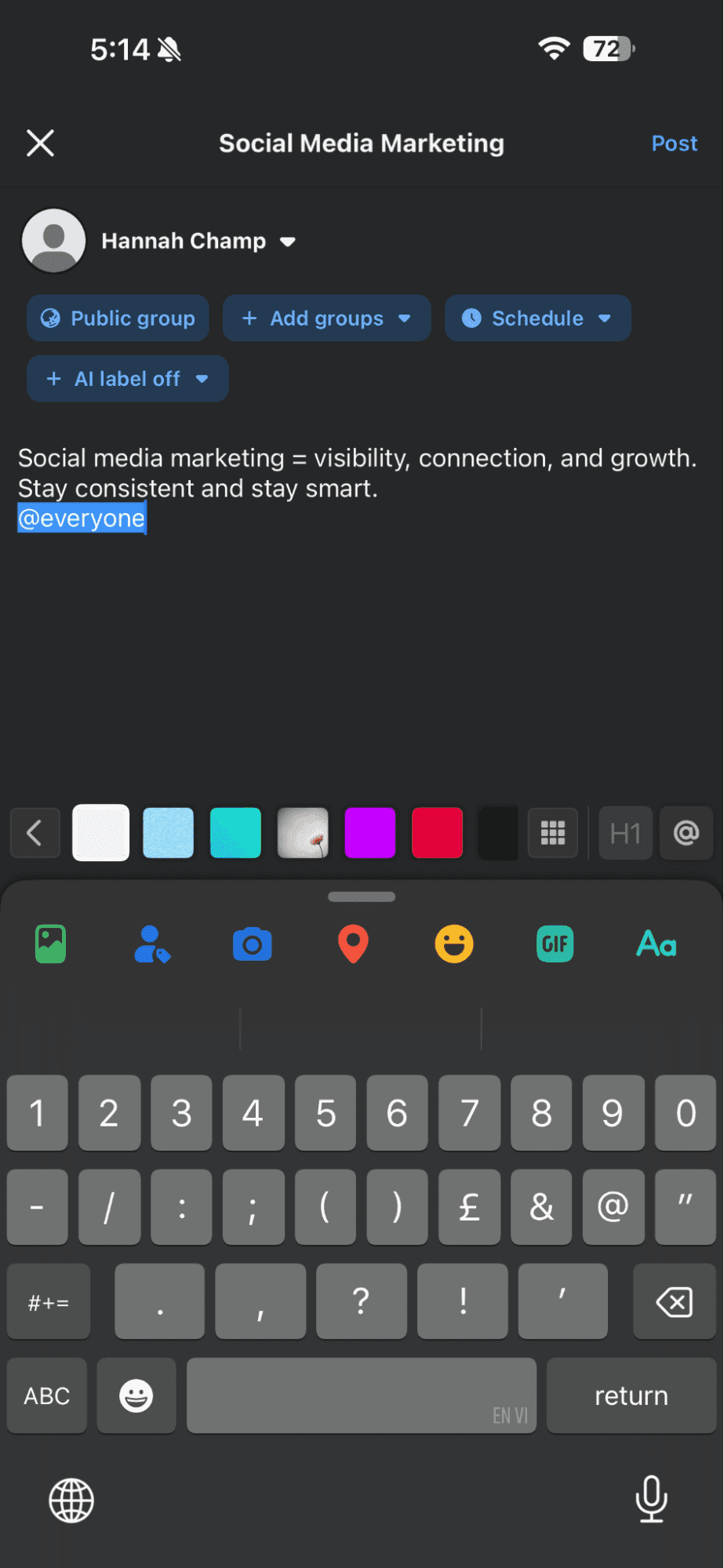
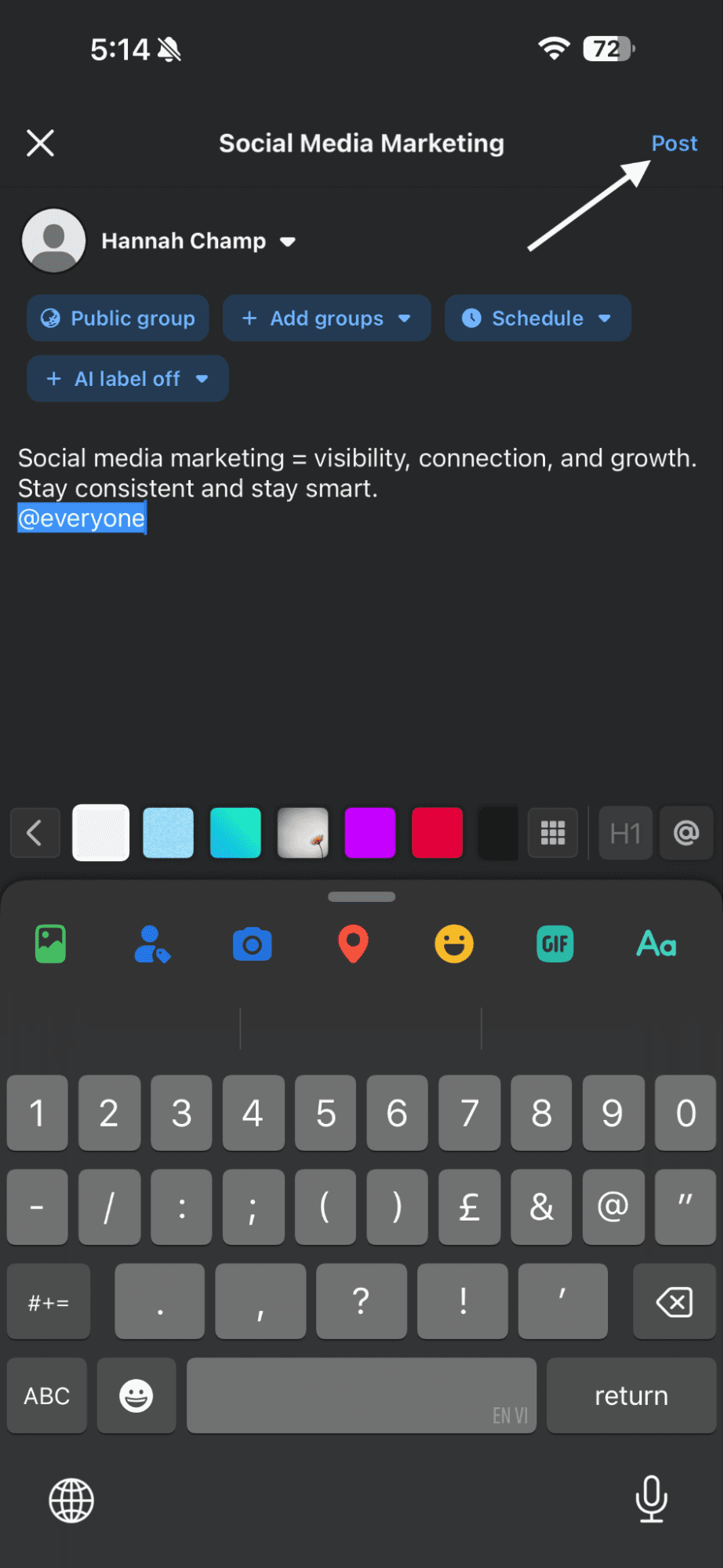
If you have permission, Facebook automatically recognizes the tag. Once you post, members receive a notification.
This is the most common way you can learn how to tag everyone in a Facebook group, especially if you manage communities on the go.
How to Tag Everyone in a Facebook Group on Desktop
If you want to learn how to tag everyone in a Facebook group on desktop, the steps follow the same logic but feel more visible.
- Log in to Facebook from your browser
- Open your group
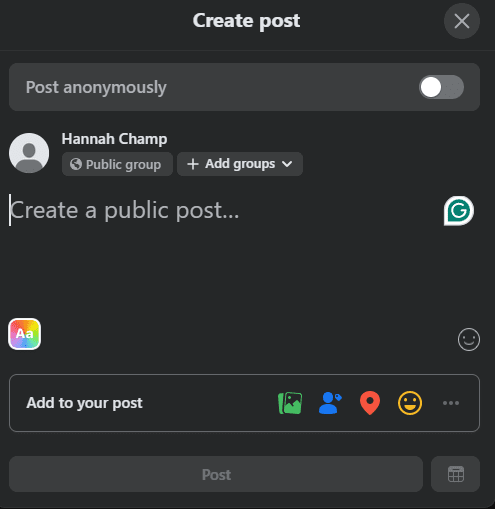
- Click Create post or open a comment box
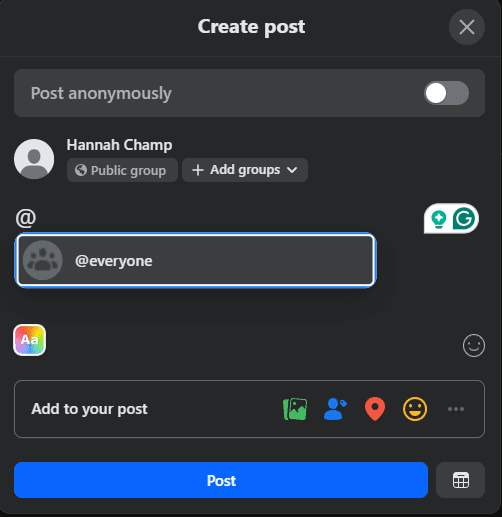
Create a Post - Type @everyone
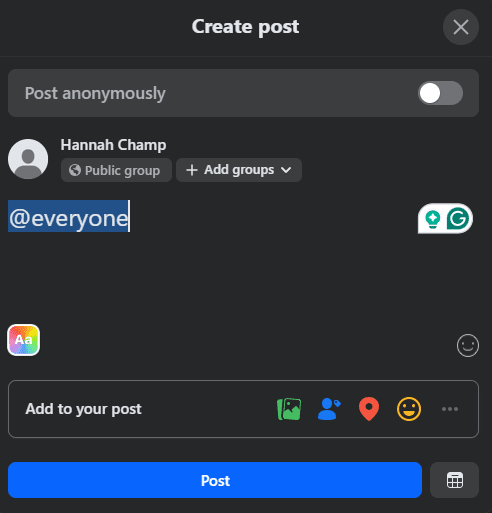
Type @Everyone - Select it if it appears
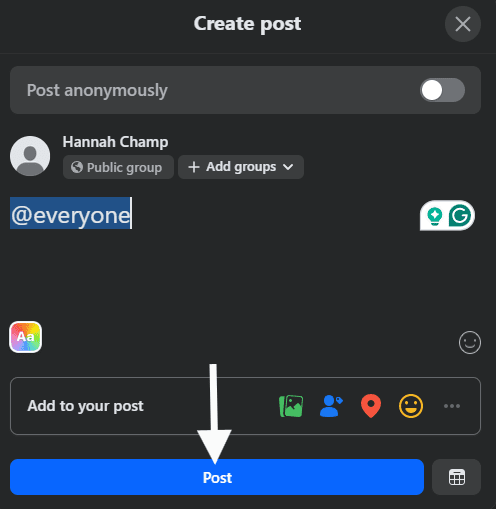
Select @Everyone - Click “Post” to publish it.
Click “Post”
A desktop often makes it easier to confirm whether the tag is available before posting.
If “@Everyone” Does Not Appear
This is where many people panic. If the feature isn’t visible to you, check these first:
- You are not an admin or moderator
- You already used the tag that day
- Facebook has not rolled it out to your group
- Your app or browser needs an update
Facebook changes features often, so availability can vary.
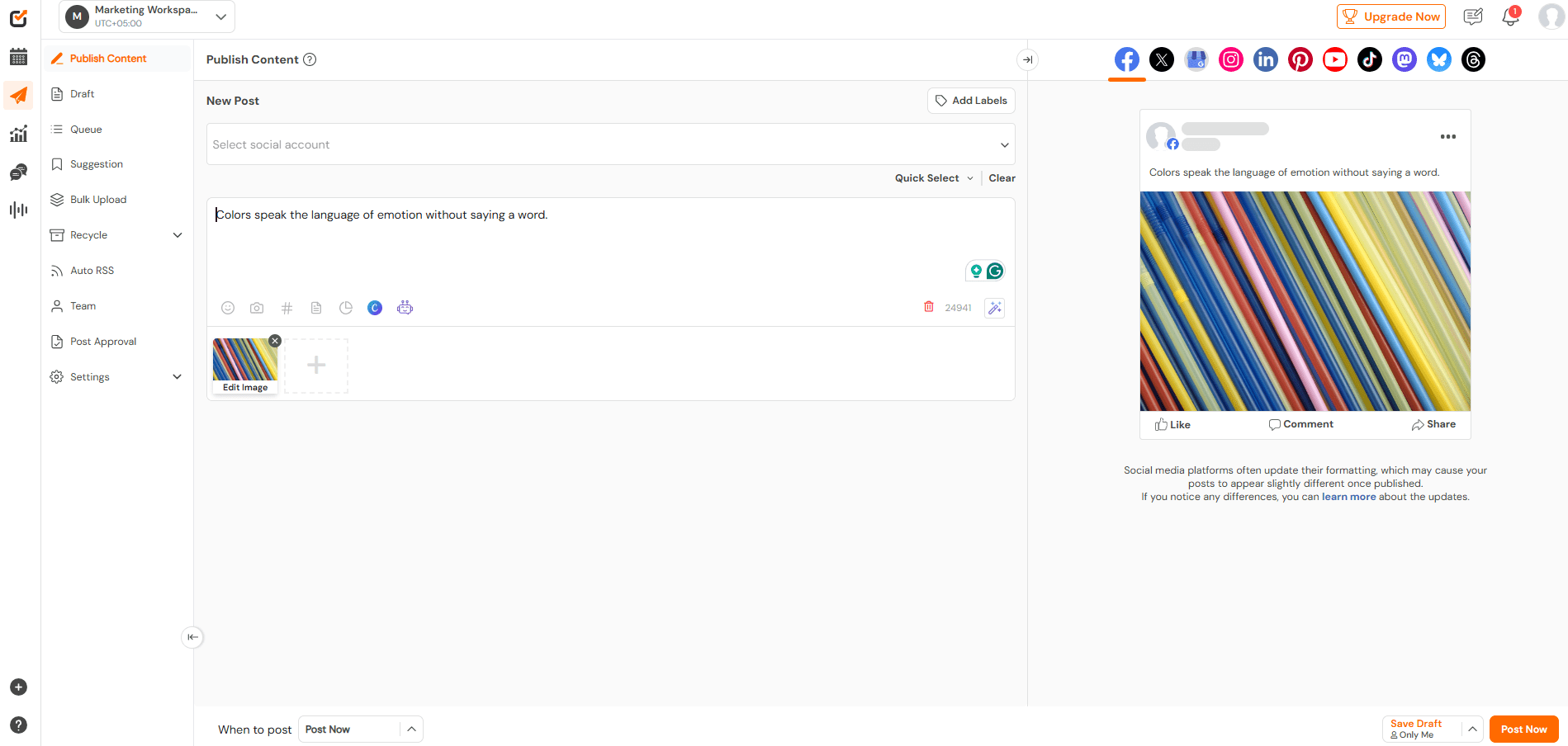
A Smarter Way to Plan Important Group Posts
If you manage multiple groups, manual posting can easily get messy. But if you plan your posts, it can help make the process smoother.
Tools like Social Champ make it easier to schedule updates, stay consistent, and avoid rushed posts when timing matters.
Quick Tip!
Using a Facebook post scheduler can save you hours each week. Plan your posts, tag everyone responsibly, and ensure your important updates reach your group when they are most active.
Reach Members Without Overdoing It!
Tagging can backfire if overused. Social Champ helps you maintain the right posting frequency across your groups without annoying members.
Featured Article: Choose the Right Facebook Cover Photo Size
Why Can’t I Tag Everyone in My Facebook Group?
Many people are unable to tag everyone in their Facebook groups, and I know how frustrating it feels.
You type @everyone, and nothing happens. No suggestion. No tag. It feels broken, but in most cases, it’s not.
You Do Not Have the Right Role
One of the most common reasons that you can’t tag everyone in a Facebook group is that you don’t have permission.
Basically, Facebook restricts this feature to admins and moderators. If you’re a regular member who wants to tag everyone in the group, you won’t find the feature.
So before trying anything else, you should confirm your role inside the group settings.
The Feature Is Not Available in Your Group Yet
Facebook does not release features to every group at the same time. Some groups have access. Others don’t. Group size, activity, and location can all affect rollout.
Even if you’re an admin, the feature may still be missing.
You Already Reached the Daily Limit
Many groups can use the tag only once per day, which means people can tag everyone once a day.
If someone else used it earlier, Facebook blocks it until the next day. This often causes confusion in larger admin teams.
Platform or Policy Restrictions
If your app isn’t up to date, you may not find this option in the group. Group rules also matter. Some groups have restrictions based on content type or posting behavior.
Quick Checklist to Fix the Issue
Before giving up, you can check this list:
- Confirm you’re an admin or moderator
- Ask if another admin used the tag that day
- Update your Facebook app or browser
- Test on both mobile and desktop
- Review group settings and rules
If you understand these limits, it can help you avoid wasting your time.
Featured Article: Facebook Stories – A Great Marketing Tool At Your Fingertips
When Should You Use the “@Everyone” Tag, and When Should You Avoid It?
If this feature helps grow your group at some points, it doesn’t mean it won’t push members away. The difference comes down to timing, intent, and restraint.
When Using @Everyone Makes Sense
The @everyone tag works best only when the message truly matters. You can use it when members benefit from seeing the post right away.
Some good examples include:
- Important rule updates that affect everyone
- Event reminders with a clear date or deadline
- Urgent announcements, such as schedule changes
- Group pauses, closures, or policy updates
In these cases, it makes sense to tag everyone, which saves time and avoids confusion. Members expect a notification because the information impacts them directly.
When You Should Avoid Using It
Overusing this feature can cause problems for you. When members receive too many notifications, they stop paying attention. Some mute the group, and others leave without warning.
You should avoid tagging everyone for:
- Promotional posts
- Casual discussions
- Repeated reminders
- Content that only applies to a small segment
Tagging in these situations feels intrusive. It also trains members to ignore future alerts.
Pros and Cons of Tagging Everyone
Here is a simple way to weigh the decision:
| Pros | Cons |
|---|---|
| Immediate Visibility | Notification Fatigue |
| Faster Responses | Member Frustration |
| Clear Communication | Risk of Members Muting the Group |
The feature itself isn’t the issue. Only the misuse is.
Community Management Matters
When you use the @everyone tag, it’s not just a technical action, but it’s a trust decision. That’s because, when anyone joins your group, they expect value, not constant interruptions.
So before you tag, ask yourself one question. Would I want a notification for this post?
If the answer is no, skip it.
These boundaries are important to understand when you’re learning how to tag everyone in a Facebook post without hurting engagement.
If used sparingly, the feature supports healthy groups, and if used carelessly, it does the opposite.
Featured Article: How to Unblock Someone on Facebook
How to Use the Feature Effectively for Better Engagement
Let me tell you about the first time I used the @everyone tag in a Facebook group. First, I thought, it would solve everything, like more notifications, more eyes, and more engagement.
But, in reality, that’s not what happened.
Some people responded right away, and others just ignored it. A few muted the group, which taught me something important.
Tagging everyone only works when the post earns attention.
Start With a Clear Reason
I suggest that before tagging everyone, just pause for a minute and ask yourself a question: “Would I care about this if I were a member?”
If your post is for solving a problem, sharing an update, or asking for quick input, people definitely respond.
But if it feels vague or self-focused, they don’t engage and scroll past it.
I always lead with the point. No warm-up. No filler. People decide in seconds whether to engage.
Timing Still Controls Visibility
Even if you get everyone’s attention with the notifications, timing matters a lot.
I’ve learned from my experience that after posting an important update late at night, the tag works, but engagement doesn’t.
Since then, I pay attention to activity patterns such as when members actually check the group, engagement feels natural, and when they don’t, notifications feel intrusive.
That’s where understanding the best time to post on Facebook helps you a lot, even when tagging is involved.
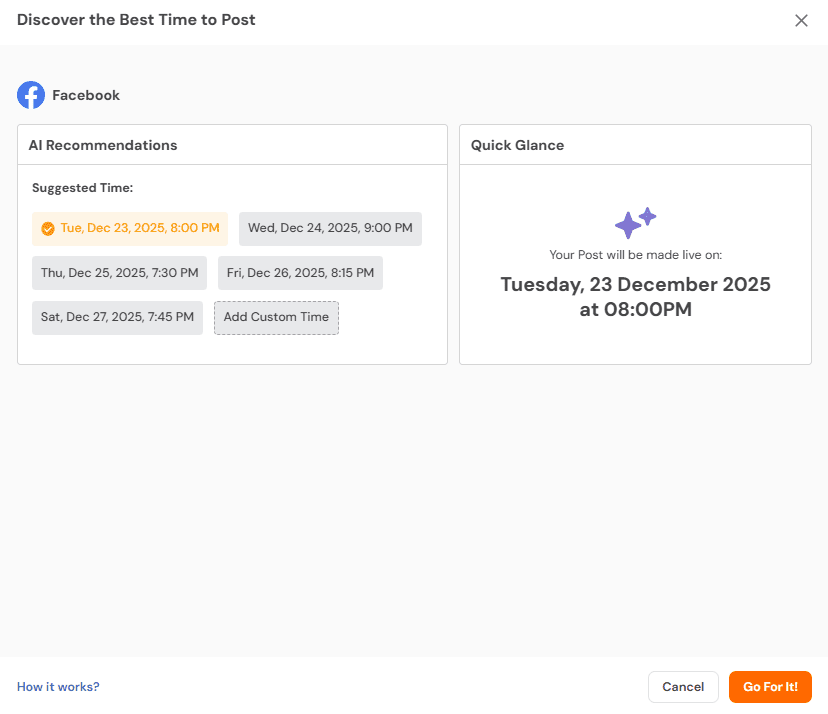
Structure Beats Spontaneity
Earlier, I used to post whenever something came up. That approach led to rushed updates and uneven engagement.
But you know what changed everything? That’s planning!
If you plan your posts ahead of time, your message sounds clearer, and your tag feels intentional, not impulsive.
And consistency also helps members trust that notifications mean something.
If you manage more than one group, planning becomes even more important. It keeps tagging rare and meaningful.
Watch What Happens After You Post
And when you’re done posting, the real lesson comes after it.
That’s why you should look at comments first, then reactions, and then follow-up questions.
When tagging works, members respond fast and stay on topic. When it doesn’t, silence shows up quickly.
Quick Tip!
Don’t post randomly. Schedule Facebook posts to align with your group’s peak activity times. This simple step boosts visibility and keeps members engaged without overwhelming them.
Reach Members Without Overdoing It!
Timing can make or break engagement. Social Champ lets you schedule Facebook posts during peak activity to get more reactions and comments.
How to Manage Tagging Behavior and Maintain Group Health
What I’ve learned from my experience is that if you tag everyone, you’re not just using the feature, but it’s a responsibility.
The way you use this feature, it shapes how members feel about your group.
Set Clear Expectations From Day One
There’s a very common mistake that most people assume members understand why tagging happened.
They don’t in every case, which leads to frustration.
I used to do that too, but now, I explain it clearly. I let the group members know when and why @everyone will be used.
Important updates only. No promotions. No noise. When people know what to expect, they are far less likely to mute or leave the group.
Control Frequency and Relevance
If you routinely tag everyone in the group, it can quickly lose its value. You should keep it rare on purpose. If everything feels urgent, nothing does.
Before tagging, you should ask yourself:
- Does this affect most members
- Does it require timely action
- Would skipping the tag cause confusion
If the answer is no, you should post without it. This approach maintains trust and keeps engagement steady.
Help Members Manage Notifications
Not everyone wants the same level of alerts, and that’s totally normal.
I remind members that Facebook allows them to adjust group notification settings.
They can mute notifications or reduce alerts without leaving the group. If you give people control, it will lower frustration and keep the community healthier.
Create Simple Internal Guidelines
If you manage a group with multiple admins, alignment is most important. I’ve seen groups fall apart because everyone tagged whenever they felt like it.
Here is a structure that works:
| Admin Action | Why It Matters | Outcome |
|---|---|---|
| Limite Tagging | Prevent Fatigue | Members Stay Engaged |
| Explain Usage | Build Trust | Fewer Complaints |
| Coordinate Admins | Avoid Overuse | Clear Communication |
Group Health Always Comes First
With almost every new update, new features come, and old ones go. But what’s permanent is the community trust.
If you learn how to manage tagging behavior, it may protect the long-term value of your group.
When you use this tagging feature with intention, it supports connection, and when you abuse it, it pushes people away.
That balance defines successful group management.
Conclusion
When you learn how to tag everyone in a Facebook group, it’s not just about typing @everyone, but it’s about timings, purpose, and respect for your members.
I’ve even seen many posts get ignored if creators overuse tagging, and I’ve seen engagement spike when it’s done right.
Basically, the key is to ask yourself, “Does this really matter to everyone?”
If the answer is yes, go ahead; if not, save it for later. Use tagging thoughtfully, and your group will stay active, connected, and happy without annoying anyone along the way.