Ever posted a TikTok that looked perfect in your editor, then went live with cropped text and a zoomed-in face? That’s usually the TikTok algorithm quietly judging your video size choices.
The thing is, TikTok is a full-screen, mobile-first platform, so it’s designed for vertical videos (9:16 aspect ratio). Since most TikTok users watch on their phones in portrait mode, vertical videos naturally fill the screen and keep viewers engaged longer.
Short Summary
- TikTok performs best with vertical videos set to a 9:16 aspect ratio, with 1080 × 1920 pixels remaining the recommended resolution for a clean, full-screen mobile experience.
- Keeping file sizes within TikTok’s limits helps avoid slow uploads, unwanted compression, and playback issues that can hurt video quality.
- Shorter, well-optimized videos often deliver stronger engagement and completion rates, especially when size and length work together.
- Ad videos come with stricter size, format, and length requirements than organic posts, so checking specs before uploading is essential.
- Using the right tools and workflows makes it easier to maintain consistent TikTok video size standards and publish content that looks polished and performs well.
And the numbers don’t lie. Studies have shown that vertical videos achieve up to 90% higher completion rates compared to horizontal videos on mobile-first platforms.
So, when your video size is off, the TikTok algorithm won’t play nice with your videos. It may push them less on the For You Page, which means lower visibility, shorter watch time, and fewer likes.
That said, getting the main specs right is key. You should nail several key aspects, such as the aspect ratio, file size, format, and length, to ensure your content looks great and performs well.
In the sections ahead, we’ll break down each spec, compare organic posts versus ads, and share tools, such as the best TikTok scheduler, to streamline your TikTok strategy. We’ll also share workflows to make sizing easy, and give best-practice tips to keep your videos looking sharp and performing their best.
Let’s get started, shall we?

Manage your TikTok videos from draft to publish with Social Champ and keep every post optimized and on schedule.
What Are the Standard TikTok Video Sizes and Aspect Ratios?
If you’re wondering how to make a TikTok video that performs well, there are a few key things to get right. Video size and aspect ratio are the first two. Get them wrong, and your content might look off, lose clarity, or fail to grab attention on the For You Page.
The most recommended TikTok video size dimensions are 1080 × 1920 pixels, which perfectly fit a vertical full-screen view. These dimensions ensure your videos look sharp and display correctly on most devices.
TikTok also supports other social media video sizes, including 1080 × 1350 pixels for tall posts and 720 × 1280 pixels for lower-resolution vertical videos.
As for TikTok aspect ratios, TikTok prefers:
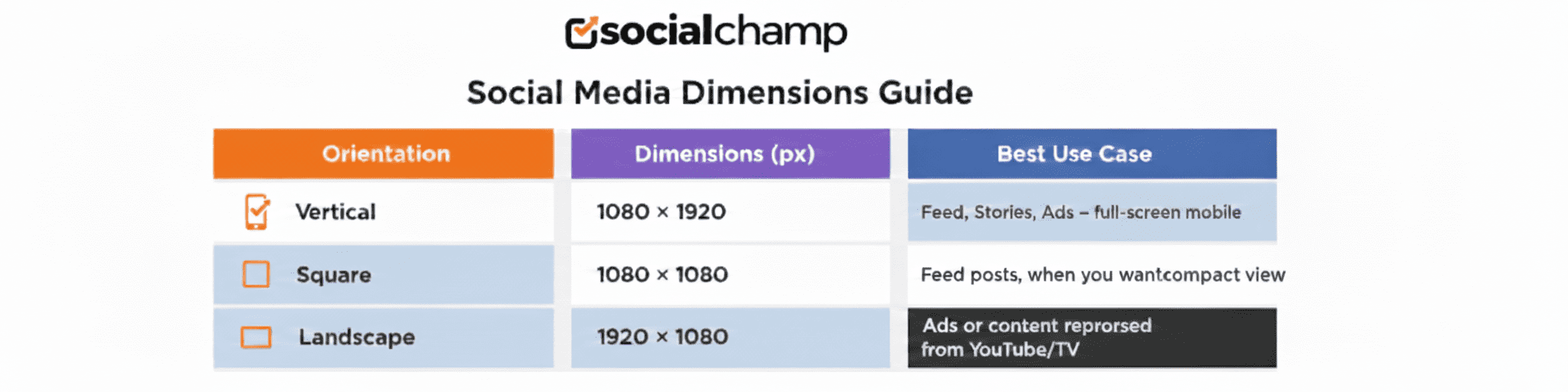
9:16 (vertical): Best for Full-Screen Mobile Viewing
This is TikTok’s favorite for a reason. Vertical videos fill the entire mobile screen, feel immersive, and match how users naturally hold their phones. As a result, they tend to keep viewers watching longer and perform best on the For You Page.
1:1 (square): Works for feed posts.
Square videos can work, especially if you’re repurposing content from other platforms. However, they don’t fully take advantage of the screen, so they often feel less engaging compared to vertical videos.
16:9 (landscape): Supported, but not ideal for mobile-first viewing.
While TikTok does support landscape videos, they’re not ideal for a mobile-first platform. These videos usually appear with black bars or require cropping, which can break the viewing experience and lower engagement.
Here’s a quick comparison to help you decide which TikTok video size ratio makes the most sense based on how your content will appear and perform on TikTok:
Pro Tip: Vertical 9:16 videos consistently perform best on mobile screens. They keep viewers glued, so they ultimately boost completion rates. So, when in doubt, go vertical!
Featured Article: How to Report a TikTok Account
What File Formats, Resolution & File Sizes Does TikTok Accept?
If you want your TikToks to look crisp and get the love they deserve from the algorithm, you need to know the basics: resolution, file format, and file size.
-
Resolution
TikTok recommends 1080p (1920 × 1080 pixels) for the best quality. The minimum acceptable TikTok resolution is 720p. Anything lower can make your video look blurry or pixelated, especially on larger screens.
-
File formats
TikTok supports MP4, MOV, MPEG, 3gp, and avi. for both organic posts and ads. These formats work best to ensure your videos upload smoothly and maintain quality across campaigns.
-
File size
Mobile uploads typically max out at 287.6 MB, while desktop uploads and ad videos can go up to 500 MB, depending on the platform. Keeping your file size within these limits helps avoid upload errors and preserves video quality.
Here’s a quick comparison for clarity:
| Device/Usage | Max File Size | Recommended TikTok Video Format |
|---|---|---|
| Mobile Organic Post | 287.6 MB | MP4 / MOV |
| Desktop Organic Post | 500 MB | MP4 / MOV |
| TikTok Ads | 500 MB+ | MP4 / MOV |
Pro Tip: Stick to 1080p and MP4 or MOV, and your videos will look sharp, load faster, and have the best shot at keeping viewers glued to the screen.
Featured Article: How to Post on TikTok: Your Ultimate Guide
How Long Should a TikTok Video Be (Length & Size Considerations)?
Video length matters almost as much as video size. Different contexts have different limits, so it helps to know what’s allowed.
For instance, mobile uploads can now go up to 10 minutes, which gives creators more flexibility for storytelling.
Meanwhile, TikTok ads tend to work best with shorter clips, usually 9–15 seconds, because they capture attention quickly without losing viewers.
To make this clearer, here’s a breakdown of length limits across different contexts and what they mean for your content strategy:
-
Mobile Organic Posts: Up to 10 minutes
TikTok allows longer uploads, which is great for tutorials, deep dives, or storytelling content.
But just because you can post a 10-minute video doesn’t mean you always should. These perform best when the content is structured to keep viewers engaged from start to finish.
-
Short-Form Organic Videos: 15–60 seconds
This is the sweet spot for most creators. Videos in this range are easier to watch in one sitting, load faster, and tend to earn higher completion rates. They’re ideal for trends, tips, behind-the-scenes clips, and quick value-packed content.
-
TikTok Ads: 9–15 seconds
Ads work best when they get to the point quickly. Shorter ad videos are easier to digest, cost less to run, and are more likely to hold attention before users scroll. This length also makes it easier to deliver a clear message without overwhelming viewers.
-
Other Contexts (Stories, TikTok LIVE Clips, and Similar Formats)
Length limits can vary depending on the TikTok video format and feature. These are typically designed for quick, casual viewing, so shorter clips usually perform better and feel more natural in the flow of the app.
But it’s not just about time; it’s also about file size and retention. Longer videos naturally increase file size, which can affect upload speed and playback quality.
Plus, if a video drags on, viewers are more likely to swipe away, which can hurt your completion rates. That’s why shorter, punchy clips often outperform longer ones, as they keep both the algorithm and your audience happy.
So, you should keep your TikTok videos concise and optimized for size to ensure smoother uploads, higher watch rates, and better overall performance.
How Do TikTok Video Size Specs Differ for Ads vs Organic Content?
It’s important to understand that TikTok’s requirements change a bit when you’re running ads versus posting organic content.
Ads need to meet stricter specs to ensure smooth delivery and consistent quality, while organic posts are slightly more flexible. Nevertheless, both need the right size and format to perform well.
For advertisers, the key differences include:
- Format: MP4 or MOV are standard, but ads may require higher bitrates or specific encoding.
- Length: Ads usually perform best at 9–15 seconds, whereas organic content can range from a few seconds up to 10 minutes.
- File size: Ads can be larger (up to 500 MB) compared to mobile organic posts (287.6 MB).
- Aspect ratio: Vertical 9:16 is still preferred, though some ad placements allow 1:1 or 16:9.
Here’s a quick pros/cons table to make it clear:
| Upload Type | Pros | Cons |
|---|---|---|
| Organic Post | – Flexible length (a few seconds up to 10 minutes).
– Smaller file size makes uploads faster. – Easier to experiment with creative styles and formats. – Can post directly from mobile. |
– Less strict specs can lead to inconsistent quality.
– May not maximize algorithmic reach if specs aren’t optimized. – Lower production value might impact engagement. – Aspect ratio or resolution mistakes can reduce completion rates. |
| Ad Upload | – Can use larger files for higher quality.
– Optimized for algorithmic delivery and engagement. – Supports multiple placements and ad formats. – Ensures consistent high-quality display across devices. |
– Must follow stricter specs for format, size, TikTok video ratio, and length.
– Longer preparation and editing time needed. – Mistakes in specs can lead to ad rejection or poor delivery. – Less room for spontaneous or experimental content |
For agencies or brands managing multiple TikTok campaigns, keeping track of all the specs, file sizes, formats, and deadlines can quickly become overwhelming.
When you handle everything manually, it’s easy to make mistakes or miss deadlines, which can impact both organic posts and ad performance.
If you’re wondering how to manage multiple TikTok accounts without any hiccups, the solution lies in smart tools like Social Champ. This is a powerful social media management tool that can help you manage uploads, monitor file sizes and formats, and schedule content across multiple campaigns seamlessly.
This scheduler can keep everything organized, so your team can focus on creating engaging videos rather than worrying about technical details. It can help ensure that every post meets TikTok’s standards and performs at its best.
Try Social Champ to schedule, track, and optimize all your videos in one place.
What Workflow and Tools Can Help Ensure Your TikTok Video Size Is Optimized?
If you want your TikTok videos to look polished and perform well, having the right workflow and tools can save you a lot of headaches.
Here are some practical tools and workflows to make this easier:
1. Video Editors: Premiere Pro, Final Cut, CapCut, InShot
These are your go-to tools for setting up your video correctly from the start. You can:
- Set the canvas to 1080 × 1920 pixels to match TikTok’s preferred 9:16 aspect ratio.
- Use vertical presets so your edits are automatically optimized for full-screen mobile viewing.
- Add transitions, effects, text, and captions while ensuring they stay within the safe zones.
- Export videos quickly with TikTok-ready settings to maintain quality and avoid unnecessary compression.
With the right video editor and proper setup, you can ensure your TikToks look polished, fit perfectly on mobile screens, and are ready to grab attention the moment they hit the For You Page.
2. Compression Tools: HandBrake, Adobe Media Encoder
Even after editing, large files can cause slow uploads or playback issues. Compression tools help you:
- Reduce file size without noticeably affecting video quality.
- Adjust bitrate and TikTok resolution to balance quality and performance.
- Ensure your videos stay under TikTok’s maximum file size limits (e.g., 287.6 MB for mobile uploads, 500 MB for ads).
Using compression tools ensures your videos upload smoothly, play without glitches, and maintain high quality. Those are the kinds of results that keep both viewers and the TikTok algorithm happy.
3. Batch Export Features
If you’re working on multiple videos at once, batch exporting saves time and ensures consistency. You can:
- Export multiple clips with the same resolution, TikTok video format size, and bitrate.
- Avoid repetitive manual setup for each video.
- Maintain uniform quality across all posts, which is especially useful for campaign series or scheduled uploads.
Batch exporting also helps you stay organized and ensures every video meets TikTok’s specifications without extra effort.
4. Preview on Mobile Devices
Even if your specs are correct, seeing your video on an actual phone is crucial. Previewing helps you:
- Check safe zones so text, captions, and graphics aren’t cut off.
- Make sure colors, effects, and transitions appear correctly on mobile screens.
- Catch small mistakes before posting, saving you edits and re-uploads later.
Previewing on a mobile device gives you confidence that your video looks exactly how you want it and is ready for your audience.
Once you’ve finalized your edits and previewed your video on mobile to ensure text and graphics stay within safe zones, the next step is to streamline posting and scheduling.
Social Champ is a solid choice for marketers because it helps with pre-check uploads, confirming correct size settings, and scheduling videos in advance. This way, your content not only looks great but also reaches your audience at the right time without any last-minute stress.
Ensure your videos are always the right size, look polished, and reach your audience at the perfect time with Social Champ.
What Common Mistakes to Avoid with TikTok Video Size?
Even experienced creators sometimes run into issues with TikTok video sizes. Avoiding these common mistakes can save you time and help your videos perform better.
Here are the typical errors to watch out for:
1. Wrong Aspect Ratio
You might film your video on your phone in landscape mode because it looks cinematic. Or maybe you repurpose a clip from YouTube or Instagram that was originally square.
The problem? TikTok is a vertical-first platform, so your masterpiece may not fill the screen properly.
The warning signs to indicate that your TikTok aspect ratio is off include:
- Black bars appear on the sides or top and bottom of your video.
- Captions or graphics are getting cut off, making text hard to read.
- Your video looks cramped or small on a mobile screen instead of filling the screen.
- Viewer engagement drops, like shorter watch times or early swipes, because the content doesn’t feel immersive.
This not only looks unprofessional but also reduces the immersive full-screen experience, which can lower engagement and watch time.
The fix is simple: always check that your canvas is set to 1080 × 1920 pixels (9:16 vertical) before you start editing. Starting with the correct aspect ratio ensures your footage fits perfectly from the very first frame, which can save you time and frustration later.
2. Too Large File Size
This usually happens when you export a 4K masterpiece with a billion effects, thinking TikTok will just magically process it. Spoiler alert: it won’t.
Larger files take longer to process, and TikTok may automatically compress them, which can reduce video quality and affect how smooth your video plays on mobile devices.
You can usually tell your file size is causing problems if you notice these common warning signs:
- Uploads take forever or seem stuck in processing.
- Video quality drops after uploading, appearing blurry or pixelated.
- Buffering or playback issues when viewers try to watch your video.
- Uploads get rejected outright because the file exceeds TikTok’s limits.
The good news? Fixing oversized files is easier than you might think. Compressing your video before uploading will shrink it without killing quality, and make it faster to upload and smoother for viewers to watch.
3. Low Resolution
And even if your aspect ratio and file size are correct, low resolution can still hurt your performance. Blurry or pixelated videos make it hard for viewers to read captions, see fine details, or fully enjoy your content.
And how do you know that you’ve committed this mistake? Well, here are a few key warning signs:
- Text and captions look fuzzy or jagged, like someone scribbled them with a crayon.
- Fine details or small graphics disappear or look messy on mobile screens.
- Viewers swipe away quickly because they can’t clearly see what’s happening.
Like all the other problems, the low-resolution issue has a fix too. Whenever possible, export your videos at 1080p (1920 × 1080 pixels) to ensure every detail, caption, and graphic stays crisp and easy to see.
You should also preview your videos on a mobile device to make sure they look polished and readable before posting.
Featured Article: Creative TikTok Ideas to Boost Engagement
Conclusion
Getting your TikTok video size right in 2026 really matters if you want your content to look polished, keep people watching, and actually perform on the For You Page.
When you get the dimensions, aspect ratio, file size, format, and video length right, a lot starts to fall into place. Your videos fill the mobile screen as intended, captions remain easy to read, and viewers are more likely to stick around until the end instead of scrolling past.
If you’re managing multiple campaigns, Social Champ is one handy tool that can help you keep everything under control without the extra stress. You can pre-check video specs, schedule uploads ahead of time, and organize your content so nothing slips through the cracks.
CTA: Stay in Control of Every TikTok Post!
Use Social Champ to plan, check, and schedule your videos in one place so specs, timing, and quality never slip through the cracks.