Do you ever feel like social media content is never-ending?
You plan, write, and schedule, but somehow it still takes hours to get a single week’s worth of posts done.
You might have tried ChatGPT to speed things up, but the drafts often feel stiff or generic, which leaves you to spend just as much time fixing them.
Short Summary
- Clear prompts help you create social media drafts faster and with fewer rewrites.
- Batching ideas and reusing content makes weekly planning feel more manageable.
- Adding context and real examples keeps AI-written content sounding natural.
- Refining first drafts instead of starting from scratch saves time and energy.
- A structured workflow turns content creation from stressful to consistent.
In fact, a survey found that 85 percent of marketers now use AI for content creation, but most still struggle to make posts feel human.
So, how can you actually save time without losing your voice?
In this blog, I’m sharing practical ChatGPT tips that help you generate ideas, write naturally, and even pair your workflow with scheduling tools to turn drafts into ready-to-publish content.
By the end, you’ll see exactly how to make your content creation faster and smoother without feeling robotic.
Let’s get into it.
Make Your AI Content Actually Work!
How ChatGPT Can Simplify Social Media Content Creation
I still remember the days when creating a week’s worth of social media posts felt like climbing a mountain.
I’d spend hours staring at a blank screen, trying to think of captions, hooks, or ways to repurpose content.
That’s when I started experimenting with ChatGPT, and it completely changed how I approached content planning.
When I used the right ChatGPT tips, they helped me move from “just surviving the week” to actually planning ahead.
Speed Up Idea Generation
One of the first things I noticed was how much faster I can brainstorm.
In 2026, we’ve moved past simple text generation. With GPT-5, the AI isn’t just predicting the next word; it’s using advanced reasoning to understand the ‘why’ behind a campaign.
It can now look at your overall brand goals and suggest a cohesive narrative, not just a list of random captions.
Now, with a simple ChatGPT prompt, I can take a single topic and generate multiple captions, hooks, or carousel ideas in minutes. The dread of “what should I post today?” has now disappeared. Instead, I had a folder of ideas ready to go for the week.
How ChatGPT Supports Different Tasks
ChatGPT isn’t just for ideas. I found it helped me draft captions, write hooks, repurpose older content, and even plan batches of posts ahead of time.
Playing around with different tones and styles became much easier, and I could quickly see what felt natural and what needed a human touch.
Here’s a quick look at how the process works in practice:
| Task | How ChatGPT Helps | Workflow Tip |
|---|---|---|
| Draft captions | Generates multiple variations fast | Pick the ones that fit your brand voice |
| Create hooks | Suggests attention-grabbing openings | Test a few and see which resonates |
| Repurpose content | Turns one idea into carousels, captions, or threads | Keep a running list of evergreen content |
| Plan batch posts | Brainstorms weekly or monthly content | Schedule your calendar to avoid last-minute stress |
Pro Tip!
Once you have your drafts, using a tool to organize and schedule your posts can make a big difference in keeping everything on track without adding more steps.
You can also combine these approaches to transform the way you work, as I did. I spent less time staring at the blank screen and more time refining ideas and engaging with my audience.
ChatGPT, when used thoughtfully, can save you hours each week and make content creation feel far less stressful.
Featured Article: How to Stop the Scroll: The Social Media Hook Formula That Works on Any Platform
Before You Start: Set ChatGPT Up for Better Results
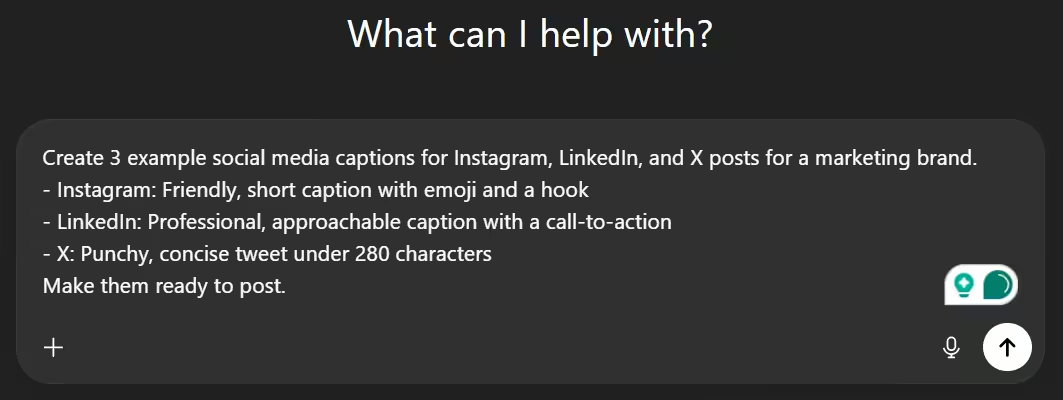
When I first started using ChatGPT for my social media, I would just type something like, “Write me a caption,” and wait.
Most of the time, the drafts were… okay at best. I spent almost as much time fixing them as I would have writing from scratch.
That’s when I realized the secret: how you set ChatGPT up matters more than anything else.
Give ChatGPT Context
One thing that changed everything for me was giving ChatGPT clear context. I started telling it exactly who my audience was, the tone I wanted, and which platform the post was for.
For example, if I wanted a LinkedIn post, I’d ask for a professional but approachable tone. For Instagram, I’d ask for something punchy and conversational.
The GPT-5 ‘Thinking’ model is a game-changer for long-form strategy. You can now upload your entire 50-page brand guidelines or last year’s performance data.
Because of its massive context window, it remembers your specific brand quirks across every prompt in a session, making ‘stiff’ AI responses a thing of the past.
Doing this saved me so much time on edits because the first drafts were already close to what I wanted.
Be Specific About Output
Another trick I use, and I highly recommend you do the same, is to define exactly what you want in terms of format, length, and style.
I stopped asking for just “a caption” and started asking for things like, “Write three Instagram captions under 100 words each, with a friendly tone and a question at the end.”
The difference was night and day. The content I got was almost ready to post.
Role-Based Prompting
I also learned that asking ChatGPT to “write as if it’s a social media strategist for my brand” or “act like a content creator familiar with LinkedIn trends” makes a huge difference.
It gives the AI a perspective, and the drafts feel natural, human, and much easier to polish.
Trust me, spending a few minutes upfront to set context, define output, and use role-based prompts completely changed the way I create content.
I now spend less time fixing drafts and more time planning creative ideas, and you can do the same.
Recipe for Success!
Cover these six points before you hit ‘generate,’ and your first drafts will be closer to publish-ready every time.
- Define your audience clearly: Who are you writing for?
- Specify the platform: Instagram, LinkedIn, or X posts need different tones.
- Set tone and style: Friendly, professional, playful, or formal?
- Mention format and length: Caption, carousel slide, or video script?
- Highlight key elements: Include hooks, call-to-actions, hashtags, or emojis.
- Ask for multiple variations: 3–5 options save you from rewriting later.
Core ChatGPT Tips That Cut Social Media Content Time in Half
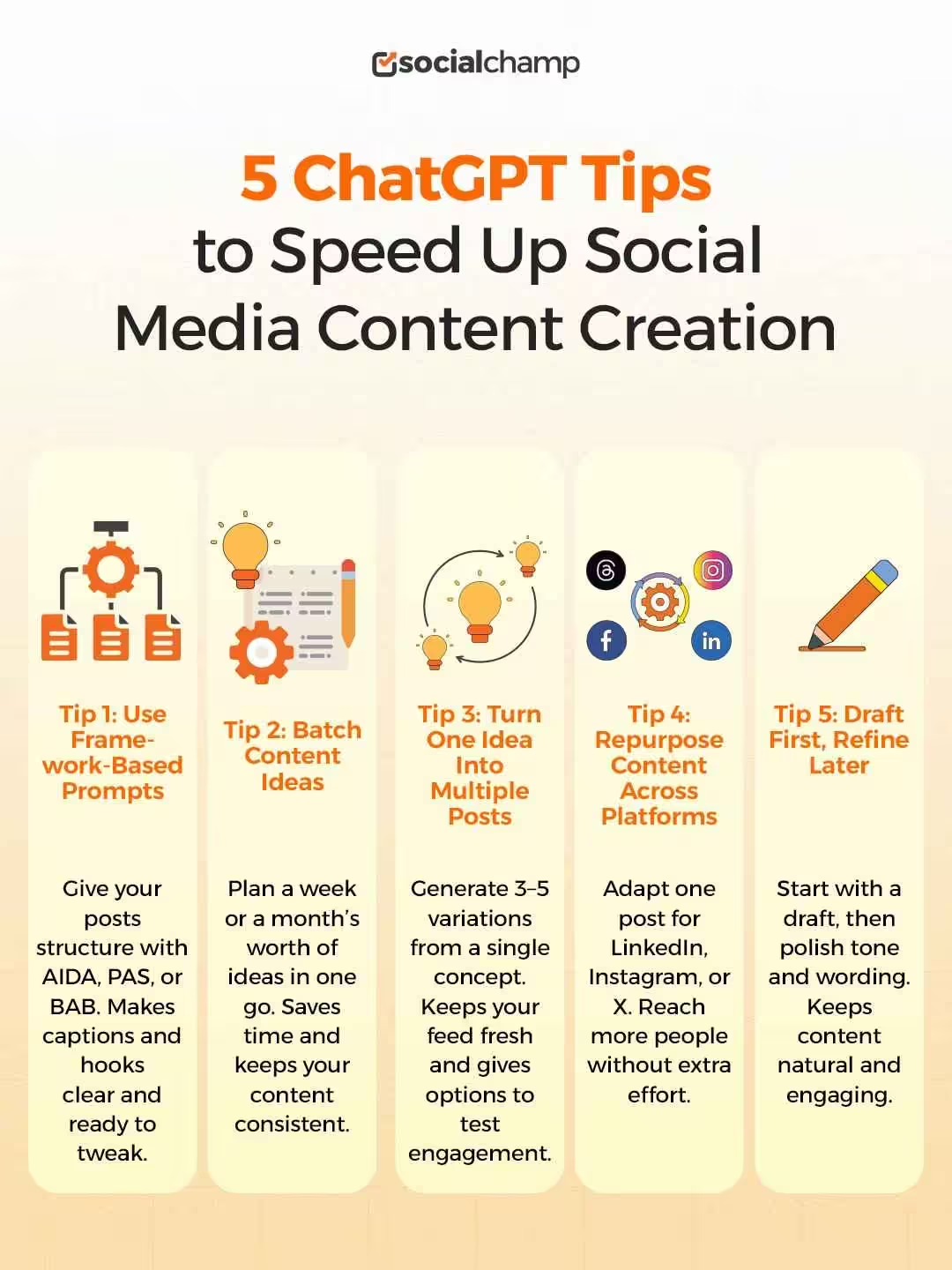
I know it can feel like a never-ending task when you create social media content. But a few simple approaches can save you a lot of time while keeping your posts engaging.
Here are some tips I personally use and recommend you try too.
Tip #1: Use Framework-Based Prompts
One thing that really helped me was using familiar writing frameworks like AIDA (Attention, Interest, Desire, Action), PAS (Problem, Agitate, Solve), or BAB (Before, After, Bridge).
They give structure to your posts and make it easier to create captions that feel complete and clear.
One of the biggest mistakes is asking ChatGPT to “just write a post.” Instead, give it a blueprint. These frameworks are designed to lead the reader’s eye from the scroll-stopping hook to the final CTA.
The PAS Framework (Problem, Agitate, Solve)
Driving urgency and selling a solution. If you’re creating urgency or selling a solution, the PAS framework is the way to go. Here’s what you need to tell ChatGPT.
“Write a [Platform] post using the PAS framework about [Topic/Product]. First, identify the Problem: [Insert specific pain point]. Agitate that problem by explaining the cost of inaction. Finally, provide the Solve by introducing [Your Brand/Solution] as the bridge to a better result. Keep the tone [Insert Tone, e.g., empathetic but firm].”
The AIDA Framework (Attention, Interest, Desire, Action)
The AIDA framework is perfect for high-engagement storytelling and product launches. Here’s the prompt you can share with ChatGPT.
“Act as a social media strategist. Use the AIDA framework to write a post about [Topic].
- Attention: Start with a controversial or surprising hook.
- Interest: Share a fresh insight or a ‘did you know’ fact.
- Desire: Describe the transformation the reader will experience.
- Action: End with a clear instruction to [Insert Link/Comment/Sign up].”
The BAB Framework (Before, After, Bridge)
The BAB Framework is perfect if you want to post case studies and testimonials. Here’s the exact prompt you can feed to ChatGPT.
“Using the BAB framework, write a short, punchy [Platform] post. Describe the Before state (the struggle), the After state (the dream result), and the Bridge (how [Topic/Product] makes that transition possible). Use varied sentence lengths for a human feel.”
With GPT-5, these frameworks work better than ever because the model understands nuance. It no longer just fills in the blanks; it understands the emotional shift between “Agitation” and “Solution.”
Tip #2: Batch Your Ideas
Instead of thinking about one post at a time, I started batching ideas.
I’d plan a week’s worth of topics in one go, then draft multiple captions at once. This simple approach saves so much time and keeps your content consistent.
Tip #3: Turn One Idea Into Multiple Posts
I like to take a single idea and create a few different variations. It keeps my feed interesting and gives me options to see what resonates best with my audience.
Trying different angles for one topic also helps when you’re juggling multiple platforms.
Tip #4: Repurpose Content Across Platforms
When you post on LinkedIn, you can turn it into Instagram captions, a thread, or even a short video script.
For this, ChatGPT Search (formerly SearchGPT) works wonderfully. You can ask the AI to ‘repurpose this blog post into an X thread, but include a hook that references a trending topic from this morning’s industry news.’ It bridges the gap between your evergreen content and the 24-hour news cycle.
Repurposing content this way saves time and makes sure your key messages reach more people.
Tip #5: Draft First, Refine Later
I never publish content straight away. Draft it, then refine the tone, polish the words, and make it feel natural.
A little adjustment goes a long way in keeping your content human and relatable.
Quick Tip!
Once your content is ready, putting it into a scheduling tool can help you organize and plan posts easily. It keeps everything on track and saves last-minute scrambling.
ChatGPT Prompt Tips for Social Media Managers
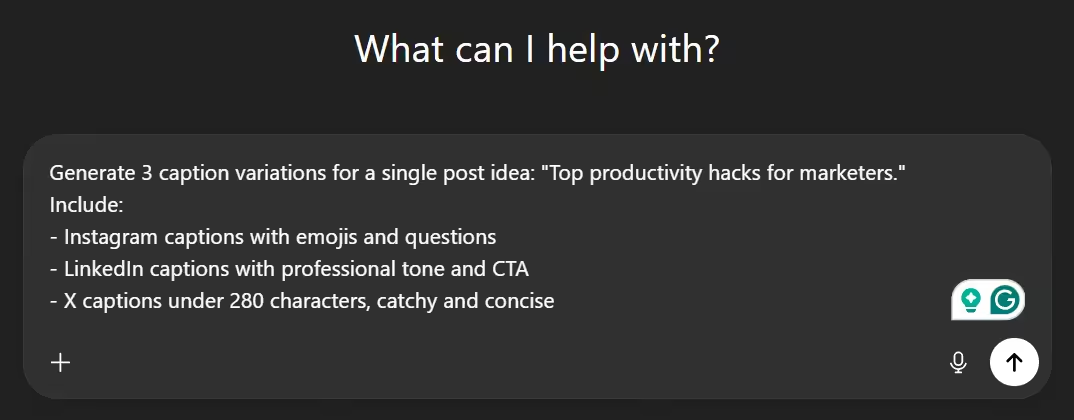
If you’re creating social media content with ChatGPT, there’s one thing you need to know: how you write your prompts determines the quality of your output.
Too often, people type vague requests like “Write a caption about marketing” and end up with drafts that feel generic or need heavy editing.
The truth is, a well-crafted prompt doesn’t just save time. It gives you content that’s natural, on-brand, and much closer to ready-to-post.
If you ignore the prompt quality, it can cost hours of unnecessary rewriting and slow down your content workflow.
Why Prompt Quality Matters
The difference between a vague prompt and a clear one is significant.
A good prompt tells ChatGPT exactly what you want: who your audience is, the tone, the platform, the type of content, and even the format.
For example, asking for “three LinkedIn captions under 100 words for social media managers, in a friendly tone with a hook and call-to-action” produces drafts that need minimal tweaking.
Using ChatGPT prompt tips consistently helps you:
- Reduce time spent editing
- Keep posts consistent across platforms
- Produce content that feels human and relatable
If you overlook this step, even a powerful tool like ChatGPT can end up slowing you down.
Key Prompt Tips to Save Time
Here are some actionable tips to improve your prompt quality:
- Be specific about the platform and audience: Instagram, LinkedIn, or X posts require different tones and formats.
- Define tone and style: Friendly, professional, playful, or formal. Being clear upfront saves revisions later.
- Include format and word count: Short captions, carousel slides, or threads should have clear limits.
- Ask for multiple variations: 3–5 options per idea give you flexibility for testing or scheduling.
- Highlight key elements: Hooks, call-to-actions, hashtags, or emojis; specify anything important upfront.
When you follow these ChatGPT tips and tricks, you ensure your content is efficient, polished, and ready for publication.
Copy-Paste ChatGPT Prompt Template for Social Media Content
You can start using this template immediately to organize your prompts and create consistent, ready-to-post content across platforms.
Click the link below to access it and streamline your content workflow.
Once you generate drafts with this template, you can upload them to a scheduling tool like Social Champ to plan, schedule, and post across platforms without last-minute stress.
How to Make ChatGPT Write Like a Human (Not AI)
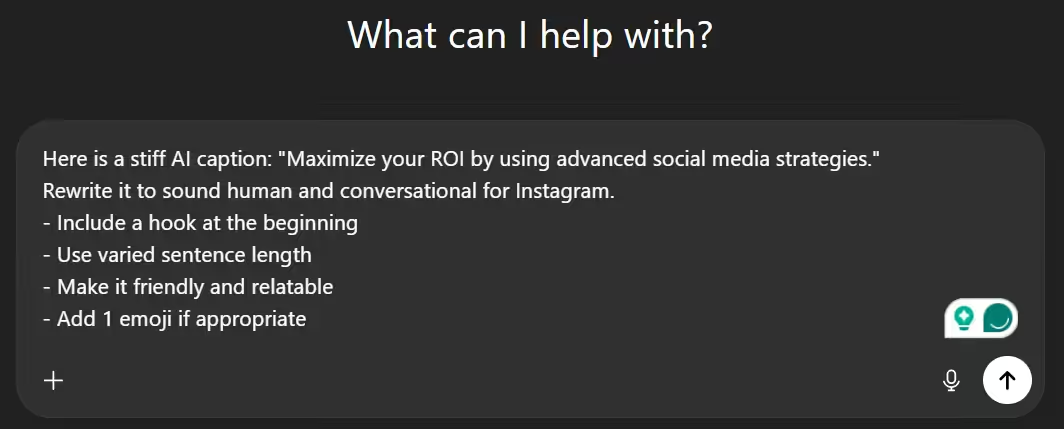
One thing I’ve noticed when scrolling through social feeds is how easy it is to spot posts that “feel AI-generated.”
You know the type: stiff sentences, flat tone, and over-polished phrasing. Even if the information is useful, it rarely grabs attention.
That’s why knowing how to make ChatGPT write like a human is so important. With a few smart tweaks, you can produce content that feels natural, relatable, and ready for your audience.
Even small adjustments in how you craft your prompts can make a huge difference.
Without them, your drafts might look technically correct but fail to engage, which means less reach, fewer likes, and missed opportunities to connect with your followers.
Why AI-Sounding Content Fails
Posts that read robotic or overly generic often fail to connect. Readers notice awkward phrasing, sentences that drag on, or a tone that feels flat.
Even if your ideas are strong, delivery is what makes content stick.
If you follow ChatGPT tips and tricks, you can help ensure your posts feel authentic, relatable, and conversational, the way a human would naturally write.
Think of it this way: your audience scrolls fast. If your post doesn’t sound like someone they can relate to, it might not even get a second glance. That’s why prompt quality matters as much as content ideas themselves.
Warning!
If your audience can tell it’s AI-generated within the first line, they’ll scroll past it, no matter how good the information is. First impressions on social media happen in under 2 seconds.
Feed ChatGPT Real Examples
One practical strategy is to feed ChatGPT real examples of content that has performed well in the past.
You can paste previous captions, threads, or carousel copy, then ask it to emulate that style. This gives the tool a “sense” of what your brand voice should sound like.
For instance, you can give it your top posts as a reference, and the drafts it will then produce will feel more polished, human, and less mechanical.
This is one of the most effective ChatGPT productivity tips to make your workflow smoother and content more relatable.
Add Human Constraints
Adding constraints can further humanize your output. Consider specifying:
- Tone – friendly, professional, playful
- Sentence length – shorter, punchy sentences often perform better on social media
- Flow – natural sequences with varied sentence structure
| AI Approach | The “Human-Optimized” Approach | |
|---|---|---|
| Prompt Used | “Write a LinkedIn post about why social media consistency is important.” | “Write a LinkedIn post about consistency. Use a relatable ‘Monday morning’ anecdote. Use short, punchy sentences. Avoid the word ‘delve’ or ‘unlock’. End with a question.” |
| The Hook | “In today’s fast-paced digital landscape, consistency is the key to unlocking success.” | “Ugh, another Monday. Another blank screen staring back at me.” |
| Sentence Structure | Long, balanced, and rhythmic. Every sentence is roughly 15 words. | Varied. Some are short. Others are a bit longer. Just like how we actually talk. |
| Word Choice | “Leverage,” “Synergy,” “Revolutionize.” | “Try,” “Work together,” “Change the game.” |
| The Feel | Reads like a textbook or a corporate brochure. | Reads like a DM from a smart friend who’s been there. |
These small but deliberate details ensure your content reads as if a human wrote it. They prevent repetitive, overly formal, or robotic phrasing that can turn readers away.
“Make It Sound Human” ChatGPT Prompt Template
Use this table when your AI output feels too stiff or corporate.
| Component | Prompt Instruction (Copy/Paste Column) |
|---|---|
| Perspective | “Write from the [1st person ‘I’ / 1st person ‘We’ / 2nd person ‘You’].” |
| Burstiness | “Vary the sentence length. Use a mix of short, punchy sentences and longer, descriptive ones.” |
| Perplexity | “Avoid predictable word choices. Use natural, conversational synonyms instead of overused AI terms.” |
| Anecdote | “Incorporate a brief, relatable observation or ‘human’ moment about [Specific Topic].” |
| Rhythm | “Write this like a spoken transcript. Use contractions (it’s, don’t, we’re) and occasional fragments.” |
| Formatting | “Avoid perfectly balanced bullet points. Make it look like a natural thought process.” |
| The ‘No-Go’ List | “Strictly avoid these words: Tapestry, delve, unleash, revolutionize, or ‘In today’s digital age’.” |
| Opinion | “Take a clear stance on [Topic]. Don’t be neutral; show a human preference or bias.” |
Did You Know?
Even tiny changes in wording or tone across platforms can dramatically improve engagement; your audience notices the subtle differences.
Advanced ChatGPT Productivity Tips for Social Media Teams
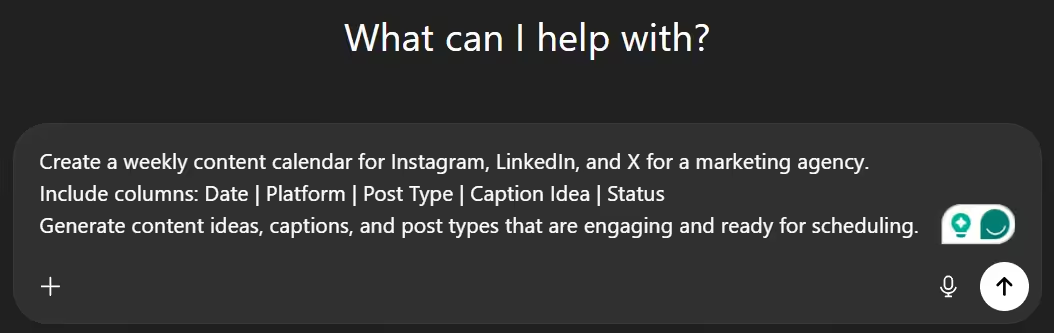
If you manage social media for multiple clients or platforms, it can feel like juggling a dozen tasks at once.
Even with ChatGPT, creating content without a system can get chaotic. I’ve seen teams spend hours rewriting prompts or adjusting drafts because there was no structure, and it’s exhausting.
That’s why building a workflow that saves time, reduces errors, and keeps everyone aligned is key.
Here are some advanced ChatGPT productivity tips that can make your process smoother.
Build Reusable Prompt Libraries
One strategy that works wonders is creating reusable prompt libraries for each platform. Keep separate templates for LinkedIn, Instagram, X, or TikTok, tailored to tone, audience, and content type.
When everyone on your team uses these templates, you save hours rewriting prompts and ensure consistent messaging across campaigns.
I’ve noticed teams that rely on libraries rarely have content inconsistencies, and even new team members can start producing quality drafts immediately.
Set Up a Repeatable Workflow
A repeatable workflow can make content creation feel almost automatic. A simple system could be:
- Ideation: Brainstorm content ideas for posts, carousels, or short videos.
- Drafting: Use ChatGPT to create multiple variations of each idea.
- Repurposing: Turn one draft into posts for different platforms.
- Optimizing: Adjust tone, structure, or engagement hooks for the audience.
Having this structured approach helps your team focus on creativity instead of scrambling to finish drafts at the last minute.
Speed Up Revisions and Team Collaboration
One thing I’ve noticed is that even when you generate great drafts, revisions can eat up time, especially with client feedback.
If you generate multiple variations at once, it lets your team quickly compare and refine.
At this stage, integrating a scheduling and collaboration tool makes a huge difference. Once drafts are ready, platforms like Social Champ help organize content calendars, schedule posts in bulk, and allow team members to comment or review, all in one place.
That way, your ChatGPT-generated content moves seamlessly from idea to published post.
These ChatGPT tips and tricks turn a chaotic process into a smooth, high-performing system your team can trust.
Your Next Viral Post Is Waiting!
Featured Article: Wild Social Media Marketing Trends for Next Year (You Can’t Miss These)
Common ChatGPT Mistakes That Slow Social Media Content Creation
Even experienced social media teams can fall into pitfalls with ChatGPT that slow down content creation or reduce quality.
Here are five common mistakes, and how to fix them:
-
Being Vague or Overloading Prompts
If your prompt is unclear or jam-packed with instructions, ChatGPT often produces generic or confusing drafts.
Fix: Break prompts into clear, focused instructions. Specify audience, tone, platform, and format separately to get content that’s easier to refine.
-
Skipping Human Review
Relying solely on ChatGPT without reviewing output can result in robotic or off-brand posts.
Fix: Always read and tweak drafts. Even small edits make content feel natural, engaging, and consistent with your brand voice.
-
Using the Same Prompt for All Platforms
Copying one prompt across every platform ignores differences in tone, format, and audience expectations.
Fix: Tailor prompts to each platform. Adjust tone, length, and format based on where the content will be posted so it feels native instead of copied and pasted.
-
Asking for Too Much at Once
Generating dozens of posts or complex content in one prompt can overwhelm ChatGPT and produce scattered results.
Fix: Split large tasks into smaller batches. Focus on one type of content or platform at a time for cleaner, more usable drafts.
-
Ignoring Trends or Current Context
The biggest mistake is treating ChatGPT like it has a ‘knowledge cutoff.’ With the integration of SearchGPT technology, the AI has real-time web access. If you aren’t prompting it to ‘search for the latest social media benchmarks,’ you’re working with one hand tied behind your back.”
Fix: Include references to current trends, hashtags, or events in your prompt. Turn on the GPT Search toggle to search the web. This keeps your content engaging and relevant to your audience.
Common Mistake Alert!
Asking ChatGPT to ‘just write a post’ without context is the #1 reason teams waste time rewriting. Every minute you skip on prompt setup can cost 10 minutes in edits.
Best Use Cases of ChatGPT for Social Media Content
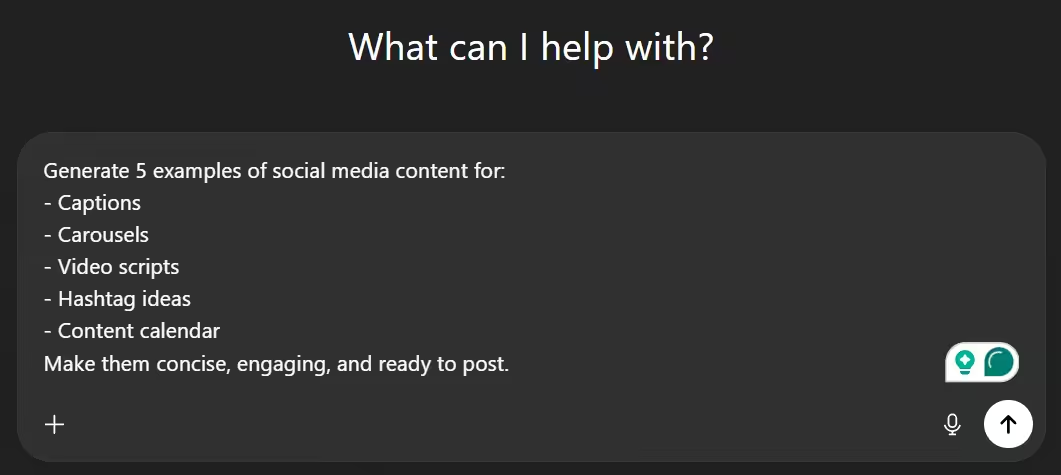
When I first started using ChatGPT for social media, I tried to use it for everything at once. That didn’t work.
What actually helped was narrowing down where it adds the most value. Once you do that, these ChatGPT tips feel practical instead of overwhelming.
Writing Captions Without Staring at a Blank Screen
Captions are often the biggest time drain. You know what you want to say, but getting the first draft out takes longer than expected.
With the right ChatGPT prompt tips, you can generate multiple caption options in one go.
You pick the strongest one, tweak the tone, and move on. This alone can cut creation time in half.
Structuring Carousel Content Clearly
Carousels need flow. Hook first, value in the middle, and a clear close. ChatGPT helps outline slide-by-slide copy so you are not guessing what comes next.
This is one of those ChatGPT productivity tips that makes planning feel less scattered and more intentional.
Drafting Short Video Scripts
For Reels or Shorts, ChatGPT works best as a starting point. It can suggest hooks, talking points, and closing lines.
You bring the personality later. This saves mental energy on recording days when speed matters.
Finding Relevant Hashtag Ideas
Instead of reusing the same hashtags every time, ChatGPT can suggest niche-specific options based on your topic and audience.
These ChatGPT tips and tricks help keep your posts relevant without overthinking it.
Mapping Out Content Calendars
When ideas feel stuck, ChatGPT helps you zoom out. You can plan themes, post types, and weekly structures in minutes.
Once content is ready, combining ChatGPT output with Social Champ helps simplify posting and measure engagement efficiently, so good ideas don’t get lost after creation.
Used this way, ChatGPT supports your process instead of slowing it down.
How to Combine ChatGPT With Social Media Scheduling Tools
I remember the phase when I felt productive just because content got written faster. Captions were ready. Ideas sat neatly in a doc.
Yet somehow, posts still went out late or not at all. That was the moment it clicked.
Writing fast is helpful, but it’s not the finish line. This is where ChatGPT tips work best when paired with a proper scheduling setup.
Why Writing Fast Still Falls Short
ChatGPT solves one problem quickly. It helps you move past the blank screen and get words down.
But once the drafts exist, new questions pop up. When should this go live? Which platform gets what version? What worked last week?
Without a system, speed can turn into pressure. You create more content, but execution lags behind.
A Workflow That Keeps Things Moving
Here is what actually changed things for me.
I use ChatGPT to generate captions, hooks, and variations in one sitting. I review them, clean up the tone, and pick the strongest options.
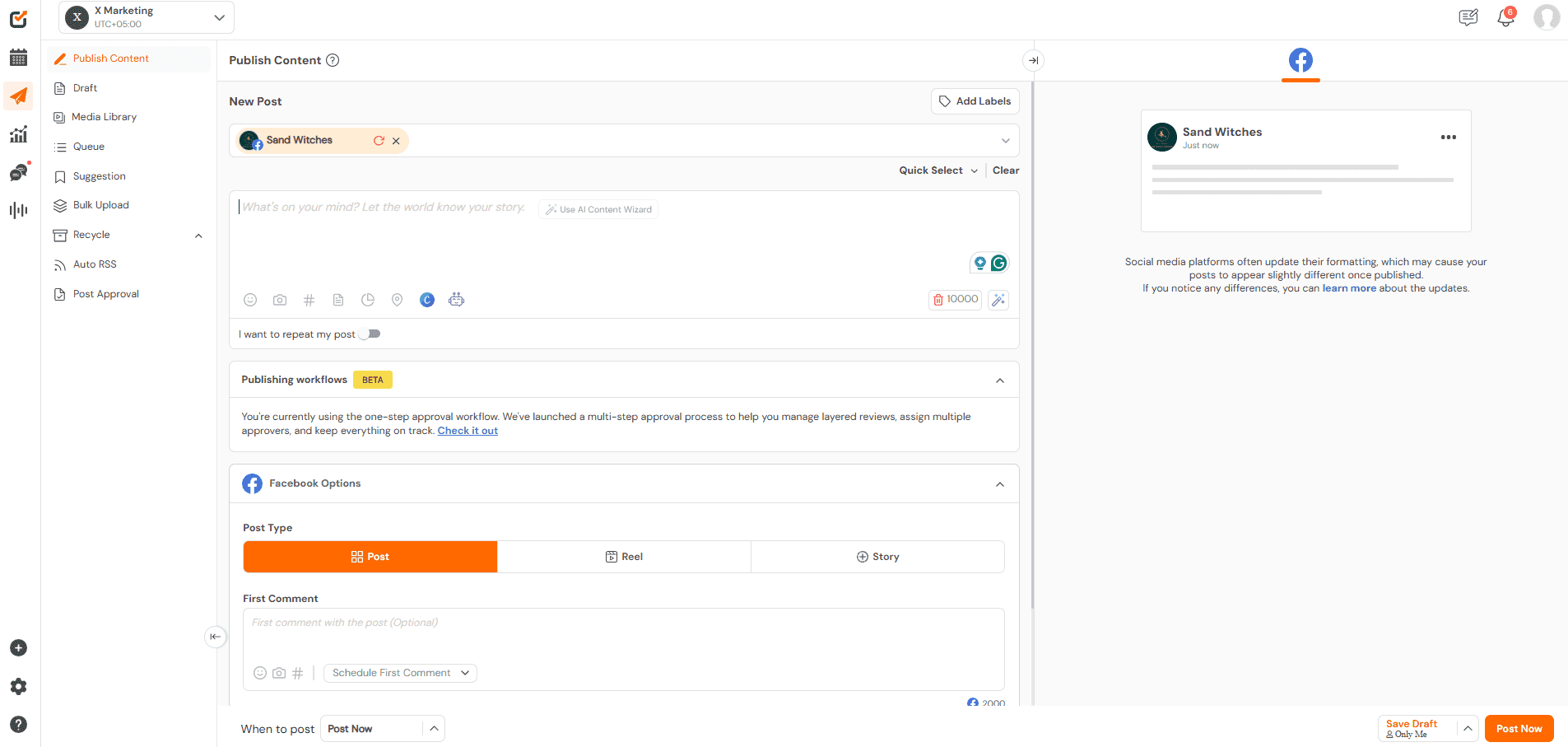
Then Social Champ takes over. I schedule posts across platforms, line up the week, and stop thinking about posting every day.
After content goes live, I check engagement and use those signals to plan the next batch. This is where ChatGPT productivity tips start paying off beyond writing.
Making AI Content Work in the Real World
Social Champ fits naturally into this flow. Its cross-platform scheduling helps adapt one idea for different channels without starting from scratch.
The recycling feature helps reuse posts that have already proven they work, which saves time and keeps your feed active.
The AI Content Wizard inside Social Champ adds another layer of flexibility. On days when a caption feels off, or you need a quick alternative, you can generate options right where you schedule.
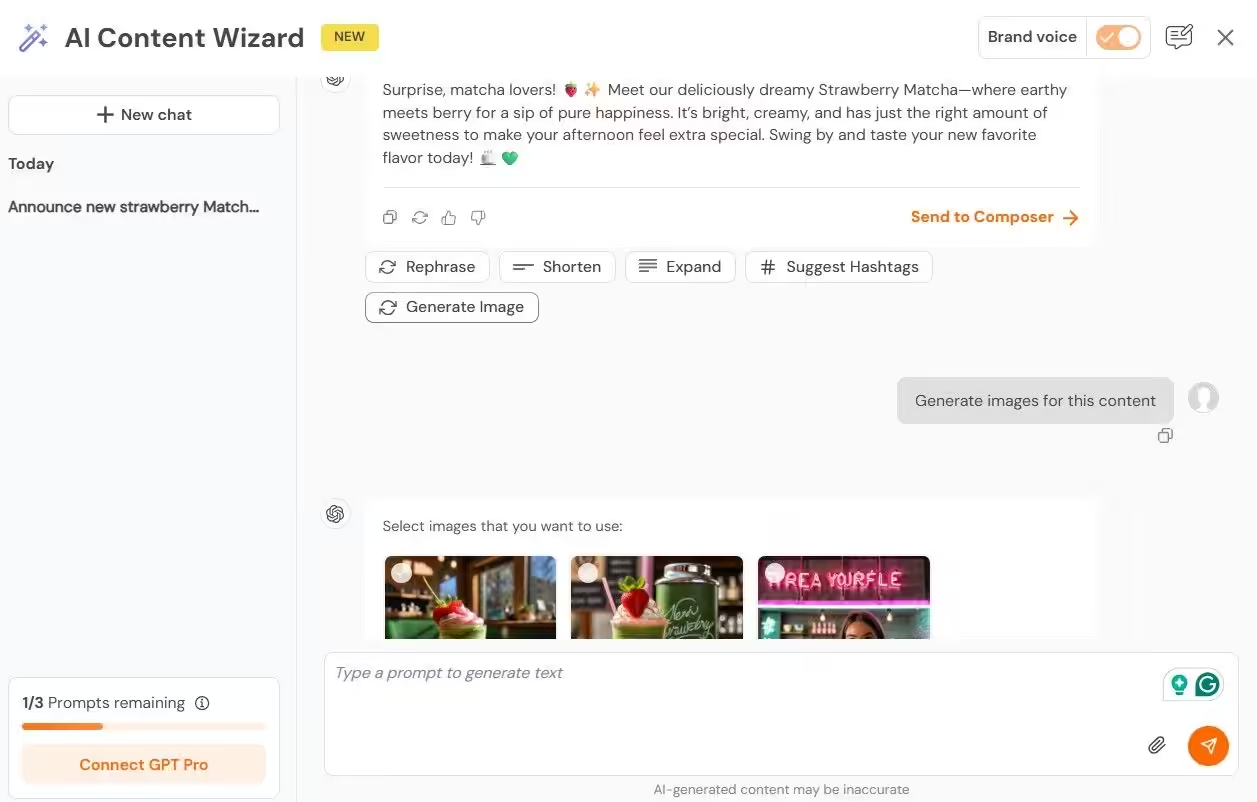
Once ChatGPT handles creation and Social Champ handles execution, content stops piling up. It moves forward. And that is when consistency finally feels manageable instead of exhausting.
What’s Stopping Your Posts From Performing?
Conclusion
Social media content can feel endless when every post starts from scratch. But as you’ve seen throughout this guide, the right ChatGPT tips can completely change that experience.
When you set proper context, write stronger prompts, batch ideas, and refine drafts with a human touch, content creation becomes easier to manage.
These ChatGPT tips and tricks help you save time without sounding robotic, while ChatGPT prompt tips guide better first drafts.
Most importantly, learning how to make ChatGPT write like a human keeps your voice intact.
With these productivity tips in place, you can finally create content faster, plan ahead, and stay consistent without burning out.