
Instagram without filters would feel a bit like fries without salt. Still edible, yet strangely underwhelming.
In fact, 90% of young women use filters to edit their photos. But filters are not just for girls who want to perfect their selfies. You can use them to build a consistent aesthetic that makes your content instantly recognizable.
For instance, you can apply the same color tone across all your posts to create a signature look or highlight products with custom effects to draw attention in a fun way.
If you’re wondering how to find, use, and create filters on Instagram, this guide will come in handy. We’ll explain everything you need to know, so you can make your photos, videos, stories, and reels more engaging, fun, and shareable.
We will also tell you how an Instagram post scheduler can help you plan and publish your filtered content consistently.
Short Summary
- Filters on Instagram enhance visuals, boost engagement, and help you create a consistent aesthetic across your content.
- Stories, Reels, and Post filters serve different purposes, from playful AR effects to polished feed edits.
- You can discover new filters through the Effects Gallery, Explore page, and creator profiles.
- Choosing the right filter for your niche or content type increases likes, comments, and shares.
- Tools like Social Champ let you schedule filtered content in advance, keeping your feed cohesive and posting on time.
What Are Filters on Instagram?
Filters are digital effects that modify the appearance of your photos or videos on Instagram. They adjust elements such as color, brightness, contrast, and tone, and some even add augmented reality features that transform how your content looks.
Instagram offers several types of filters, each designed for different content formats, such as Stories, Reels, and Feed Posts.
The main difference between Stories filters, Reels filters, and Post filters comes down to where you use them and what they do on Instagram.
- Stories Filters: Using filters is one of the top Instagram Story hacks. Stories filters include augmented reality effects, face filters, animations, and interactive elements that appear in real time while you record or take a photo.
- Reels Filters: These filters enhance short-form videos in Reels. They usually include creative video effects, color grading, transitions, and overlays that make your clips look more dynamic and entertaining.
- Post Filters: These are classic photo and video editing filters for posts you publish on your feed. They adjust color, lighting, contrast, and tone to improve the overall look of your post.
Filters vs. Lenses: Understanding the Technical Difference
To truly master your Instagram strategy, you need to know that not all “filters” are the same. While the terms are often used interchangeably, there is a distinct technical and strategic difference between a standard Filter and an AR Lens.
Color Filters (LUTs)
In the world of photography, these are known as LUTs (Lookup Tables). These are static presets that adjust the color grading, contrast, saturation, and overall “mood” of your content. For instance, the classic filters you see on Instagram, like Clarendon, Gingham, or Juno, are all known as color filters.
For brands, these are great for creating a consistent visual identity and aesthetic across your grid posts.
Augmented Reality (AR) Lenses
Lenses are interactive, data-driven effects that use Augmented Reality to map 3D objects or digital layers onto the real world. Unlike static filters, Lenses use face-tracking and surface-detection technology.
For example, the Interactive quizzes, virtual makeup try-ons, 3D background replacements, or branded face masks you see on Instagram are all AR lenses.
These are great for driving User-Generated Content (UGC) and boosting Story engagement.
Save Time Managing Instagram With Social Champ
How to Create Your Own Custom Instagram Filters (The 2026 Way)
If you want to go beyond the built-in library, the process for creating filters has changed significantly. Since Meta sunsetted Meta Spark Studio in early 2025, third-party AR creation has shifted to a new landscape.
Here is how you can still create unique, branded “filters” for your audience today:
-
The “Preset” Method (For Aesthetic Feed & Stories)
While you can no longer build 3D AR face masks for the native Instagram gallery as easily, most creators now use Lightroom Presets to maintain a signature look.
All you have to do is design a unique color grade (LUT) in Adobe Lightroom or CapCut.
Many brands now offer these “DNG” preset files as lead magnets—users download your custom filter settings and apply them to their own content, keeping your brand’s aesthetic consistent across their feed.
-
The Cross-Platform Hack: TikTok & Snapchat
Since Instagram removed third-party AR effects, the most popular way to use custom filters on Instagram is to “bridge” them from other platforms.
- TikTok Effect House: Create your AR effect in TikTok’s Effect House, record your video there, and then re-upload the polished version to Instagram Reels.
- Snapchat Lens Studio: Snapchat remains the industry leader for AR. Brands create lenses in Lens Studio and encourage users to save the video to their camera roll for use on Instagram.
-
Generative AI Style Transfers
The cutting edge of filter creation is AI Video-to-Video. You can use platforms like Runway or Luma AI to apply “style transfers” to your footage (e.g., turning a standard video into a cinematic anime or claymation style) before uploading to Instagram.
These effects are more unique than anything in the standard Instagram tray and are highly likely to go viral on the Explore page.
Featured Article: 30+ Instagram Story Hacks to Boost Engagement
How to Search and Discover New Filters on Instagram
Instagram offers several built-in tools that help you discover trending and custom filters. You can browse curated effects, explore what other creators use, and even search for filters created by specific artists.
The Effects Gallery is the main place to search for new filters. Here are the steps to search filters on Instagram:
- Open the Camera: Open Instagram and swipe right or tap the “+” icon, then select “Story” or “Reel.”

- Access the Gallery: Scroll to the end of the circular filter icons at the bottom and tap the “Browse Effects” (magnifying glass) button.
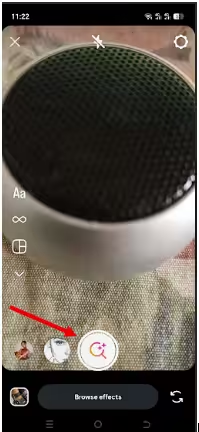
- Explore Categories: Inside the gallery, you can browse through various categories, such as “Trending,” “Appearance,” or “Special Effects.”
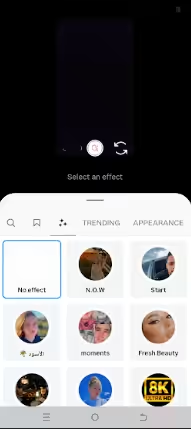
The “Trending” section in the gallery is the best place to find currently popular filters.
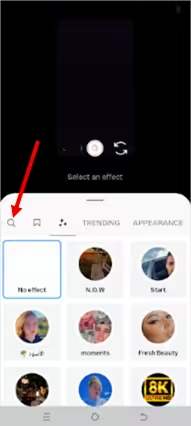
- Search for Specific Filters: Tap the magnifying glass icon to search for specific effects by name or by creator.
- Try Post: Select the filter to see a preview.
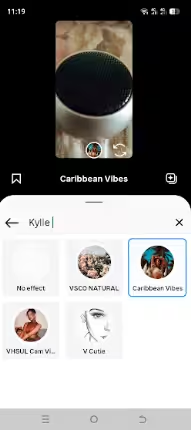
That’s how to search filters on Instagram from the Effects Gallery.
Pro Tip: Once you discover a few favorites, you can save them for quick access. Saved effects appear in your camera tray so you can reuse them anytime without searching again.
How to Use Filters on Instagram Stories, Reels & Feed Posts
Do you want to use filters on Instagram? The good news is that using filters on the platform is easy once you know how to apply them.
Here’s how to apply them to each type of content so your posts stand out.
How to Apply Instagram Story Filters
- Open the Stories camera by tapping your profile picture or the + icon.
- Swipe through the filter carousel at the bottom to preview effects in real time.
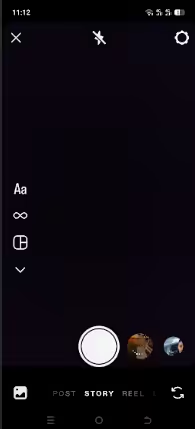
- Tap a filter to apply it during capture, or record your story first and then swipe to add a filter afterward.
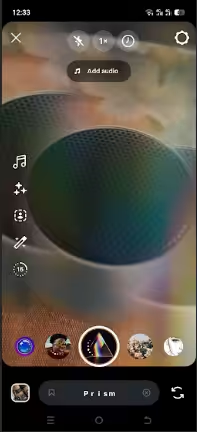
Using Instagram Story filters adds personality and creativity to your stories, making them more visually appealing.
Featured Article: How Often Should You Post on Instagram?
How to Apply Instagram Reels Filters
- Open the Reels camera.
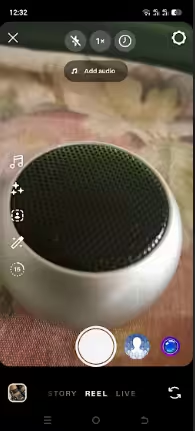
- Browse through effects and tap your preferred filter.

- Once you tap the filter, wait a moment to see a live preview of your video.
- You can combine filters with editing tools like speed adjustments, text overlays, and music for a polished reel.
- Once everything looks fine, click the Next button at the bottom right to finish uploading your Reel.
How to Apply Instagram Post Filters
- Tap the + Icon and choose Post at the bottom of the screen.
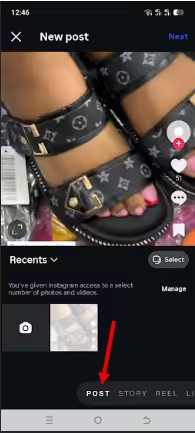
- Choose a photo or video to upload to your feed and tap Next.
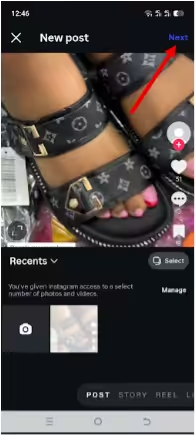
- Tap the Edit
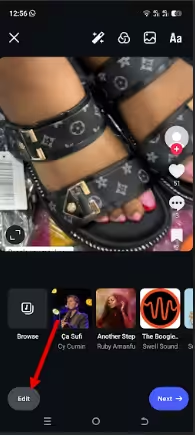
- Scroll through Instagram’s built-in filter options and tap one to preview it.
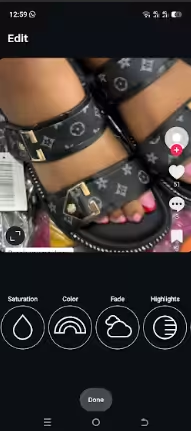
- Adjust the intensity of the filter using the slider to get the exact look you want.
- Use additional editing tools for brightness, contrast, structure, and more to finalize your post.
Following these steps helps you use filters on Instagram effectively on every type of content, giving your feed a consistent and eye-catching style.
Featured Article: How to Use Instagram Filters to Create TikTok Videos?
What Are the Best Instagram Filters Right Now? (2026 Edition)
Not all filters deliver the same impact, so choosing the best Instagram filters can make a big difference in how your content looks and performs.
Here’s a snapshot of the top-performing and most-used Instagram filters trending in 2026, based on what creators and users are still loving on the platform today:
-
Beauty & Portrait Favorites
Beauty and portrait filters enhance photos that focus on faces and people. They adjust lighting, smooth tones, and boost color balance so your portraits look clearer and more polished.
Examples include Clarendon, Crema, Juno, and Lark, among others.
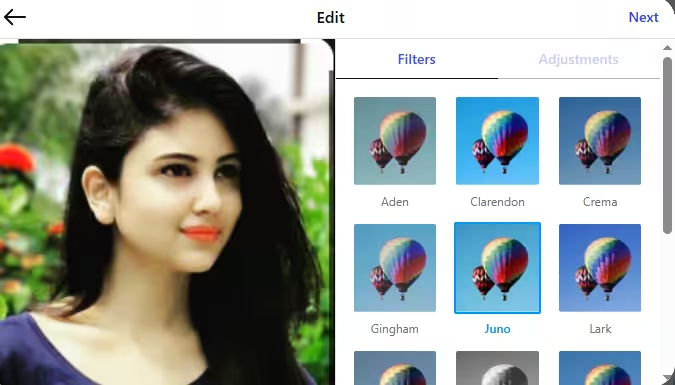
An Example of a Beauty Filter These Instagram filter names remain popular because they improve selfies and lifestyle photos without heavy editing. Many creators rely on them to keep their portraits bright, flattering, and consistent across their content.
-
Vintage & Nostalgic Looks
Vintage and nostalgic filters give your photos a retro feel that resembles old film photography. They often soften colors, reduce contrast, and add warm tones or a faded effect that makes images look timeless.
Examples include Gingham, Moon, and Perpetua, among others.
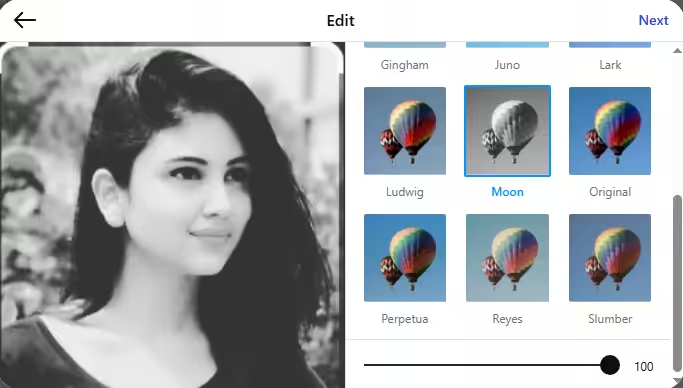
An Example of a Vintage Filter These filters remain popular because they create a sense of nostalgia and storytelling. You can use them to give your content a relaxed, aesthetic vibe that feels artistic and slightly old-school.
-
Fun & Creative Effects
Fun and creative filters focus on entertainment and visual experimentation rather than subtle editing. They add playful elements such as animations, color distortions, AR objects, or face distortion.
Here’s an example:
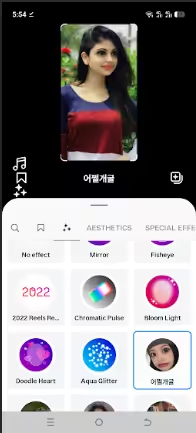
Face Distortion Filter These filters are popular because they make posts more interactive and eye-catching. You can use them in reels and stories to grab attention quickly and encourage viewers to engage, react, or share the content.
-
Emerging Trends
Emerging filter trends focus on fresh aesthetics and evolving visual styles that capture what users currently enjoy on Instagram. These filters often reflect broader social media trends, such as nostalgia, minimalist edits, or cinematic looks that help creators stand out in crowded feeds.
They gain popularity because creators constantly experiment with new visual styles to keep their content unique and engaging. Many trends also draw inspiration from older aesthetics, which explains why retro and throwback filters continue to resurface and attract attention online.
The best Instagram filters do more than enhance photos. They help you shape a distinct visual style that makes your content easier to recognize.
The key is to choose filters that match your content and stay consistent with your overall aesthetic on Instagram. When you find the right mix, your photos and videos feel more polished, engaging, and memorable for anyone scrolling through their feed.
Keep Your Feed Consistent With Social Champ
Strategic Planning: How to Manage Your Filtered Content With Social Champ
You found the perfect filter. Your photo looks great. Your reel has the right vibe. Now comes the part many creators forget about: posting at the right time.
Instead of scrambling to upload content at random hours, you can schedule your filtered posts with baddie Instagram captions in advance with Social Champ. The platform lets you plan photos, reels, and other visual content from one dashboard, so your carefully edited posts go live exactly when your audience is most active.
Here’s how you can leverage it to ensure your carefully edited visuals hit the feed at the peak of audience activity.
- Plan Your Visual Aesthetic: Use the Drag-and-Drop Content Calendar to preview how your filtered posts look side-by-side. This prevents “clashing” filters and ensures a cohesive brand grid.
- Optimize Posting Times: Don’t let your best edits go to waste. Use AI-Powered Suggested Times to find the best time to post reels on Instagram. This way, you publish when your followers are most likely to engage with your content.
- Cross-Platform Consistency: Apply your signature look once and schedule it across Instagram, TikTok, and Pinterest simultaneously from a single dashboard. You can also preview and post to all social media at once in a single click.
- Improve Discoverability: A great visual needs a strong technical setup. Schedule Instagram posts in advance. Optimize every post by pre-scheduling a First Comment for hashtags and ensuring your Link in Bio is updated to match your latest campaign.
- Maintain a Consistent Voice: Your captions should match your visual vibe. If you’re struggling with “writer’s block,” the Champ AI Suite can help generate captions that align with your brand voice, keeping your tone as polished as your photos.
- Centralize Your Community Management: To keep engagement high, respond to comments and DMs promptly. Using a unified Social Inbox allows you to manage all interactions from one place, ensuring no follower query slips through the cracks.
Expert Tip: The Instagram algorithm prioritizes consistency. By planning your filtered content a week in advance, you remove the stress of “real-time” editing and ensure your brand remains top-of-mind for your followers.
How Filters Can Boost Your Engagement on Instagram
If you want your posts to get more interaction, filters can help pull in eyes and reactions in ways plain posts often don’t. Certain visual effects, especially interactive AR filters, encourage people to stop scrolling, interact with the post, and even share it with others.
In fact, research shows that filtered photos are 21% more likely to be viewed and 45% more likely to be commented on by consumers of photographs.
So, how do you pick a filter that actually boosts engagement? Well, here are some tips for choosing the right filter for your niche:
-
Beauty & Fashion
Filters that enhance skin tones, brighten highlights, and make colors pop work best here. Think Clarendon, Juno, or Rise. These filters make selfies, makeup tutorials, and outfit posts look polished and professional without overdoing it.
Tip: Keep your filter consistent across posts to create a signature aesthetic that followers recognize instantly.
-
Travel & Lifestyle
Filters that bring out vibrant colors, warm tones, or cinematic contrasts work well for landscapes, cityscapes, and lifestyle shots. Valencia, Gingham, or Aden can give your photos a timeless, wanderlust-ready vibe.
Tip: Use subtle enhancements that amplify natural beauty rather than altering the scene completely. Your audience should feel like they’re right there with you.
-
Food & Beverage
Filters that make colors vivid and textures pop can turn a simple meal into a mouthwatering visual. Filters like Lark, Ludwig, or Clarendon help highlight fresh ingredients and create an appetizing look.
Tip: Avoid filters that wash out colors or make food look unnatural. A subtle boost in brightness and saturation usually works best.
-
Fitness & Health
High-contrast and slightly cooler-toned filters often complement workout videos, yoga routines, or outdoor fitness shots. Lo-Fi, Reyes, or Valencia help emphasize action and movement while keeping visuals clean and energetic.
Tip: Focus on filters that highlight motion and energy without over-saturating the scene. Consistency is key if you post workout routines regularly.
-
Art & Creative Content
Filters that experiment with colors, textures, or overlays work great for digital art, illustrations, or experimental photography. Creative AR filters or cinematic color-grading effects can make your posts stand out in feeds crowded with standard photos.
Tip: Don’t be afraid to get bold, as this niche rewards creativity. But make sure your filter enhances the artwork rather than competing with it.
Choosing the right filter for your niche keeps your content visually cohesive, engaging, and shareable. When you align your filters with your content type, your posts will not only look better but also perform better in terms of reach, likes, and comments.
Featured Article: How to Use Instagram: Guide for Beginners
Conclusion
Filters on Instagram have become essential tools for anyone looking to make their content stand out in 2026. Knowing how to find, use, and even create your own filters gives you the power to shape a unique visual identity that resonates with your audience.
To take your filtered content to the next level, you can plan and schedule posts using one of the best Instagram management tools. Social Champ, for instance, can allow you to organize photos, videos, and Reels in advance and ensure your feed stays cohesive and your content reaches your audience at the best time.