

Ever saved a Pinterest video only to realize later you could not watch it offline when you needed it?
That moment feels frustrating, especially when the video had something useful you wanted to keep. In 2026, short video content on Pinterest is more common than ever, and knowing how to download Pinterest videos can help you keep content you use for ideas, reference, or planning.
Short Summary
- Pinterest does not offer a direct option, but you can still learn how to download Pinterest videos using safe and practical methods.
- iPhone and Android users can rely on built-in screen recording when downloading is not available.
- Desktop users get more control through browser-based tools and trusted downloaders.
- Photos and GIFs are easier to save, as Pinterest allows direct image downloads.
- Following safety guidelines helps you avoid low-quality files, account issues, and copyright concerns.
Pinterest isn’t just a place to scroll. About 80 percent of users say they visit Pinterest to find inspiration for projects, shopping, and ideas.
That means videos matter a lot, and they especially influence people’s decisions. If you cannot save them quickly, you might lose a valuable resource before you know it.
This guide shows simple steps you can take to download Pinterest videos on mobile and PC. You will learn what works, what does not, and what follows the platform’s rules.
That way, you can keep the videos that matter to you without confusion.

Make Pinterest Marketing a Breeze!
Schedule, publish, and engage with posts on Pinterest with Social Champ’s centralized dashboard!
Can You Download Videos From Pinterest?
So now, for the big question: can you download a video from Pinterest?
While Pinterest lets you download images pretty easily, it hasn’t yet allowed the same option for videos. So, no, you can not download Pinterest videos through Pinterest.
However, you can save the videos to your Pinterest profile, which might not be as handy as downloading them to your phone, but it can still be very useful. With this option, you won’t have to search for that video whenever needed.
So, before elaborating on ways to download a video from Pinterest, let’s look at how you can save a video to your Pinterest profile.
If you are using your mobile, you have two ways to save video pins on Pinterest.
- Method 1: When you explore the feed, you’ll see the pin icon at the bottom of the video. Tap it to save the video to your profile.
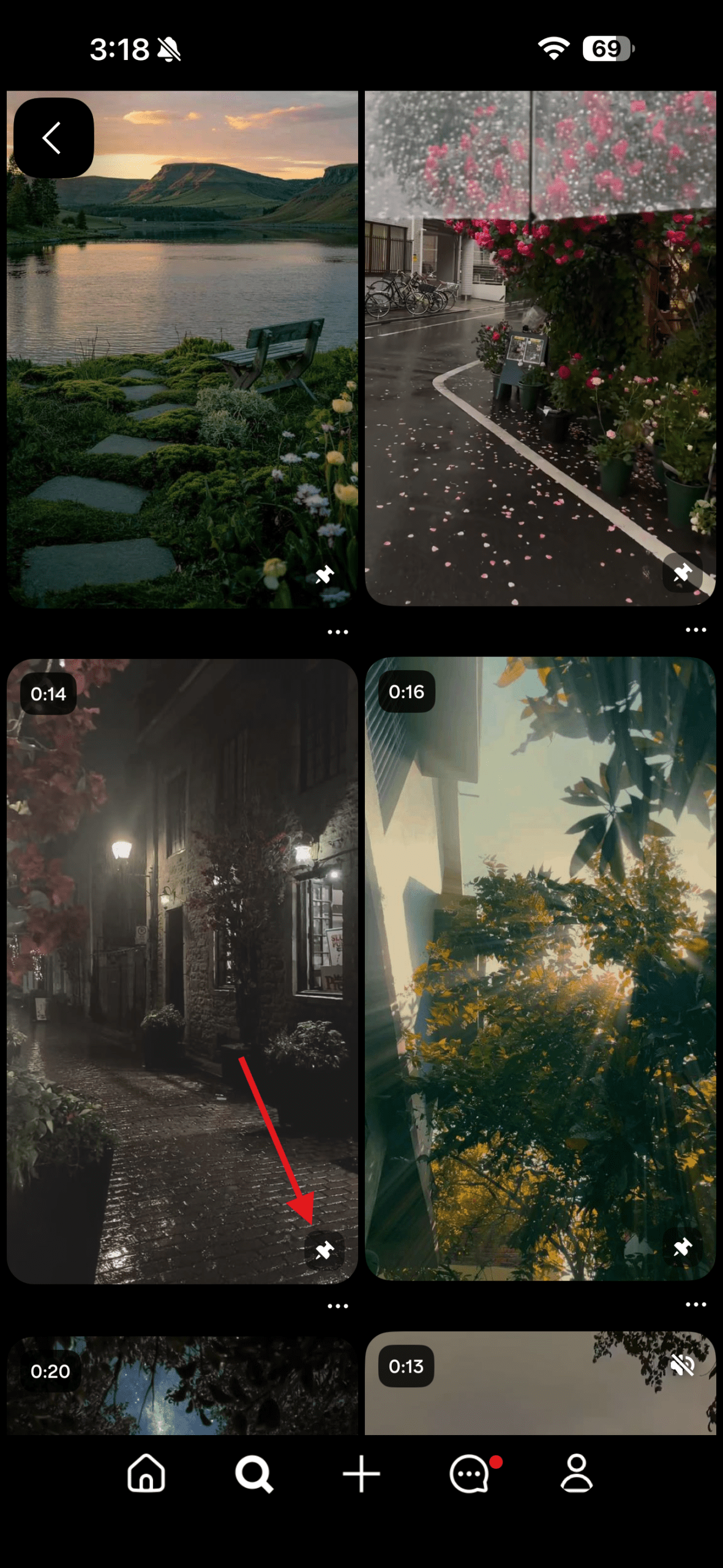
Tap the Pin Icon - Method 2: Open the video post on your phone. At the bottom, there is a big red Save button. Select it to save the video pin.

Tap the Save Button
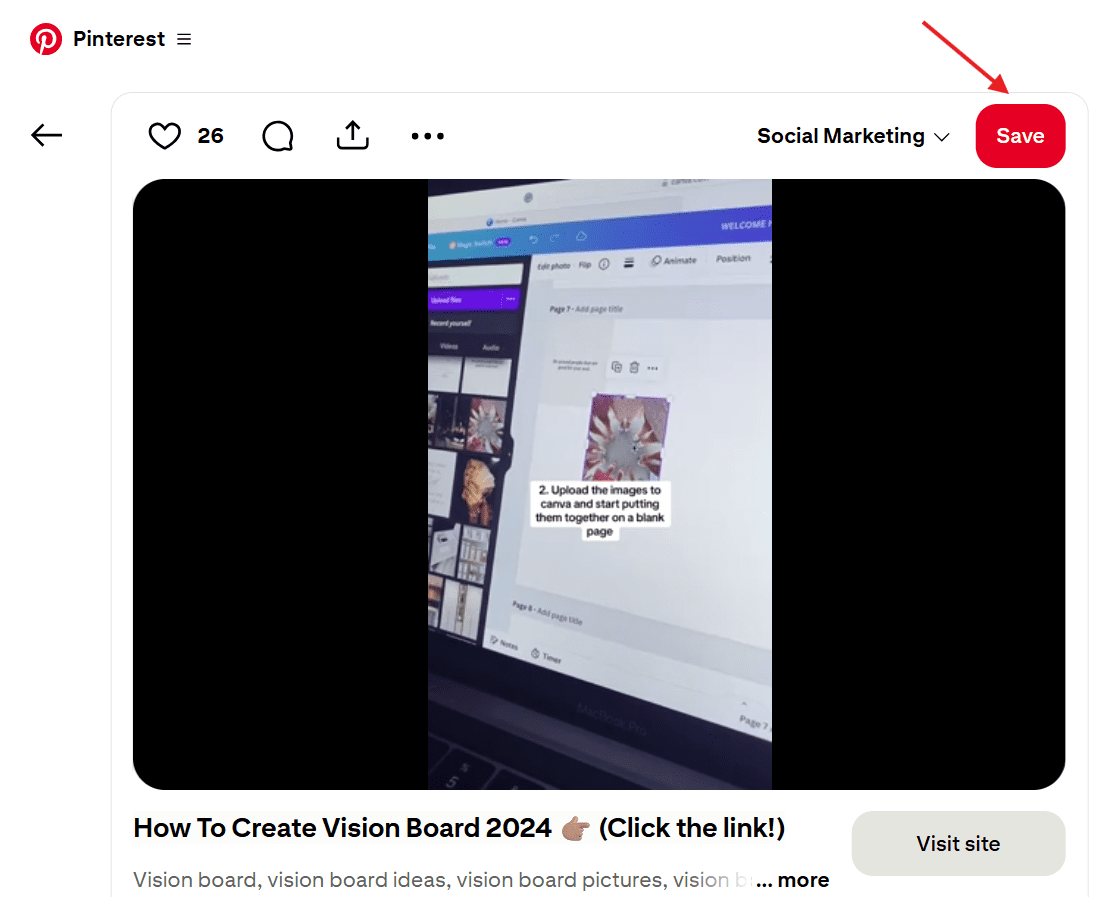
If you’re using Pinterest from your desktop, you can save a video pin to your Pinterest profile (or board) in the same way as any mobile user. Start by opening the post and clicking on the Save button in the top right corner of the post.

But what if you really want to download it?
Luckily, we have a solution. While Pinterest has yet to introduce the download option for videos, there are many third-party platforms that offer a range of tools for Pinterest, from downloading inspiring videos to scheduling pins, creating posts, and even helping you schedule Pinterest posts to manage content more efficiently.
Although most of them are secure, we do advise caution when it comes to third-party sites. So, let’s see how to download Pinterest videos through sources outside of Pinterest.
Quick Tip!
If you find yourself saving too many videos and losing track, take a step back and look at Pinterest statistics. They show which formats and topics perform best. Pair that insight with the right Pinterest tools, so you save content with a clear purpose, not just because it looks good in the moment.
Featured Article: Best YouTube Management Tools You Should Use
How to Download Pinterest Videos on iPhone (Official Method)?
If you use an iPhone and you’re searching for how to download Pinterest videos, you might notice Pinterest does not offer a direct download button.
That gap often leads to confusion. Still, there is an official and safe way to download Pinterest videos on iPhone without risking your account or device.
Step 1: Save the Video Inside Pinterest
Open the Pinterest app and find the video you want. Tap the three dots on the pin. Select Save and choose a relevant Pinterest board. This step matters if you want quick access later. It also helps when you plan to save Pinterest video ideas for reuse.
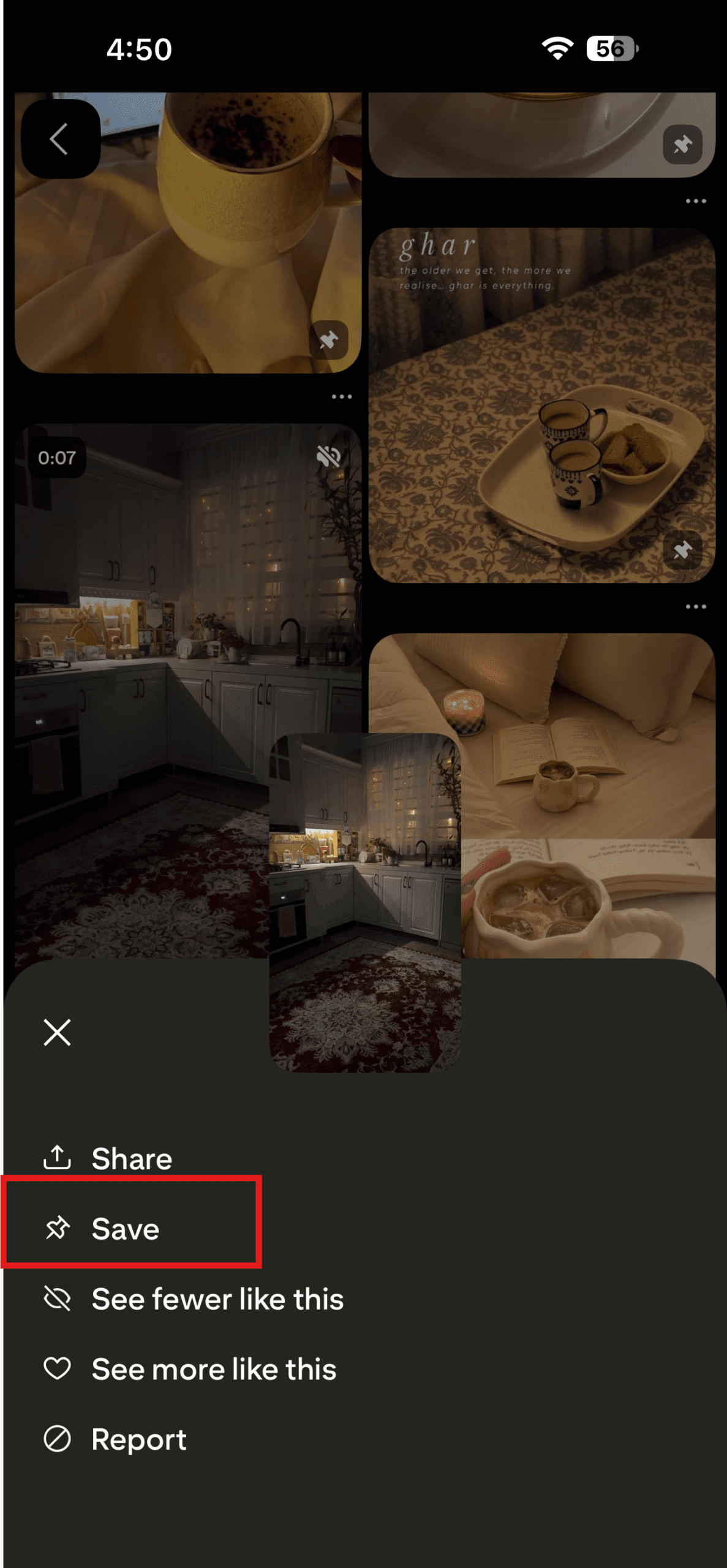
Step 2: Use Screen Recording on iPhone
Apple includes screen recording by default. Open Control Center and start recording. Play the video in full screen.
This method lets you save Pinterest videos without third-party tools. Once the video ends, stop the recording. Your iPhone saves the file automatically in Photos.
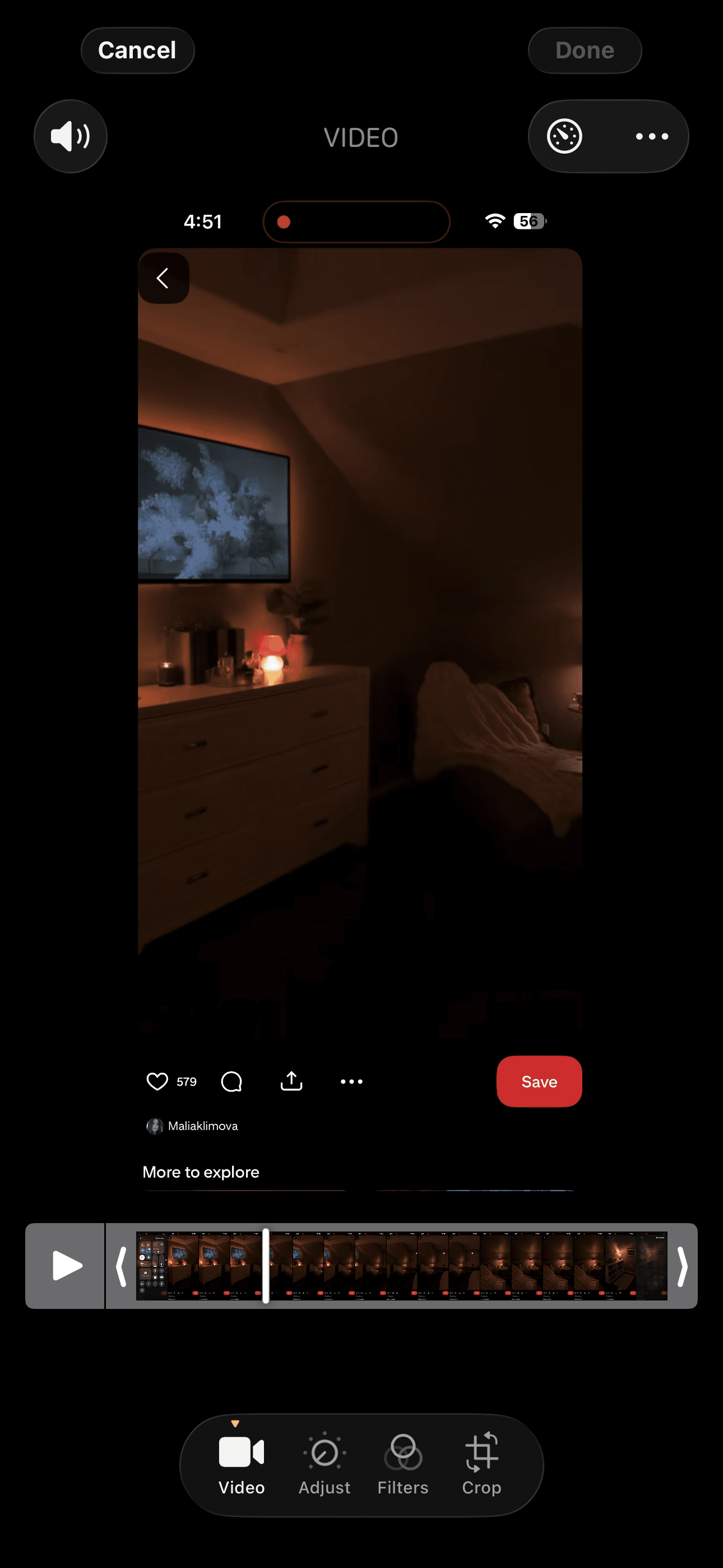
Step 3: Trim and Rename the Video
Open the video in Photos. Trim extra seconds from the start or end. Rename the file if you plan to reuse it later. This step helps when you save videos from Pinterest for reference or content planning.
Step 4: Keep Usage Guidelines in Mind
This method works best for personal use. If you plan to repost, check Pinterest rules first. Understanding how to post videos on Pinterest helps you avoid copyright issues.
This approach does not rely on a Pinterest downloader or external apps. It works well when you want to save Pinterest video clips fast. If you need bulk downloads or higher control, other methods may suit better.
Featured Article: How Does the Pinterest Algorithm Work: 8 Tips to Rule the Platform
How to Download Pinterest Videos on Android (Official Method)?
Downloading Pinterest videos on Android is easier than many think, but following the right steps ensures you do it safely and efficiently. Here’s a clear guide on how to download Pinterest videos on your Android device.
Step 1: Save the Video Inside Pinterest
Open the Pinterest app and find the video you want. Tap the three dots on the top right of the pin and select Save. Organizing your clips helps if you regularly save Pinterest videos for ideas or reference.
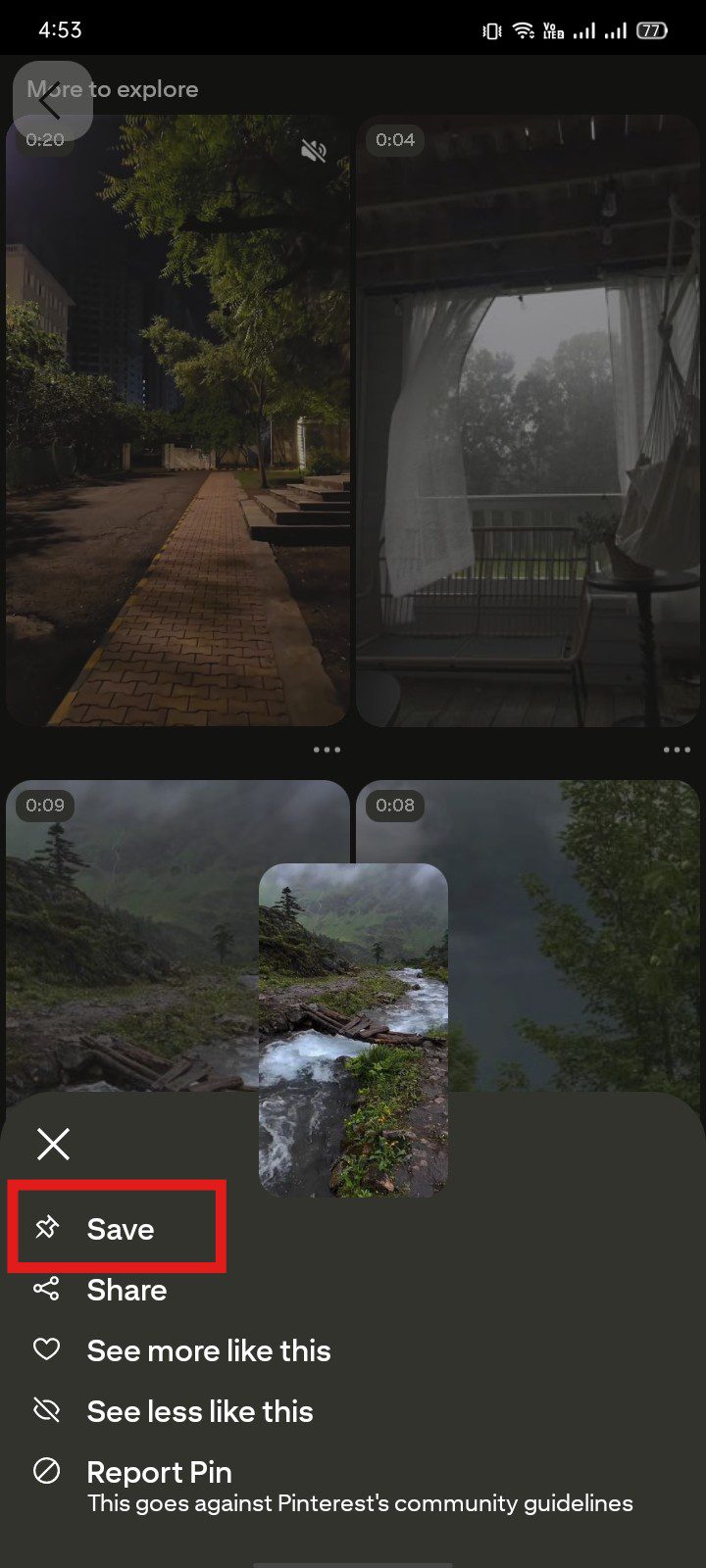
Step 2: Screen Recording as a Backup
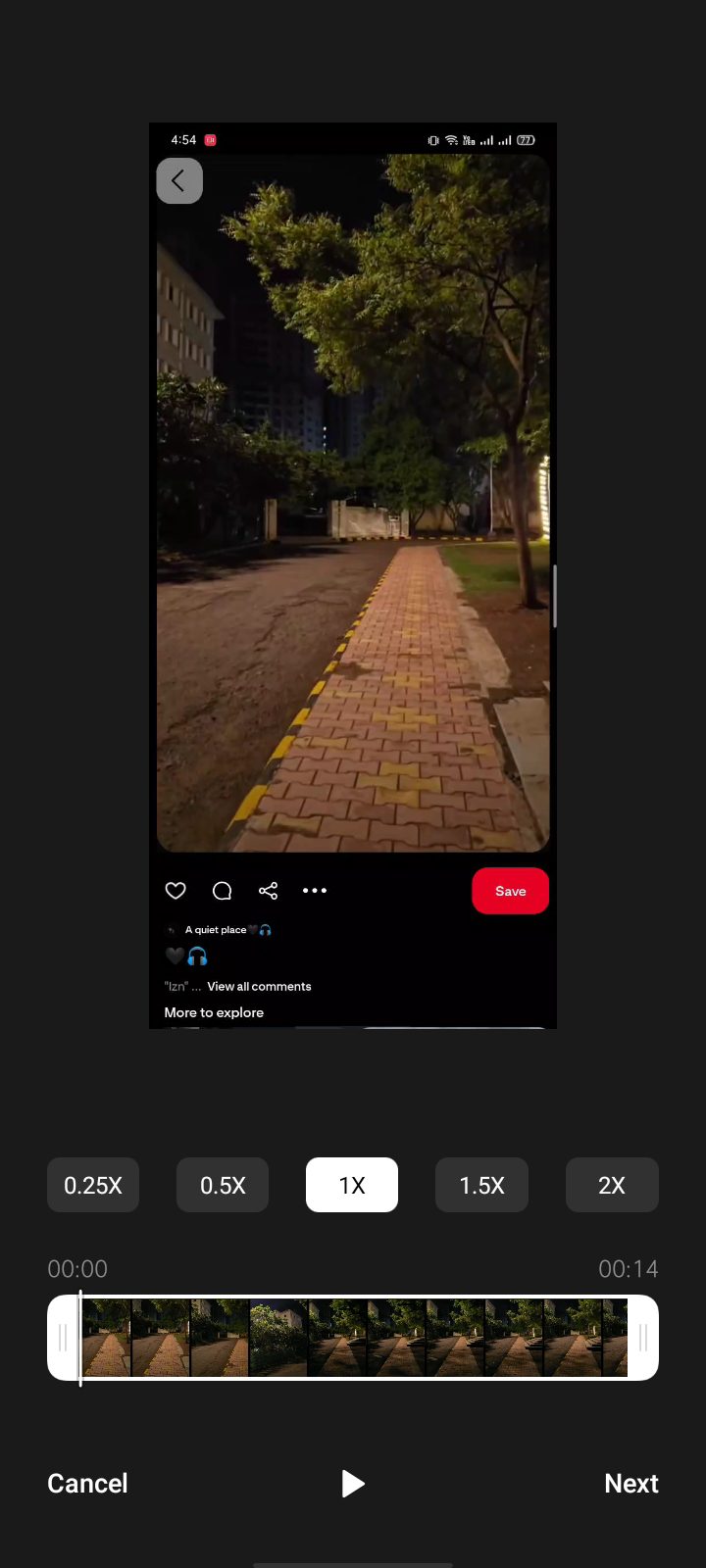
If direct download is not available, use your Android’s built-in screen recorder. Start recording, play the video in full screen, and stop recording when done. The file will automatically save. This works for most videos from Pinterest on Android.
Step 3: Trim and Organize Your Video
Open the video in your gallery, trim extra seconds, and rename the file for easy access. If you save Pinterest videos for content planning, this step keeps everything neat and ready for later use.
Step 4: Keep Pinterest Trends in Mind
Considering Pinterest trends can help you decide which videos are worth saving. Popular topics move fast, so saving videos early ensures you can reference them before the content gets buried in feeds.
Using these official methods lets you save Pinterest videos safely without relying on a Pinterest downloader. With organized clips, you can easily plan, reference, or repurpose video content.
Stop Letting Downloaded Pinterest Videos Sit Unused!
With Social Champ, you can plan, schedule, and publish your Pinterest content from one dashboard, without manual posting every time.
How to Download Pinterest Videos on PC (Desktop)?
Downloading Pinterest videos on a PC gives you more control over your files and quality. If you want to save Pinterest videos for projects, inspiration, or content planning, following the right steps makes the process simple and safe.
Step 1: Open Pinterest in Your Browser
Go to Pinterest on your PC and log in. Find the video you want to save.
Step 2: Use the Official Pinterest Save Option
Click the “Save” button in red color at the top right corner of the video to save the video in your Pinterest board. This is the cleanest method to save Pinterest video content without extra software.
Step 3: Use a Pinterest Downloader if Needed
Pinterest doesn’t offer a direct download option. In this case, you can use a trusted Pinterest downloader online. Copy the video link from Pinterest, paste it into the downloader, and follow the instructions. This allows you to save videos from Pinterest on PC efficiently.
Step 4: Organize Your Downloaded Videos
Once downloaded, rename and sort your files for easy access. If you use Pinterest professionally, knowing Pinterest for business can help you decide which videos to save and repurpose.
Step 5: Consider Timing for Content Planning
When saving videos for reposting or inspiration, check the best time to post on social media. This ensures you reuse or schedule content effectively.
By following these steps, you can save videos from Pinterest on your PC safely, keep them organized, and have them ready for inspiration, reference, or marketing use.
Pro Tip!
If you plan to reuse saved videos for content, timing matters more than most people think. Instead of posting randomly, use a Pinterest scheduler to stay consistent. It also makes it easier to schedule your posts ahead of time, so saved videos actually turn into published content.
Featured Article: How to Sell On Pinterest: Everything You Need to Know!
Other Methods to Download Pinterest Videos
Although the method mentioned above is the most popular for downloading Pinterest videos, you also have other options. If you don’t want to use third-party websites to download Pinterest videos, there are several ways to download them. Let’s briefly take a look at those other methods:
- Using Browser Extension
- Screen Recording
Using Browser Extension
Download a browser extension that will support the downloading of Pinterest videos. If you’re using Chrome, Video Downloader Professional is a good choice. For Firefox users, Video Downloader Plus is a great option. You can add these extensions to your browser from your browser’s extension store.
Here’s how to download Pinterest videos with the help of browser extensions:
- Once you add the extension to your browser, the extension icon will appear in your browser’s toolbar
- Go over to Pinterest and open the video you want to download
- Click on the extension icon on the toolbar
- It will give you some options for download. Select the quality and format you want.
- The extension will start downloading immediately, or provide a prompt asking for the download location.
- Once you have selected the file destination, your Pinterest video will be downloaded.
Using Screen Recorder
You can either use the built-in screen recorder on your phone or download one like OBS Studio and Camtasia.
After installing one of these software programs, you can choose the video settings for screen recording. This will include screen size and resolution, among other features. You can then head to Pinterest and open the video you want to download. Start recording from the software while you play the video. Once the video has finished playing, you can stop recording and save the file on your computer.
How to Download Pinterest Photos and GIFs?
If videos are not what you need, you might still want to save visuals. Many people look for how to download Pinterest videos and end up needing photos or GIFs instead.
The good news is that saving images is simpler and works the same on mobile and desktop.
Here is a clear, step-by-step process:
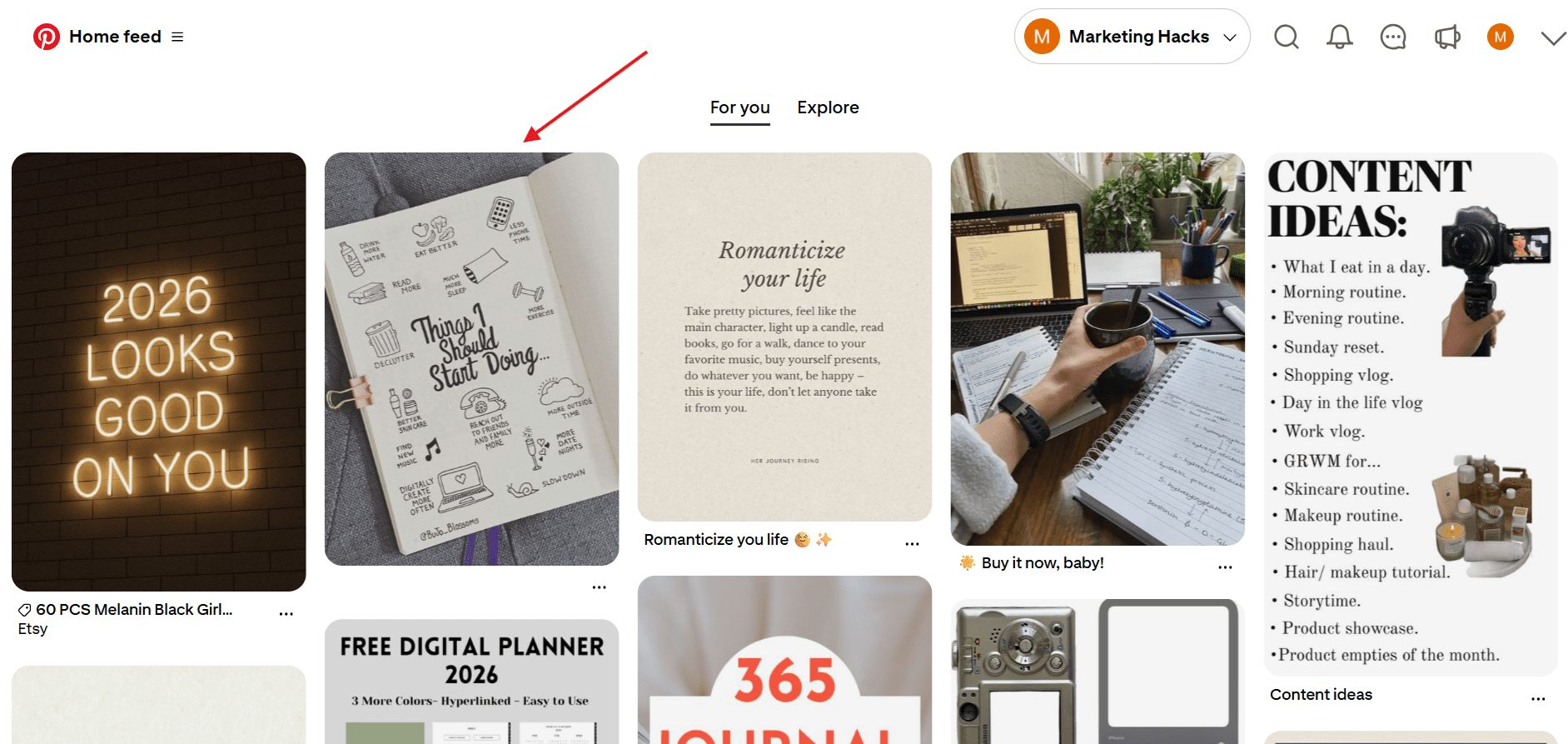
Step 1: Open the Pin You Want to Save
Open Pinterest and click the photo or GIF you want. Make sure it opens fully, not inside a scrolling feed.
Step 2: Use the Image Menu
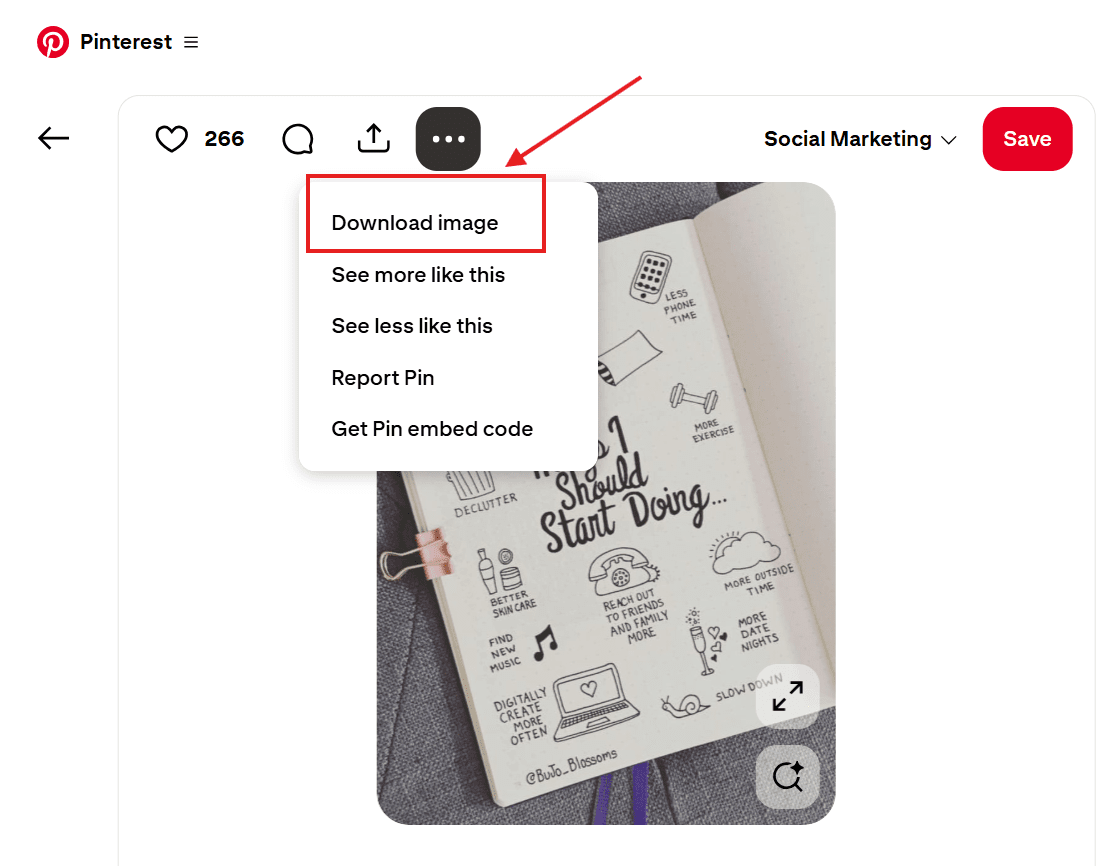
At the top of the Pin, click the three dots, select “Download image,” and your image will be downloaded to your device.
Step 3: Check Image Quality Before Saving
Some pins redirect to websites. If the image opens in a new page, save it from there to retain its original quality. This matters when image dimensions affect layout or reuse, especially if you care about Pinterest Pin size.
Step 4: Save and Organize Your Files
Rename the file and store it in a labeled folder. This helps if you save Pinterest video ideas, photos, or GIFs together for planning.
Photos and GIFs save faster than video files. Still, using clear steps avoids low-quality downloads or missing files. Once saved, your visuals stay ready for reference or reuse when you need them.
Did You Know?
Many people save videos for product ideas but forget to organize them. If you browse a lot of Pinterest shopping content, clean your boards regularly. Knowing how to delete pins on Pinterest helps you remove outdated saves and keep only what still matters.
Grow Your Pinterest Reach Now!
Social Champ helps you organize, schedule, and publish Pinterest content without jumping between tools.
Troubleshooting Pinterest Video Download Issues
If you followed the steps above and still cannot save the video, you are not doing anything wrong. Many readers try multiple methods and find that downloading Pinterest videos does not always work as expected.
This section helps you understand why that happens and what you can do next.
Screen Recording Saves Poor Quality
If screen recordings look blurry, check your device settings. Low resolution settings affect results. Increasing recording quality improves results when you save videos from Pinterest using official tools.
Links Do Not Work In Third-Party Tools
If a Pinterest downloader fails, the video link may have changed or expired. Refresh the pin page and copy the link again. This usually fixes issues related to Pinterest video download tools.
Downloads Fail Repeatedly
Frequent failed attempts can happen if Pinterest limits actions on your account. In rare cases, activity limits or signals similar to a Pinterest shadow ban may affect visibility and actions. Slowing down and spacing actions often resolves this.
Try switching devices. A method that fails on mobile often works when you download videos from Pinterest on PC. As a result, you avoid repeated errors and save Pinterest videos without frustration.
Safety Tips for Downloading Pinterest Videos
Before you try to download Pinterest videos, it helps to pause and think about safety. Many readers rush to save content and later face issues they did not expect.
This section walks you through simple ways to protect your device, your account, and the original creator.
Stick to Official Options First
Always try Pinterest’s built-in save or screen recording features before anything else. These methods reduce risk and help you save Pinterest videos without exposing your device to harmful files. Official tools also lower the chance of account restrictions.
Be Careful With Third-Party Tools
Some sites promise quick Pinterest video download results but include ads, redirects, or hidden downloads. If you use a Pinterest downloader, check reviews and avoid tools that ask for login details. Never install unknown software just to save videos from Pinterest.
Respect Creator Rights
Saving a video does not give permission to repost it. If you plan to share content publicly, credit the creator or ask for consent. This matters even more if you use Pinterest for content planning or learning how to make money on Pinterest.
Avoid Bulk Downloads
Downloading too many videos in a short time can trigger platform limits. Space out your actions if you regularly save Pinterest video content. This helps you stay within normal usage patterns.
Keep Files Organized
Rename files and store them clearly. This avoids confusion when you save videos from Pinterest across devices.
Following these steps keeps the process safe, ethical, and stress-free.
Master Pinterest Posting with Ease!
Social Champ lets you save time by scheduling multiple Pinterest posts at once, so your audience sees your content at the perfect moment.
Featured Article: How to Post on Pinterest: A Step-By-Step Guide for Desktop & Mobile
Conclusion
By now, you should have a clear picture of how to download Pinterest videos without second-guessing every step.
We covered what Pinterest allows, where the limits show up, and which methods actually work on iPhone, Android, and desktop. If one option failed for you, another usually picked up the slack.
The main takeaway is simple. Pinterest videos are not always easy to keep, but they are worth saving when they spark ideas or solve a problem.
Acting early helps, especially since videos move fast and often get buried in busy feeds.
Use official methods first. Be cautious with outside tools. Respect creator rights. When you follow these basics, downloading feels less stressful and more practical.
Once you know the process, saving Pinterest videos stops feeling like a workaround and starts feeling like a normal part of how you use the platform.




2 comments
Eric John
Thanks, Sarah for sharing these valuable guides on downloading Pinterest videos.
Harper Bennett
Oh, nice tips! The guide on downloading Pinterest videos is spot-on. Practical steps for saving and sharing content seamlessly.