As of early 2026, Meta’s ecosystem has reached an incredible scale, with over 3.58 billion daily active people (DAP) hanging out across its family of apps, including Facebook, Instagram, Messenger, and WhatsApp. For businesses like yours, this means your competition is active every single second, testing fresh ways to grab attention.
With billions of people scrolling, you actually have a front-row seat to a massive, real-time experiment! You can see exactly what hooks an audience, what gets them talking, and what totally falls flat.
Short Summary
- You can use the Meta Ad Library to easily discover and explore competitor Facebook ads across different brands and industries.
- Monitoring competitor ads helps you uncover insights into creatives, messaging, offers, and targeting strategies.
- Analyzing ad formats, CTAs, and copy trends allows you to identify what resonates with your shared audience.
- Regular audits, whether monthly or quarterly, help you stay updated with evolving advertising trends and competitor tactics.
- Organizing your findings in a central place enables you to turn competitor insights into actionable improvements for your own campaigns.
The best part is you don’t need insider access or a huge budget to figure this out. With the right approach and a powerful Facebook post scheduler in your toolkit, you can turn their ad strategies into your own inspiration (without the awkward copy-paste energy).
This guide shows you how to see competitors’ Facebook ads, analyze them, and use those insights to sharpen your own campaigns.
Hear What Others Miss
Why Should You Monitor Competitor Facebook Ads?
If you’re not checking what your Facebook competitors are running, you’re basically showing up to a game without scouting the other team. You might still score, but you’ll miss out on easy wins they’ve already figured out.
Here are some smart (and slightly sneaky) reasons why keeping an eye on competitor Facebook ads can seriously level up your strategy.
-
Creative Inspiration That Actually Converts
Scrolling through competitor ads gives you a front-row seat to what visuals, formats, and styles are grabbing attention. You’ll quickly notice patterns like bold colors, user-generated content, or short-form videos that keep popping up.
Take fitness brands, for example. They often rely on transformation videos and quick before-and-after shots because they consistently hook viewers. Instead of reinventing the wheel, you can remix these ideas in a way that fits your brand voice.
-
Ad Copy Insights That Hook Your Audience
Your competitors are constantly testing headlines, captions, and CTAs to see what drives clicks. Monitoring their ads lets you spot which phrases, tones, and emotional triggers they lean on the most.
For instance, eCommerce brands love lines like “Limited Time Offer” or “Only a Few Left” because urgency works. You can take those proven angles and adapt them into your own messaging without sounding like a copycat.
-
Offer Positioning That Makes People Click
Beyond visuals and words, competitor ads reveal how they position their offers to stand out. You’ll see whether they push discounts, free shipping, bundles, or exclusive perks.
Think of SaaS companies offering “Free Trials” versus “No Credit Card Required”; the small wording changes have a big impact. Watching these variations helps you craft offers that feel irresistible to your audience.
-
Targeting Clues Hidden in Plain Sight
While you can’t see exact targeting settings, competitor ads still give away hints about who they’re trying to reach. The tone, imagery, and even the comments section can reveal the audience they’re speaking to.
For example, ads featuring young creators, trending slang, and fast edits usually aim for Gen Z. Meanwhile, polished visuals and benefit-driven copy often target professionals or older audiences.
-
Industry Benchmarks You Can Learn From
Monitoring ads over time helps you understand what’s “normal” in your industry, from ad formats to posting frequency.
For example, in the real estate space, you’ll notice how agents running Facebook ads for real estate often rotate property listings, provide virtual tours, and post testimonial creatives on a consistent schedule, especially when promoting new developments or open houses.
If every brand in your niche is pushing video ads and you’re still stuck on static images, that’s your cue to switch things up. These benchmarks help you stay competitive without falling behind the curve.
Spying on competitor Facebook ads for ecommerce isn’t sneaky; it’s smart. You’re simply learning from what’s already out there and turning those insights into campaigns that actually work.
Unlock Smarter Ad Planning With Social Champ
How to See Competitor Facebook Ads Using the Meta Ad Library
If you want a simple (and free) way to check out what your Meta competitors are running, the Facebook Ads Library is your go-to tool. It gives you a transparent look at active ads across Facebook and Instagram in just a few clicks.
Meta Ad Library works on both desktop and mobile, so you can do a little ad spying whether you’re at your desk or casually scrolling on your phone.
Here’s exactly how to use it to uncover your competitors’ ads without breaking a sweat:
On Desktop
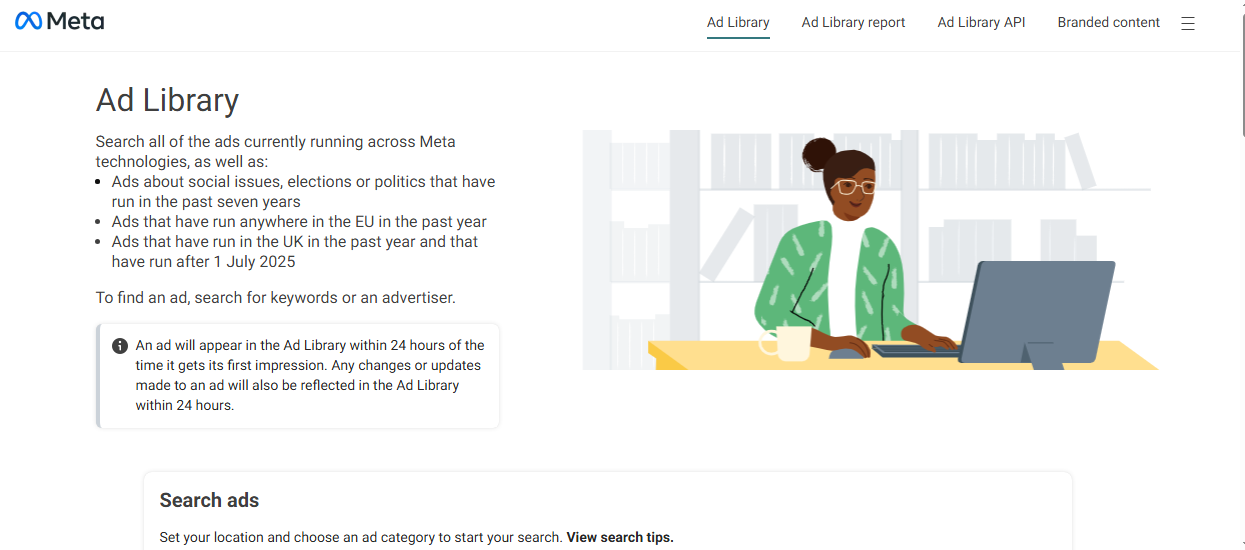
- Open the Meta Ad Library
Go to the Meta Ad Library in your browser to access all active ads.
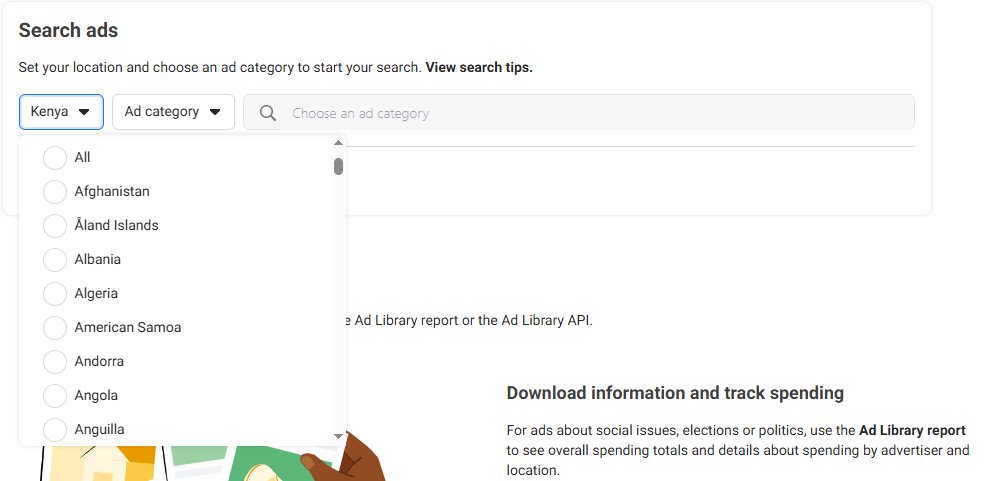
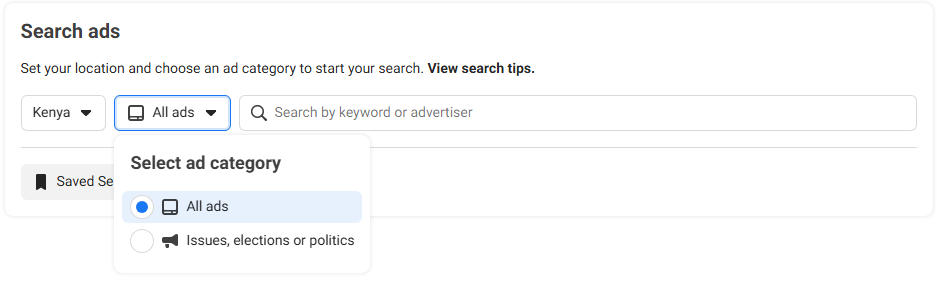
- Select Your Country
Choose the country you want to view competitor Facebook ads from so your results are relevant to your market.
- Choose “All Ads” Category
This lets you see regular business ads instead of political or special categories.
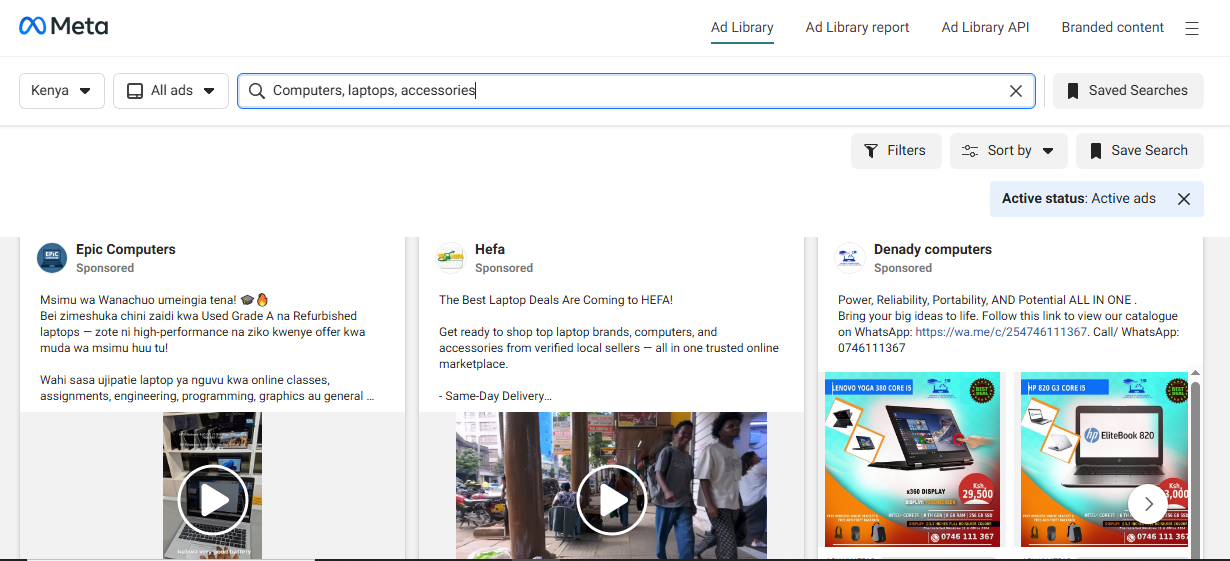
- Search by Brand or Keyword
Enter your competitor’s name or related keywords to find their ads quickly.
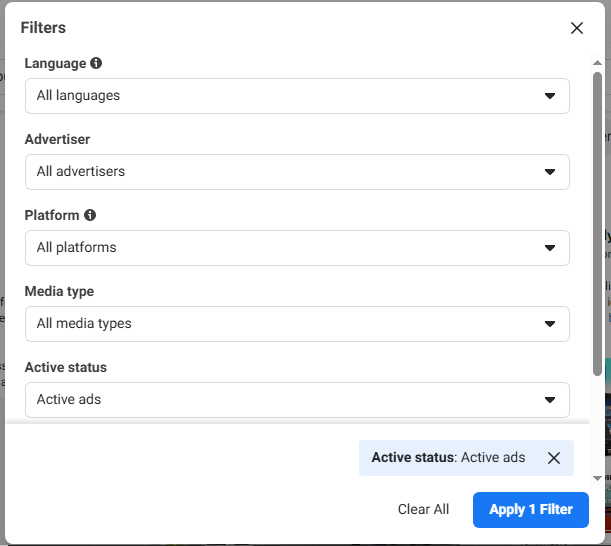
- Filter Results
Narrow results by applying filters.
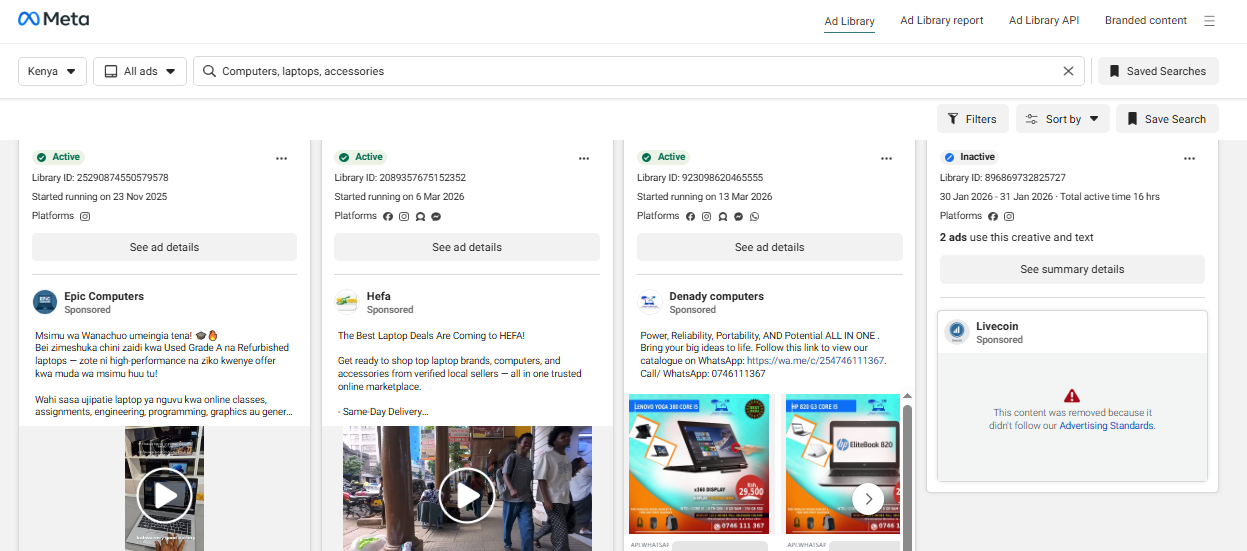
- Explore Ad Creatives
Scroll through visuals, copy, and formats to spot patterns and winning ideas.
💡 Spotting AI-Generated Content
As of 2026, Meta mandates transparency for photorealistic AI content. When viewing an ad in the Library, look for the “AI info” label (often located in the three-dot menu or next to the “Sponsored” tag).
If a competitor is consistently using AI-augmented backgrounds or “virtual models,” they are likely testing high volumes of creative variations at a low cost. If they stick to “Human-shot” raw video (UGC), it’s a signal that their audience currently values authenticity over high-production AI polish.
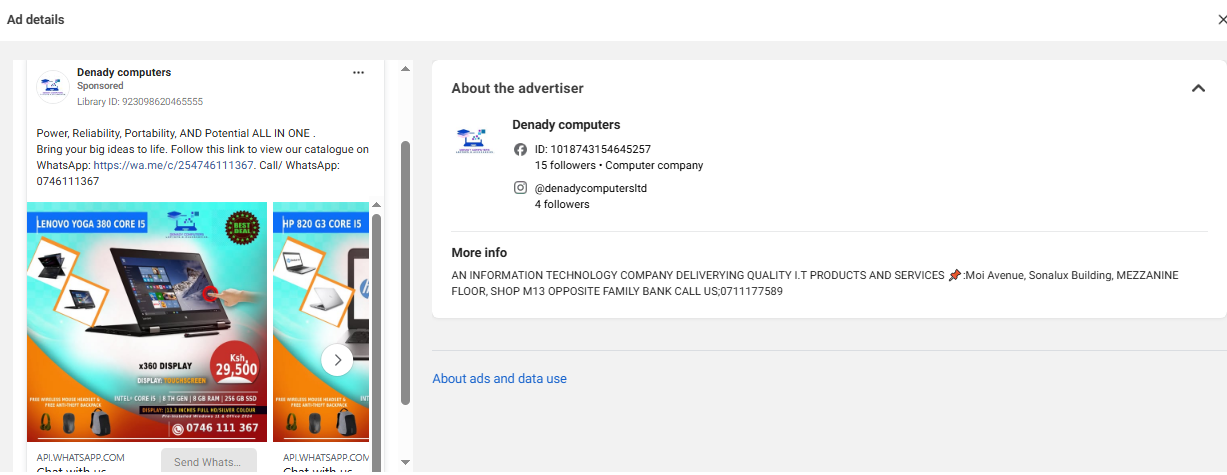
- Click for More Details
View ad variations, start dates, and campaign activity for deeper insights.
On Mobile
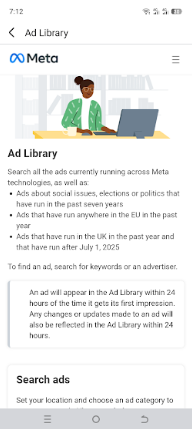
- Open Your Browser (or Facebook App)
Access the Meta Ad Library through your mobile browser for full functionality.
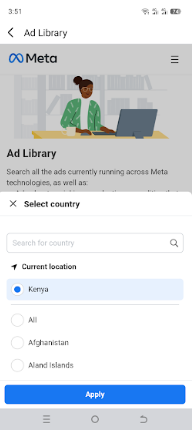
- Set Your Country
Pick the relevant country to refine your search results.
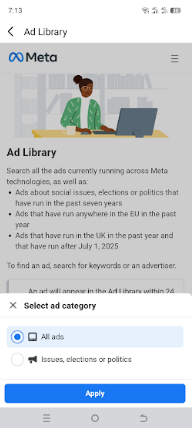
- Select “All Ads” and click “Apply.”
Stick with this category to view standard competitor ads.
- Search for a Brand or Topic
Type in a competitor’s name or keywords to pull up their ads.
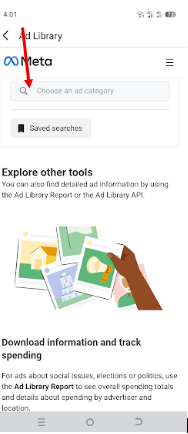
- Apply Platform Filters
Choose to view ads running on Facebook, Instagram, or both.
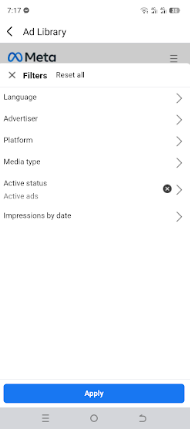
- Scroll and Study Ads
Swipe through ads to analyze visuals, messaging, and offers.
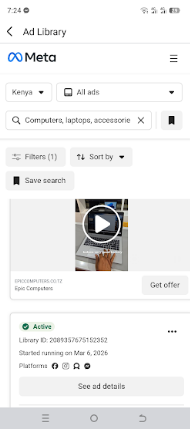
- Tap “See ad details” for More Info
Get additional details like ad duration and different versions of the same campaign.
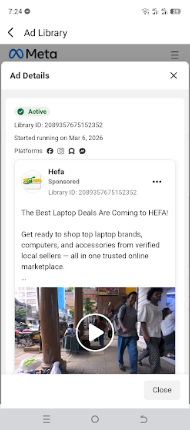
With just a few taps or clicks, you can uncover a goldmine of ideas your Meta competitors are already testing. The best part is, you get to learn what works without spending a single dollar on trial and error.
Featured Article: How to Post Ads on Facebook
What Can You Learn From Competitor Facebook Ads?
Peeking at competitor ads isn’t just for curiosity. It’s where the real marketing, including Facebook Messenger marketing, “aha” moments happen.
Here are some key insights you’ll want to keep an eye on as you scroll:
-
Ad Formats That Grab Attention
You’ll quickly notice whether your competitors lean into videos, carousels, or simple image ads. Pay attention to what shows up repeatedly. That’s usually a sign it’s working.
If everyone in your niche is using short, punchy videos, that’s your cue to test them too. On the flip side, spotting a unique format can give you a chance to stand out.
Creative is the New Targeting
Meta’s Advantage+ algorithm relies less on manual interest keywords and more on “Creative Signals.” This means the visuals are the targeting.
When analyzing a competitor’s video, pay extreme attention to the first 3 seconds (the hook). Does it feature a specific pain point? A certain demographic?
The AI “reads” these visual cues to decide which users to show the ad to. If you see a competitor’s ad scaling, don’t just look at the product; look at who the visuals are speaking to. That is the audience the AI has identified as high-converting.
-
CTA Types That Drive Action
Look closely at how they tell people what to do next. Are they using “Shop Now,” “Learn More,” or something more playful like “Grab Yours Today”?
Different CTAs create different vibes, and you can test similar ones to see what clicks with your audience. Sometimes, a tiny tweak in wording can mean a big jump in conversions.
-
Value Propositions That Sell
This is the “why should I care?” part of the ad, and your competitors are working hard to get it right. Notice whether they focus on price, quality, convenience, or exclusivity.
For example, one brand might highlight “50% off,” while another pushes “premium quality.” Watching these angles helps you position your own offer more effectively.
-
Visual Styles That Stop the Scroll
From bold colors to clean minimal designs, visuals play a huge role in performance. Take note of recurring themes, fonts, and imagery styles.
If you keep seeing user-generated content or lifestyle shots, that’s not random, but intentional. You can borrow the style while still keeping your brand identity intact.
-
Seasonal Timing and Trends
Competitor ads often follow seasonal patterns such as holidays, back-to-school, and major sales events. Spotting these trends early helps you plan your campaigns ahead of time.
If you notice spikes in certain types of ads during specific months, you can prepare your own campaigns before the rush hits. Timing, as they say, is everything.
-
Build Your Own Swipe File
As you gather all these insights, don’t just rely on memory; save them. Create a simple swipe file or database where you store standout ads, ideas, and patterns.
Over time, this becomes your personal playbook for high-performing campaigns. And trust me, future you will be very grateful for it.
The more you conduct competitor ad analysis, the less you rely on guesswork and the more you lean on proven ideas.
Centralize Your Ad Strategy With Social Champ
How to Analyze Competitor Facebook Ads Strategically
Scrolling through competitor ads is step one, but the real wins come when you dig into the “why” behind them.
Here’s how to turn casual scrolling into smart, strategic insights you can actually use:
-
Spot Ad Frequency and Longevity
If you keep seeing the same ad from a competitor for weeks or months, that’s usually a strong signal that it’s performing well. Brands don’t keep spending money on ads that flop.
On the flip side, ads that disappear quickly may have underperformed or were just short tests. Tracking this helps you understand what’s worth replicating and what to avoid.
-
Analyze Creative Variations
Competitors rarely run just one version of an ad. They test multiple variations. Look for small changes in headlines, visuals, or CTAs across similar ads.
This tells you what they’re experimenting with and what they might be optimizing. You can use the same approach by testing different elements instead of changing everything at once.
-
Break Down Copywriting Trends
Pay attention to how competitors structure their messaging. Are they using short, punchy lines or longer storytelling captions?
You’ll also notice patterns like urgency (“Limited Time”), social proof (“Trusted by 10,000+ users”), or pain-point-driven hooks. These trends give you a blueprint for writing copy that resonates.
-
Decode Audience Targeting Clues
You may not see exact targeting settings, but creatives reveal a lot. The language, visuals, and tone often point directly to the intended audience.
For example, memes and casual slang usually target younger users, while polished, benefit-driven messaging leans toward professionals. Use these clues to refine who you’re speaking to.
Watch the “On-Platform” Migration (Threads & WhatsApp)
With the new privacy regulations making external tracking more difficult, top brands are shifting to “on-platform” funnels.
- Check for “Click-to-WhatsApp” Ads: Use the Ad Library filters to look specifically for ads with the WhatsApp CTA. If a competitor is running these heavily, they’ve likely found that personal chat conversations convert better than traditional landing pages in a post-cookie world.
- Threads Integration: Don’t forget to toggle the Threads The Ad Library shows how brands are adapting their high-performance Meta creative into text-first, conversational ads for the Threads feed.
-
Build Hypotheses for A/B Testing
Instead of copying ads outright, turn your observations into testable ideas. Think in terms of “If this works for them, it might work for me too.”
For instance, if competitors use video testimonials, you can test your own version against a static image. This way, you’re making data-backed decisions instead of guessing.
At the end of the day, strategic Facebook competitor analysis is all about understanding why competitor ads work, so that you can create campaigns that don’t just compete, but outperform.
Featured Article: How to Advertise on Facebook
Improve Your Ad Strategy With Social Champ
Once you have researched competitor ads and gathered ideas, it’s time to actually put all that insight to work without losing your mind in the process.
Here’s how Social Champ helps you turn competitor inspiration into scroll-stopping Facebook campaigns:
- Plan and Build Your Swipe File: Instead of losing ideas in messy notes, use Social Champ’s Content Library to organize competitor-inspired hooks and visuals. Map them out on a visual Social Media Calendar to ensure your organic and paid strategies are perfectly aligned.
- Schedule and Boost Directly: Save time by scheduling your Facebook content in advance. Want to turn a high-performing organic post into an ad? You can Boost Posts directly from the Social Champ dashboard, allowing you to capitalize on engagement without switching between multiple tabs.
- Advanced Competitor Analysis and Social Listening: While the Meta Ad Library shows you what they are running, Social Champ’s Competitor Analysis tool shows you how their organic strategy is performing. You can track their post-frequency, engagement rates, and top-performing content. Pair this with Social Listening to monitor industry trends and sentiment in real-time, ensuring your ads always hit the right note.
- Optimize With Data-Driven Insights: Don’t guess. Know. Use the Analytics Dashboard to monitor your performance and compare it against the benchmarks you’ve set. Whether it’s tweaking a CTA or adjusting your posting schedule, you’ll have the data to make every ad dollar count.
Boost Your Best Content!
How Often Should You Audit Competitor Facebook Ads?
Keeping an eye on competitor ads shouldn’t be a one-and-done thing. It should be more like a regular check-in that keeps your strategy sharp. The trick is finding a rhythm that fits your industry without turning it into a full-time job.
Here’s a simple way to think about your audit cadence:
-
Monthly Audits for Fast-Moving Industries
If you’re in industries like eCommerce, digital products, or trending niches, things change quickly. New creatives, offers, and formats pop up all the time, so a monthly check helps you stay ahead.
Performing monthly audits can enable you to catch fresh trends early and adjust your campaigns before they feel outdated.
-
Quarterly Audits for Stable Niches
For industries that don’t change as often, like B2B services or traditional businesses, a quarterly review usually does the job. This gives you enough data to spot meaningful patterns without overanalyzing every little change.
You can focus on bigger shifts in messaging, positioning, and campaign strategy.
-
Seasonal Check-Ins for Campaign Peaks
Around major sales periods or holidays, it’s smart to do extra audits. Facebook competitors often roll out their best creatives during these times, and you don’t want to miss that.
Watching what they do during peak seasons helps you plan stronger campaigns for your own big moments. Timing really is everything here.
-
Centralize Your Findings for Easy Access
Don’t let your insights disappear into scattered notes. Use tools like Google Sheets, Notion, or Social Champ to keep everything organized in one place.
This makes it easier to collaborate with your team, track patterns over time, and actually use what you’ve learned. A well-organized swipe file can quickly become your secret weapon.
At the end of the day, consistency beats intensity. Regular audits keep you informed, inspired, and ready to outsmart the competition without burning out.
Featured Article: Facebook Messenger Marketing Strategies
Conclusion
Keeping tabs on your competition doesn’t have to feel complicated or time-consuming. Once you understand how to see competitor Facebook ads, you unlock a steady stream of ideas, trends, and proven strategies you can actually use.
From spotting winning creatives to decoding messaging and timing, every insight gives you a clearer direction for your own campaigns. Pair that with a scheduling tool like Social Champ and a consistent review process, and you’re no longer guessing; you’re making smarter, data-backed moves.