How many hours did you spend last week just figuring out what to post on Instagram?
Two? Three? Maybe more?
It’s a common bottleneck; nearly 33% of marketers cite content creation as their biggest hurdle, and it usually happens when you’re trying to reinvent the wheel every Monday. When your posting schedule is inconsistent, engagement naturally drops, which ultimately makes the whole process feel even more like a chore.
So, if you never want to start from scratch again, I’ve put together this list of 25+ reusable Instagram feed ideas, which includes proven layouts, repeatable themes, and plug and play templates you can rotate every month.
Pair them with a solid Instagram scheduler, and you’ll wonder why you didn’t do this sooner.
Ready to get those hours back? Let’s get into it.
Short Summary
- A good Instagram feed is about intentional patterns and visual consistency, not perfect photos.
- From checkerboard grids and monochrome aesthetics to branded templates and seasonal themes, you can rotate every month.
- Reusable feed templates let you plug in your content, schedule it, and keep your grid looking polished without redesigning anything.
- Scheduling content between 5:00 PM and 9:00 PM gives your posts the best chance of being seen.
- Small habits like batching content, auditing your grid, and repurposing top performers keep your feed consistent without the weekly stress.
A Whole Month of Instagram Posts. Done.
What Makes a Good Instagram Feed?
Before we jump into the ideas, let’s get one thing straight. A good Instagram feed isn’t about perfect photos. It’s about intentional patterns.
I used to think great feeds required professional photography and expensive design tools. Turns out, the accounts I admired most just had a system in place. And that made all the difference.
Visual Consistency Creates First Impressions
When someone lands on your profile, they decide in seconds if they want to follow you. The decision is not based on one post; it’s built on how your entire Instagram grid looks and feels together.
Essentially, consistent colors, fonts, and editing styles signal that you know what you’re doing, while a messy, random grid signals the opposite.
First impressions happen fast on Instagram. Your feed needs to win that split-second judgment.
Note for 2026: The New Vertical Standard
Before you start designing, remember that the old square grid is basically gone. Instagram profiles now show posts in a 3:4 vertical format (1080 × 1440 px). 4:5 still works great for the feed, but if you’re using 1:1 templates, your posts might get awkwardly cropped on your profile. Designing with the taller format in mind will keep your grid looking clean.
Aesthetic + SEO = Discovery
In 2026, a “pretty” feed isn’t enough; it has to be searchable. Instagram’s algorithm now functions like a behavioral search engine. This means your feed ideas must incorporate Social SEO.
From the keywords you use in your captions to the descriptive Alt Text you add to your “Earth Tone” or “Pastel” images, every element helps Instagram categorize your content.
Don’t just design for the eye; design for the search bar as well.
A System Beats Inspiration Every Time
Inspiration runs out. Systems don’t. When you have a repeatable structure for your feed, you stop relying on creative motivation to show up consistently.
You just follow the plan. Pick a layout. Choose your colors. Set a content rotation. Then repeat it month after month.
Leveraging AI for Visual Storytelling
You don’t have to guess how your grid will look. Instead, you can use AI-powered design tools to generate “Grid Mockups” before you even take a photo.
To save even more time, you can use Social Champ’s AI Suite to draft human-like captions tailored to your brand’s tone, like witty, professional, or empathetic.
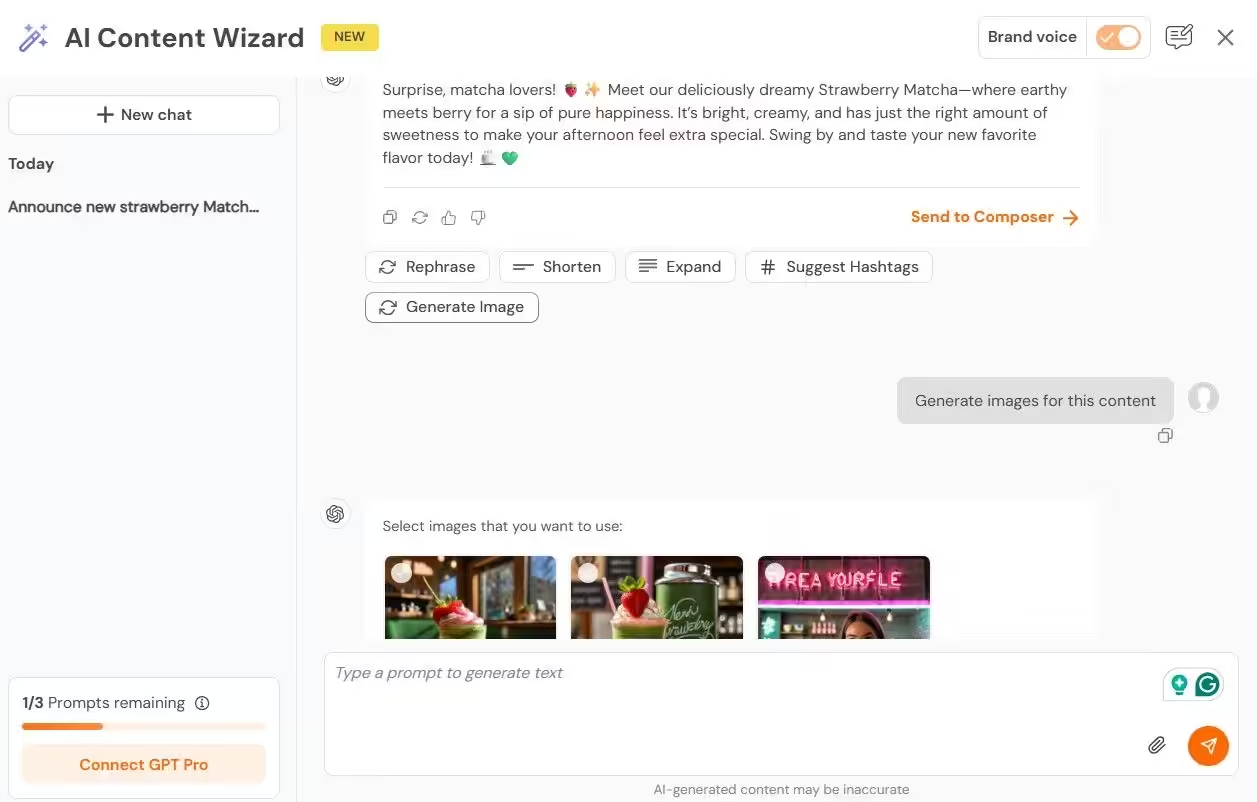
This allows you to maintain a high-frequency posting schedule without losing the personal touch that your audience craves.
Your Feed Is Your Brand’s Storefront
Think of your grid as a shop window. Every post is a display piece. If the window looks organized and inviting, people walk in. If it looks chaotic, they keep scrolling.
Your feed tells people what your brand is about before they read a single caption. Make that story clear.
Now let’s fill that window with ideas that actually work.
Plan Your Instagram Feed in Minutes!
Featured Article: How to Edit Grid on Instagram
25+ Instagram Feed Ideas You Can Reuse Every Month
Alright. This is what you came here for.
Every idea on this list focuses on how your entire grid looks and flows. Not just what you post, but how it all comes together when someone visits your profile.
Pick one or two ideas that match your brand. Set them up once. Then rotate them month after month.
Layout-Based Feed Ideas
Your grid structure is the foundation of your entire feed. These Instagram feed layout ideas give your profile a visual pattern that looks organized without hours of planning.
-
Checkerboard Grid
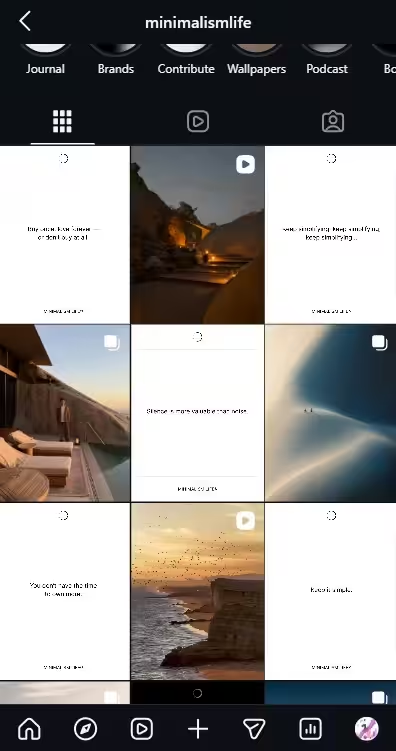
Checkerboard’s Grid Alternate between two content types or visual styles. One post is a photo. The next is a text graphic. Then back to a photo. When someone views your grid, it creates a clean checkerboard effect that feels polished and balanced.
This is one of the easiest layouts to maintain. You only need two content formats. Swap the topics monthly but keep the pattern consistent. Your grid stays fresh without any extra design work.
-
Row By Row Feed
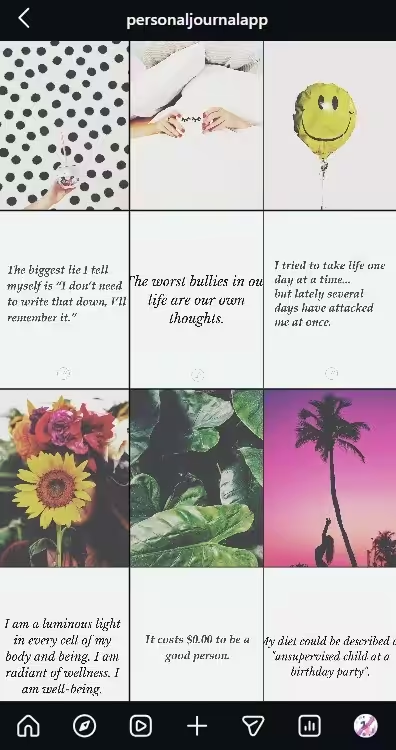
Row By Row Feed Each row of three posts follows a single theme, color, or content type. Row one might be product shots. Row two could feature branded quotes. Row three shows behind-the-scenes content.
This layout tells a story as visitors scroll down your profile. It also makes batch creation simple. Plan three posts at a time around one theme, publish them together, and move to the next row.
-
Puzzle Grid
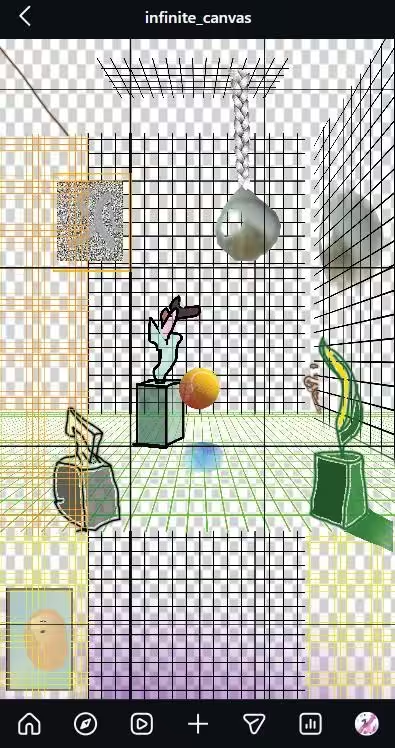
Puzzle Grid Your posts, when viewed together on your grid, form a larger image. This takes more planning upfront, but the visual payoff is huge. It stops people mid-scroll and makes them want to explore your entire profile.
And it’s not as complicated as it looks! You can easily use tools like Canva, which offer free puzzle grid templates. All you have to do is design the full image first, split it into individual posts, and schedule them in order.
-
Diagonal Pattern Feed
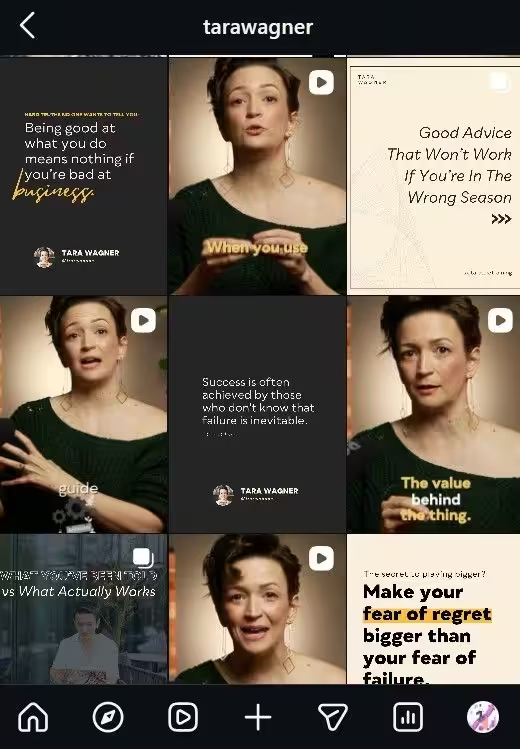
Diagonal Pattern Feed Repeat the same content type every third post. This creates a diagonal line across your grid. Quotes flow diagonally. Photos flow diagonally.
It’s subtle, but the pattern gives your feed a sense of rhythm most people can’t quite explain. They just know it looks right.
-
Column Layout Feed
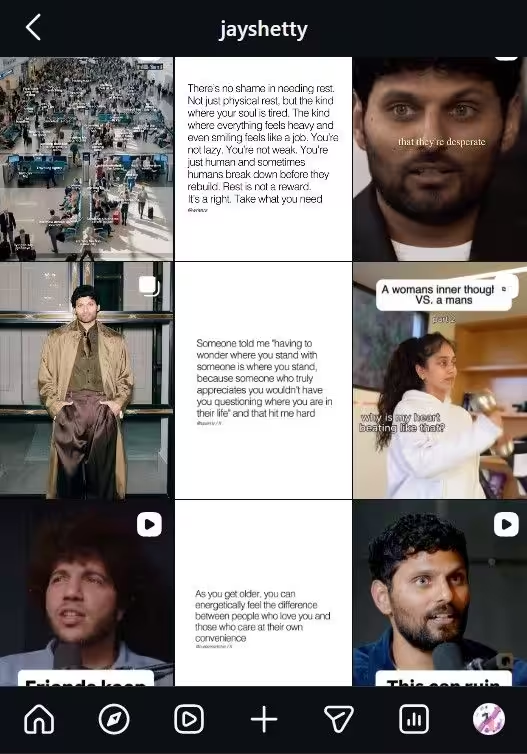
Column Layout Feed Assign a content type to each column. The left column is always quotes. The middle column is always photos. The right column is always carousels.
This is one of the most structured Instagram feed layout ideas out there. It makes planning incredibly simple because you always know what goes where.
Color and Aesthetic Feed Ideas
Color is the fastest way to make your feed look cohesive. I tested this myself. Switched from random colors to a strict three-color palette, and the difference was immediate.
These aesthetic Instagram feed ideas use color as the backbone of your entire grid.
-
Monochrome Feed
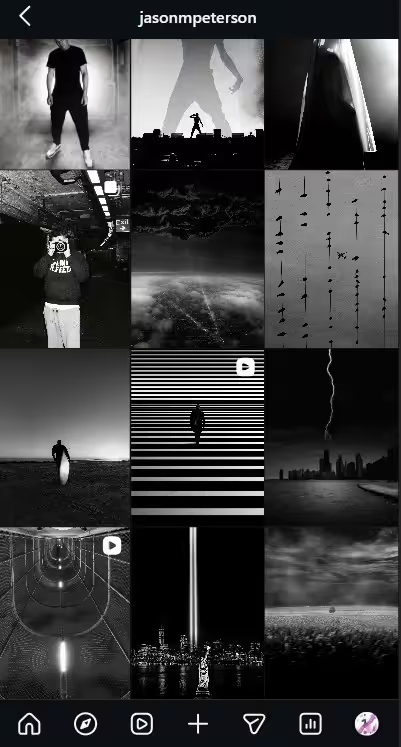
Monochrome Feed Stick to one dominant color across your entire feed. Every post uses shades and tones of that single color. All blue. All beige. All black and white.
The result is a striking, unified look that’s instantly recognizable. It’s simple to execute but hard to forget.
-
Rainbow Gradient Feed
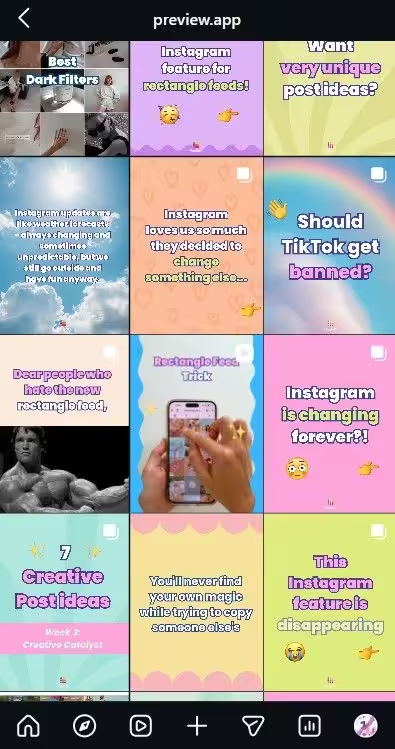
Rainbow Gradient Feed Your feed transitions through colors as someone scrolls. The top rows might feature warm tones. Then cool tones appear further down.
This takes planning, but the visual impact is worth the effort. Map out your color transitions a month in advance, and it becomes surprisingly easy to maintain.
-
Earth Tone Feed
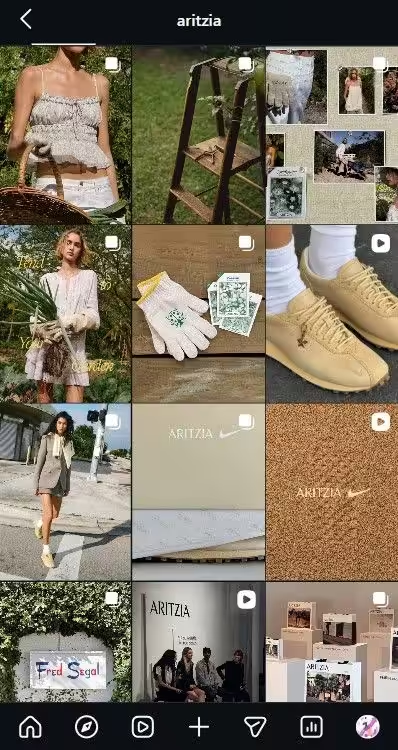
Earth Tone Feed Warm browns, soft greens, muted oranges, and creamy whites. This palette feels organic, calming, and premium.
It works especially well for lifestyle brands, wellness businesses, and personal brands. Pick three to four earth tones and rotate them consistently across every post.
-
Pastel Feed
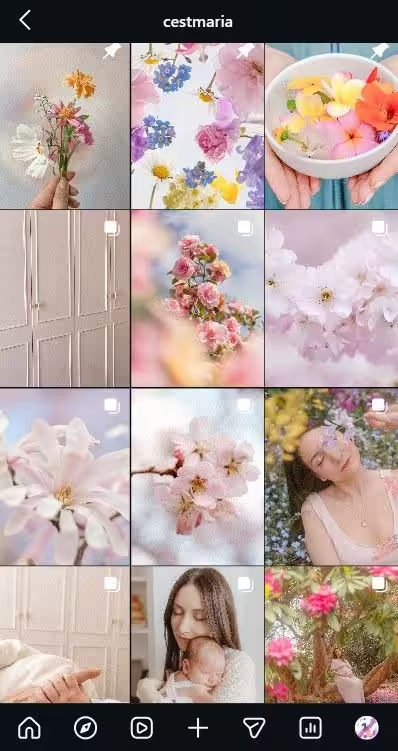
Pastel Feed Soft pinks, light blues, lavender, mint. A pastel feed feels approachable and friendly, which is why it’s popular among beauty brands, creative businesses, and coaches.
The trick is keeping the saturation level consistent across every post. One overly bright image can break the entire aesthetic.
-
Dark and Moody Feed
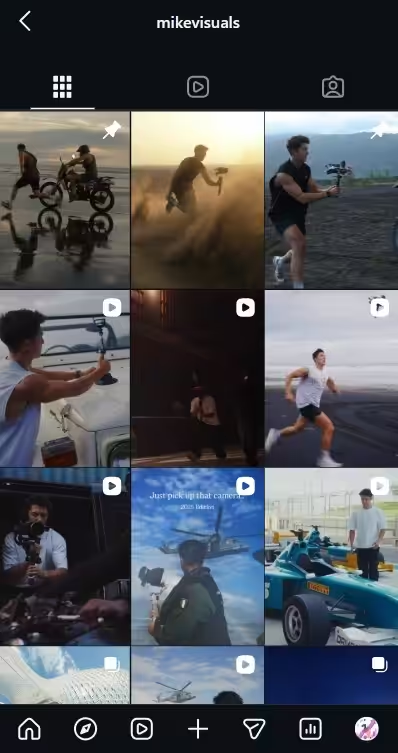
Dark and Moody Feed Deep blacks, rich shadows, muted highlights. This aesthetic feels premium and bold. It works well for photographers, luxury brands, and creative agencies.
Apply the same dark preset or filter to every image. Your feed stays consistent with minimal editing effort.
-
Bright and Airy Feed
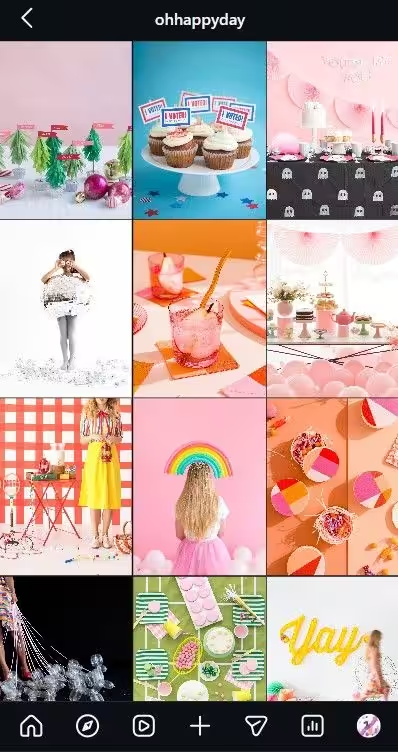
Bright and Airy Feed High exposure. Soft shadows. Light backgrounds. This style feels fresh, optimistic, and modern. To make it happen, all you need to do is increase brightness and lower contrast in your editing.
Apply the same adjustments to every photo. Your feed instantly looks cohesive, even with different subjects in each post.
Branded Feed Ideas for Businesses
If you run a business, your feed needs to work harder than looking pretty. These Instagram feed ideas for businesses combine aesthetics with brand strategy.
-
Branded Template Grid
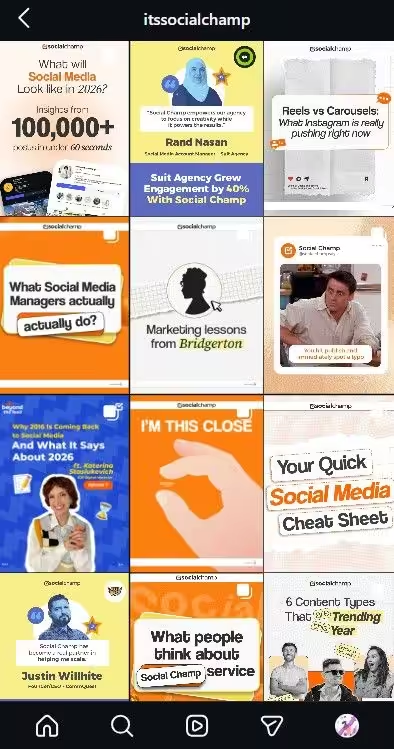
Branded Template Grid Create three to five post templates with your brand colors, fonts, and logo placement. Rotate them across your feed.
Every post becomes instantly recognizable as yours, even when it appears outside your profile in someone’s explore page or shares.
Authenticity Tip:
Consistency matters, but if your grid looks too polished or corporate, people may scroll past. Every few posts, mix in a raw behind-the-scenes photo or lo-fi clip. These small breaks make your brand feel more human without ruining your aesthetic.
-
Color Block Feed
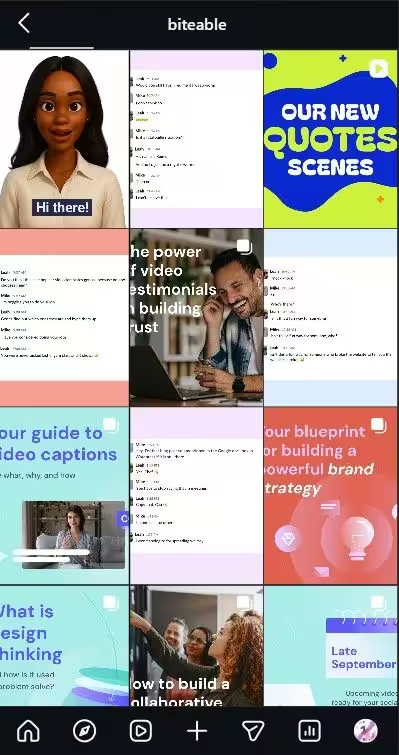
Color Block Feed In color-block feeds, each post features a single bold dominant color to create a cohesive, striking grid. When viewed as a whole, the profile transforms into a vibrant mosaic that feels intentional, organized, and high-energy.
To achieve this, group sets of three, six, or nine posts by color. One block uses your brand’s primary color. The next shifts to a secondary color.
When someone scrolls your profile, they see distinct visual sections that feel organized and deliberate.
-
Border and Frame Feed
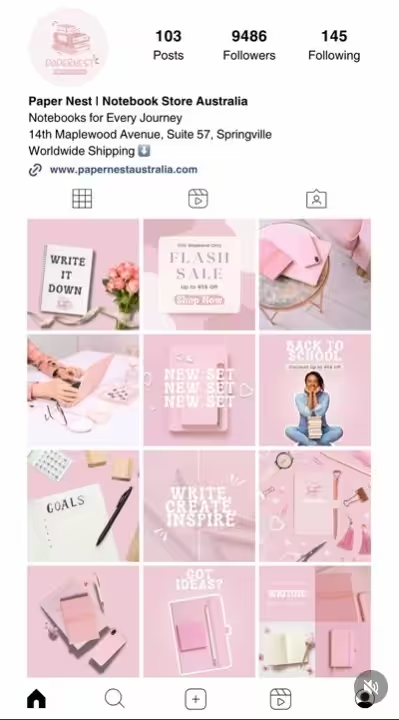
Border and Frame Feed A border or frame feed is a visual layout strategy where every photo or video is surrounded by a consistent border (usually white, black, or a soft neutral) before being posted. This creates a “gallery” effect, adding breathing room between posts so the grid feels airy and professional rather than cluttered.
To create this, you’ll need to add consistent white or colored borders to every post. This creates breathing room between images on your grid.
The result is a clean, gallery-style look that feels polished without heavy design work. Pick one border style and apply it to everything.
-
Mixed Media Pattern Feed
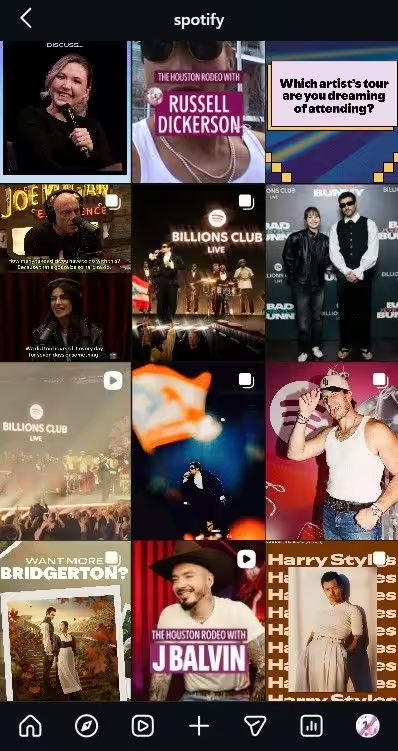
Mixed Media Pattern Feed If you’re not a monotone feed kind of person, a mixed media pattern feed might be for you. It is a dynamic layout that blends various content types like photography, digital illustrations, hand-drawn elements, and bold typography into a repeating or structured sequence. Instead of sticking to just “pretty photos,” it treats the grid like a digital collage or an art journal.
Alternate between photos, graphics, and video thumbnails in a set pattern. Photo, graphic, video. Repeat. This gives your feed variety while keeping it structured.
Here’s why this matters. According to Social Champ’s research, images account for 66.36% of Instagram posts, videos 24.23%, and carousels 9.42%.
A mixed media feed ensures you’re not over-relying on one format. It keeps your grid dynamic and gives the algorithm more content types to push.
-
Quote and Photo Alternating Feed
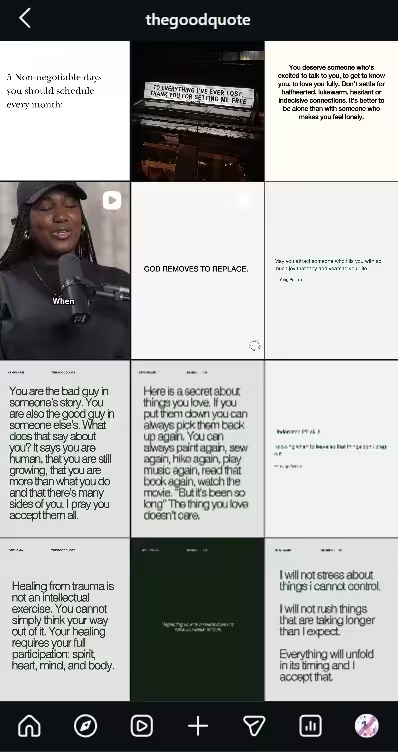
Quote and Photo Alternating Feed As the name suggests, every other post switches between a branded quote graphic and a photograph. Your grid gets a natural rhythm. Your audience gets a mix of inspiration and visuals.
And you always know what type of post comes next, so planning takes minutes.
Content Theme Feed Ideas
These ideas shape the narrative of your feed. Not just how it looks, but what story it tells when someone scrolls through your profile.
-
Behind the Scenes Feed
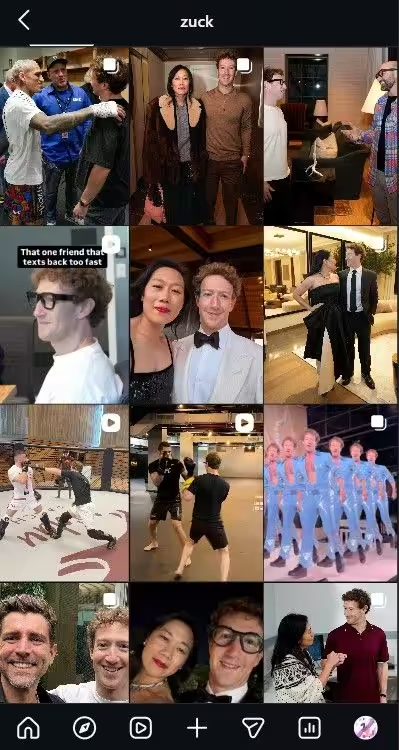
Behind the Scenes Feed This feed makes your entire feed about the process, not the polished result. It includes raw workspace shots, team moments, and work-in-progress clips.
This approach builds trust fast. People connect with the human side of your brand more than the highlight reel.
-
Product Showcase Grid

Product Showcase Grid For eCommerce brands, this is the best way to go. In Product showcase grids, every post ties back to your product. It includes lifestyle shots, close-ups, tutorials, and customer photos.
The feed tells a complete product story from every angle. And to keep it fresh without losing focus, rotate contexts and settings every month.
-
UGC Curated Feed
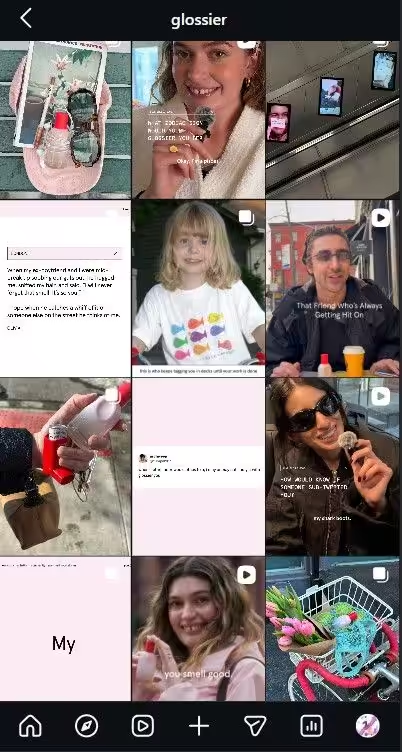
UGC Curated Feed Build your feed around user-generated content. Repost customer photos, reviews, and videos with credit. Your grid becomes a community gallery.
As a result, more people tag you in hopes of being featured. That’s a content system that feeds itself. Less work for you. More reach from your audience.
-
Educational Carousel Feed
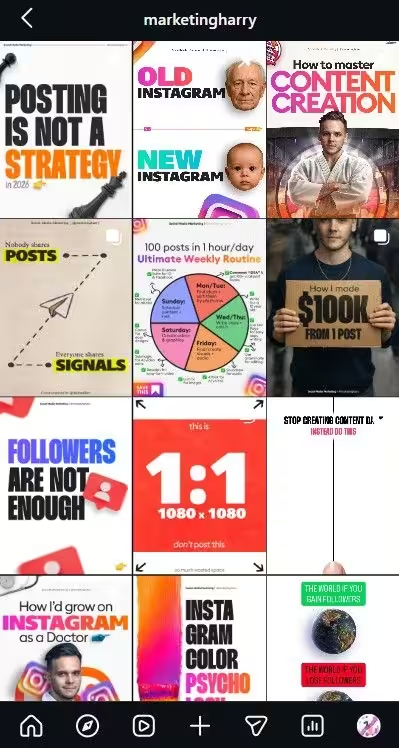
Educational Carousel Feed Educational feeds are best for B2B SaaS, professional services, and health and wellness brands. In this, every post teaches something. They include carousel slides, step-by-step frameworks, and “how-to” guides that solve specific customer pain points.
To make them, you need to identify your most frequent customer questions and design a recurring template that makes information easy to scan and save.
2026 Growth Hack: The algorithm now prioritizes “Sends per Reach” over Likes. When planning your educational carousels, design the 2nd or 3rd slide to be a “standalone” value piece like a checklist or a cheat sheet. This encourages users to DM the post to a friend, which is the single fastest way to boost your distribution this year.
-
Magazine Editorial Feed
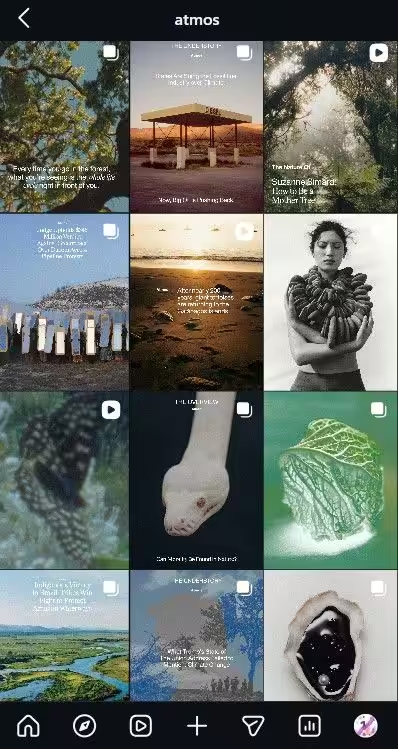
Magazine Editorial Feed If you want your brand to appear premium, treat your feed like a magazine layout. Mix editorial photography with text overlays, pull quotes, and clean compositions.
This style works well for fashion, food, design, and creative brands. It gives your profile a high-end, curated feel that stands out from typical business feeds.
Seasonal and Trend-Based Feed Ideas
These Instagram feed ideas keep your grid relevant throughout the year.
-
Monthly Theme Feed
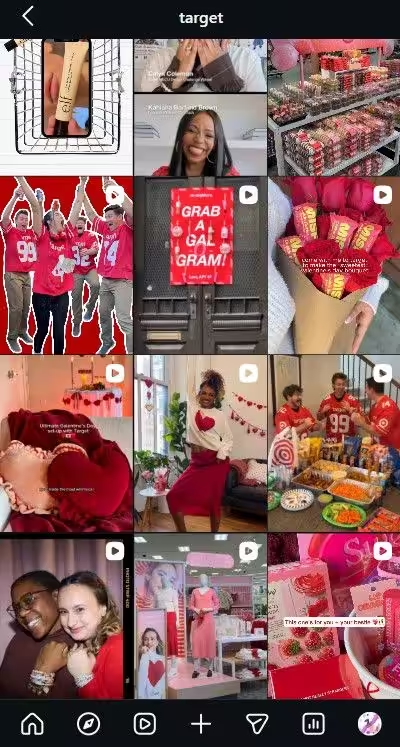
Monthly Theme Feed Plan your feed around holidays, awareness days, and cultural moments. February gets Valentine’s Day customer love stories. October brings spooky twists on your regular content.
Monthly themes give your feed built in structure before you even sit down to create.
-
Milestone Celebration Feed
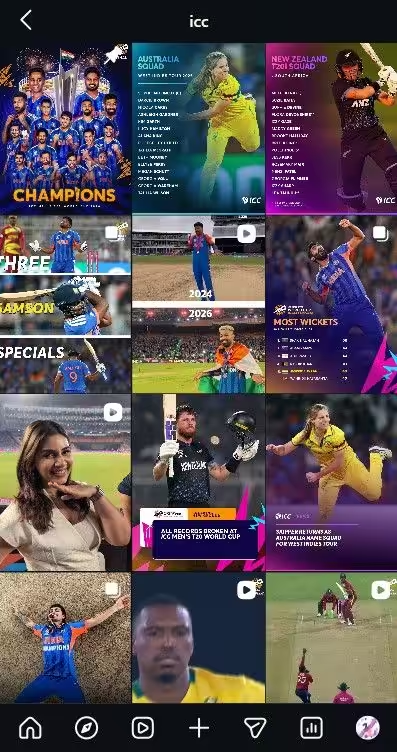
Milestone Celebration Feed Hit a revenue goal? Reached 10K followers? Celebrated a team anniversary? Build posts around those wins.
Milestone content feels authentic and celebratory. Your audience wants to root for you. Even small wins count.
-
Trend Alert Feed

Trend Alert Feed Spot a new reel format or a rising content style? Create a post about it. Share your take. Explain how your audience can use it.
This positions you as someone who stays current. And it gives followers a reason to check your feed regularly. That’s FOMO working in your favor.
-
Audience Feedback Feed

Audience Feedback Feed Once a month, dedicate a post to asking your audience what they want. What topics interest them? What content do they enjoy most?
This boosts engagement through comments and gives you a roadmap for next month. Your audience tells you what to create. Use that.
-
Event Highlight Feed
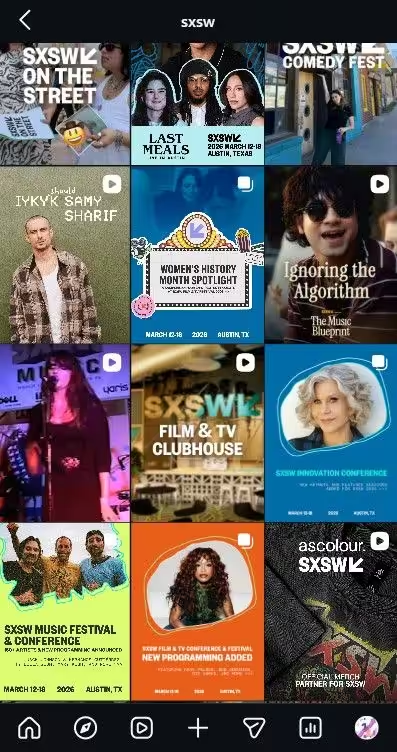
Event Highlight Feed Webinars, live sessions, product launches, conferences. Turn those moments into feed content with carousels, photo dumps, or short recap videos, all work.
They show your brand is active, growing, and involved in your industry
Quick Tip: Load your recurring feed themes into a scheduling tool at the start of each quarter. One focused session can map out three months of content. With a little preliminary effort, you’ll get a consistent feed that runs on autopilot.
Got Your Feed Ideas? Now Schedule Them Easily!
5 Reusable Instagram Feed Templates You Can Start Today
You’ve got the ideas. Now let’s make them plug-and-play. These five templates give you a ready-made structure you can set up once and reuse every month.
Pick the layout that fits your goals, click the link to open the spreadsheet, and make a copy to your own drive. Customize it with your brand elements, schedule your content, and you’re done!
-
Weekly Theme Rotation (The All-Rounder)
Best For: Brands with multiple content pillars who want variety without chaos.
Your grid stays dynamic but structured. You alternate between carousels, images, and videos. To reuse, simply swap your topics weekly while keeping the visual format consistent.
-
Product and Testimonial (The Sales Generator)
Best For: E-commerce and service-based businesses.
Each row of three becomes a mini sales page: Product, Proof, and Lifestyle. This allows you to feature a new product or service monthly while telling a complete story as users scroll.
-
Aesthetic Quote Series (The Reach Booster)
Best For: Influencers, coaches, and brands focusing on inspiration and values.
This takes five minutes to update each month. Use the same branded graphic templates but update the quotes. Your feed stays perfectly on-brand with almost zero design effort.
-
Community Spotlight (The Trust Builder)
Best For: Brands with high customer engagement and user-generated content (UGC).
Turn your audience into your content team. Collect tagged photos and video testimonials monthly and slot them into a diagonal pattern. It builds social proof and keeps your grid looking curated.
-
Evergreen Tips and FAQ (The Authority Builder)
Best For: Educators, consultants, and B2B brands.
These posts never go stale. Assign one column to carousels, one to tip cards, and one to FAQs. A tip you post today stays relevant six months from now; just add new audience questions every month.
Featured Article: 17 Best Instagram Management Tools
How to Plan Your Instagram Feed for Maximum Impact
You’ve got 25+ ideas and five ready-made templates. Now let’s turn them into an actual plan. This doesn’t need to be complicated. Four steps and you’re set.
Define Your Goals and Content Pillars
Start with one question. What do you want your feed to achieve? More followers? Leads? Sales? Brand awareness? Your goal determines what you post and how often.
Then pick three to five content pillars. These are your recurring themes. Education, behind the scenes, customer stories, promotions, and trending topics. Every post you create should fall into one of these buckets.
Tip of the Day: Write your content pillars on sticky notes near your workspace. Every time you create, pick a pillar and build from there. Decision fatigue is gone.
Create a Simple Visual Style Guide
Pick a color palette. Choose one or two fonts. Decide on a consistent editing style. That’s your visual guide. Every post follows these rules. No exceptions.
Your aesthetic Instagram feed ideas only work if the visual system stays consistent.
Pick a Layout Strategy and Stick With It
Your Instagram feed layout ideas need structure. Here’s a quick reference to help you choose.
| Layout Style | How It Works | Best For |
| Checkerboard | Alternate between two content types | Mixing quotes with photos |
| Row by Row | Each row of three follows one theme | Storytelling or launches |
| Diagonal | Same type flows diagonally across the grid | Subtle brand consistency |
| Color Blocks | Group posts by color in sections | Bold, aesthetic brands |
| Column Layout | Each column has a fixed content type | Structured business feeds |
Pick one and commit for at least a month before you change anything.
Schedule Everything in Advance
This is where the plan comes to life. Organize your pillars into a monthly calendar. Assign layouts and formats to specific days. Then load everything into Social Champ and queue it up.
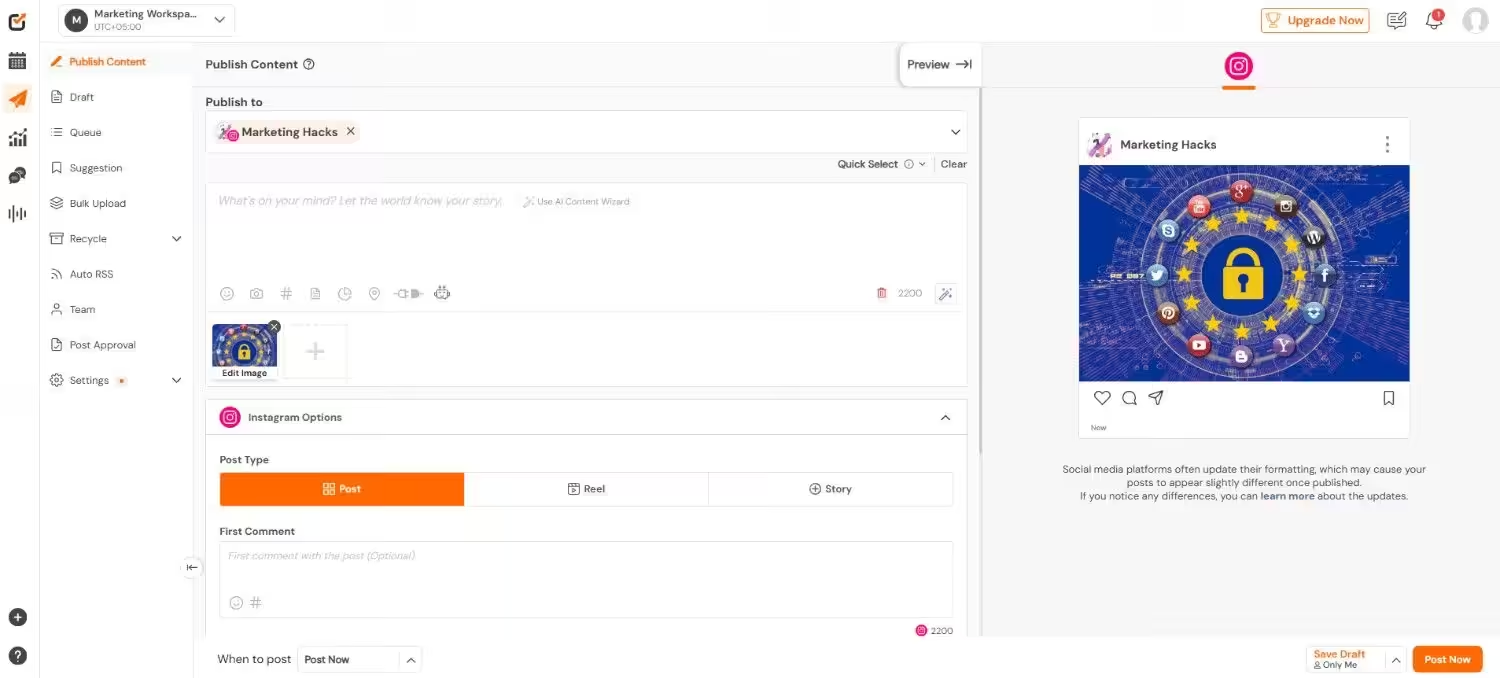
But here’s something most people overlook. Timing matters just as much as content.
According to Social Champ’s data, Instagram posting activity peaks between 5:00 PM and 9:00 PM, with 7:00 PM leading at 7.79% of all posts. Meanwhile, early morning slots like 6:00 AM see as little as 1.40% activity.
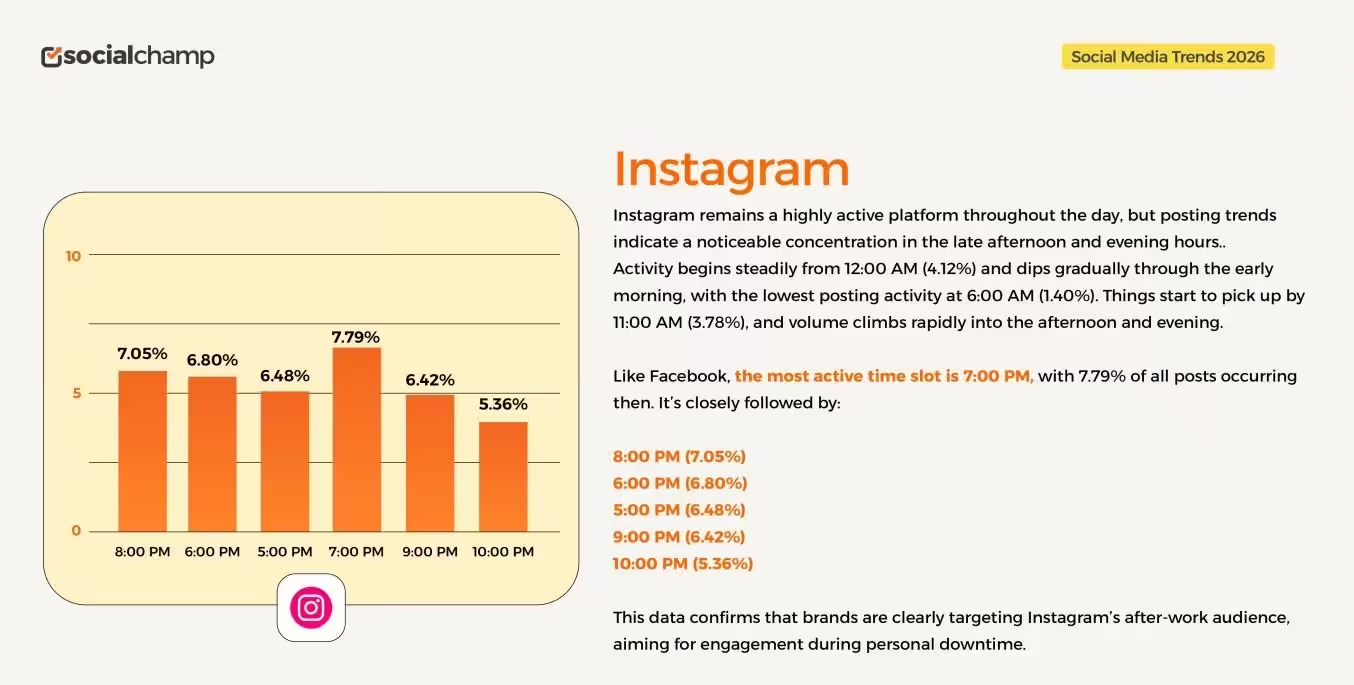
Your audience is most active after work hours. So when you schedule your feed in Social Champ, aim for that evening window. Great content posted at the wrong time still gets buried.
Quick Planning Checklist
- ✅ Goal defined
- ✅ Content pillars set
- ✅ Visual style guide created
- ✅ Layout strategy chosen
- ✅ Monthly calendar scheduled in Social Champ
All five checked? You’re ahead of most brands on Instagram. Now let’s keep it that way.
Tips to Keep Your Instagram Feed Consistent Long Term
Planning your feed is the easy part. Staying consistent for three months? That’s where most people fall off. These five habits keep things on track.
- Batch content monthly. Sit down once or twice a month and knock everything out. Captions, graphics, scheduling. One session. Whole month sorted.
- Audit your grid every 30 days. Pull up your profile and just look. Does it still feel cohesive? If something looks off, adjust next month’s content to fix it.
- Repurpose top performers. If a post was crushed three months ago, reuse it. New caption. Updated graphic. Most of your current followers never saw the original anyway.
- Prioritize dwell time and sends. Forget likes. They’re a vanity metric now. Focus on content that keeps users on your post longer (Dwell Time) and encourages them to DM it to friends (Sends). These are now the primary drivers for reaching the Explore page.
- Refresh templates quartely. Small tweaks every few months keep things fresh without starting from scratch.
Conclusion
Now you’ve got 25+ Instagram feed ideas, five reusable templates, a planning framework, and habits to stay consistent. That’s everything you need to stop scrambling for content and start showing up with intention.
Don’t try to do it all at once. Pick one feed idea. Set up one template. Schedule your first week of content. Start small and build from there.
And if you want to make the whole process effortless, Social Champ lets you plan, preview, and schedule your entire Instagram feed in advance. One session. Whole month covered.