
With all the bells and whistles Instagram offers—like Reels, Stories, product tags, and even AR filters—you might feel like you need a personal assistant just to keep up.
That’s where scheduling posts in advance comes in handy, letting you plan your content for days or even weeks ahead.
Instead of scrambling to post every day, you can focus on building a consistent, engaging feed that keeps your audience hooked without the daily stress.
While Meta has turned scheduling content into a bit of a labyrinth, using the right apps to schedule Instagram posts can simplify your life and help you shine on this visual-first platform.
In this article, we’ll highlight some of the best apps and recommend the best social media scheduler so that you can take the stress out of your social media strategy!

Try Social Champ today and unlock the potential of your social media strategy!
Short Summary
- With the right scheduling app, you can keep your feed organized, maintain consistency, and save time on repetitive tasks.
- Scheduling apps help you optimize posting times based on when your audience is most active, boosting engagement.
- Many apps offer features like content calendars and media libraries, making planning and visualizing your posts easier.
- Some apps have collaboration features that allow team members to work together seamlessly, ensuring everyone is aligned on content strategy.
- Some scheduling apps provide analytics and performance tracking, helping you measure the success of your posts and refine your strategy.
Quick Overview of Apps to Schedule Instagram Posts
Choosing the right tool for scheduling Instagram posts can make a world of difference, especially if you’re managing multiple accounts or planning content weeks in advance.
With the right scheduler, you can keep your feed organized, maintain consistency, and save time on repetitive tasks.
Here’s a quick rundown of top apps to help you stay on top of your social game and keep your posts flowing smoothly.
- Social Champ: AI-Driven, Affordable, User-Friendly
With Social Champ, you get an all-in-one scheduler that uses Artificial Intelligence to optimize posting times and even suggest captions. Its user-friendly dashboard is a plus for anyone managing multiple accounts or juggling content across platforms.
- Buffer: Reliable, Simple, Team Collaboration
Buffer is known for its straightforward design and excellent collaboration features, making it ideal for teams. Plus, it’s easy to use for scheduling and tracking performance on Instagram.
- Hootsuite: Analytics, Multi-Platform, Large Teams
Hootsuite goes beyond scheduling with advanced analytics and engagement tools. It’s perfect for larger teams needing in-depth reporting and comprehensive platform management.
- Later: Visual Planner, Instagram-Focused, Media Library
Later’s visual-first approach is perfect for Instagram. Its drag-and-drop grid planner and media library make curating your feed a breeze.
Best Instagram Scheduling Apps at a Glance
Here’s a quick snapshot of the best Instagram scheduling apps to help you streamline your social media strategy:
| Tool | Pricing | Best For | Instagram Profiles | Ease of Use | Support |
| Social Champ | $26/month | Individuals, SMBs, Agencies & Enterprises | 12 Social Accounts | ***** | ***** |
| Buffer | $5/month/Channel | SMBs & Brands | 1 Channel | **** | **** |
| Hootsuite | $99/month | Enterprises and Multi-Location Brands | 10 Social Accounts | **** | ***** |
| Later | $16.67/month | Creators & Influencers | 1 Social Set | **** | **** |
Compare key features and find the right fit to keep your Instagram feed organized, engaging, and on schedule.
-
Social Champ
Social Champ stands out as one of the best apps to schedule Instagram posts free, thanks to its intuitive design and powerful features tailored for both individuals and teams.
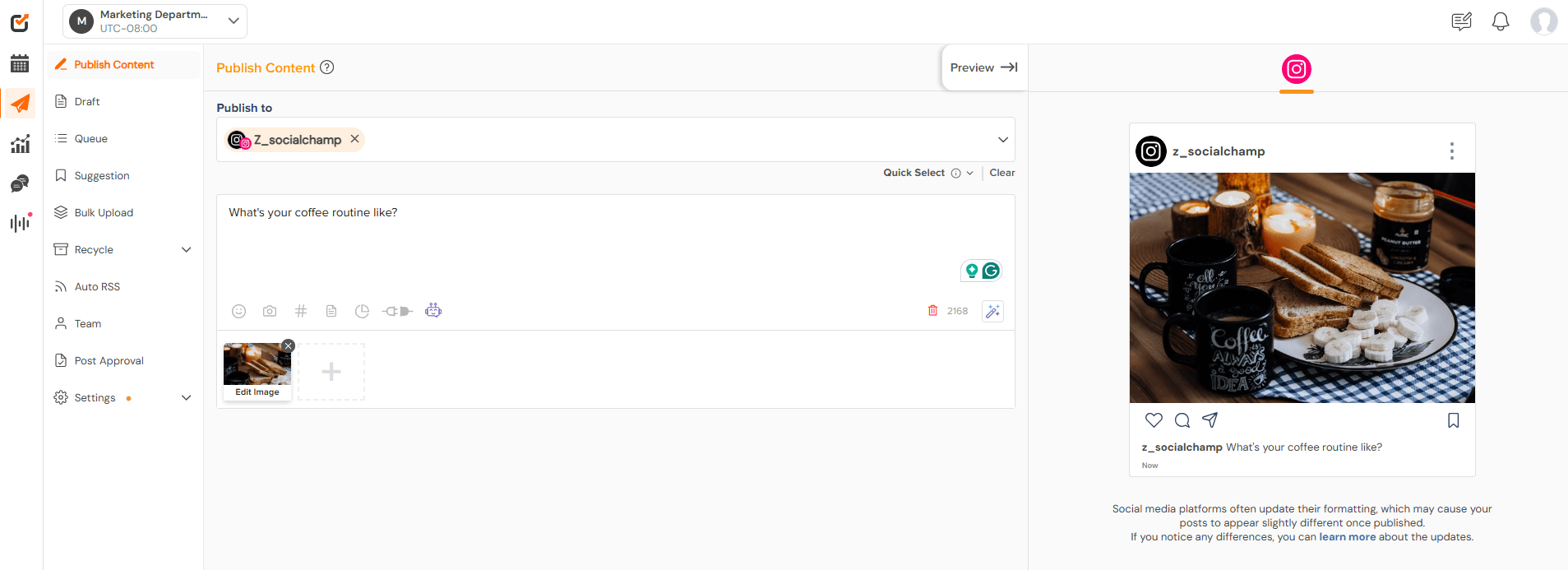
Social Champ’s Instagram Scheduler With its intuitive interface, you can easily schedule a variety of content types, including images, videos, and carousels, allowing you to keep your feed dynamic and engaging.
The platform allows you to schedule individual posts or queue up multiple posts for the future, which helps maintain a consistent posting schedule.
Pros
- AI-Powered Scheduling: Social Champ leverages AI to optimize post timings, helping you reach your audience when they’re most active and boosting engagement.
- Bulk-Scheduling: The tool allows you to upload and schedule multiple posts at once, which can save you a significant amount of time.
- Affordable Pricing: Social Champ offers a range of budget-friendly plans, making it accessible for individuals, small businesses, and larger teams alike.
- Collaboration Features: With team collaboration tools, Social Champ allows for seamless content review and approval, keeping everyone on the same page.
- Grid View: Social Champ allows a Grid View option, letting you see how cohesive your Instagram page will appear.
- Social Listening: You can also track your brand’s mentions with the tool’s listening capabilities.
- Competitor Analysis: The platform also comes with a competitor analysis tool to help you identify opportunities and trends by analyzing your competitor’s performances.
Cons
- Lack of Advanced Image Editing Tools: Social Champ does not offer advanced image editing capabilities within the platform. However, it does offer a Canva integration that lets you design and perfect your visuals within the platform.
Overall, the scheduling feature is user-friendly, versatile, and packed with functionality, making it a powerful tool for anyone looking to streamline their Instagram strategy.
Try Social Champ – the best Instagram scheduler to help you streamline your content planning, save time on repetitive tasks!
-
Buffer
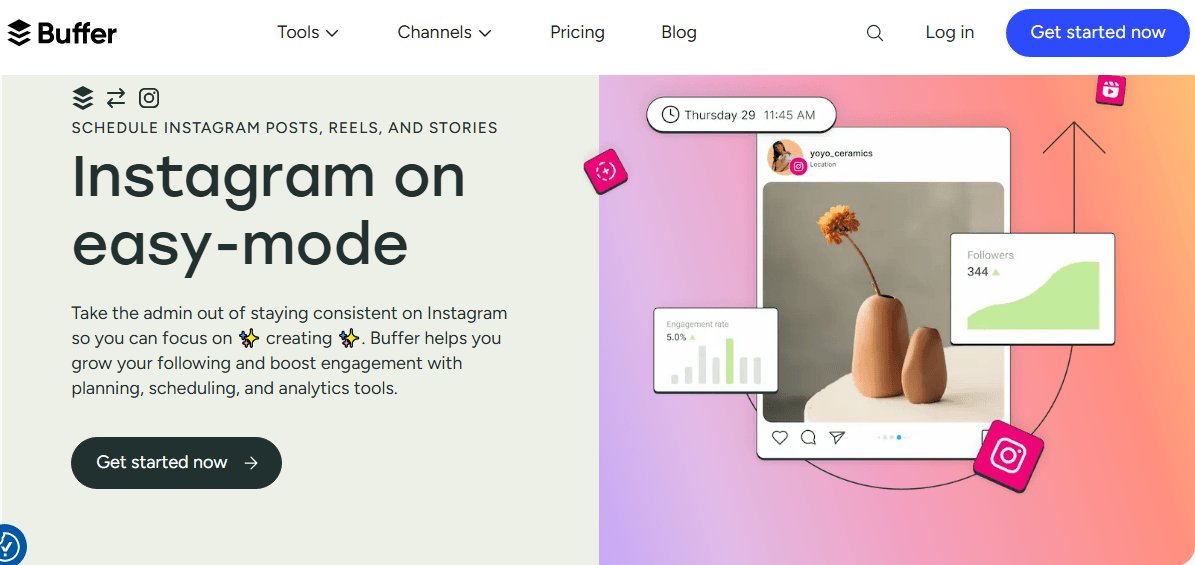
Buffer-Instagram Integration Buffer has a robust scheduling feature designed to help you efficiently manage your social media presence, including Instagram.
The platform allows you to schedule up to 10 posts per channel at a time on its free plan, making it a suitable option for casual users and small businesses.
For those who require more extensive scheduling capabilities, you can check out Buffer’s pricing and choose accordingly. Buffer’s paid plans enable you to schedule an unlimited number of posts.
Pros
-
-
- User-Friendly Interface: Buffer is known for its clean and straightforward interface, making it easy for users of all skill levels to navigate and manage their social media accounts.
- Cross-Platform Functionality: It supports various social media platforms, allowing you to schedule content not just for Instagram but also for Facebook, Twitter, LinkedIn, and Pinterest, all from one dashboard.
- Analytics and Insights: Buffer offers analytics that helps you track post performance, engagement, and audience insights, enabling you to refine your content strategy based on real data.
-
Cons
-
-
- No Bulk Scheduling: Buffer doesn’t have a bulk scheduling feature. As such, you may need third-party software to schedule Instagram posts in bulk.
-
-
-
Hootsuite
Hootsuite also has a powerful scheduling feature that streamlines the process of managing Instagram and other social media accounts.
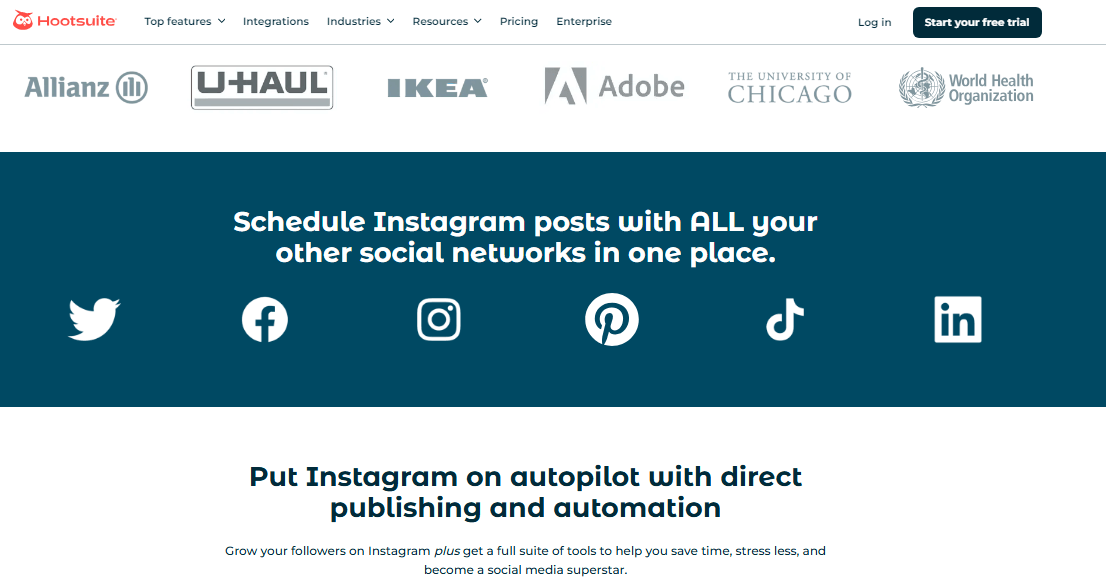
Hootsuite’s Instagram Integration When you look at social media platforms, you’ll see that their paid plans offer the ability to schedule an unlimited number of posts.
This feature is particularly beneficial for businesses and marketers who require the flexibility to plan extensive content calendars without the constraints of post limits.
Pros
- Comprehensive Social Media Management: Hootsuite allows users to manage multiple social media accounts from a single dashboard, making it easy to oversee various platforms without switching between apps.
- Advanced Analytics: Hootsuite provides robust analytics tools that help you track performance metrics across your social media accounts, enabling you to refine your strategy based on actionable insights.
- Team Collaboration Features: For businesses and larger teams, Hootsuite offers collaboration tools that allow multiple users to work together on content creation and scheduling, enhancing workflow efficiency.
Cons
- No Free Plan: Hootsuite doesn’t offer a free plan. Furthermore, its pricing can be higher than other scheduling tools, especially for small businesses or individual users.
Featured Article: Hootsuite vs Social Champ: Which One Suits Your Business
-
Later
Later is one of the best apps to schedule Instagram posts mainly because it focuses on visual content.
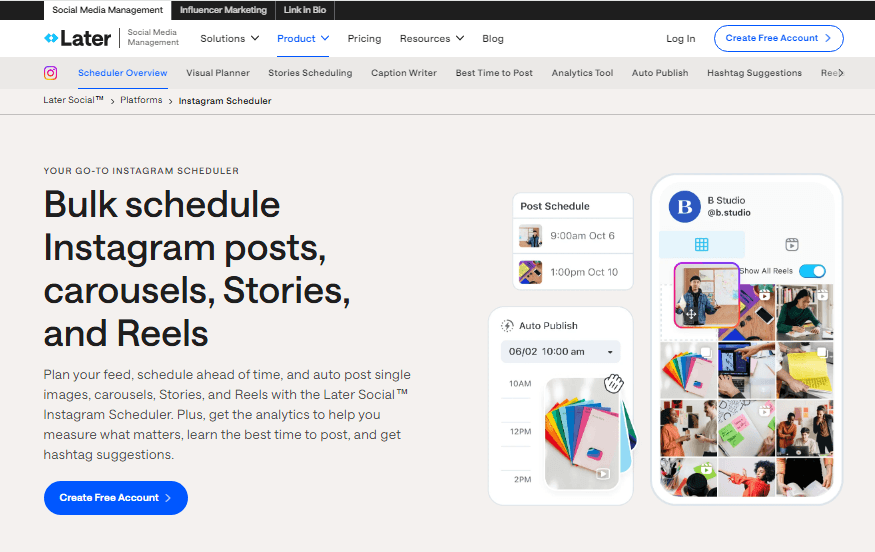
Later-Instagram Integration Its scheduling feature is designed to help users efficiently manage their visual marketing strategy, allowing for a seamless posting experience.
With Later, you can schedule up to 30 posts per social profile on its Starter plan, which is great for casual users or those just starting with social media marketing.
For those who require more extensive scheduling capabilities, Later’s other paid plans allow for a significantly higher number of posts.
Pros
- Visual Content Calendar: Later’s drag-and-drop visual content calendar allows users to easily plan and preview their Instagram feed, ensuring a cohesive aesthetic before posts go live. This feature is particularly beneficial for brands that prioritize visual storytelling.
- Linkin.bio Feature: Later offers a unique Linkin.bio feature that helps users create a clickable landing page from their Instagram feed, allowing followers to access multiple links through a single link in their bio. This can enhance engagement and drive traffic to specific pages.
- User-Friendly Interface: Later is known for its clean and intuitive interface, making it easy for users to navigate the platform and schedule posts, even if they are not tech-savvy.
Cons
- Limited Free Plan: Later’s free plan is extremely limited, which may not be ideal for individuals on a tight budget.
Featured Article: 12+ Best Later Alternatives For Your Business
How to Schedule Posts on Instagram
Scheduling posts on Instagram can help you maintain a consistent presence without the hassle of manual posting every day.
Follow these simple steps to get your content ready and set to go!
- Open the Instagram app.
Launch the Instagram app on your device to get started.
- Tap the + sign to create a new post.
Look for the “+” icon at the bottom center of your screen and tap it.

- Choose “Post”
Tap “Post” to begin creating your post.

- Load your content.
Select the photos or videos you want to share from your gallery and make any necessary edits.
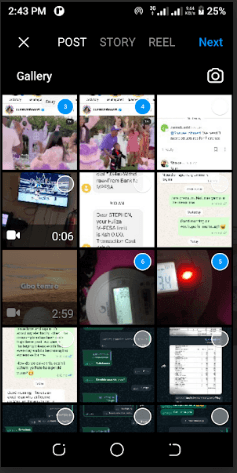
- Tap Next.
Once your content is ready, hit the “Next” button at the top right to move to the next step.
- Choose Advanced Settings, then Schedule.
Scroll down to find “Advanced Settings,” tap on it, and then select the “Schedule” option.
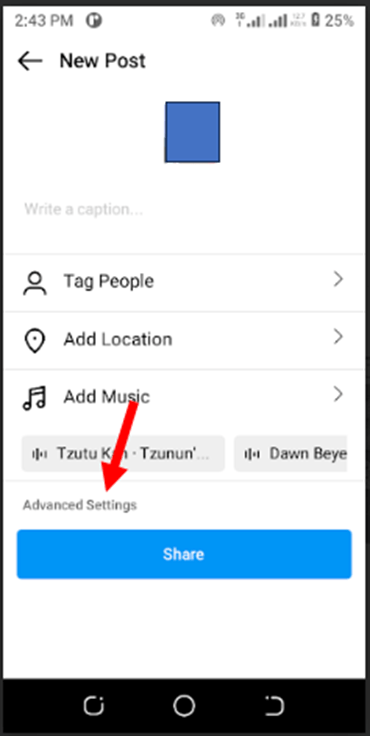
- Select your desired time and date, then tap Done.
Pick the date and time you want your post to go live, and don’t forget to tap “Done” to save your settings.
How to Schedule Instagram Posts With Social Champ
Here’s a quick rundown of how to schedule Instagram posts seamlessly with Social Champ:
-
Login to Social Champ
Start by logging into your Social Champ account.
If you haven’t created one yet, you’ll be able to sign up quickly, and you’ll be ready to start scheduling in no time!
-
Connect Your Instagram Account
Once logged in, click on the + sign on the left panel and choose “Add Social Account.”
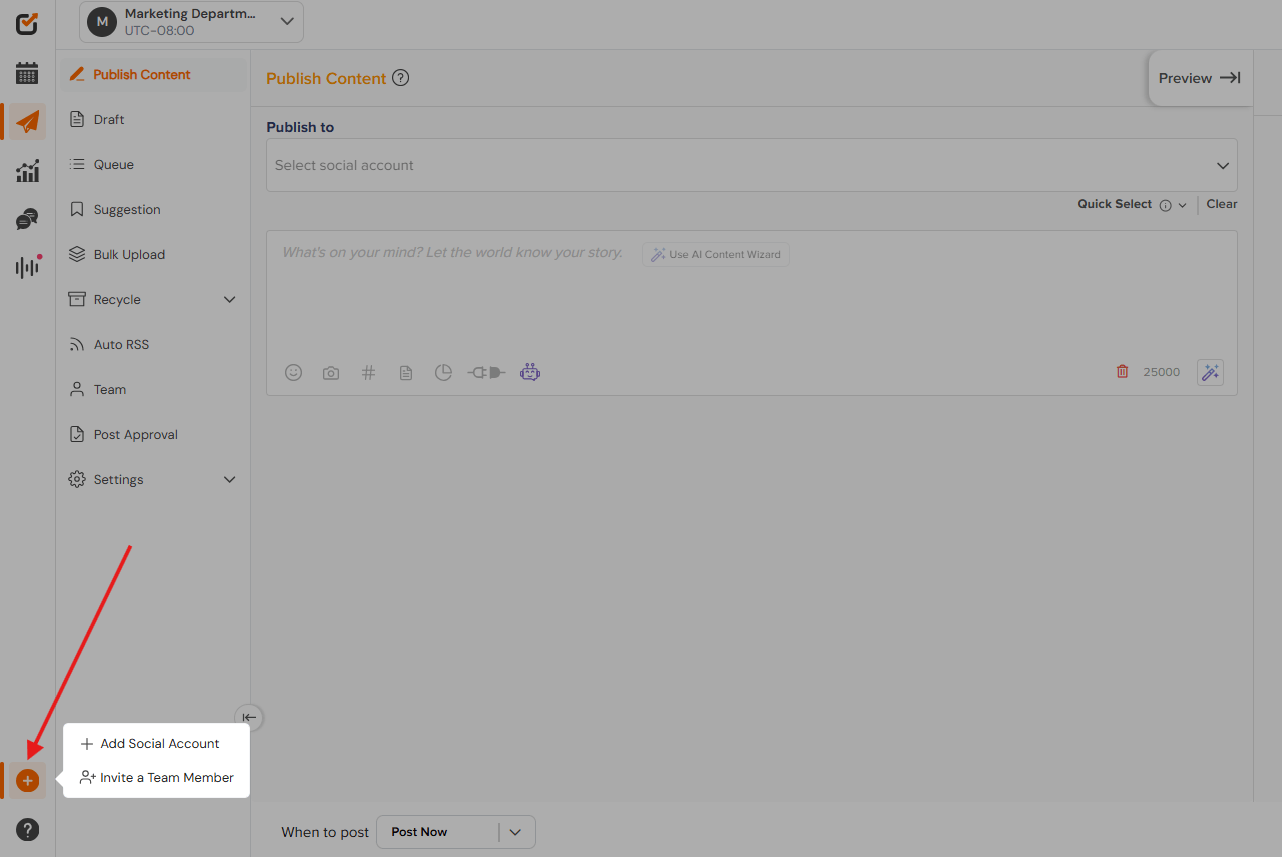
Choose “Instagram Profile” from the list of social media sites.
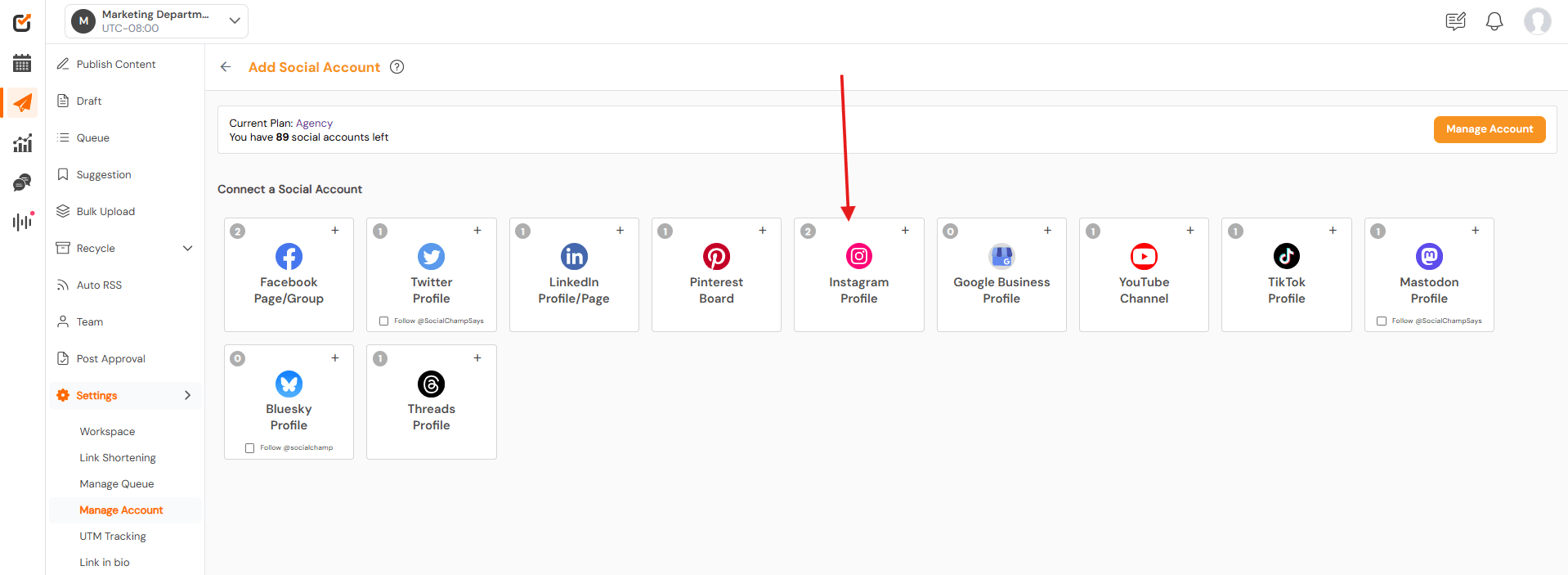
Just follow the on-screen prompts, and Social Champ will link up to your Instagram profile in a few easy steps.
-
Access the Post Composer
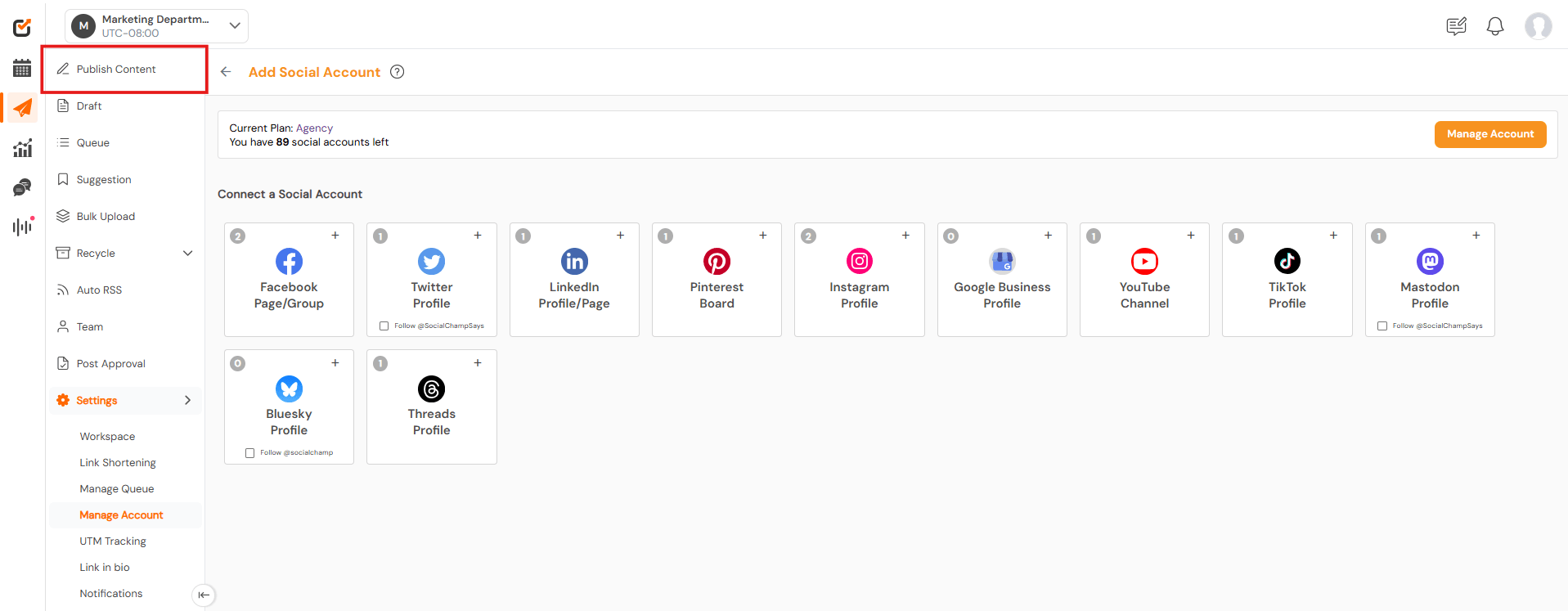
Click on “Publish Content” to access the Post Composer, where all the scheduling magic happens.
-
Compose Your Post
In the Post Composer, click on “Select Social Account” and select your Instagram Profile from the list of linked social accounts.
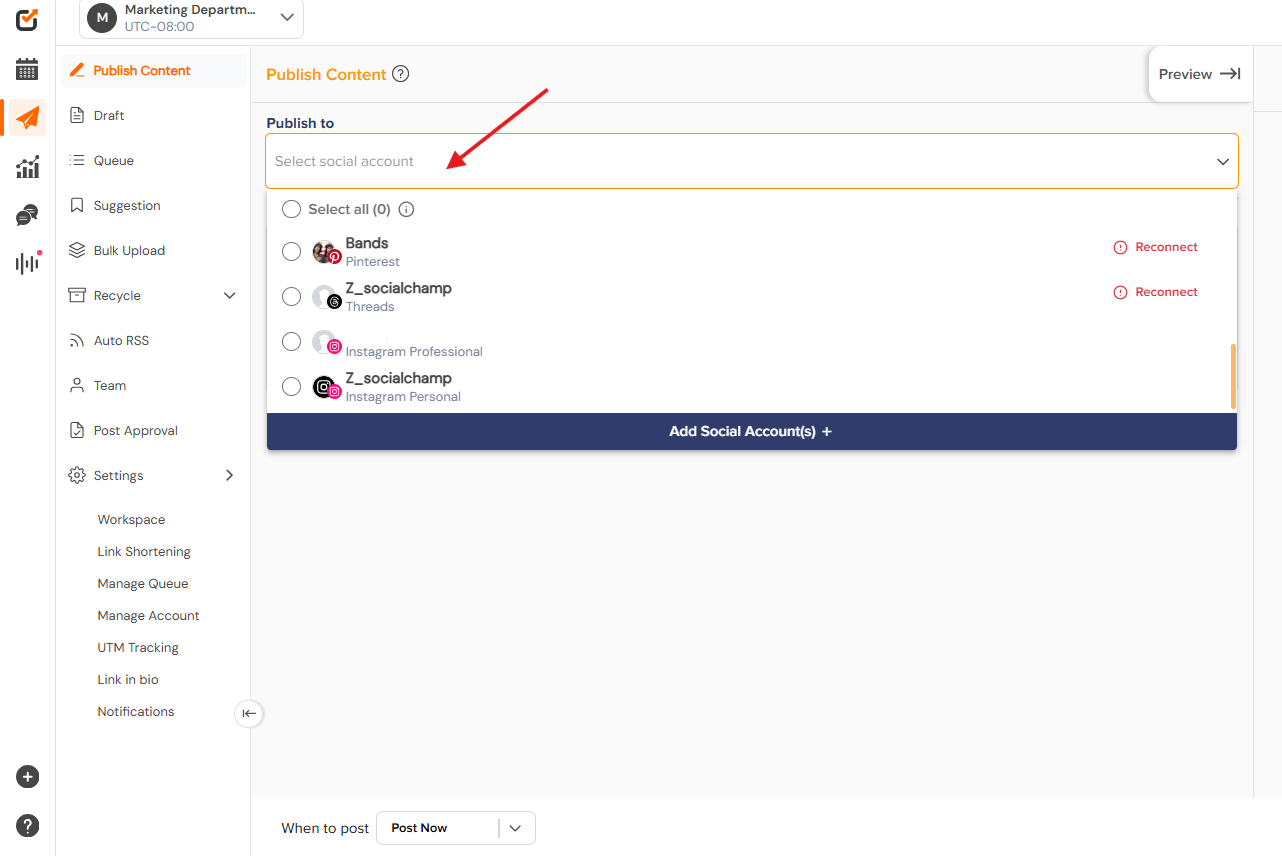
Start crafting your Instagram post. Type out your main message, keeping your brand tone and audience in mind.
-
Add Media, Captions, and Tags
Upload any media files, like photos or videos, and add engaging captions.
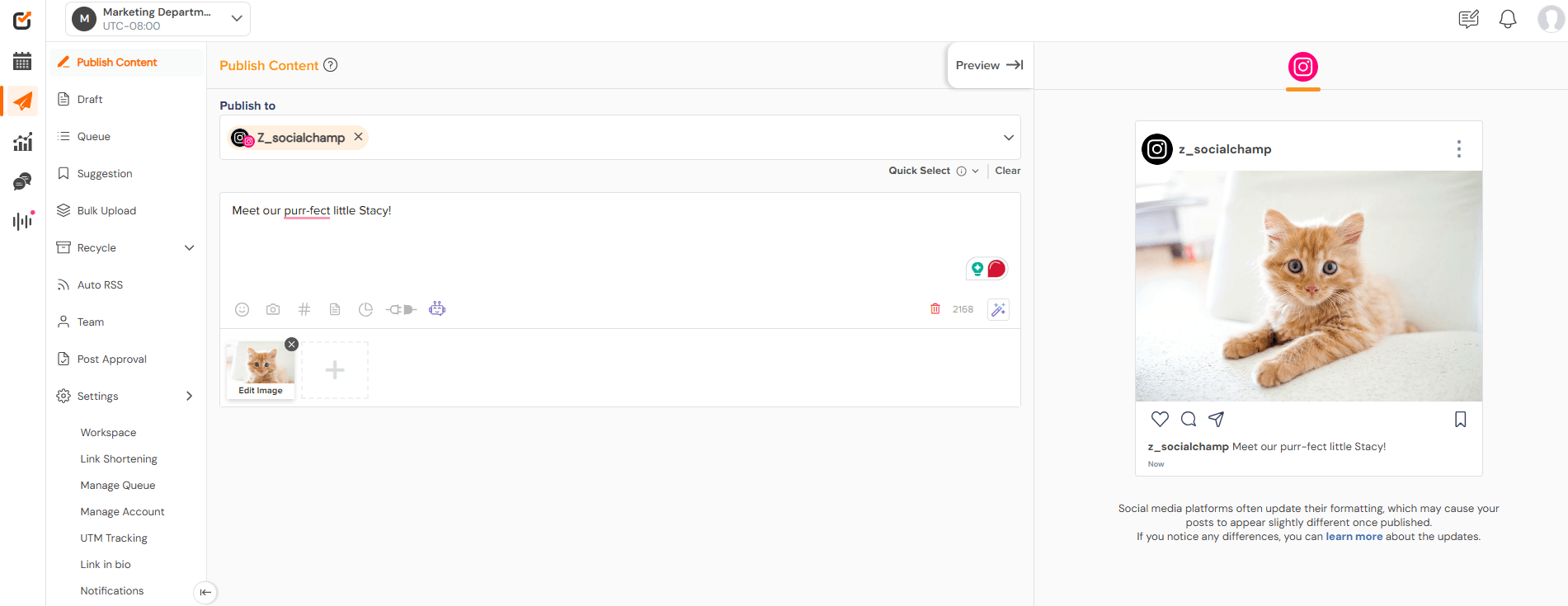
Social Champ also lets you add hashtags and tags that can boost your post’s reach on Instagram.
-
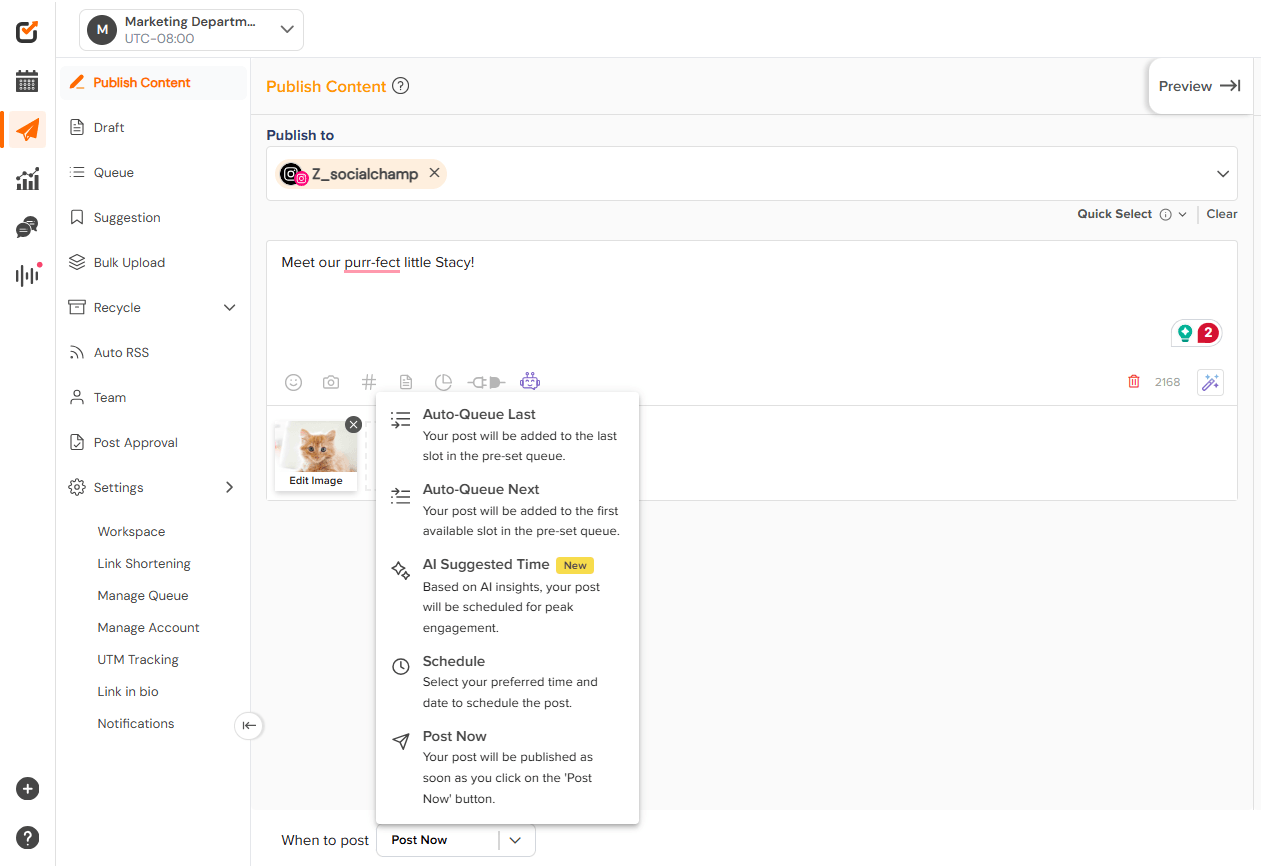
Schedule Your Post
Once you’re happy with your post, click on the scheduling options at the bottom.
Choose the date and time you want your content to go live, making it easy to plan around your peak engagement times.
-
Review and Confirm
Finally, review your post details to ensure everything looks perfect. Once you’re satisfied, hit the “Schedule” button at the bottom right.
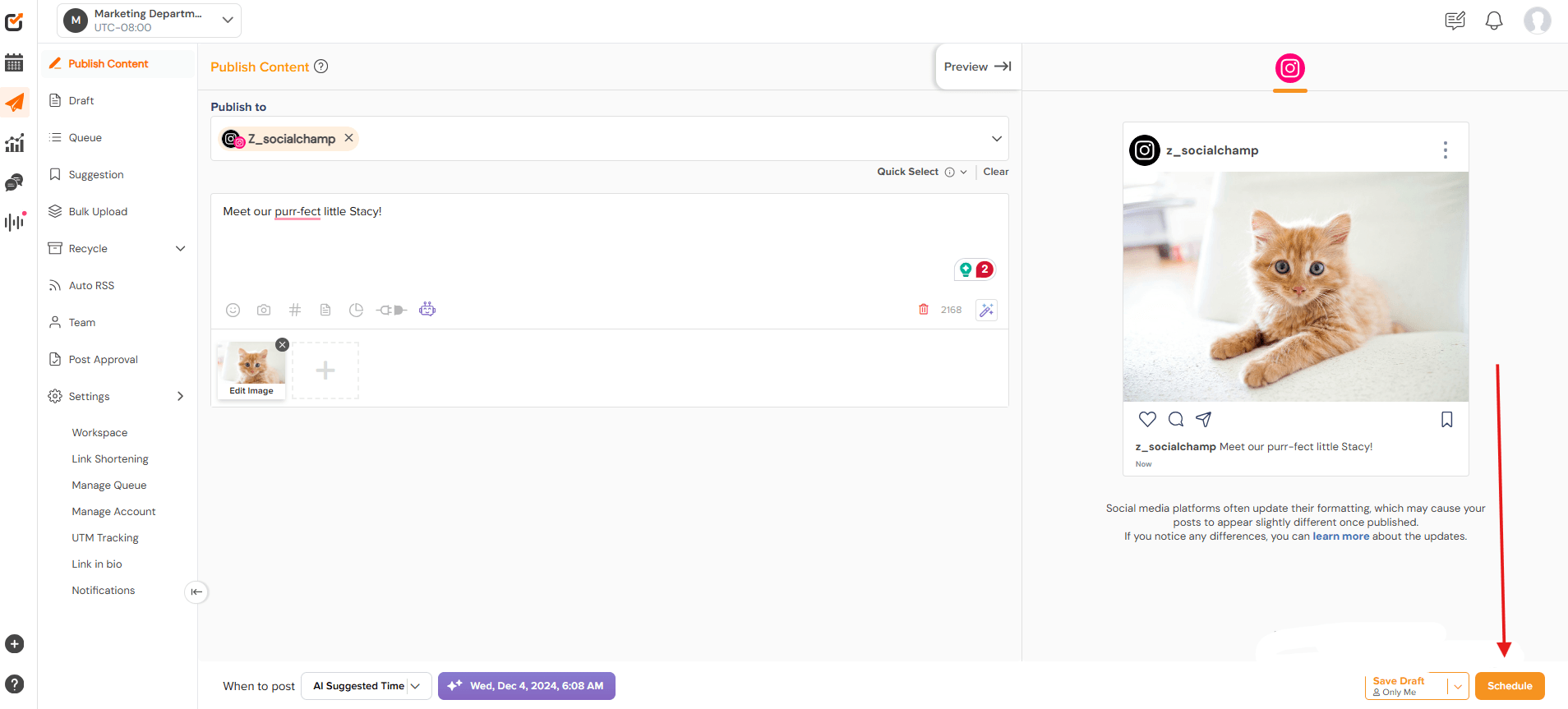
Social Champ will take it from there, posting your Instagram post on your behalf at the scheduled time.
Using Social Champ’s scheduling tool is a smart way to stay organized, keep content consistent, and save tons of time for the rest of your marketing strategy.
Social Champ makes it easy to plan, schedule, and automate your Instagram posts so you can focus on creating great content and connecting with your audience.
Conclusion
Finding the right app to schedule Instagram posts can be a game-changer for your content strategy.
With so many options out there, it’s essential to choose a tool that fits your unique needs and helps you stay organized while keeping your posts engaging. After all, who wouldn’t want to save time and still make their feed look fabulous?
If you’re looking for an all-in-one solution that balances ease of use with powerful features, Social Champ is worth a try.
It’s designed to make your life easier while boosting your Instagram presence—because let’s face it, you’ve got better things to do than stress about when to post!




4 comments
Mona Chung
The detailed evaluations of each tool’s capabilities, along with pros and cons, provide a balanced perspective for potential users. It’s encouraging to see such a variety of options that cater to different business sizes and objectives. Thanks a lot!
Lonnie Holden
This is exactly what I needed! Scheduling posts has always been a challenge for me, so it’s great to see such a thorough list of apps that can help streamline the process. Thanks for the helpful suggestions!
Dave Siegel
This blog is so helpful! Finding the right app to schedule Instagram posts can be overwhelming. Definitely bookmarking this for future reference!
Henry Alfred
This is such a helpful roundup! Scheduling Instagram posts has been a game-changer for me, and I’m always on the lookout for the best tools. Definitely bookmarking this to try some new ones—thank you for the insights!