A copyright strike is a YouTuber’s worst nightmare!
A lot of new creators use music and visuals owned by others unknowingly, and they only find out when they’re hit by a copyright strike!
That’s the main reason why you should know how to avoid copyright on YouTube.
If you upload a YouTube video and it includes content you don’t own or have permission to use, YouTube can mute your audio, remove monetization, or place a strike on your channel.
Short Summary
- Understand how copyright works to protect your videos and channel.
- Use original footage, licensed music, or public domain clips.
- Give proper credit when using others’ content.
- Plan uploads with Social Champ for stress-free posting.
- Follow rules consistently to avoid claims, strikes, or lost monetization.
In 2024 alone, YouTube processed over 2.2 billion copyright claims through automated checks. That’s how closely your uploads are being watched.
I’ve even seen videos lose traction when a claim messes with the YouTube algorithm.
So, in this guide, I’ll tell you exactly how to avoid copyright on YouTube and what you should do if a strike hits.
![How to Avoid Copyright on YouTube in [current_year]: Complete Guide 4](https://www.socialchamp.com/wp-content/uploads/2024/07/Calendar-v2.png "How to Avoid Copyright on YouTube in [current_year]: Complete Guide 5")
Post Without Second-Guessing Your Content!
When you plan ahead, you post with confidence. Social Champ helps you organize YouTube uploads so you avoid last-minute edits that can lead to claims.
What Is Copyright on YouTube and How Does It Work?
Have you ever gone through the situation where your video got muted or flagged?
I know it happens to most creators, and it’s really frustrating.
The major reason for this is that many creators don’t even realize that a few seconds of music or a short clip can trigger a copyright claim.
Let’s break down what’s really happening behind the scenes.
Copyright in Simple Terms
Copyright is all about protecting someone’s original work. Music, video clips, graphics, and even some sound effects belong to creators, and YouTube needs to respect that.
When you use their content without permission, you risk claims, strikes, or your video being taken down.
How YouTube’s Content ID Works
YouTube has a system called Content ID that scans every video upload automatically.
It compares your video to a huge database of copyrighted material. If it finds a match, it can:
- Assign a copyright claim
- Give a copyright strike
- Or block your video entirely
This happens in seconds, and sometimes even the algorithm can limit your video’s reach after a claim.
Claim, Strike, and Fair Use: What’s the Difference?
Here’s a quick cheat sheet to make sense of it:
| Type | What It Means | Consequence | What to Do |
|---|---|---|---|
| Copyright Claim | Someone else owns part of your video | Monetization may go to the owner | Review the claim, replace or remove content if needed |
| Copyright Strike | Serious violation | Limits on uploads, three strikes can suspend your channel | Fix the issue, appeal only if confident of your rights |
| Fair Use | Legal exception for commentary, education, or parody | Usually allowed | Make sure your content genuinely qualifies and credits sources |
When you understand how copyright works and these differences, it’s your first step to post confidently without any risk.
And trust me, a little knowledge can save your videos and your channel.
Featured Article: How to Make a Post Shareable on Facebook
Why Does YouTube Flag or Remove Content for Copyright?
You may have seen some videos that vanish or suddenly lose monetization, right?
It doesn’t happen randomly. YouTube flags content when it detects copyrighted material. And do you know, even the tiniest clip can trigger a claim.
Common Triggers for Copyright
Here are the usual reasons your video might get flagged:
- Using unlicensed background music, even a few seconds of a popular track can be enough.
- Reposting clips from movies or shows doesn’t mean it’s safe.
- Including third-party graphics or memes without permission.
- Streaming or sharing live copyrighted content from other creators or TV shows.
You may be surprised, but even “remixed” clips or small audio samples can trigger Content ID.
Like many other creators, you may think you’re safe. But it’s better to stay updated about how to avoid copyright on YouTube to protect your videos.
How the Detection Process Works
You can consider it like a chain reaction.
You upload a video → YouTube scans it → Content ID matches any copyrighted elements → YouTube takes action.
Sometimes, the action is a claim, sometimes a strike, and occasionally your video gets blocked entirely.
If you understand these triggers and processes, you can stay one step ahead and post without risking your channel’s growth.
Pro Tip!
Even the best content needs the right schedule. Social Champ helps you post your videos at the best time to post on YouTube to maximize your reach.

How to Avoid Copyright Strikes on YouTube
I’ve seen many creators who spent hours editing their videos, added trending tracks, and when they hit upload, a copyright claim appeared.
If you’re a YouTuber, you can totally related with this situation.
But the good news is, you can avoid this headache entirely just with a few smart habits.
Here’s how to avoid copyright strikes on YouTube:
-
Use Royalty-Free or Licensed Music
Do you know that music is the biggest culprit for strikes?
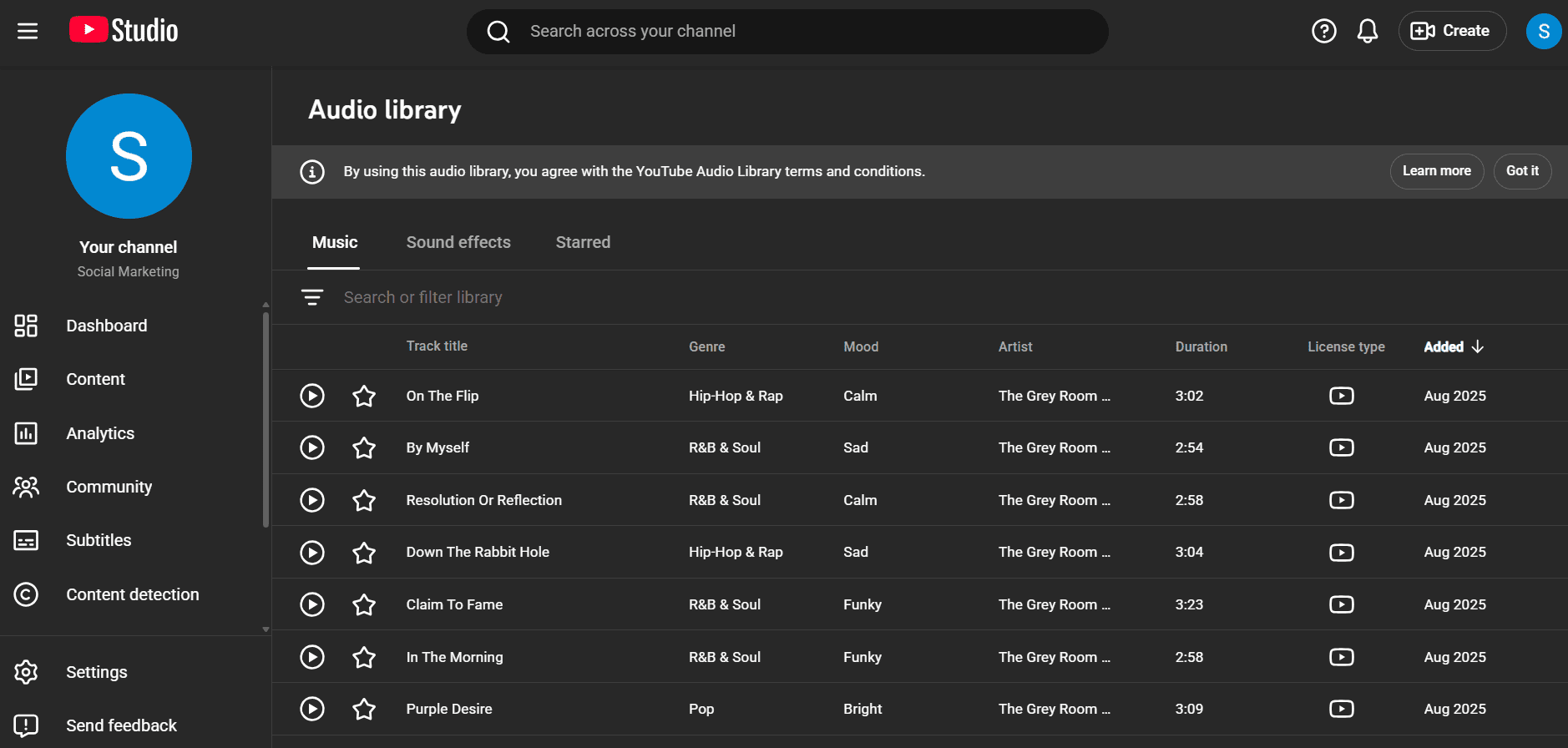
If I talk about myself, I always check if a track is royalty-free or properly licensed. Here, you can use YouTube’s Audio Library to safe track which are free to use.

YouTube’s Audio Library -
Create Your Own Visuals and Footage
If you really want to avoid copyright strikes on YouTube, I recommend that you use your own video clips, photos, and animations that are completely yours.
I started shooting simple B-roll and using basic graphics, and the difference was huge. Zero claims, full control.
-
Give Credit When Required
Some licenses allow you to use the content if you give credit to the creator. It’s easy to forget, but a small note in your description can save hours of stress later.
-
Avoid Downloading Other People’s Videos
I know when YouTubers like other people’s videos, they want to borrow them, but even short snippets can get flagged.
I once tried remixing a clip and ended up losing monetization. Not worth it.
-
Keep Up With YouTube’s Copyright Rules
It’s better to keep checking YouTube’s copyright rules because the platform updates its policies all the time.
I, too, make it a habit to always check the YouTube Studio copyright tab before posting.
Pro Tip for Creators!
Even if a clip is labeled “free,” double-check the terms. Some tracks may restrict monetization or regional use. A few minutes of reading now can save days of frustration later.
If you follow these steps, you cannot only keep your channel safe but also stay organized with a YouTube scheduler, which makes it easy to plan uploads without rushing.
Featured Article: How to Grow YouTube Channel (With Real-Life Examples)
What Are the Best Tools and Resources to Prevent Copyright Issues?
Back then, when I started posting regularly on YouTube, I realized that it’s not enough to rely on guesswork only.
It feels really overwhelming when you find safe images, music, and clips. But don’t worry, there’s good news.
You can use many tools and resources to make this process easier and safer.
Royalty-Free and Licensed Media Tools
If you use the right tools, you won’t get claims from Content ID. Here are some popular options you can go for:
| Tool | Type | License | Best For |
|---|---|---|---|
| TrackClub | Music | Royalty-free with subscription | Background music for videos |
| Epidemic Sound | Music and SFX | Subscription-based, commercial use allowed | Creators, YouTubers, streamers |
| Canva Elements | Graphics and Video Clips | Free and premium licenses | Thumbnails, motion graphics, visual elements |
| Pixabay / Pexels | Images and Videos | Free / Public domain | Stock visuals, clips, backgrounds |
YouTube’s Own Features
YouTube itself offers a few tools to keep your uploads safe:
- Audio Library: Free music and sound effects cleared for monetization.
- Creative Commons Filter: Search videos licensed for reuse.
- Rights Management Dashboard: Check which content belongs to you and monitor claims.
Stay Organized With Social Champ
Let me tell you the secret of stay organized on your YouTube channel.
It’s Social Champ!
If you manage multiple YouTube uploads, Social Champ makes it easier for you to schedule them.
You can plan in advance, review everything, and ensure you only post content that’s safe and doesn’t affect your channel growth.

Tip of the Day!
Don’t rush uploads at the last minute. Plan ahead and schedule YouTube videos using Social Champ to stay organized and post when your audience is most active.
Save Time, Focus on Creating!
Don’t let copyright worries slow you down. Social Champ makes scheduling, monitoring, and publishing your videos simple so you can spend more time creating content.
What Is Fair Use and How Can You Use It Safely?
Have you ever watched a reaction video or a funny commentary clip and thought, “How do they get away with that?” That’s fair use in action.
Basically, YouTube lets creators use copyrighted material in certain situations, but don’t get me wrong. It’s not a free pass.
Fair Use in Everyday Terms
Fair use is usually allowed for:
- Commentary: Adding your thoughts or perspective on someone else’s video.
- Criticism: Reviewing movies, shows, or games.
- Education: Using clips to explain or teach something.
- Parody: Making fun of content in a funny or transformative way.
I’ve seen my fellow creator who tried to make a reaction video once and used a short clip from a popular show with his commentary.
At first, he thought he’d get a strike, but luckily, it was considered fair use.
The Four-Factor Test
To play it safe, think about these four questions:
- Purpose and Character: Are you adding value, or just reposting?
- Nature of the Work: Original creative content is stricter.
- Amount Used: The less you use, the safer you are.
- Effect on the Market: Will your video replace the original?
Simple Examples
- Fair Use: A reaction video where you comment on a short TV clip.
- Not Fair Use: Uploading a full episode with minor edits.
What to Do if You Get a Copyright Claim or Strike
Have you ever been in a situation where you see a copyright warning on one of your videos?
I can understand the panic. But don’t worry. Once you understand what’s going on, handling it is way easier than it seems.
Know the Difference
First, let’s clear up the confusion:
- Copyright Claim: Someone owns part of your video. Usually, your video stays up, but monetization may go to the owner.
- Copyright Strike: It’s a more serious problem. It limits what you can upload, and on three strikes, your channel could get suspended.
If you know which one you’re dealing with, it can help you act smart instead of stressing out.
Step-By-Step: What You Should Do
- Check the Claim in YouTube Studio: Head to the Copyright tab and see exactly what’s causing the alert.
- Remove or Replace the Problem Content: Swap out the music, clip, or image that triggered it.
- Dispute Only if You’re Sure: If you truly own the content or fair use applies, go ahead. Otherwise, don’t risk it.
- Learn and Avoid Repeat Mistakes: Three strikes can suspend your channel, so double-check future uploads.
How to Legally Use Music, Clips, and Images on YouTube
At first, most of the creators think that if they use a quick background track or a stock image, it won’t cause any harm.
And when they get their first claim, they realize how careful they need to be.
Let me tell you the key: Use legal content and know where to find it.
Purchase or License Content Properly
If you want popular music, graphics, or clips, the safest way is to buy a license.
Platforms like Epidemic Sound or TrackClub make it simple. You pay once or subscribe, and you’re cleared to use the content without worry.
Use Creative Commons Wisely
Creative Commons is another option, but it’s not all “free to use.” Each license has its rules:
- Some require attribution
- Some restrict commercial use
- Some forbid modifications
You should always check the license before you include it in your video. I’ve seen many creators get claims because they assumed “free” meant “safe for monetization.”
Safe Content Checklist
Here’s my personal checklist before uploading anything:
- Use original or licensed tracks
- Attribute creators properly when required
- Avoid copyrighted intros, logos, or transitions
- Double-check usage terms even for “free” content
Public Domain Sources
You shouldn’t ignore the public domain!
Sites like Pixabay, Pexels, and Unsplash provide images and clips that are free to use. I often pull backgrounds or B-roll from these to save time and keep my videos safe.
What Are the Consequences of Ignoring YouTube Copyright Rules?
I’ve learned from my experience that if you ignore copyright rules, it can be costly.
Even one small mistake can quickly snowball, and before you know it, your video is blocked, monetization is gone, and even your channel could be at risk.
What Can Happen?
Here’s a quick look at what could happen if you skip the rules:
| Violation Type | Penalty | Duration |
|---|---|---|
| Copyright Claim | Monetization goes to the owner | Usually permanent on that video |
| Copyright Strike | Upload limits, three strikes can suspend the channel | Strike lasts 90 days |
| Repeated Violations | Account termination | Permanent |
Even if you’re careful most of the time, one wrong track or clip can slow your growth or lead to serious consequences.
Conclusion
So, here’s the takeaway: if you learn how to avoid copyright on YouTube, you can easily protect your channel, your hard work, and your peace of mind.
You should use your own footage, pick licensed or public domain music, and give credit when it’s needed.
Plus, make sure to plan ahead with Social Champ to stay organized and avoid last-minute stress.
With these steps, you can post confidently, grow your audience, and focus on creating content you love.