
With so many YouTube videos going live every minute, every day, you need to know the best time to post on YouTube; otherwise, your content might just be lost!
You cannot predict the best times based on your intuition, and you most definitely can’t be uploading videos on a whim. If you do, well, that would be an easy way to go down! Hence, it is important to find when your audience is most active.
There are a few ways to do it, including using a YouTube scheduler, and I’ve created this guide to tell you about them. So let’s not waste any more time and get going!
Short Summary
- Timing your YouTube uploads helps trigger early algorithmic momentum so your videos don’t get buried under millions of daily uploads.
- While general weekday afternoons (3 PM – 5 PM) and weekend mornings (6 AM – 8 AM) serve as strong general defaults, ideal windows shift depending on the day of the week.
- Wednesday at 4 PM stands out as the single highest-performing global upload slot, with Thursday and Friday afternoons following closely behind.
- Shorts are less time-sensitive due to their continuous recommendation feed, whereas long-form videos benefit from being posted 1–2 hours before peak audience hours so YouTube can index them.
- Live streams and Premiere videos should be launched directly during peak hours (like weekday evenings or weekend afternoons) to capture real-time viewer engagement.
- Broad geographic regions require different target times—for example, mid-day to late afternoon works best for North America, while evenings are ideal for South Asia and Australia.
- You can find your ideal posting schedule by checking the “When your viewers are on YouTube” heatmap in YouTube Studio, manually A/B testing different time slots, or using AI-suggested scheduling tools.
- Success shouldn’t just be measured by total views, but by early view velocity in the first 24–48 hours, browse and notification traffic sources, average watch time, and new subscriber growth.
What Is the Best Time to Post YouTube Videos in 2026: Global Insights

If you’re wondering whether timing really makes a difference in YouTube marketing, the answer is a firm yes—and there’s data to back it up.
Thanks to our analytics tool and multiple studies from sources like HubSpot, consistently show that when you post can have a significant impact on how well your video performs.
Let’s take a look!
-
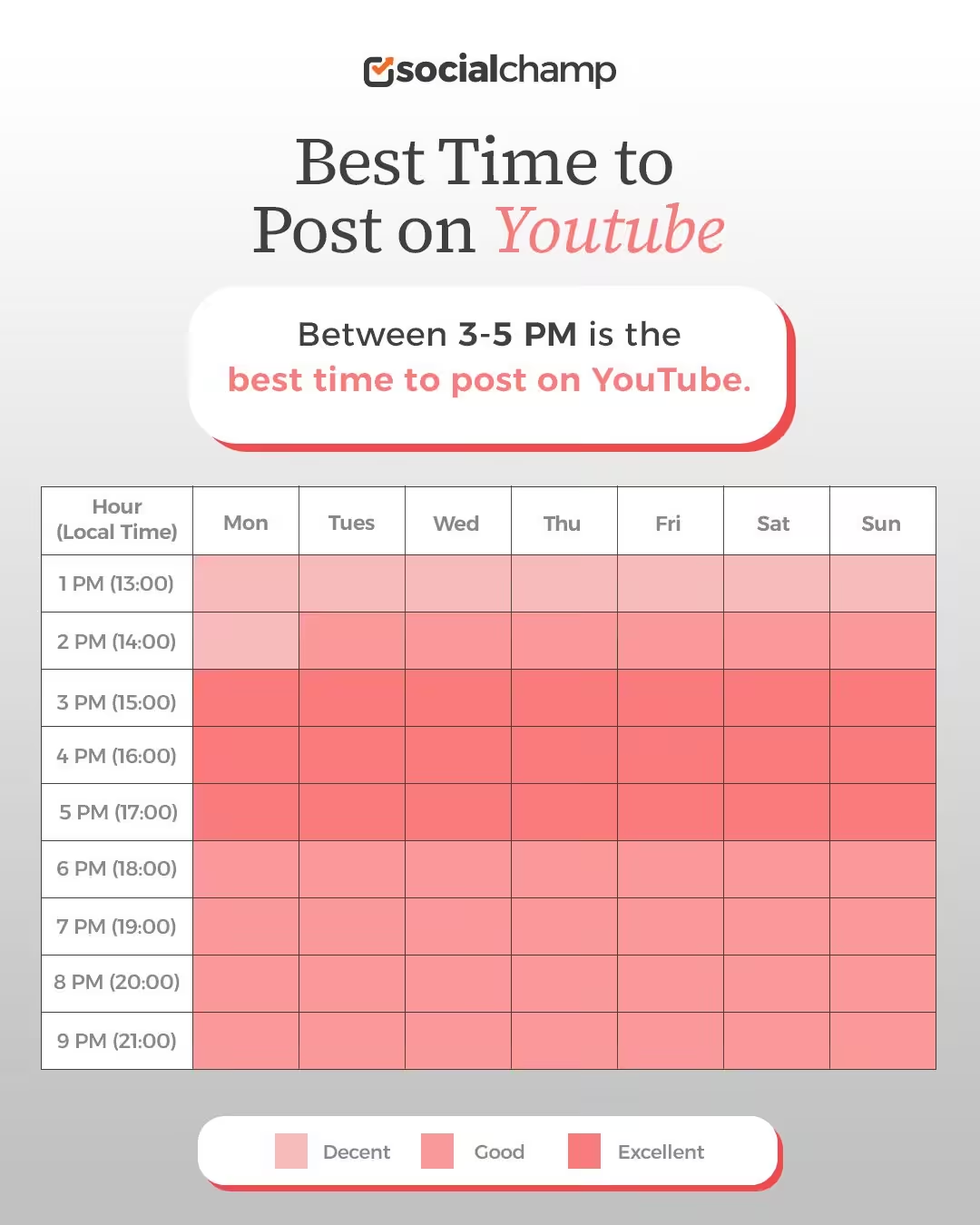
Peak Engagement Falls Between Late Afternoon and Early Evening
Across multiple studies, one pattern consistently stands out: afternoons and early evenings tend to generate the highest viewer activity on YouTube.
Specifically, the 3 PM to 5 PM window on weekdays has emerged as a sweet spot.
This time frame allows your video to populate in feeds and recommendations just before users log on after school, work, or during evening downtime.
-
The Golden Hour: Wednesday at 4 PM
Among all time slots analyzed, Wednesday at 4 PM appears to outperform others regarding average views. According to research, videos posted at this time consistently see higher engagement.
Friday and Thursday, followed by Monday at 4 P.M., also rank well, but Wednesday stands out as the prime opportunity for visibility.
-
Late-Night Activity Also Holds Value
While afternoon posts get a head start, evening hours (6 PM to 9 PM) remain strong contenders for engagement.
That makes sense: this is when people are relaxing and unwinding and more willing to click on long-form content or explore something new.
If your audience is older or international, these late slots might work even better.
At a glance:
Featured Article: How to Post a Video on YouTube?
When Is the Best Time to Post on YouTube by Day?
While the general advice is to post on YouTube in the afternoon to early evening, viewer behavior actually shifts slightly depending on the day of the week.
Understanding these patterns can help you time your uploads for when your audience is naturally more active, without relying on guesswork.
Based on aggregated data from various platforms and scheduling tools, here’s how engagement typically flows throughout each day.
At a glance:
Best Time to Post on YouTube Monday
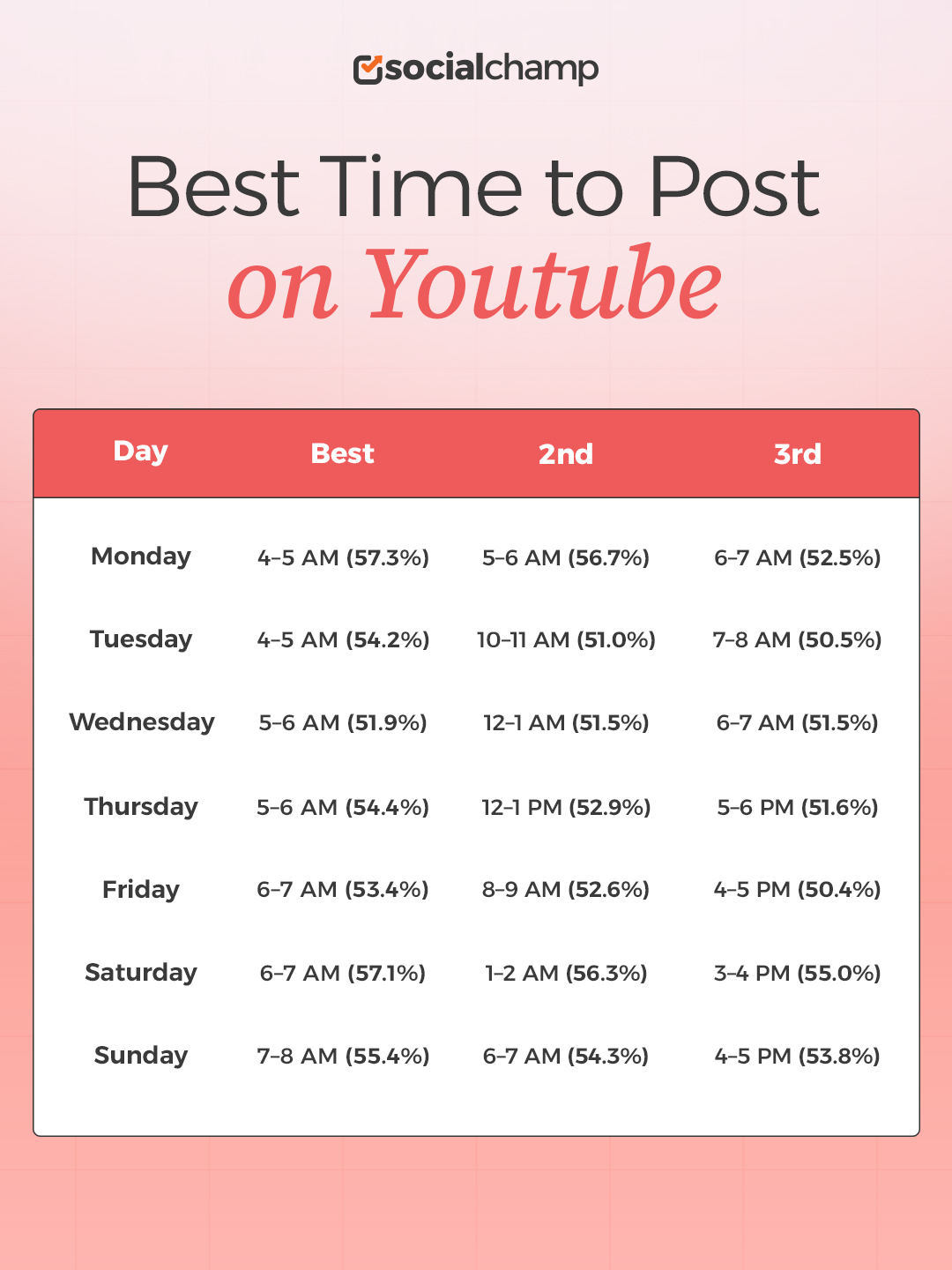
The best time to post on Monday starts at 4 AM- 7 AM; this is the best slot for the first day of the week.
As people start their week, they usually prefer to watch YouTube in the morning before work because they know the workplace will be hectic today!
Best Time to Post on YouTube Tuesday
Viewership continues to build slightly as the week progresses.
People watch YouTube on Tuesday in different slots. The best slot is 4 AM- 5 AM and is closely followed by the next best 10 AM- 11 AM.
Best Time to Post on YouTube Wednesday
Wednesday is when mid-week blues really hit you, and people still prefer to watch YouTube in the morning before work.
5 AM- 7 AM is the perfect slot for Wednesdays, and then the window again opens at midnight, between 12 AM- 1 AM.
Best Time to Post on YouTube Thursday
We can say that, according to our data, 5 AM- 6 AM is the ideal time for most days to post on YouTube, but on Thursdays the window is open in the afternoon and evening as well.
12 PM- 1 PM and 5-6 PM are the second and third best slots on Thursdays!
Best Time to Post on YouTube Friday
On Fridays, engagement peaks at 6 AM- 9 AM and then drops throughout the afternoon. It again opens at 4-5 PM to give people a break from their busy lives.
Best Time to Post on YouTube Saturday
The engagement continues to peak at 6-7 AM even on Saturdays. The second best window to post your YouTube content on Saturday is 1-2 AM, and the third window opens at 3-4 PM.
Best Time to Post on YouTube Sunday
Sundays often follow a similar pattern to Saturdays, but with slight differences. The best window opens between 6-8 AM and then closes for the afternoon.
It again opens between 4 PM- 5 PM to give a good climax to everyone’s week!
Best Time to Post on YouTube by Content Type
Timing on YouTube isn’t a one-size-fits-all game. Uploading a quick, casual Short is completely different from hosting a live stream or dropping an hour-long, deep-dive video.
The trick to choosing the best time to post comes down to understanding how viewers interact with each specific content format. Here is a breakdown of how publishing times vary across YouTube’s main content types, formatted to help you refine your channel’s schedule.
| Content Type | Timing Sensitivity | Best Time to Post | Optimal Strategy |
|---|---|---|---|
| YouTube Shorts | Low | 12 PM – 5 PM (Weekdays) |
Focus on content quality; post during afternoon windows for a minor early boost.
|
| Long-Form Videos | High | 1–2 hours before peak (e.g., 2 PM – 4 PM for a 6 PM peak) |
Post early so YouTube can index and process the video before peak viewer traffic.
|
| Live Streams | Very High | 7 PM – 10 PM (Weekdays)2 PM – 8 PM (Weekends) |
Broadcast live directly during peak hours when viewers are free to watch in real time.
|
| Premieres | High | At peak viewer activity (e.g., 5 PM – 7 PM) |
Launch directly at peak hours to maximize live chat interaction and engagement signals.
|
Featured Article: How Often Should You Post on YouTube Shorts?
What Is the Best Time to Post on YouTube by Country and Time Zones?
Based on competitor findings and general platform trends, the table below provides optimal posting time frames (local time) for broad regions.
But remember: Always prioritize your own channel’s YouTube Analytics data over these general times.
| Region/Country | Optimal Posting Window (Weekdays – Local Time) | Optimal Posting Window (Weekends – Local Time) | Viewership Trend |
|---|---|---|---|
| North America (U.S./Canada) | 12 PM – 5 PM (EST/PST) | 9 AM – 2 PM (EST/PST) | Strong mid-day and late-afternoon peaks for breaks and leisure. |
| UK/Europe | 4 PM – 7 PM (GMT/CET) | 11 AM – 2 PM (GMT/CET) | Afternoon/Early evening for after-work/school relaxation. |
| South Asia (India) | 8 PM IST | 11 AM IST | High evening viewership after daily routines; late mornings on weekends. |
| Australia | 6 PM – 8 PM (AEST) | 1 PM – 4 PM (AEST) | Evening is prime time after work, with weekend afternoons also strong. |
Aligning with Your Audience and Scheduling
The biggest piece of advice is to align your posting times with your audience’s primary location using YouTube Studio Analytics.
- Access Audience Data: Go to YouTube Studio Analytics, Audience, “When your viewers are on YouTube.” This heatmap shows exactly when your viewers are most active, displayed in their local time.
- Prioritize Your Top Region: If 80% of your audience is in the U.S., schedule your post for their peak time. If you have a global audience, target the peak time of your largest audience segment.
- Cross-Time Zone Scheduling: For channels with significant audiences across multiple time zones (e.g., U.S. and U.K.), publishing 2-3 hours before the peak time in your largest region can allow the video to gain initial traction, or use a tool like Social Champ that can automatically handle scheduling across multiple time zones to hit different local peaks with separate posts (if using other platforms like Twitter or Facebook to promote the video).
Finding Your Best Time to Post on YouTube
One thing you should know about the best time to post is that there’s no single best time on social media. You might get a lot of the information from data like ours, but that doesn’t mean that it will work for you. The best time to post on YouTube depends on many factors, including your industry, region, and audience.
Which is why it is important to find the best time to post for your audience, so you can publish your content when they’re active. There are two ways you can do this! First is to A/B test your timing. This is manual effort; you need to create content and experiment with posting it at different times and see which time it performs best. That might be your best time to post.
However, this first method requires a lot of time and trial and error. The easier and much more efficient way is to get a tool that tells you the best time to post for your audience. These tools have AI-suggested times that analyze your data from previous posts and, based on that, recommend the best time to post. This has a much better chance of success, and it also saves you so much effort and time.
Another option is relying on YouTube management tools to do the heavy lifting!
Social Champ is one such tool that gives you the option to let AI suggest the best time to post on YouTube. It analyzes your audience’s past behavior with your content and then suggests the right time to post. This is the single easiest way to get your posts live at the right time.
Here’s how you can schedule YouTube Shorts and videos through Social Champ for the best time:
- Sign in to your Social Champ account; if you’re new, please sign up!
- Connect your YouTube profile and select YouTube from the “select social accounts” tab.
- Create your post and check the preview.
- Select “AI suggested time” at the “when to post” tab at the bottom of the screen.
- Select “Go for it” and hit schedule.
Stop Guessing Your Best Upload Time!
How To Measure Success
Timing your uploads perfectly won’t mean much if you don’t track how those specific publish windows impact performance. Because YouTube takes time to process, index, and surface content, measuring success for posting times isn’t just about total views; it’s about early momentum and sustained viewer signals.
-
Early View Velocity (First 24–48 Hours)
Check how quickly your video accumulates views immediately after publishing. High early velocity tells you your video hit your subscribers and core audience right when they were active and ready to click.
-
Traffic Sources (Browse vs. Notifications)
Look at where early views originate in YouTube Analytics. Strong performance in Notifications and Browse Features in the first few hours confirms you published at an optimal window for subscriber engagement.
-
Watch Time and Audience Retention
Pay attention to whether posting at different times impacts how long viewers stick around. Dropping a long video when your audience only has a quick break can lead to early drop-offs, while weekend or evening slots often yield higher overall watch time.
-
Subscribers and Conversions per Video
High initial engagement helps push your video to broader recommendation feeds. Tracking how many new subscribers or actions a video generates right after launch tells you if the initial timing wave helped seed the content to the right people.
Conclusion
Today, knowing the best time to post on YouTube matters just as much as content quality.
By matching your upload schedule to your audience’s habits, and giving YouTube’s algorithm a couple of hours to index your content before peak viewing time, you give every upload the fighting chance it deserves.
At the end of the day, consider these global benchmarks and content guidelines your starting line, not a rigid rulebook. Dive into your YouTube Studio analytics, test out a few different posting windows, or lean on scheduling tools to take the guesswork out of the equation.









Ben Jose
Yes, I too agree to the fact of the algorithm playing a major role behind the visibility of content at peak hours. Very well curated information.