
Wondering why your social media posts don’t get the social buzz they deserve?
Most often, it’s because of two things: no visuals at all, or low-quality photos that fail to impress.
Short Summary
- High-quality product photos can boost social media engagement by two to three times compared to text-only posts.
- Planning your shoot, including goals, audience, and platform requirements, sets the foundation for professional-looking images.
- Proper lighting, clean backgrounds, and careful attention to angles and props make your products look polished and appealing. Plus, editing and optimizing your photos for each platform ensures consistency, sharpness, and maximum visibility.
- Common product photography mistakes, such as poor lighting, inconsistent branding, over-editing, or ignoring social media optimization, can make your photos look unprofessional and hurt engagement.
- Using tools like Social Champ allows you to schedule, repurpose, and track your product photos, making your social media strategy more efficient and effective.
If you’d like to boost engagement and make your posts stand out, it helps to know that posts with high-quality images get two to three times more interactions than text-only updates.
This is exactly why product photography matters for social media marketing.
Strong visuals are the backbone of visual content marketing, as they help your brand stand out and communicate its value instantly.
So, if you’d like to capture attention, build trust, and turn casual scrollers into loyal customers, you should start using the right social media product photos.
In this guide, you’ll learn how to do product photography in a way that makes your products shine online.
In addition to finding valuable product photography tips, you’ll discover how to showcase product photos using a social media scheduler.
![How to Do Product Photography: Tips to Capture Photos That Sell in [current_year] 4](https://www.socialchamp.com/wp-content/uploads/2024/07/Calendar-v2.png "How to Do Product Photography: Tips to Capture Photos That Sell in [current_year] 5")
Turn Visuals Into Engagement!
Let Social Champ handle your social media scheduling while you focus on creating scroll-stopping content.
What Is Product Photography?
Let’s start by answering the big question: what is product photography?
Product photography is simply taking pictures of your products in a way that makes them look appealing, clear, and ready to sell.
It’s all about showing your product from the best angles, highlighting its features, and making people want to buy it.
Now that you know what product photography is, it’s important to realize that there are different types of product photography.
Types of Product Photography
We’ll focus on four main types of product photography that drive the best results.
-
Lifestyle Product Photography
Lifestyle photography presents products in scenes that reflect how people actually use them.
So, instead of just plopping it on a plain background, you place it in real-life situations that make your audience imagine themselves using it.
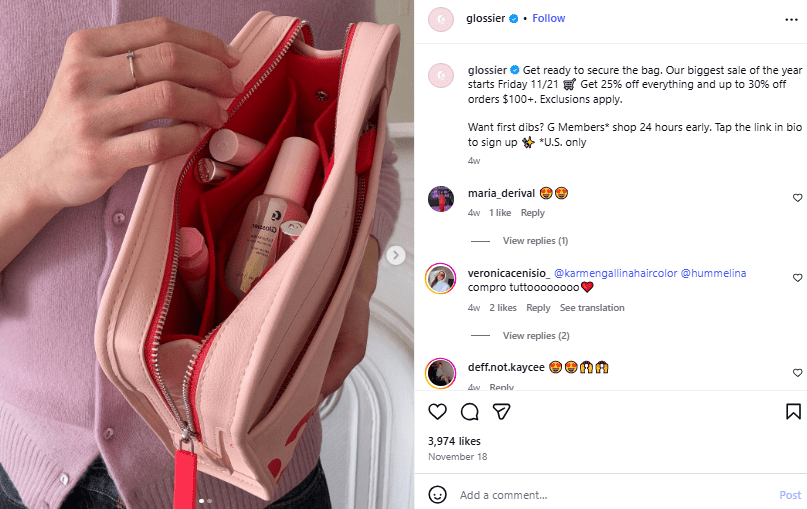
Take Glossier on Instagram as an example. They feature their skincare and makeup products on counters, in hands, and tucked inside tote bags.

Glossier’s Lifestyle Product Photography on Instagram This approach shines for brands that want to combine visual appeal with authenticity. It makes products feel relatable and part of everyday life.
-
Studio Product Photography
Unlike lifestyle photography that blends products into everyday scenes, studio photography presents them in a polished, distraction-free setting.
It’s all about crisp details, flawless lighting, and plain backgrounds that make your items pop.
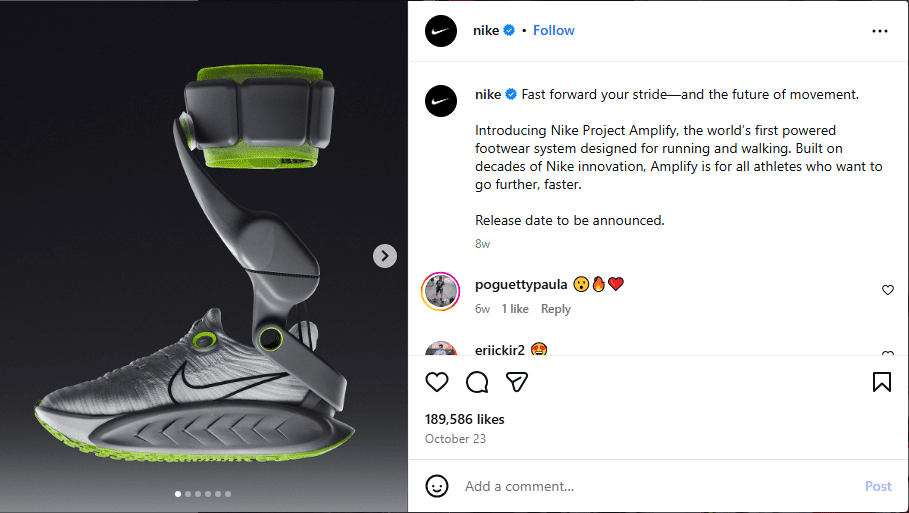
Nike is one of the brands that uses this type of product photography most often.
They usually present shoes and apparel in studio settings to emphasize design, texture, and color without anything else stealing the spotlight.
Nike’s Studio Product Photography on Instagram This style works best for businesses aiming to showcase their products clearly, whether for e-commerce, catalogs, or advertising.
-
360-Degree Photo Photography
360-degree product photography is a technique that lets viewers see your product from every angle.
It combines multiple photos into a rotating view in order to give your audience an interactive experience as if they were holding the product in their hands.
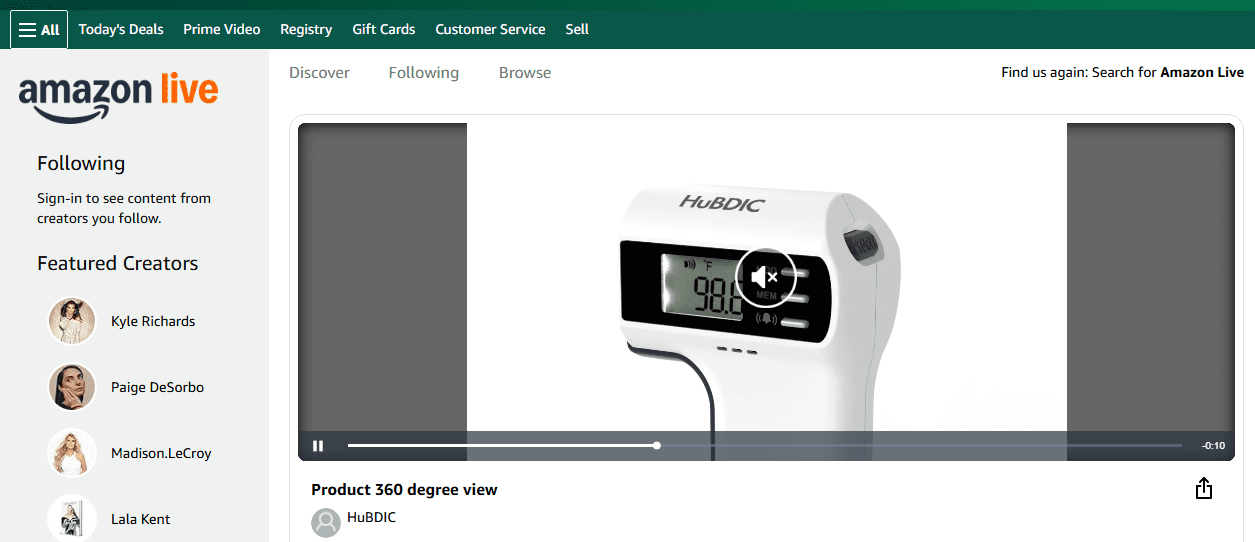
Amazon has mastered this art. Many of their product listings allow shoppers to rotate items and examine every side.
Here’s an example:
Amazon’s 360-Degree Product Photography 360-degree photography is perfect for brands that sell online and want to give shoppers a detailed, hands-on look at their products without needing a physical store.
-
Flat lay
Flat lay photography involves arranging your products neatly on a surface and shooting from above.
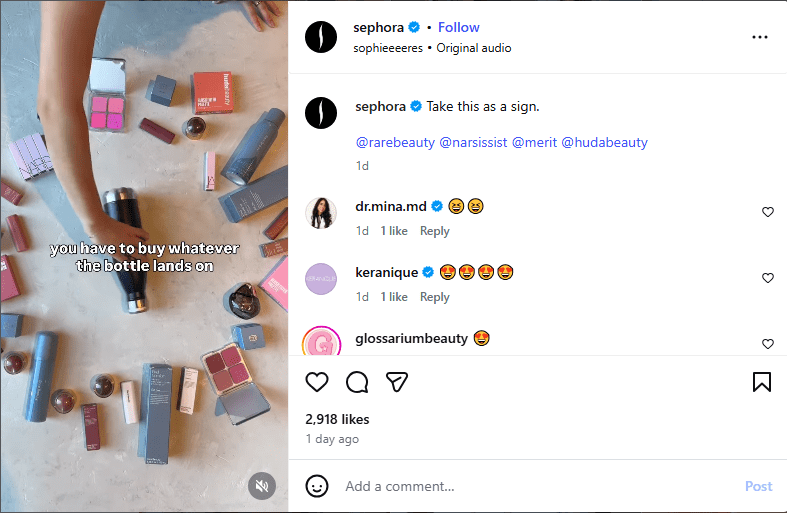
A good example of a brand that uses this style is Sephora. Their Instagram posts often feature neatly organized beauty products with props that enhance the overall aesthetic and make the items pop.
Sephora’s Flat Lay Product Photography on Instagram Flat lay photography can work best for you when you want to display several products at once.
It helps you highlight the details of each item while creating a visually appealing layout that grabs attention on social media.
Equipment for Product Photography
Now that you know the different types of product photography, the next step is making sure you have the right equipment to bring your shots to life.
Here are the essentials you’ll need for a solid product photo setup:
- Camera: A good camera helps capture sharp, detailed images, but you don’t need a fancy DSLR to start. Even a smartphone with a high-quality lens can do the trick.
- Good lighting: Proper lighting highlights your product’s features, reduces shadows, and ensures colors look true to life. Natural light or softbox setups work wonders.
- Background: Clean, simple backgrounds keep the focus on your product and give your images a professional look.
- Tripod: Using a tripod keeps your shots steady, ensures consistency across images, and frees your hands for adjustments.
But don’t worry if you don’t have access to these items. Even smartphones can work wonders for DIY product photography if you do it right.
Speaking of doing it right, there are several key principles to keep in mind when creating stunning product shots. They are:
- Composition: Arrange your product and props thoughtfully to guide the viewer’s eye and make the image balanced and engaging.
- Lighting: Use consistent, flattering light to highlight details and prevent harsh shadows or blown-out areas.
- Angles: Experiment with different angles to showcase the product’s best features and make it look dynamic.
- Color balance: Keep colors true to life and consistent across all images to maintain a professional look.
- Branding consistency: Ensure your images match your brand’s style and aesthetic so your visuals are instantly recognizable.
In the end, you want photos that look professional and drive engagement and sales. Following these principles will help you master your product photo setup and achieve those goals.
Why Product Photography is Crucial for Social Media
We’ve highlighted a few brands that are killing it with strong product photography. Glossier, Nike, and Sephora are just a few examples.
You might think product photography is only for these big brands, but that’s not true.
You can capture high-quality product photos too, whether you’re using the essential equipment we mentioned or just your smartphone. The key is to make sure your images look professional, sharp, and polished.
And why should you care? Well, high-quality product photos do more than just look good; they grab attention, build trust, and drive action. On social media, posts with clear, appealing images usually stop scrollers in their tracks and make them want to engage.
Beyond engagement, professional-looking photos also boost conversions. When your products appear professional and appealing, people trust them more and are eager to make a purchase.
That trust often sparks repeat business and keeps your customers coming back for more.
Step-by-Step Guide to Product Photography
Now that you know why product photography matters, let’s walk through a step-by-step product photography guide to help you create stunning images that sell.
Here are the steps to follow:
Step 1: Plan Your Shoot
Planning your shoot sets the foundation for creating product photos that look professional and achieve results.
Start by defining your goals. Ask yourself what you want each photo to accomplish. Is it driving sales, increasing engagement, or showcasing your product’s features?
Clear goals help guide every decision during the shoot, from lighting to composition.
Once you have your goals all figured out, the next thing to consider is who will see these photos and what appeals to them.
Understanding your audience helps you choose the right style, props, and mood to make your products irresistible.
The last step in planning your shoot is figuring out the platforms where your photos will appear.
Different platforms have different requirements for size, resolution, and format. So, planning ahead ensures your images look perfect whether they appear on Instagram, Pinterest, TikTok, or your website.
Step 2: Set Up Lighting and Background
The role of lighting and background in product photography is crucial because they shape how potential customers perceive your product.
For instance, proper lighting eliminates harsh shadows, emphasizes key features, and creates a mood that matches your brand.
Natural light is ideal whenever possible, as it creates soft, flattering shadows and true-to-life colors.
If natural light isn’t available or consistent, you can set up softboxes or other artificial lighting to evenly illuminate your product and avoid harsh shadows.
Once your lighting is ready, turn your attention to the background. It’s always advisable to choose clean, simple backdrops that won’t distract from your product. Also, make sure the color and texture complement what you’re photographing.
It doesn’t end there. You should connect the right background with your lighting to enhance the overall mood of the shot and ensure the product stands out.
One last thing to consider at this point is how your props and surroundings will interact with both lighting and background.
Even small additions can add context or a lifestyle feel, but keep them subtle so the focus remains on the product.
Thoughtful coordination of lighting, background, and props helps create polished, professional images that immediately grab attention.
Featured Article: Lighting Techniques Every Social Media Marketer Should Know
Step 3: Shoot the Product
Now it’s time to shoot your product.
First, make sure your camera or smartphone is properly focused on the product so every detail looks sharp and clear.
From there, try different angles to find the most flattering perspectives, since even a small change in angle can completely shift how the product looks.
At the same time, think about using props to add context and personality. When chosen carefully, props support the product rather than steal attention from it.
When taking shots, it’s best to take multiple shots from each angle so you have plenty of options to work with later.
This extra variety gives you more flexibility during editing and makes it easier to select images that work best for your feed, website, or marketing materials.
Step 4: Edit and Enhance
After shooting, it’s time to move into editing, where your photos truly come together.
Start by adjusting brightness and contrast so your product stands out clearly without looking overexposed or dull.
From there, fine-tune the colors to ensure they look natural and consistent across all your images.
The editing process also involves using tools like Canva, Lightroom, or Photoshop to clean things up.
Small tweaks such as cropping, straightening, or removing minor distractions can make a big difference in how professional your photos appear. These subtle changes can help keep the focus exactly where it belongs.
When done right, editing enhances your product images without overpowering them. It gives you visuals that are ready for social media and beyond.
Step 5: Optimize for Social Media
Finally, it’s time for social media photo optimization, so all your hard work pays off.
Start by adjusting aspect ratios to match each platform, since what works on Instagram may not look right on Pinterest or TikTok.
Making these tweaks ensures your photos appear exactly as intended without awkward cropping.
Next, focus on resolution and image quality. Upload images that are sharp and clear, but not so large that they slow down loading times.
Choosing the right image format also matters, as it helps preserve quality while keeping file sizes manageable.
After that, review your images for consistency across platforms. Using the same visual style and sizing helps your brand look polished and recognizable wherever your content appears.
There you have them! The best product photography tips above will help you create eye-catching images that look professional and drive real engagement across your social media channels.
Featured Article: Master Social Media Optimization Strategies
Which Platforms to Showcase Your Product Photos On
Once your product photos are ready, the next step is choosing the right social media platforms to show them off.
Picking from the best platforms for product photos helps you increase product visibility and reach the right audience at the right time.
Here’s a quick breakdown of where your product photos can shine and how each platform supports your goals:
- Instagram: This is a visual-first platform. You make carousel posts to show different angles, reels to add motion, and strong visuals grab attention fast.
- Facebook: Facebook works well for product albums, paid ads, and retargeting campaigns. It gives you space to educate, remind, and convert your audience.
- Pinterest: Pinterest is ideal for evergreen product content. Vertical images perform best and can keep driving traffic long after you post them.
- LinkedIn: LinkedIn suits B2B products and professional visuals. It’s also a great place to share behind-the-scenes content that builds credibility and trust.
- TikTok: TikTok favors short-form videos and dynamic product demos. You can do quick, engaging visuals to show your product in action and reach new audiences fast.
Choosing the right mix of platforms ensures your product photos work harder for you and help your brand stay visible, engaging, and memorable.
Still, managing posts across multiple platforms can get messy fast when you handle everything by hand.
Social Champ integration simplifies the chaos by helping you schedule posts, reuse visuals, and monitor engagement in one place.
Up next, we’ll break down how to use this handy tool, so read on to see it in action
How to Showcase Product Photos With Social Champ
If this is your first time hearing about Social Champ, it’s a social media management platform that lets you plan content, publish posts, and monitor engagement from one dashboard.
Below are simple, effective ways you can showcase your product photos using Social Champ and keep your product marketing online running smoothly.
-
Scheduling Product Posts for Maximum Engagement
Social Champ makes social media scheduling easy. Instead of posting manually every day, you can plan your content ahead of time and relax.
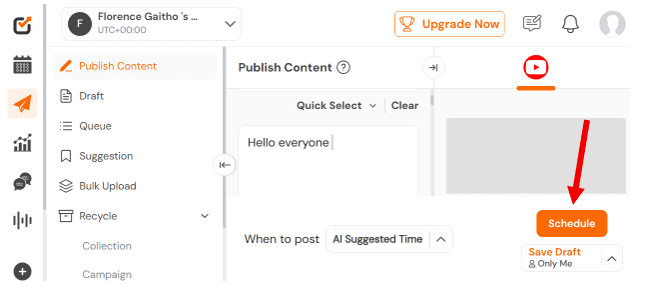
This automated scheduling means your feed stays active even when you’re offline. So, there’ll be no missed opportunities. You’ll remain consistent with your posting at all times.
-
Repurposing Photos Across Multiple Platforms
One great product photo should never be a one-hit wonder. With Social Champ, you can repurpose the same photo for Instagram, Facebook, LinkedIn, and more without starting from scratch.
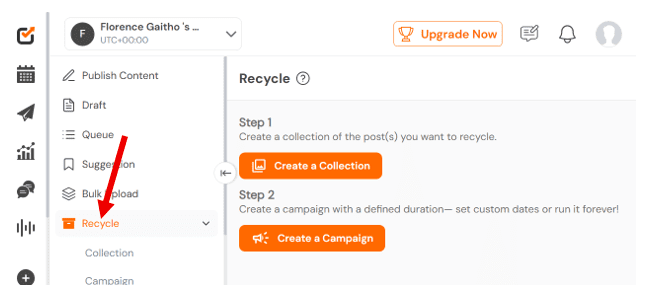
This feature saves you time while keeping your product visibility high everywhere your audience hangs out.
-
Storing Photos in the Media Library
Social Champ’s media library keeps all your product photos organized in one place.
With this, too, you won’t have to dig through folders or wonder where that perfect image went.
Having your visuals stored and ready makes planning faster and stress-free.
-
Canva Integration for Quick Editing
Need to tweak a photo before posting? Social Champ’s Canva integration lets you edit visuals quickly without leaving the platform.
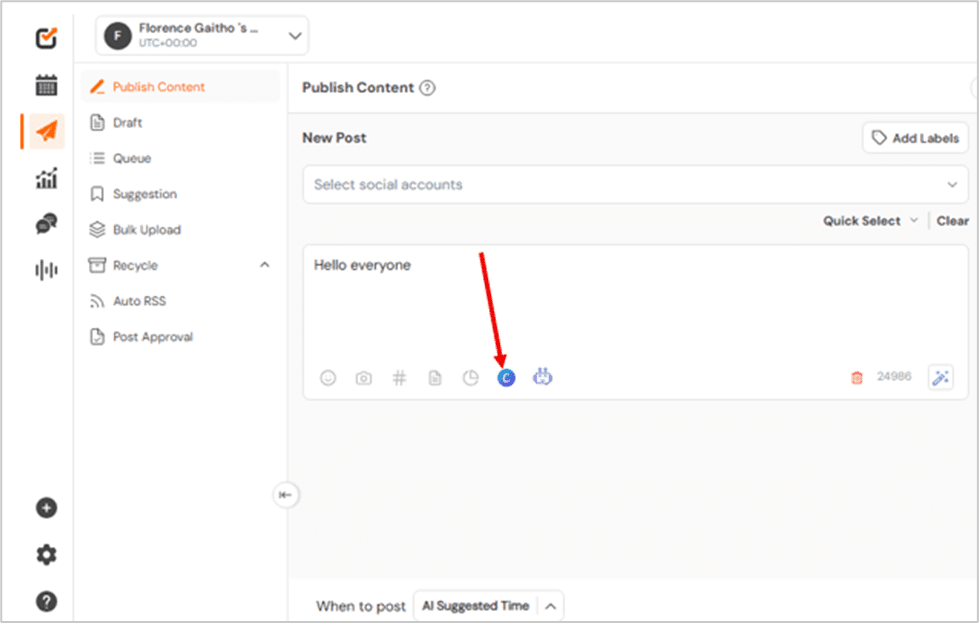
You can resize images, add text, or polish designs in just a few clicks. This keeps your visuals on-brand and ready to post in minutes.
-
Tracking Performance and Analytics to Refine Visuals
Once your photos are live, Social Champ helps you track how they perform. You can see which visuals get the most engagement and which ones need improvement.
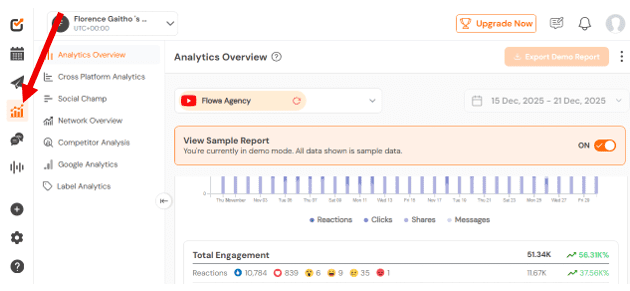
These insights help you refine your product photography over time. Better data leads to better visuals and stronger product marketing online.
-
Bulk Uploads to Save Time
If you have lots of product photos, bulk uploads are a lifesaver. Social Champ lets you upload and schedule multiple images at once.
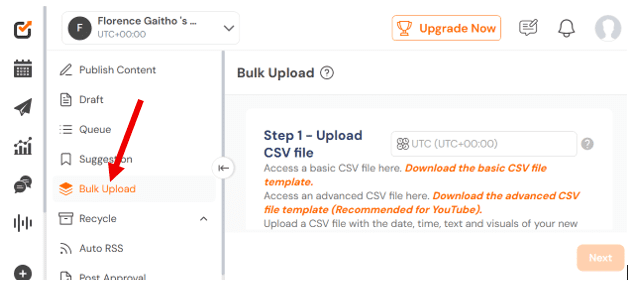
This feature cuts down repetitive work and keeps your content calendar full. You spend less time posting and more time growing your brand.
With Social Champ, showcasing product photos feels less like work and more like a smart system.
From social media scheduling to repurposing content and tracking results, everything you need for effective product marketing online stays in one easy place.
Simplify Your Social Strategy With Social Champ
Manage multiple platforms, optimize your posts, and monitor performance all in one place.
Advanced Tips for Social Media Product Photography
Here are some advanced tips help you refine your visuals and make your product photos stand out on social media:
-
Maintain Consistent Branding
Consistency helps your audience recognize your brand instantly as they scroll.
When your colors, fonts, and visual style stay aligned, your content feels professional and trustworthy.
To make this work, choose a clear color palette, stick to one or two fonts, and use similar layouts across your photos.
Over time, this visual consistency strengthens your branded content and keeps your feed cohesive.
Featured Article: Stay True to Your Brand: Conveying Values via Marketing
-
Use Lifestyle Photography to Tell a Story
Lifestyle photography adds emotion and context, which helps your products feel relatable rather than salesy.
Stories, on the other hand, make your content memorable and encourage stronger engagement.
To do this well, you should place your products in real-life settings that reflect how people use them. Show moments, routines, or scenarios that naturally highlight your product in action.
-
Leverage User-Generated Content and Reviews
User-generated content builds trust because it comes from real customers, not polished brand campaigns. Seeing others use and enjoy your products makes them feel more credible.
You can encourage customers to share photos and reviews, then feature that content on your social channels.
But always ask for permission and keep the visuals aligned with your overall brand style.
-
A/B Test Visuals to See What Resonates
A/B testing helps you understand what your audience actually likes instead of guessing. Small changes in visuals can lead to big differences in engagement.
Try posting two versions of the same product photo with different angles, backgrounds, or captions. Track performance and use the results to guide future creative decisions.
Featured Article: The Ultimate Guide to Social Media Audience Analysis
Common Product Photography Mistakes to Avoid
Before really getting the hang of it, most people run into a few common issues that quietly hold their photos back.
Knowing these product photography mistakes early can help you avoid social media image errors that can hurt engagement and visibility.
Here are the most common mistakes to watch out for and how to fix them:
- Poor lighting or blurry images: This mistake makes products look unprofessional and hard to trust. To avoid such, you should consider using natural light or simple lighting setups. Also, keep your camera steady to capture sharp, clear photos.
- Inconsistent branding: Switching styles, colors, or visual themes too often can confuse your audience. To avoid this, stick to a consistent look that matches your brand across all product photos.
- Over-editing or unnecessary effects: Heavy filters and effects can distort colors and make products look unrealistic. Instead, keep edits subtle so your photos look natural and polished.
- Ignoring social media optimization: Using the wrong dimensions or large file sizes can lead to cropped or blurry posts. Follow platform-specific image optimization tips to ensure your images load quickly and display correctly.
Avoiding these common product photography mistakes can help your visuals look professional, consistent, and ready to perform.
With the right approach and smart photo optimization tips, your product photos can stand out and drive better results on social media.
Conclusion
Learning how to do product photography is essential if you want your products to stand out and connect with your audience.
Posting high-quality images on social media will not only attract your audience’s attention. It will also build trust and encourage potential customers to take action.
The good news is that you don’t have to do the posting manually. You can leverage a powerful tool like Social Champ.
With it, you can schedule posts, repurpose content across multiple platforms, and track engagement, all from one sleek dashboard.
The end result? Your product photos will be seen by the right people at the right time.
Showcase Your Product Photos On 11 Platforms With A Single Click!
Start using Social Champ today to schedule, optimize, and track your posts effortlessly.