
Tell me honestly. When you scroll during the holidays, which Christmas social media posts attract you the most?
I’m pretty sure they are the ones that feel warm, real, and timely, and not the rushed ones that all look the same, right?
Short Summary
- Christmas social media posts help your brand connect emotionally and boost engagement.
- Start posting from early November for retail, mid-November for SaaS, and creators.
- Mix content types like greetings, UGC, contests, Reels, and carousels for variety.
- Keep visuals festive, consistent, and simple. Design doesn’t need to be perfect.
- Plan, schedule, and automate with Social Champ to stay stress-free during the holidays.
More than half of holiday shoppers now explore gift ideas and deals on social media, which means your post should show up in front of people when they are ready to decide.
If your posts feel boring, people don’t engage with them.
But if you plan ahead and share the right message, they stop mid-scroll, react, and engage.
So today, I’m going to share with you some creative ideas for social media posts, along with examples and strategies you can actually use this holiday season.
Let’s begin!

Posting daily during the holidays drains time fast. Social Champ gives you back your time without missing a post.
Why Do Christmas Social Media Posts Matter for Brands?
Christmas is not just a date on the calendar. It’s a season of excitement, joy, and connection.
People scroll with a different mindset; they are looking for inspiration, gift ideas, and content that feels festive.
If your brand shows up in the right way, you can capture attention, spark engagement, and even influence buying decisions. Missing the season means you miss the opportunity to connect.
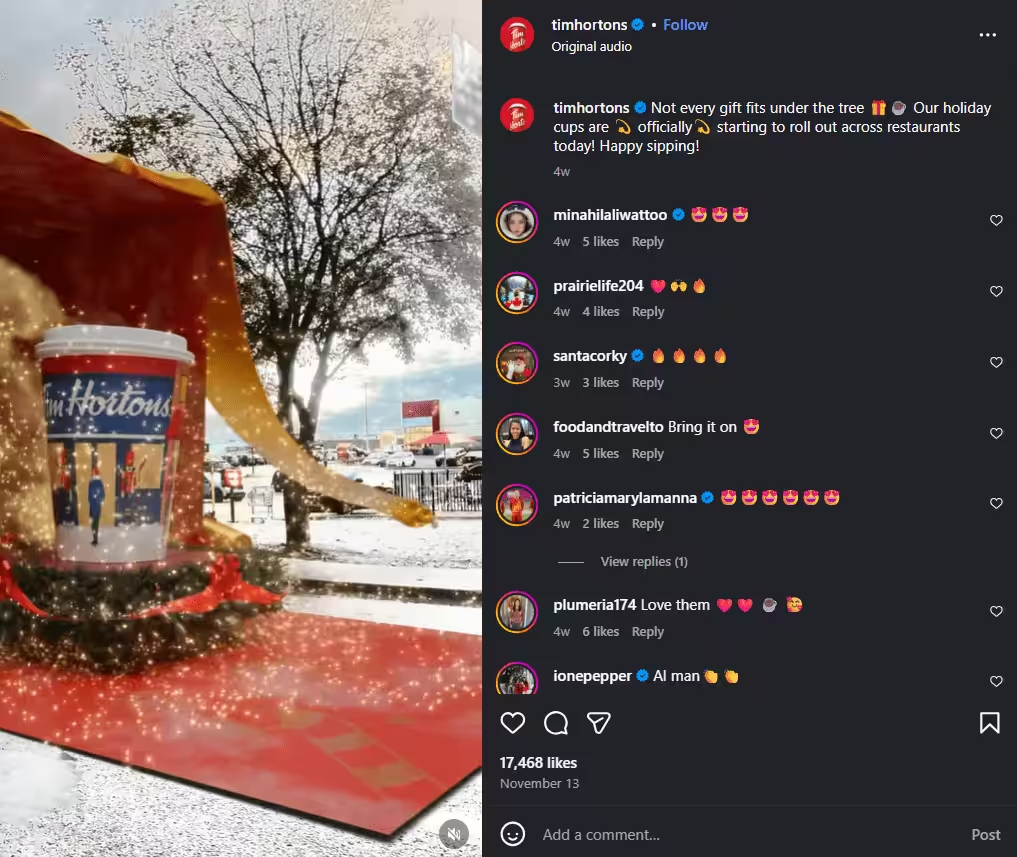
Because People Scroll Differently During Christmas
I always notice this every year, around December, social media feeds feel different. People pause longer, like more posts, and even comment on things they would normally skip.
That’s because the holiday season changes how people behave online. Your content has the chance to feel personal, fun, and shareable if you tap into that mood.
Because Emotions Drive Holiday Decisions
Let me tell you the truth: most holiday purchases start with a feeling, not logic.
Someone sees a heartwarming post or a clever Christmas idea, and suddenly they click, buy, or share.
Your Christmas social media posts can guide these decisions naturally by connecting emotionally, not pushing too hard.
Because Staying Silent Costs Attention
When the feed is full of festive posts, and your brand stays quiet, people notice that and scroll past.
If you don’t post during the holidays, people will start thinking you’re not present, inactive, and not a part of the celebration.
Because This Opportunity Won’t Last Forever
You know well that the holiday window is short. Peak engagement comes and goes fast.
Brands that plan early capture attention and make an impact. And those who wait often regret missing the festive buzz.
When Should You Start Posting Christmas Content?
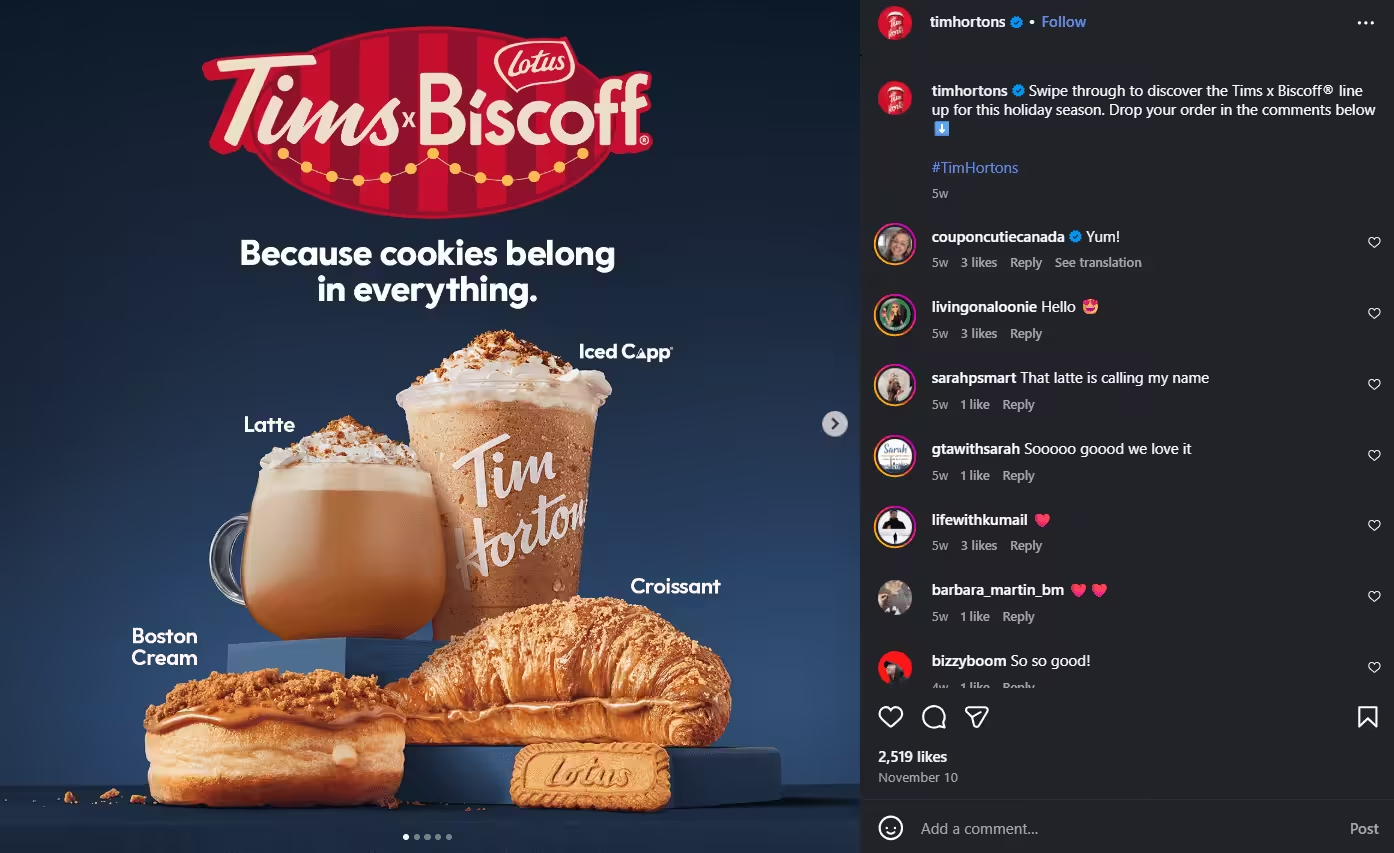
Now you may be thinking, when should you start posting content for Christmas to get maximum engagement, right?
I see every year some brands ask the same question in early December: “Is it too late to post Christmas content?” And most of the time, the answer is yes.
Christmas social media posts work best when they feel natural, not rushed.
Timing matters because your audience doesn’t wake up one day and suddenly think about Christmas. The feeling builds slowly.
Early November Is When the Feeling Starts
Let’s just think about your own habits.
You can see the decorations, ads, and gift ideas start appearing on your feed by early November. Social media works the same way.
And you know this is the right time to warm things up. You can share light festive content and post teasers of what is coming.
Just let your audience ease into the season without pressure.
Late November Is When Attention Peaks
After Thanksgiving, the switch flips. People actively search for gift ideas, deals, and inspiration.
This is when social media Christmas interactive posts start getting real attention. People comment, save, and share more.
So, if your content shows up now, it feels timely instead of intrusive.
December Moves Fast, So Plan Ahead
December always feels shorter than it is. Days blur together. People scroll daily but decide quickly.
If you wait until now to plan, stress kicks in. When posts are ready in advance, you stay calm and consistent.
Different Brands, Different Starting Lines
- If you are a retail brand, you should start in early November and stay visible through mid December.
- For SaaS and service brands, it’s better to start in mid-November with helpful, seasonal content.
- Creators can start early and ride trends as they appear.
The brands that win Christmas do not rush. They prepare!
Featured Article: How Is Threads Different From Instagram? Key Differences Explained
What Are the Best Christmas Social Media Post Ideas for 2026?
Creativity always wins in every season, especially during Christmas.
If your Christmas social media posts are just the usual “Merry Christmas” graphics, you may lose attention.
Let me tell you the trick that I apply to get the most of the audience’s attention.
Post content that entertains, connects emotionally, inspires, or gives your followers something useful or shareable.
Here, I’ve broken down a comprehensive 50+ ideas for Christmas social media posts into categories.
Quotes and Greetings
- Heartwarming Merry Christmas: You can pair a festive image with a caption like: “Wishing you laughter, joy, and cozy moments this Christmas!”
- Funny Holiday Quote: Share a fun holiday quote just like: “Dear Santa, I can explain… #ChristmasVibes”
- 12 Days of Christmas Countdown: Run a 12-day countdown for Christmas by sharing one festive message each day, like a mini tip or fun fact.
- Motivational Holiday Quote: Give an End-of-year inspiration like “May your Christmas sparkle with moments of love and laughter!”
- Team Greetings: Introduce your team with a short festive note: “From our team to yours, Merry Christmas!”
- Festive Reflection Posts: You can share a thoughtful note about what the season means to your brand or audience.
- Holiday Humor: Post short jokes or puns such as, “Sleigh my name, sleigh my name! #ChristmasFun”
User-Generated Content (UGC)
- Customer Holiday Photos: Repost festive photos from customers with a caption, “Our community makes Christmas brighter! #HolidayWith[Brand]”
- DIY Setups With Your Product: You can show creative ways in which followers are decorating or using your product.
- Tag-To-Feature Campaigns: Encourage followers to tag your brand for a feature.
- Customer Stories: Share your customer stories and highlight how a product made a customer’s holiday special.
- Holiday Challenges: Share a post in which you ask your followers to show their festive spirit using your product.
- Gift Hacks From Followers: Repost creative ideas for using your products as gifts.
- Pet Christmas Moments: Share pictures that your followers submit of their pets in festive attire.
Contests and Giveaways
- Best Holiday Photo Contest: Run a photo contest with a festive product bundle as the prize.
- Christmas Trivia Quiz: Ask fun holiday questions and reward winners with discounts.
- Tag-A-Friend Giveaway: Ask your followers to tag their friends to boost your reach.
- Caption This Photo: Use a funny or festive image and ask your followers to suggest the best caption. The best caption wins.
- 12 Days of Giveaways: Run a giveaway and offer daily prizes to keep your audience coming back.
- Share and Win: Encourage users to share your post to participate.
- Holiday Craft Contest:Ask your followers to submit their homemade ornaments or décor using your product.
Sales and Promo Posts
- Festive Discount Announcements: Announce your holiday or festive discount. For example: “Christmas Deal Alert! 20% off all gifts till Dec 24.”
- Gift Bundles: Highlight ready-made bundles for last-minute shoppers.
- Limited-Time Offers: Create urgency so your followers act fast. You can write a caption, “Only 3 days left to grab this holiday special!”
- Early Bird Specials: Offer a special discount to your followers who shop before the peak.
- Holiday Gift Guides: Suggest products as perfect gifts in a carousel style that works well.
- Exclusive Loyalty Offers: Provide special festive deals only for your subscribers or followers.
- Flash Sales: Run short, surprise sales during December to boost engagement.
Carousel Ideas
- Step-By-Step DIY Tutorials: Share some easy steps for holiday crafts, gift wrapping, or decoration tutorials.
- Top 5 Gift Ideas: Share a gift guide and highlight items in slides with short descriptions.
- Before-And-After Transformations: Post pictures of the room décor before and after, product setups, or festive makeovers.
- Countdown Carousels: Example: “7 Days to Christmas” with tips, deals, or festive inspiration.
- Mini Recipe Guides: Post the step-by-step holiday recipes across slides that followers can try during the season.
- Team Festive Setups: You can show your staff holiday decorations or celebrations.
- Holiday Tips Carousel: Share short, useful seasonal tips like party prep, shopping, or décor.
Story-Specific Ideas
- Polls and Questions: Run a poll and ask: “Which cookie wins: Gingerbread or Chocolate Chip?”
- Festive Quizzes: Post an emoji-based quiz like “Guess the Christmas song” challenge to engage your audience.
- Behind-The-Scenes: Share videos of your team’s decorating or preparing for the holidays.
- Holiday Hacks: Provide quick gift wrapping or decoration tips in a story.
- Countdown Stickers: Highlight sales or festive events.
- Shoutouts: Feature followers, customers, or partners celebrating the season.
- Quick “Did You Know?” Stories: Post fun Christmas facts or trivia to keep your audience engaged.
TikTok / Reels Ideas
- Holiday Trend Dances: Join trending audio with a festive twist and post these videos.
- Before vs. After Transformations: Create a Reel of your room décor, product makeovers, or gift prep.
- Quick Recipe or Craft Tutorials: Post a short video of 15–30 seconds showing festive hacks.
- Funny Behind-the-Scenes Clips: Show your team celebrations or product prep bloopers in the Reel.
- Product Unboxing or Gift Reveal: Post a product unboxing video with festive music and props.
- Short Holiday Storytelling: Share a 15–30 sec story about your brand or a customer moment.
- Seasonal Tips in Motion: You can share quick tips like gift wrapping, decorating, or holiday hacks.
Shareable Template Ideas
- Holiday Bingo: Post your followers’ screenshots and play.
- 12 Days Challenge Template: Post daily small tasks for your followers.
- Festive Quiz Templates: Add quizzes like: “Which Christmas treat are you?”
- Downloadable Gift Tags or Stickers: Share downloadable gift tags or stickers that are shareable and brandable.
- Editable Holiday Calendar: Provide your followers with an editable holiday calendar to plan festive activities.
- Festive Meme Templates: Post humorous, shareable, and simple festive meme templates for your followers
- Christmas Poll Template: Run holiday-themed polls like “Hot chocolate or eggnog?”
- Story Checklist Template:Tick off holiday tasks like decorating, shopping, or gifting.
Plan and schedule your Christmas content with Social Champ and make sure it reaches everyone on time.
What Christmas Post Examples Can You Use for Inspiration?
Sometimes, the best way to get your creative juices flowing is to see examples in action.
So now you don’t need to copy anyone to make your feeds engaging. Take these little inspirations to create posts that feel festive, relatable, and engaging.
Let’s have a look at these mock examples with captions, hooks, and visual ideas that you can follow:
-
Festive Product Highlight
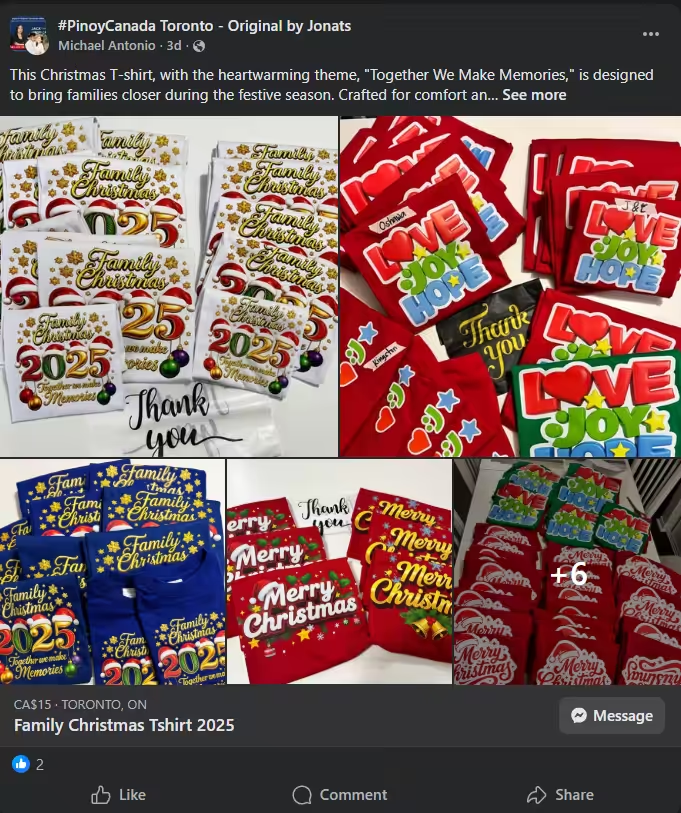
Festive Product Highlight on Facebook One of the best Christmas post examples is to highlight your festive product. You can show your followers how your product can be a part of someone’s cozy holiday moment.
- Visual Idea: A decorated living room with your product subtly placed among holiday décor.
- Caption Example: “Bring warmth to your holidays with our festive gift sets. Perfect for spreading joy this season!”
- Hook: Highlights how your product enhances holiday experiences.
-
Interactive Christmas Poll
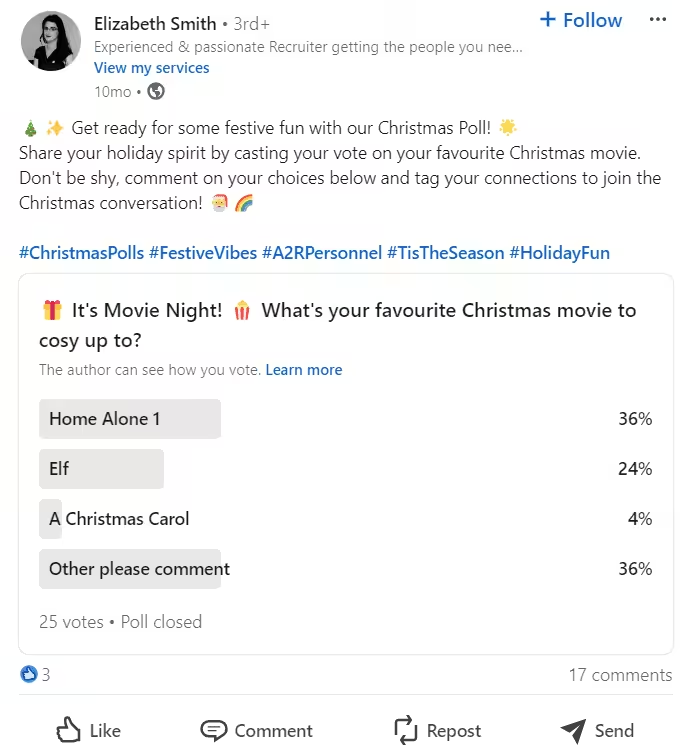
Christmas Poll on LinkedIn Polls are the best way to engage your followers. You can encourage them to share their preferences and engage instantly. Share a poll in your story or carousel.
- Visual Idea: Bright story graphic showing two holiday treats side by side.
- Caption Example: “Which treat wins the holiday crown? Gingerbread or Chocolate Chip? Vote now!”
- Hook: Drives interaction and participation.
-
Behind-The-Scenes Holiday Prep
People connect with your brand more when you show them your human side. For this, you can show your team’s personality and festive spirit.
- Visual Idea: Team decorating the office or preparing gifts.
- Caption Example: “The elves are hard at work! Here’s a sneak peek at our festive prep.”
- Hook: Humanizes your brand and fosters connection.
Check the behind-the-scenes filming of the video of @georgemichaelofficial on TikTok:
As a thank you for your continued love and support for ‘Last Christmas… | TikTok
-
Countdown to Christmas

A Countdown to Christmas Post on Instagram Countdowns can build excitement among followers and keep them returning daily. You can share tips, facts, or mini-promotions.
- Visual Idea: Carousel or story countdown with daily tips or fun facts.
- Caption Example: “12 days of Christmas cheer! Day 1: Don’t forget to gift yourself a moment of joy.”
- Hook: Creates anticipation and repeated engagement.
-
Giveaway or Contest
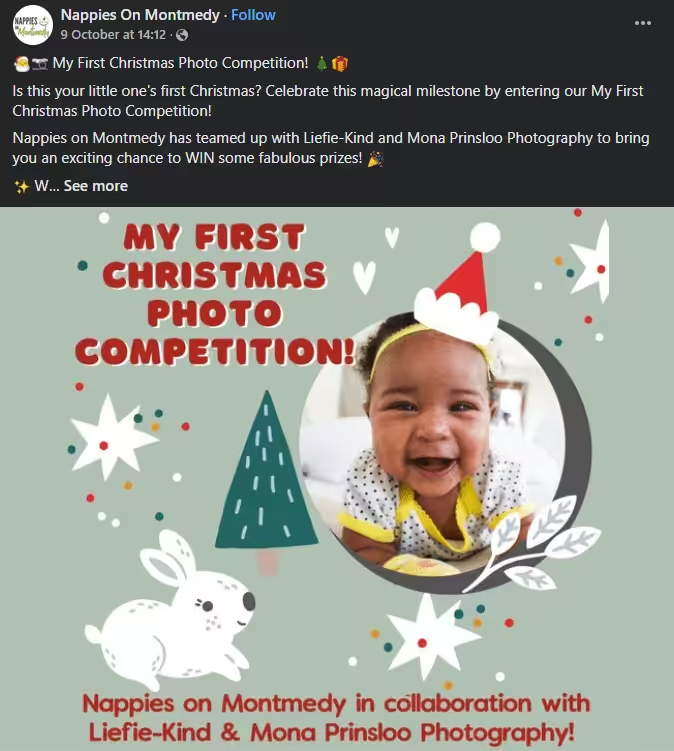
A Christmas Photo Contest on Facebook Run a giveaway or a contest and encourage your followers to participate and share your posts to increase reach.
- Visual Idea: Branded graphic highlighting the prize with festive elements.
- Caption Example: “Holiday Giveaway! Tag a friend and share your festive photo to win a Christmas gift bundle! Ends Dec 15.”
- Hook: Drives engagement and expands your community.
Pro Tip!
Mix these examples with your brand’s personality. The goal is to create content that’s relatable, festive, and interactive without feeling forced.
Featured Article: Employer Branding on Social Media
How Do You Create a Christmas Content Plan That Works?
Over the years, I’ve learned a very important lesson: a solid content plan is your holiday lifesaver!
If you plan ahead, you can actually enjoy the season while keeping your social media alive, fun, and engaging at the same time.
Here’s how you can do it:
Step 1: Set Your Goals
Before getting started, the first thing you should do is ask yourself, “What do I want this Christmas to achieve?”
Maybe you want to boost sales, grow your community, or simply spread holiday cheer.
If you know your goals beforehand, you can decide what content works best and when to post it.
Step 2: Pick Your Content Formats
Now, once your goals are clear, think about how you’ll deliver your messages. Will it be:
- Heartwarming quotes or greetings?
- Fun polls, quizzes, or interactive stories?
- Festive product highlights or gift guides?
- Short Reels, TikToks, or carousel posts?
Try to mix up the formats to keep your feed fresh and give your followers multiple ways to engage.
Step 3: Plan Your Promotions and Offers
If you’re running holiday deals, don’t leave them to chance. Map out your promotions early:
- Early December sneak peeks
- Flash sales or giveaways
- Last-minute gift pushes
Timing your offers ensures followers see them exactly when they’re ready to shop, without feeling spammed.
Step 4: Balance Festive and Brand Messaging
Let me tell you a trick!
Don’t just post random Christmas content, but blend holiday spirit with your brand story.
For instance, you can show your team decorating while subtly featuring your products, or share a gift guide that shows your best sellers.
This keeps posts relatable while reinforcing your brand.
Step 5: Batch Your Content
Design, write, and schedule in one go. Trust me, nothing kills holiday cheer like planning posts on Dec 23.
When you batch your content, it saves time and ensures everything looks cohesive.
Moreover, tools like Social Champ let you plan, schedule, and post to all social media at once, so you’re stress-free and ready to enjoy the holidays.
Step 6: Use a Mini Holiday Calendar
I like creating a micro-calendar because it’s like having a festive roadmap. For example:
- Nov 15–30: Sneak peeks, early gift ideas
- Dec 1–10: Countdown posts, engagement content
- Dec 11–20: Promotions, contests, last-minute shopping tips
- Dec 21–24: Urgency posts, holiday greetings, UGC features
If you have this in front of you, it prevents chaos and ensures every post has a purpose.
Let’s take a look at this mini calendar template, which helps you see the whole season at a glance, so you’re not guessing what to post or when.
| Date Range | Content Focus | Post Ideas | Platforms |
|---|---|---|---|
| Nov 15–20 | Warm-up and Awareness | Teaser posts, festive quotes, behind-the-scenes prep | Instagram, Facebook, LinkedIn |
| Nov 21–30 | Early Shoppers | Gift guides, product highlights, soft promos | Instagram, Facebook, Pinterest |
| Dec 1–7 | Engagement Boost | Polls, quizzes, countdown posts, UGC prompts | Instagram Stories, X, LinkedIn |
| Dec 8–14 | Value and Trust | Tips, how-to posts, customer stories, carousels | Instagram, Facebook, TikTok |
| Dec 15–20 | Sales Push | Offers, bundles, limited-time deals | Instagram, Facebook, Email |
| Dec 21–24 | Urgency and Emotion | Last-minute reminders, festive greetings, reels | Instagram, Facebook, TikTok |
| Dec 25 | Celebration | Merry Christmas post, gratitude message | All platforms |
| Dec 26–31 | Reflection and Wrap-up | Year-in-review, thank-you posts, New Year teasers | Instagram, LinkedIn |
Featured Article: How to Share a Reel to Your Story: Step-By-Step Guide for Instagram and Facebook
How Can You Design Engaging Christmas Posts Without a Designer?
Everyone thinks they need a designer to design their holiday social media posts. I used to think that too.
Let me tell you the good news.
You don’t need a designer to create scroll-stopping Christmas posts. You just need a few smart choices and a clear system.
Stick to Festive Colors That Feel Familiar
Christmas visuals work because they trigger emotions fast. Reds, greens, whites, golds, and soft neutrals instantly set the mood.
You can pick two main colors and one accent. Keep them consistent across posts so your feed looks intentional, not random.
If you use too many colors, it may dilute your message.
Use Simple Fonts That Read Well
You don’t have to use fancy scripts that look pretty but hurt readability. Choose one clean font for text and one bold font for headings.
If someone can’t read your post in three seconds, they scroll past. Simple always wins during busy holiday feeds.
Add Festive Elements Without Overcrowding
Think small touches. Snowflakes, ornaments, lights, or subtle borders. One or two elements are enough.
Your message should still be the hero. Decorations should support it, not steal attention.
Keep Your Brand Look Consistent
Christmas posts should feel festive, but they should still feel like you. Use your logo placement, tone, and spacing the same way you do all year.
This helps followers recognize your content instantly, even when the feed gets crowded.
How to Design a Christmas Post Fast Using Social Champ
Here’s the simple flow I follow when time is tight:
- Pick one message or offer
- Open Canva inside Social Champ
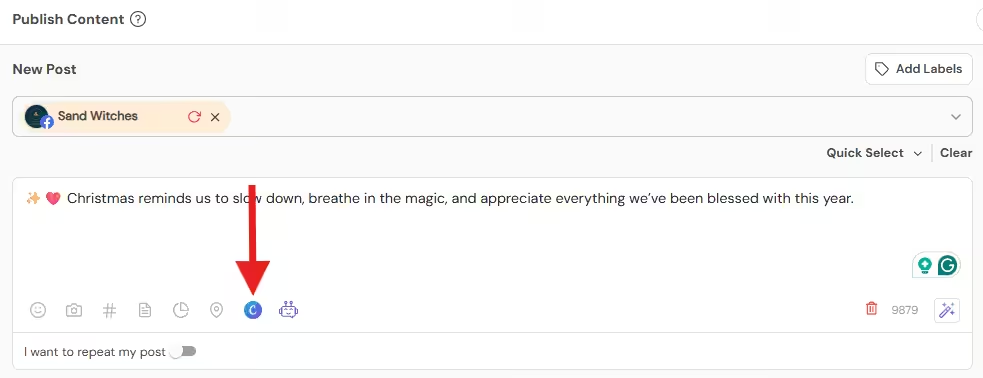
Open Canva Inside Social Champ - Choose a festive template
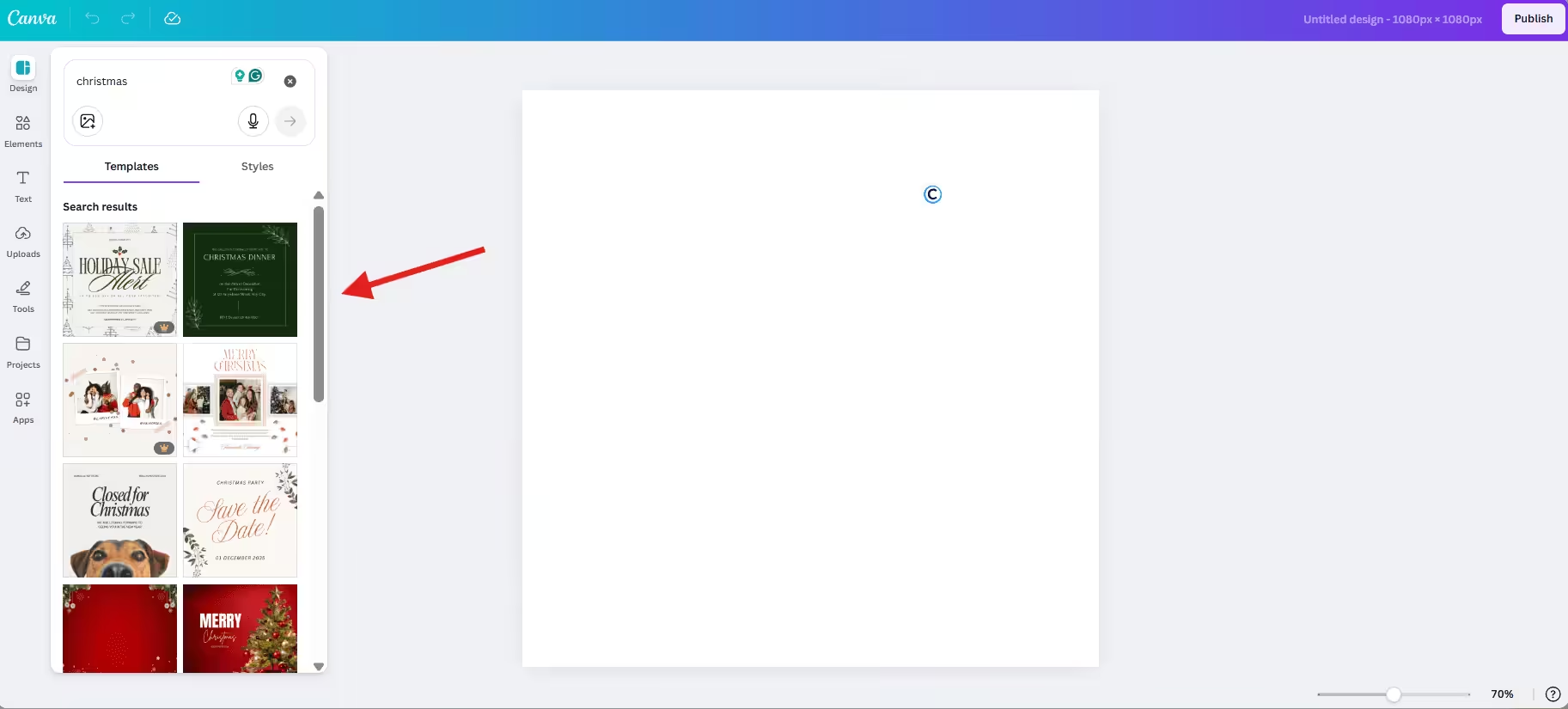
Choose a Festive Template - Add a short headline and use one strong visual
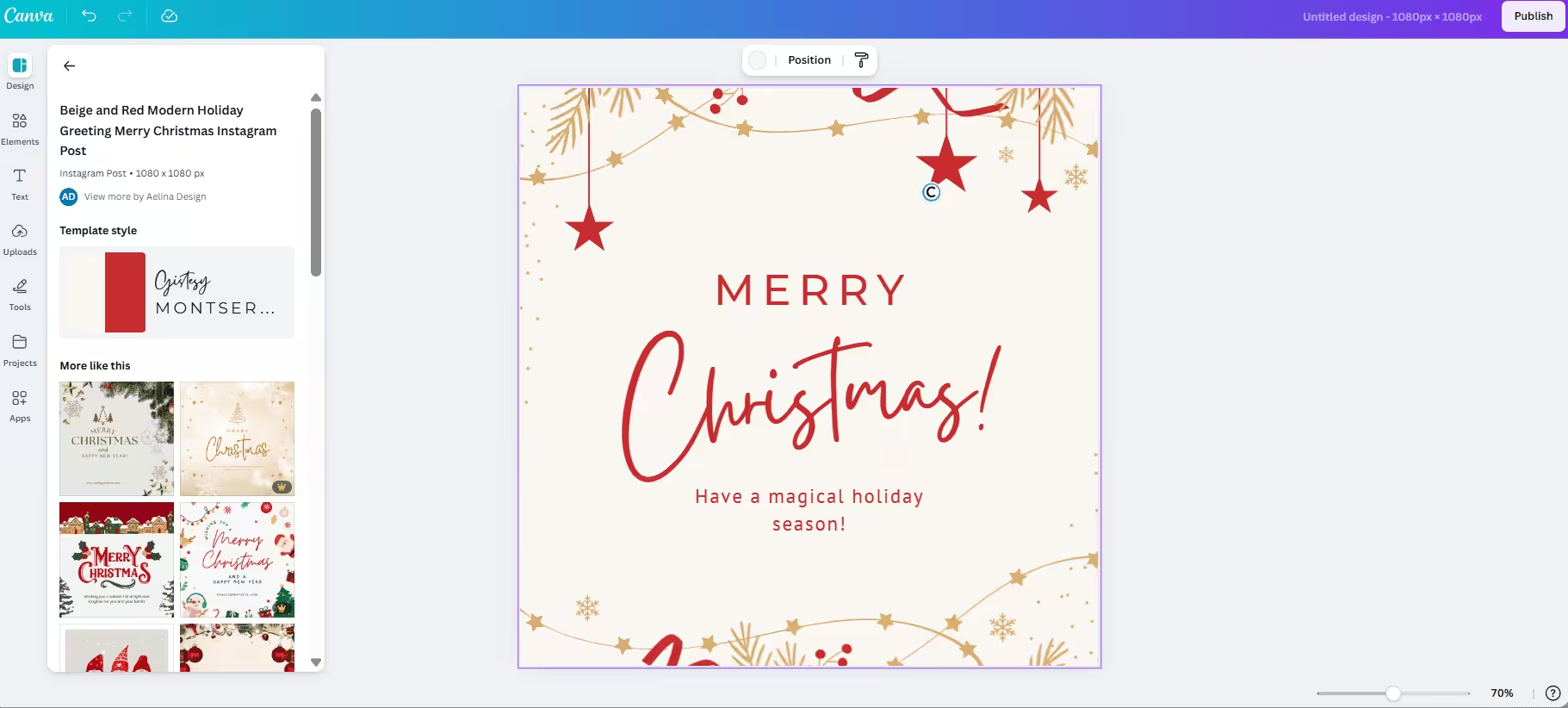
Add Your Headline and Use a Strong Visual - Click “Publish”
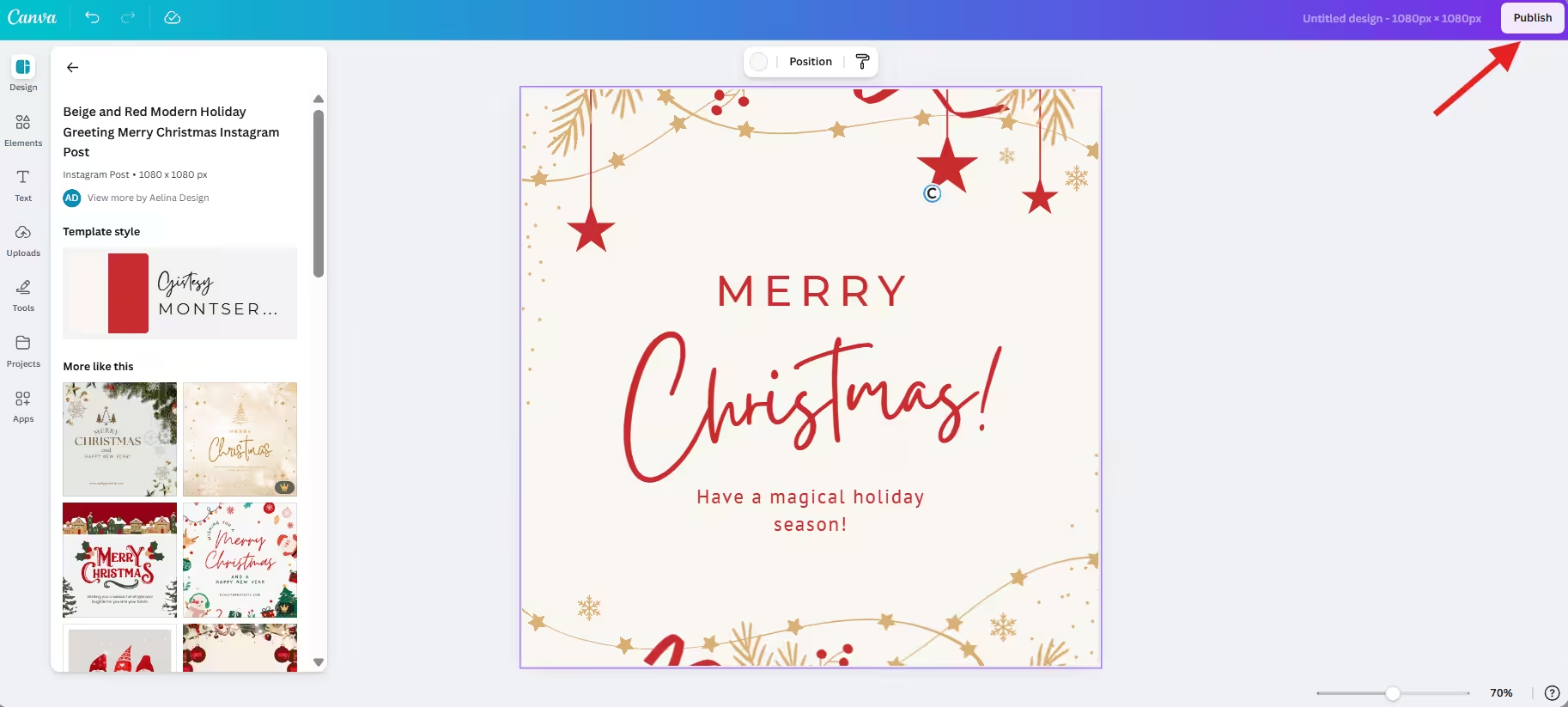
Click “Publish” - Now, you can schedule or publish your post through Social Champ.
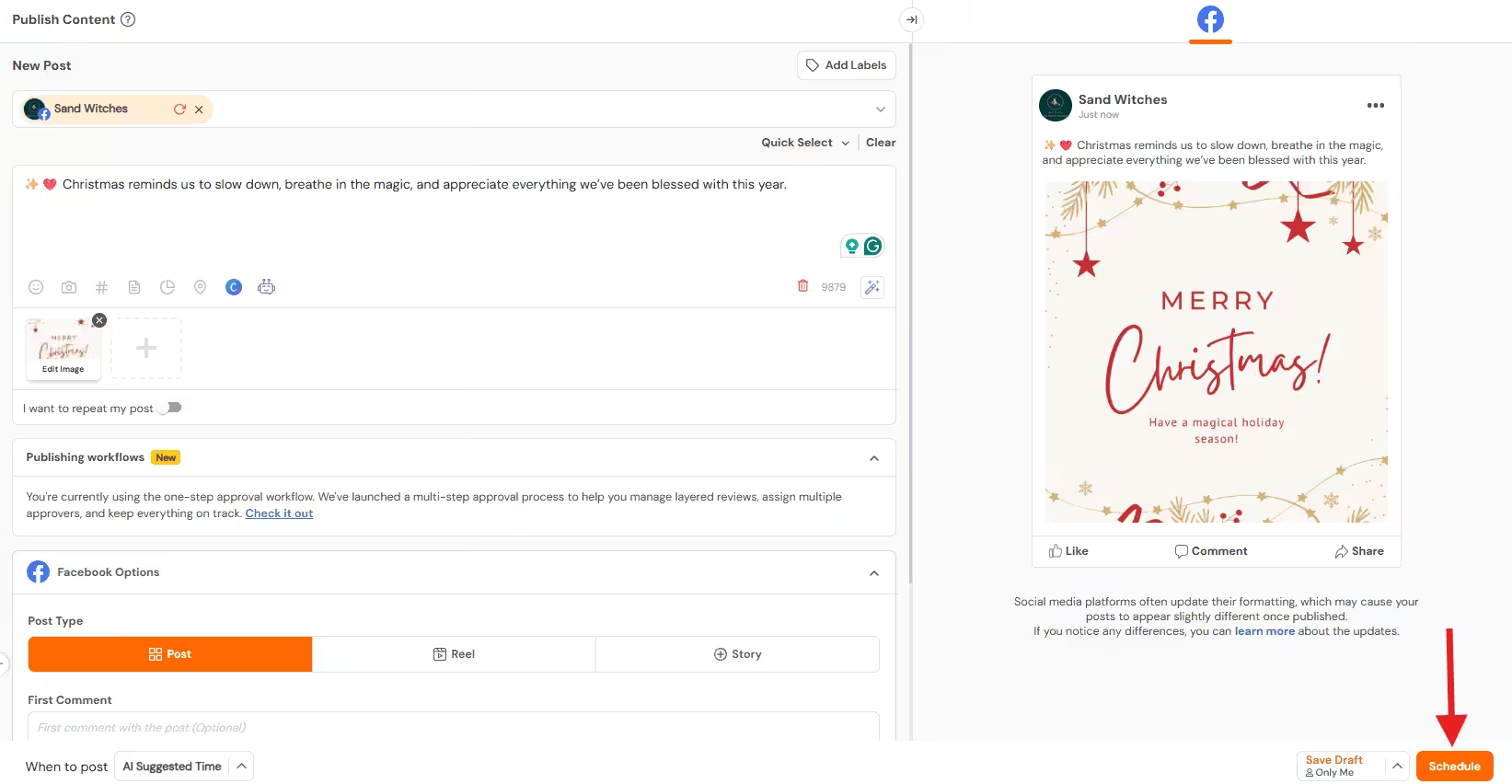
Schedule Through Social Champ
Design eye-catching Christmas posts with Canva integration inside Social Champ. No design skills needed.
Quick Tip!
Want to stand out this holiday season? Check out these tips to boost your social media presence this Christmas and make your posts festive, engaging, and scroll-stopping!
What Tips Help Your Christmas Posts Perform Better?
Every year during Christmas, I see brands put in real effort, post something festive, and still hear nothing back.
The problem is not always with the content. Sometimes it’s because the Christmas feeds get crowded fast.
A few small tweaks can make a big difference.
Post When People Are Actually Scrolling
It’e pretty common that people’s routines are changed during the holidays. They scroll more in the early morning, late evenings, and even during lunch breaks.
You should try posting between 7–9 AM and 7–10 PM. Test what works for your audience and adjust. Don’t guess. Watch the patterns.
Use Clear, Simple Calls to Action
When you’re posting your Christmas content, don’t just assume that people already know what to do next.
Instead, tell them. Ask them to comment, save, share, vote, and click.
One clear action works better than five vague ones. Christmas posts perform best when the CTA feels friendly, not pushy.
Keep Hashtags Relevant and Focused
If you add too many hashtags, it doesn’t mean you’ll get more reach.
You should use a short mix of seasonal and niche tags that fit your post. Three to five hashtags are often enough. Make sure they match the content, not just the season.
Use Trending Audio for Reels and TikTok
Holiday trends move fast. A trending sound can give your video a big visibility boost.
Scroll for five minutes before posting. If you see the same audio pop up, use it while it’s still fresh.
Avoid Sounding Too Salesy
Yes, people shop during Christmas. But they also want warmth and connection.
You should balance promotions with stories, tips, or humor. Posts that feel human get saved and shared more than hard sales messages.
Stay True to Your Brand Voice
Everyone jumps on the latest trends during the holidays. Make sure not to lose your voice in the process.
Follow the trends while staying true to your brand voice. If your brand is playful, keep it playful; if it’s calm and helpful, keep it as is.
Quick Christmas Post Checklist
Before you publish, check this:
- Is the message clear?
- Is the visual easy to read?
- Is there one clear CTA?
- Does it feel festive but on-brand?
- Is it scheduled at the right time?
If you can say yes to all five, you’re in a good place.
How Can You Use Social Champ to Automate Christmas Social Media Posting?
Christmas sounds fun to everyone, but for social media managers, the magical holiday can become stressful if they don’t plan and schedule their posts on time.
This used to happen to me as well, and I can totally understand the last-minute posting frustration.
Do you know what fixes that? Automation!
Social Champ helps you plan your entire Christmas content in advance, so your posts go live even when you’re offline.
Schedule All Your Christmas Posts in Advance
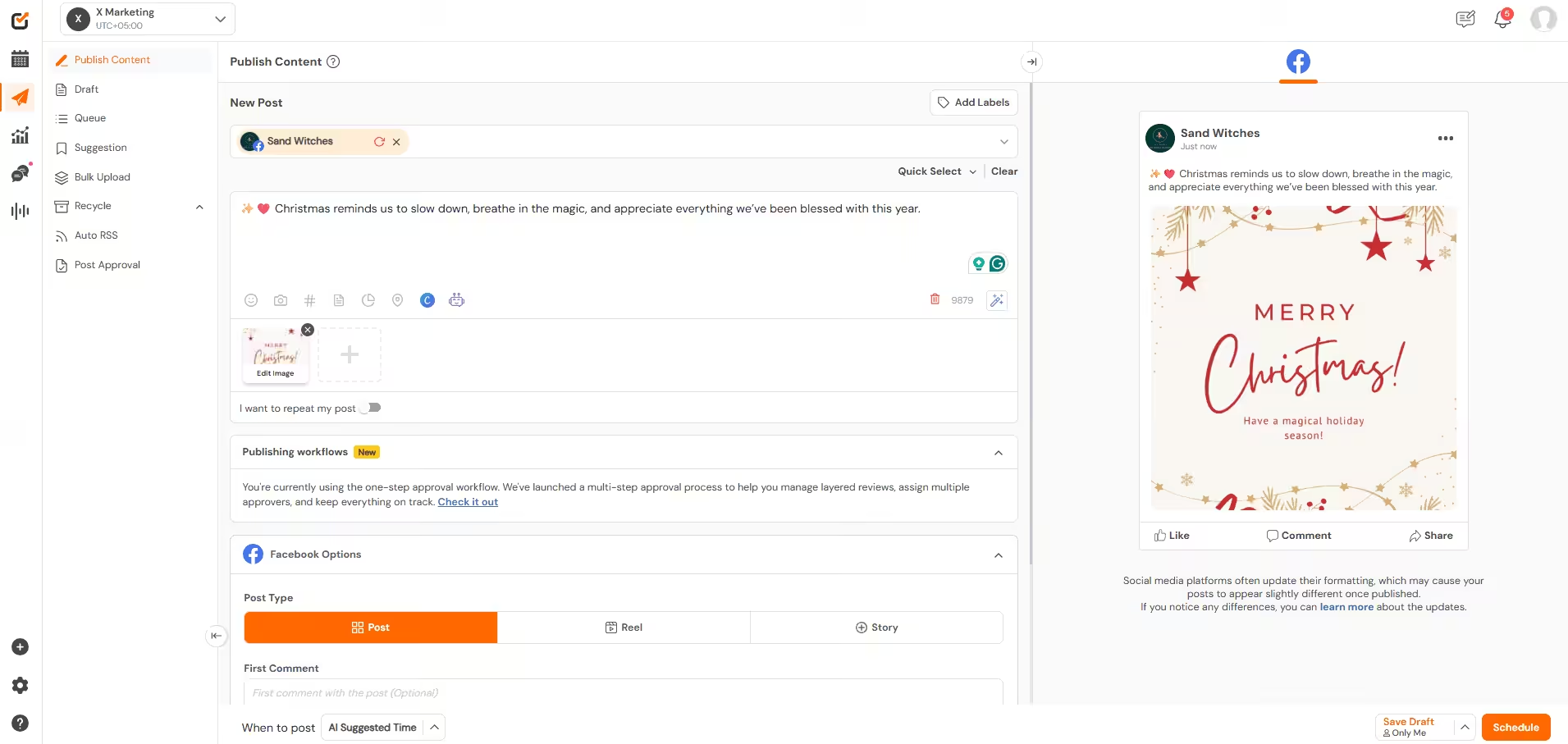
Imagine scheduling everything weeks ahead instead of posting daily during the holidays.
Social Champ lets you line up your posts, no matter if it’s a festive greeting or a promotional post.
Just forget about manual posting. Once it’s scheduled, it’s done.
Bulk Upload Festive Content
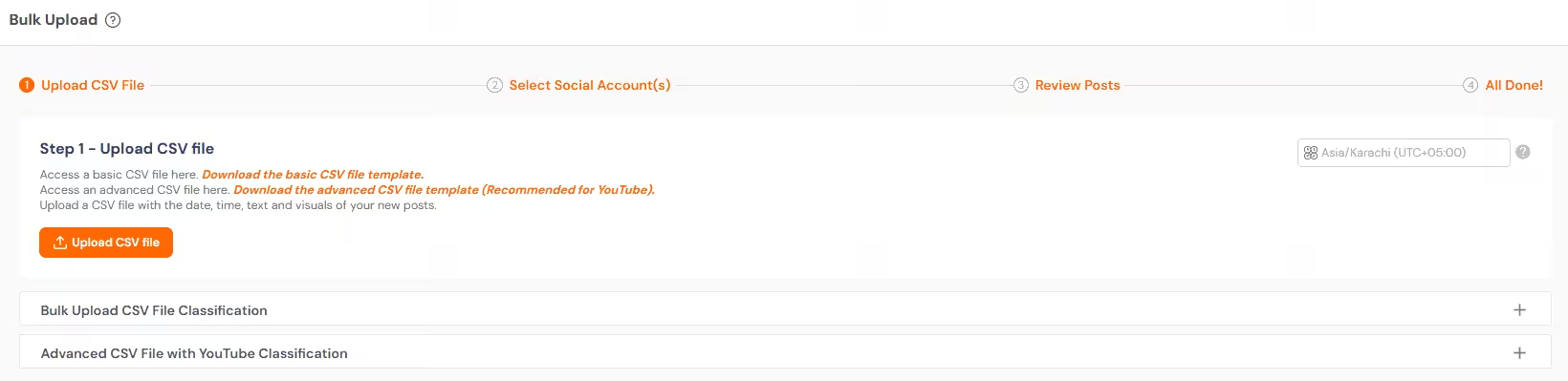
Christmas content usually comes in batches. Greetings. Offers. Carousels. Reels.
Social Champ’s bulk scheduling feature allows you to upload multiple posts at once. This saves hours and keeps your posting consistent throughout the season.
Create Smarter Captions With AI Suggestions
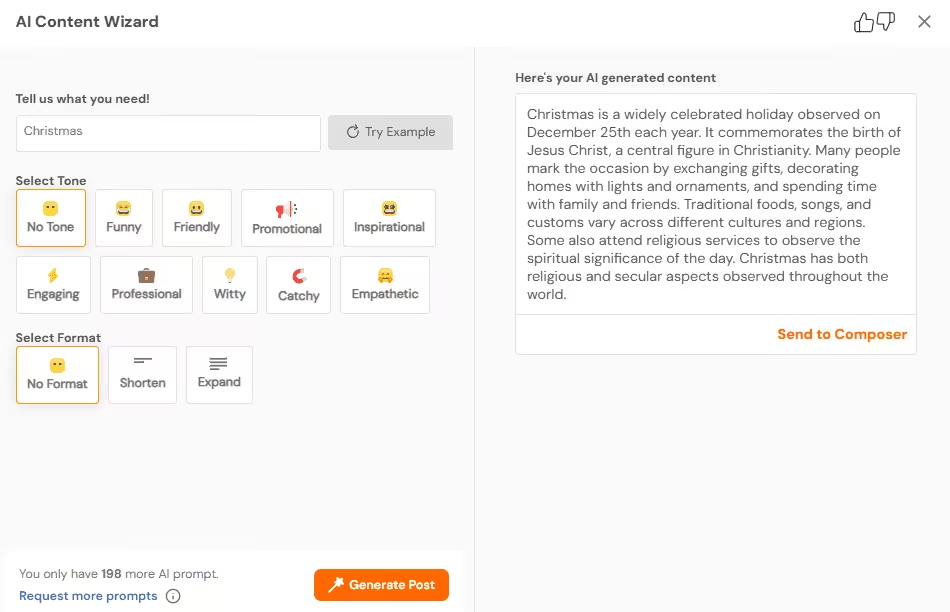
During Christmas, it’s common to run short on ideas. Don’t worry, Social Champ’s AI Content Wizard generates captions for you that sound natural and festive.
You stay in control of the voice. The tool just helps you move faster.
Monitor Engagement Without Logging In Every Hour
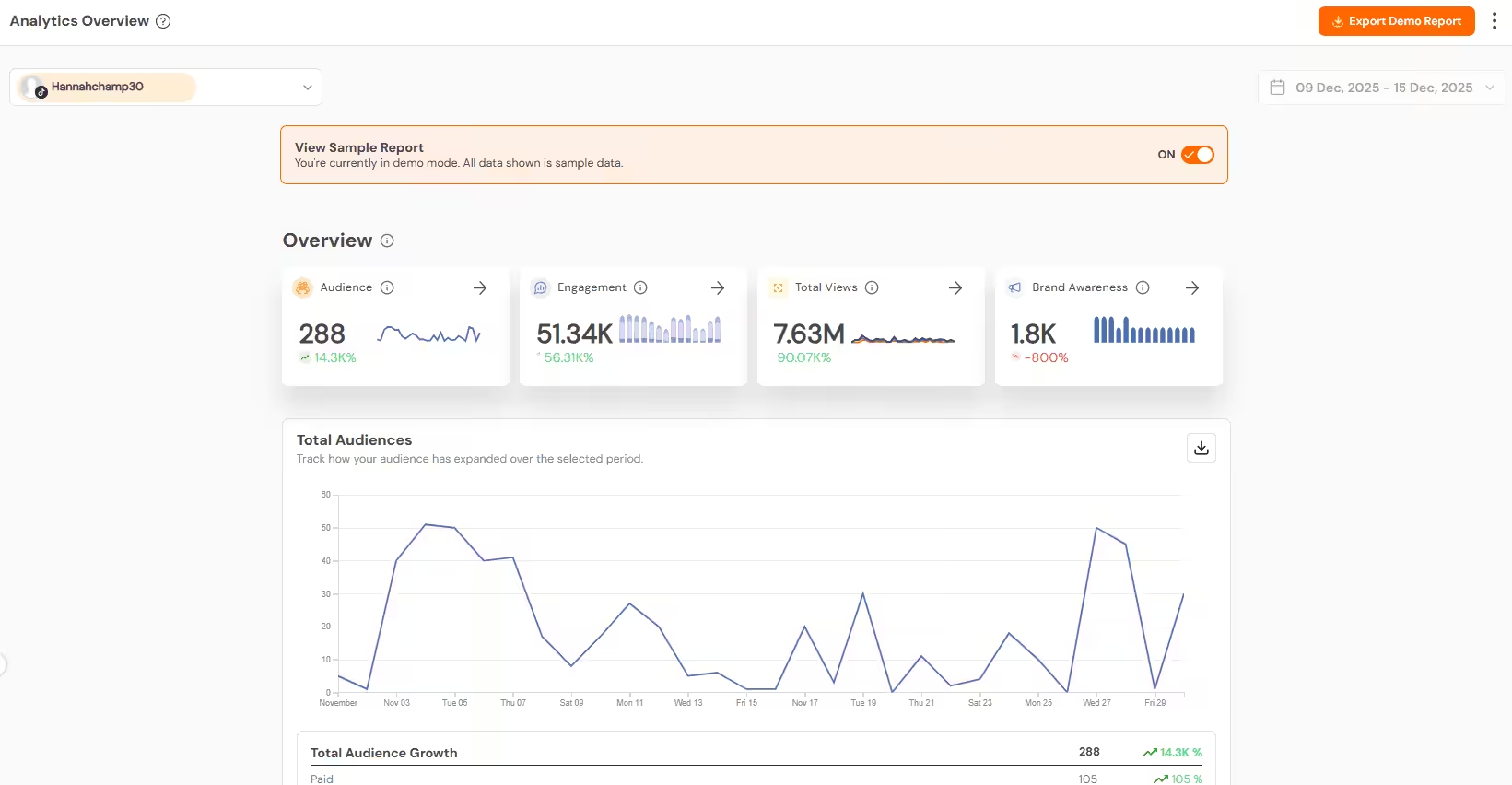
And it’s important to monitor whether your holiday content is working or not.
For this, Social Champ helps you track likes, comments, and overall engagement in one place. You can spot your high-performing posts and adjust your strategy for the future without constantly checking each platform.
Schedule Across Multiple Platforms
Christmas campaigns usually run on more than one channel.
With Social Champ, you can easily plan and schedule your Christmas content on multiple social media channels, customize captions for each platform, and keep your messaging consistent everywhere.
Stay Present Without Being Online
This is the real win.
Your Christmas posts go live on time. Your audience stays engaged. And you’re not glued to your screen during the holidays.
That’s what smart automation looks like.
Upload multiple posts at once, schedule them across platforms, and focus on enjoying the holidays while Social Champ does the work.
What Are the Best Hashtags to Use for Christmas Social Posts?
When it comes to bringing your Christmas posts in front of the right audience, hashtags play a huge role, but only when they’re relevant.
General Christmas Hashtags
- #Christmas2026
- #MerryChristmas
- #FestiveSeason
Promotional Hashtags
- #ChristmasSale
- #HolidayDeals
- #GiftIdeas
Aesthetic and Creator Hashtags
- #ChristmasVibes
- #FestiveFeed
- #WinterVibes
Engagement Hashtags
- #SpreadJoy
- #HolidayMoments
- #FestiveFun
Quick Tip!
Stick to 3–5 hashtags per post and match them to the content. Tools like Social Champ let you save hashtag sets so you can reuse them all season without extra work.
Conclusion
Christmas comes around so fast, doesn’t it?
But during this season, how your brand shows up really matters. The right Christmas social media posts can make your audience stop scrolling, smile, and even engage with you.
You should plan a little ahead, keep your posts simple and festive, and focus on content that feels human and fun.
No last-minute chaos, no rushed graphics, just posts that connect, spread joy, and make your brand a part of the holiday celebration.
Do it right, and people will remember you long after the tinsel comes down.
Frequently Asked Questions
1. What Types of Christmas Posts Work Best on Social Media?
2. How Can I Schedule My Christmas Posts Effectively With Social Champ?
Social Champ lets you schedule your Christmas posts smoothly to stay on top during the festive season.
- Plan Ahead: Outline your campaign and create a content calendar to stay organized.
- Create Post: Create your post by uploading your media and writing eye-catching captions.
- Use the Champ AI Suite: Get help with AI to generate attractive visuals and write compelling descriptions.
- Schedule Post: Schedule your post on your preferred date, or you can get the AI-powered best time to post recommendations to schedule it at optimal times.










Mindy Charles
Loved these ideas for Christmas social media posts! They’re super creative and perfect for the holiday season. I especially liked the idea of running a holiday-themed contest. Thanks for the inspiration!
Elissa Charles
These Christmas post ideas are fantastic! Love the mix of interactive and festive concepts to keep audiences engaged during the holidays. Can’t wait to try some of these out—thanks for the inspo!