Disclaimer:
The information presented in this blog post is based on publicly available data from official sources at the time of writing. Our intention is solely to provide accurate and helpful information. If you notice any inaccuracies, please feel free to contact us for corrections.
You’ve probably heard about tools like Pallyy, as it’s a great choice for small businesses and content creators who want a simple social media management solution.
Pallyy built its reputation on clean design, easy scheduling, and affordable pricing that doesn’t require a marketing degree to understand.
But, I understand that Pallyy pricing still leaves some questions, like what does “1 social set” actually mean, or can you really manage your business with their free plan, or maybe there’s another tool that offers more flexibility and is more affordable.
Short Summary
- Pallyy offers multiple pricing tiers: a Free plan, Starter, Pro, Agency, and Scale plan
- The Free plan is perfect for trying out the platform and suits solo creators with basic posting needs.
- Costs can rise fast with Pallyy’s tiered pricing if you need to buy add-ons for extra social sets and users.
- Social Champ starts at $4 /month per channel, offering more advanced features at a fraction of the price
- Social Champ’s pricing scales easily without surprise costs, especially since its Growth plan includes unlimited users.
That’s exactly what I’m going to tell you today.
Let’s continue to thoroughly break down Pallyy pricing plans and determine if they make sense for your needs.
Want the Best Value for Your Marketing Budget?
Pallyy Pricing Plans Explained
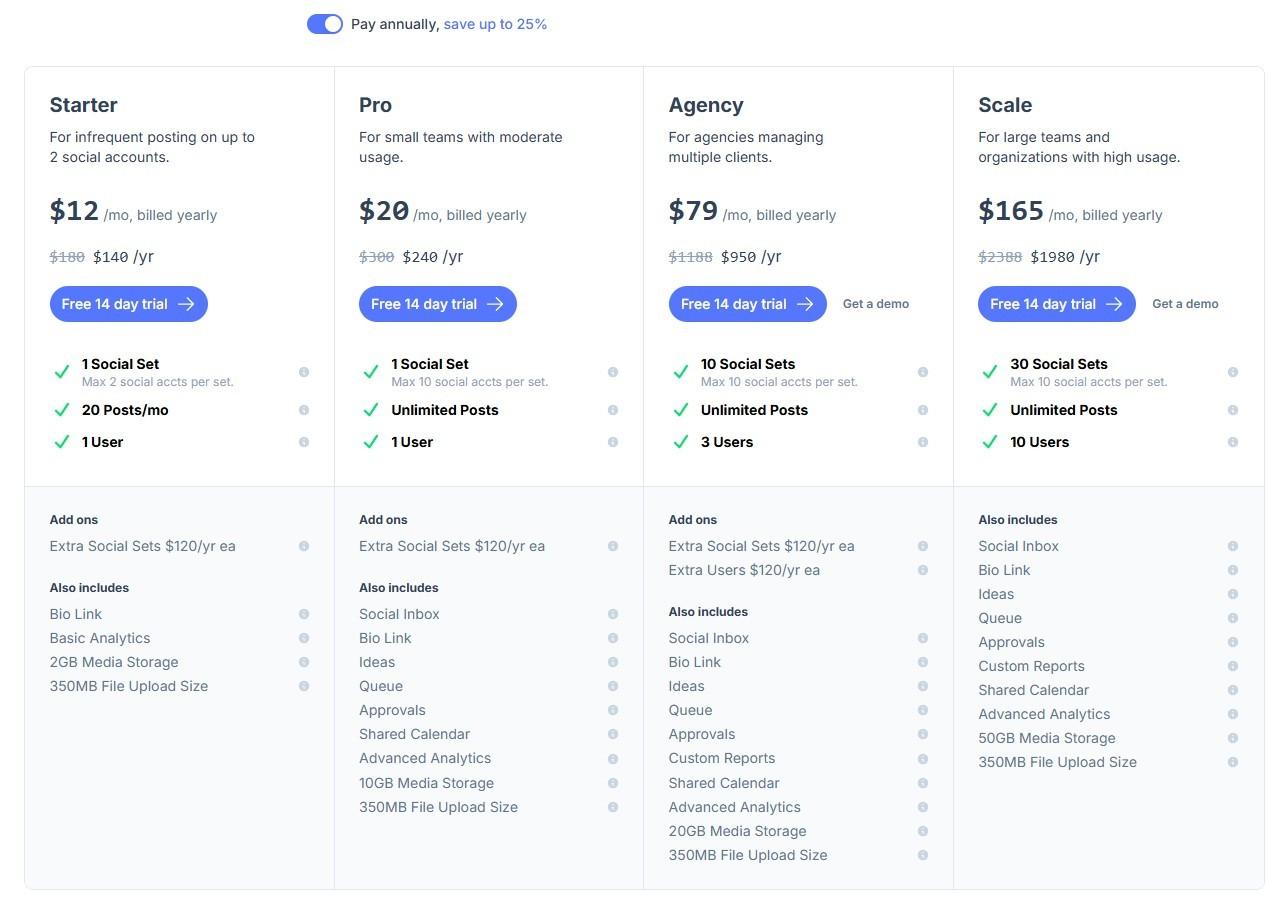
Let me walk you through what you’ll actually pay for Pallyy and what you get at each level. I’ve broken down the real Pallyy cost so you can see exactly where your money goes.
Here’s the quick overview of Pallyy pricing plans (these rates reflect their annual billing option, which saves you up to 25%):
| Feature/Plan | Free | Starter | Pro | Agency | Scale |
|---|---|---|---|---|---|
| Price (Billed Yearly) | $0/mo | $12/mo ($140/yr) | $20/mo ($240/yr) | $79/mo ($950/yr) | $165/mo ($1980/yr) |
| Social Sets | 1 Social Set | 1 Social Set (Max 2 accts) | 1 Social Set (Max 10 accts) | 10 Social Sets (Max 10 accts/set) | 30 Social Sets (Max 10 accts/set) |
| Posts/mo | 15 Posts/mo | 20 Posts/mo | Unlimited Posts | Unlimited Posts | Unlimited Posts |
| Users | 1 User | 1 User | 1 User | 3 Users | 10 Users |
| Also Includes | Basic Analytics, 200MB Media Storage | Bio Link, Basic Analytics, 2GB Storage, 350MB Upload | Social Inbox, Bio Link, Ideas, Queue, Approvals, Shared Calendar, Advanced Analytics, 10GB Storage, 350MB Upload | Pro features + Custom Reports, 20GB Storage | Agency features + 50GB Storage |
| Add-ons | – | Extra Social Sets: $120/yr each | Extra Social Sets: $120/yr each | Extra Social Sets: $120/yr each Extra Users: $120/yr each | – |
| Trial | – | 14-day free trial | 14-day free trial | 14-day free trial | 14-day free trial |
-
Free Plan
Pallyy offers a free plan in which you get 1 social set, 15 posts/month, and basic analytics for free. This plan is perfect if you’re just starting out or managing a single brand that doesn’t post much.
Let’s say you own a bakery and share photos twice a week on Facebook and Instagram. You’d use about eight posts monthly, staying well under the 15-post limit.
But most businesses hit that 15-post cap fast. If you post daily across Instagram and Facebook, you’ll reach your maximum in a week.
That’s when you need to consider Pallyy’s paid plans.
-
Starter and Pro Plans
Here, Pallyy pricing gets exciting because they offer flexible options for growing users.
If you just need a slight bump from the free tier for infrequent posting on a couple of accounts, the Starter plan costs $12/month (billed yearly at $140/yr) and gives you 20 posts for 1 social set.
But the real sweet spot for most users is the Pro plan.
The Pro plan costs $20/month when billed yearly ($240/yr). For that price, you get 1 social set (up to 10 social accounts) and unlimited posts.
Let’s say you manage your own business. If you get a subscription for the Pro plan, you’ll get unlimited posts, a social inbox for managing comments and messages, approvals for team review, a shared calendar, advanced analytics, and 10GB of storage.
That’s a solid value at $20/month.
But after some time, if you need to add another brand, you don’t need to upgrade your whole tier; you just pay an additional $120/year for each extra social set.
While the Pro plan offers unlimited posts, it is strictly limited to one brand’s social set. If you’re a freelancer managing multiple distinct clients, you will need to pay an additional $120/year for every new brand you take on, which can cause your baseline $20/month cost to rise quickly.
-
Agency Plan
If your client roster is growing, Pallyy’s Agency plan steps up to the plate. At $79/month when billed yearly ($950/yr), it includes 10 social sets and gives you 3 users right out of the box, plus Custom Reports and 20GB of storage.
Need a bit more room? Extra social sets are $120/year each, and extra users are just $120/year each.
Here’s a real example. You’re a growing agency with 12 client brands and a small team requiring 4 users total. Your Pallyy cost breaks down like this annually:
- Base Agency plan: $950/yr
- Two extra social sets: $240/yr
- One extra user: $120/yr
- Total: $1,310 yearly (which breaks down to roughly $109/month)
That’s highly manageable for most growing teams. But what if you scale even bigger?
-
Scale Plan
Now let’s talk about Pallyy’s Scale plan.
At $165/month when billed yearly ($1980/yr), you get unlimited social sets and users for one set price.
Specifically, this massive capacity tier gives you 30 social sets, 10 users, and unlimited posts. Plus, you get 50GB of storage instead of 20GB.
This makes sense when your Agency plan add-on costs start approaching $1,980/yr.
In this plan, you have plenty of room for a large client roster and a bigger team. You won’t have to worry about constantly adding extra users or social sets, which saves you money and removes the mental math.
The predictable cost helps with budgeting, and you don’t worry about onboarding new clients.
But, this plan suits large agencies and high-usage organizations only. If you’re a small business or solo freelancer, you will find it more expensive due to a limited budget, and are better off sticking to the Pro or Agency tiers.
Featured Article: Is Hypefury Pricing Justified? Here’s What You’re Really Paying For
Popular Comparison: Social Champ vs. Pallyy
You’re probably wondering how Pallyy stacks up against other tools. This is a very common thought when you’re considering a new tool.
Social Champ and Pallyy both are popular with small businesses and agencies, but they take entirely different approaches to pricing and features.
Let me break down what I’ve found so you can make the right choice for your situation.
Here’s a direct comparison of both tools:
| Feature | Social Champ | Pallyy |
|---|---|---|
| Starting Price (billed yearly) | $4 /month per social account | $12/month |
| Supported Platforms | – Instagram
– X – YouTube – TikTok – Threads – Google Business Profile – Bluesky – Mastodon – WhatsApp Business |
– Instagram
– X – YouTube – TikTok – Threads – Google Business Profile |
| Supported Social Accounts/Sets | 1 Social Account (Plus a Free plan for 3 accounts) | 1 Social Set (Up to 2 accounts on Starter, 10 on Pro) |
| Unlimited Post Scheduling | ✅ (on all paid plans) | ✅ |
| Calendar Planner | ✅ | ✅ |
| Bulk Scheduling / Upload | ✅ | ✅ |
| Post Approval System | ✅ | ✅ |
| Boost Ads / Post Boosting | ✅ | ❌ |
| Analytics & Reporting | ✅ | ✅ |
| Social Inbox | ✅ | ✅ |
| Google Analytics Integration | ✅ | ❌ |
| Support Type | Email & Chat Support | Email & Chat Support |
| First Comment Scheduling | ✅ | ✅ |
| Hashtag Manager | ✅ | ✅ |
| AI Assistant/Generators | ✅ | ✅ |
| Social Listening | ✅ | ❌ |
| Link in Bio | ✅ | ✅ |
| Client Management | ✅ | ❌ |
| CRM Integrations | ||
| SSO & API Access | ✅ | ❌ |
How the Pricing Actually Works
Pallyy pricing plans follow a tiered model based on “Social Sets.” A social set bundles a brand’s profiles together.
I’m breaking down pricing into easily digestible chunks so you can have an idea of how Pallyy scales when billed annually:
- Starter Plan ($12/mo): Perfect for infrequent posting, giving you 1 social set (limited to 2 accounts) and 20 posts per month.
- Pro Plan ($20/mo): The sweet spot for most businesses, offering 1 full social set (up to 10 connected social accounts) and unlimited posts.
- Agency Plan ($79/mo): Built for managing multiple clients, giving you 10 social sets and 3 users.
- Scale Plan ($165/mo): Unlocks 30 social sets and 10 users for large organizations.
If you are on the Pro or Agency plan and take on a new client, you don’t necessarily need to upgrade your entire tier. You can just add an extra social set for $120/year (which breaks down to $10/month).
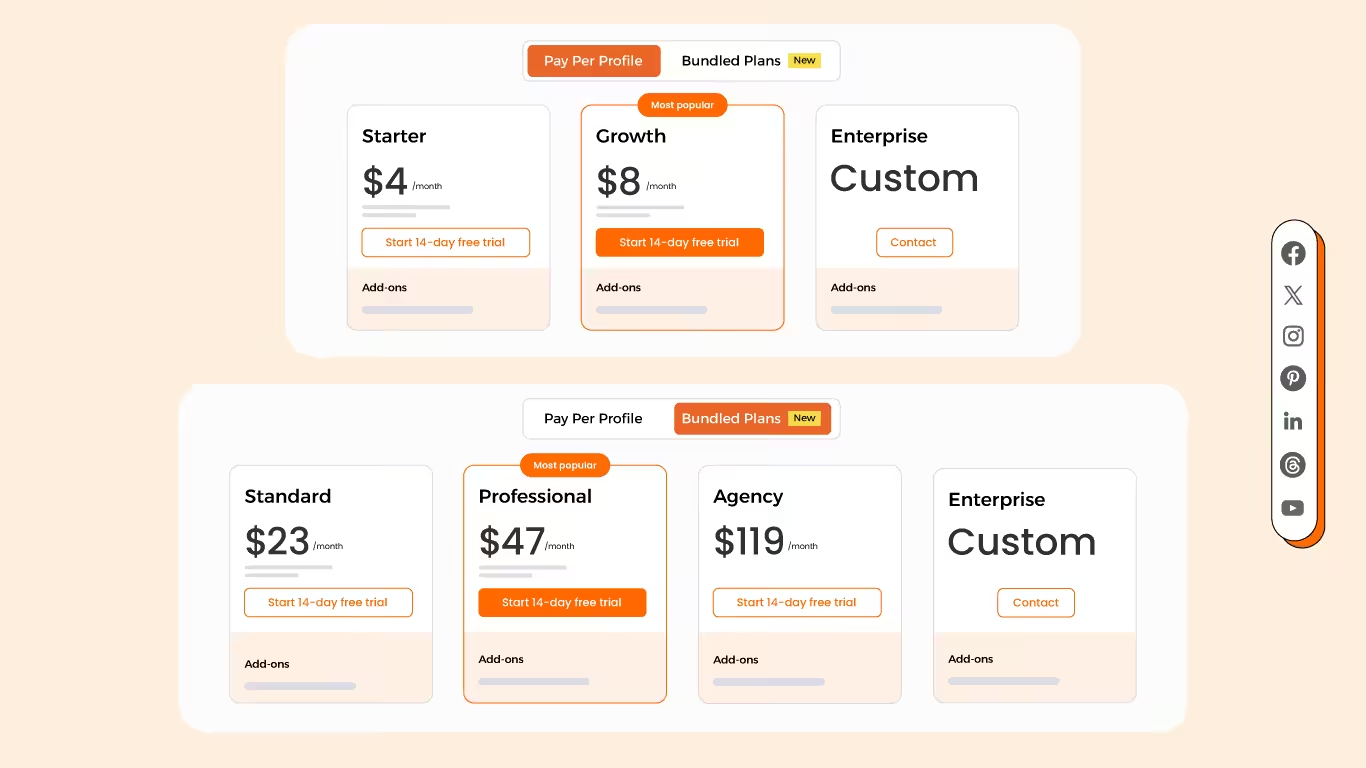
Social Champ, on the other hand, offers flexible per-channel and bundled pricing. The pay-per-profile plans include:
- Starter, which costs $4 and has 1 user. In this plan, you can manage 1 social accounts.
- Growth, which costs $8 and has unlimited users. In this plan, you can manage 1 social accounts.
With Social Champ, you also get Flat-Rate bundles, which are:
- Free, which costs $0 and has 1 user. In this plan, you can manage 3 social accounts.
- Standard, which costs $23 and has 2 users. In this plan, you can manage 6 social accounts. This plan also comes with add-ons for accounts. You can add another account for $5/account
- Professional, which costs $47 and has 5 users. In this plan, you can manage 12 social accounts. This plan also comes with add-ons for accounts. You can add another account for $4/account and pay $8/user for another user.
- Agency, which costs $119 and has unlimited users. In this plan, you can manage 30 social accounts. This plan also comes with add-ons for accounts. You can add another account for $3/account
- Enterprise, which is Custom and has unlimited users. In this plan, you can manage unlimited social accounts.
Features That Matter for Your Workflow
As you know, both tools cover the basics you expect. You get scheduling, calendar views, analytics, and team approvals. But they shine in different areas.
Pallyy built its reputation on Instagram planning. The grid preview, drag-and-drop scheduling, and visual content planning feel incredibly natural if Instagram drives your strategy.
You also get their bio link tool and a content ideas feature, which is a lifesaver when you’re stuck for post concepts.
Social Champ focuses heavily on broad social media management across multiple platforms.
It supports a wider variety of networks (like Mastodon, Bluesky, and WhatsApp Business) and offers distinct features like social listening, ad boosting, and competitor analysis that larger, multi-channel teams often require.
Making Your Decision
You can start by evaluating your current needs. Since well-structured lists act as scannable shortcuts to high-priority content, start by asking yourself these core questions:
- How many distinct brands do you manage? (This dictates if you need Pallyy’s bundled social sets or Social Champ’s individual channels).
- How many team members need access? (Social Champ’s Growth plan offers unlimited users, whereas Pallyy charges $120/yr per extra user on their Agency tier).
- What is your monthly posting volume? (If you post infrequently, Pallyy’s $12/mo Starter plan might be all you need).
Then project six months ahead. Will you add more clients? Hire more teammates? Expand to new platforms?
Run the numbers using the different Pallyy pricing tiers and Social Champ’s per-account scaling. If you have a massive team but only a few social profiles, Social Champ’s unlimited users might save you a ton.
If you are highly visual, manage distinct brands, and want a unified “set” of tools for a predictable flat rate, Pallyy’s structure makes a lot of sense.
The right choice depends entirely on your specific workflow, not which tool has the longer feature list.
Featured Article:All About Simplified Pricing: Costs, Features, and Plans
All-In-One Dashboard for Every Platform!
Why Social Champ Is a Smart Alternative to Pallyy
Let’s be real, I’m not here to criticize Pallyy pricing.
It’s a solid tool that works exceptionally well for many businesses, especially highly visual Instagram-first creators. But when you compare both platforms extensively, Social Champ offers better value and functionality in several key areas.
Let’s take a look.
Better Pricing That Works For You
Here’s where Social Champ really shines compared to the current Pallyy pricing plans.
Social Champ’s pricing is straightforward: $4/month per channel for Starter, $8/month per channel for Growth, and custom Enterprise pricing. You get predictable costs without doing too much math, and you only pay for the exact channels you connect.
Pallyy’s cost, however, can feel restrictive with their “per-set” model, especially if you have a growing team.
Let’s run a real scenario: Say you manage 4 client brands, but you only handle their Facebook and Instagram (8 social accounts total), and you need to bring on one teammate.
- On Pallyy: You would likely need to jump to their $79/month Agency plan to get the multi-user support and enough social sets to cover your clients.
- On Social Champ: You would use the Growth plan. 8 channels at $8 each is $64/month. But the best part? The Growth plan includes unlimited users. You save money, and you don’t pay a penalty for hiring help.
Pallyy restricts multi-user support to its higher tiers. You must be on the $79/mo Agency plan to add teammates, and even then, extra users cost $120/year each. In contrast, Social Champ’s $8/month Growth plan includes unlimited users and workspaces right out of the box, making it a much safer bet for growing teams.
More Features at Every Price Point
Social Champ doesn’t just win on team pricing. You get more functionality across the board:
- Advanced scheduling features: Enjoy bulk uploads, RSS automation, and evergreen content recycling.
- Better analytics: Access competitor analysis, social listening, and comprehensive custom reports.
- Team collaboration tools: Utilize client management workflows, white-label reporting, and robust post-approval systems without needing a high-tier agency plan.
- Broader platform coverage: Post to platforms like Bluesky, Mastodon, and WhatsApp Business (which Pallyy doesn’t currently offer).
Scalability Without Sticker Shock
This is where rigid tier structures can really hurt growing agencies.
As you add clients and team members, your monthly bill can climb in sudden, expensive jumps when you are forced into a higher tier just to add one extra teammate or one extra brand. With Social Champ’s flexible pricing, it becomes much easier and far more affordable to scale your agency.
Start Saving Without Sacrificing Features!
Featured Article: A Detailed Look at Postiz Pricing and Plans
Conclusion
I’ve walked you through everything you need to know about Pallyy pricing.
You’ve got a few clear paths: start on the Free or Starter plan to test things out, go with the Pro plan if you’re managing a single brand with heavy posting needs, or jump to the Agency and Scale tiers when you’re ready to grow your team and client roster.
But here’s what I really want you to take away from this. Don’t just look at the monthly price tag. Think about how the tool fits into your daily routine.
Will it actually save you time? Does it support the platforms where your audience hangs out? Can it grow with you without breaking your budget?
I’ve shown you the numbers, but you need to feel how each platform works with your content and team.
Your social media strategy deserves a tool that makes your life easier, not more complicated.