

Posting on Instagram feels straightforward until you see how everything sits together on your profile. Maybe you just finished uploading a series of bright, colorful product shots, but just one post now disrupts the flow with its somber tones.
It’s at that moment you wish you could move posts like puzzle pieces until the grid looks just right. There’s bad and good news.
The bad news is that Instagram still can’t let you fully rearrange existing posts natively. The good news is that you don’t have to be stuck with a messy grid forever. You can edit how the grid looks through thoughtful planning, selective archiving, post pinning, and grid preview tools.
This guide shows you how to edit grid on Instagram. I’ll walk you through practical methods, helpful tools, smart layout ideas, and the limitations that shape what is realistically possible.
Short Summary
- Editing your Instagram grid is about planning, previewing, and arranging content, not just shuffling old posts.
- Archiving, pinning, and hiding posts help control the look of existing content.
- Planning future posts with drafts, captions, and color schemes keeps your feed cohesive.
- Choosing the right grid style and avoiding common mistakes make your profile visually appealing.
- Social Champ makes planning, scheduling, and previewing posts easy, keeping your grid polished and consistent.
Along the way, you’ll see how a reliable Instagram scheduler can help plan your posts so the grid looks intentional rather than accidental.

Take Control of Your Grid With Social Champ
See your posts, rearrange with ease, and plan your feed like a pro with the powerful scheduler.
What Does Editing Your Instagram Grid Actually Mean
The biggest misconception about Instagram grids is that you can drag and drop posts to make everything line up perfectly.
The truth is, editing your Instagram grid isn’t about shuffling old posts like puzzle pieces. It’s about shaping the overall look of your profile so it tells the story you want.
You can use two approaches to shape the overall look of your profile. One, you can adjust the visibility of existing posts, and two, you can edit future posts.
Adjusting visibility for existing posts gives you control over what already appears in your grid through archiving, hiding, or pinning content. This approach lets you tweak your profile’s look without affecting likes, comments, or other engagement metrics.
Editing future posts, on the other hand, lets you plan ahead so each new upload fits seamlessly into your feed. This way, your profile starts to feel intentional rather than like a random collection of pretty squares.
Featured Article: How to Become Instagram Famous
How To Edit Grid on Instagram Using Built-In Features
Even though Instagram doesn’t let you freely rearrange your grid, it does offer some built-in tools to shape how your profile appears.
Let’s take a look at the steps for adjusting the visibility of existing posts and for editing future posts so your profile looks polished and intentional.
Steps for Adjusting the Visibility of Existing Posts
Controlling which posts appear on your grid is a simple way to clean up your profile without deleting content. Below are the main methods Instagram gives you to adjust the visibility of your existing posts:
-
Archive Posts
If a post no longer fits your feed’s vibe, clashes with your current aesthetic, or you just want to refresh your grid without permanently deleting anything, archiving is your go-to tool.
The good thing about archiving is that it lets you remove content from your grid while keeping it safe in your account, so you don’t lose likes, comments, or memories.
So how do you archive Instagram posts? First thing to note is that you cannot directly archive Instagram posts using a PC. This feature is currently limited to the mobile app.
Here are the steps for archiving Instagram posts using your phone:
- Go to the post you want to hide.
- Tap the three dots in the top-right corner.

Tap the 3 Dots - Select “Archive.”
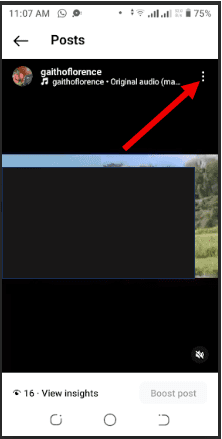
Archiving posts is a perfect way to tidy up your feed, remove outdated or off-brand posts, or temporarily hide seasonal content. It gives you the freedom to keep your profile looking fresh while your old content stays just a tap away.
-
Pinning Posts
You can pin up to three posts at the top of your profile to make sure your best content gets noticed first. Pinned posts stay at the top of your grid, so even if you post something new, these highlights remain front and center.
Here are the steps for pinning posts on Instagram:
- Go to the post you want to pin.
- Tap the three dots in the top-right corner.
- Select “Pin to your main grid.”
Select Pin to Your Main Grid
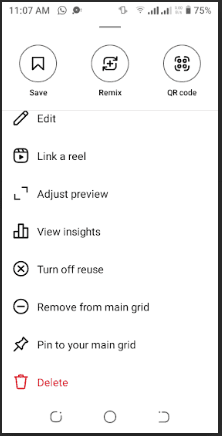
This feature is perfect for highlighting top-performing posts, important announcements, promotions, or any content you want new visitors to see right away.
Steps for Editing Future Posts
Planning your future posts is the best way to keep your Instagram grid looking cohesive and intentional. With a little foresight, you can make sure every new upload fits seamlessly into your feed.
Below are the main methods you can use to edit and plan your future posts.
-
Draft Posts
Planning ahead is everything on Instagram. Saving posts as drafts lets you prepare your content in advance, adjust visuals, and refine captions so everything fits your feed’s overall look.
This way, you can see how new posts will align with your existing grid before publishing, helping your profile feel polished and intentional rather than random.
Here’s how to do it:
- Tap the + icon to create a new post.
- Tap + Icon on Instagram
- Add your photo or video and tap next
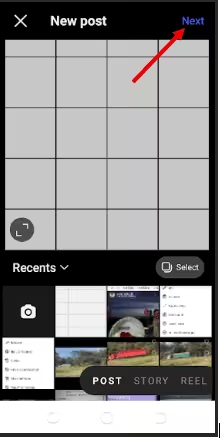
Tap Next - Make edits as necessary and tap the arrow at the top right.
- Tap ‘Arrow’ at the Top Right
- Tap “Save Draft.”
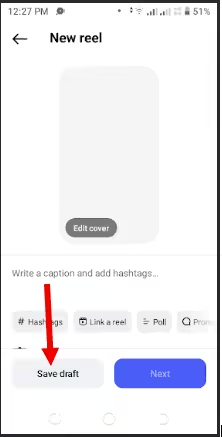
Select Save Draft
The best time to draft posts is when you want to maintain a consistent theme, plan a series of posts for a campaign, or simply make sure each upload complements your feed before it goes live.
-
Use Captions and Hashtags Strategically
The grid isn’t just about visuals. Clever captions and the right hashtags can tie your posts together, highlight your brand’s personality, and make your feed feel like a well-planned story instead of a random collection of images.
Hashtags also help new audiences discover your content, while captions give context, humor, or personality that reinforces your overall style.
Using Instagram’s built-in tools gives you more control over how your profile looks without needing third-party apps. Whether you’re adjusting existing posts or planning future ones, these features help you create a cohesive, polished feed that reflects your style and brand.
Featured Article: Instagram for Business: Grow Your Brand Online
How To Edit Profile Grid on Instagram Before Posting
Planning ahead is hands-down the most effective way to edit your Instagram grid. Once a post is live, your options are limited, so thinking about your feed before publishing gives you full control over the look and flow of your profile.
Instagram allows you to preview certain posts so you can see how they’ll fit in your feed before hitting publish.
The workflow is simple: plan → preview → publish.
- First, plan your visuals, captions, and posting schedule.
- Next, preview how everything fits together.
- Finally, publish with confidence, knowing your grid looks intentional from every angle.
There are two options that let you visualize your upcoming posts and arrange them in the perfect order before anything goes live.
The first one is feed previews, which show you exactly how upcoming posts will sit alongside existing content. These previews you spot clashes in colors, layout, or theme.
The second option is post sequencing, which lets you arrange the order of future posts so your grid tells a cohesive story. This is whether you’re planning a campaign or just want your profile to look polished.
Taking the time to organize your posts before they go live can save you a lot of headaches later.
What Tools Help You Edit And Preview Your Instagram Grid
Editing and previewing your Instagram grid gets a lot easier when you use the right tools. While Instagram’s built-in features are useful, dedicated tools give you extra control over planning, sequencing, and visual consistency.
These tools generally fall into three categories: feed preview tools, scheduling tools, and design tools. Each category serves a different purpose, whether you want to see your grid before posting, plan content in advance, or polish visuals to fit your aesthetic.
Here’s a comparison table that shows what each tool type helps with and what it’s best for:
| Tool Type | What it Helps With | Best For |
|---|---|---|
| Feed Preview | Visualizing upcoming posts in your grid | Creators and brands planning cohesive feeds |
| Scheduling | Planning and automating post timing | Social media managers and busy business owners |
| Design | Editing visuals, applying filters, creating themes | Anyone wanting a polished and consistent look |
These categories cover the core functions you need to edit and preview your grid effectively, without overwhelming you with dozens of options.
Once you understand the different categories, you can focus on solutions that fit your workflow. One such solution is Social Champ.
How Social Champ Helps You Plan and Edit Your Instagram Grid
Scheduling isn’t just about picking a time to post. It’s your chance to choreograph your entire feed so every post hits in the right order.
Social Champ is one of the Instagram management tools that make it easy to take control of your Instagram grid. It turns planning, editing, and publishing into a smooth, stress-free process.
Here’s how Social Champ helps you with planning and editing your Instagram grid:
-
Visual Planning Through Scheduling
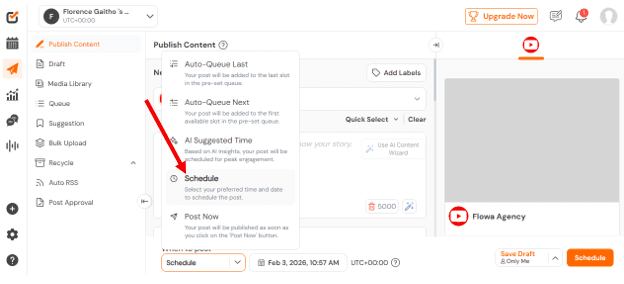
Social Champ’s scheduling feature is a core part of how it helps you plan your Instagram grid. It lets you line up posts well into the future rather than scrambling to post in the moment.
Social Champ’s Scheduling Feature This means you can build out your visual story ahead of time, batch your content, and keep a consistent posting rhythm that makes your grid look intentional rather than random.
In addition to basic scheduling, Social Champ’s AI‑Suggested Time feature analyzes your past engagement and suggests the best time to post on Instagram, so your content goes live when your audience is most active. This helps to maximize reach and engagement
-
Maintaining Consistent Posting Order
Social Champ’s Social Calendar is like a visual blueprint for your feed. It shows all your scheduled posts across days, weeks, or even months, letting you see the full layout at a glance.
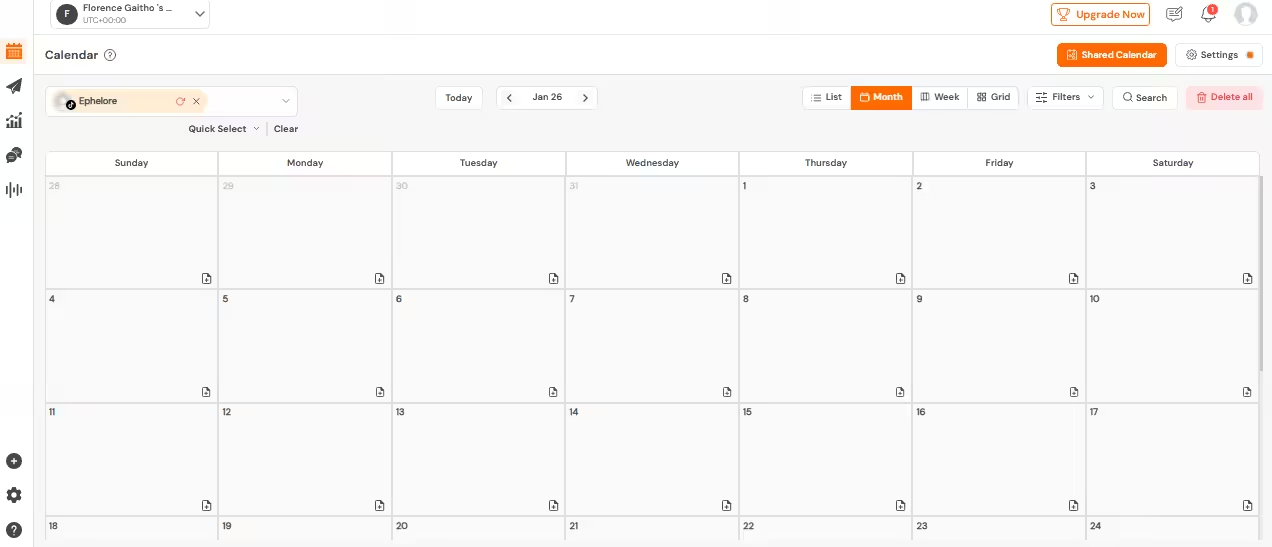
Social Champ’s Social Calendar With the calendar, you can drag, rearrange, and plan posts ahead of time so your grid flows seamlessly. It makes it easy to keep a consistent posting order, avoid accidental overlaps, and ensure campaigns or series land exactly where they should.
-
Avoiding Grid Mistakes Before Publishing
Social Champ lets you preview your feed before a single post goes live. You can catch clashing colors, wonky layouts, or posts that don’t vibe before they ever reach your audience.
This way, every post slots perfectly into your grid, and your feed tells a cohesive story. You can post with confidence knowing your Instagram profile looks intentional, polished, and ready to impress.
Queue Up Weeks of Content in Minutes
Schedule your posts with Social Champ and keep your feed flowing flawlessly.
How Should You Edit Your Instagram Grid Strategically
Editing your Instagram grid strategically starts with choosing a style that matches your brand, mood, and message.
Let’s take a look at the top five most popular grid styles, how you should edit them, and who they are ideal for:
-
Row-by-Row Grid
A row-by-row grid groups every three posts into a single theme, topic, or visual style. Each row works as its own mini-story, whether that’s a campaign, color scheme, product launch, or content series, while the overall grid still feels clean and organized.
This style works especially well for:
- Brands running campaigns.
- Creators who post in content batches.
- Businesses that want a structured feed without overthinking every single post.
-
Checkerboard Grid
A checkerboard grid alternates between two types of posts, such as photos and quotes, light and dark images, or branded graphics and lifestyle shots. The pattern creates visual balance across your feed and keeps things from feeling cluttered or repetitive.
This style is ideal for:
- Creators who mix visuals with text.
- Brands that want a clean and recognizable pattern.
- Businesses that post educational content alongside promotions.
-
Color-Coded Grid
A color-coded grid groups posts by dominant colors, creating a smooth visual flow across your feed. Instead of focusing on content type, you focus on color palettes, letting similar tones appear together so the grid feels cohesive at a glance.
This style works well for:
- Brands with a strong visual identity.
- Creators in fashion, design, or lifestyle niches.
- Anyone who wants their profile to feel instantly recognizable.
-
Vertical Line Grid
A vertical line grid uses the center column (or a single column) of your Instagram feed for a specific type of post, such as quotes, announcements, or branded graphics.
The surrounding columns support it with complementary visuals, creating a clear visual anchor down the middle of your profile.
This style is great for:
- Brands that want to highlight key messages.
- Creators who post regular quotes or tips.
- Businesses running recurring campaigns.
-
Puzzle Grid
A puzzle grid is a single large image split into multiple posts that come together to form one complete visual across your feed. Each post is part of a bigger picture, so the full impact only shows when someone views your profile grid.
This style works well for:
- Launches, announcements, or short-term campaigns where you want to make a bold first impression.
- Brands and creators who plan content in advance.
It’s also great if you like planning ahead and want your grid to look intentional even when someone scrolls quickly through your profile.
It works best if you want consistency without strict rules or heavy planning.
A color-coded grid is a great choice if you enjoy visual planning and want your grid to look curated without relying on strict layouts.
A vertical line grid works best if you post consistently and plan ahead, since one out-of-place post can break the visual line.
Choosing the right grid style helps your profile look intentional rather than accidental. When your layout matches your content goals, your feed becomes easier to recognize, easier to follow, and far more memorable.
Featured Article: How to Build a Linktree for Instagram
What Mistakes Ruin an Instagram Grid
Even the best-looking posts can fall flat if a few common mistakes sneak in. Here’s what to avoid so your grid stays clean, cohesive, and on-brand.
-
Over-Editing
Too many effects, heavy filters, or extreme edits can make your feed feel chaotic.
Fix: Stick to light, consistent edits that enhance your visuals instead of overpowering them. -
Inconsistent Filters or Styles
Jumping between presets, tones, or color moods breaks the visual flow.
Fix: Choose one or two core styles and apply them consistently across your posts. -
Chasing Trends That Don’t Fit Your Brand
Viral formats are tempting, but not every trend belongs on your grid.
Fix: Only adopt trends that align with your brand voice, visuals, and long-term content goals.Avoid these pitfalls, and your grid won’t just look good post by post; it’ll feel intentional as a whole.
How Often Should You Update or Refresh Your Instagram Grid
There’s no set rule for refreshing your Instagram grid, and that’s a good thing. A grid update usually makes sense when something changes on your end, not just because time has passed.
If you’re rebranding, launching a new campaign, or shifting your niche or content focus, refreshing your grid helps your profile reflect that change instantly. In these cases, cleaning up older posts can make your current direction clearer to new visitors.
When refreshing, archiving is often the smarter move than deleting. Archiving lets you hide posts that no longer fit your style or message without losing insights or content you might want to reuse later. You can reserve deleting for posts that no longer serve any purpose.
Overall, think of grid updates as intentional resets, not routine chores. Update when your content evolves, and let your grid grow the rest of the time.
Turn Your Feed Into a Work of Art
Use Social Champ to plan, preview, and maintain a consistent posting order on Instagram.
Conclusion
Mastering how to edit grid on Instagram is less about shuffling old posts and more about planning, previewing, and curating a cohesive profile that tells your story. Whether you’re adjusting existing posts, scheduling future content, or experimenting with grid styles, taking control of your Instagram profile ensures every post contributes to your overall story.
Remember, the key is intentionality. Think ahead, use previews, and keep your posting consistent, and your grid will always look as good as the content you create. With a strategic approach and tools like Social Champ, your feed can stay polished, consistent, and ready to impress your audience without the guesswork.


