


Ever needed to dig up something you tweeted months (or even years) ago?
Maybe you’re checking on a past campaign, researching competitors, or just trying to track your brand’s history. Whatever the reason, knowing how to find old tweets can save you a ton of time and headaches.
In this guide, I’ll walk you through the easiest ways to track down those old posts, using tools you probably already have and a few tricks that make the process way simpler.
Short Summary
- Old tweets can be found using a mix of basic search, advanced search, archives, and third-party tools depending on your needs.
- Methods differ when searching for your own tweets versus someone else’s, so choose the right approach.
- Search operators and date filters make finding older content faster and more precise.
- Default Twitter/X search favors recent posts, so archives and advanced tools help you dig deeper.
- Tools like Social Champ make managing, tracking, and repurposing tweets easier, turning frustration into efficiency.
By the end, you’ll know exactly how to find old tweets without pulling your hair out.
You’ll also learn how a Twitter scheduler can help you organize, track, and even repurpose your tweets for maximum impact.
Ready to stop scrolling and start finding old tweets? Let’s do this.
Why Would You Want to Find Old Tweets
Sometimes an old tweet is more than just a throwback. It can be proof, inspiration, or something you urgently need to track down.
Here are some of the most common reasons people go digging through their tweet history:
- Recovering deleted or forgotten tweets: Maybe you deleted something by accident or just want to revisit a post you vaguely remember. Finding it can save you from rewriting brilliance from scratch.
- Research, PR, or audits: Brands, journalists, and marketers often review past tweets to fact-check statements, assess reputation, or analyze messaging over time.
- Content repurposing: That high-performing thread from 2022 could easily become a LinkedIn post, blog section, or newsletter highlight with a little refresh.
Whatever your reason, knowing how to find old tweets quickly will turn frustration into strategy.
Track Engagement Effortlessly With Social Champ!
How To Find Old Tweets Using Twitter Search
Let’s start with the obvious: the search bar. Yes, the tiny box at the top of X (still lovingly called Twitter by most of us) is more powerful than it looks.
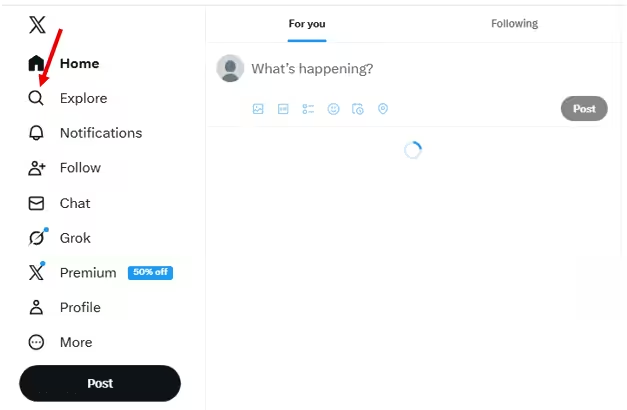
Just click at the magnifying glass labeled ‘Explore’ at the top left bar.
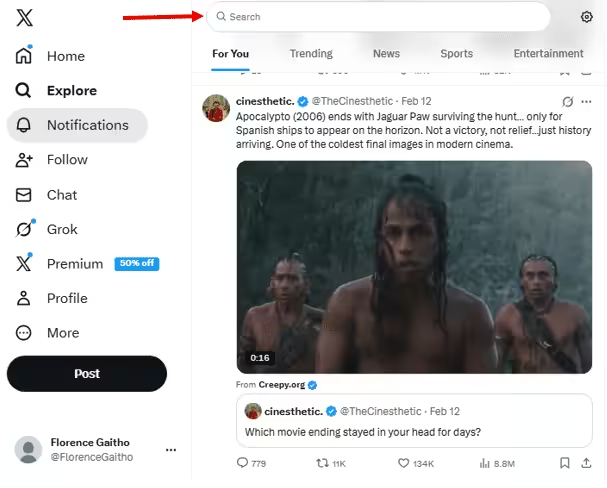
Once you click on the magnifying glass, the search bar will appear at the top of your feed.
What’s next?
Start With Basic Keyword Search
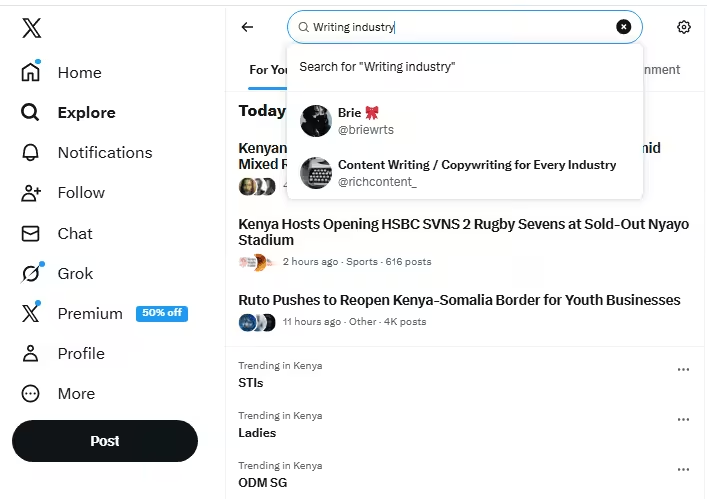
Type in a keyword you remember from the tweet. It could be a phrase, hashtag, username, or even a random word you’re sure you used.
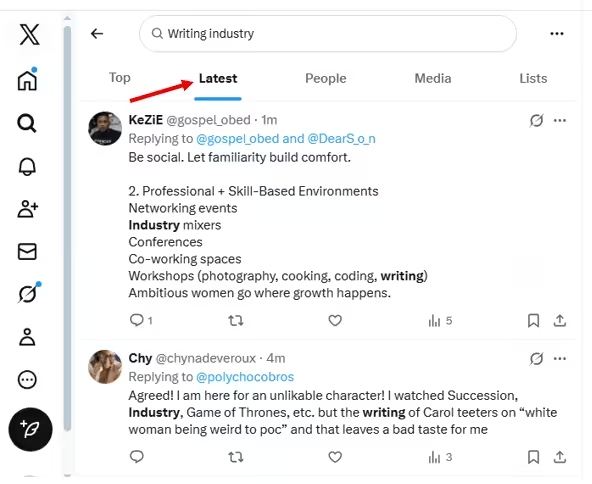
Hit enter, then switch to the “Latest” tab to avoid seeing only top-performing posts.
If you’re searching for your own tweet, add your username to narrow it down. Like this: from:yourusername keyword
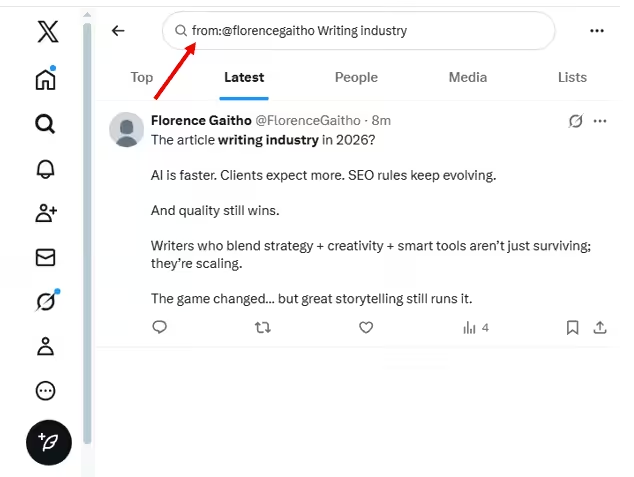
If you’re searching for someone else’s tweet, write this on the search bar: from:theirusername keyword
That one little operator (from:) instantly filters out the noise. No more scrolling through memes and unrelated hot takes.
Featured Article: How to Get Verified on Twitter (X): Step-By-Step Guide
Searching Your Own Tweets vs. Others’
Here’s where things differ slightly.
- Your own tweets: You can combine keywords with your handle and even add date ranges for more precision (we’ll get into that shortly). You also have access to your full history through your archive if search falls short.
- Other users’ tweets: You’re limited to what’s publicly visible and indexed in search. If the account is private or the tweet was deleted, standard search won’t help.
The Big Limitation: Recency Bias
Default search on X loves recent content. Even if you’re hunting for something from 2018, the algorithm may serve you fresh posts first because it assumes newer equals better.
That means basic search works great for recent tweets… but for older ones, you’ll need to level up with advanced filters and operators. Don’t worry, we’re going there next.
How To Find Old Tweets With Advanced Search
Advanced Search is the most powerful native way to find old tweets without scrolling for hours or whispering “please” to the algorithm. It lets you filter tweets by:
- Keywords: Search exact phrases, combinations of words, hashtags, or exclude certain terms. Perfect when you remember what was said but not when.
- Accounts: Find tweets from a specific account, to a specific account, or mentioning one. Great for locating your own posts or someone else’s throwback hot takes.
- Engagement: Filter by minimum replies, likes, or reposts. Ideal when you’re trying to find that one tweet that “blew up.”
- Dates: Set a start and end date to narrow results to a specific month, year, or even a single day. This is the secret sauce for serious tweet archaeology.
Step-By-Step: How To Use Advanced Search
- Open X (Twitter) and type anything into the search bar.
- Click the three dots next to the search bar.

Click the Three Dots - Select “Advanced Search.”
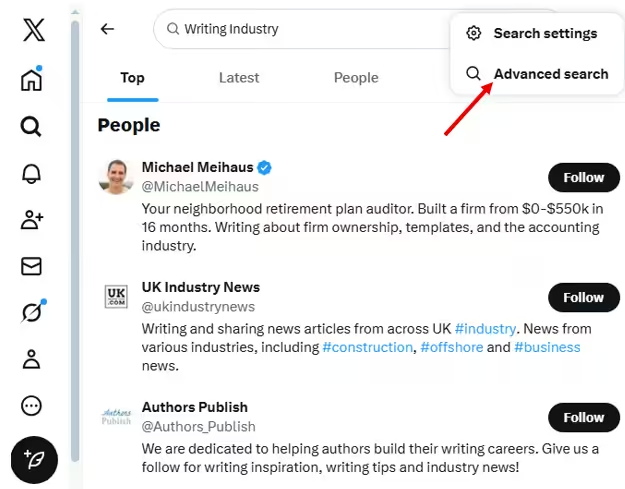
Click Advanced Search - Fill in the fields you remember (keyword, account, or date).
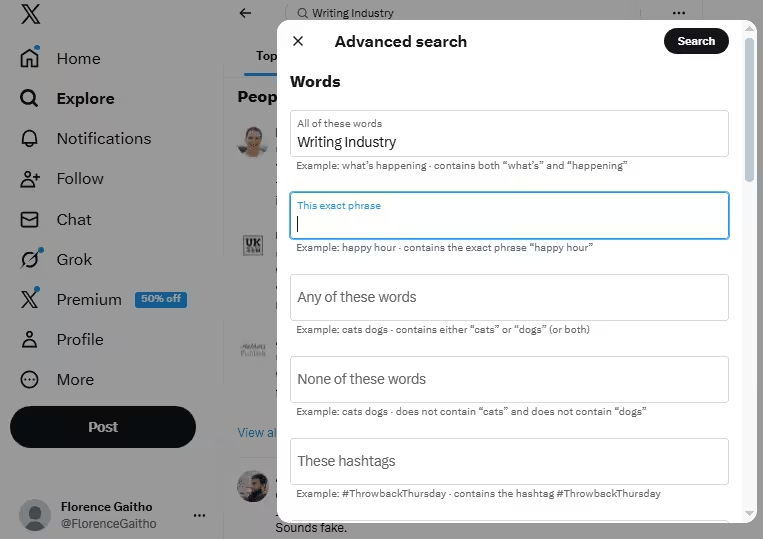
Advanced Search Window - Leave everything else blank. Yes, blank is beautiful.
- Hit Search and let the filtering magic happen.
Pro tip: If you remember the account and date range, you often don’t even need keywords. Less clutter = better results.
Here’s a quick cheat sheet to help you understand what each Advanced Search field does and when you should actually use it.
| Advance Search Field | What It Does | When To Use It |
|---|---|---|
| All These Words | Finds tweets containing specific words | You remember parts of the wording |
| Exact Phrase | Searches for a precise sentence or words | You remember the tweet almost word-for-word |
| Any of These Words | Finds tweets with at least one of several words | You’re not sure which wording was used |
| None of These Words | Excludes certain terms | You’re getting irrelevant results |
| From These Accounts | Shows tweets posted by a specific account | Finding your own or someone else’s old tweets |
| To These Accounts | Finds replies sent to an account | Looking for past conversations |
| Mentioning These Accounts | Shows tweets that tag an account | Tracking mentions |
| Minimum Replies/Likes/Reposts | Filters by engagement level | Finding viral or high-performing tweets |
| Dates (From–To) | Narrows results to a time range | Searching by year, month, or event timeline |
Advanced Search is fast and precise. Once you get the hang of it, you’ll never scroll endlessly again.
Featured Article: Best Time to Post on Twitter: Updated Data Based On 1M Posts
How To Find Your Own Old Tweets
Want to dig up that gem you tweeted… back when flip phones were still a thing? Finding your own old tweets is way easier than scrolling endlessly through your timeline, if you know the right tricks.
The magic combo is simple:
- from:username: Start with yourself! This tells Twitter/X to only show tweets from your account.
- Keywords: Add words or hashtags you remember from the tweet. The more precise, the faster you find it.
- Date Filters: Narrow the search by specific months, years, or even exact days. This helps you skip irrelevant tweets and zoom straight to the good stuff.
Sometimes, even with the best search tricks, things don’t go according to plan, and your perfect tweet can stay stubbornly hidden.
When that happens, it’s usually because you’ve made a simple slip. Common mistakes include using the wrong date format, forgetting operators like from: or since:, or skipping quotation marks for exact phrases.
Steer clear of those mistakes, and you’ll be zooming straight to your old tweets without getting lost in a sea of random posts.
Repurpose Content Seamlessly With Social Champ!
How To Find Old Tweets From Other Users
Looking to dig up tweets from someone else without creeping too hard? Don’t worry, finding old tweets from other accounts can be done ethically and publicly, using nothing more than clever search strings and a little know-how.
The easiest way is to use Advanced Search (or X/Twitter’s native search bar) with specific parameters. For example:
- from:elonmusk Tesla → Tweets from Elon Musk that mention Tesla
- from:natgeo “wildlife photography” → NatGeo tweets containing the exact phrase “wildlife photography”
- to:username keyword → Replies sent to a particular account with a keyword
Using these tricks, you can ethically uncover old content, follow conversations, or research trends, without ever sliding into someone’s DMs.
Keep in mind, private or protected accounts are off-limits. If the account isn’t public, you won’t be able to see their old tweets, and that’s a boundary you don’t want to cross.
What Third-Party Tools Help Find Old Tweets
Sometimes, Twitter’s native search just won’t cut it, especially if you’re looking for old tweets with tricky keywords, across multiple accounts, or spanning long timeframes.
That’s where third-party tools come in as a fallback or power-up option. Here’s a simple comparison of the main types of tools you might consider:
| Tool Type | Examples | Best For | Limitations |
|---|---|---|---|
| Tweet Archivers | – TwimeMachine
– TweetBackup |
Downloading and storing large volumes of your own tweets | – Usually only works for accounts you control
– Setup can be technical |
| Search & Analytics Platforms | – Social Bearing
– TweetDeck – Brand24 |
Finding tweets by keywords, hashtags, or accounts with additional metrics | – Often paid
– May have limits on free searches |
| Content Monitoring Tools | – Social Champ
– Hootsuite – Sprout Social |
Tracking mentions, engagement, or trends across multiple accounts | – Can be overkill for casual searches
– Mostly focused on analytics rather than full tweet history |
These tools are handy when you need more control, better filtering, or historical insights. But for most searches, Advanced Search is still your first stop.
Tips To Search Through Years of Tweets Faster
Digging through years of tweets can feel like searching for a needle in a haystack, but with the right tricks, you can get there faster. Here are some practical tips to help you slice through your timeline efficiently and find exactly what you’re looking for:
- Narrow Keywords: Use specific words or phrases to cut down irrelevant results.
- Search by Engagement: Filter tweets by minimum replies, likes, or retweets to quickly find the ones that stood out.
- Combine Multiple Operators: Mix from:, since:, until:, and keywords to zero in on precise tweets without scrolling endlessly.
- Exclude Words: Use the – operator to filter out tweets with terms you don’t want showing up.
- Leverage Hashtags: If you remember hashtags, add them to narrow the search to specific campaigns, events, or trends.
- Bookmark Searches: Save advanced search URLs for repeat queries so you don’t have to rebuild filters every time.
These efficiency hacks make digging through years of tweets faster, smarter, and way less frustrating.
Featured Article: 400+ Twitter Bio Ideas: How to Write a X/Twitter Bio
How Social Champ Helps You Reuse and Track Past Content
Social Champ is one of those Twitter post schedulers that does a lot more than just scheduling. It helps you manage multiple accounts from a single dashboard, bulk upload posts, create caption templates, and analyze performance across platforms.
And that’s not all. It can help you take your old content and turn it into fresh engagement gold, all while keeping your posting schedule smooth and stress-free.
Here are the key ways Social Champ optimizes your twitter content strategy:
-
Identify Evergreen Tweets
Social Champ lets you spot posts that still resonate, so you can bring back those timeless tweets without reinventing the wheel. It also shows which content performed best, so you can decide what to reuse for maximum engagement and reach.
-
Repurpose Content Across Platforms
Why stop at Twitter? With Social Champ, you can easily share top-performing content on Facebook, LinkedIn, Instagram, and more. This is the easiest way to maximize reach without extra effort.
-
Plan Future Posts Strategically
Social Champ helps you spot what works, plan around engagement peaks, and build a posting calendar that keeps your audience hooked. You can use insights from past content to schedule future posts smarter.
With Social Champ, your old tweets aren’t just history; they’re the secret sauce for consistent, strategic, and monetization-friendly content. Reuse, track, and post like a pro, all while keeping your workflow playful and stress-free.
Stay Organized and Efficient
Conclusion
Tracking down old tweets doesn’t have to be a wild goose chase. From basic keyword searches to advanced operators, archives, and third-party tools, there’s a method for every situation. Whether you’re recovering a forgotten gem, doing research, or repurposing content, knowing the right search tricks can save you hours of scrolling and frustration.
For an extra boost, add Social Champ to your social media toolkit. It can help you uncover past tweets, track performance, and keep all your content neatly organized. It can make finding old posts feels effortless instead of frustrating.


