You can’t scale a business on manual labor alone. If you’re still hand-triggering every email or manually posting every update, you’re hitting a ceiling that your competitors have already smashed through.
Marketing automation is the process of using software to automate repetitive marketing tasks, like lead nurturing, social media management, and ad campaigns, to drive efficiency and personalization at scale.
Short Summary
- Marketing automation helps you organize repetitive tasks into structured workflows that save time and improve consistency.
- Clear goals, defined audiences, and well-planned triggers form the foundation of any effective automation setup.
- Automation works best when you focus on key areas like email campaigns, social media posting, lead nurturing, and follow-ups.
- Continuous tracking and optimization allow you to refine your campaigns and improve performance over time.
- Social Champ helps you streamline planning, scheduling, collaboration, and analytics in one place, making it easier to manage and scale your marketing efforts.
It’s not just a “nice-to-have” anymore; it’s the industry standard. According to the HubSpot State of Marketing Report (2026), 47% of marketers report leveraging automation to make marketing processes more efficient.
But how do you actually get started without breaking your funnel?
In this guide, I’ll show you exactly how to implement marketing automation step-by-step, all the way from choosing your tech stack to auditing your first automated workflow.
What Is Marketing Automation?
Marketing automation is the use of tools and software to handle repetitive marketing tasks automatically, so you don’t have to manage everything manually.
It shows up as real actions happening in the background through automated campaigns and workflows that respond to user behavior, timing, or predefined triggers.
Here are some everyday examples of how it works:
- An email marketing automation system automatically sends a welcome email sequence when someone subscribes to your newsletter.
- A social media management tool schedules and publishes posts across multiple platforms at set times.
- A CRM system automatically segments leads into lists based on their interests, behavior, or demographics.
- A CRM platform triggers follow-up emails when a user downloads a resource or abandons a cart.
- An analytics platform collects data from your campaigns and automatically generates and sends performance reports on a scheduled basis.
Together, these systems handle the repetitive parts of your marketing so you can focus on strategy and growth. When each tool works in sync, your automated marketing campaigns stay consistent, your data stays organized, and your marketing runs more smoothly in the background.
The Marketing Automation Tool for Socials
How to Implement Marketing Automation Step by Step
Ready to turn scattered tasks into a structured system that actually runs on its own, or at least makes your day feel a lot less chaotic?
Setting up marketing automation works best when you follow a clear path that connects your goals to the actions your audience experiences across different channels.
Here’s a practical step-by-step approach to get started:
- Set Clear Goals: Define what you want to achieve with automation, whether it’s more leads, higher engagement, or better sales follow-ups. Clear goals guide the rest of your setup.
- Identify Your Audience: Understand who you’re targeting. Segment your audience based on behavior, interests, or demographics to ensure your automated marketing campaigns are relevant.
- Choose Your Channels: Decide where your automation will run. Is it email, social media, SMS, or a combination?
- Define Triggers: Set the events that trigger automated actions, such as a form submission, a website visit, or a specific user behavior.
- Build Workflows: Map out the sequence of automated actions, from sending emails and posting on social media to updating contact records or generating reports. Workflows keep your marketing consistent and efficient.
When these steps come together, retail marketing automation stops feeling like a complex setup and starts working like a coordinated system.
Your goals guide the direction, your audience shapes the messaging, and your triggers and workflows keep everything moving at the right time.
With a clear structure in place, you reduce manual effort, improve consistency, and create a smoother experience for both you and your audience.
Featured Article: Mastering AI Prompts for Social Media: Create, Optimize, and Engage
The Marketing Automation Process (From First Trigger to Conversion)
Marketing automation doesn’t just run. It moves through a smooth sequence where each step hands off to the next like a well-rehearsed routine.
From the moment a user shows interest to the moment they convert, everything follows a structured path that keeps things flowing without constant manual input.
Here’s how the process usually plays out:
Stage 1: Data Capture
At the data capture stage, the goal is to collect and store user information automatically as people interact with your brand. Several marketing automation tools help you do this smoothly, including:
- Customer Relationship Management (CRM) platforms: These are centralized systems that capture user data from forms, landing pages, and sign-ups, then store and organize it in one place so you can easily manage and access contact information.
- Landing page builders with built-in forms: These tools let you create dedicated pages with embedded forms that collect visitor details and automatically send that information to your database or connected systems.
- Email marketing tools: These platforms collect subscriber data when users opt in through signup forms or lead magnets. They help you build and manage your email list for future campaigns.
- Website form builders: These tools gather user inputs through customizable forms and often integrate with other systems to pass captured data into your marketing or CRM platform.
- Social media lead capture tools: These SaaS tools collect user information directly from social media forms. They allow people to submit their details without leaving the platform.
These tools work together to track and store every interaction. They provide you with the data you need to move users into the next stage of your marketing automation process.
Stage 2: Segmentation
At this stage, the system takes the data you’ve collected and actively organizes your audience into smaller, more meaningful groups.
Here’s how the system typically groups users:
- It groups users based on actions like clicks, sign-ups, downloads, or page visits.
- It sorts users according to interests shown through their engagement with specific topics or content.
- It categorizes users by demographics such as location, age, or industry, where applicable.
- It updates segments dynamically as users continue interacting with your brand.
- It prepares each group for targeted campaigns that match their behavior and intent.
Segmentation helps you move away from one-size-fits-all messaging and toward more relevant communication.
Stage 3: Triggers
Triggers are the signals that tell your system when to respond. They are specific events or conditions that activate automation and keep your marketing moving at the right time.
Common types of triggers include:
- A user submitting a form on your website
- A user subscribing to your email list
- A user clicking on a link in an email or message
- A user visiting a specific page on your website
- A user abandoning a cart or leaving before completing a process
- A user reaching a certain point in a journey or sequence
When you set your triggers correctly, your system knows exactly when to act without constant monitoring. This keeps your automation timely, consistent, and aligned with how users interact with your brand.
Stage 4: Execution
This is the stage where your automation comes to life, and your planned workflows start running in the background based on the triggers and rules you have set.
Here are some examples of what execution can look like:
- Sending automated email sequences to nurture leads over time
- Scheduling and publishing social media posts using a social media management tool
- Updating contact records or tagging users based on their behavior
- Delivering personalized messages or content to specific audience segments
- Sending internal notifications to your team when a lead takes a key action
At this point, your system consistently carries out the tasks you have defined. It keeps your marketing active and aligned with your strategy without requiring constant manual input.
Stage 5: Optimization
This stage focuses on improving how your automation performs over time based on real data and results.
At this point, you review how your marketing automation campaigns and workflows are performing and make adjustments to get better outcomes.
Here are some examples of what optimization involves:
- Analyzing open rates, click-through rates, and conversions to identify what works
- Testing different subject lines, messages, or content formats to improve engagement
- Refining audience segments based on updated behavior or interaction patterns
- Adjusting triggers and timing to better match user activity
- Updating workflows to remove gaps, reduce drop-offs, and improve user experience
When you continuously optimize your automation, your system becomes more effective, more relevant, and more aligned with your audience’s behavior over time.
Automate Social Media With Social Champ
How to Implement Marketing Automation for Agencies and Teams
When you’re managing multiple people, clients, and campaigns at once, marketing automation becomes less of a luxury and more of a well-organized control center for everything you do.
Here’s how you can set it up so your team stays aligned and your workflows stay clean:
-
Collaboration
Collaboration is all about how you and your team work together inside your automation system. You start by assigning clear roles so everyone knows what they are responsible for, then you share access based on those roles to avoid confusion or overlap.
From there, you rely on shared dashboards, comments, and task assignments to keep communication smooth as work moves between team members, so nothing gets stuck or duplicated.
-
Approvals
Approvals focus on how you review and finalize work before it goes live. You set up approval steps within your workflows so content moves through a structured review process instead of going straight to publishing.
You make it easy for the right people to check, suggest changes, and approve content, which helps you maintain consistency and avoid errors across automated marketing campaigns.
-
Multi-Client Workflows
Multi-client workflows refer to how you organize and manage automation for different clients without mixing things up.
You create separate workflows, campaigns, and folders for each client, then label and structure everything clearly so each brand stays distinct.
This approach helps you keep timelines organized, avoid cross-client confusion, and ensure each client’s strategy runs independently and efficiently.
-
Governance
Governance is about setting the rules that guide how your automation is used across your team. You define permissions, establish access levels, and outline best practices so everyone follows the same standards.
As a result, you maintain control over who can edit, publish, or manage workflows, which helps you keep your operations secure, consistent, and accountable.
When you bring these elements together, your team operates with more clarity and less chaos. Your workflows stay organized, your clients stay happy, and your automation actually supports the way you work instead of complicating it.
Featured Article: Mastering Multichannel Advertising: Strategies, Benefits, and Expert Tips
Automate Social Campaigns Easily With Social Champ
When you are looking for a reliable social media management software for agencies, having a tool that keeps your campaigns organized, consistent, and easy to manage can make a big difference.
Social Champ helps you bring structure to your marketing efforts by giving you a practical way to plan, execute, and manage campaigns without constantly switching between tools or losing track of tasks. It keeps your team aligned while your marketing automation campaigns stay active and organized across multiple platforms.
Here’s how its features support your marketing automation efforts:
-
Planning (Social Calendar)
Planning is crucial because it keeps your content consistent, timely, and aligned with your overall strategy. Without a clear schedule, campaigns can become scattered and harder to manage across multiple platforms.
With Social Champ’s social calendar, you can map out your posts in advance, visualize your entire content plan, and schedule campaigns with ease.
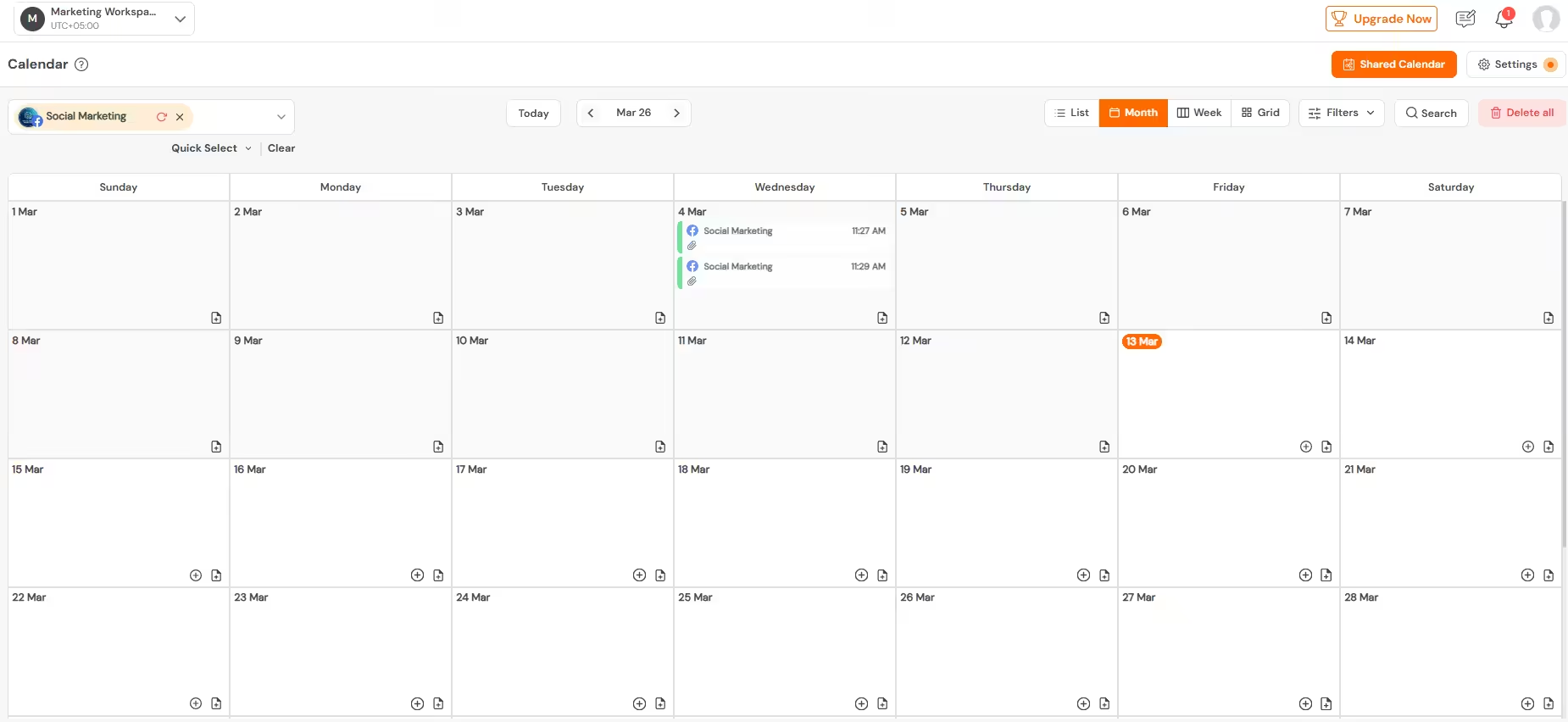
Social Champ’s Calendar It gives you a clear overview of what goes out and when, so you stay organized and in control.
-
Team Collaboration Tools
Collaboration matters because marketing rarely happens in isolation, especially when multiple team members are involved in content creation and management. A smooth workflow helps you avoid miscommunication and keeps everyone aligned on tasks and responsibilities.
Social Champ provides built-in team collaboration features that allow you to assign roles, share access, and manage tasks within your team.
It helps you coordinate efforts seamlessly so your team can work together without stepping on each other’s toes.
-
Approvals
Approvals are important to ensure quality, consistency, and brand alignment before anything goes live. Without a proper review process, mistakes can slip through and affect your campaigns.
Social Champ allows you to set up approval workflows where content can be reviewed and approved before publishing.
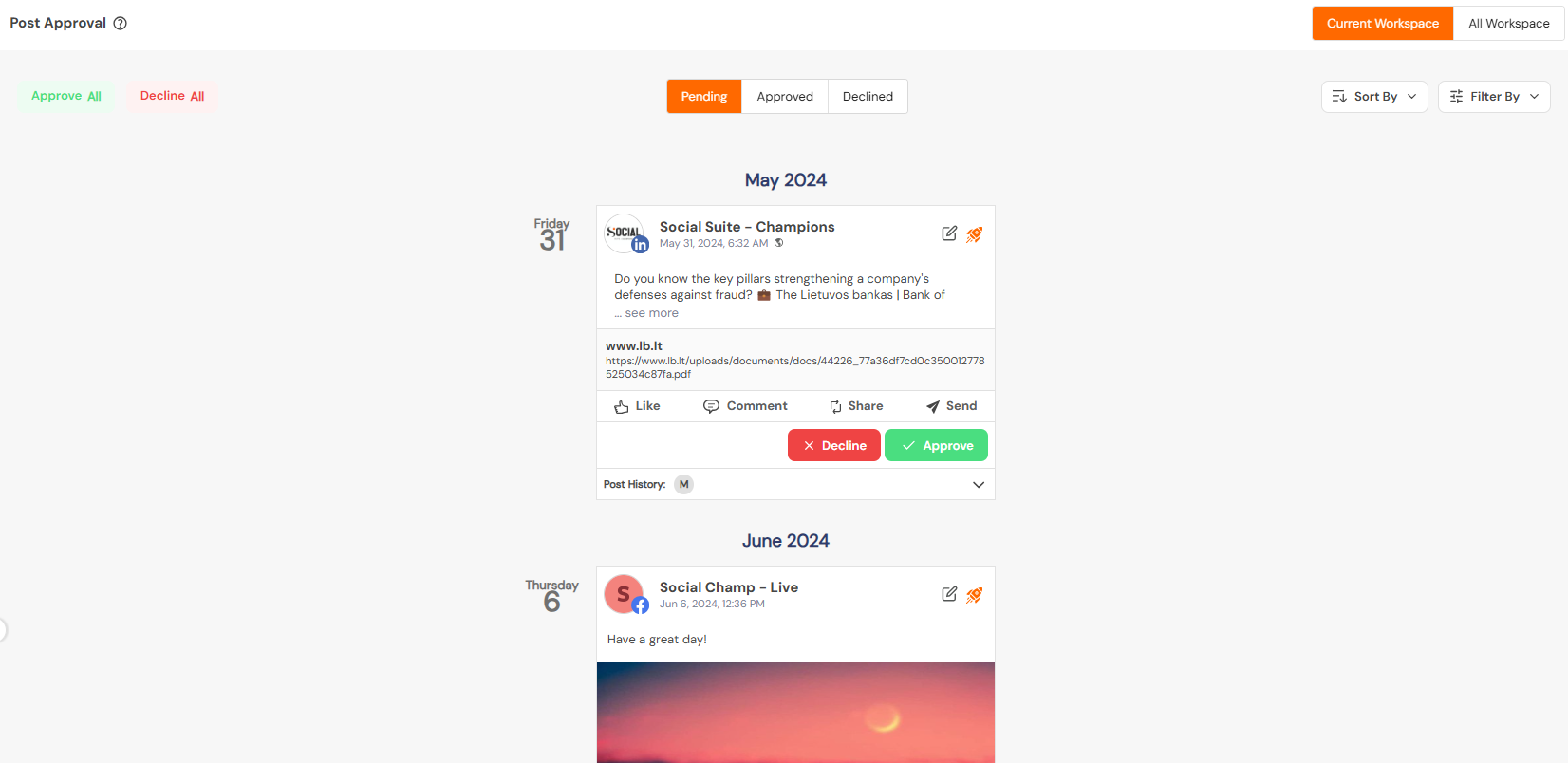
Social Champ’s Post Approvals Social Champ groups posts into clear categories such as pending, approved, and declined, which makes it easy for you to track review status and manage content efficiently. This keeps your content polished and ensures every post meets your standards.
-
Multi-Client and Multi-Platform Support
Managing multiple clients and platforms is essential when you handle diverse accounts with different goals and audiences. Without proper organization, it can quickly become overwhelming.
Social Champ supports multiple clients and platforms from a single dashboard, allowing you to switch between accounts easily.
Supported Social Media Platforms
This social media management platform helps you manage everything in one place while keeping each client’s content separate and well-structured.
-
Unified Social Inbox
A unified inbox is important because it centralizes all your conversations, making it easier to respond quickly and stay engaged with your audience. Without it, messages can get missed across platforms.
Social Champ’s unified social inbox brings all your messages, comments, and mentions into one view.
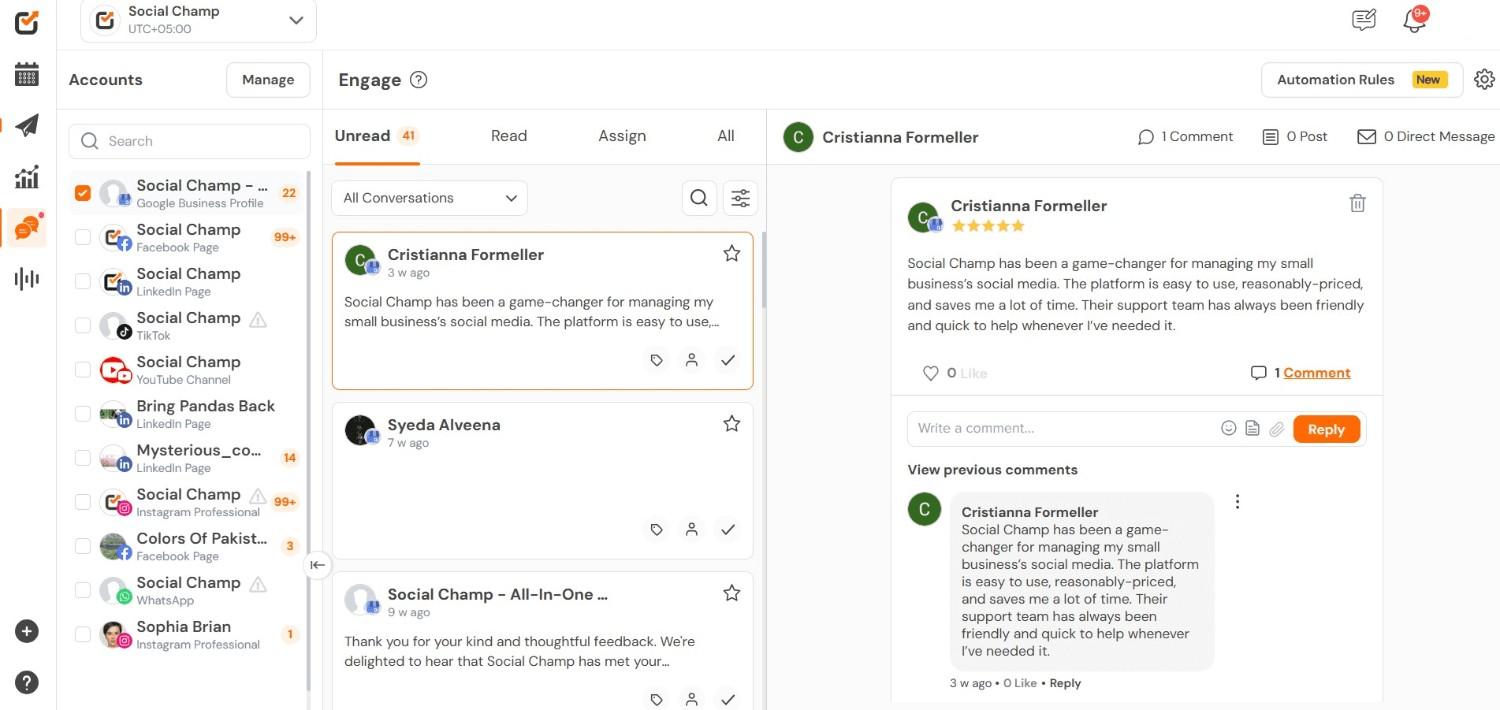
Social Champ’s Social Inbox It allows you to manage interactions efficiently without jumping between different social channels.
-
Analytics
Analytics play a key role in understanding what works and what doesn’t, helping you make informed decisions. Without proper insights, it becomes difficult to optimize your campaigns effectively. Social Champ’s analytics feature lets you track performance across your platforms.
It gives you clear reports and insights so you can measure engagement, identify trends, and improve your strategy over time.
-
Competitor Analysis & Social Listening
Competitor analysis is important because it helps you understand what others in your space are doing and where you can improve. Without this visibility, you may miss opportunities to refine your strategy.
Social Champ is among the best competitor research tools as it has a competitor analysis and social listening feature that lets you monitor and analyze your competitors’ activity. It helps you compare performance, spot trends, and make smarter decisions based on real market insights.
Successfully implementing marketing automation requires a “best-of-breed” stack where your tools actually talk to one another. To keep your workflow from becoming a “Franken-stack” of disconnected apps, we recommend mapping your tools to specific phases of the customer journey.
Below is a checklist of the core components you’ll need to automate your marketing lifecycle:
| Implementation Phase | Tool Category | How Social Champ Solves This |
|---|---|---|
| 1. Discovery | Social Listening & Research | Competitor Analysis and Social Listening: Track rival benchmarks to automate your content gap analysis. |
| 2. Planning | Content Strategy & Organization | Social Calendar: A bird’s-eye view to ensure your automated queue never runs dry. |
| 3. Execution | Multi-Channel Publishing | Bulk Upload & Scheduling: Automates weeks of content delivery across 11+ platforms in minutes. |
| 4. Engagement | Community Management | Social Inbox: Centralizes all interactions into one automated stream for faster replies. |
| 5. Optimization | Data & Reporting | Analytics: Automatically generates PDF reports to prove ROI without manual data entry. |
Expert Recommendation
When companies first learn to implement marketing automation, they often fall into the “set it and forget it” trap, resulting in robotic, stale content. At Social Champ, we’ve found that the most successful automated workflows aren’t those that replace humans, but those that empower them to stay consistent.
Take, for example, the challenge of managing multi-client approvals. In a manual setup, feedback gets lost in email threads. We’ve structured our Post Approval Dashboard specifically to bridge this gap. By automating the transition from “Draft” to “Approved,” you ensure that your automation queue only ever publishes high-quality, vetted content.
Pro-Tip for Agencies:
If you are managing 10+ clients, don’t just automate the posting; automate the governance. Use Workspaces to keep client data siloed. This prevents the “wrong account” nightmare and ensures your automated triggers are pulling from the correct data sets, which becomes a cornerstone of professional-grade marketing automation.
Which Marketing Tasks Should You Automate First?
When you’re getting started, it’s easy to want to automate everything at once, but the smarter move is to focus on the tasks that save you the most time right away while keeping things simple and manageable.
Here are the quick-win areas you should prioritize first:
- Email Campaigns: Automating welcome emails, newsletters, and follow-ups helps you stay consistent with communication without manually sending each message. This keeps your audience engaged from the moment they join your list.
- Social Media Posting: Scheduling posts in advance using a social media management tool ensures your content goes out regularly across platforms without daily effort. It helps you maintain visibility while freeing up your time.
- Lead Nurturing: Setting up automated workflows allows you to guide leads through your funnel with targeted content based on their behavior or interests. This keeps your brand relevant while moving prospects closer to conversion.
- Follow-Ups: Automated follow-ups ensure no lead gets overlooked after key actions like sign-ups, downloads, or inquiries. This helps you stay responsive and maintain momentum in your conversations.
- Basic Reporting: Automating reports gives you regular performance insights without manually pulling data each time. It helps you track progress and adjust your strategy more efficiently.
Focusing on these areas first helps you build a strong foundation without overwhelming your system. Once these are running smoothly, you can gradually expand into more advanced automation as your needs grow.
Featured Article: Our Team Tested 70+ Productivity Tools – Here Are Our Top 15 Picks
Conclusion
Marketing automation helps you bring structure and consistency to your marketing efforts. The real advantage comes from removing repetitive manual tasks and creating systems that keep your campaigns active even when you’re not constantly involved.
Social Champ steps in as a practical way to keep your planning, publishing, collaboration, and tracking neatly connected, so your campaigns run with less friction and more flow. It helps you manage everything from a single dashboard while keeping your team aligned and your workflow consistent.