
Statistics show that over 1.1 billion people use Facebook Marketplace every month. That is a huge global audience scrolling, searching, and shopping in real time.
That kind of reach can work in your favor. You can clear out items you no longer need. Or you can test a small business idea and build a steady side income if you stay consistent.
Whatever your reason, you need to know how to use the platform the right way. You need to know how to create strong listings, respond to buyers the right way, and handle transactions safely.
If you already plan your content with a Facebook post scheduler, you can even align your Marketplace activity with your regular posts and promotions.
Short Summary
- Facebook Marketplace is free, easy to use, and connects buyers and sellers locally and beyond.
- Clear titles, quality photos, and competitive pricing help your listings get noticed faster.
- Staying aware of trends, Marketplace SEO, and safety features can boost sales and engagement.
- Avoid common mistakes like ignoring messages, poor photos, or violating policies to maintain trust and credibility.
- Facebook automation tools like Social Champ save time by scheduling posts, cross-posting, and managing conversations.
In this step-by-step guide, you will learn how to use Facebook Marketplace with confidence, so you can sell smarter, attract serious buyers, and make the most of every opportunity.
Sell Smarter on Facebook
What Is Facebook Marketplace?
Facebook Marketplace is a built-in buy and sell platform inside Facebook. It allows you to list items for sale, browse products from other people, and connect directly with buyers or sellers.
Everything happens within your Facebook account, which means you do not need a separate app or website to get started.
How Facebook Marketplace Works
Facebook Marketplace works like a digital marketplace where individuals and businesses can trade items locally or ship them to other locations.
You post a listing with photos, a description, and a price. Then, interested buyers can view the details and contact you directly.
On the other hand, if you are shopping, you can search for items, compare prices, and message sellers to ask questions before making a decision.
Facebook Marketplace’s Core Features
Facebook Marketplace comes packed with tools that make buying and selling smoother, faster, and more reliable. Here’s a deeper look at its core features:
-
Keyword Search
The keyword search allows you to find exactly what you want without endless scrolling through unrelated listings. Simply type in the product name, brand, or description, and Marketplace will show the most relevant results. This saves time and helps you quickly locate rare items or specific deals.
-
Location Filters
Location filters let you narrow your search to your city, neighborhood, or a customer radius. This is especially useful for items that require local pickup, as you get to connect with nearby sellers and avoid shipping hassles. You can find deals that are convenient and accessible, which makes transactions faster and safer.
-
Category Sorting
Marketplace organizes listings by categories, such as electronics, furniture, or fashion, and lets you sort by price or relevance. This helps you browse efficiently, compare similar items, and make smarter purchasing decisions. You can quickly focus on what matters without getting lost in unrelated listings.
-
Messenger Communication
Messenger integration allows direct, instant conversations between buyers and sellers. You can ask questions, negotiate prices, or arrange pickup times, all in real time. This seamless communication reduces confusion, builds trust, and speeds up the buying or selling process.
-
Seller Profiles and Ratings
Before committing to a purchase, you can check seller profiles and ratings. This gives insight into a seller’s credibility and past transaction history, which helps you make safer choices. High ratings and verified profiles increase confidence, while new buyers can spot potential risks before engaging.
These core features work together to make Facebook Marketplace a convenient, secure, and efficient platform for local commerce.
How the Algorithm Shapes What You See
The Facebook algorithm plays a key role in what appears in your feed. It uses signals such as your location, browsing activity, previous searches, and engagement patterns to surface listings that are most relevant to you.
Because of this system, two people in the same city may see different products based on their interests and behavior. This personalized ranking increases the chances that buyers find items they actually want.
Pro Tip: When our team tested listing times, we found that items posted on Thursday evenings (between 7 PM and 9 PM) received up to 20% more inquiries than those posted on Monday mornings. Buyers tend to browse more heavily as they plan their weekend shopping!
The Scale and Reach of Marketplace
Facebook Marketplace holds a social commerce market share of 51.19%, making it the largest social commerce platform. This dominance means that more people are discovering, buying, and selling items here than on any other social platform.
With such a massive audience, sellers can reach local customers and even test small business ideas without needing a separate website. Meanwhile, buyers benefit from variety, competitive pricing, and the convenience of messaging sellers directly through Facebook.
All of this shows that Marketplace is not just a casual side feature. It is a central hub for social commerce that gives both buyers and sellers access to a thriving digital marketplace that keeps growing every month.
Stop Manual Posting, Start Selling
How to Use Facebook Marketplace to Sell Items (Step-by-Step for Beginners)
If you are new to Facebook Marketplace, selling your first item might feel a little intimidating. Don’t worry.
Here is a simple, beginner-friendly walkthrough broken down into clear steps so you can start listing like a pro.
Navigating to Marketplace
Here’s what you need to do:
- Open the Facebook app or website.
- Look for the Marketplace icon
It’s usually a little shop symbol on the main navigation bar.

Click or tap it to enter the Marketplace hub where all listings appear.
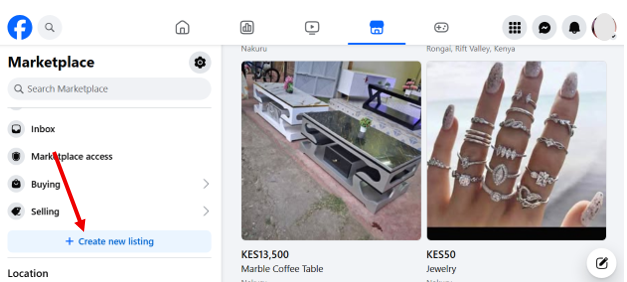
Creating a New Listing
- Select “Create New Listing.”
- Choose Listing Type
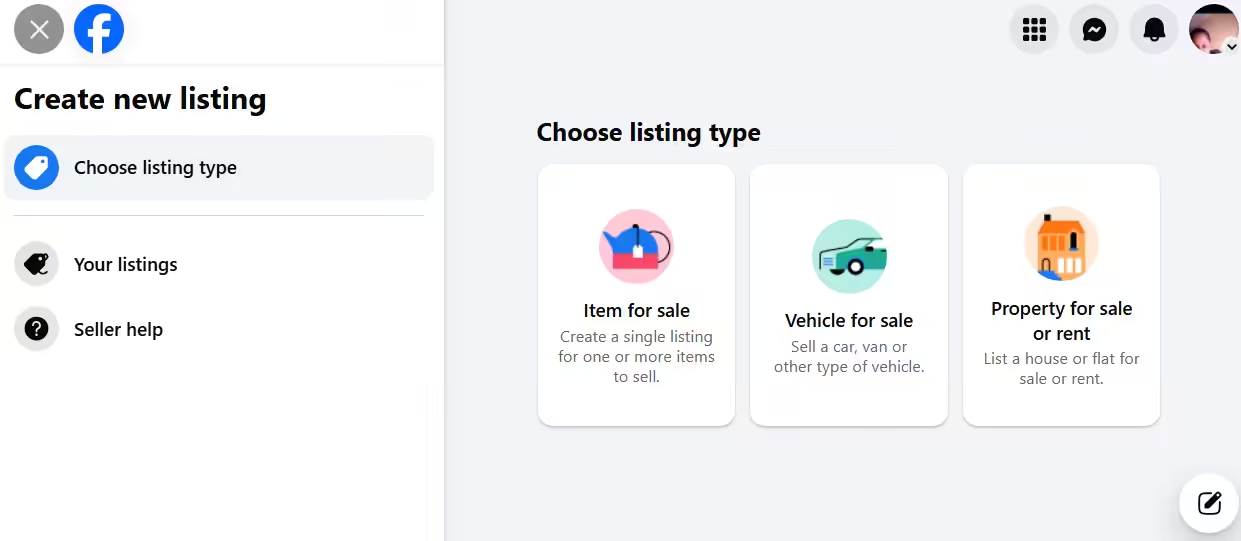
This will open a new form where you can start adding your item’s details.
Uploading Photos and Descriptions
- Click “Add photos”
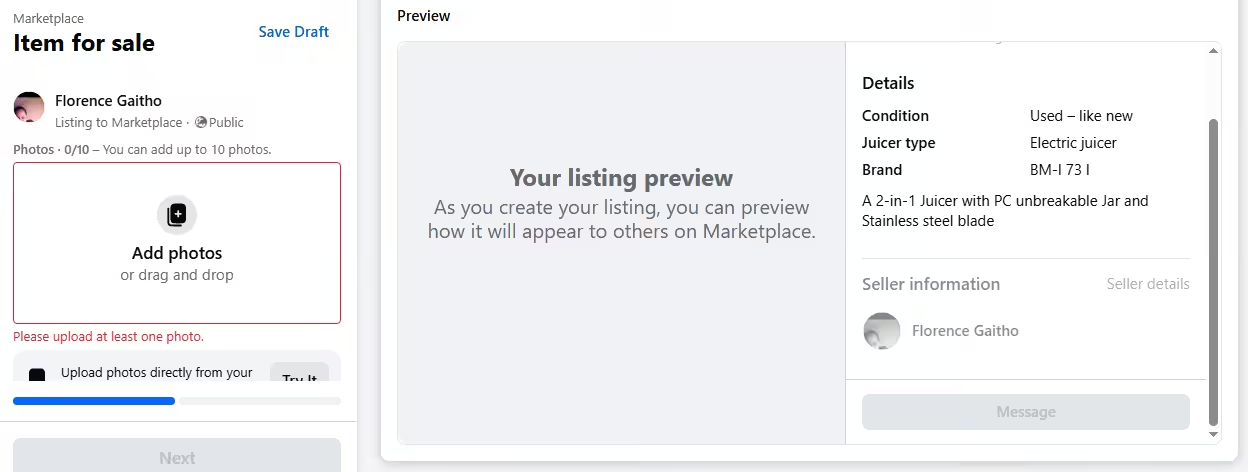
Choose high-quality photos. Bright, well-lit images attract more buyers.
Setting Price and Category
- Add a title
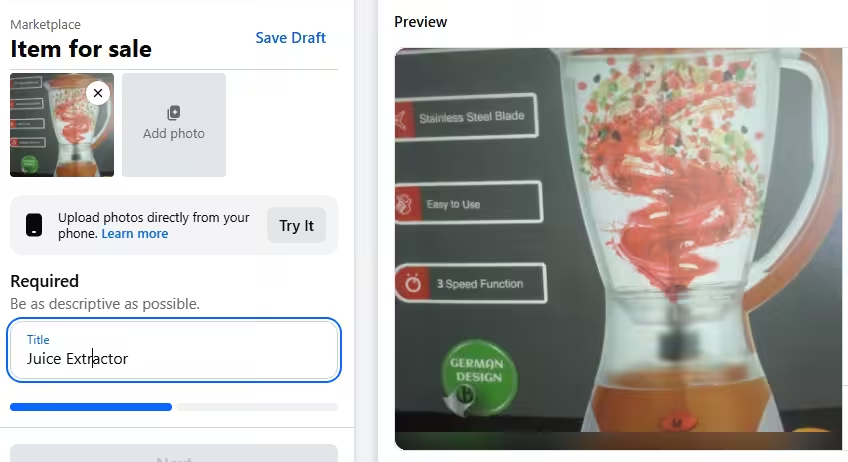
- Add the price
Enter the price you want to sell for. Check similar listings to stay competitive.

- Choose a category
Choose the correct category so buyers can find your item easily.

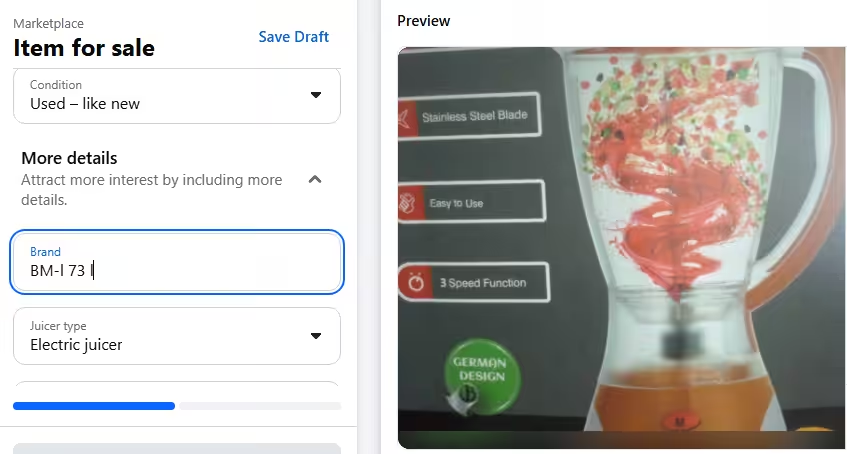
- State the condition of the item

- Add more details
- Add a description
Write a concise, honest description.
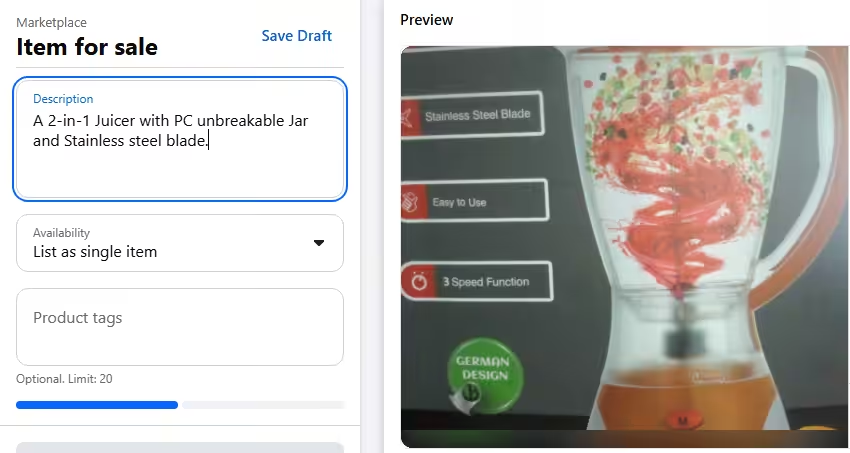
The more transparent you are, the faster your item sells.
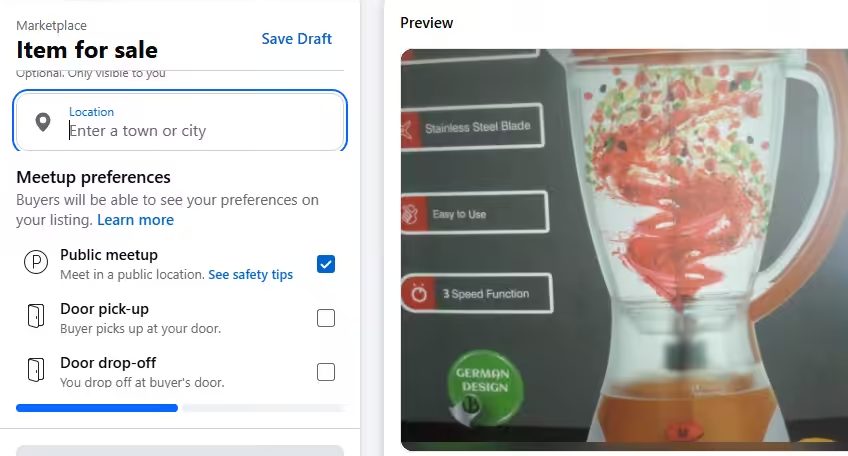
- Add location and meetup preferences
This helps nearby buyers see your listing first.
- Click Next
- List in more places
Choose other Facebook groups you’d like to post your listing.

You can post your listing in up to 20 groups.
- Click “Publish.”
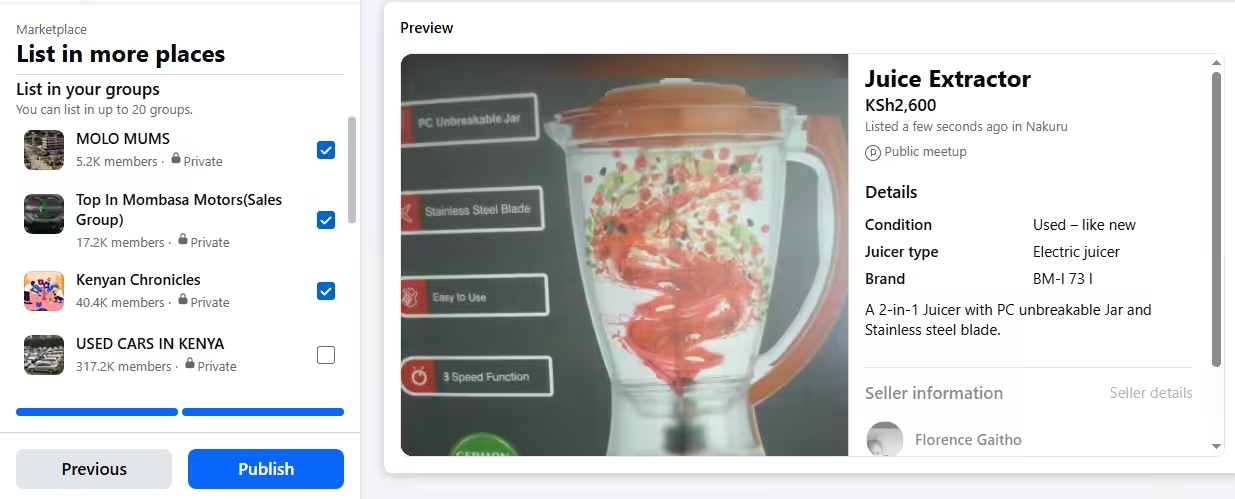
After hitting “Publish,” your listing will go live in the Facebook Marketplace and all the groups you’ve selected. You can monitor messages, adjust your listing if needed, and watch your item attract attention.
Featured Article: Boost Post vs Facebook Ads: A Complete Guide
How to Keep Your Listing Fresh: Renewing & Relisting
If your item hasn’t sold within 7 days, Facebook allows you to “Renew” the listing to push it back to the top of the feed.
- To Renew: Go to “Your Listings,” tap the three dots next to the item, and select Renew in Marketplace. You can do this up to 5 times.
- The “Delete and Relist” Strategy: If the item still hasn’t moved after 5 renews, delete the listing and create a fresh one. This signals to the algorithm that it’s a brand-new product, which often triggers a new wave of views.
How to Buy on Facebook Marketplace Safely and Smartly
Shopping on Facebook Marketplace can feel like a treasure hunt; you never know what gems you’ll find. With a few tricks, you can shop confidently, avoid headaches, and score the deals you want.
Here are some practical tips to help you buy on Facebook Marketplace safely and smartly:
-
Filter Listings to Save Time
Use the search bar and filters to narrow results. You can filter by category, price, and location. This helps you see only the items that actually fit what you need, so you don’t waste time scrolling through unrelated listings.
-
Message Sellers Directly
When you find something you like, tap Message Seller. Ask questions about the item’s condition, history, or availability. Keep the conversation clear and polite. Quick, friendly messages usually get faster responses.
-
Check Profiles and Ratings
Before committing, glance at the seller’s profile. Facebook Marketplace shows ratings, reviews, and how long they’ve been active. Sellers with positive ratings and complete profiles are usually more trustworthy.
-
Arrange Safe Pickup
If your item is local, set a meetup in a public, well-lit area like a café or parking lot. Bring a friend if possible. Always inspect the item before handing over cash.
-
Payment Tips
Use cash for small local deals or trusted payment apps for larger transactions. Avoid wire transfers or unusual payment requests. If it feels off, step back and reassess.
Caution: Scams happen. Never share personal information like your address before confirming the transaction. Avoid deals that seem too good to be true. Trust your gut and stay alert.
Shopping smart on Marketplace is all about combining common sense with these easy steps. Follow them, and you’ll turn scrolling into scoring without the stress.
Sell Smarter on Facebook
What Can You Sell on Facebook Marketplace (And What’s Not Allowed)
Facebook Marketplace is packed with buyers hunting for everything from the latest gadgets to cozy home décor.
Knowing what sells well and what you absolutely cannot list can save you time and keep your account safe.
High-Performing Categories
Here’s a table showing the items that tend to fly off the virtual shelves fast:
| Category | Item Examples | Why It Sells |
|---|---|---|
| Electronics | Smartphones, laptops, headphones, smartwatches | Tech moves fast, and buyers love a good deal on gadgets. |
| Furniture | Chairs, tables, shelves, sofas | People constantly look to furnish homes without paying full retail. |
| Fashion & Accessories | Shoes, bags, jackets, jewelry | People are constantly looking for trendy items and brand-name pieces. |
| Home & Garden | Kitchenware, décor, plants, tools | Everyday items and décor are always in demand locally. |
| Toys & Games | Board games, LEGO sets, bicycles | Family-friendly items sell fast, especially for kids. |
What You Cannot Sell
Meta keeps Marketplace safe by banning certain items. Avoid these completely:
| Prohibited Items | Why They Are Prohibited |
|---|---|
| Animals | Selling pets or livestock can lead to abuse or unsafe conditions. |
| Drugs & Alcohol | Illegal or regulated substances violate laws and Facebook rules. |
| Firearms & Weapons | Guns, explosives, and knives pose serious safety risks. |
| Adult Content | Sexual services, adult products, and explicit material are not allowed. |
| Counterfeit Goods | Fake designer items or pirated products infringe on copyrights and trademarks. |
For the full, up-to-date rules, check out Meta’s official commerce policies.
Knowing what works and what’s banned keeps your listings smooth, your account safe, and your sales flowing.
How to Use Facebook Marketplace for Business Growth
Facebook Marketplace isn’t just for selling your old stuff. It’s a powerful tool for small businesses and creators to reach local buyers, boost visibility, and drive sales.
The key is understanding how to use it strategically to boost Facebook reach, increase visibility, and drive real sales.
If you are just starting out, you might wonder whether to use your personal profile or a business page. Personal profiles work for casual selling or testing a product idea, but they have limited tools and reach.
On the other hand, a Business Page adds credibility, lets you list multiple products, and gives access to professional features that help scale your operations.
Using Marketplace alongside Facebook’s other business tools takes things to the next level. You can integrate it with Facebook tools such as:
- Facebook Shops: Sync your products across Marketplace and your online shop. This keeps your inventory updated automatically.
- Ads Manager: Boost your listings to reach a wider audience. Target specific locations, interests, or demographics to find potential buyers faster.
- Automated Product Sync: Connect your catalog so any new items or price changes reflect across all your listings without manual updates.
To see how this works in real life, consider a well-known brand like Lolly Wolly Doodle. This American company built much of its business by selling clothing directly through Facebook before expanding its operations and reaching millions of customers via social commerce.
Another example is Hats Unlimited, a Southern California retailer that boosted its local and online sales by listing products on Facebook Marketplace and connecting directly with buyers. The brand also used the platform alongside Facebook Shops and Ads Manager to reach a wider audience.
You can use examples like this to inspire your own Marketplace strategy and understand how businesses of all sizes tap into Facebook’s huge audience to grow sales.
Featured Article: How to Share Facebook Posts to Instagram: A Comprehensive Guide
Personal Profile vs. Business Page: Which is Right for You?
| Feature | Personal Profile | Business Page |
|---|---|---|
| Setup Cost | Free | Free |
| Primary Audience | Local individuals & neighbors | Target demographics & local customers |
| Trust Factor | High (Individual/Peer-to-peer) | High (Brand authority & reviews) |
| Ads Access | Limited (Basic boosting) | Full (Facebook Ads Manager & retargeting) |
| Inventory Sync | Manual entry only | Automated (Sync via Facebook Shops) |
| Insights & Analytics | Basic (Views/Saves) | Advanced (Engagement data & Trends) |
| Automation | Manual management | Compatible with Social Champ |
Tips to Optimize Your Listings for More Views and Faster Sales
If you want your items to get noticed instead of ignored, a few smart tweaks can make a big difference.
Here are four practical listing optimization strategies that can help your listing stand out and sell on Facebook Marketplace faster.
-
Keyword-Rich Titles
Your title is prime real estate. Use clear, specific keywords that buyers actually type into the search bar.
Instead of “Nice Chair,” go with “Solid Wood Dining Chair Set of 4.” Specific titles rank better in Facebook Marketplace search and attract buyers who know what they want.
-
Descriptive Yet Concise Copy
Your description should answer the questions buyers ask before they do. Include brand, size, condition, age, and any flaws.
Keep it tight and easy to scan. Clear details build trust, and trust closes deals.
-
Good Image Quality
Research shows that high-quality product images lead to a 94% higher chance of a purchase compared to low-quality images.
Therefore, you should use bright lighting and clean backgrounds. Show multiple angles and close-ups of important details.
Sharp images make your listing look credible and serious, which matters a lot on Facebook Marketplace.
-
Strategic Pricing
Pricing is not a guessing game. Check similar listings to see what buyers are paying.
A competitive price attracts more clicks, while a wildly high one scares people away before they even message you.
These things work together to improve visibility and engagement. However, the exact words you choose can push your Facebook Marketplace listing even further.
Here’s a quick table comparing click boosting words versus vague ones that often get skipped.
Click-Boosting Words Vague Words That Get Ignored Like New Good Barely Used Nice Original Packaging Box Included Solid Wood Wooden Limited Edition Special Updated Model Newer Smoke Free Home Clean Fully Functional Works Authentic Real Pet Free Home Okay Condition Specific words create clarity and urgency. Vague words create hesitation. On Facebook Marketplace, clarity wins almost every time.
Apply these strategies consistently, and you’ll see more views, faster sales, and happier customers on Facebook Marketplace.
Featured Article: Unlocking the Power of Social Listening on Facebook
How to Automate Facebook With Social Champ
Studies show that marketing automation can increase productivity by up to 20 percent. That boost often comes from removing repetitive tasks from your daily routine.
Instead of logging in several times a day to post updates, reply to comments, and share content across pages, automation handles those steps for you. You save time, reduce errors, and stay consistent without scrambling at the last minute.
If you’re looking for a tested and proven Facebook automation tool, Social Champ is an excellent pick. Here’s how to automate Facebook with the tool:
-
Schedule Posts in Advance
One of the biggest time savers is the ability to schedule posts ahead of time. Instead of posting manually every day, you can plan your content for the week or even the month in one sitting. You choose the date and time, and Social Champ takes care of publishing it automatically.
You can also schedule multiple posts at once. This is perfect when you already have your content ready and just want to load everything into the calendar quickly. No back and forth. No repetitive clicking.
If you want to move even faster, the bulk upload feature lets you schedule dozens of posts in one go. You simply upload a file with your captions, links, and media, and the tool lines everything up for you. It feels like going from manual driving to cruise control.
And if you are unsure about timing, the AI Suggested Time feature steps in. It analyzes your audience behavior and recommends the best times to post on Facebook. That means your content goes live when your followers are actually active, not when you randomly hit publish.
-
Repost to Groups and Pages
Managing multiple Facebook groups and pages can have you juggling too many tabs at once. Social Champ makes it simple. Instead of creating separate posts for each space, you can select multiple destinations and publish in one go. You stay consistent everywhere, and your message reaches a wider audience without extra effort.
It also saves you from the classic mistake of forgetting to share important updates in one of your groups. With reposting built in, your content flows smoothly across your Facebook presence while you focus on engagement and growth.
-
Cross-Post Across Platforms
If you are active on more than just Facebook, you already know the struggle. Posting the same content separately on Instagram, LinkedIn, and other platforms takes time and focus. Social Champ solves that with cross-posting.
You can create one post and publish it across multiple platforms from a single dashboard. That means your Facebook content can go live on Instagram, LinkedIn, X, and more without extra work. You stay consistent everywhere while managing everything in one place.
This feature is perfect if you want your brand message to stay aligned across channels. Instead of rewriting and reposting the same update five times, you do it once and let the tool handle the rest. It keeps your workflow simple and your brand visible across platforms.
-
Manage Conversations
Engaging with your audience is just as important as posting content, but keeping up with comments and messages can quickly become overwhelming. Social Champ makes it easy to manage conversations from its unified inbox.
You can track messages, reply to comments, and respond to multiple inquiries across your Facebook pages and groups without switching tabs. This keeps your communication organized, timely, and professional.
With everything in one dashboard, you never miss a lead or a customer question. You stay connected, build trust with your audience, and keep your Facebook presence active.
Scale Your Marketplace Business
Common Mistakes to Avoid on Facebook Marketplace
Making mistakes on Facebook Marketplace can cost you time, buyers, and even your account. Luckily, most errors are easy to avoid if you know what to watch out for.
Here are some frequent pitfalls sellers run into when they post on Facebook Marketplace and how to fix them:
-
Ignoring Inquiries
Ignoring messages from potential buyers can make your listing seem untrustworthy or inactive. To avoid losing interest, respond promptly and politely. Even a quick acknowledgment goes a long way in keeping buyers engaged and building trust.
-
Setting Unrealistic Prices
Pricing too high or too low can scare off buyers or make them doubt your item’s value. To ensure your price attracts attention while staying fair, check similar items in your area and adjust accordingly. A competitive price leads to faster sales.
-
Posting Incomplete or Blurry Images
Poor photos make buyers scroll past without a second thought. The best thing to do is upload clear, well-lit images that show multiple angles. Include close-ups of important details so your listing looks professional and trustworthy.
-
Violating Platform Policies
Breaking Facebook’s rules can get your listing removed or your account suspended. To stay on the safe side, review the prohibited items and guidelines. Stick to allowed products and honest descriptions to keep your account in good standing.
Avoiding these common mistakes helps your listings stand out, gain more clicks, and turn curious browsers into actual buyers.
Featured Article: How to Link Instagram to Facebook
How to "Rank #1" in Facebook Marketplace: A Checklist
Before you publish your listing, run through these four technical checks to ensure the Facebook algorithm pushes your item to the top of local search results.
- Facebook’s search engine prioritizes the beginning of your title. Ensure your most important 3 keywords are within the first 3 words.
- Ineffective: “Selling my old used blue iPhone 15 Pro.“
- Good: “iPhone 15 Pro – Blue, 128GB, Excellent Condition.”
- Facebook allows up to 20 tags per listing. Use every single one. Include synonyms, misspellings, and related categories (e.g., if selling a “Desk,” use tags like Office Furniture, Writing Table, Home Office, Wood Desk).
- Avoid the “Miscellaneous” or “Other” trap. Facebook uses “Breadcrumb” navigation to categorize buyers. If you are selling a dining table, ensure your path is Home & Kitchen > Furniture > Dining Room Furniture > Dining Tables.
- Visual Freshness: Listings with at least 5 high-resolution photos (including one of the item’s original tags or a “scale” reference) receive higher engagement scores from the algorithm, which interprets more photos as a “Higher Trust” listing.
Future of Facebook Marketplace: Trends to Watch in 2026
Facebook Marketplace is not standing still. The platform is evolving quickly, and knowing what’s coming can help you stay ahead of the game.
Here are some key trends shaping the future of buying and selling on Facebook Marketplace:
-
Smarter Listings With AI Assistance
Artificial intelligence is set to make Marketplace smarter than ever. Listings will be automatically matched to buyers who are most likely to be interested, and sellers can get AI suggestions for pricing, titles, and descriptions to boost sales.
-
Decisions Backed by Data
Numbers and analytics will guide decisions more than intuition. Sellers who track engagement, conversion rates, and popular categories can make informed choices to improve listings and reach the right buyers faster.
-
Stunning Content Beats Generic Targeting
Visuals and presentation are taking center stage. High-quality photos, videos, and engaging descriptions will outperform generic listings, even if your audience targeting isn’t perfect. Creativity will become a major differentiator.
-
Optimizing for Marketplace Search
Optimizing your listings for search within Marketplace will matter more than ever. Using keywords in titles, descriptions, and categories ensures your items appear in relevant searches and reach buyers who are actively looking.
-
Safer and More Reliable Transactions
Buyer and seller confidence will continue to grow as Marketplace rolls out better verification, ratings, and secure payment systems. Knowing that transactions are safe will encourage more people to buy and sell on Facebook Marketplace regularly.
Keeping up with these trends will help you make smarter decisions, attract more buyers, and get the most out of Facebook Marketplace in 2026.
Featured Article: How to Block (And Unblock) Someone on Facebook: A Simple Guide
Conclusion
Facebook Marketplace has grown into a powerful platform for both casual sellers and serious businesses. Whether you want to declutter your home, reach local buyers, or expand your small business, knowing how to use Facebook Marketplace effectively can save time, increase sales, and make your experience smoother.
From optimizing your listings with clear titles and images to leveraging Facebook publishing tools like Social Champ for automation, there are plenty of ways to stay ahead of the curve. Keep an eye on trends, follow best practices, and watch your Marketplace efforts pay off in 2026 and beyond.