Ever scroll past an account where every post looks like it just won the popularity lottery? A random post appears, the likes roll in, comments appear instantly… and yet something feels off.
That feeling isn’t wrong. Research estimates that up to 55% of Instagram engagement may be fake, fueled by bots and tightly coordinated engagement pods. It’s a big reason why Instagram keeps tightening its limits.
In 2026, Instagram’s new policy regarding action restrictions is smarter, stricter, and way less forgiving of spammy behavior. From how fast you follow accounts to how often you comment with the same emoji, every move is counted.
This guide breaks down what those limits actually are and why Instagram enforces them. You’ll also learn how using an Instagram-approved social media scheduler can help you stay active, visible, and unblocked without walking on eggshells.
Short Summary
- Instagram limits protect your account by controlling how many likes, follows, comments, and DMs you can send in a short time.
- Account age and engagement quality matter: new accounts face stricter limits, while older, trusted accounts have more freedom.
- Posting too fast or repeating actions can trigger soft restrictions, action blocks, shadowbans, or temporary limits.
- Following best practices, such as pacing actions, varying engagement, and respecting content and profile limits, helps keep your account safe and your growth steady.
- Smart scheduling and platform-approved tools like Social Champ help maintain consistent posting without violating Instagram rules.

Grow Your Presence on Instagram Safely!
From scheduling to analytics, Social Champ gives creators, brands, and agencies the tools to scale without hitting Instagram limits.
What Are Instagram Limits and Why Do They Exist?
Instagram limits are rules set by the platform to control how users interact on the platform. These rules dictate how many likes, comments, follows, or DMs you can send in a certain time.
Instagram limits make sure the app stays safe, fair, and enjoyable for everyone. That’s why limiting the number of likes, comments, follows, or DMs a user can send in a short period allows the platform to:
- Stop spam: Limits prevent users (or bots) from blasting the same comment or link everywhere at once.
- Block bots: Automated accounts can’t bypass human-like restrictions, so fake engagement is harder to generate.
- Reduce abusive behavior: Users can’t harass others endlessly because actions are throttled, giving Instagram a chance to flag or review suspicious activity.
These limits keep Instagram from turning into a wild west of bots, spam, and trolls, thus making the platform a safer, more authentic space for real users.
Opt For Smart Engagement With Zero Risk
Social Champ helps you manage engagement safely, so your activity looks natural, and Instagram stays happy.
Featured Article: How to Hide Following List on Instagram?
Instagram Limits by Action Type (Follows, Likes, Comments, DMs)
Engagement used to be king, but in 2026, the Instagram algorithm isn’t handing out crowns for clicks alone. Too much too fast, and it’s more likely to hit the brakes than boost your post.
An important thing to note is that Instagram limits aren’t one-size-fits-all. They’re heavily dictated by account age and engagement quality. New accounts (0-3 months old) get stricter restrictions to prevent spam, while older, well-behaved accounts have more wiggle room.
Here’s a quick breakdown of the limits you need to keep in mind:
-
Daily Actions
Active accounts get the golden ticket with up to 1,000 daily actions, while newbies have to pace themselves with roughly 100–500 interactions per day.
To keep your account in Instagram’s good graces, spread out your actions. New accounts should aim for 5–25 actions per hour, while older accounts can safely handle 30–50 per hour. You should consider mixing likes, follows, comments, and DMs to mimic natural engagement.
In other words, pace yourself, sprinkle in variety, and let Instagram think you’re a real, charming human, not a hyperactive robot.
-
Follows
Instagram sets a hard limit of 7,500 accounts that any user can follow. For new accounts, the Instagram follow limit per day is capped at roughly 100 follows, while older, active accounts can push it to 300–500 follows daily without triggering Instagram’s alarms. Going beyond that? You’re entering risky territory.
For smooth sailing, aim for 5 follows per hour for new accounts and up to 20 per hour for older, trusted accounts. That way, you won’t exceed the Instagram follow limit and risk your account.
-
Likes
New accounts have a cap of around 250 likes per day, while established accounts can reach up to 1,000 likes daily. Going faster than that is a fast track to a temporary freeze.
So, what should you avoid? Things that will raise red flags include liking posts in rapid-fire succession or targeting a very narrow set of accounts repeatedly. Instagram knows when your “love” looks automated.
For safety, try 15–25 likes per hour for new accounts and 40–60 likes per hour for older accounts. Sprinkle them throughout your scrolling session rather than smashing the like button nonstop.
-
Comments
Repeated phrases, emoji-only comments, or commenting on the same thing on multiple posts in seconds is an instant red flag. Instagram treats these as low-value engagement or spam.
New accounts should keep comments under 30–50 per day, while seasoned accounts can safely hit 100–150 comments daily. Remember, spammy repetition is worse than silence.
To stay on Instagram’s good books, aim for 3–5 comments per hour if your account is fairly new, or 8–12 per hour if your account is older. While at it, keep it genuine. This means mixing up the words, emojis, and tone.
-
Direct Messages
Spamming DMs is one of the fastest ways to hit restrictions. Sending the same message to multiple recipients, messaging people who don’t follow you, or blasting strangers with links can all trigger blocks.
New accounts are limited to roughly 20–50 DMs per day, while older accounts can comfortably send 50-150 DMs per day.
To stay safe, stick to 2–4 DMs per hour for new accounts and 5–10 per hour for active accounts. Personalize messages, spread them out, and avoid copy-paste campaigns.
Instagram Posting & Content Limits You Should Know
Instagram content has plenty of room for creativity, but it still comes with guardrails to keep feeds readable, discoverable, and spam-free.
Here’s how far you can push each content type before Instagram pushes back:
- Feed Posts: There’s no official cap, but experts recommend posting up to three times per day.
- Reels: There’s no strict daily cap, but posting too many Reels in rapid succession can look spammy and may hurt distribution. Aim for 4-7 reels per week, so there is no suspicion.
- Stories: You can upload up to 100 Stories in 24 hours; after that, Instagram simply won’t take it lightly if you add more.
- Captions: The Instagram caption character limit is set at 2,200 characters, including hashtags, so there’s space to talk, but not write a novel. Crafting good Instagram captions is only part of the equation. Pair them with smart posting habits, and you’ll see better engagement without risking your account.
- Hashtags: You can include up to 30 hashtags in post captions. Instagram’s Creators account recommends using just 3–5 hashtags per caption instead of stuffing posts with dozens.
View this post on Instagram
Stick to these posting and content limits, and Instagram won’t have to put your account in time-out.
Post at the Best Time, Every Time!
Let Social Champ analyze your audience and recommend the perfect posting hours for maximum engagement.
Instagram Profile Limits
Your profile may be small, but Instagram keeps it tightly controlled to prevent abuse and impersonation. Here are the limits for profile edits:
- Username: The Instagram character limit for the username is up to 30 characters and can only include letters, numbers, periods, and underscores. Changing your username too frequently may trigger temporary restrictions.
- Bio: Your bio is limited to 150 characters, so every word has to earn its place, emoji included.
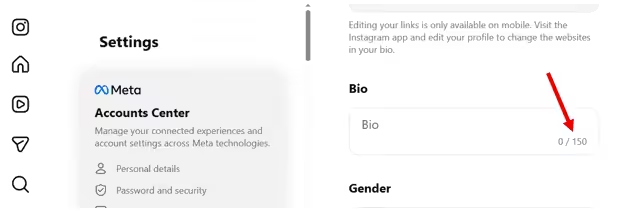
Instagram Bio Limit - Link: You can add one clickable link in your profile (or use a link-in-bio tool). However, updating it repeatedly in a short time can raise red flags. Note that editing your links is only available on mobile.
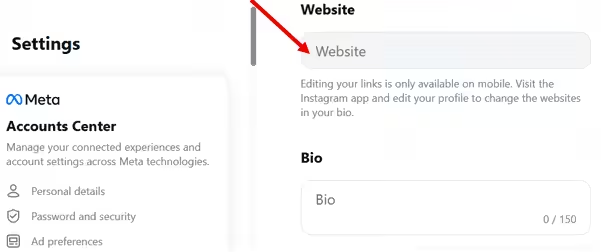
Website Link
With profile limits, restraint beats constant tweaking every time. Set it up cleanly, avoid constant changes, and Instagram will have far fewer reasons to question your account’s intentions.
Featured Article: How to Make Money on Instagram
What Happens If You Break Instagram Rules? (Restrictions, Blocks & Bans)
Breaking Instagram’s rules doesn’t usually mean instant exile. It’s more of a graduated response system that starts with gentle nudges and only gets serious if the behavior keeps going.
Let’s see the repercussions of not following Instagram rules:
- Soft restrictions are the lightest touch. Your actions still work, but your reach quietly dips, posts don’t travel as far, and engagement feels muted.
- Temporary blocks happen when you push a little too hard. Likes, follows, comments, or DMs may stop working for a few hours or days. These blocks give you a forced breather to reset your behavior.
- Action blocks are more targeted. Instagram might freeze specific actions, such as like commenting, or following, while everything else works fine. These usually kick in after repeated or aggressive activity patterns.
- Shadowbans are the sneakiest. Your content is still visible to followers, but it quietly disappears from hashtags and explore. This measure makes discovery nearly impossible without any official notification.
- Permanent bans are the final stop, and they’re rare unless there’s repeated abuse, automation, or serious policy violations. Most users never get anywhere near this stage if they adjust their behavior early.
The takeaway is that Instagram prefers correction over punishment. Slow down, switch up your patterns, and focus on real interactions. If you do that, you can usually get back in the algorithm’s good graces without any drama.
Automate Without Risk With Social Champ!
Stay compliant with Instagram rules while automating posting across multiple accounts safely and efficiently.
Featured Article: How to Post on Instagram from PC
How Social Champ Helps You Stay Within Instagram Limits (Recommended Tool)
Growing on Instagram is a balancing act. Post too little and you disappear. Post too much or too fast, and the algorithm starts side-eyeing your account.
To strike a safe balance, you should consider automating your posting schedule with a smart tool like Social Champ. This social media management tool can ensure your content goes out consistently, naturally, and without tripping Instagram’s limits.
Here’s how Social Champ makes that possible:
-
Smarter Scheduling, Not Spammy Bursts
Social Champ helps you schedule Instagram posts ahead of time so your content goes out at a steady, human-looking pace.
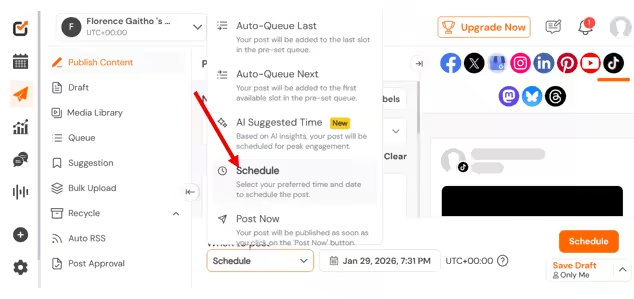
Social Champ’s Scheduling Feature Instead of dumping multiple posts in one sitting, you can spread them across days and time slots. That consistency keeps your account active without triggering action limits or looking automated.
Plus, Social Champ has the AI Suggest Time feature that enables you to know the best time to post on Instagram and on other platforms.
-
Healthy Posting Frequency That Keeps You Safe
One of the easiest ways to hit Instagram limits is over-posting in a short window. Social Champ lets you plan a realistic content calendar, which makes it easier to maintain a healthy posting rhythm.
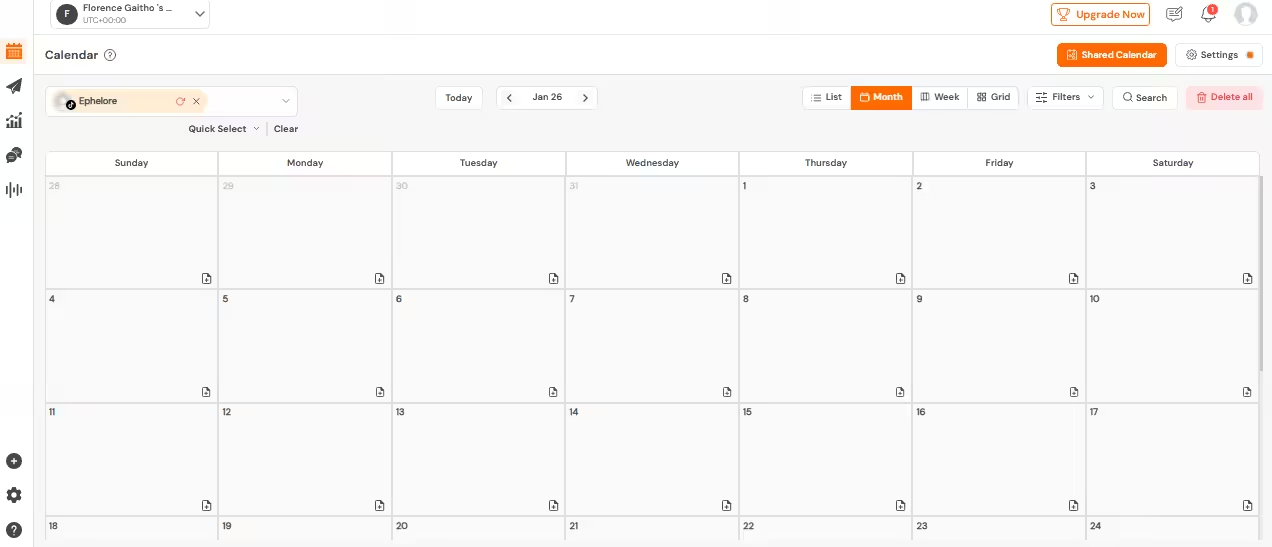
Social Champ’s Social Calendar With this tool, your feed stays fresh, your audience stays engaged, and Instagram doesn’t feel the need to step in.
-
Built for Scaling Without Crossing Lines
For brands, agencies, and creators managing multiple accounts, things can get risky fast. Social Champ helps you stay organized across profiles while keeping activity controlled and compliant. You can grow your presence confidently without resorting to risky shortcuts that lead to blocks or restrictions.
-
Automation That Plays Nice With Instagram
Not all automation is created equal. Social Champ focuses on approved, scheduling-based automation rather than aggressive actions like auto-following or mass commenting. That means you get efficiency without triggering spam filters or waving red flags at the algorithm.
In short, Social Champ helps you grow the smart way. Consistent content, controlled activity, and zero guesswork around Instagram limits. That’s how you scale without stress.
Pace Your Engagement Like a Pro
Spread likes, comments, and posts naturally with Social Champ’s smart scheduling to avoid blocks and action restrictions.
How to Avoid Instagram Limits and Use the Platform Safely?
Staying active on Instagram without hitting limits takes a mix of strategy, patience, and a little common sense. With the right approach, you can grow your presence safely while keeping the algorithm happy.
Here are some practical strategies to help you navigate Instagram limits and use the platform safely:
- Pace Your Actions: Spread likes, follows, comments, and DMs throughout the day instead of doing them all at once. Think quality over speed.
- Account Warm-Up: New accounts should start slow and gradually increase activity over days or weeks to build trust with Instagram.
- Maintain Healthy Posting Frequency: Schedule posts consistently without spamming your followers; spacing out posts keeps engagement steady and organic.
- Vary Your Engagement: Avoid repetitive comments or identical DMs. Mix up emojis, phrases, and interactions to look human.
- Use Approved Tools: It’s important to use Instagram-approved tools when scheduling your content. Scheduling tools like Social Champ can help you plan content responsibly and avoid triggering action blocks.
- Follow Instagram’s Updated Policies: Stay informed about the platform’s latest rules to ensure every action aligns with its guidelines.
- Monitor Account Activity: Keep an eye on notifications for soft blocks or action restrictions and adjust behavior if needed.
These strategies can help you grow your account while staying compliant, avoiding penalties, and keeping your engagement authentic.
Featured Article: How to Go Viral on Instagram
Conclusion
Maintaining a social media presence on Instagram isn’t about chasing every like, delivering the most comments, or racing to follow everyone in sight. It’s about pacing your actions, creating quality content, and building genuine connections, all while respecting Instagram’s new policy.
Using smart Instagram management tools like Social Champ can also help keep your account safe, visible, and growing steadily. Play by the rules, focus on authentic engagement, and you’ll navigate the algorithm with confidence.