
Ever spent hours filming a product video only to watch it flop with 47 views? Or maybe you haven’t even started because you don’t know what to shoot first?
I’ve been in both spots. And honestly, the problem was never the video. It was the fact that I had zero system behind it.
Here’s the thing. 91% of businesses use video marketing, but most are just throwing stuff at the wall. No plan. No templates. No consistency. That’s not product video marketing. That’s a coin toss.
Short Summary
- Product video marketing spans micro-demos, UGC, process videos, and AI explainers, not just polished demos.
- You can start shooting product videos today with a smartphone, a $15 mic, and free editing software.
- The 5-Angle Script Model turns any product into a 30-second video that actually converts.
- One master video becomes eight platform-ready posts using AI tools and Social Champ.
- Track watch time, CTR, save rate, and completion rate weekly to know what’s actually working.
So I built this guide to fix that. You’ll get my framework, free templates, and a simple scheduling workflow using the right tools to keep your product video marketing strategy running on autopilot. Let’s get into it.
New to Product Video Marketing? Start Here.
Product Video Marketing 2026: At a Glance
| Goal | 2026 Strategy |
|---|---|
| Primary Format | 9:16 Vertical (3:4 Safety Zone) |
| Key AI Tools | Generative B-Roll and Auto-Captioning |
| Top Metric | Completion Rate and Save-to-View Ratio |
| Distribution | 1 Master Video → 8 Platform-Specific Variants |
| Automation | Bulk Scheduling via Social Champ |
What Does Product Video Marketing Even Look Like in 2026?

If you think product video marketing is just slapping together a polished demo reel and calling it a day, I need you to update that playbook.
Because what worked in 2023 looks completely different from what’s winning right now.
It’s Not Just Product Demos Anymore
When I first started creating product marketing videos, I thought there was one format. The clean, scripted, 60-second demo. That was it. And sure, demos still work. But in 2026, the brands getting real traction are mixing formats like crazy.
Here’s what a solid video marketing strategy for a new product actually looks like today:
- Micro-demos (5 to 15 seconds): Single-feature focus. Quick. Punchy. Perfect for Reels and Shorts.
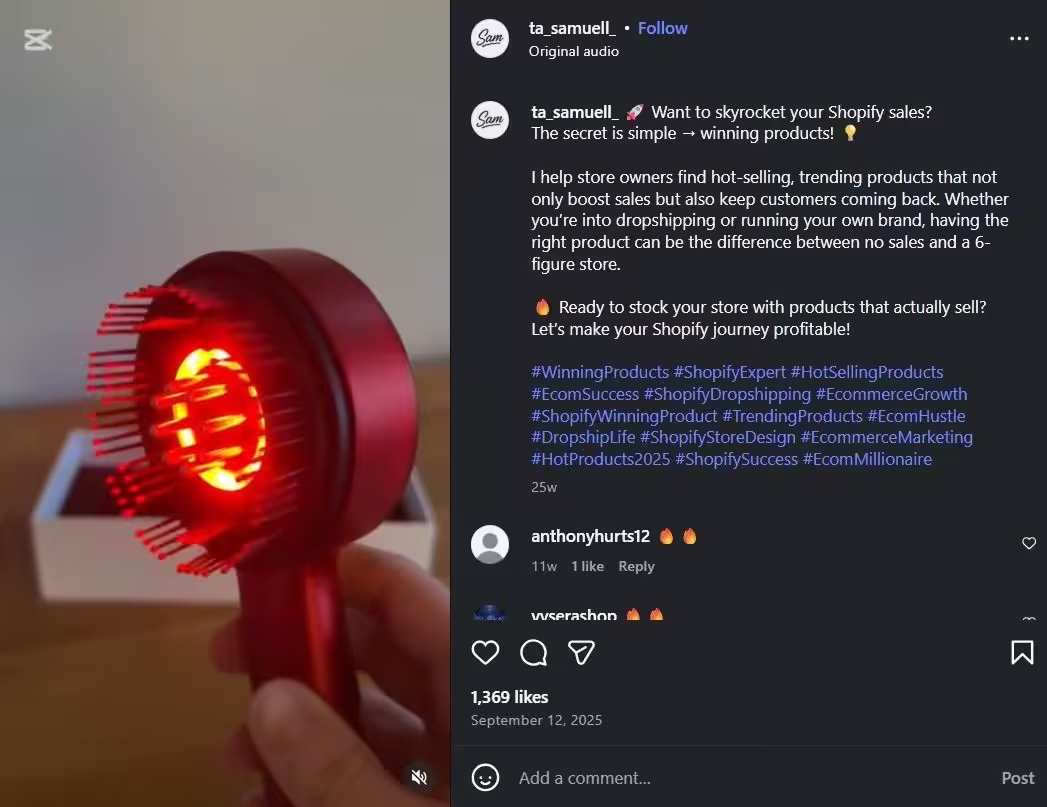
A Product Demo Reel - UGC-style testimonials: Raw, phone-shot, trust-building clips from real customers. No fancy lighting required.
- Process videos: “How it’s made” or “Behind the build” content that people genuinely love watching.
- Comparison clips: Side-by-side with competitors, which is a little risky but effective.
- AI-generated explainers: Screen recordings paired with an AI voiceover using AI video creation tools for product marketing. Fast to produce and surprisingly effective.
One of the most important product video marketing best practices I can share? Stop thinking in single videos. Think in batches. Think in series. Think in systems.
Where Product Videos Actually Get Watched (Platform-By-Platform Specs)
Here’s something I learned the hard way. You can create an incredible product marketing video, but if you export it in the wrong size for the wrong platform, it gets crushed by the algorithm. So bookmark this table.
| Platform | Ratio | Max Duration (2026) |
|---|---|---|
| Instagram Reels | 9:16 | 20 min |
| TikTok | 9:16 | 60 min |
| YouTube Shorts | 9:16 | 3 min |
| LinkedIn Video | 9:16 / 4:5 | 15 min |
| Facebook Reels | 9:16 | No Limit |
| X | 9:16 / 1:1 | 4 hours (Premium) |
Pro Tip!
Export your master at 1080×1350 px (4:5). This ratio crops perfectly to 1:1 for LinkedIn and centers cleanly within 9:16 for TikTok/Reels. Since adopting this single-export method six months ago, I’ve cut my editing time nearly in half.
Featured Article: Instagram Engagement Rate Explained: Benchmarks, Formula, and How to Improve It
How to Create Your First Product Video on a Near-Zero Budget
I’m going to be honest with you. My first product marketing video cost me way too much time, way too much money, and it still looked mediocre.
Because I made the classic beginner mistake. I thought I needed expensive gear and a film school education to get started. I didn’t. And neither do you.
The “One Product, Five Angles” Script That Writes Itself
Here’s the trap I see beginners fall into every single time. They try to cram every feature, every benefit, and every use case into one bloated three-minute clip.
Nobody watches it. The algorithm buries it. And then they think product video marketing doesn’t work for them.
It does work. You just need a tighter framework.
I call it the 5-Angle Model, and it changed how I approach every video marketing effort for a new product:
- The Problem Punch (7 sec): State the pain your audience feels. No product yet. Just the frustration.
- The Reveal (5 sec): Introduce your product as the answer. Keep it visual. Keep it fast.
- The Proof (10 sec): Show one feature delivering one result. A screen recording or a quick live demo works perfectly.
- The Social Proof (5 sec): Drop a quote overlay, a review screenshot, or a short UGC clip. Let someone else do the selling.
- The CTA (3 sec): One clear action. Not three. One.
That’s a 30-second product marketing video that actually converts.
The 2026 Minimalist Gear Kit
Let me kill the “$2,000 camera” myth right now. You don’t need it. Some of the highest-performing product videos I’ve seen in 2026 were shot on phones.
Here’s your minimum viable setup:
- Phone with 4K recording: iPhone 14 or newer, Pixel 7+, or anything in that range. You probably already own one.
- $15 clip-on lavalier mic: Audio quality makes or breaks a video faster than visuals do. This is your best $15 investment.
- Natural window lighting + $10 white foam board reflector: Sit your product near a window, bounce light with a foam board from the opposite side. Done. Studio-quality lighting for ten bucks.
- Free editing software: CapCut, if you want fast and simple. DaVinci Resolve, if you want prosumer-level control without spending a cent.
That’s it. Seriously. Under $30 and you’re in business.
Check out this reel of product photography with a smartphone.
View this post on Instagram
Pro Tip!
Shoot in 4K at 30fps even for a 1080p export. This provides a “digital zoom” buffer, allowing you to punch in 200% in post without losing sharpness. This trick effectively creates two camera angles from one shot, instantly elevating production value without a second camera.
The Best AI Video Creation Tools for Product Marketing
In 2026, AI has moved beyond simple captions. To stay competitive, you need tools that handle “Neural Editing” and “Generative B-roll.”
- Generative B-Roll and Visuals: Sora, Runway, or Luma Dream Machine. If you lack a specific shot of your product in a “lifestyle” setting, these tools can generate realistic 5-second b-roll clips from a text prompt to fill gaps in your footage.
- Neural Product Cloning: HeyGen and Flair.ai. These allow you to upload a high-res photo of your product and “place” it into a fully rendered video environment without ever picking up a camera.
- Intelligent Reframing: Opus Clip and Munch. These tools use AI to identify the “hook” in your long-form video and automatically crop it to 9:16, keeping the product centered in the frame at all times.
- Voice and Localization: Use this to instantly translate your product marketing video into 30+ languages with perfectly synced AI voice clones.
The Ultimate Workflow Success!
Once your AI tool generates platform-optimized clips from a single shoot, Social Champ’s Bulk Upload becomes your secret weapon. Instead of manual posting, you can schedule every version across all platforms from one dashboard, turning a single video into a week of multi-channel presence in minutes.
Product Video Marketing Best Practices That Actually Move the Needle
I’ve tested a lot of tactics over the years. Most of them made no difference. But a handful of product video marketing best practices consistently separate the videos that perform from the ones that vanish. Here are the ones I swear by.
You Have 3 Seconds Before They Scroll Past You
A Facebook study highlights that 65% of viewers who stay past the first three seconds will continue watching for at least ten seconds.
In a scroll-heavy feed, those first three seconds are the difference between a total skip and a genuine brand connection.
Here are hook formulas I keep coming back to:
- The Controversial Claim: “This $12 tool replaced my $200/month subscription.”
- The Visual Pattern Interrupt: Start with the result first. Show the “after” before the “before.”
- The Direct Question: “Why is nobody talking about this feature?”
- The Textual Hook: Large bold text overlay in frame one. Stops thumbs cold.
Quick trick that made a big difference for me: use a 10-frame static hold (roughly 0.33 seconds of a bold text card) before any motion begins. This gives the algorithm’s thumbnail selector a clean frame AND stops the scroll.
Why Captions Are No Longer Optional
85% of social video is watched on mute. I learned this the hard way when my best product marketing video got incredible reach but terrible engagement. Nobody could follow along without sound.
And beyond performance, accessibility matters. Here’s how to get captions right:
- Burn them in. Don’t rely on platform auto-captions for critical product messaging. They make errors that hurt trust.
- Font: Bold sans-serif like Montserrat Bold. Minimum 42pt at 1080p. Dark semi-transparent background box.
- Position: Center-lower third, above native UI elements. Keep text in the middle 70% of the vertical height.
Warning!
Auto-generated captions frequently misspell product names and technical terms. Always review before publishing. One wrong word in a caption can make your brand look careless and cost you trust instantly.
Getting the 3:4 Vertical Look Right Without Awkward Framing
Switching from horizontal to vertical-first thinking broke my brain at first. Text got cropped. Products looked off-center. Thumbnails felt random.
That’s where Social Champ’s Grid Preview became a lifesaver for my product video marketing workflow. It shows exactly how your video thumbnails will appear on your Instagram grid before you go live. Your profile is your storefront, so this matters.
Here’s the workflow I follow:
- Upload the video to Social Champ
- Let it generate the thumbnail
- Preview it in Grid view
- Rearrange for visual rhythm and brand consistency
- Confirm the schedule
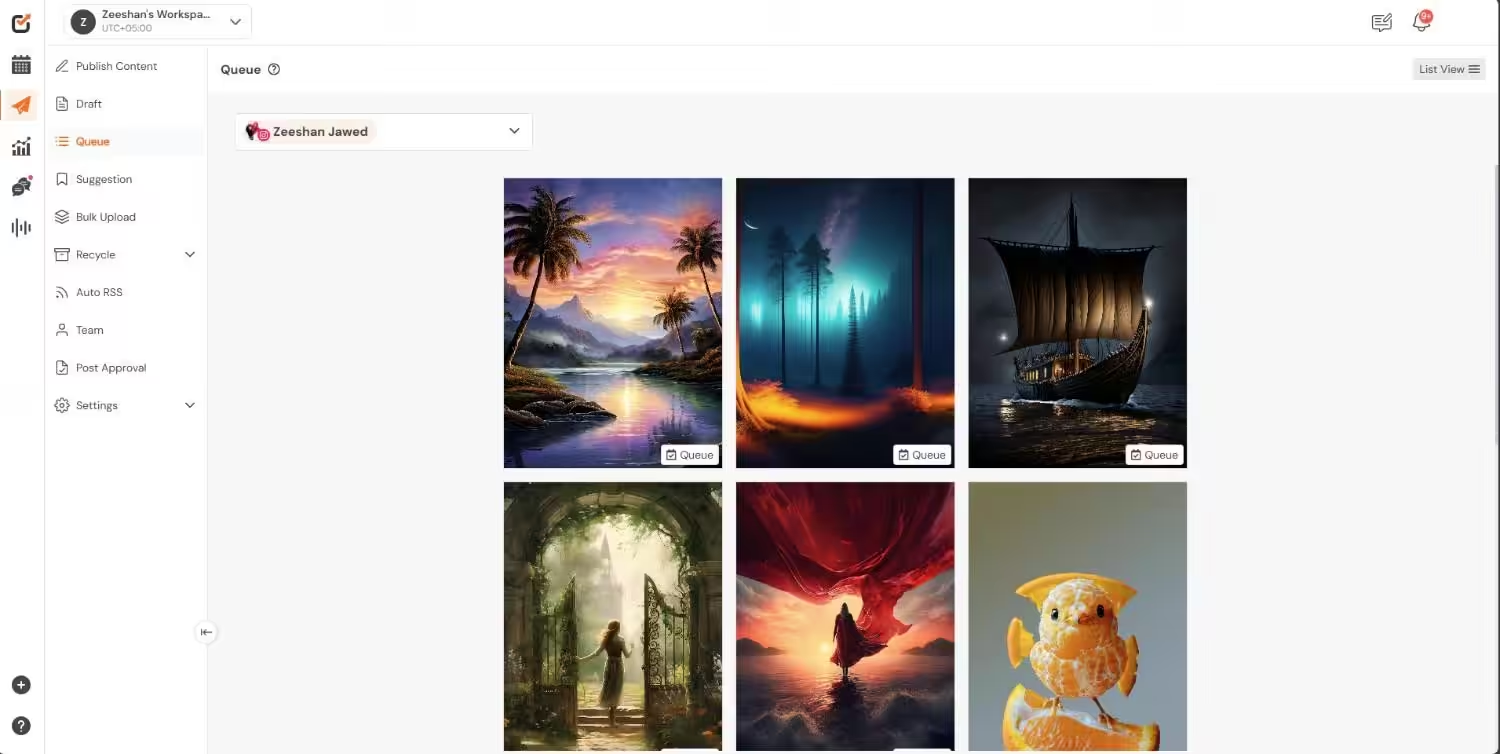
Success Tip!
Design a custom thumbnail for every product marketing video. Use a consistent template with your brand color border, a product shot, and 3-word hook text. Preview it in Social Champ’s grid layout to keep your feed looking intentional, not random.
Build Consistency Into Your Videos!
Stop Guessing, Start Measuring: Video Metrics That Actually Matter
For the longest time, I would post a product marketing video and immediately start refreshing to watch the view count climb.
The views felt good. Likes felt great. But neither was actually telling me anything useful about whether my product video marketing was working.
It took me way too long to figure out which numbers actually matter. Let me save you that wasted time.
The Four Numbers You Should Check Every Week
Forget vanity metrics. These are the four I look at every single week:
- Average Watch Time (AWT): If 50%+ of viewers are sticking around, your hook and content match are strong. Below that? Your video is promising something the content isn’t delivering.
- Click-Through Rate (CTR): 1 to 3% on organic social video is solid. If you’re hitting that range consistently, your CTAs are landing.
- Save/Share Ratio: This one is huge. Saves signal purchase intent. People are literally bookmarking your video to come back later. Above 2% saves-to-views means you’re creating high-intent content.
- Completion Rate: Critical for YouTube Shorts, especially. Its algorithm uses a “completion loop score,” and 80%+ completion gets significantly more distribution. Keep your videos tight, and this number climbs fast.
If your completion rate is low but your AWT is decent, your video is probably just too long. Trim the fat. Cut 5 seconds off the end and test again.
How to Track All of This in One Dashboard With Social Champ
Logging into five platforms every Monday morning to pull numbers manually? I did that for months. It was painful.
Now I use Social Champ’s Analytics to see video performance across all platforms in a single view. Here’s how I use it for my product video marketing best practices workflow:
- Compare video types: Filter by tag (“product-demo” vs. “testimonial”) to find which format wins per platform.
- Cross-platform benchmarking: See if your demo performs better on Reels vs. TikTok, then shift your effort accordingly.
- Team reporting: Generate white-label PDF reports pulled directly from Social Champ. No manual screenshotting. No messy spreadsheets.
Spot Your Winning Product Videos!
Your Distribution Playbook: How to Turn One Video Into Eight Posts
This is the part of product video marketing that nobody warns you about.
Creating the video is only half the battle. Getting it out across every platform in the right format, with the right captions, at the right time? That’s where most strategies quietly die.
I know because mine almost did. I was spending 2 to 3 hours per video just manually uploading, reformatting, and scheduling across platforms. That’s not sustainable. So I built a system.
The “1 to 8” Repurposing Workflow
Here’s the exact framework I follow for every product marketing video now:
- Shoot one 60-second master video in 3:4 at 1080 × 1440.
- AI-edit into variants: 60-sec for Reels and TikTok, 30-sec for Stories, 15-sec for pre-roll, 1:1 crop for LinkedIn and X.
- Write platform-native captions. Instagram gets hashtags + CTA. LinkedIn gets a story-driven post. TikTok gets trend-aware text.
- Batch-schedule all variants in one session. One sitting. Done for the week.
One shoot. Eight posts. That’s how video marketing for a new product becomes repeatable instead of exhausting.
Bulk Upload, AI Captions, and the Visual Calendar Inside Social Champ
This workflow only works if you have the right tool behind it. Here’s how I run it inside Social Champ:
- Bulk Upload: Upload all video variants with a CSV for captions and media files in one batch. Social Champ maps each file to the correct platform and queues them automatically.
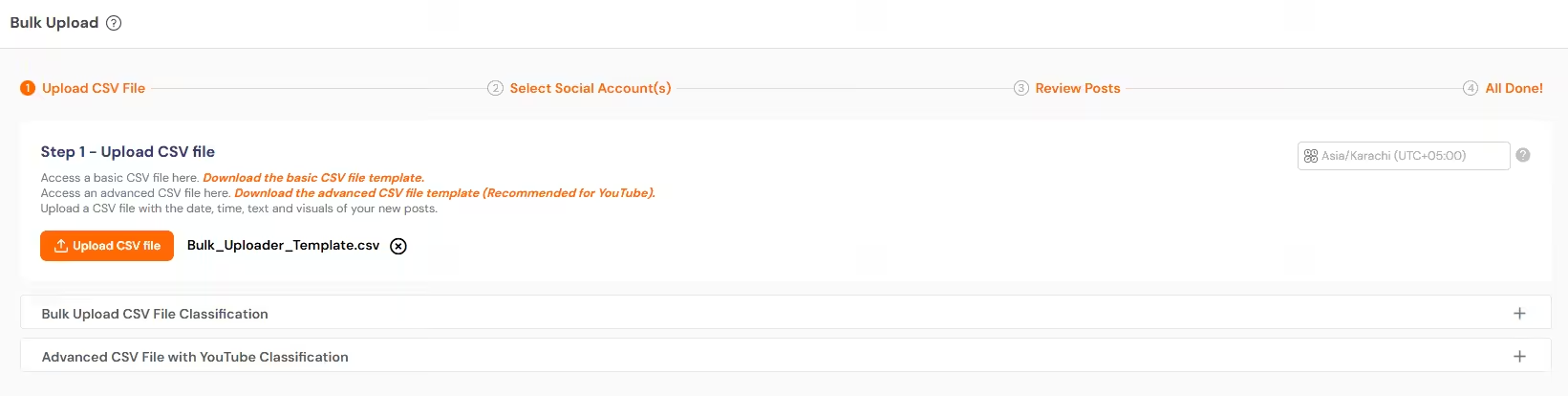
Social Champ’s Bulk Upload - Champ AI Suite: Generate platform-specific captions right inside the composer. Input your video’s key message, select a tone, and it generates captions for you to review. You can even generate visuals for your content.
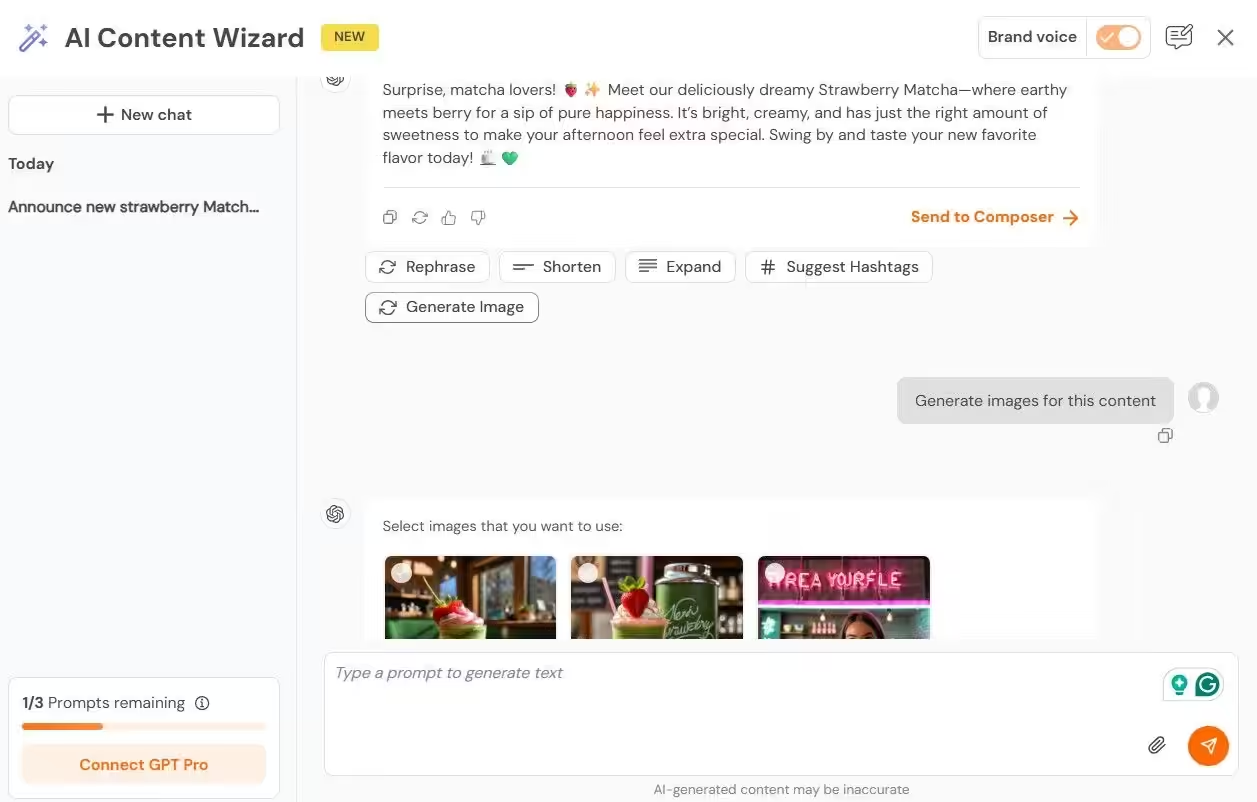
Social Champ’s AI Content Wizard 
Social Champ’s AI Imaginator - Visual Calendar: Drag-and-drop view of your entire week or month across all accounts. Spot gaps, overlaps, or content-type imbalances at a glance.
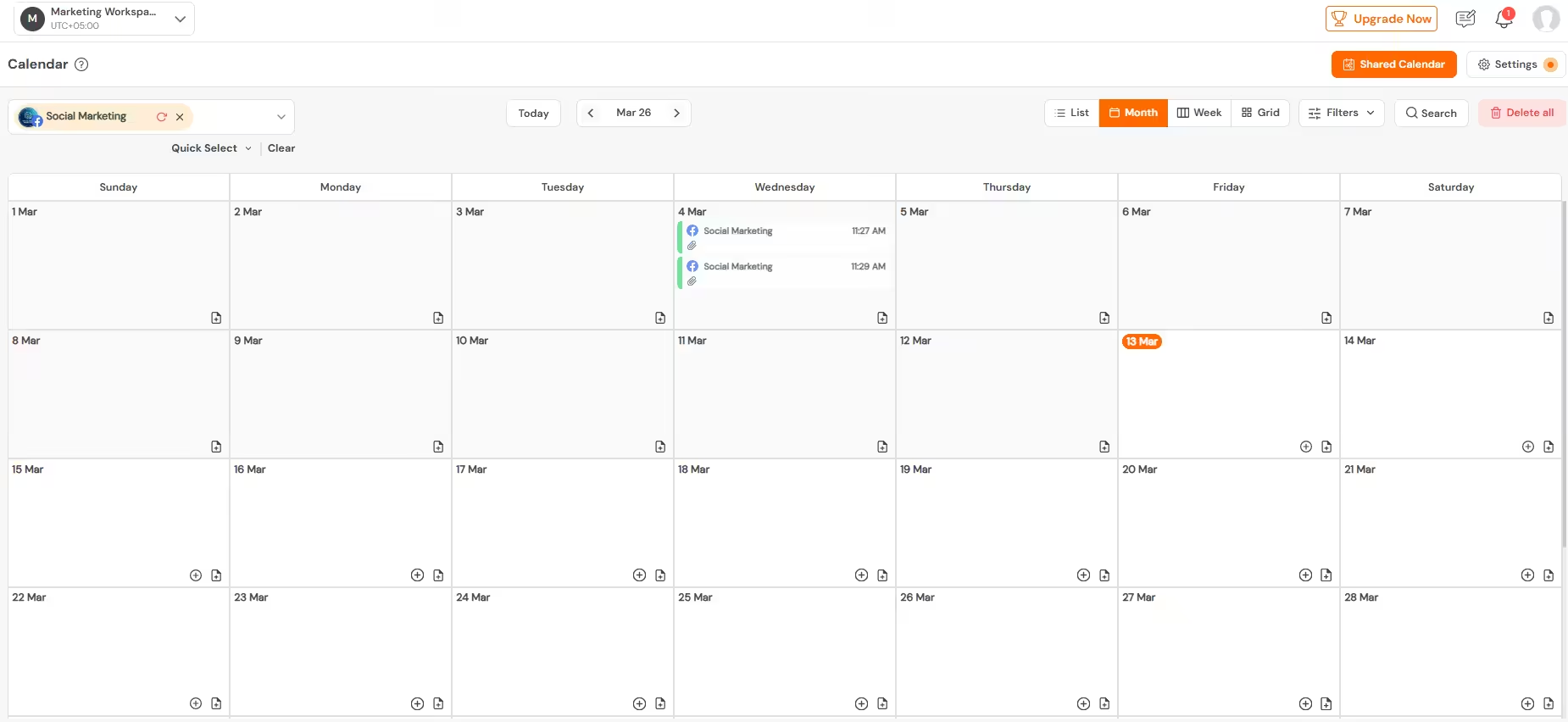
Social Champ’s Calendar
Here’s the step-by-step:
- Open Social Champ and go to Bulk Upload
- Upload your CSV mapping video files to the platform, caption, and date/time
- Social Champ validates formats and flags any spec mismatches
- Review everything in the Visual Calendar and adjust for platform peak windows
- Approve and Social Champ auto-publishes on schedule
Featured Article: Instagram Lite Explained: What It Is and How It’s Different from the Full Version
How Often Should You Actually Post Product Videos?
I get asked this constantly. But before I give you the numbers, here’s some context that might surprise you.
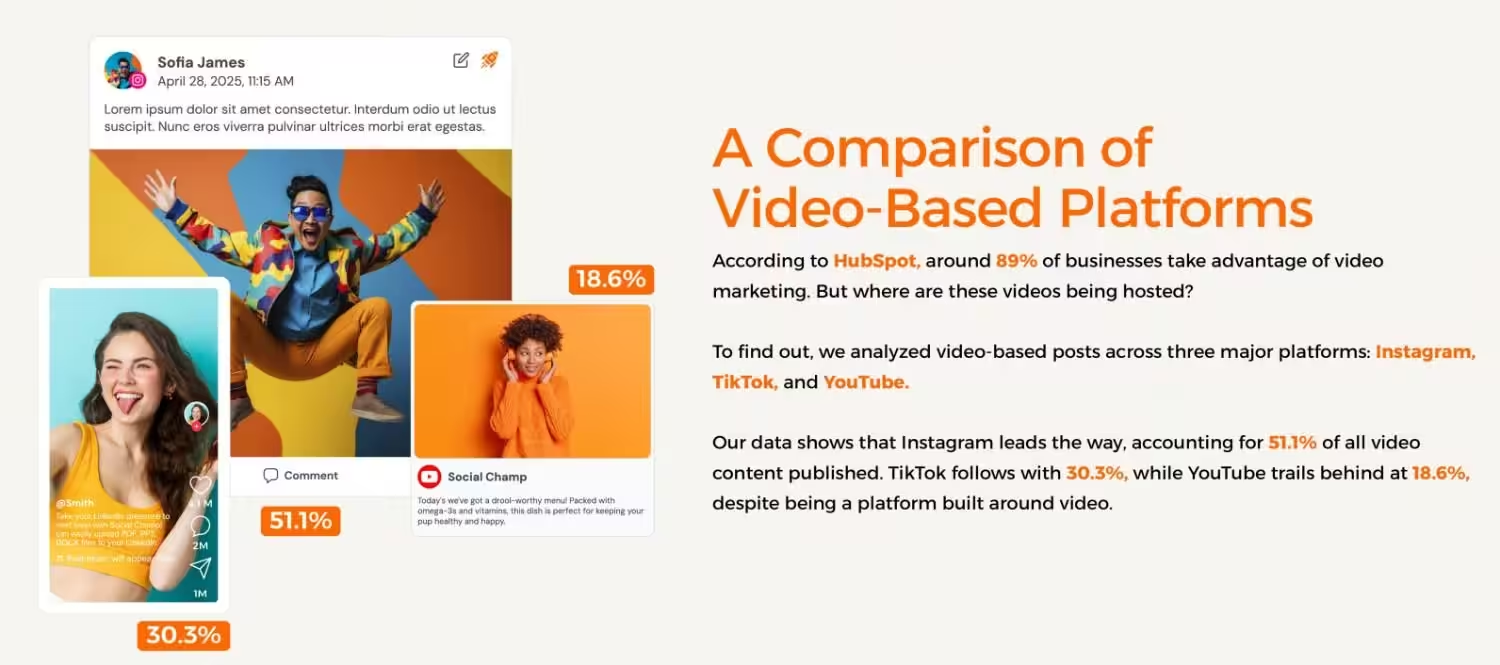
According to Social Champ’s data, after analyzing video-based posts across three major platforms, Instagram leads the way, accounting for 51.1% of all video content published.
TikTok follows at 30.3%, while YouTube trails at 18.6%, despite being a platform literally built around video. Since around 91% of businesses are already using video marketing, if you’re not showing up consistently, you’re falling behind.
With that in mind, here’s what’s actually working for product video marketing best practices in 2026:
- Instagram Reels: 4 to 7 per week (makes sense given it dominates video publishing)
- TikTok: 1 to 3 per day (the algorithm tests each video independently, so volume wins)
- LinkedIn: 2 to 3 videos per week (over-posting triggers throttling)
- YouTube Shorts: 5 to 7 per week
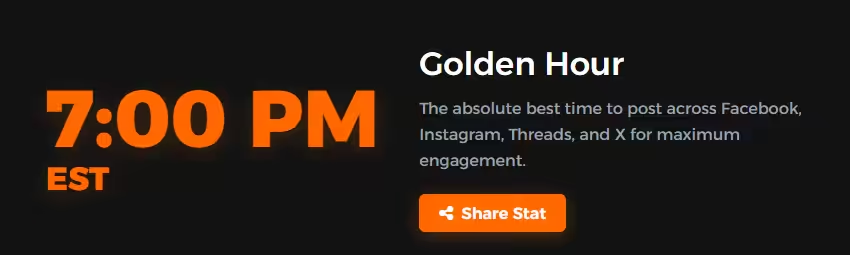
According to Social Champ’s data, 7:00 PM EST is the Golden Hour for social video. It’s the absolute best time to post across Facebook, Instagram, Threads, and X for maximum engagement.
Note on Timing!
While 7:00 PM EST is a strong global benchmark, remember that in 2026, AI-driven feeds prioritize User Intent over chronological order. Use Social Champ’s “Best Time to Post” analytics to identify when your specific audience is most active to trigger the initial engagement signal the algorithm needs.
Free Templates to Kickstart Your Product Video Marketing Today
I promised you templates in the title, and I don’t break promises. These are the exact templates I use in my own product video marketing workflow. Just grab them, fill them in, and start creating.
Template 1: The 30-Second Product Video Script (Fillable)
This is based on the 5-Angle Model I shared above. Fill in the blanks for your product, and you’ve got a script ready to shoot in minutes. I’ve included three pre-written examples so you can see how it works for different business types.
Template 2: Weekly Product Video Content Calendar
Stop wondering what to post each day. This calendar maps your entire week based on the posting cadence.
Use this spreadsheet for ideation and scripting, then bulk upload your final assets into Social Champ for scheduling. Keep the creative workflow separate from the distribution workflow.
Template 3: Product Video Specs Cheat Sheet
Print this out. I can’t tell you how many times I’ve exported a marketing video in the wrong aspect ratio and had to redo the whole thing. This cheat sheet reflects the 2026 vertical standards and caption safe zones.
Template 4: Video Performance Scorecard
This is how I track what’s actually working in my product video marketing strategy week over week. The spreadsheet auto-calculates weekly averages so you can quickly spot your top and bottom performers. Pair this with Social Champ’s Analytics for the full picture.
Benchmarks to aim for:
- AWT: 50%+
- CTR: 1 to 3%
- Save Rate: 2%+
- Completion Rate: 80%+
Use this scorecard alongside the product video marketing best practices. After 4 weeks of data, you’ll clearly see which hook types, video lengths, and platforms are driving the best results for your specific product.
Create. Schedule. Analyze. All In One Place.
Wrapping It Up
Look, product video marketing in 2026 doesn’t require a big budget, a fancy camera, or a full production team. It requires a system. And that’s exactly what this guide gave you.
A framework for scripting, a near-zero budget gear setup, AI tools to cut your editing time, templates you can use today, and a scheduling workflow that keeps you consistent without burning out.
The brands winning right now aren’t doing anything magical. They’re just showing up consistently with a plan. You’ve got the plan now. So stop overthinking it, grab the templates, load up Social Champ, and start posting your first product video this week. You’re ready.