If you have ever watched a TikTok LIVE and seen tiny animated roses, galaxies, or lions flying across the screen, you probably wondered what is actually happening.
Are they just cute stickers? Are they colorful digital badges? Or is everyone just being extra for fun? Well, welcome to the world of TikTok Gifts.
They look simple at first glance. A viewer taps a gift. The animation pops up. The creator smiles and says a big thank you.
Short Summary
- TikTok Gifts turn fan support into real-time rewards.
- Creators earn 50% of the gift’s value after TikTok’s cut.
- Low, mid, and high-priced gifts serve different engagement purposes.
- Consistent, interactive Lives encourage more gifting from viewers.
- Tools like Social Champ help schedule, track, and boost gift revenue.
But behind that quick moment is a system of coins, diamonds, and cash value. Actually, a few of those flashy icons come with a surprisingly high price tag.
If you want to grow on TikTok, you need to know how this system works. This article breaks down what TikTok Gifts are, how their value is determined, and how you can maximize them without guessing your way through it.
You also need smart tools, like a TikTok Scheduler, to keep your content consistent and your audience engaged so you show up at the right time, every time.
Let’s dive straight in, shall we?
What Are TikTok Gifts?
TikTok Gifts are digital items that users send to content creators during LIVE streams on the TikTok platform.
TikTok Gifts
Fans send these gifts to show appreciation, cheer on creators, and sometimes just for the sheer fun of it.
Users purchase these virtual gifts with the app’s in-app currency, called coins.
Different gifts cost different amounts of coins, so some of those sparkling lions are more “premium” than others.
Once a gift lands in a creator’s hands, it converts into Diamonds. Creators can then redeem these Diamonds for real-world currency through TikTok’s payout system.
Optimize Timing and Boost Viewer Interaction
How Much Are TikTok Gifts Worth in 2026?
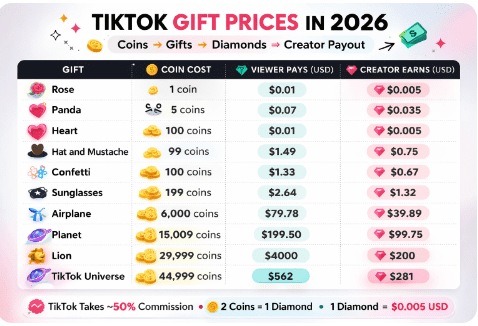
TikTok’s virtual currency system works in a series of coins → gifts → diamonds → payout steps, and each layer affects the final worth of a gift.
Below is a snapshot of a TikTok live gifts list showing how much common gifts cost in coins and what their creator payout looks like after TikTok’s commission.
How Coin-to-Dollar and Diamond Conversion Works
Here’s a simple breakdown of the in-app currency system:
- Viewers buy coins with real money: The typical TikTok price is roughly $0.0129 per coin in the U.S., but regional pricing can vary.
- Viewers use Coins to send virtual gifts: Each gift requires a set number of coins. For example, a Swan might cost 699 coins, while a Universe runs tens of thousands.
- Gifts convert into Diamonds for creators: TikTok converts coins into Diamonds at a 2:1 ratio (every 2 coins spent becomes 1 diamond for the creator).
- Diamonds convert to cash: Creators can redeem Diamonds for real-world money once they meet the minimum payout threshold (often around $50). Each Diamond typically equals $0.005 USD.
Platform Commission and Taxes
TikTok takes a commission on all gifts, often around 50% of what viewers spend in coins. This means if a fan spends $10 worth of coins on gifts, roughly half of that goes to TikTok as its service fee before diamonds are awarded.
Creators must also consider local taxes when they cash out their earnings. Depending on a creator’s country and tax status, income from TikTok gifts can be subject to income tax or self-employment tax.
TikTok generally does not withhold these taxes automatically, so it is the creator’s responsibility to report earnings according to local law.
TikTok Gift Value Calculator (The Quick Formula)
Want to know exactly how much a gift is worth without the guesswork? Use this simple formula to calculate your take-home pay:
(Gift Coin Cost ÷ 2) × $0.005 = Your Estimated Payout
- Example (Galaxy Gift): 1,000 Coins ÷ 2 = 500 Diamonds.
- 500 Diamonds × $0.005 = $2.50 USD in your pocket.
Note: This accounts for TikTok’s 50% commission but does not include local bank transfer fees or income taxes.
Featured Article: How to Post on TikTok: A Comprehensive Guide to Posting on TikTok
How to Send and Buy TikTok Gifts as a Viewer
Before you can send gifts, you need coins in your TikTok wallet. Recharging coins is easy, and you can do it both on mobile and desktop. Let’s take a look at the steps for buying and sending TikTok gifts.
How to Buy TikTok Gifts via Desktop
- Log in to TikTok on your desktop browser.
- Click “Get Coins.”
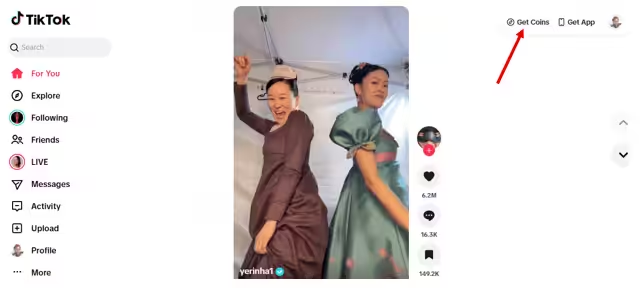
Alternatively, you can click on the “Live” feature on the left panel.
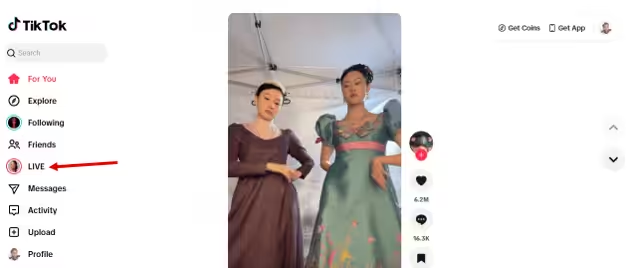
Then click “Get Coins.”
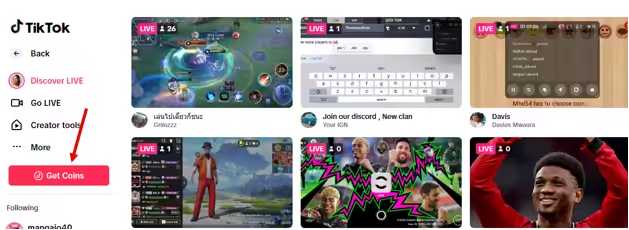
- Choose the number of coins you want to buy.
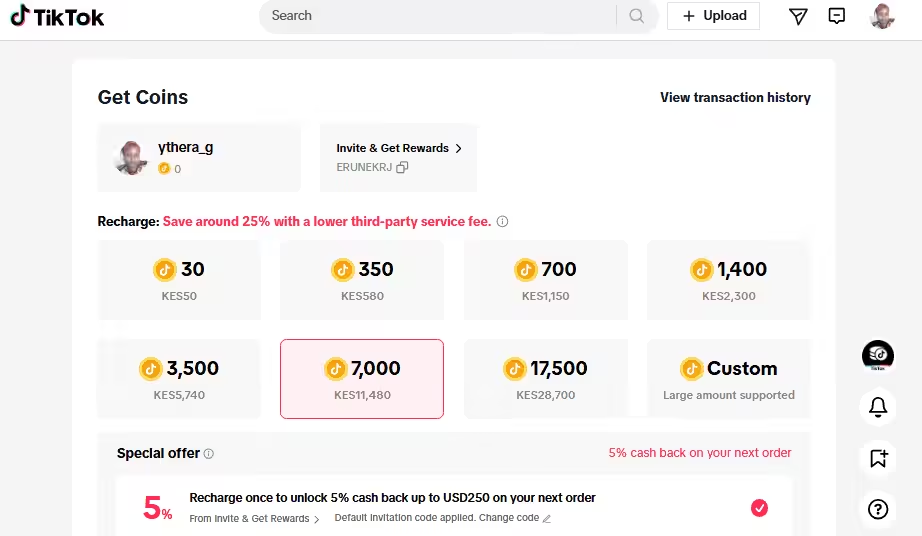
- Click “Recharge.”
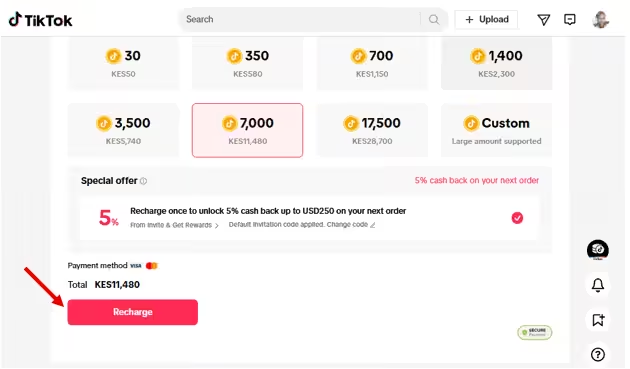
- Choose your payment method, enter details, and click “Pay and Link.”
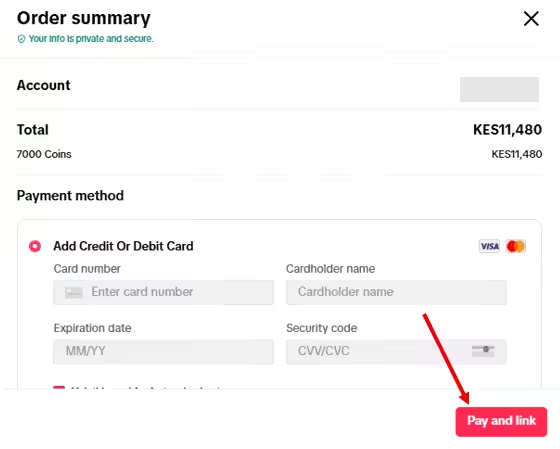
And you’re done! TikTok will load your account with the coins you’ve just bought.
Quick Tip: If you are serious about maximizing gifts, consider switching from your phone to TikTok Live Studio on your PC. This official desktop software allows you to use professional microphones, multi-camera setups, and custom overlays.
High-quality production value often leads to longer viewer retention and a more “premium” feel, which naturally encourages viewers to send higher-value gifts like the Lion or Interstellar.
How to Buy TikTok Gifts via Phone
- Go to your profile and tap on the three lines (settings).
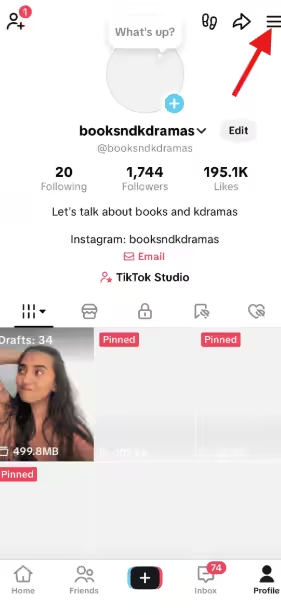
Select the 3 Lines - Select “Balance” to see your current coin amount.
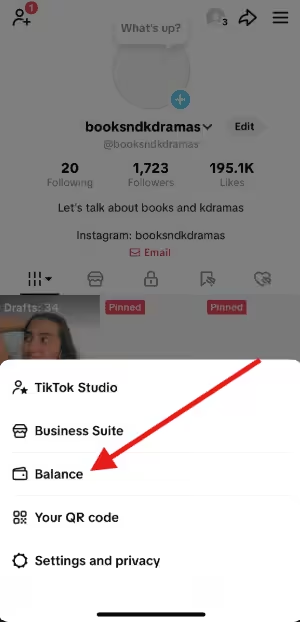
Select Balance - Choose “Get Coins” and pick the number of coins you want to buy.
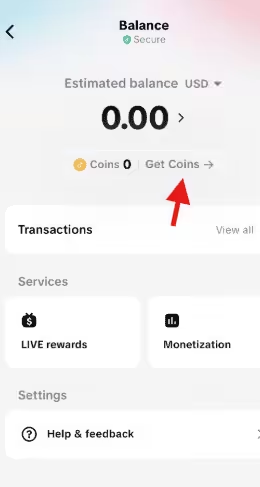
Tap Get Coins - Complete the payment using your preferred method.
Now that you have TikTok coins loaded in your account, you can easily send gifts to the creators you love.
Here’s how you can send gifts on TikTok:
- Open the live stream or video you want to support.
- Click the gift you want to send from the list of virtual gifts at the bottom of the screen. You can click “More” to view all the available gifts.
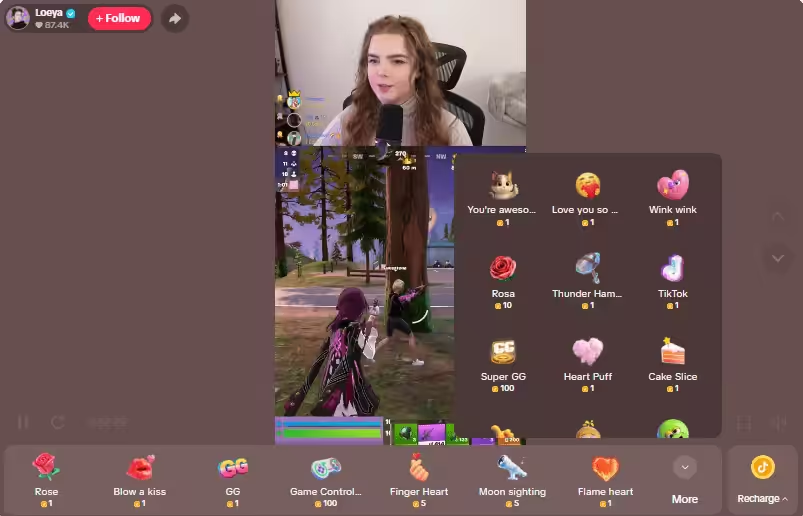
Select More to View All Gifts - Once you’ve selected a gift, confirm your selection and hit “Send” to deliver the gift instantly.
TikTok supports a variety of payment methods to make coin purchases convenient. You can use credit/debit cards, PayPal, or app store payment options, depending on your device. It’s helpful to pick a method you trust to keep your transactions safe.
To make sure you spend wisely, consider a few safety tips:
- Set a budget for gifts each month to avoid overspending.
- Avoid third-party websites that claim to sell coins at a discount or at a price that doesn’t match the TikTok price.
- Double-check your purchase before confirming to prevent mistakes.
- Keep payment info secure and use the app store or official TikTok channels.
Following these steps ensures your TikTok gifting experience is smooth, fun, and safe.
Track Performance & Spot Gift Trends
How to Enable and Maximize TikTok Gifts as a Creator?
Enabling TikTok Gifts is your ticket to turning fan love into fun, interactive support during your Lives. Knowing the rules and using smart strategies can help you make the most of every gift that flies your way.
Here are the requirements for live gifting eligibility:
- Age: You must be 18 years or older.
- Followers: Typically need at least 1,000 followers to go live with gifts.
- Region: Live gifting must be available in your country.
- Account status: Your account should be in good standing with no restrictions on live streaming.
Pro-Tip: Check Your Local Eligibility
While the industry “gold standard” for going LIVE is 1,000 followers, TikTok has been rolling out access to creators with as few as 500 to 800 followers in specific regions (such as parts of Europe and Southeast Asia). If you haven’t hit 1,000 yet, check your Creator Tools daily; you might already have the “Go LIVE” button waiting for you!
Once you tick these boxes, activating gift features is easy. You just turn on LIVE streaming and enable Gifts in your Creator Tools.
Here’s a clear, step-by-step guide for activating TikTok Gift features as a creator:
- Open TikTok and log in to your creator account.
- Go to your profile and tap the three dots (or “Settings & Privacy”).
- Select “Creator Tools” from the menu.
- Tap “LIVE Gifts” or “Gifts” to access the gifting options.
- Enable the Gifts feature by toggling it on.
- Confirm your account details (age, region, and payment information) if prompted.
- Start a LIVE stream. The gift icon will now appear for viewers to send coins and virtual gifts.
- Check your Wallet or Balance to monitor incoming Diamonds from gifts during or after your Live.
These steps ensure your account is ready to receive gifts and start turning fan support into creator rewards.
However, simply switching the feature on will not make animated lions magically appear on your screen. You need to show up with energy, spark conversations, create moments people enjoy, and give viewers a reason to tap that gift button in the first place.
To help you turn engagement into consistent gift revenue, here are a few smart strategies you can start using right away:
- Engage actively with viewers and shout out gift senders.
- Host themed or special Lives to spark excitement.
- Acknowledge gifts quickly with reactions or fun comments.
- Promote upcoming Lives so fans know when to tune in.
- Offer exclusive perks or content for loyal gifters.
These steps make TikTok gifting not just rewarding but also a fun way to connect with your audience.
Plan Consistently & Earn More Gifts
Are TikTok Gifts Worth It? (Pros and Cons for Creators & Viewers)
TikTok Gifts can feel like a win-win at first glance. Still, whether they are truly worth it depends on how you use them and what you expect in return.
Before you decide where you stand, let’s break down the pros and cons for creators first.
Pros
- Instant Earnings: Gifts convert into Diamonds that creators can redeem, which means you earn in real time while you stream.
- Live Interaction: Gifts spark excitement during Lives and encourage shoutouts, reactions, and stronger audience bonds.
- Status Building: Big gifts often boost visibility and create social proof, which can make your stream feel more popular and dynamic.
Cons
- TikTok’s Cut: TikTok takes a significant commission, which means you keep only a portion of what viewers spend.
- Income Volatility: Gift revenue can fluctuate wildly depending on trends, timing, and audience mood.
- Spam Risk: Some viewers may send gifts just to interrupt, troll, or distract from your content.
However, the story does not end with the creators. From the viewer’s perspective, gifting comes with its own mix of fun and caution.
On the upside, gifts offer social signaling, since sending bigger gifts can grab attention and stand out in the chat. They also add a layer of fun and interaction that makes Lives more engaging.
On the flip side, those small taps can add up quickly, and what feels playful in the moment can become expensive over time.
In the end, TikTok Gifts can absolutely be worth it, but only if both creators and viewers approach them with strategy, awareness, and a little self-control.
Featured Article: How to Go Live on TikTok: Stream, Earn, and Grow Your Audience
How Social Champ Helps You Maximize TikTok Gift Strategies
If you want more gifts, you need more than good vibes and a ring light. You need a plan.
Part of that plan is using a reliable TikTok management tool that keeps your content consistent, strategic, and data-driven. Many social media managers and marketers rely on Social Champ, and so should you.
Here’s how Social Champ helps you level up your TikTok gift game:
- Schedule “Hype” Content: Use Social Champ to schedule TikTok videos and post countdown videos. Consistency keeps your profile active in the algorithm, which ensures more viewers are notified the moment you hit the Go LIVE
- Target Peak Gifting Hours: Don’t stream to an empty room. Use Analytics and the tool for the best time to post on TikTok to identify exactly when your followers are most active, allowing you to align your Live sessions with high-traffic windows.
- Bridge the Gap with Cross-Promotion: Use the Social Media Calendar to promote your upcoming TikTok Live across Instagram and Facebook simultaneously, bringing your entire community into one stream.
- Maintain Your Posting Momentum: While you focus on engaging with gifters during a Live, Social Champ keeps your regular feed running with automated posts, so your growth never pauses.
Engage Fans With Valuable Data Insights
How TikTok Gifts Are Shaping the Future of the Creator Economy in 2026
TikTok Gifts are no longer just flashy animations flying across a screen. They are part of a bigger shift toward digital tipping and micro-monetization.
This is where fans support creators in small, frequent bursts instead of through traditional ads alone.
The Rise of Digital Tipping and Micro-Monetization
First, let’s talk about the big shift. Digital tipping is now mainstream, and TikTok sits comfortably at the front of that wave. Instead of relying only on brand deals or ad revenue, creators can earn through small, frequent contributions from their audience.
Even better, micro-monetization makes earning feel more accessible. A single gift may be small, yet consistent support from dozens of viewers during a Live can quickly stack up.
This model favors community-driven creators who nurture loyal audiences rather than chase viral spikes.
Stronger Fan Engagement and Loyalty
Because gifting happens in real time, it creates instant interaction. A viewer sends a gift, the creator reacts, and the chat lights up. That loop of action and recognition builds excitement and emotional connection.
Over time, this interaction strengthens loyalty. Fans who feel acknowledged are more likely to return, participate, and support again.
Gifting becomes more than a transaction. It becomes a shared moment that deepens the relationship between creator and community.
Evolving Policies and Global Expansion
Meanwhile, TikTok continues to refine its live monetization policies. The platform has expanded live gifting support across more regions, which opens doors for creators worldwide. As more countries gain access to these features, international usage keeps growing.
In addition, payment systems and compliance standards continue to evolve. Clearer rules and better infrastructure give creators more confidence in using gifting as a revenue stream. That stability encourages long-term planning instead of short-term experimentation.
What This Means for the Creator Economy
Put it all together, and you see a clear trend. TikTok Gifts are shaping a creator economy that feels faster, more interactive, and more community-powered.
In 2026, digital tipping is not just an extra feature. It is a central pillar of how creators monetize attention and turn engagement into a real opportunity.
Featured Article: How to Link Instagram to TikTok: Step-By-Step Guide
Conclusion
TikTok Gifts have evolved from playful on-screen animations into a powerful monetization tool that fuels the modern creator economy. It opens the door to real-time earnings, stronger community bonds, and new growth opportunities.
Still, success with TikTok Gifts does not happen by accident. It requires strategy, timing, and content that gives people a reason to interact. When you combine engaging Lives, smart scheduling, and data-driven insights, you create the perfect environment for gifts to flow naturally.