
What if a 20-second video could bring more attention to your channel than a 10-minute upload ever did?
That question sits at the center of YouTube Shorts in 2026.
Short videos no longer feel optional. They shape how people find creators today. In fact, it’s confirmed that Shorts now crosses 200 billion daily views, a number that keeps climbing.
Short Summary
- YouTube Shorts in 2026 focus on fast discovery, consistent posting, and audience retention rather than one-off viral clips.
- Creators and brands can monetize Shorts through ads, fan support, brand deals, and external income channels.
- Repurposing Shorts across platforms works best when you adjust captions, format, and posting rules per platform.
- Performance improves when you track retention, loop rate, subscriber growth, and posting patterns.
- Tools like Social Champ help you manage, publish, and analyze Shorts across platforms without extra effort.
So pause for a second and think about the point of YouTube Shorts. It’s not about chasing trends. It’s about showing up where attention already lives.
Shorts push your content to viewers who never searched for you. That only happens when your clips match how the YouTube algorithm decides what gets seen.
Scroll on, because once you understand how YouTube Shorts actually work, you stop guessing and start making smarter moves with every upload.

Ready to Go Viral? Start Mastering YouTube Shorts With Social Champ Today!
Start mastering the art of YouTube Shorts today and watch your audience grow like never before with Social Champ’s powerful tools.
What Are YouTube Shorts and Why Are They So Popular?
If you are new to short-form video, YouTube Shorts are vertical videos designed to capture attention fast.
Originally capped at 60 seconds, Shorts now allow creators to post clips up to 3 minutes long. They are mobile-first, scrollable, and built for quick consumption, making it easier than ever for viewers to engage with your content on the go.
How Shorts Stand Out From Other Platforms
You might wonder how Shorts compare to TikTok or Instagram Reels.
While all three formats are short and vertical, YouTube Shorts tie directly into YouTube, giving creators access to the platform’s massive user base.
Unlike TikTok, Shorts benefit from YouTube’s existing search ecosystem and recommendation engine, helping your videos reach viewers beyond your subscribers.
Instagram Reels often stay within the app’s social circle, but Shorts can appear on search results, channel pages, and even the homepage feed.
Considering this, using Shorts strategically means you can reach both casual scrollers and people actively searching for topics, giving you a broader audience than most short-form platforms alone.
Who Benefits Most From YouTube Shorts
Creators, influencers, educators, and brands all have something to gain. Short, attention-grabbing clips allow creators to showcase highlights, tips, or entertainment in seconds.
Brands can use Shorts to promote products, announce launches, or share behind-the-scenes content. Educators can simplify lessons into digestible, memorable snippets.
Even small businesses can leverage Shorts to introduce services quickly and reach new audiences without long production times.
Additionally, the rapid growth of Shorts offers opportunities for experimenting with content without heavy commitment. If you want to see which tools top creators use, check out YouTube marketing tools that help plan, schedule, and analyze Shorts effectively.
A Quick Look at Shorts Growth
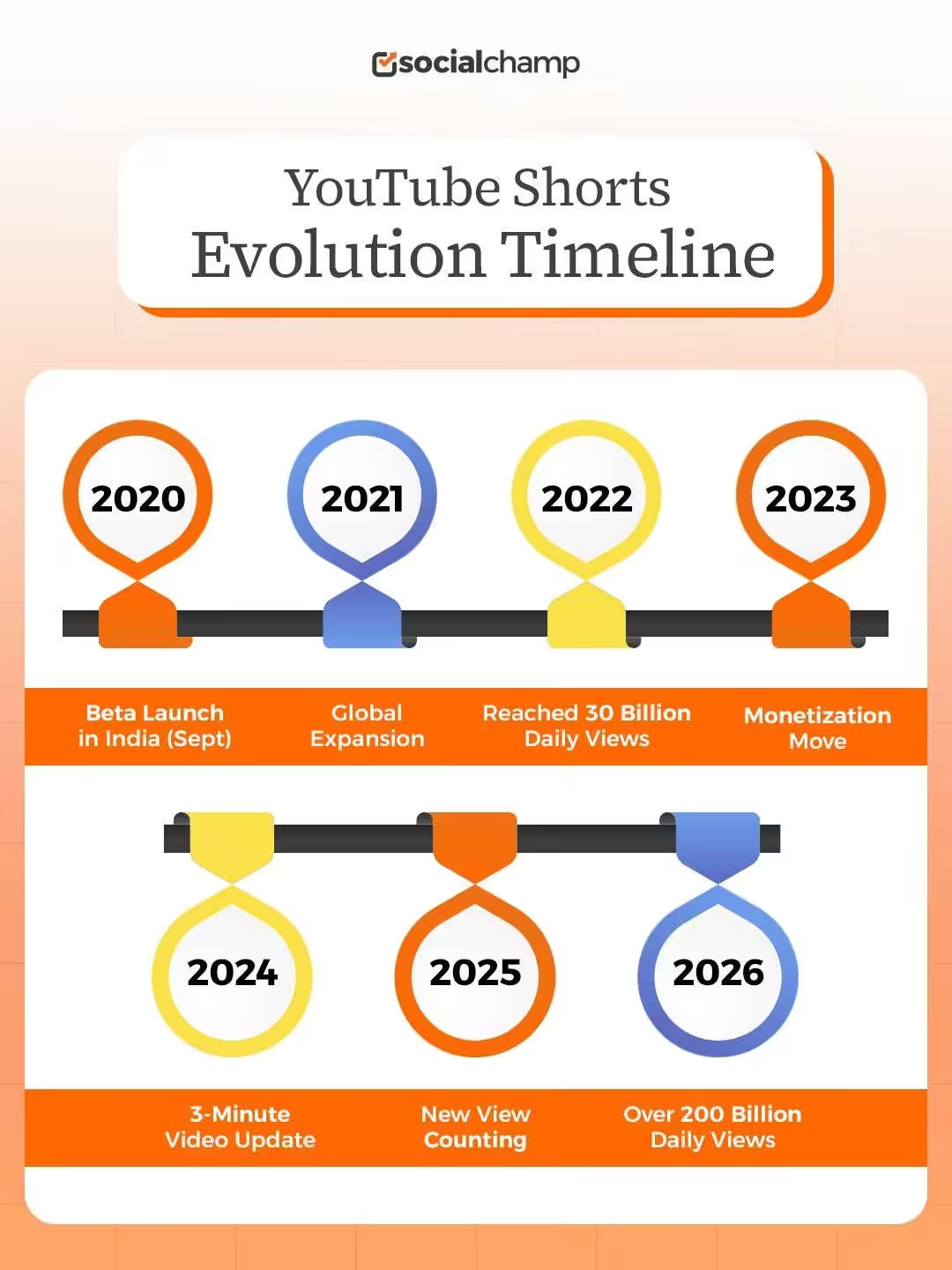
The rise of Shorts has been fast.
YouTube launched the feature in September 2020 and reached over 30 billion daily views within about one year of its global launch. This growth shows how quickly the format gained traction after launching.
From a simple scrollable feed to a core part of the platform, Shorts have become a must-use format for anyone looking to grow their presence online.
Featured Article: B2C Social Media Marketing Strategy Guide: Engagement, Advertising, and Analytics
Want to Save Time and Boost Engagement?
Schedule, track, and monitor all your YouTube videos now with Social Champ and maximize your impact.
What Are the Key Features and Latest Updates to YouTube Shorts in 2026?
If you are creating YouTube Shorts today, you should know how the format has changed in 2026.
Shorts started simple, but now they include tools and features that make short‑form content more creative and effective. These updates help you do more with less effort, reach people faster, and adapt to how viewers scroll.
Core Editing Features You Can Use
At its core, YouTube has expanded the tools available inside YT Shorts so you can polish videos without extra apps. These include:
- Multi‑Segment Editing: You can record clips in chunks and combine them in your workflow. It makes storytelling easier when you want to show a sequence of moments.
- Audio Remixing: Add music or sound from other Shorts to your own clips. If a song or sound is trending, you can use it to make your Shorts feel familiar, not random.
- Voiceovers: Record spoken commentary over your clips. This works well for tips, commentary, and explanations.
- Filters and Effects: A range of visual effects can help set the tone of your content without extra editing software.
Each of these features adds flexibility. They are not required, but they give you more ways to connect with viewers and align with YouTube Shorts best practices.
Vertical Live Shorts
In 2026, YouTube supports vertical live Shorts. This means you can go live in a vertical format similar to traditional Shorts.
Live vertical streams make real‑time engagement easier. If you host Q A sessions, quick demos, or live announcements, this feature lets you connect with your audience instantly.
Shorts Feed Enhancements
YouTube has upgraded how the Shorts feed recommends videos. Instead of just showing the latest uploads, the platform now uses AI‑based discovery to match content with what viewers like to watch next. This affects every part of YouTube Shorts, from reach to watch time.
When you post Shorts that match viewer interests, the algorithm is more likely to show your clips to the right people.
Other Notable Additions
Here are a few more updates to note:
- Suggested captions and subtitles for accessibility
- Shorts performance insights in analytics
- Tools to loop clips smoothly for longer watch times
If you want help managing your content and planning uploads, checking out popular YouTube schedulers can save time and keep your strategy consistent.
As YouTube continues to expand features for Shorts, creators who use these tools thoughtfully are more likely to find audience growth and engagement in 2026.
Featured Article: How to Avoid Copyright on YouTube
How to Create a YouTube Short (Step-By-Step for 2026)
If you want to create YouTube Shorts but aren’t sure how, you’ll be happy to know that I’ve compiled instructions for creating or uploading YouTube Shorts on a PC or Mac.
Creating and Uploading YouTube Shorts Using a PC or Mac
Do you have an intriguing video concept perfect for YouTube Shorts, but want to create it from your computer?
If so, here are the steps to follow:
-
Prepare Your Short-Form Video
The first step involves creating or editing a video that meets the YouTube Shorts criteria.
This means you should have a video saved up on your computer that’s 60 seconds or less in duration and optimized for vertical viewing. -
Access YouTube Studio
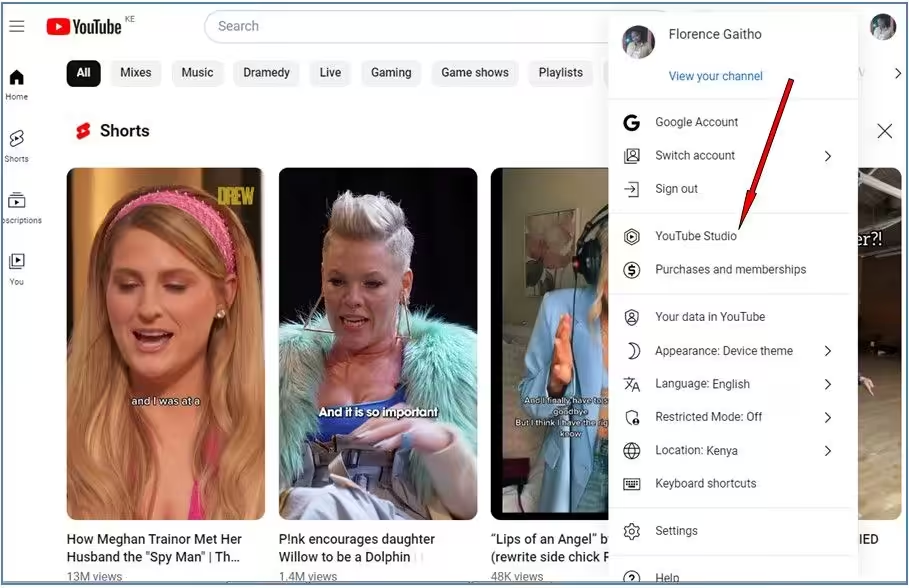
Access YouTube Studio Log in to your YouTube account and navigate to YouTube Studio using your web browser.
You can access YouTube Studio by clicking your profile picture at the top right and then clicking “YouTube Studio.”
-
Upload Your Short Video
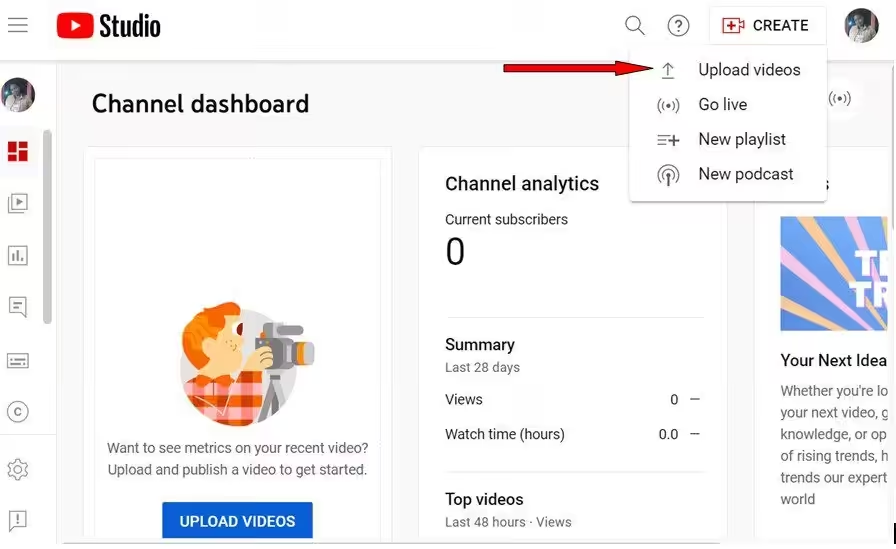
Upload Your Short Video Click the “CREATE” button in YouTube Studio and select “UPLOAD VIDEOS.”
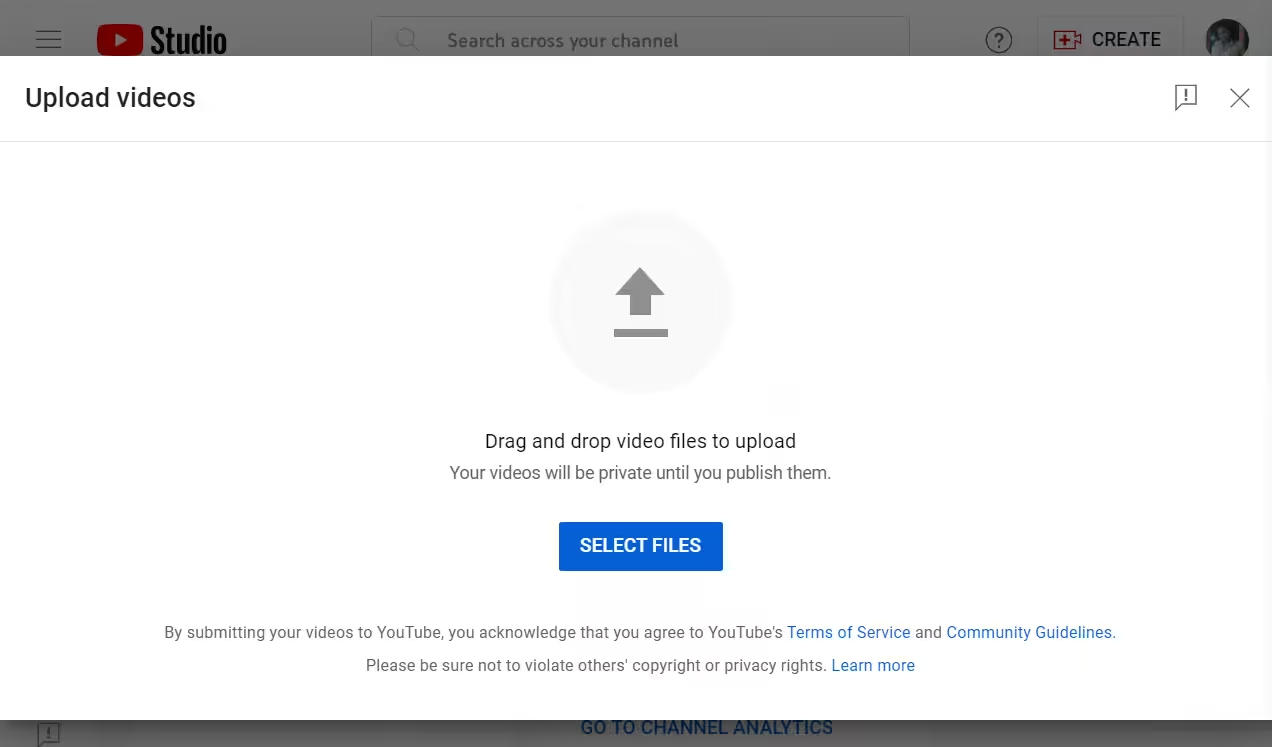
Select “Upload Videos” Alternatively, you can click the “UPLOAD VIDEOS” button highlighted in blue at the bottom.
Once you click “UPLOAD VIDEOS,” drag and drop the video file you’ve prepared for the Shorts format.
Alternatively, you can click the “SELECT FILES” button highlighted in blue to choose the short video from a location on your computer.
-
Add Details and Optimization
Fill in the title, description, tags, thumbnails, and other necessary details for your Short video.
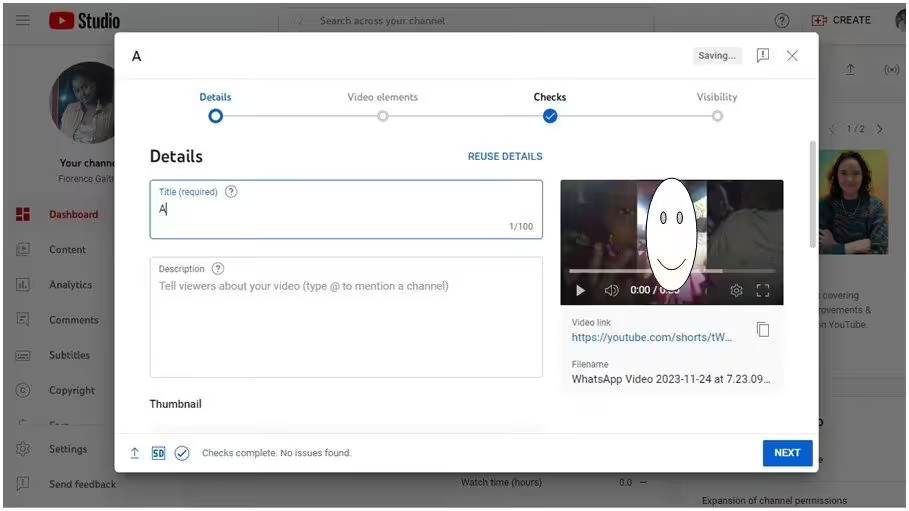
Add Details and Optimization Once you fill in the necessary details, click “NEXT.”
-
Add Video Elements
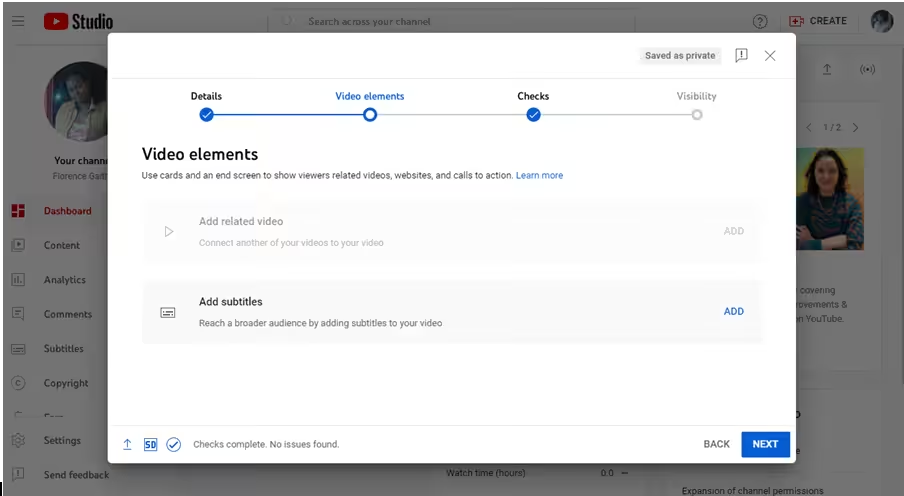
Add Video Elements Add video elements, such as subtitles, on the next window that appears.
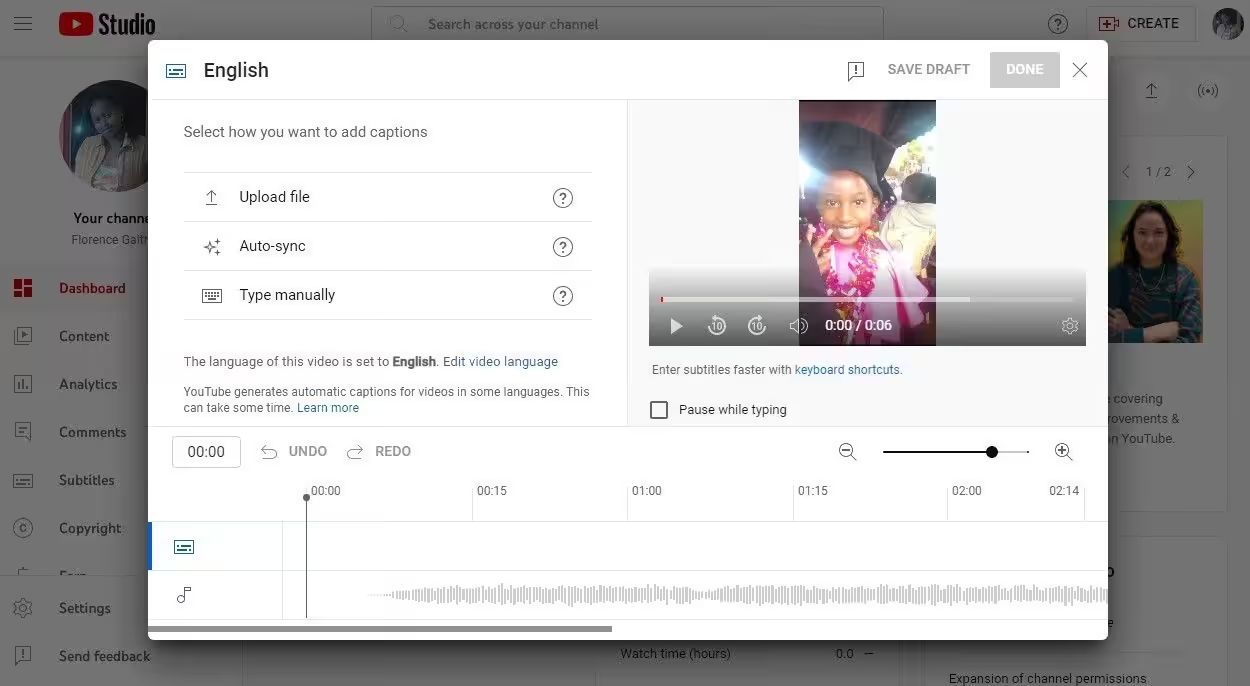
Add Subtitles When you click on “ADD” under Add subtitles, the following window will appear.
Once you’re done editing, click “NEXT.”
-
Fix Issues, If Any
YouTube will conduct the necessary checks to ensure your video doesn’t have issues that may restrict its visibility.
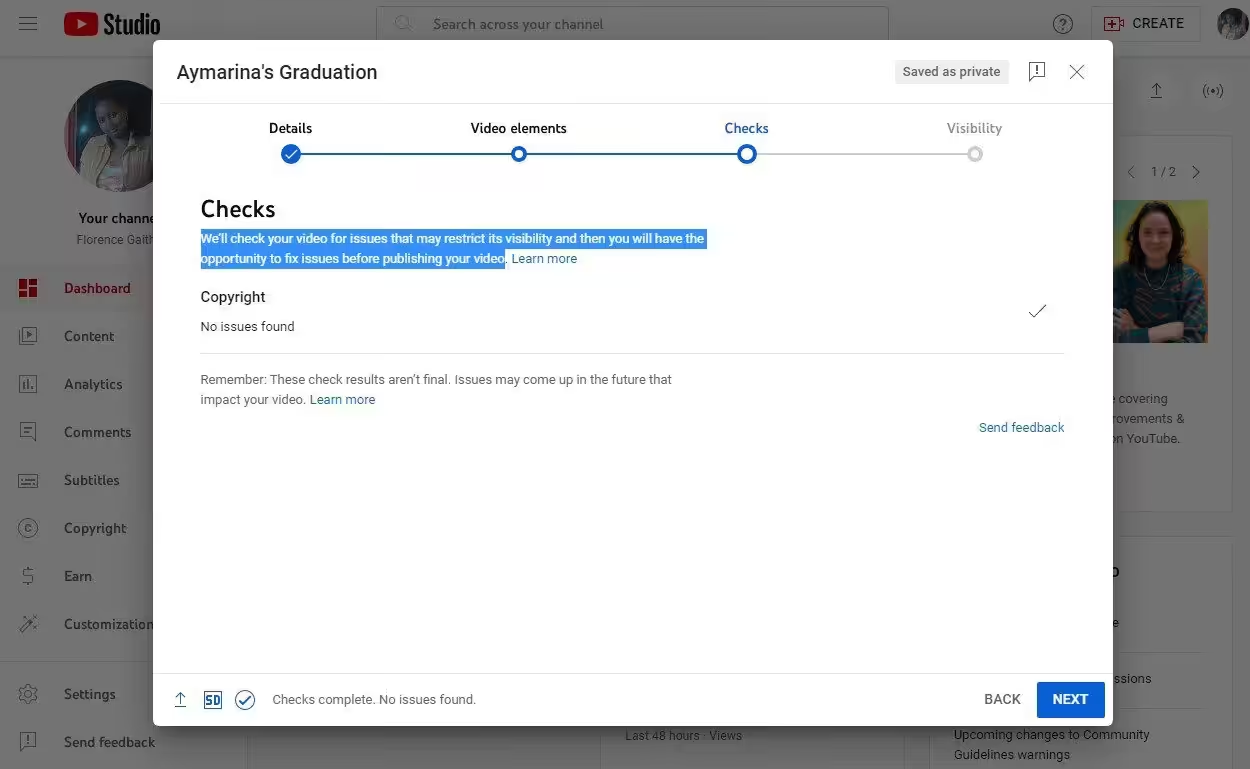
Fix Issues, if Any To ensure your video passes this step, ensure that the short video you intend to upload meets YouTube’s community guidelines and copyright policies. If no issues are found, click “NEXT.”
-
Choose the Visibility Settings
From the window that appears, choose the visibility settings for your YouTube Short.
Choose whether to make your video private, unlisted, or public. Also, decide on whether to publish the video right away or save it to publish later.
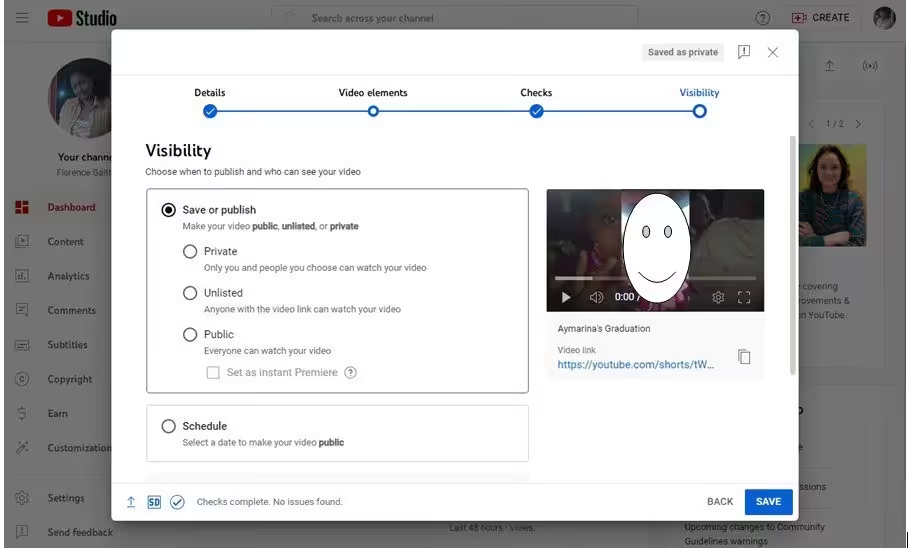
Choose the Visibilty Settings Once you’ve completed all necessary information and settings, click the “SAVE” button to upload your Short video to YouTube.
-
View Your Saved Video
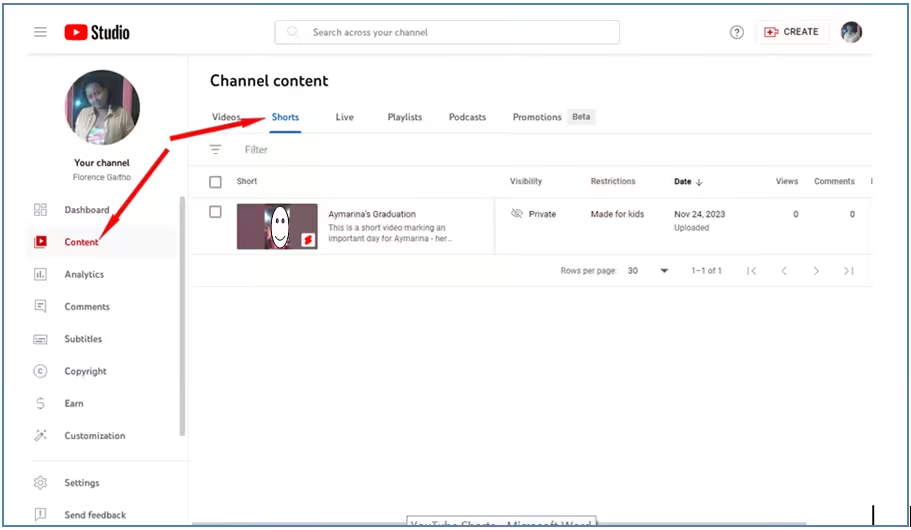
View Your Saved Video From your profile, you can view YouTube Shorts by clicking on “Shorts” from the “Content” tab, as shown below:
That’s it! You’ve successfully uploaded a YouTube Short using your PC.
Creating and Uploading YouTube Shorts Using a Mobile Phone
The process for uploading YouTube Shorts on mobile devices, whether using Android or iPhone (iOS), is generally the same.
So, whether you’re an Android or iPhone user, you can follow the following steps to create and upload YouTube Shorts:
- Access the YouTube App
Open the YouTube app on your Android device or iPhone. - Create a Short
Tap the ‘+’ to start creating a new video.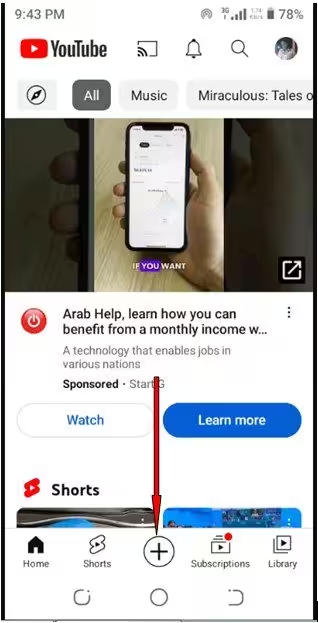
Click the “+” Icon - Tap “Create a Short”
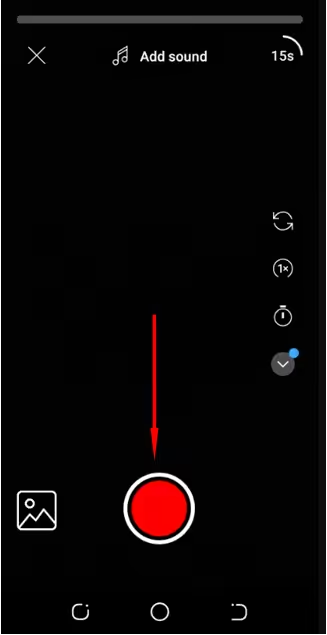
Tap “Create a Short” - Record or Upload a Video
Use the Shorts camera to record a new video. Alternatively, upload an existing video from your device’s gallery by tapping the phone’s media library in the bottom-left corner. - Enhance and Edit
Use the available editing tools within the Shorts camera to enhance your video. You can:- Add sound
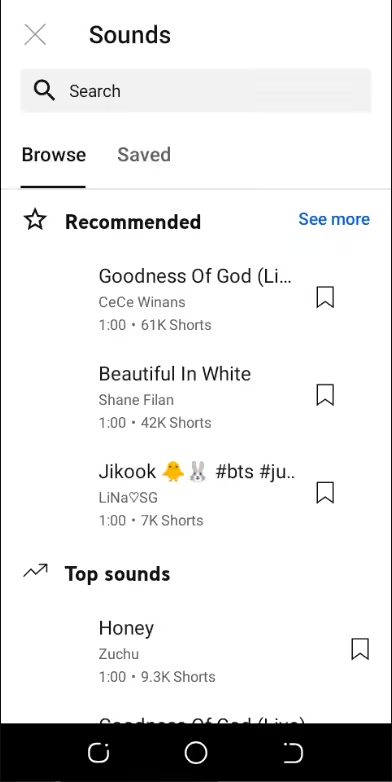
Add Sounds - Set the timer
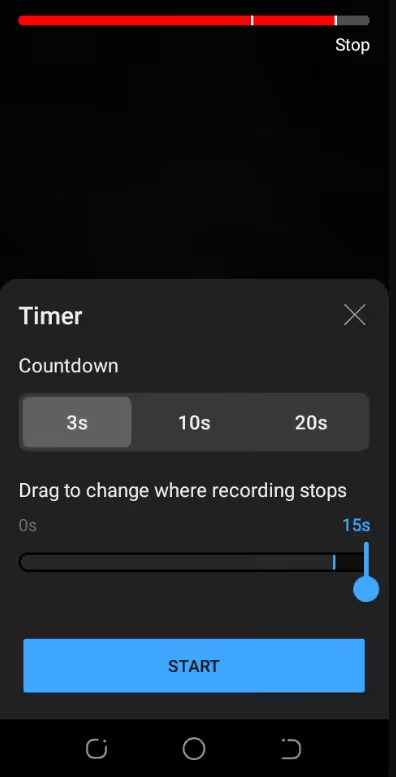
Set the Timer - Adjust playback speed
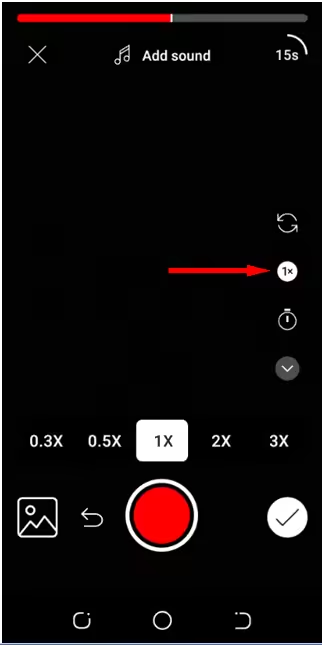
Adjust Playback Speed - Add a voice-over
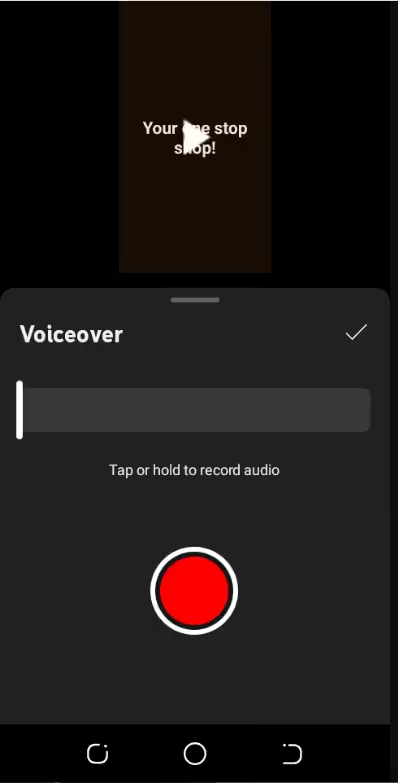
Add a Voice-Over - Include text
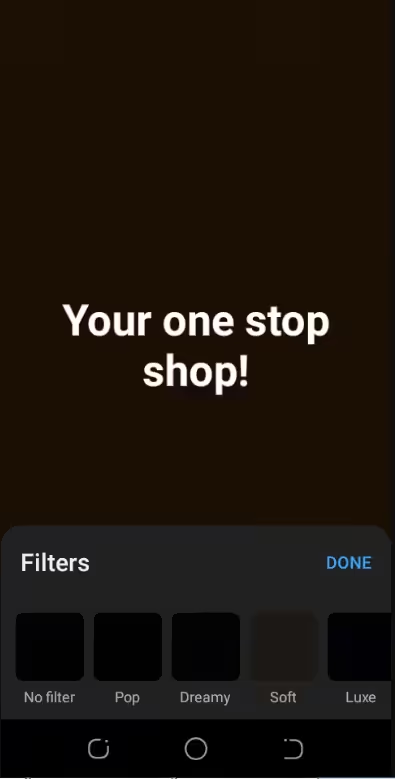
Include Text
You can also create a timeline, ensuring the video duration is 60 seconds or less and that it follows the vertical aspect ratio for Shorts.
- Add sound
- Apply filters
Once you’re done making the necessary edits, click “Next.” - Add Details
Provide details for your YouTube Short to help optimize your video for search and discovery on YouTube. You can choose to add or set the following:- Visibility
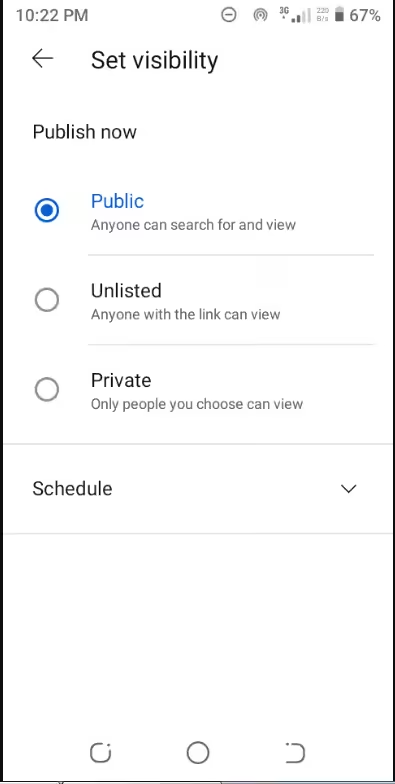
Set Visibility - Audience
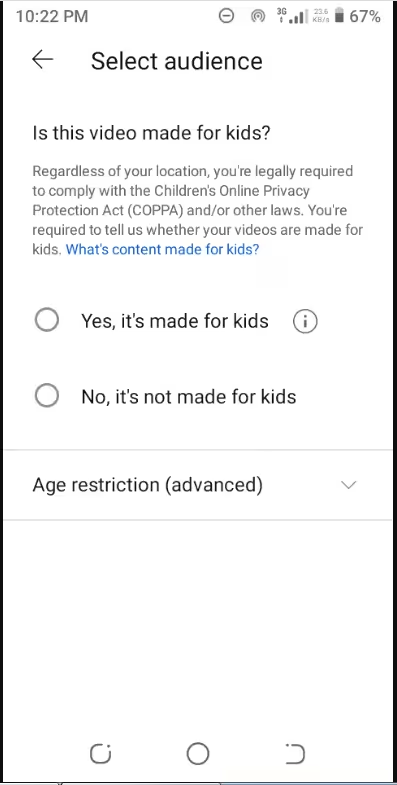
Select Audience - Shorts Remixing
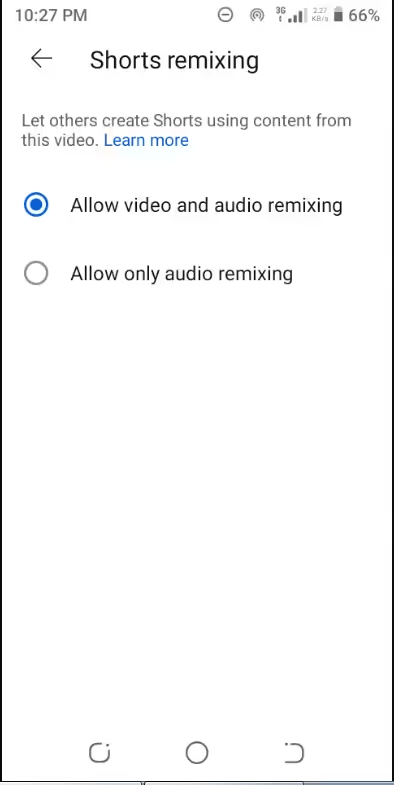
Shorts Remixing - Paid promotion label and upload your Short
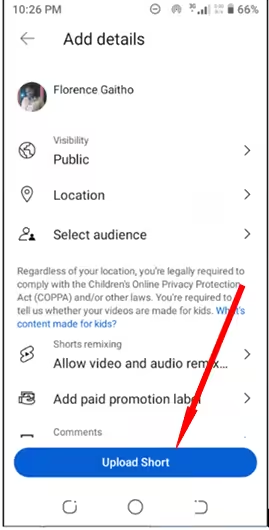
Tap “Upload Short”
Once you’re satisfied with your Short and have added all the necessary information, upload it to YouTube by clicking the upload button.
Once you hit the “Upload Short” button, your Short will be saved in your Library. You can view the Short by clicking “Your Videos.”
Once you click “Your Video,” you’ll see the YouTube Shorts you’ve created, including the ones you previously created using a computer, if any.
And that’s how to make and upload YouTube Shorts using your mobile phone.
- Visibility
Tip of the Day!
Posting Shorts works best when you treat them like full uploads, not throwaways. Understanding how to post a video on YouTube properly helps avoid quality loss and visibility issues, even for short-form content.
YouTube Shorts Best Practices to Get More Views
As one of the largest video-sharing platforms globally, YouTube hosts an extensive library of video content.
Considering that viewers watch over 1 billion hours of videos daily, it’s easy for your videos to get lost in the vast sea of content shared on the platform daily.
How can you ensure that your video content stands out and gets found?
There are several things we pay attention to here at Social Champ to ensure the success of our YouTube Shorts.
We want you to succeed as well, so we’re sharing some best practices to consider when creating and uploading your YouTube Shorts below:
-
Keep It Concise and Engaging
Shorts thrive on brevity. As such, you should aim for quick, engaging content that captures attention within the first few seconds.
Start with a compelling hook or introduction within the first few seconds to captivate viewers and encourage them to watch the entire Short.
-
Use the Vertical Format
The ideal aspect ratio for YouTube Shorts is 9:16, emphasizing a vertical orientation.
This aspect ratio perfectly fits the upright orientation of mobile devices, aligning seamlessly with how users naturally hold their phones.
By producing content in this format, you’ll cater to the prevailing trend of mobile-first viewership, enhancing the accessibility and engagement potential of your videos.
-
Use Catchy Thumbnails
Thumbnails play a crucial role in attracting viewers.
Therefore, you should make your thumbnails visually appealing and intriguing.
Be sure to design eye-catching and vibrant thumbnails that accurately represent the content of your Short.
-
Include Engaging Visuals and Effects
You should use visually appealing elements such as animations, text overlays, filters, and creative effects to capture viewers’ attention in a limited timeframe.
-
Utilize Trends
Staying abreast of trends and challenges on YouTube and various social media apps is pivotal for creators crafting YouTube Shorts.
Embracing these trends offers a direct pathway to relevance and discoverability within the dynamic digital landscape.
When you align your video content with prevalent challenges, viral trends, or popular memes, you can tap into the pulse of online culture, increasing the likelihood of your Shorts being noticed and shared.
This proactive approach not only keeps your video content fresh and relatable but also presents an opportunity to engage with a wider audience.
-
Optimize Titles and Descriptions
Optimizing the title and description of YouTube Shorts holds immense importance as it significantly impacts discoverability and viewer engagement.
Crafting a compelling title that captures the essence of the Short enhances its visibility in search results and recommendations.
Moreover, a well-optimized description, rich with relevant keywords and social media hashtags, offers additional context to both viewers and YouTube’s algorithm, aiding in better indexing and categorization.
-
Include a Clear Call-To-Action (CTA)
Incorporating a clear Call-to-Action (CTA) within YouTube Shorts serves as a guiding beacon for viewer engagement and channel growth.
So, you can include a compelling CTA that prompts viewers to take specific actions, such as liking, commenting, sharing, subscribing, or visiting other related content.
This will encourage audience interaction and foster a sense of community engagement.
-
Maintain Consistency and Frequency
Another way to foster a sense of community engagement is by maintaining a consistent schedule for uploading Shorts.
This is where a social media management tool comes in handy.
With this tool, you can make regular uploads, increasing visibility and building anticipation among viewers.
-
Interact With Your Audience
Responding to comments and actively engaging with your audience is a fundamental practice for creators uploading YouTube Shorts.
When you acknowledge and respond to comments, you show appreciation for viewer feedback, making viewers feel valued and heard.
This interaction creates a sense of inclusivity and encourages further engagement, leading to a more vibrant and interactive community around the Shorts.
-
Monitor Analytics
Monitoring YouTube analytics is crucial as it provides valuable insights into your YouTube Shorts’ performance and audience reception.
When you analyze metrics such as views, watch time, audience retention, likes, comments, and shares, you can understand how your Shorts are resonating with viewers.
In addition to offering features for scheduling posts, a social media management tool offers features for analyzing performance metrics.
The insights that a tool like Social Champ gathers can help you identify which content resonates best, what engages the audience the most, and where to improve.
Ready to Make Your Every YouTube Short a Winner?
Track performance metrics with Social Champ and watch your views and engagement soar. Try it now!
Pro Tip!
The first two seconds matter more than editing tricks. Open with motion, text, or a bold statement. These small YouTube hacks often make the difference between a swipe and a full watch.
What’s New for Creators Using YouTube Shorts in 2026?
If YouTube Shorts play a role in your content plan, you should know how creator policies have shifted in 2026.
YouTube has adjusted its approach to make short-form content more viable as a long-term channel strategy, not just a testing ground.
Changes to the Partner Program
YouTube now offers clearer paths into the Partner Program for creators who focus on Shorts.
There is an early access tier that allows smaller channels to use fan support tools before qualifying for full ad revenue. This helps you start earning and building community sooner while you work toward higher thresholds.
Once you meet the full requirements, Shorts become eligible for ad revenue alongside other monetization features.
What Happened to the Shorts Fund
The Shorts Fund no longer exists in its original form. Instead of fixed monthly bonuses, YouTube shifted to a revenue-sharing model tied directly to Shorts performance.
This change removes uncertainty. Your earnings now depend on how your Shorts perform over time rather than a one-time payout.
Monetization and Creator Rewards
YouTube Shorts supports multiple earning options. You can earn through ad revenue, fan funding tools, and paid features available inside the platform.
This structure rewards consistency and viewer engagement rather than viral spikes. As a result, creators who post regularly tend to see more stable results.
Support for Shorts-Only Channels
YouTube now recognizes channels that focus primarily on short videos. Shorts views count toward eligibility and growth milestones. This shift benefits creators who rely on YT Shorts as their main format and want a clear path to growth without long-form uploads.
If you want deeper insights into earnings options, understanding YouTube monetization helps you plan smarter as policies continue to evolve.
Policy Evolution Overview
| Area | Earlier Approach | Current Approach |
|---|---|---|
| Shorts Earnings | Bonus payouts | Ongoing revenue share |
| Partner Access | Single threshold | Tiered access |
| Shorts-Only Channels | Limited recognition | Stronger support |
10 Ways to Use YouTube Shorts
You may wonder how I can use YouTube to advertise my brand, products, or services to all these online shoppers using the short-form video feature.
Here are 10 ways you can effectively utilize YouTube Shorts:
-
Teasers and Previews
You can use Shorts to offer sneak peeks, teasers, or previews.
Give viewers a glimpse of what’s to come, sparking curiosity and anticipation for your full-length videos or series.
@WayUpMedia is one of the creators who utilize Shorts for this purpose. See an example here: Sneak Peek into a $3.5 Million Property.
-
Quick Tutorials and Tips
You can also share bite-sized tutorials, tips, or life hacks within the 60-second limit.
Try to condense valuable information into Shorts, providing quick and helpful insights on various subjects. -
Behind-The-Scenes Snippets
Another way you can use Shorts is by showing behind-the-scenes glimpses of your creative process, production, or daily activities.
This offers a personal touch, allowing viewers to connect with you on a more human level.
-
Product Showcases and Reviews
If you have a new product, you can showcase it by providing brief reviews and highlighting key features, benefits, or experiences concisely.
This can help viewers make informed decisions.
-
Mini Q&A Sessions
Potential customers will always have questions, so it’s also wise to answer frequently asked questions or address common queries within Shorts.
Quick responses to popular questions can engage your audience and provide valuable information.
Check out this example for inspiration:
-
Challenges and Trends
Participating in popular challenges or trends is one of the best practices.
So, you should create Shorts that align with trending topics, dances, memes, or challenges to engage with the community and increase visibility.
I’m sure you’ve come across many dance challenges on social media platforms, so you have an idea.
-
Storytelling and Micro-Narratives
You can also craft micro-narratives or short stories within a limited timeframe.
Engage viewers by conveying compelling stories or narratives in a condensed format, like this: Small Business Success Story.
-
Highlighting Milestones or Celebrations
Celebrate milestones, achievements, or special occasions in short and celebratory clips.
Share memorable moments with your audience, fostering a sense of community. Check out an example here.
-
Showcasing Creativity
Display your creativity through arts and crafts, DIY projects, or artistic expressions in Shorts.
Demonstrate creative processes or showcase visually captivating content, as Yasmin Art Drawing did here.
-
Promotions and Announcements
You can utilize Shorts to announce promotions, events, upcoming launches, or channel milestones.
Keep your audience informed and engaged with timely updates, like how @AvantHealthcareProfessionals did here
The above 10 diverse strategies illustrate YouTube Shorts’s versatility, offering various ways to engage audiences, convey information, and express creativity within the short-form video format.
Remember to tailor your content to align with your audience’s preferences so you can maximize the impact and effectiveness of your Shorts.
Can You Earn Money From YouTube Shorts in 2026? (Including Monetization Requirements)
With YouTube Shorts continuing to attract massive attention, eligible creators still have several ways to earn from short-form content.
If you publish Shorts on your channel, you can monetize them through YouTube’s built-in features as well as external income options.
Here is a complete look at all monetization methods available this year, including those already in place and the newer additions.
-
Ad Revenue
YouTube Shorts are eligible for ad monetization through the YouTube Partner Program. Ads appear between Shorts in the feed, and revenue is shared with creators through the Shorts ads pool.
To access monetization features, YouTube offers an early eligibility path.
You can qualify with 500 subscribers and 3 million Shorts views within 90 days. This gives you access to fan funding tools.
Full ad revenue access comes after meeting the higher Partner Program requirements.
-
Channel Memberships
Creators with Channel Memberships enabled can offer paid memberships to viewers. These often include badges, exclusive posts, or member-only content.
Memberships give you recurring income that does not rely on views alone.
-
Super Chat, Super Stickers, and Super Thanks
Shorts that include live vertical streams or premieres can use Super Chat and Super Stickers.
Additionally, Super Thanks allow viewers to support your Shorts directly by tipping on individual videos. These features work well when your audience wants to show appreciation beyond comments and likes.
-
Merchandise Shelf
Creators approved for the YouTube Partner merchandise shelf can display branded products directly under their videos, including Shorts.
This makes it easier for viewers to support your work without leaving the platform.
-
Sponsorships and Brand Deals
Brand partnerships remain a common source of income for YouTube Shorts creators.
Sponsored Shorts, product mentions, and paid collaborations allow you to earn outside of YouTube’s ad system. This model fits creators with a clear niche and consistent audience.
-
Affiliate Marketing
Affiliate links can still be added to Shorts descriptions. When viewers make purchases through those links, you earn a commission.
This option supports creators who review products, tools, or services.
External Monetization Options
Beyond YouTube’s features, many creators earn through external channels such as:
- Merchandise stores
- Patreon or similar membership platforms
- Digital products like courses or guides
These methods support the broader point of YouTube Shorts, which is to attract attention and guide viewers toward deeper engagement.
Revenue Models for YouTube Shorts
| Revenue Model | Description |
|---|---|
| Shorts Ads Pool | Shared ad revenue from Shorts feed |
| Channel Memberships | Monthly recurring support |
| Super Features | Tips and live support |
| Brand Deals | Paid partnerships |
| Affiliate Links | Commission-based income |
| External Sales | Merch and digital products |
Benefits of Scheduling YouTube Shorts through Social Champ
Social Champ provides the functionality to schedule YouTube Shorts, enabling you to plan and publish your Shorts content at specified times.
Here are some potential benefits that scheduling YouTube Shorts through a social media management tool like Social Champ might offer:
-
Efficient Time Management
Scheduling YouTube Shorts via Social Champ can streamline content planning, allowing you to batch-create and schedule multiple Shorts in advance.
This efficiency helps in managing time effectively.
-
Convenience and Flexibility
Scheduling YouTube Shorts through Social Champ offers convenience and flexibility, allowing you to plan and schedule content conveniently and across time zones.
-
Optimal Timing for Audience Engagement
Social Champ provides insights or analytics to identify optimal posting times, allowing you to schedule Shorts for when your audience is most active, potentially boosting engagement.
-
Consistent Posting Schedule
With scheduling capabilities, Social Champ allows you to maintain a consistent uploading schedule for YouTube Shorts, enhancing channel visibility and audience retention.
-
Centralized Content Management
The tool offers a centralized dashboard to manage various social media platforms, including YouTube, providing a unified view and easy scheduling across different channels.
-
Analytics and Performance Tracking
Social Champ offers analytics and performance tracking for scheduled YouTube Shorts, enabling you to assess engagement metrics and refine your content strategy.
Now that you know the benefits of scheduling YouTube Shorts using Social Champ, it’s time to schedule your short videos like a champ!
How to Schedule YouTube Shorts Using Social Champ
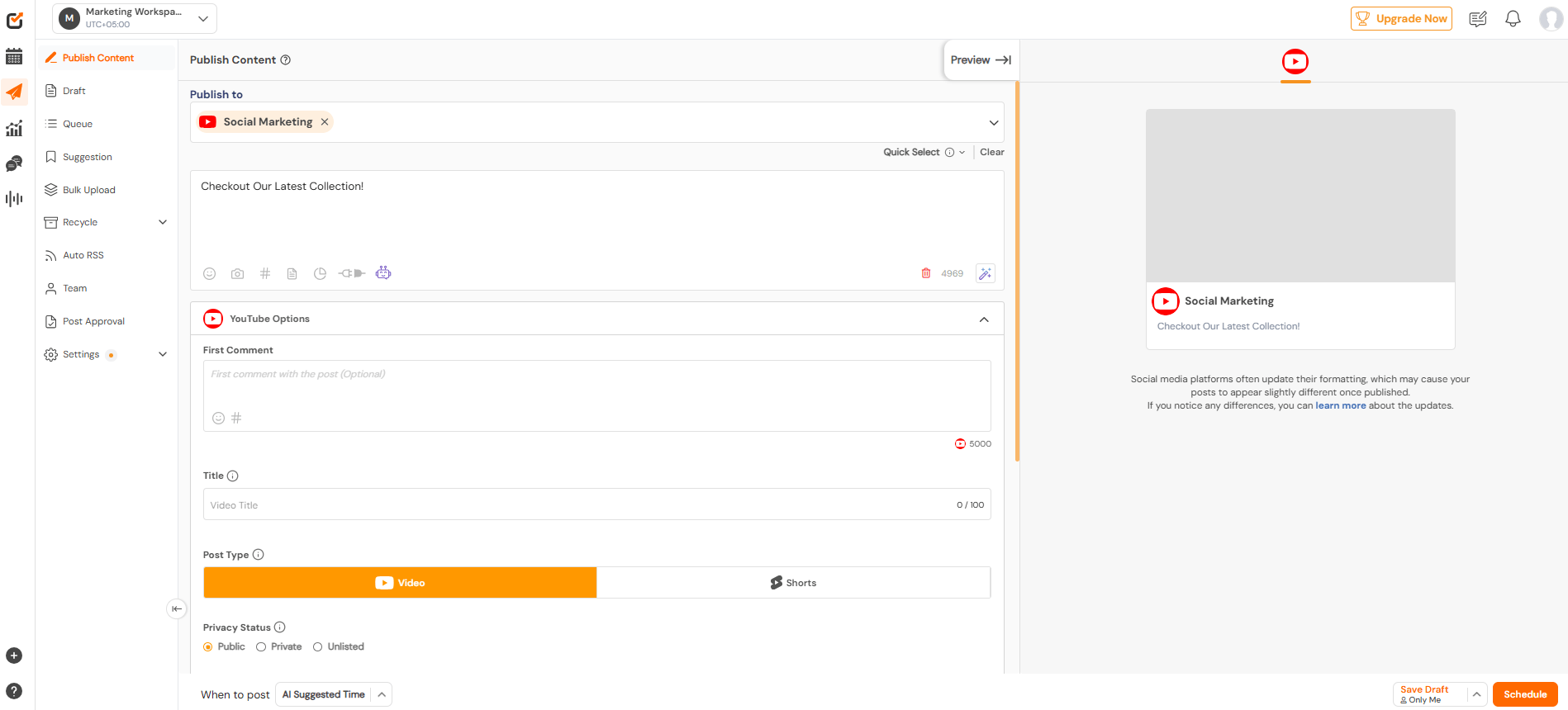
Social Champ can help you get along with the scheduling of YouTube Shorts conveniently.
The best part is that you can schedule and upload YouTube Shorts using Social Champ.
Let us walk through these steps to know how.
The first and foremost requirement is to ensure that your YouTube account is connected to Social Champ.
- Log in to your Social Champ account.
- Select the YouTube account from the drop-down menu at the top.
- Explain what the Short is about and your feelings about it with text, emojis, and hashtags, among others.
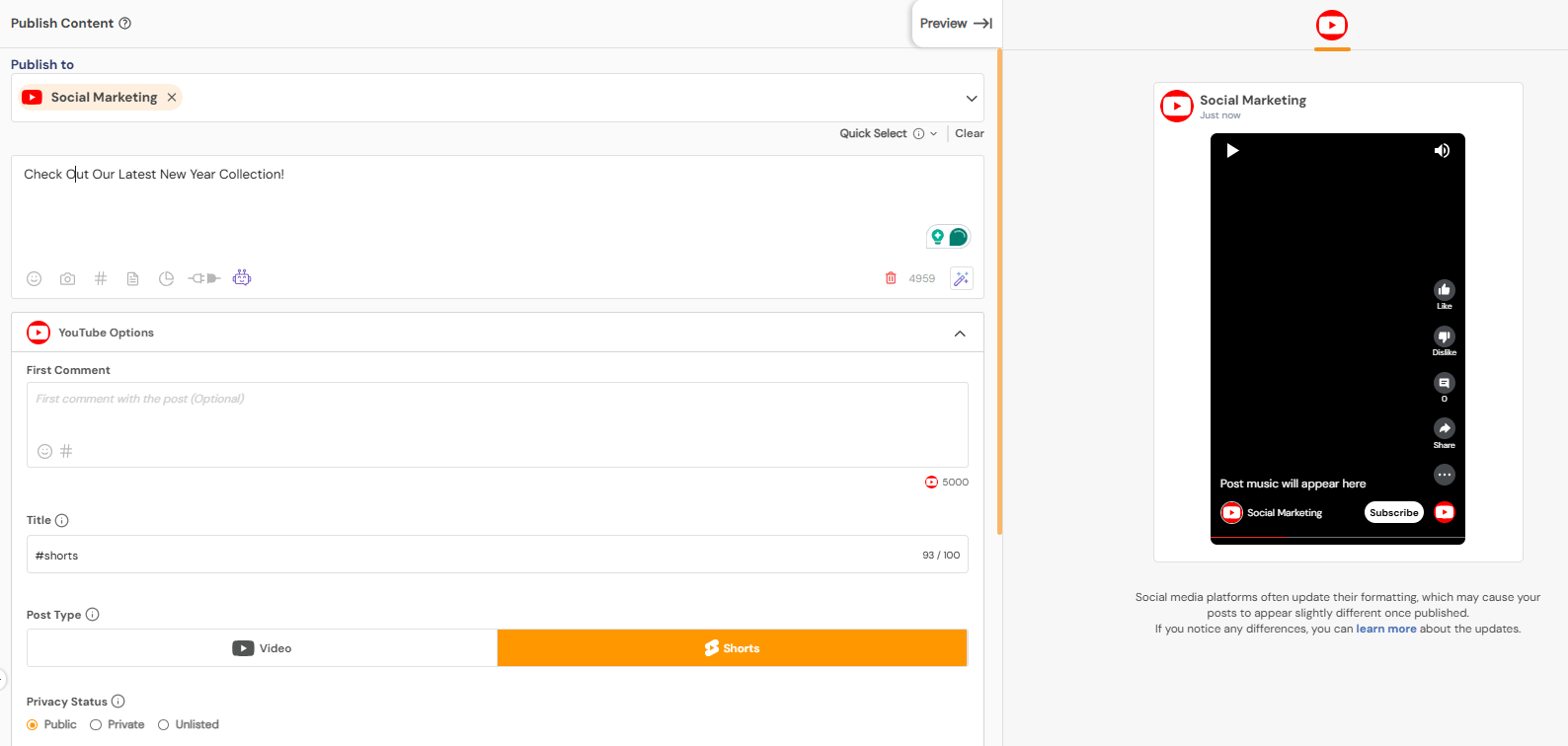
Add Caption of Your Short Video - Look at the bottom of the toolbar and click on the icon to add media.
- Select the intended video to post as a YouTube Short.
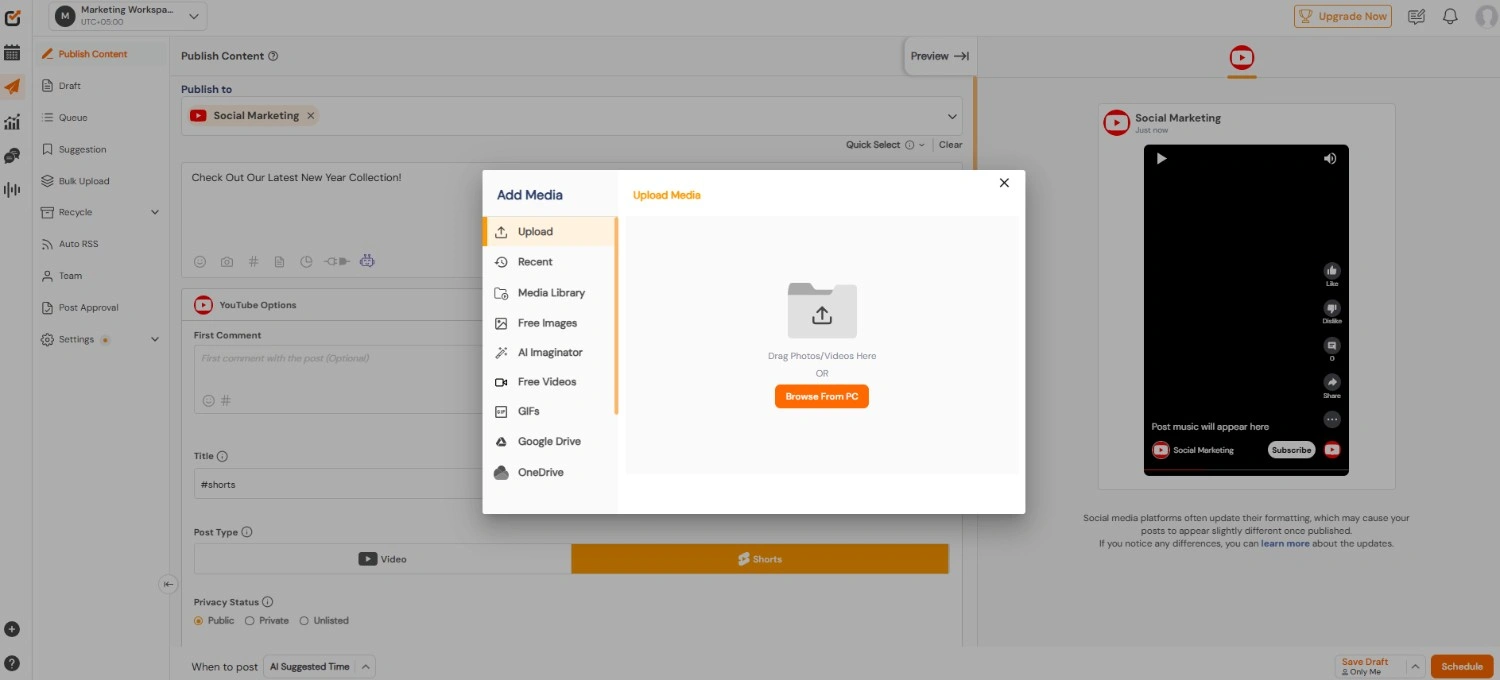
Add Media - Choose a thumbnail for the video from the Édit Thumbnail Option.
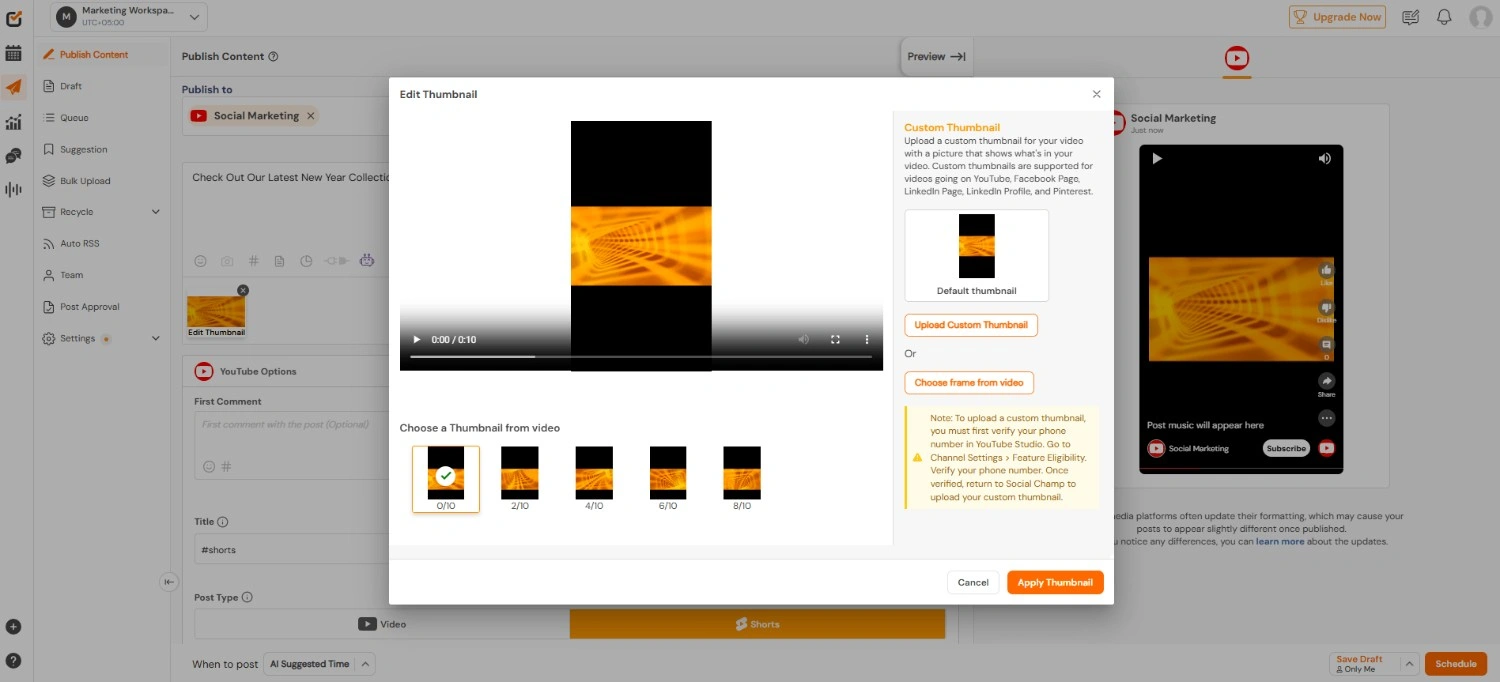
Choose a Thumbnail for Your Short Video - Now, decide when to schedule the post and click the post now/schedule button.
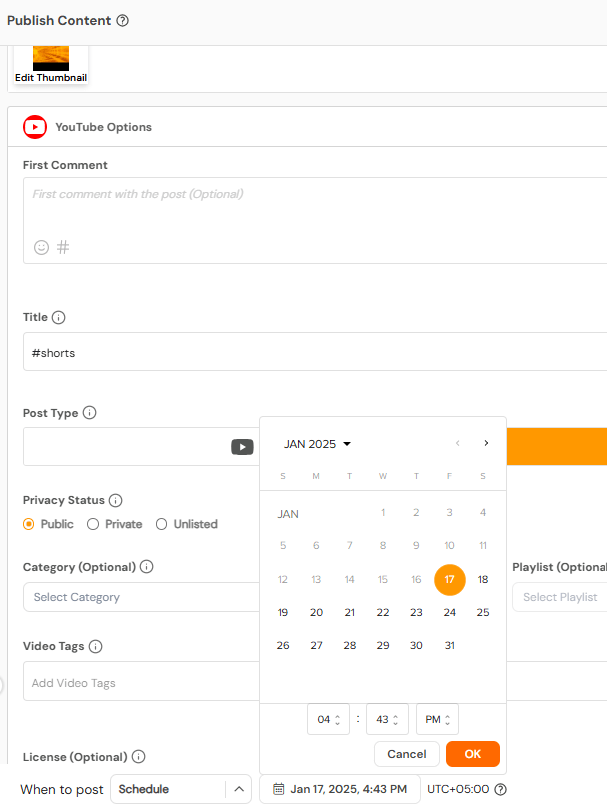
Schedule Your Short
However, you need to be critical of the specifications.
Ensure the Short duration is between 5 and 60 seconds with an aspect ratio of 9:16. Video dimensions should be less than 1920 px.
And hey, you are done. If you have done these eight steps diligently, you can now easily schedule YouTube Shorts with the help of Social Champ.
Say Goodbye to Last-Minute Posting Stress!
Schedule your YouTube Shorts with Social Champ today and never miss the perfect posting time again!
Featured Article: How to Post a YouTube Short: Step-By-Step Guide
How to Reuse YouTube Shorts on TikTok, Reels, and More
Repurposing YouTube Shorts across platforms helps you extend the life of each video.
In 2026, creators and brands rarely post Shorts in one place only. The key is doing it the right way so each platform works in your favor.
Repost Guidelines You Should Follow
Before reposting your Shorts elsewhere, a few adjustments matter. Platforms tend to favor native-looking content.
- Remove watermarks before reposting. Videos with visible platform logos often get less reach.
- Adjust hashtags to match each platform’s trends and search behavior.
- Update captions so they feel natural to the audience you are posting for.
Following these steps supports the point of YouTube Shorts, which is discovery, not duplication.
Best Platforms to Cross-Promote Shorts
Several platforms work well for reposting YouTube Shorts content:
- TikTok for trend-driven discovery
- Instagram Reels for visual storytelling and brand reach
- Facebook Shorts for community-driven engagement
- LinkedIn for professional insights and educational clips
Each platform attracts a different audience. Posting the same video everywhere without tweaks often limits results.
Platform Specific Optimization Tips
Each platform has its own rules. Small changes can make a big difference.
- Length: TikTok and Reels favor shorter clips. LinkedIn performs better with concise, value-focused videos.
- Captions: TikTok captions can be casual. LinkedIn captions should be clearer and more direct.
- Music policies: Trending sounds work well on TikTok and Reels. LinkedIn prefers voiceovers or original audio.
These adjustments align with YouTube Shorts’ best practices and improve cross-platform reach.
| Platform | Ideal Length | Caption Style | Music Use |
|---|---|---|---|
| TikTok | Short and fast | Casual | Trending sounds |
| Reels | Visual focused | Engaging | Licensed music |
| Medium | Community tone | Optional | |
| Short and clear | Professional | Original audio |
Managing Cross-Posting Without Extra Work
Posting the same video manually on multiple platforms can eat up time. This is where tools matter.
Using Social Champ, you can schedule and publish your Shorts to several platforms with a single setup. Instead of uploading the same video again and again, you manage everything from one dashboard.
That makes it easier to stay consistent and avoid missed posting windows.
If your goal is to get more views on YouTube and beyond, smart repurposing helps you stay visible without creating new content every time.
Cross-posting works best when you respect each platform while keeping your core message intact.
Good to Know!
If you plan to reuse your own Shorts across platforms, be careful with third-party tools. Many YouTube video downloader tools violate YouTube’s terms and can put your channel at risk. Always download or export content using approved methods or original files.
How Are Brands and Creators Using YouTube Shorts Effectively?
YouTube Shorts are no longer experimental. Brands and creators use them with clear intent.
The goal stays the same across industries. Get attention fast, show value, and give viewers a reason to return.
Ecommerce Brands and Product Unboxing
Ecommerce brands use YouTube Shorts for quick product unboxing and demos.
A short clip showing packaging, texture, or first use often answers buying questions faster than long videos. These Shorts focus on clarity, not polish.
That approach aligns with the point of YouTube Shorts, which is fast discovery and instant context.
Many brands also reuse these clips across platforms to extend reach without extra production.
SaaS Companies and Feature Highlights
SaaS teams rely on Shorts to explain one feature at a time. Instead of long walkthroughs, they post short clips that solve one problem.
This works well for updates, tips, or UI changes. Over time, these Shorts build familiarity and trust.
This approach follows YouTube Shorts’ best practices by keeping content focused and easy to follow.
Coaches and Educators Sharing Micro Tutorials
Coaches, consultants, and educators use YouTube Shorts to share micro-tutorials. A single idea. One takeaway. No filler. These clips work well because viewers can apply the tip right away.
Many creators pair Shorts with longer content to support growing a YouTube channel without overwhelming new viewers.
Events and Behind-The-Scenes Content
Event organizers use Shorts to show behind-the-scenes moments. Venue prep, speaker clips, and crowd reactions help build anticipation.
These videos feel real and timely, which helps them perform well in the Shorts feed.
Visual Use Case Carousel Idea
To make this section more engaging, add a carousel showing:
- Ecommerce product thumbnails
- SaaS dashboard clips
- Coaching tip screenshots
- Event behind-the-scenes frames
Each slide can include a short caption explaining how that Short supports reach or engagement. Tools that help manage and organize this content often fall under YouTube tools
categories that simplify planning.
Across industries, one thing stays consistent. Brands and creators who respect the format tend to see stronger results from YouTube Shorts.
Quick Tip!
Shorts that lead viewers to a clear next step tend to convert better. If your goal is growth, pair Shorts with long-form content and playlists to support how to grow YouTube channel over time.
What Metrics Matter Most When Tracking YouTube Shorts Performance?
Posting YouTube Shorts without tracking results leaves you guessing.
In 2026, performance data matters more than volume. The right metrics help you understand what holds attention, what drives action, and what supports long-term growth.
Retention and Average View Duration
Retention sits at the center of Short’s performance. It shows how long viewers stay before swiping away.
A strong average view duration tells YouTube your content keeps attention. This aligns closely with the point of YouTube Shorts, which is fast engagement without friction.
Shorter videos with a clear opening often perform better. Watching retention patterns helps you spot weak intros and tighten your delivery.
Loop Rate and Repeat Views
Loop rate shows how often a Short replays. Since Shorts loop automatically, rewatching signals interest.
If viewers watch more than once, the algorithm often responds with wider distribution. This is a quiet but powerful signal in YouTube Shorts performance tracking.
Click Through Rate From Search
Some YouTube Shorts appear in search results. When that happens, click-through rate becomes relevant.
A clear title and strong opening frame can improve CTR. This supports discoverability and fits well with YouTube Shorts best practices focused on clarity and intent.
Subscriber Growth From Shorts
Subscriber growth tied to Shorts tells you whether viewers want more from you. A Short that brings new subscribers often has a clear message and consistent topic focus.
Tracking this helps you see which content builds loyalty instead of one-time views.
Limits of Shorts Analytics
Shorts analytics still lack depth compared to long-form content. You may not see full audience paths or detailed funnel data.
This makes context harder to spot when Shorts live across platforms.
That is where unified reporting helps.
Getting a Clearer View With Unified Reporting
Using tools like Social Champ, you can track Shorts’ performance alongside other platforms in one place. Instead of jumping between dashboards, you see trends, posting patterns, and engagement signals together. This makes it easier to decide what to post next and when.
Understanding audience behavior also connects closely with YouTube demographics and timing decisions, like the best time to post on YouTube.
When you focus on the right metrics, Shorts stop feeling random. They start feeling measurable, repeatable, and intentional.
Did You Know?
Your channel’s visual identity still matters with Shorts. Using the correct YouTube banner size keeps your channel page clean and professional when Shorts viewers tap through to your profile.
Turn One Short Into Multi-Platform Reach!
Post your YouTube Shorts to TikTok, Reels, Facebook, and LinkedIn in a few clicks with Social Champ. Stay consistent without extra uploads.
Conclusion
YouTube Shorts have moved from a trend to a core growth channel.
When you focus on clear creation, follow proven best practices, track the right metrics, and reuse content across platforms, Shorts become easier to manage and easier to scale.
Monetization options now reward consistency, not just viral moments, which makes Shorts a realistic long-term play for creators, businesses, and agencies alike.
The key is experimentation. Test formats, study performance, and stay consistent even when results feel slow. Small improvements add up faster than you think.
If you want a simpler way to plan, publish, track, and repurpose YouTube Shorts without the daily grind, Social Champ gives you the structure to stay consistent and competitive this year.









Rita Marsh
Really appreciated this update. YouTube Shorts are a dynamic format, and staying current with best practices is crucial.
Jeremy Roger
YouTube shorts are pretty similar to Instagram Reels. Havent tried it yet but I think I need to try it now, will definately implement these strategies in my short video.
Trisa Tarin
Great piece of information; thanks for sharing the ideas!
Ezekiel Perez
Thanks for the information! YouTube shorts are derivative of Instagram reels and TikTok. I usually use YouTube shorts to post videos like contests, holiday videos & posts alike. Will focus on these tips as well.