Have you ever tried to find your college roommate or your school friend on Instagram?
We’ve all been there.
Just like you, I also look for my childhood friends on the Internet, but finding your real-life friends on such a massive platform can still feel like trying to find a needle in a digital haystack.
Short Summary
- Finding real-life friends on Instagram can feel overwhelming due to the platform’s massive user base, but Instagram offers tools to make it easier.
- Syncing your phone contacts is the fastest way to discover people you already know, especially via the mobile app’s Account Center.
- Instagram’s search features, filters, bio keywords, mutual followers, and username variations help narrow down results when syncing isn’t ideal.
- Desktop and web versions are useful for searching and reviewing profiles, though contact syncing must be done on mobile.
- Privacy matters: syncing shares your address book with Meta, so it’s best to turn it off once you’ve found who you need.
Featured Article: How to Get Followers on Instagram Organically
With over 2 billion monthly active users worldwide (that’s nearly 35% of all internet users), it’s not easy to find the contacts you’re looking for.
But the good news is that the Instagram algorithm has actually made it a lot easier to bridge the gap between your phone’s contact list and your “Following” count.
Grab a coffee, and let me tell you how to find contacts on Instagram.
Featured Article: How to See Past Usernames on Instagram

The Brands You Follow? They’re Scheduling.
Join them. Plan Instagram posts ahead with Social Champ and stay ahead of the curve.
Featured Article: Ultimate Guide to Instagram Promotion
Why Would You Want to Find Contacts on Instagram?
We’ve all spent way too long typing names into the search bar only to find 50 accounts with the same name and no profile picture.
It’s frustrating when you know someone is on the platform, but they’re hidden behind a clever (but impossible to find) username like @coffee.lover09.
And Instagram is such a competitive platform, you need all the support you can get from people you know.
Think about it:
-
- For Networking: That person you met at a conference last week? They might be posting industry insights on their Stories. Connecting there is much more organic than a stiff LinkedIn message.
- For Business: If you’re a creator or business owner, your first “true fans” are almost always the people already in your phone’s contact list. They are the ones most likely to support your new launch or share your latest Reel.
- For Personal Connection: Life gets busy, and “lost connections” are a real pain. Maybe you have a cousin’s new phone number but no idea what their handle is, or you’re trying to find a former colleague who you know would love your new hobby content.
Featured Article: How to Link Instagram to TikTok?
How to Find Contacts on Instagram Using Your Phone
If you’re looking to find friends quickly, the mobile app is your best friend. Here’s how to find contacts on Instagram with your phone:
Step-By-Step: Connecting Your List
Whether you’re on an iPhone or an Android, the process is almost identical. Here is the quickest way to get it done:
- Head to Your Profile: Tap your profile picture in the bottom right corner.
- Open the Menu: Tap the three horizontal lines (the “hamburger” menu) in the top right.
- Enter the Account Center: Tap on Settings and Privacy, then select Account Center at the very top.
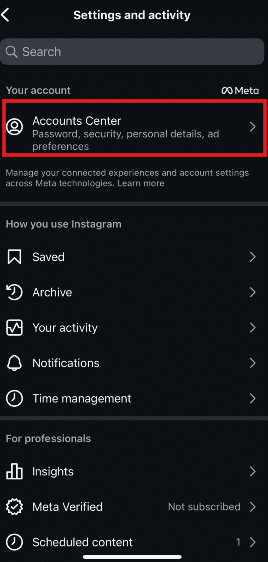
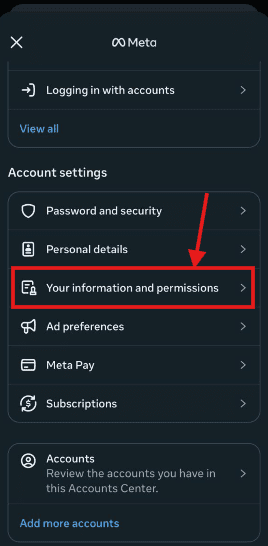
Go to Account Center - Find Your Info: Scroll down and tap on Your information and permissions.
Click on Information and Permissions - Upload Contacts: Tap Upload contacts and select the specific Instagram account you’re using.
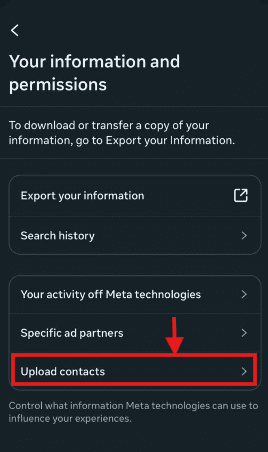
Click on Upload Contacts - Toggle the Switch: Turn on Connect contacts. If your phone asks for permission for Instagram to access your address book, tap Allow.
Featured Article: Everything About Instagram Drafts
Quick Reference: Mobile Syncing Methods
| Method | Outcome | Pro-Tip |
|---|---|---|
| Contact Syncing | Automatically suggests profiles linked to your phone numbers/emails. | Refresh the list: If you add a new contact to your phone, toggle this off and back on to force an update. |
| Discover People | A curated list of mutual friends and synced contacts. | Tap the small person icon with a ‘+’ on your profile page to jump here instantly. |
| Facebook Sync | Connects your FB friends list to your IG suggestions. | Great if you have a huge Facebook network but a small phone contact list. |
iOS vs. Android: Is There a Difference?
For the most part, the Instagram app looks the same on both systems. However, there’s one small “gotcha” regarding system permissions:
- On iOS (iPhone): You should go into your iPhone Settings > Instagram and ensure the Contacts toggle is green. Apple is very strict about app permissions!
- On Android: Most modern Androids will ask you for permission via a pop-up the moment you toggle the “Connect Contacts” switch inside the app. If it fails, check Settings > Apps > Instagram > Permissions.
Featured Article: How Is Threads Different from Instagram?
How to Find Contacts on Instagram With the Search Function
If contact syncing feels a bit too “broad” for you, the search bar is your next best bet.
-
Using the Search Bar Like a Pro
Don’t just type a name and hope for the best. To find that specific person among millions, you need to use the built-in filters:
- The “Accounts” Tab: After you type a name into the search bar, look at the menu just below it. Tap Accounts. This filters out hashtags, audio, and locations, showing you only actual profiles.
- Use Known Info: If “John Smith” brings up too many results, try searching for “John Smith [Company Name]” or “John Smith [City].” Instagram’s 2026 algorithm now scans bios for these keywords!
- The Mutual Friend: If you know your target is friends with a specific person, go to that friend’s profile and tap their Following or Followers list. Search the name there; it’s much more likely to show the right person.
-
Advanced Search Options
- Username Variations: If @janesmith is taken, try searching for jane.smith, jane_smith, or jane_smith1.
- Cross-Platform Search: Sometimes it’s easier to find someone’s IG link on their LinkedIn or Twitter (X) bio first.
- Search by Bio: Use keywords related to their hobby or job (e.g., “Graphic Designer Austin”).
-
Networking at Scale
Searching for contacts one by one is fine for old friends, but if you’re trying to build a professional network or manage a brand, you need a more powerful home base.
This is where a tool like Social Champ becomes a lifesaver.
While you’re finding all these new contacts, you’ll want a way to engage with them consistently without spending all day on your phone.
Social Champ lets you schedule your outreach, track who is engaging with your content, and even manage all those new DMs from one central dashboard.
It’s the perfect wingman for turning those new contacts into actual relationships.
One Dashboard. Endless Instagram Control.
Schedule posts, manage accounts, and keep your feed active with Social Champ.
Featured Article: Instagram Ad Sizes: A Comprehensive Guide for Eye-Catching Creatives
How to Locate Contacts on Instagram Using Desktop or Web
Sometimes, you just need a bigger screen and a real keyboard to do your detective work.
While Instagram is primarily a mobile-first app, the desktop version (Instagram.com) has also become powerful.
If you’re sitting at your desk and want to see who from your real-world network is online, here is how to navigate the web version:
Step-By-Step: Finding People on Desktop
- Log In: Head to Instagram.com and sign in.
- The Search Sidebar: On the left-hand side of your screen, click the Search (magnifying glass) icon. You can type in names, handles, or even specific keywords, such as “Marketing Manager New York.”
- Check Your Suggestions: On your home feed (click the Instagram logo), look to the far right. You’ll see a section titled “Suggested for you.” Clicking “See All” here will give you a list of people Instagram thinks you know based on mutual followers and your activity.
- The Account Center Hack: If you want to manage or upload contacts from your computer, click More (the three lines at the bottom left) → Settings → See more in Accounts Center. Under your information and permissions, you can view the contacts you’ve previously uploaded from your phone.
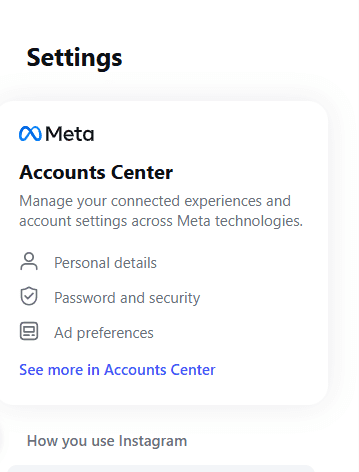
Click on See More in Accounts Center
Mobile vs. Desktop: What’s the Difference?
It’s important to note that the desktop version isn’t a 1:1 mirror of the app. There are some things you simply can’t do from a browser.
| Feature | Mobile App | Desktop / Web |
|---|---|---|
| Sync New Contacts | ✅ | ❌ |
| “Discover People” Tab | ✅ | Limited Suggestions |
| Search by Name/Handle | ✅ | ✅ |
| Manage Synced Contacts | ✅ | ✅ |
| QR Code Scanning | ✅ | ❌ |
Pro-Tip: If you’re a professional using Instagram for business, the desktop version is actually better for deep-diving into a contact’s profile to see their tagged photos or older posts without your thumb getting tired of scrolling!
Featured Article: How to Hide Likes on Instagram
What Are the Key Privacy and Ethical Considerations When Finding Contacts?
Finding your old friends is fun, but not at the cost of privacy!
While Instagram’s tools make it easy to bridge your offline and online worlds, doing it the wrong way can make things awkward or even compromise your data.
-
Privacy First: The Trade-Off of Syncing
When you hit that Connect Contacts button, you’re essentially handing your address book over to Meta’s AI. While this helps the algorithm find your friends, it also means:
- Data Exposure: You are sharing the phone numbers and emails of everyone in your phone, including people who might not even be on Instagram.
- Persistent Syncing: If you leave it on, Instagram continues to check your contacts periodically. If you value maximum privacy, it’s best to sync once to find your friends and then toggle it back off.
Ethical Networking Best Practices
Just because you can find someone doesn’t always mean you should immediately jump into their DMs. Here’s how to handle your new connections with class:
- Respect the Request: If you find someone and their account is private, send one follow request and leave it at that. Don’t try to message them from a business account to ask why they haven’t accepted you.
- Obtain Consent for Tags: If you find an old friend and post a “throwback” photo of them, ask for their consent first. In 2026, people are much more protective of their digital footprint.
- Avoid the “Follow-Unfollow” Trap: Some people use contact lists to follow hundreds of people, hoping for a follow back, only to unfollow them a day later. This is the fastest way to get flagged as a bot by the Instagram algorithm.
The Do and Don’t Checklist
| Do | Don’t |
|---|---|
| Do personalized follow requests if you’re reaching out for networking. | Don’t use automated “scrapers” to find phone numbers linked to accounts. |
| Do check mutual followers to confirm you’ve found the right person. | Don’t spam your entire contact list with “invite to Instagram” texts. |
| Do disconnect contact syncing after you’ve found who you need. | Don’t take it personally if someone keeps their profile private. |
| Do use a professional tone if the contact is a business lead. | Don’t “stalk” tagged photos to find someone who has a private main profile. |
Featured Article: How to Add a Collaborator on Instagram
Conclusion
Social media is at its best when it bridges the gap between digital screens and real-world relationships.
Take a moment to review your privacy settings, be intentional with your follow requests, and don’t be afraid to reach out and say hello once you find that lost connection.
The fastest way to get started is definitely the Account Center on your mobile app, but remember to use those search filters if you’re looking for someone specific.
Keeping your data footprint small by toggling off syncing once you’ve found your circle is always a smart move for your digital privacy.
I hope, now you know how to find contacts on Instagram.
If you’re using these tips to grow a brand or a professional network, staying organized with a tool like Social Champ will ensure you turn those new follows into lasting, meaningful relationships.