Do you know that Instagram actually keeps track of every time you change your username, even if it doesn’t show the full history to everyone?
And the interesting part is that Instagram locks your username for 14 days after you change it to prevent others from snatching it.
In this blog, I’ll show you exactly how you can see and understand what Instagram keeps hidden, just like how I gatekept Social Champ’s free plan. Couldn’t help it, it’s so good I didn’t want it to be a common thing.
Now that I’ve shared my secret, let’s move on to unlock Instagram’s.
Short Summary
- Instagram keeps a permanent record of all username changes to maintain account security and prevent confusion.
- When you change your handle, Instagram locks your previous username for 14 days, preventing any other user from claiming it during that period.
- You can access your own full history of former handles by navigating to the “Your Activity” section and selecting “Account History”.
- For other users, you cannot see a full list of their past handles, but you can see the total number of times the account has changed its name.
- Checking another user’s history through the “About This Account” menu helps verify authenticity and evaluate a brand or creator’s stability before collaborating.
- Tracking your own history allows you to analyze which usernames performed best for your brand and ensures your identity aligns with long-term strategy.
- High-quality usernames should pass the “Radio Test” (easy to spell), be free of excessive numbers, and avoid confusing double letters.
- Users should avoid industry clichés like “official” or “real” and stay away from excessive punctuation that makes searchability difficult.
- Identifying patterns in username changes can reveal if an account is recovering from spammy activity or shifting niches to impress the algorithm.
- Using professional tools like Social Champ can help manage rebrands and profile consistency more effectively
Be Everywhere at Once!
Featured Article: Instagram Ad Sizes: A Comprehensive Guide for Eye-Catching Creatives
Understanding Instagram’s Username History Feature
If you’re wondering how to see past usernames on Instagram, it’s helpful to know what Instagram tracks and why it matters.
Every account has its username history on Instagram, which is a record of all the handles an account has used over time.
If we talk about your own profile, you can easily access your username history under your Instagram account history.
And for other users, Instagram keeps it private.
You can’t see all of their previous usernames, but you can see the number of times an account has changed its name.
This small detail can be surprisingly helpful if you want to check the credibility of a profile or simply satisfy your curiosity.
What Instagram Records About Usernames
Instagram keeps a record of every username you change on your account.
These are sometimes referred to as former usernames or past usernames on Instagram. The platform maintains this record in order to ensure account security and prevent confusion.
And as you know, Instagram locks your username for 14 days after you change it, so no other user can claim it for two weeks.
Why Username History Matters
Sometimes people want to track the Instagram username history just out of curiosity, but with this history, you can:
- Verify a profile’s authenticity before following or interacting
- Understand the evolution of your own account over time
- Prevent confusion when someone tries to reuse an old username
By learning how to see old usernames on Instagram, you can manage your profile even better.
No matter if it’s your account or someone else’s, it’s pretty useful to know the ins and outs of username changes.
Additionally, if you post regularly and want to keep your profile active, you can use Instagram management tools or a good Instagram scheduler to make your life a lot easier.
Featured Article: How to Do Social Media Book Marketing in 2026?
How to Check Your Own Instagram Username History
So you’re here because you want to learn about how to see former usernames on Instagram. Right?
Here, I’ll explain the simple steps of how to see past usernames on Instagram for your own account, and these are quite straightforward.
This Instagram username history is a way to see how your online identity has changed over time and to keep track of changes you’ve made from the start.
Step-By-Step Guide to Check Your Username History
Here are some of the easiest steps to find your past usernames on Instagram:
- Open Instagram and go to your profile.
- Tap the menu icon (three lines) in the top-right corner of your screen.

Tap the Menu Icon - Now go to the “Your Activity” option.
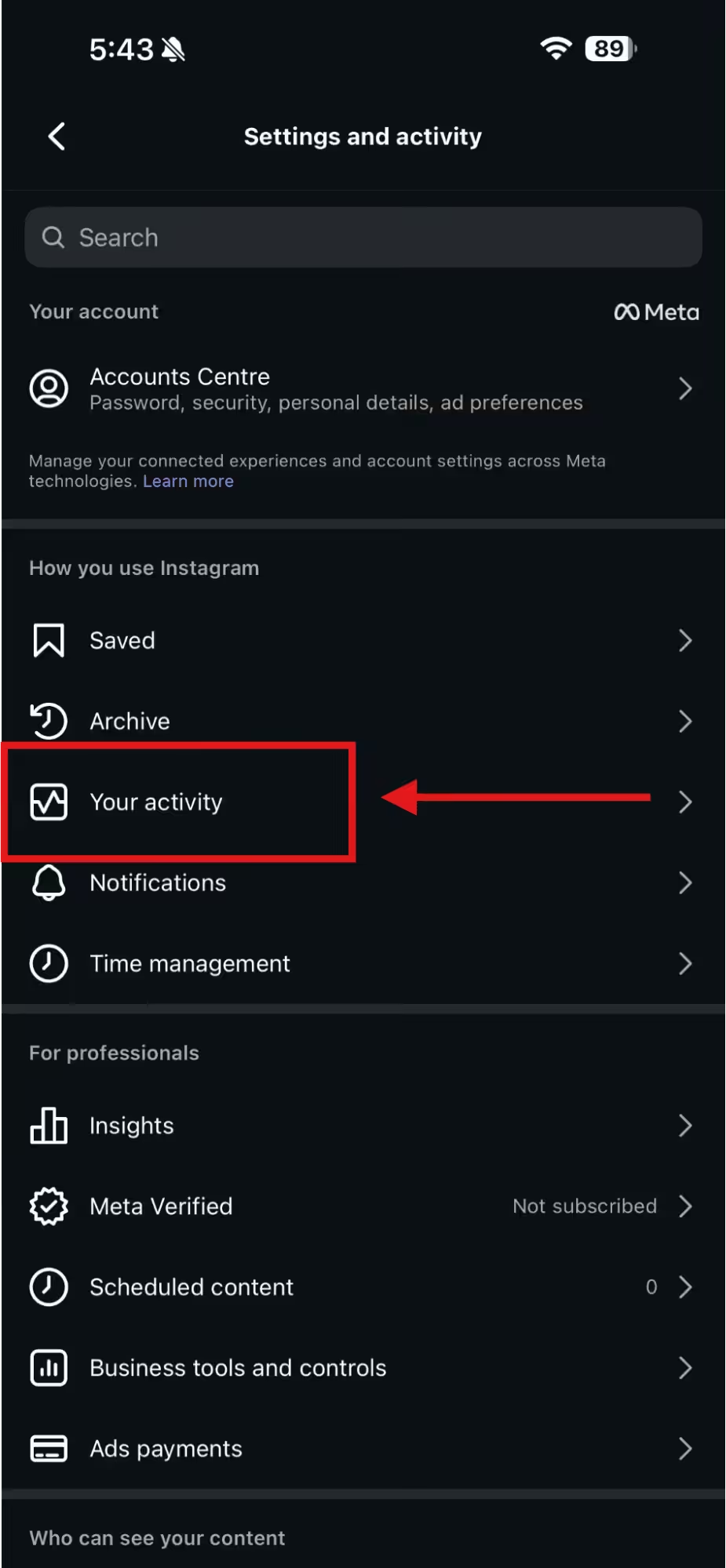
Select “Your Activity” - Here, select Account History.
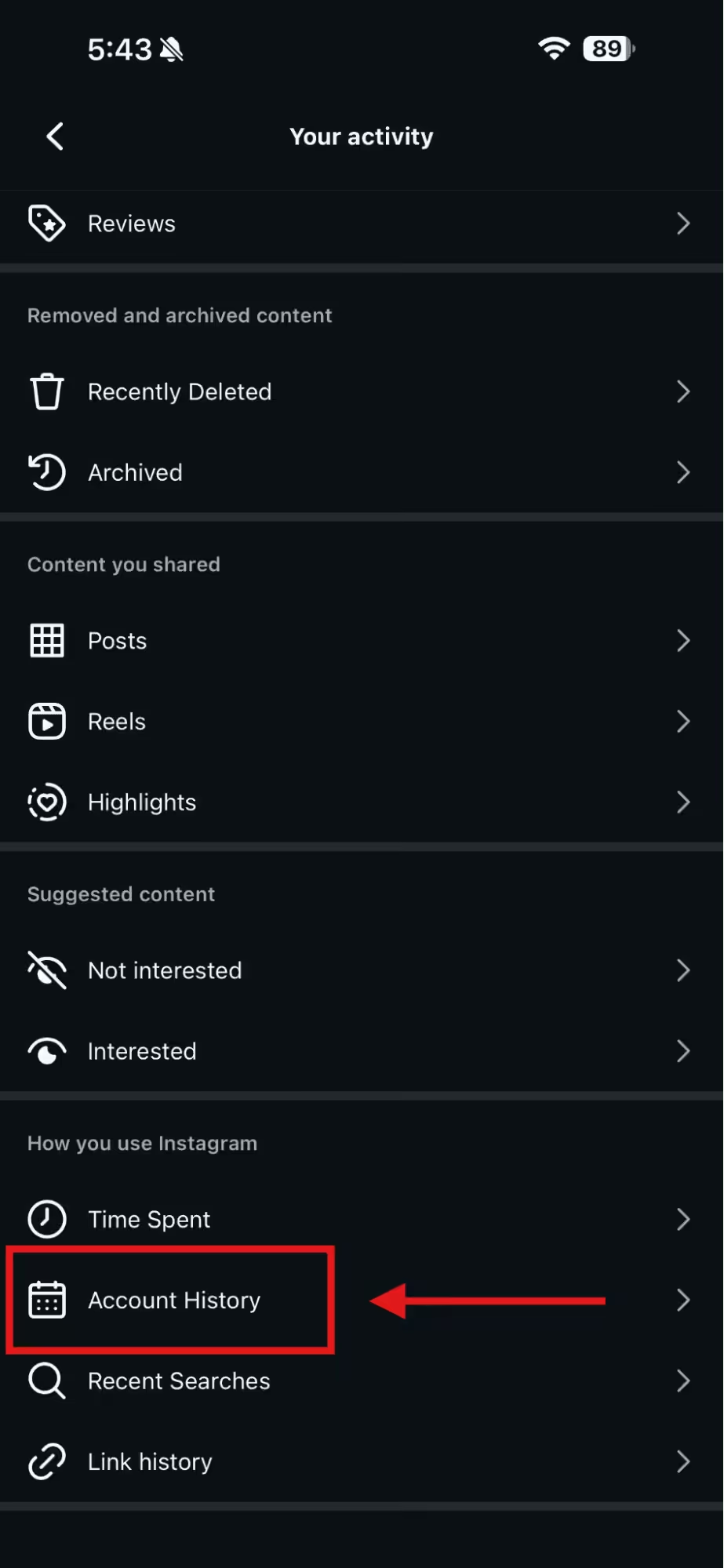
Tap “Account History” - Now, you’ll see your former usernames on Instagram, which have been recorded by the platform.
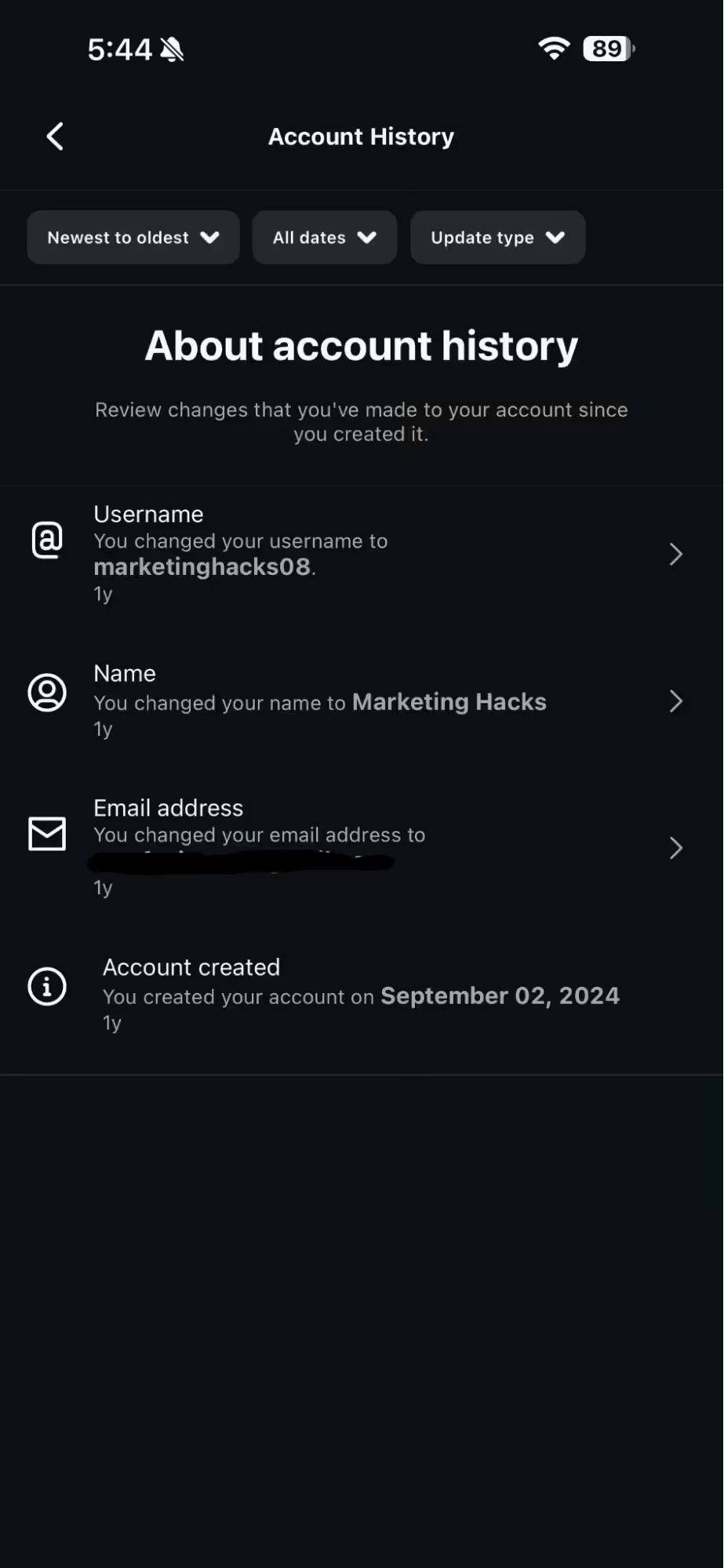
Your Instagram Account History
Why Tracking Your Username History Matters
If you learn how to see past usernames on Instagram, it can be a strategic advantage. For starters, you can check to see which username performed best for your brand and update the current one accordingly.
P.S. If you’re thinking of updating your username, here are a few helpful resources:
Additionally, viewing your history will allow you to avoid repeating mistakes from past usernames and make sure your new name aligns with your long-term strategy. Not to mention, you’ll satisfy your curiosity and also get a clearer view of your identity.
Moreover, if you know the former usernames, it can help you verify if an old name has ever been flagged for spam or suspicious activity. This is very important, especially if you manage a business account or plan collaborations.
Stop Living by Your Alarm Clock.
Featured Article: How to Change Background Color on Instagram Story in 2026
How to Check Someone Else’s Instagram Username History
Now that you’ve learnt how to see past usernames on Instagram for your own account, you may be wondering if it’s possible for someone else’s account or not.
So the answer is yes, but with some limitations.
Let me tell you what that means.
Instagram doesn’t allow you to see the full list of someone else’s former usernames, but you can see how many times they have changed their username.
And honestly, that number alone can tell you more than you’d expect. You can check:
- Whether a specific business rebranded itself, and the number of times they’ve done that.
- If a particular creator you’re planning to work with has rebranded themselves entirely.
By checking this history, you can have a little more context before you trust or engage with an account.
How to See If Someone Changed Their Username
Here are the simple steps that you can follow to check someone else’s Instagram username history:
- Open the profile that you want to check
- Tap the three dots in the top right corner of your screen

Tap the Three Dots - Choose the “About This Account” option
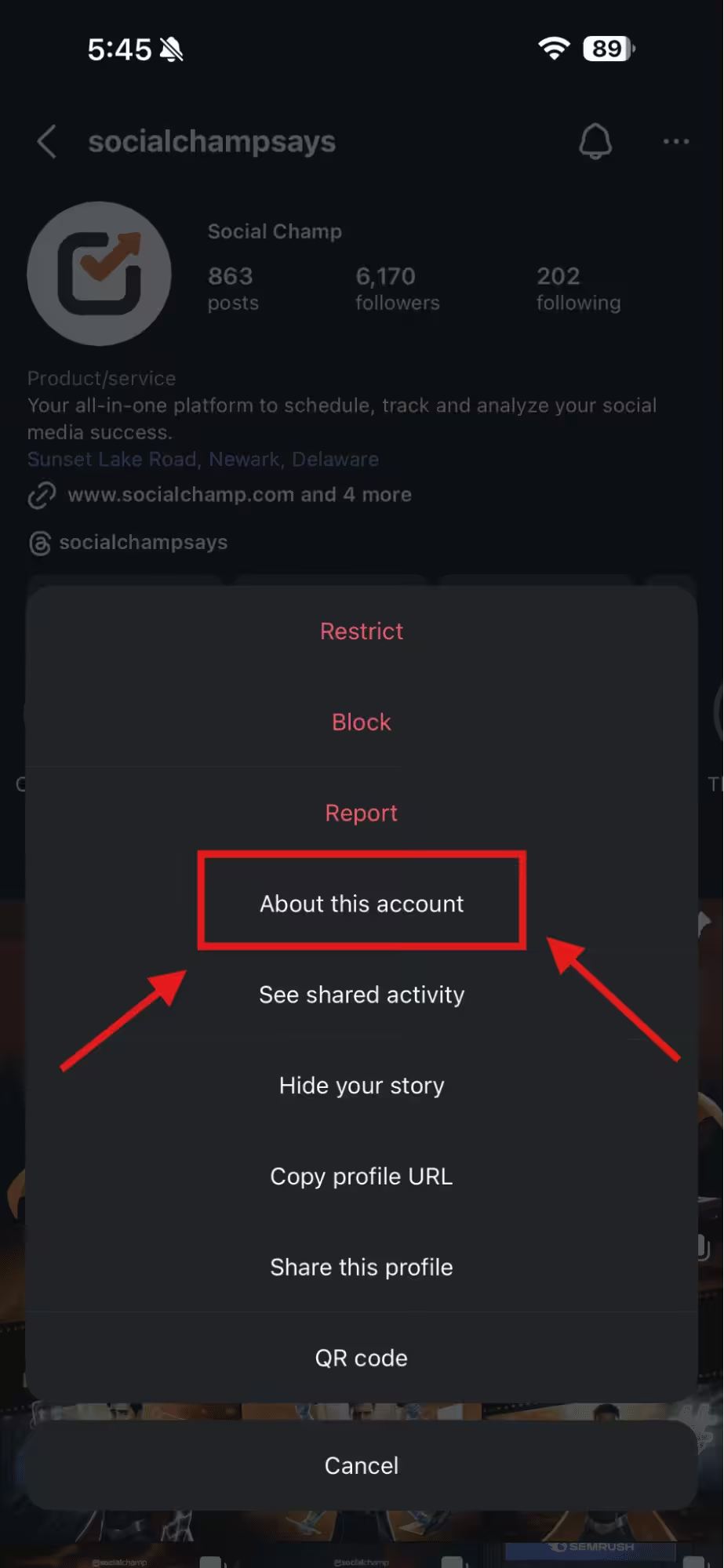
Tap “About This Account” - Select the Former Usernames option.
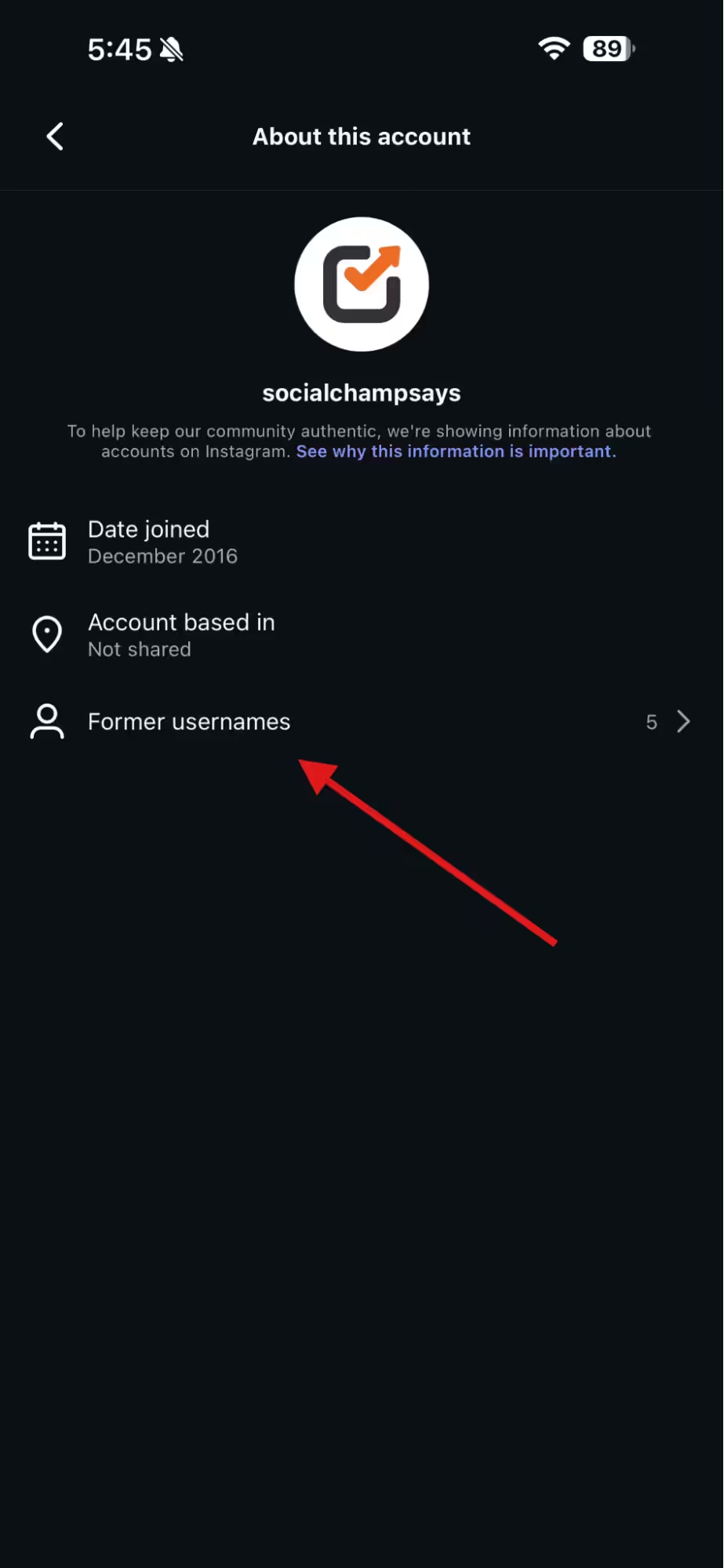
Tap “Former Usernames” - Here you’ll see how many times the account has changed its usernames.
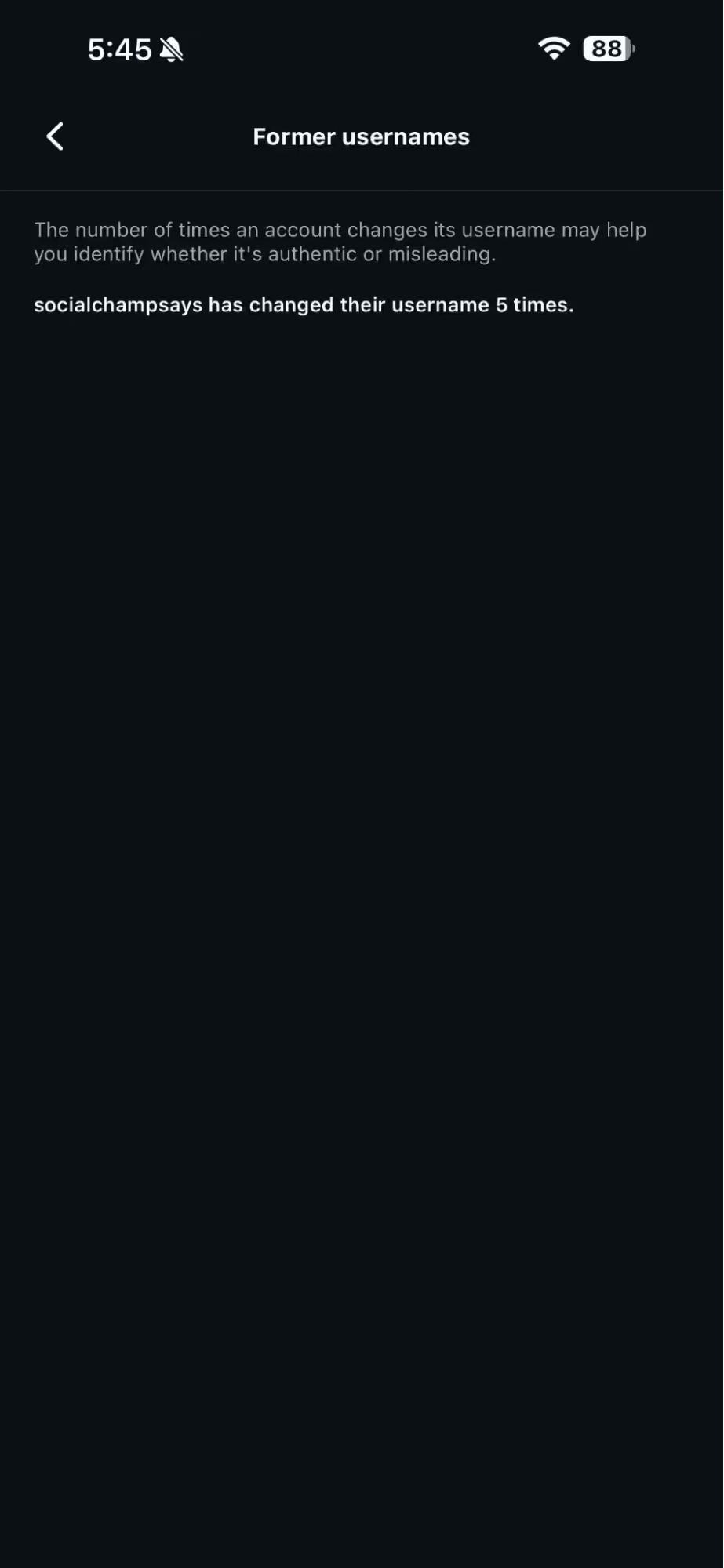
Former Usernames Number of the Account
Unfortunately, you can’t track the actual names they used before, but you can see the number of changes.
It gives you a sense of how stable or consistent an account has been. And consistency matters a lot on Instagram, especially now that user trust is a big deal.
Featured Article: Does Instagram Shadowban Exist Or Is It a Myth?
Why This Information Helps You Understand Other Accounts Better
If you know how often someone changes their username, you can learn a lot from this.
A creator who uses a single identity tends to do long-term branding. Conversely, someone who keeps changing names shows that they’re trying out different niches or recovering from spammy activity.
This is even more useful when you’re trying to know how to use Instagram with more purpose. The way accounts behave, including how often they rebrand, can reveal patterns.
Other creators change usernames each time they change their content style. Others do it prior to big posting shifts to impress the algorithm.
So while Instagram won’t give you a full list of former usernames, the small details you do get are still helpful.
They give you a clearer picture before you follow, message, collaborate, or trust an account.
If you want to get more insights related to Instagram, don’t forget to check out these guides as well:
Featured Article: The Best Guide to Facebook Competitor Analysis
Instagram Username Quality Checklist
Use this checklist to evaluate if your current Instagram username (or one you are planning to switch to) is optimized for growth, searchability, and brand credibility.
| Category | Checklist Item |
|---|---|
| Simplicity | Is the username easy to spell after hearing it once? (The “Radio Test”) |
| Memorable | Is it free of excessive numbers (e.g., @johnny12345) or random strings? |
| Clarity | Does it avoid double letters that are hard to read? (e.g., @glasssmith vs @theglasssmith) |
| Branding | Is it consistent with your other social media handles (TikTok, X, Facebook)? |
| Search (SEO) | Does it contain a relevant keyword for your niche? (e.g., @travelwithben) |
| Longevity | Will this username still represent your brand 3-5 years from now? |
Common Pitfalls: What to Avoid When Choosing Your Instagram Handle
Picking a username might feel like a quick task, but a wrong move can make your profile nearly invisible or, worse, look untrustworthy. If you want to maintain a professional edge and keep your “About This Account” history clean, steer clear of these common mistakes:
-
Excessive Punctuation and Symbols
Avoid cluttering your handle with too many underscores or periods, such as @j.o.h.n_smith. These are difficult for users to type and even harder to remember when they are trying to find you via search.
-
The Numbers Trap
Unless a number is part of your brand name, avoid adding random strings like @johnny12345. It often signals a bot account or a lack of creativity, which can deter potential followers from hitting that follow button.
-
Industry Clichés
Try to move beyond generic suffixes like “official” or “real”. Unless you are a high-profile celebrity at risk of constant impersonation, these tags can feel a bit dated and redundant.
-
Double Letter Confusion
Be wary of how words look when they are smashed together. A username like @glasssmith can be confusing to read at a glance; opting for something like @theglasssmith provides much better visual clarity.
-
Misleading Identifiers
Don’t use words that don’t reflect your actual content. Including “Shop” when you don’t sell products, or “Blog” if you don’t have a website, creates a bait-and-switch experience that hurts your brand’s integrity.
-
Lack of Longevity
Think about where you want to be in five years. Choosing a username that is too specific to a current trend or a very narrow niche might force you into another name change later, adding yet another entry to your past username history.
All-In-One Social Media Management!
Conclusion
So that’s everything you need to know about how to see past usernames on Instagram and why this little feature can make a big difference.
Now you have an idea of what Instagram keeps in your account history, how to see your former usernames on Instagram, and how to see if someone else has changed theirs.
Although Instagram doesn’t let you see every detail of other profiles, these small clues can still help you judge credibility before you partner with a creator.
And honestly, it feels good to have this clarity. You can easily look at your own username changes, spot how your identity evolved, and avoid confusion when you rebrand or restart your content.
If you ever plan to polish your profile, refresh your handle, or take your presence more seriously, these insights give you a solid head start.