
According to Think with Google, YouTube reaches more people aged 18 to 49 than any cable network. So, if you thought TV commercials were still king, think again! YouTube has become a powerful platform for advertisers to connect with this coveted demographic in a more targeted and engaging way through YouTube ads.
YouTube ads aren’t just effective; they’re a smart investment. On average, businesses are seeing a whopping $2 return for every $1 spent on YouTube advertising. Now, that’s what I call a bang for your buck.
Whether you’re a small business owner, a budding content creator, or just someone curious about the world of YouTube advertising, there’s never been a better time to jump in.
If you’re itching to tap into this digital goldmine and take your marketing game to new heights with a YouTube Scheduler, you’re in the right place. This blog post uncovers the crucial aspects of YouTube advertising you should know about.
What Are YouTube Ads?
So you know when you’re watching YouTube videos, and suddenly there’s this interruption – a short video pops up before your chosen content starts playing? That’s a YouTube ad.
Think of YouTube ads as mini-commercials. They’re designed to grab your attention, tell you something cool or useful, and hopefully, persuade you to take some sort of action, like visiting a website, buying a product, or just remembering a brand for later.

With Social Champ’s advanced scheduling feature, you can plan, organize, and schedule your YouTube videos with ease.
YouTube Ad Types: Your Quick Guide to YouTube Ads
YouTube offers a variety of ad types to cater to different SMART marketing goals and audience preferences. Here are the common YouTube ad types:
-
TrueView Discovery Ads
When scrolling through YouTube, you’ll notice video recommendations with a little “Ad” or “Sponsored” label on it. These are TrueView Discovery Ads.
These ads show up on the YouTube homepage, in search results, and even as suggested videos on the right-hand side of the screen.
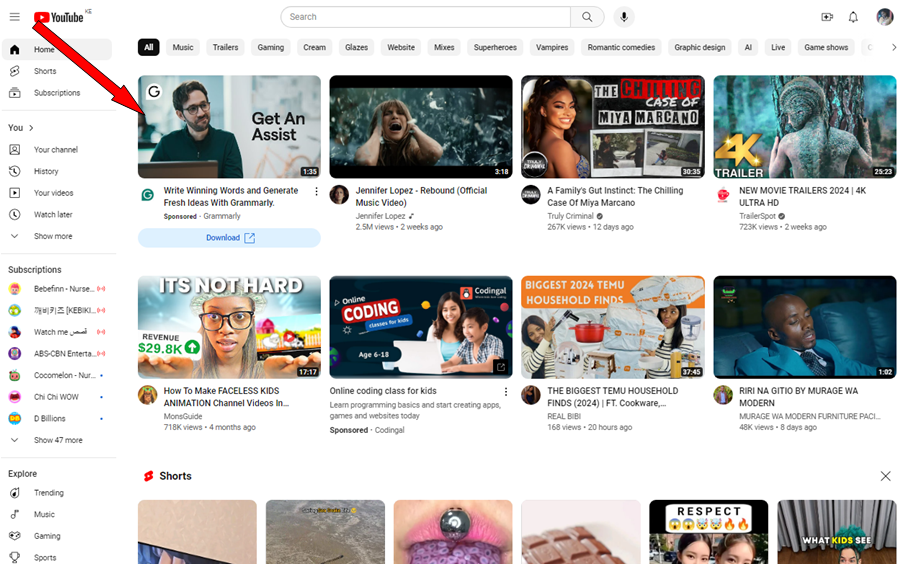
TrueView Discovery Ads They look like regular videos, but they’re actually ads, and you get to choose whether you want to click and watch them or not.
-
In-Stream Ads
These are ads that pop up before, during, or after the video you want to watch. You know, when you’re all set to watch a tutorial on how to make the perfect pancake, and suddenly there’s a quick ad for a new pancake mix? That’s an in-stream ad.
Here’s an example:
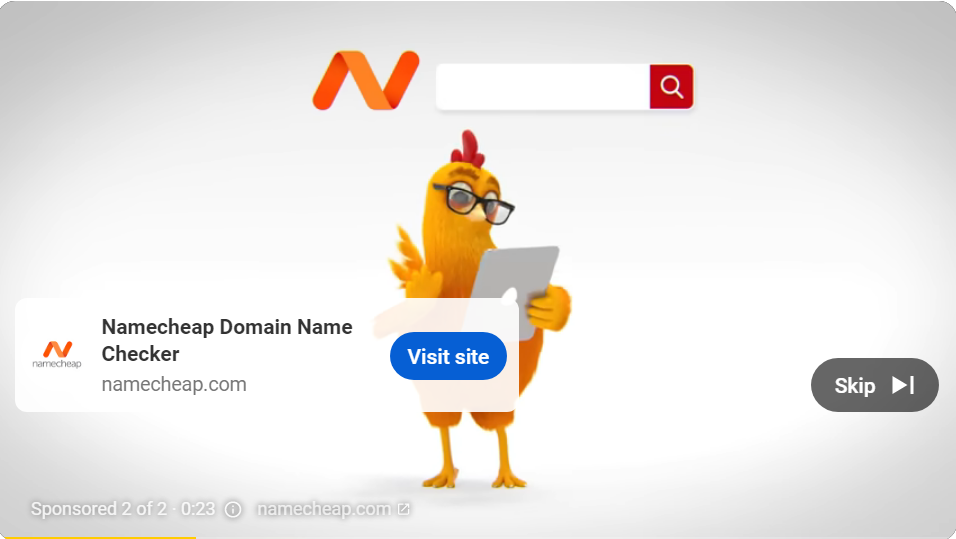
In-Stream Ads In-stream ads can be skippable or non-skippable. Skippable ads give viewers the option to skip the ad after 5 seconds.
-
Bumper Ads
These are super short ads that you can’t skip, but they’re so brief that you barely have time to finish your popcorn. They’re just six seconds long and are perfect for getting a quick message across.
Bumper ads might not tell the whole story, but they’re great for creating brand awareness and leaving a lasting impression.
-
Overlay Ads
Have you ever watched a YouTube video and noticed a small banner or pop-up at the bottom of the screen with a message or a link? That’s an overlay ad. See below:
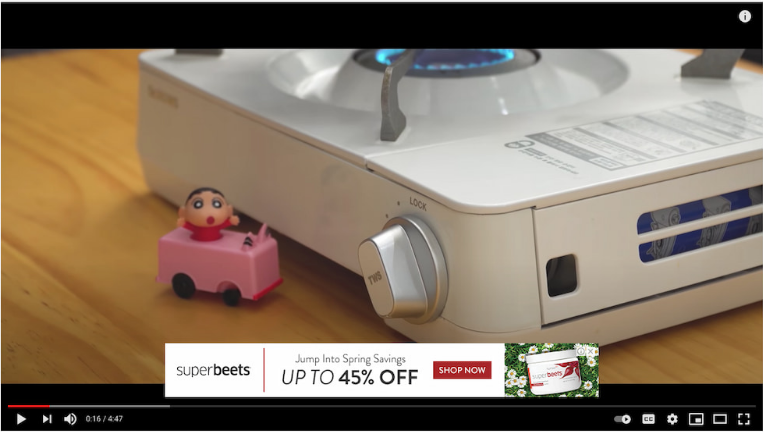
Overlay Ads These ads can include text, images, or even videos. They’re clickable, so if something catches your eye, you can simply click on it to learn more.
-
Display Ads
These are the ads that show up on the right-hand side of the YouTube page or at the top of the suggested videos section. They’re like little billboards for your brand, grabbing your attention as you browse through videos. They can be images or text and are clickable, just like overlay ads.
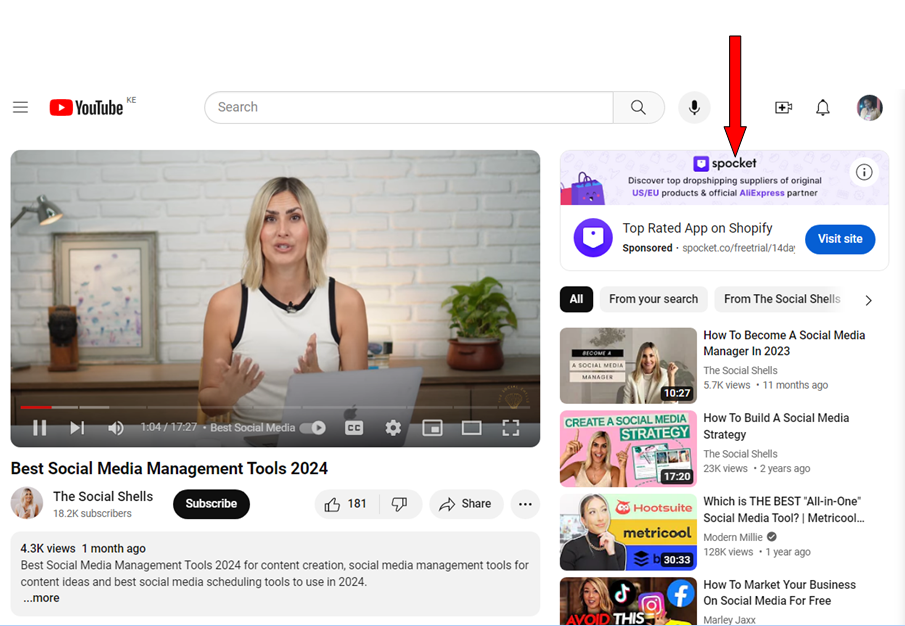
Display Ads Each of the above YouTube ad types has its own unique advantages, and you can use them to target different audiences or achieve specific YouTube marketing objectives.
Related Article: 15+ YouTube Tips for Building a Thriving Channel
How to Use YouTube Ads
Essentially, YouTube ads are a way for businesses, creators, and brands to promote their products, services, or messages to the massive audience that tunes into YouTube every day.
Here are several ways to use YouTube Ads:
-
Targeted Marketing
Suppose you’re a brand selling the latest and greatest fitness gear. You don’t want your ads showing up in front of people who’ve never seen the inside of a gym, right? That’s where targeting comes in.
YouTube lets you get super granular with your targeting by tapping into users’ interests and behaviors. Are your potential customers into yoga, weightlifting, or marathon running? YouTube knows. When you target users based on their interests, you can ensure your ads are hitting home with the right crowd.
YouTube also lets you target your ads based on age, gender, income level, and even parental status. Want to reach active millennials who are into fitness? Done. How about affluent professionals looking to upgrade their workout gear? You got it.
-
Localized Targeting
With YouTube’s geographic targeting options, you can hone in on specific locations – whether it’s targeting a particular city, zip code, or even a radius around your local business.
So, if you own a local business, you can choose a localized targeting option that will ensure your mouthwatering ads are only served to people in your local area. You can highlight special promotions and events or even showcase testimonials from happy customers in the neighborhood.
Doing this will ensure you’re not wasting precious advertising dollars on viewers halfway across the globe.
-
In-Market Audience Targeting
You can also use YouTube ads to target users who are actively researching or considering products or services similar to yours. And these are not random viewers. They are potential customers who are actively considering making a purchase in your product category.
In-market audiences are further down the marketing funnel – they’ve moved past the browsing stage and are now seriously considering their options.
So, when your ad pops up while they’re watching their favorite cooking tutorial or catching up on cat videos, it’s like a gentle nudge in the right direction.
Since these users are already primed to make a purchase, they’re more likely to convert – whether it’s clicking through to your website, signing up for your newsletter, or making a purchase right then and there.
-
Placement Targeting
YouTube is a treasure trove of content, with millions of channels and videos covering just about every topic. With placement targeting, you can play matchmaker, handpicking exactly where you want your ads to appear.
Want your makeup tutorial ad to run before the latest beauty vlogger’s video? Easy peasy. How about having your ad show up next to the latest gadget review from your favorite tech guru? Consider it done.
When your ad appears on a popular channel or video, you’re not only reaching your target audience but also gaining some of that content creator’s credibility.
-
Sequential Messaging
Ever watched a movie or read a book where the story unfolds piece by piece, keeping you hooked until the very end? Well, think of sequential messaging as your chance to tell your brand’s story in a similar way but in bite-sized ad segments.
Instead of bombarding viewers with a single ad and hoping it sticks, sequential messaging lets you string together a series of ads that build upon each other, creating a cohesive narrative.
When you strategically sequence your ads, you’re not just telling a story, and you’re guiding viewers through the customer journey and reinforcing key messages along the way.
So, whether you’re launching a new product, promoting an event, or simply spreading the word about your brand, sequential messaging on YouTube is your secret weapon for crafting a compelling narrative that keeps viewers coming back for more.
-
Guide Viewers to Action
One way to guide viewers to action is by using call-to-action overlays. While your video ad is busy dazzling viewers with its charm and creativity, call-to-action overlays can appear as clickable buttons or links, encouraging viewers to take action right then and there.
Call-to-action overlays provide a frictionless way for viewers to engage with your brand without ever leaving the video player. Whether it’s visiting your website, subscribing to your channel, or learning more about your products, these clickable buttons make it easy for viewers to take action in the moment.
So, whether you’re looking to drive traffic to your website, grow your subscriber base, or increase sales, call-to-action overlays on YouTube are your secret weapon for guiding viewers to action and turning them into loyal fans.
-
Encourage Engagement
Similar to call-to-action overlays, companion banner ads can pop up alongside the video player, offering additional information or nudging viewers to engage.
These types of ads provide a seamless way to enhance your video ad and provide viewers with extra value without interrupting their viewing experience.
Whether they offer more information about your product, direct viewers to your website, or prompt them to sign up for a newsletter, clickable banners are like a one-two punch that keeps viewers engaged and ready to take action.
-
Remarketing
Remarketing or retargeting is whereby you target users who have previously interacted with your brand or visited your website. It’s like having a second chance to make a first impression, except this time, you’re armed with all the knowledge of their past interactions.
Remarketing isn’t just a one-time deal. You can set up a YouTube ads campaign to target users at different stages of the customer journey, from those who have just visited your website to those who have abandoned their shopping carts or signed up for your newsletter.
With remarketing, you have the opportunity to tailor your ads specifically to the interests and preferences of each viewer. Whether it’s showcasing similar products, offering a special discount, or highlighting customer testimonials, these personalized ads are like a gentle nudge that reminds viewers why they were interested in your brand in the first place.
How to Run YouTube Ads and Grow Your Business
Running YouTube ads can be a game-changer for growing your business. Here are the steps for running YouTube Ads:
Step 1: Upload Your Video to YouTube
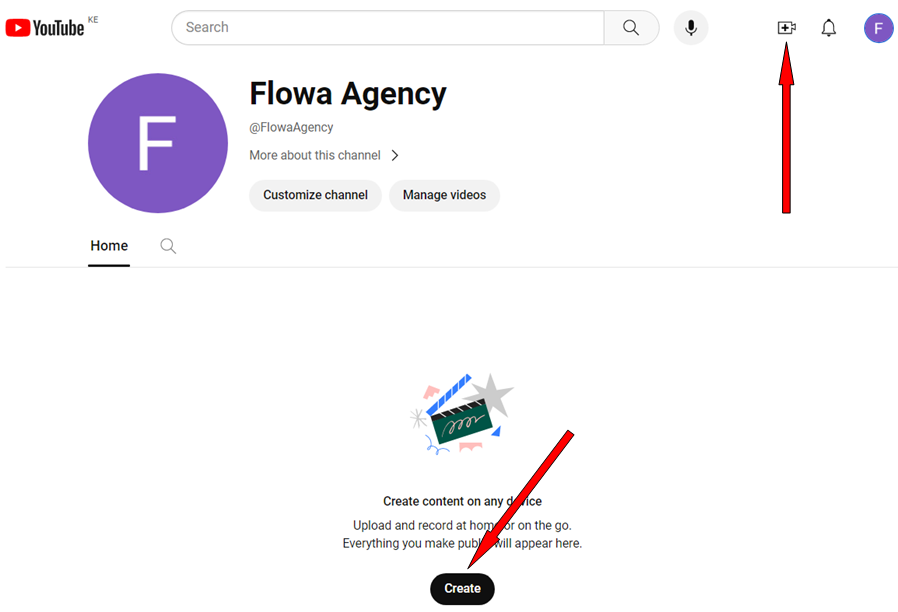
Login to your YouTube account and click on the “+” icon at the top right or the “Create” button at the bottom.
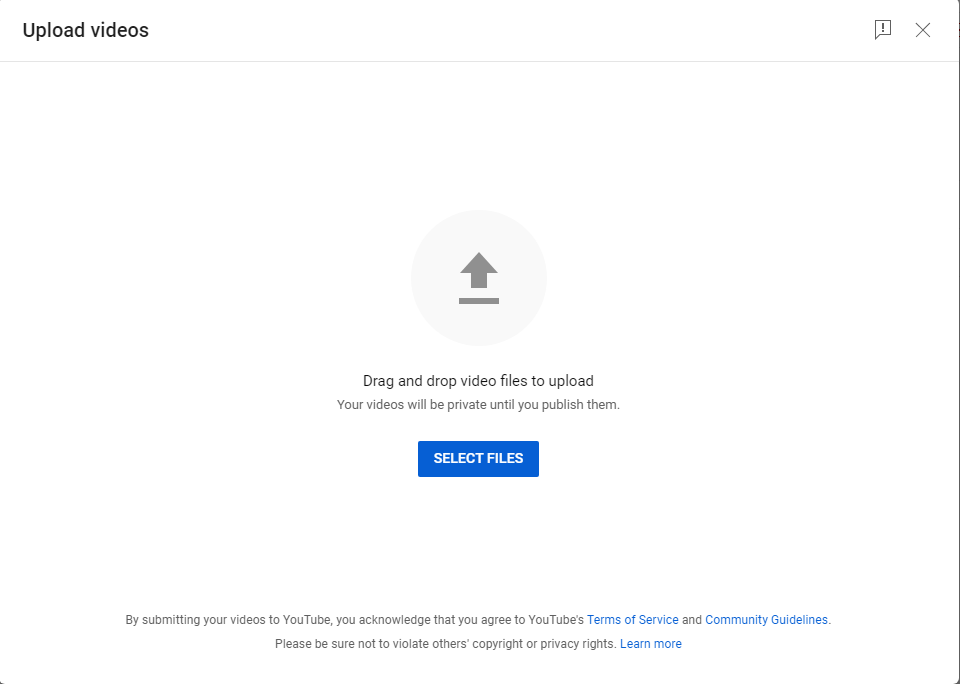
After clicking the “Create” button, go ahead and upload your ad video. You can either drag & drop your video file or click the “SELECT FILES” button to choose the video from a location on your PC.
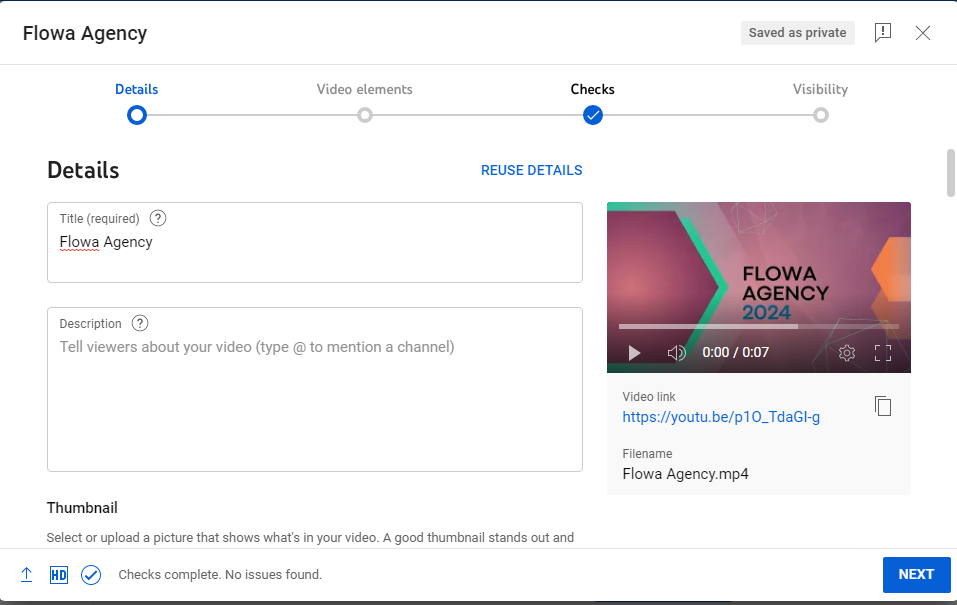
Go ahead and provide details for your video, such as the title, description, and thumbnails. You can also choose the audience, language, etc, and click “Next.”
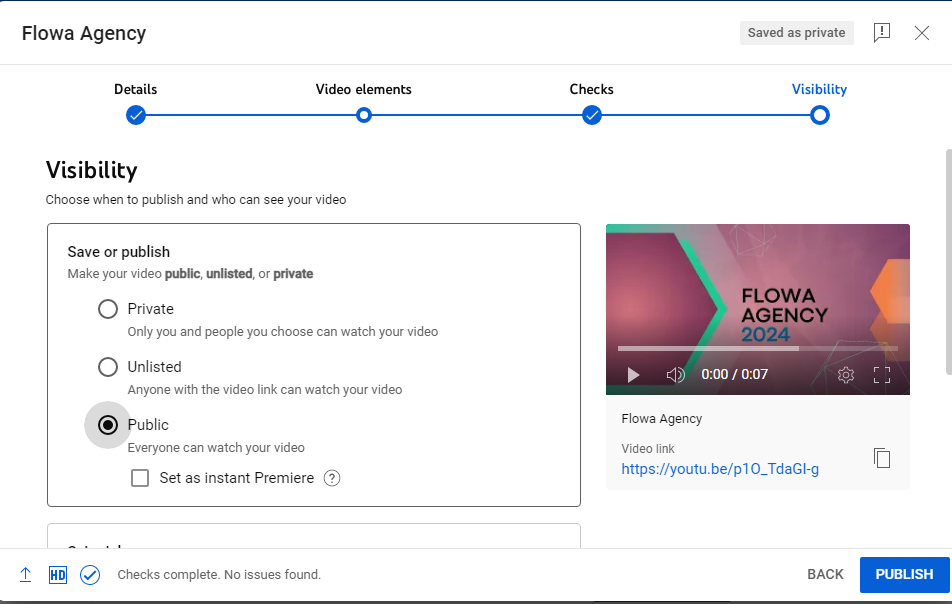
Go ahead and choose visibility for your video, and click the “Publish” button.
You’ve successfully added your video ad on YouTube.
Step 2: Set Up Your Google Ads Account
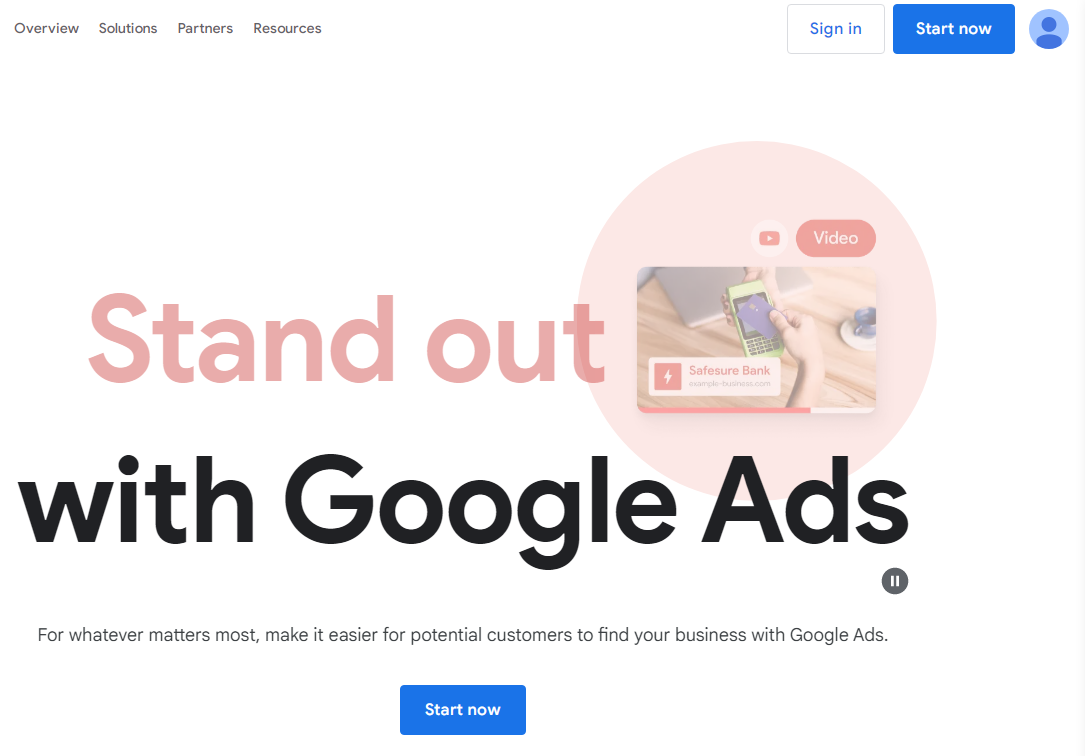
Google Ads is the platform where you’ll set up and manage your YouTube ad campaign. So, create your Google Ads account or log in if you have one already.
Once logged in, do the following:
- Link Accounts
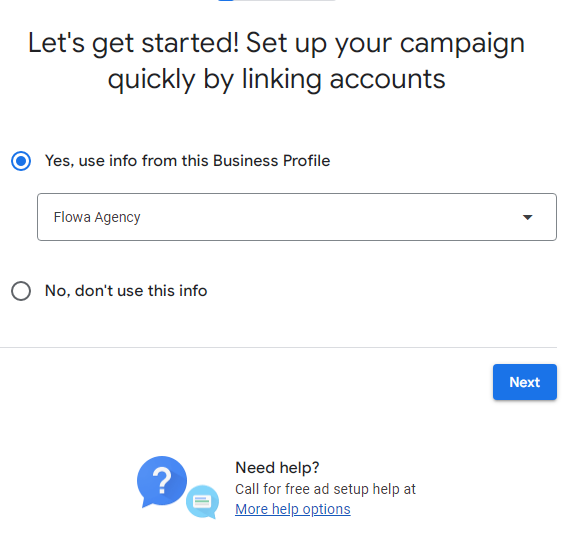
Link Your Google Ads Account and your YouTube Account.
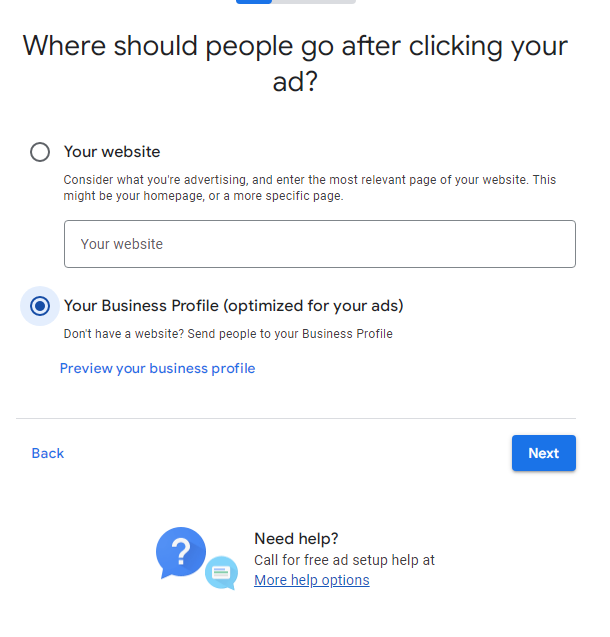
Choose where people will be directed after clicking your ad.
- Select Campaign Goal
Choose the campaign goal that aligns with your objectives.
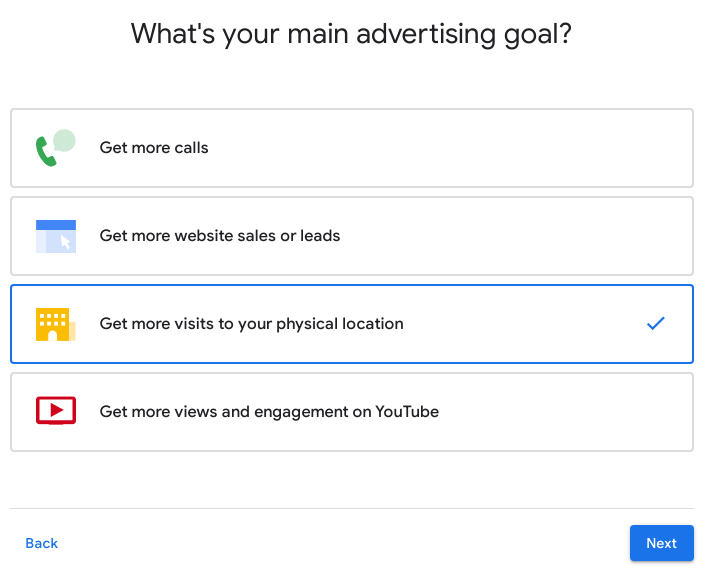
- Write Headlines and Descriptions
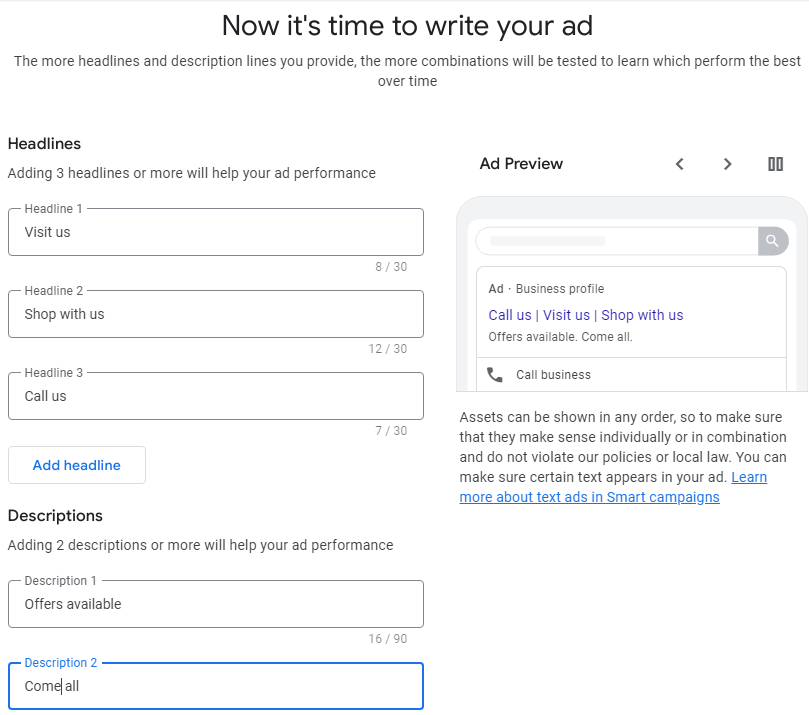
Write Headlines and Descriptions - Add Keyword Themes
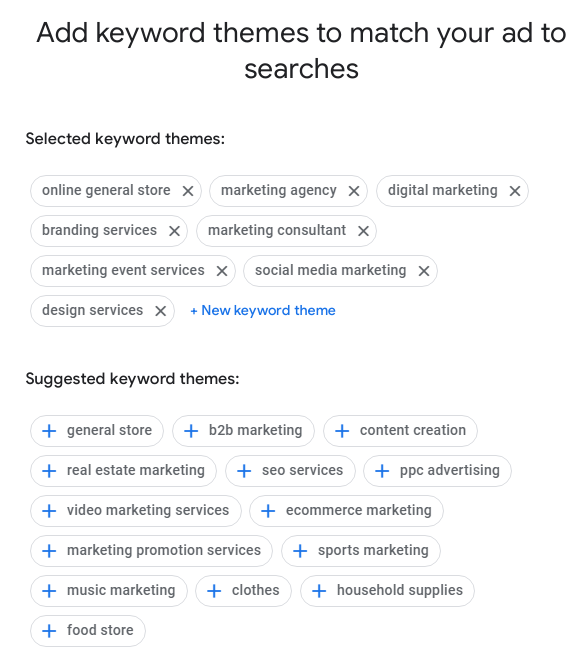 Add Keyword Themes
 - Select the Geographic Location
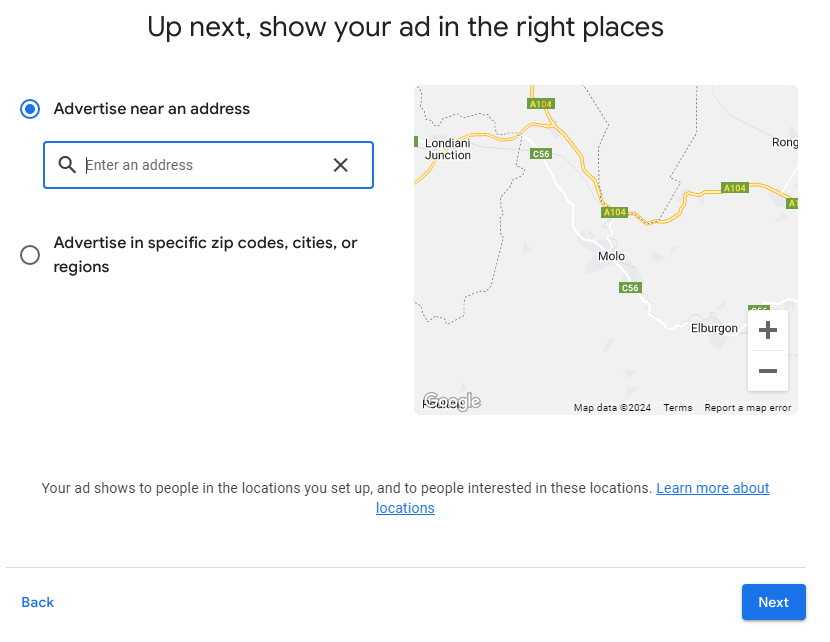 Select the Geographic Location
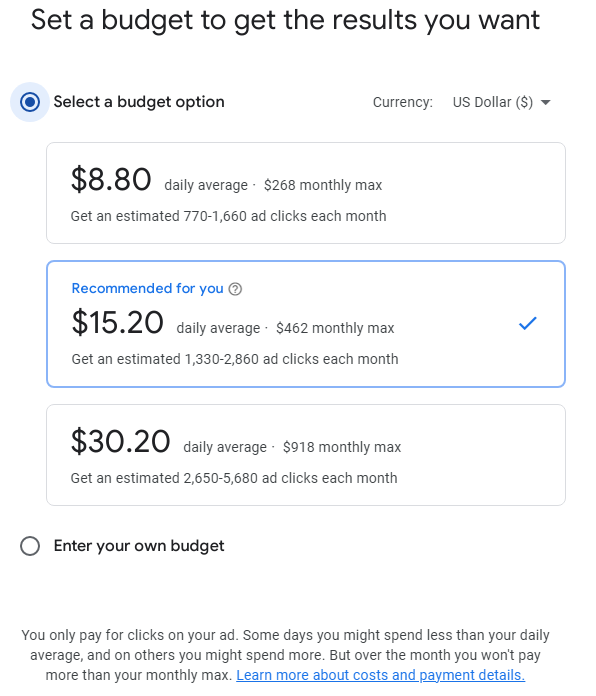
 - Set a Budget
You can choose from the budget options provided or you can create a custom budget.
- Review Your Campaign
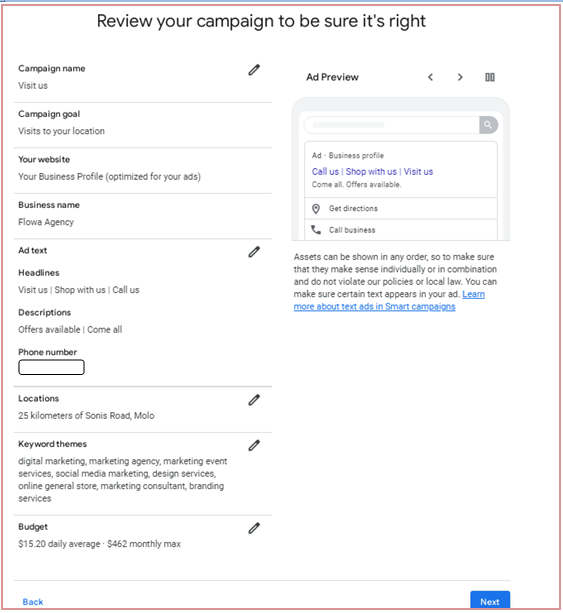
Double-check all campaign settings, targeting options, and ad creatives to ensure everything is in place.
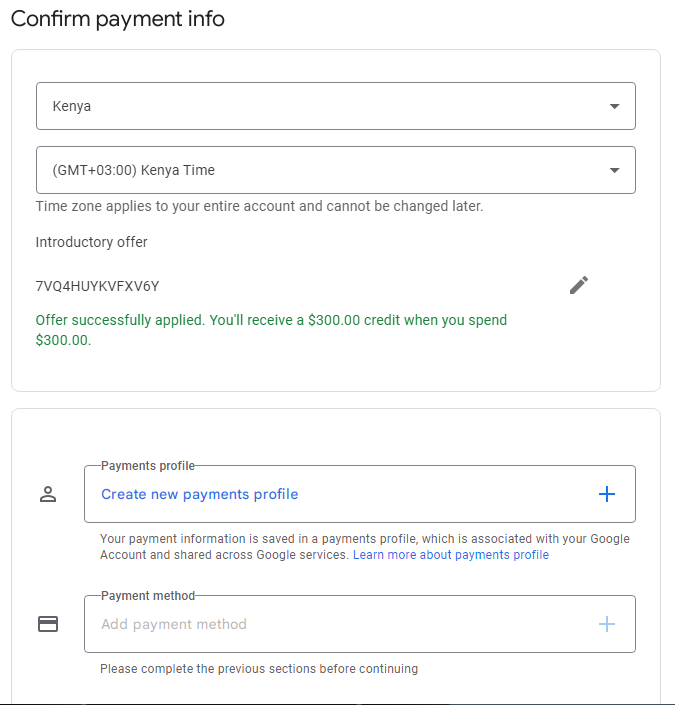
- Confirm Payment Info
Once you enter the relevant details, click “Next” to confirm payment info.
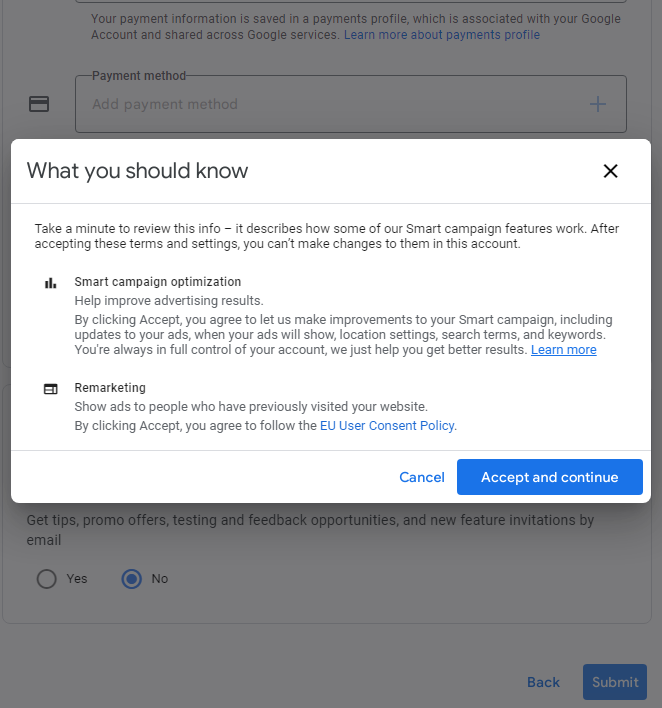
The next step involves reviewing and accepting the terms and conditions.
Once you’ve reviewed the information, click the “Accept and continue” button.
You’re all set.
Related Article: Social Media Metrics that Don’t Matter At All
7 Benefits of YouTube Ads
Understanding the benefits of YouTube ads is crucial for brands seeking to expand their online presence and connect with their target audience effectively.
Let’s explore the incredible benefits these dynamic advertising tools bring to the table:
-
Massive Audience Reach
YouTube has over 2.5 billion logged-in monthly users. Yeah, you heard that right, billion with a ‘B’! That’s like reaching almost a third of the entire internet population. So, when you advertise on YouTube, you’re basically setting up shop in one of the busiest hubs on the web.
-
Targeting Options Galore
YouTube knows a lot about its users – what they watch, what they search for, what they’re into – you name it. And guess what? You can use all that juicy data to target your ads to specific audiences.
Want to reach yoga enthusiasts in their 30s who live in California? Done. How about gamers who love pizza? You got it. The targeting options are endless.
-
Flexible Ad Formats
YouTube offers a variety of ad formats to choose from. Whether you’re into short and snappy bumper ads, captivating in-stream ads, or subtle display ads, there’s something for everyone. You can mix and match ad formats to fit your budget and marketing goals like a pro.
-
Engagement Metrics Galore
Ever wonder if your ads are actually making an impact? Well, wonder no more. YouTube gives you all the juicy engagement metrics you could ever want: views, clicks, watch time, and more. So you can see exactly how your ads are performing and tweak them to perfection.
-
Creative Freedom
YouTube is like the Wild West of advertising – there are no rules, just endless possibilities. Want to create a heartwarming story that brings a tear to your viewer’s eye? Go for it. How about a quirky, off-the-wall ad that leaves them scratching their heads in confusion (in a good way, of course)? Sure thing. With YouTube ads, the only limit is your imagination.
-
Cost-Effective Advertising
Believe it or not, YouTube ads can be pretty budget-friendly, especially compared to traditional TV ads. You can set your own budget, choose how much you want to spend per day or per campaign, and even adjust your bids in real time to get the most bang for your buck.
-
Global Reach
One of the coolest things about YouTube is that borders do not bind it. Your ads can reach people halfway across the globe, opening up a whole world of opportunities for your business or brand. Whether you’re a local mom-and-pop shop or a multinational corporation, YouTube ads can help you connect with audiences near and far.
So, there you have it. These are just a few of the many benefits of advertising on YouTube. Whether you’re looking to boost brand awareness, drive traffic to your website, or increase sales, YouTube ads have got you covered.
Conclusion
As you embark on your journey with YouTube ads, remember to keep your finger on the pulse of your campaigns. Dive into Google Ads’ reporting tools to track essential metrics like views, impressions, click-through rates, and conversions. These insights are like gold nuggets. They tell you what’s working and what needs tweaking.
But if you’re juggling multiple campaigns across multiple social media sites, having a centralized hub to track all your crucial metrics is a game-changer. That’s where Social Champ steps in. With its intuitive dashboard, you can effortlessly monitor the performance of all your social media campaigns from a single location, saving you time and hassle.
Manage multiple social media platforms from a single, centralized hub.




1 comment
Hazel Lyons
Incredibly detailed guide, really breaks down the complexities of YouTube ads into understandable steps.