Around 83% of consumers read Google reviews before choosing a business. Still, I see a lot of business owners who don’t consider Google reviews for business a priority.
Why does it happen? I see this pattern repeatedly. Companies spend money on ads and follow a few new trends, yet their review profiles sit empty.
Meanwhile, 71% of consumers say they would leave a review on Google if someone simply asked.
Your happy customers want to help you. You just need to have the right system to make it happen.
In this guide, I’ll tell you how to get more Google reviews for business without sounding desperate.
Let’s fix this!
Short Summary
- Google reviews for business are your 24/7 sales team and a major local SEO ranking factor.
- Ask happy customers for feedback within 24 hours and hand them a direct link or QR code.
- Respond to every review quickly; silence looks like guilt and speed builds trust.
- Never buy reviews or offer incentives; ethical practices protect your reputation long-term.
- Use Social Champ to monitor conversations, schedule GBP posts, and catch fake reviews fast.
- Your competitors are already collecting reviews; start today or hand them your customers.
Google Reviews for Business: Why They Matter More Than Ever
Whenever you think about visiting any new restaurant, what’s the first thing you do? It’s probably checking its reviews on Google, right?
Your customers do the same. They check your Google reviews before calling you or visiting your business.
Basically, Google reviews are the first impression of your business. And you don’t get a second chance for the first impression.
Your Customers Judge You In Seconds
As I told you, 84% of consumers check Google reviews for business before choosing it. That means they don’t visit your website or social media profile directly; instead, they check your star rating and reviews first.
I even saw some businesses with amazing service, but their Google profile is completely dry. And then they wonder why no one is calling them.
Meanwhile, their competitor has 200+ reviews on their Google profile. Now guess who gets the call?
Google Reviews Improve Your Ranking
Review signals account for 16% of local SEO ranking factors. If you want to appear in the Local Pack, you need fresh feedback. The businesses in those top three spots almost always have strong profiles and recent activity.
I’ve even seen a client jump from 12 to 80 reviews in 6 months only. Their local ranking increased, and they were also getting phone calls. You can’t buy that credibility. You can only earn that.
Trust Beats Every Ad Budget
If I’ve to choose between spending $5,000 a month on ads and collecting 10 genuine reviews, honestly, I’ll go for collecting reviews.
According to BrightLocal, 42% of people trust online reviews as much as recommendations from friends or family. But 55% of shoppers don’t choose businesses with fewer than 4 stars. And if you don’t reply to a single bad review, you can lose dozens of customers.
Your Competitors Are Already Ahead
Let’s say a customer searches for your service in his city. He finds three businesses from which one of them has 4.8 stars and 200 reviews. The second has 4.2 stars and 45 reviews, and the third one has 3.9 stars with 12 reviews. Now tell me who’ll get the call? Obviously, the first one.
Even your competitors already know this. They ask for feedback, reply to reviews, and build a moat around their business while you wait. Every other day you delay is a day you hand customers to someone else.
Protect Your Online Name!
How to Get More Google Reviews for Your Business
Let’s put it this way. You served an amazing meal, or fixed their plumbing, or gave the best haircut of their life. They walked out very happy but forgot your name.
That’s a very common problem. Your happy customers walk out, and your Google business reviews stay empty. So, let’s fix that.
Ask While the Experience Is Fresh
I always tell business owners to ask for reviews within 24 hours. That’s because customers’ experience is fresh at that time, their mood is good, and the phone is already in their hands. Basically, that’s your moment.
Simply train your team to ask customers before they leave: “Can you share your experience on Google?”
If you run an online business, send an email or text the same day. Don’t wait a week, because by then their mind is somewhere else.
Make It Super Easy
You can’t expect customers to find your page themselves. They won’t. You need to directly hand them the link. You can do this:
- Create a short URL that leads straight to your review form
- Put it in your email signature and add it to your receipts
- Print a QR code and tape it to your counter
- Send the link right when the customer agrees to write a Google review
I’ve seen many coffee shops put QR codes on their tables, and it literally makes sense.
You should also optimize your Google Business Profile properly to make it look professional. When customers see the complete profile with photos and posts, it builds trust.
If you want to give your Google Business Profile a glow-up, check out Google Business Profile optimization tips.
Follow Up, But Don’t Be That Person
Sometimes only one request is not enough. You can ask within 24 hours first. If you don’t get a reply, after three days, send them a polite reminder. After that, let it go. You don’t want to annoy a happy customer.
I use a simple rule. The follow-up should feel like a favor, not a demand. I wanted to send this in case it got buried. No pressure at all. That tone gets results.
You can also automate the process by using the Google Business Profile management tools. Some tools automatically send SMS or email requests, track responses, and handle follow-ups. Basically, less manual work for you.
And please, never buy any reviews. Also, don’t offer a discount for a 5-star review because fake reviews destroy trust. Google will catch you, and your account can get suspended. It’s not worth it.
Additionally, it’s important to keep your profile active, so schedule Google Business Profile posts regularly. It shows customers that you’re actually active and care about your online presence.
Schedule Posts That Convert
How to Manage Google Reviews for Business Like a Pro
Getting Google My Business reviews is only half the game. You’ve to manage them also. I’ve seen business owners collect 50 Google My Business reviews, but they literally didn’t reply to any of them.
That’s like inviting guests to your house and leaving them at the door.
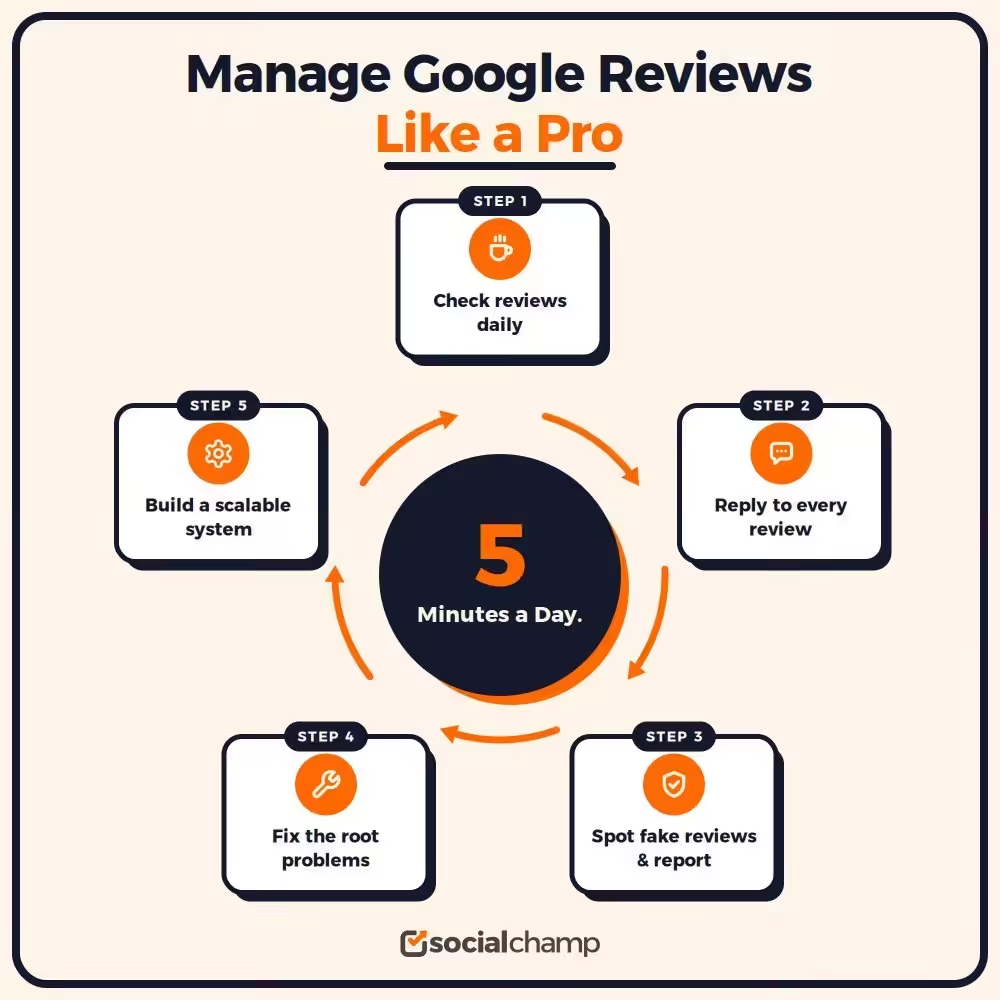
Check Your Reviews Every Morning
I check my Google reviews with my coffee, and it takes only 5 minutes. You can follow the same routine.
Whenever you get a new Google review for business, Google sends a notification, so don’t let them pile up. When you give a quick reply to a new Google review for business, it shows customers that you pay attention.
You can set a simple schedule. Read the reviews from Monday to Friday, not only to reply but to spot the patterns.
If three customers are complaining about wait times, that’s not random. That’s useful data!
Respond to Every Single Review
I reply to the good reviews and the bad ones also. Every single time.
For positive reviews, you can keep them simple. Thank the person by name, and mention any specific detail from their visit. It makes them feel that you actually read their review. And it takes only 30 seconds.
And for negative reviews, first pause before you type. Don’t argue in public. You can sincerely apologize for their experience, offer to fix the situation, and move the conversation offline. Share your email and phone number with them, as it shows the customer that you are serious about solving their problem.
Quick checklist:
- Thank every reviewer by name
- Reference something specific they mentioned
- Genuinely apologize for negative feedback
- Offer a direct contact for follow-up
- Never blame the customer in public
Spot and Report the Fake Reviews
Fake reviews unfortunately happen. Your competitor might post them, or a former employee might leave a rant.
If the review violates Google’s policies, you can flag it. Just click the three dots next to the review, select the reason, and submit it. If Google agrees, they remove it.
If the matter is serious, you can use the Google Business Profile community forum. Give the evidence and clear details. The more details you provide, the faster they act.
Build a System That Scales
If you manage multiple locations, it may feel like a headache to login every account daily. For this, you can use tools that let you manage multiple Google My Business accounts from one dashboard. This way, you can save time and spot issues quickly.
You should also set up brand monitoring. You need to know what people are saying about your brand beyond Google. Reviews on Facebook, Yelp, and industry sites matter too. A complete picture helps you protect your name everywhere.
Common Google Review Mistakes That Hurt Your Business
I’ve seen many smart business owners damage their reputations with just one wrong move. Google reviews for business can build you up or damage you, either way.
The difference often comes down to the mistakes you avoid. Let me walk you through the ones I see most often.
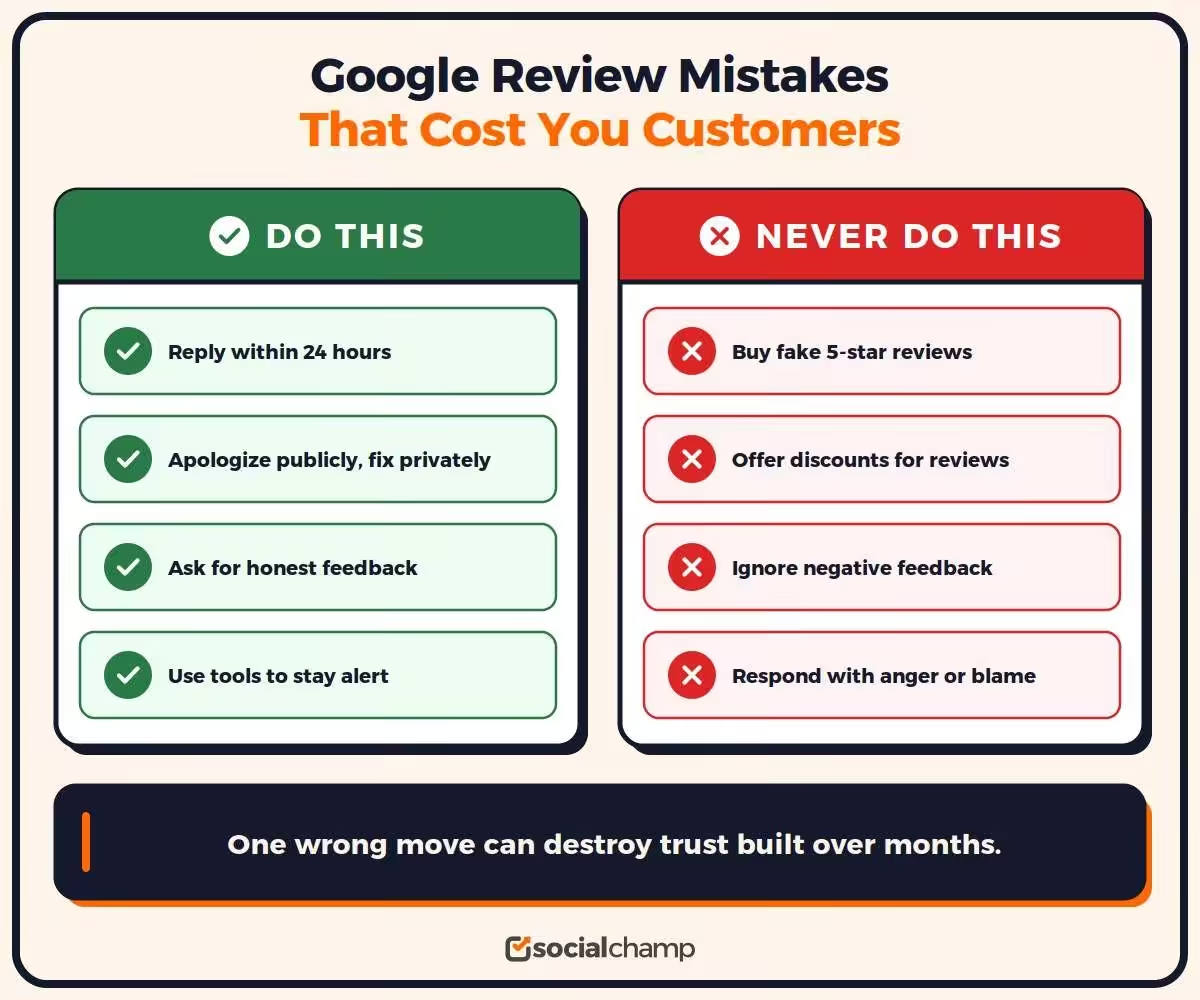
Buying Reviews
It’s the fastest way to ruin your credibility. I know you want reviews fast, but don’t ever click on the service that says “50 5-star reviews for $50.”
Google detects the fake patterns. They look at account history, IP addresses, and writing styles. When they catch you, they remove the reviews. They might suspend your profile, and you lose everything you built.
Even customers spot fake reviews when a sudden spike of glowing reviews with zero real detail looks kinda suspicious.
It takes months to build trust but literally only a few seconds to destroy it. You should earn your reviews the right way.
Ignoring Negative Feedback
A 1-star review sits on your profile for three weeks, and you hope it goes away; it doesn’t. It stares at every potential customer who finds you.
I usually prefer to respond to reviews within 24 hours, even if it looks unfair or the customer is wrong. A public response shows future customers that you truly care. And silence looks like guilt.
You can take the conversation offline if needed, provide a phone number, and genuinely try to fix the problem. Most customers remove their negative review when their issue is resolved.
Incentivizing Reviews the Wrong Way
You can’t offer a free coffee in exchange for a 5-star review. Also, you should not enter only positive reviews in the contest. Google doesn’t allow these practices.
You can definitely ask for honest feedback. Simply ask, “We’d love to hear your honest opinion.” That’s it. Don’t offer any payment, gifts, or special treatment in return for the review.
Also, you can’t filter out the bad ones before they post. This is called review gating, and it can seriously backfire.
Responding With Emotion
If someone leaves a nasty review about your business, your first instinct is to defend yourself, right? I’ve felt this too. But a heated public response makes you look small.
I first write the response in the Notes app. Then wait for an hour and rewrite it with a fresh mind.
Just thank the customer, apologize for their experience, offer them a solution, and keep the response short.
Future customers read these exchanges. They judge your character. A calm, professional response turns a negative review into proof that you handle problems well.
Delaying Your Response
If a review without a reply sits on your profile for 2 months, your profile may appear abandoned. You should treat the reviews like text messages from an important client. Check them regularly and respond to them quickly.
If you struggle to keep up, use tools that alert you instantly. Your social media reputation management strategy should include review alerts.
Forgetting That Reviews Are Marketing
Every review is content, and every response is a chance to show your brand voice.
You should mention the specific services in your replies. Reference your team members by their names. This reinforces what we do for anyone who reads it.
A strong review profile supports other marketing channels too. It boosts your digital marketing strategy for professional services or any business model you run. From search results to AI summaries, reviews shape your first impression.
Avoid these mistakes, and your Google reviews for business become an asset that compounds over time. Make them, and you hand customers to your competitors while you sleep.
Google Reviews for Business: Best Practices to Increase Trust and Sales
Now you know how to get more reviews and manage them, so what’s next?
Most business owners collect feedback and then let it rot. If you want customers to leave a Google review, you must actively ask and make it easy. That’s a waste.
Your Google reviews for business can drive real revenue if you treat them like a strategy and not an afterthought.
Ask for Specific Details
Vague reviews don’t help anyone. Whenever you ask for customer feedback, ask them a simple question like “What did you like the most about the service?” Which team member helped you?” or “How did we solve your problem?”
Specific reviews look genuine and help future customers to make a decision. They also fill your profile with keywords that Google indexes. When a reviewer mentions your service by name, that phrase can help you rank for it.
I always tell my clients to guide the conversation without writing the review for the customer. A simple nudge works. Mention what stood out during their visit. That’s it.
Display Reviews Everywhere
Your reviews shouldn’t be limited to your Google Business Profile.
Add them to your website and into the email footer. Also, share their screenshots on social media. You can easily turn a good review into multiple pieces of content.
Use the customer’s exact words when displaying the review on the website. Don’t unnecessarily edit or polish their wording.
A real customer’s simple line can create more trust than a perfect marketing slogan.
Fix the Root Problem
Reviews reflect your business. If three customers say the service is slow, the issue is not your customers but your process. Fix that first.
You should read every negative review and look for patterns.
If two people mention cold food, check the kitchen. If three people say the payment process confused them, redesign it. Reviews are basically free market research. And if anything you’re getting is for free, you should definitely use it.
When you fix the real problem, it also decreases the chances of future complaints. You can also tell your customer, “We heard you. We changed this. Thank you for helping us improve.” That message turns critics into fans.
Respond to Build Relationships
Responding to reviews doesn’t mean that you only write “Thank you!” and end the conversation.
If a customer mentions they loved a specific product, you should tell them about a new release they might like. When you praise a staff member, tag them in your internal chat so they see it.
That makes your team feel that their effort is being noticed. Plus, customers feel heard too. And the people who will read your reviews in the future can also see that you’re not interested in collecting stars only.
Your Google reviews for business are your goldmine. You just have to know how to use them.
- Read your reviews every week.
- Take action on patterns and problems every month.
- Use the best feedback in your marketing every day.
Treat your feedback seriously, and it’ll help your business to grow rapidly.
Manage Your Google Reviews With Social Champ
Basically, along with writing, I test tools for living. I properly use and stress-test them, then find the one that really saves my time.
When you manage Google reviews for business alongside your social presence, Social Champ is the tool I recommend.
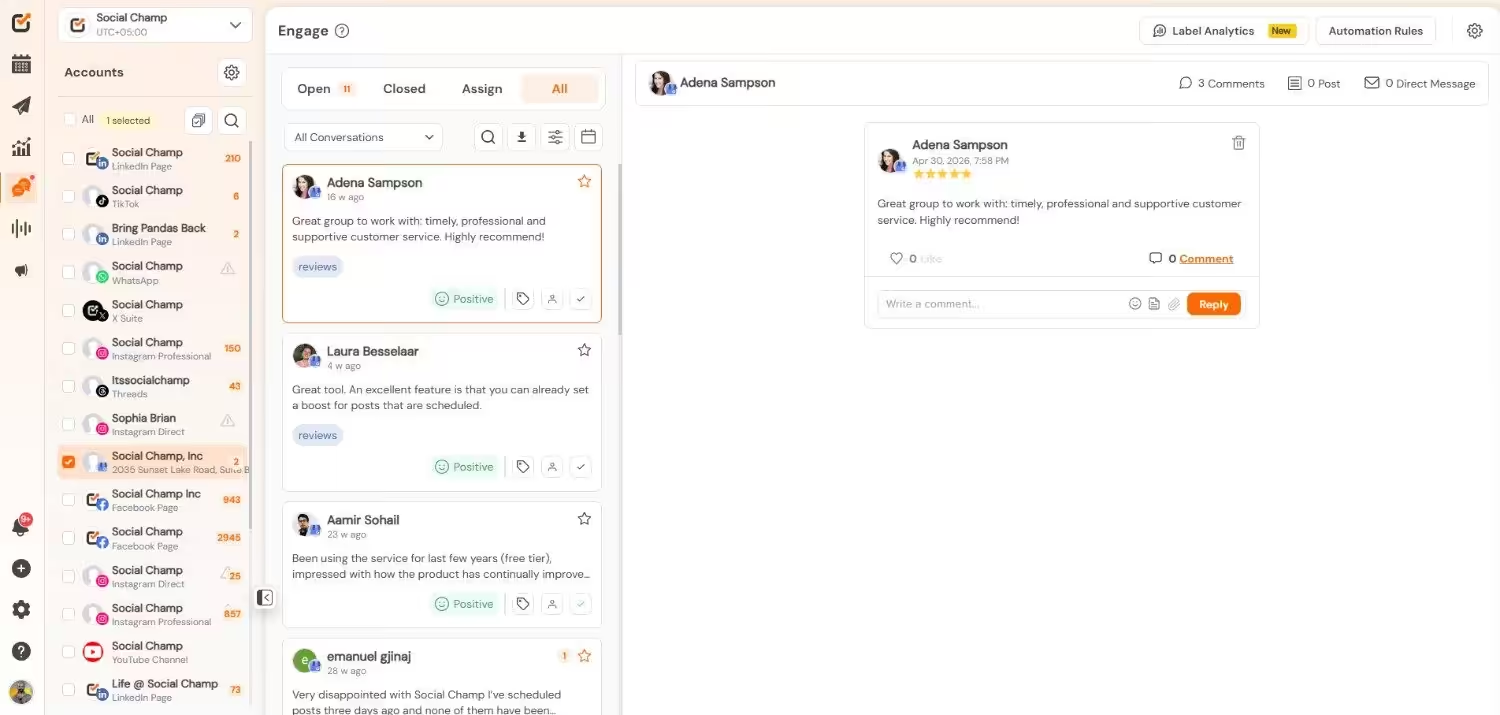
You can’t manage five platforms manually because you’ll miss something every time. A review sits unanswered for a week. A customer comment gets buried. And your competitor responds to that customer faster and wins the trust.
I’ve seen this happen too many times. It’s not because business owners are lazy. They’re busy. They need help.
See All Your Conversations in One Place
Social Champ helps you manage your mentions, comments, and messages from one dashboard.
That means you don’t have to log in to every account repeatedly. You can easily see what people say about your business.
If any customer leaves a negative review, you can spot and respond to it quickly without letting it sit unnoticed for days.
Speed wins in reputation management. When you respond fast, you show customers that you pay attention. You turn a complaint into a conversation. You turn a fan into an advocate. You also spot fake feedback before it does real damage.
Schedule Posts That Build Trust
Reviews aren’t the only important content. Your Google Business Profile posts are important too.
With the help of Social Champ, you can schedule your updates, offers, and photos in advanced to keep your profile active. A good Google Business Profile scheduler saves hours every week.
I usually prefer to plan my posts a week ahead so that, whether it’s a new product launch, a promotion, or any important update, everything is scheduled in advance.
It keeps your profile fresh and active, and an active profile gets more views; more views lead to more Google Business reviews.
Additionally, when customers see a business that cares, they feel the business is more active and trustworthy, and they feel more likely to write a Google review.
Engage Without Losing Your Mind
You run a business, and you don’t have time to post manually at 9 AM every day.
Social Champ handles the timing. You write the content. The tool publishes it. You get alerts when someone replies. You jump in when it matters.
This is how you scale. You stay human, and you don’t burn out. You build a reputation that brings in customers while you sleep.
Your Google reviews for business deserve a system. Start your free trial today and see how much time you get back.
Automate All Your GBP Updates
Conclusion
Google reviews for business aren’t optional anymore.
So don’t think of these as only stars and comments. These are your sales team, your SEO boost, and your trust signal all in one.
Start asking for reviews today, respond to every review, and fix the problems people highlight.
Even your competitors are already doing this, so don’t let them take customers that should be yours.
Open your Google Business Profile right now and send your first review request. Your future customers are waiting.