Life feels manageable until two dreaded alerts pop up on your screen: the battery low warning and the “your phone is out of storage” notification.
The storage issue is especially concerning because you cannot install any more of your favorite apps. It is either you delete a few apps to create some space or start looking for lighter alternatives that do not demand so much from your phone.
If you love Instagram but cannot install the full app without deleting half your photos, Instagram Lite offers a simpler way to keep scrolling without the storage stress.
It comes with a much smaller app size, lighter system demands, and a simple promise to keep your feed active without draining your phone.
This guide walks you through what Instagram Lite is, how it differs from the full version, and whether it makes sense for your phone and your daily Instagram habits.
You will also learn how an Instagram scheduler helps you manage, plan, and grow your Instagram Lite presence.
Short Summary
- Instagram Lite offers a lighter version of Instagram that uses less storage, less data, and runs smoothly on low-end devices.
- The app focuses on core features such as the feed, Stories, Reels, and messaging, while skipping advanced tools.
- It is designed mainly for regions with slower internet speeds, higher data costs, and Android phones with limited storage.
- Compared to the full app, Instagram Lite delivers faster performance but fewer creative and shopping features.
- Social Champ complements Instagram Lite by letting you schedule, manage, and analyze Instagram content from one dashboard.
What Is Instagram Lite and Why Did Meta Create It?
Instagram Lite, also called Insta Lite, is a stripped-down version of Instagram. This version keeps the core experience intact, so you still post photos, watch Stories, and message friends, just without all the extra bells that quietly eat up space and data.
The full Instagram app focuses on rich visuals, advanced effects, and frequent feature updates. These features work great on newer devices, but can feel overwhelming on older devices.
Meta created Instagram Lite with a very specific goal in mind: to make Instagram accessible on phones with limited storage, lower processing power, and slower or more expensive internet connections.
The difference in purpose is clear when you use it. The full app aims to deliver everything Instagram can possibly do, from advanced Reels tools to AR filters and shopping features.
Instagram Lite focuses on accessibility and efficiency, so you can stay connected without worrying about storage warnings, slow loading times, or excessive data usage.
Manage Multiple Instagram Lite Accounts with Ease
With Social Champ, you can handle several Instagram Lite accounts from one dashboard without switching apps or logging in and out all day.
Track Performance Easily With Analytics Tool
Instagram Lite Key Features
Instagram Lite focuses on the essentials you rely on every day. It delivers a familiar experience while asking far less from your phone, which makes it easier to stay connected without constant storage or performance worries.
Here are the core features of Instagram Lite:
- Feed: You can scroll through posts, like photos, and drop comments without waiting forever for things to load or dealing with a cluttered screen.
- Stories: This version allows you to catch up on Stories or post your own without hassle, so you never miss what your friends or favorite creators are up to.
- Reels: With it, you can watch and explore Reels quickly, even on slower connections, and use less data than the full Instagram app.
- Messaging: You can send and receive DMs, share posts, and stay in touch with friends without all the extra features slowing you down.
These core features cover the essentials, but Instagram Lite clearly skips a few extras to stay lightweight. Here is what you will notice is missing or limited compared to the full app.
- Filters: You get fewer creative filters and no advanced AR effects, so your photos stay simple.
- Shopping: Access to Instagram Shops is limited or sometimes unavailable, which means less browsing for in-app purchases.
- Advanced editing: Editing tools are basic, so you can tweak photos and videos, but you won’t find the pro-level options from the full app.
- Ads: Unlike the full Instagram app, the Lite version doesn’t support ads to ensure a faster experience.
Instagram Lite does not try to impress your phone; it tries to respect it. If your priority is staying connected without storage warnings, slow loading, or unnecessary extras, this lighter version lets you enjoy Instagram the way it should be: fast, simple, and stress-free.
Featured Article: How to Use Instagram
Instagram Lite Benefits
Instagram Lite brings all the fun of Instagram without overloading your phone or your patience. Here are the main benefits you get when you choose Instagram Lite:
- Data Saving: You use less mobile data, which keeps your bill in check and your connection faster. You can scroll through your feed and watch Stories without sweating every megabyte.
- Less Storage: The app takes up a tiny fraction of space compared to the full version. You can keep more of your photos, videos, and other apps without deleting anything important.
- Faster Performance: Everything loads quicker, even on older phones or slower connections. You spend less time staring at a blank screen and more time enjoying content.
- Smoother Messaging: Sending and receiving DMs go smoothly. Conversations flow naturally, and you stay connected with friends without interruptions.
- Simple Experience: The app stays focused on what matters most, so you are not distracted by features you rarely use. Instagram feels cleaner and easier to navigate.
These benefits of Instagram Lite make it clear why you should choose the lighter version over the full app. You get a faster, smoother, and more efficient experience without sacrificing the core Instagram fun.
Instagram Lite vs Instagram App: Key Differences That Matter
Instagram Lite and the full Instagram app serve the same core purpose, but they differ in ways that really matter depending on your phone and usage.
The following are the key differences between Instagram and Instagram Lite that matter:
-
App Size
The full Instagram app eats up around 108MB on Android.
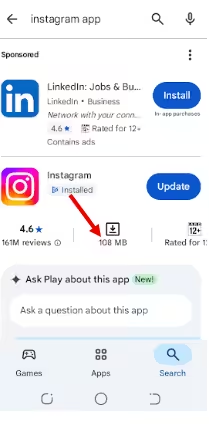
The full version uses more data thanks to high-resolution media and extra features. In comparison, the Lite version is just 3.3 MB.
It lets you scroll, watch Stories, and browse Reels without worrying about eating through your plan.
-
Data Usage
According to test results, the full Instagram app can chew through 400–600 MB per hour of browsing, depending on the content.
Instagram Lite keeps things light, often using around 20–30 MB per hour. As such, you can scroll longer with Lite without worrying about blowing through your mobile data.
-
Speed
The full app can lag or take longer to load content, especially on older devices or when browsing high-resolution photos and Reels.
Instagram Lite outperforms the full Instagram app on phones with limited storage, slower processors, or weaker internet connections.
-
Features
The full app comes with advanced tools, AR filters, in-app shopping, and pro-level editing. Instagram Lite keeps things simple and efficient. It sticks to the essentials: feeds, Stories, Reels, and messaging.
While Instagram Lite includes Reels, it doesn’t allow users to record or edit their own Reels. This is because it lacks the full suite of creation and editing tools found in the main Instagram app.
The same limitation applies to Stories, where posting is possible, but advanced effects and interactive features are missing.
-
Performance on Low-End Devices
Instagram Lite runs smoothly even on older phones or low-spec devices. It keeps your experience consistent and reliable, so you never have to worry about your phone struggling to keep up.
The full app often struggles in these situations, causing slower navigation, delayed messaging, and occasional crashes.
Analyze Growth With Social Champ
How to Get Filters on Instagram Lite?
Using filters on Instagram Lite works exactly like on the full version. Follow these simple steps to apply filters while using the app:
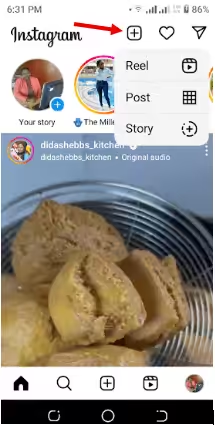
- Create a New Post
Launch the app on your phone, tap the “+” icon, and choose “Post.”
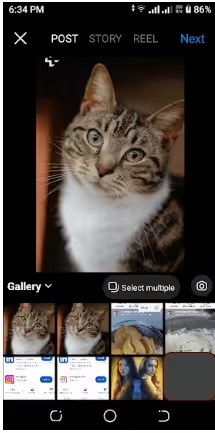
- Select a Photo or Video
Choose the media you want to share from your gallery and click “Next.”
- Tap on Filters
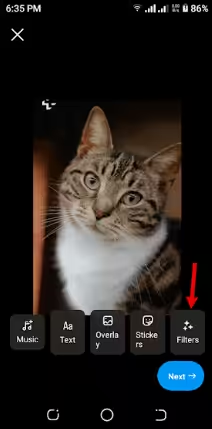
Add Filters
- Choose Your Favorite
Swipe through the available filters at the bottom of the screen to preview them. Tap the filter you like to apply it to your photo or video, then tap “Next.”
- Share Your Post
Add a caption, tags, or location if you want, then tap “Share” to post it.
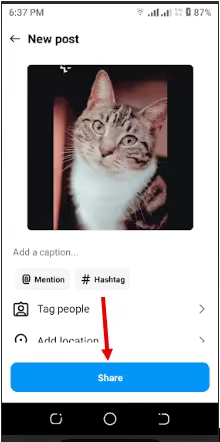
Once you’ve applied your favorite filter and shared your post, you’re all set to enjoy Instagram Lite just like the full app. It keeps your photos looking great while keeping your phone fast and light.
If you haven’t already, learn how to link Instagram to Facebook to simplify cross-posting, manage comments more efficiently, and keep your content connected across both platforms.
Featured Article: How to Become Instagram Famous
Which Countries Is Instagram Lite Currently Available In?
As of 2026, Instagram Lite is available in more than 170 countries, focusing on developing nations and emerging markets.
Here’s what Vishal Shah, Meta’s AI Chief, had to say on Insta:
View this post on Instagram
Instagram Lite is specifically designed for regions where internet bandwidth is limited, mobile data is expensive, and many users rely on Android devices with restricted storage.
Here’s how Instagram Lite’s availability breaks down around the world:
- Sub-Saharan Africa: Instagram Lite is available throughout much of Sub-Saharan Africa, reaching users across the region.
- India: India was one of the first major markets to get Instagram Lite, where it continues to serve users with slower connections and lower-end devices.
- Latin America: Several countries in Latin America, including Venezuela, are part of the regions supported by Instagram Lite.
- Southeast Asia and North Africa: Nations like Egypt, Myanmar, and others in these parts of Asia and Africa also have access to the Lite version of the app
Making Insta Lite available in these regions ensures that the platform remains accessible to a wide audience without compromising performance or usability.
If you’ve just realized that Instagram Lite is available in your country and haven’t figured out how to make money on Instagram yet, you’re missing out.
Featured Article: How to Share an Instagram Post to Story
Managing Instagram Lite Accounts Efficiently With Social Champ
If you’re a creator or social media manager, you’re probably wondering whether Instagram Lite is good for building your brand. The answer is yes.
Although it has limited features compared to the full app, Instagram Lite still lets you stay active, engage with your audience, and share content.
Handling one account is doable, but when you have several, things can get complicated. To manage multiple accounts like a pro, you need an Instagram scheduler like Social Champ.
With Social Champ, you can schedule posts, plan content, and manage multiple Instagram Lite accounts from a single dashboard.
Here are some of the features that make Social Champ an efficient tool for managing Insta Lite accounts:
- Scheduling Tool: Plan and queue your posts in advance so your content goes live at the perfect time without you having to lift a finger. Plus, the tool lets you know the best time to post on Instagram so your posts go live when most of your followers are likely to view and engage.
- Social Media Calendar: Get a visual overview of all your scheduled posts across multiple accounts, making it easy to spot gaps or overlaps in your content strategy.
- Analytics Tool: Track engagement, reach, and performance metrics to see what works and optimize your future posts.
- Sentiment Analysis: Understand how followers feel about your brand and campaigns, helping you fine‑tune your messaging.
- Competitor Analysis: Keep an eye on competitors’ strategies and performance to spot trends and stay ahead in your niche.
Social Champ also lets you manage Instagram Lite along with other social networks from one dashboard. Tracking all your social media activity in one place saves you time and keeps your strategy organized.
Visualize Your Content With a Calendar
Which Is Better, Instagram or Instagram Lite?
It comes down to factors such as your location, the speed and cost of your internet connection, your phone’s storage and processing power, and how important advanced features like AR filters, shopping, and pro-level editing are to your daily Instagram use.
If you mostly scroll, post, and message without needing all the extra tools, Instagram Lite is likely the smarter choice. It keeps your phone fast, saves data, and lets you stay active on Instagram without the digital clutter.
Featured Article: How to Make Money on Instagram
Conclusion
As of February 2026, Instagram’s full version and Instagram Lite have over 500 million downloads on the Google Play Store. This says a lot about how many people want Instagram without the digital clutter.
For creators and businesses, pairing Instagram Lite with Social Champ takes your social media game to the next level. You can schedule Instagram posts, manage multiple accounts, track analytics, and even monitor competitors effortlessly.