Disclaimer:
The information presented in this blog post is based on publicly available data from official sources at the time of writing. Our intention is solely to provide accurate and helpful information. If you notice any inaccuracies, please feel free to contact us for corrections.
Nothing kills the excitement of finding a productivity tool faster than a sign-up for a pricing requirement!
Loomly has long been a favorite for teams looking to escape the clutter of spreadsheets, but there’s a growing elephant in the room. While the platform is sleek and the features are dependable, Loomly pricing isn’t always laid out on a silver platter for everyone to see.
This lack of upfront clarity often leaves business owners in a state of budget limbo, wondering if they’re about to sign up for a bargain or a boardroom-level expense.
Short Summary
- Loomly is a popular social media management tool that has shifted toward a gatekept pricing model in 2026, often requiring a trial sign-up to see final costs.
- The lack of transparency is a strategic move to offer customized enterprise quotes and capture leads, but it creates budget limbo and friction for smaller teams.
- Non-transparent pricing models hinder accurate budgeting and lead to sticker shock when users scale from small team tiers to advanced agency plans.
- Transparent alternatives like Social Champ build more trust by offering a free-forever plan and publicly listed tiers that allow for instant comparison.
- To find Loomly’s exact cost for your specific needs, you must currently initiate a 15-day trial or contact their sales team for a customized Enterprise quote.
For agencies juggling multiple client budgets or small businesses watching every cent, knowing your monthly overhead at a glance is vital. When a social media management tool hides its costs, it adds a layer of friction that most busy teams simply don’t have time for.
My goal with this guide is to pull back the curtain. I’m going to break down Loomly’s actual pricing structure, estimate what your real-world costs might look like once you scale, and see how it stacks up against open-pricing alternatives like Social Champ, which prides itself on showing you exactly what you’ll pay before you even create an account.
By the end of this post, you’ll know exactly what Loomly likely costs for your specific team size, which hidden features might force a price jump, and which tools in the market offer the most bang for your buck without the mystery. Let’s dive in.

Supercharge Your Social Media Game With a Powerful Tool!
Start your free trial today and see why Social Champ is the ultimate choice for intelligent and efficient social media management!
Why Is Loomly’s Pricing Not Publicly Listed?
If you’ve visited Loomly’s website recently, you might have noticed a frustrating trend: the pricing page often leads you down a rabbit hole of a trial sign-up rather than a clear price list.
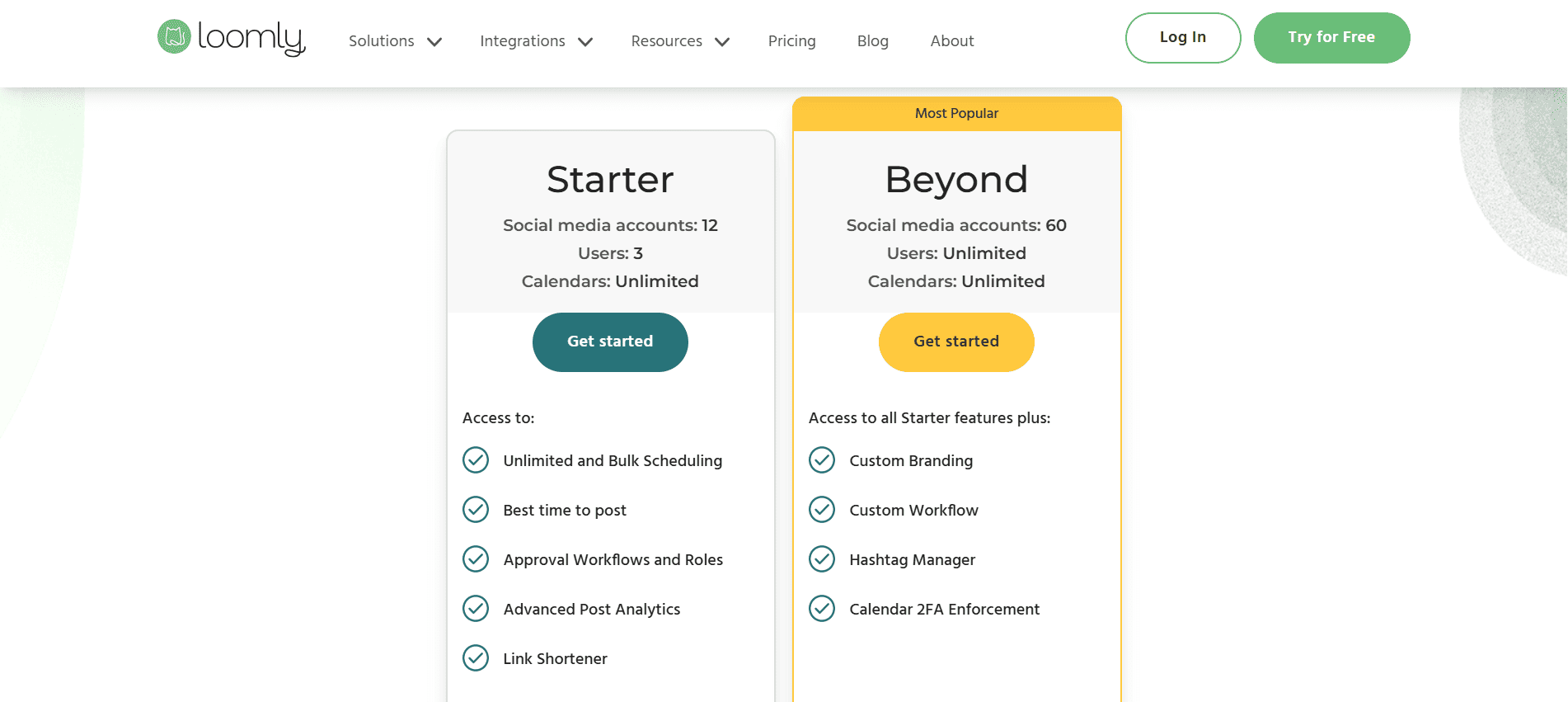
Loomly currently operates on a gatekept pricing model. This means that while they offer a free trial, the actual cost of staying on the platform long-term is often hidden behind a registration wall or reserved for direct sales consultations.
This approach is becoming more common in the SaaS world, but it’s a major point of contention for users who just want to know if the tool fits their budget.
The Downside for You (The User)
While it might benefit the software provider, hidden pricing creates several hurdles for the average user:
- Time Wasted: You have to sign up just to find out the tool is 2x your budget.
- Comparison Friction: It makes it nearly impossible to do a quick side-by-side comparison with other tools.
Transparent vs. Hidden Pricing Models
-
Transparent Model (e.g., Social Champ)
-
Clarity: Prices are listed on the homepage.
-
Speed: You can sign up and pay in under 2 minutes.
-
Trust: You know you’re paying the same as everyone else.
Social Champ Pricing
-
-
Hidden Model (e.g., Loomly)
-
Clarity: Prices require a login or a phone call (for the Enterprise plan).
-
Speed: Signing up can take up to 5 minutes just to see the price.
-
Trust: There’s always a nagging feeling you could have negotiated a better deal.
-
The Evolution of Loomly Pricing Plans
Loomly hasn’t always been as premium as it is today. In earlier versions (circa 2020–2022), Loomly was widely known as the budget-friendly alternative to Hootsuite.
In its early years, Loomly’s base plan started at around $25–$30/mo, making it a go-to for solo freelancers. By 2026, we’ve seen those entry points climb toward the $49/mo mark (when billed annually), reflecting the platform’s shift toward more agency-focused clients.
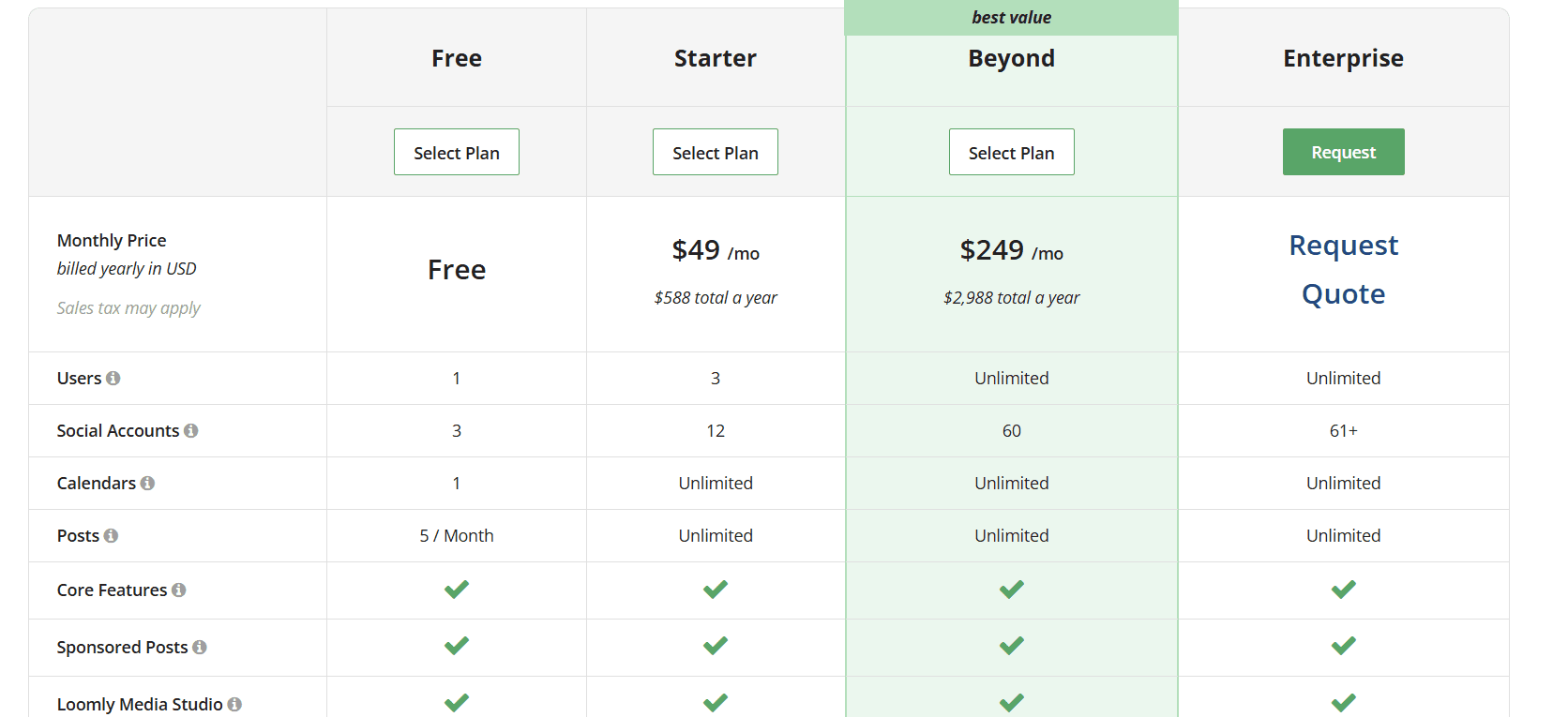
Here is a breakdown of each plan typically offered:
- Free Plan: This is an entry-level teaser tier best for solo users. It includes 1 user seat and allows for up to 3 social media accounts. However, it is strictly limited to just 5 posts per month and lacks advanced tools like bulk posting or deep analytics.
- Starter Plan: Priced at $65/month (or $49/month billed annually), this is where the platform becomes practical for small businesses. It supports up to 12 social accounts and 3 users, offering unlimited scheduling, approval workflows, and basic analytics.
- Beyond Plan: This is the high-tier “Agency” option, costing $332/month (or $249/month annually). It significantly jumps to support 60 social accounts and unlimited users. It unlocks premium features like Custom Branding, Custom Workflows, and Hashtag Manager.
- Enterprise Plan: This is a custom tier for large organizations with 61+ social accounts. It requires a requested quote and includes specialized features like White-label options, SSO (Single Sign-On), and a Dedicated Account Manager.
What Factors Likely Affect Loomly Pricing?
Understanding Loomly’s cost isn’t just about the sticker price; it’s about understanding the levers that push you from one tier to the next.
Here are the primary factors that drive the total cost:
- Number of Team Seats: This is often the biggest catalyst for a price jump. While a basic plan might support 3 users, moving to a collaborative team environment (unlimited users) typically requires a more expensive plan.
- Social Profiles/Accounts: Loomly groups accounts into brackets (e.g., 12 accounts in Starter plan). If you’re an agency that just landed your 13th client account, you may be forced to upgrade your entire plan even if you don’t need the other features in the next tier.
- Advanced Analytics & Reporting: While basic post-tracking is standard, features like scheduled PDF reports are usually reserved for the premium level.
How Does Loomly’s Hidden Pricing Compare to Social Champ?
In the SaaS world, pricing transparency is a critical trust builder. It allows teams to budget accurately, prevents sticker shock from hidden fees, and shortens the decision-making cycle.
While Loomly has moved toward a more gatekept model that often requires a trial sign-up or sales quote to see final numbers, Social Champ takes the opposite approach by keeping its pricing completely public and easy to find.
| Platform | Free Plan | Starting Price | Transparency | Core Features | Ideal For |
|---|---|---|---|---|---|
| Social Champ | YES (15 posts/mo) | $4 /mo | YES (Publicly listed) | Scheduling, Content Calendar, Social Listening, Engage, & Analytics |
Solopreneurs, Growing Agencies, & Budget-Conscious Teams
|
| Loomly | YES (Available only after signing up) (5 posts/mo) | $49 /mo | NO (Requires trial/login) | Visual Calendar, Approval Workflows, & Manual Post Previews |
Mid-to-Large Teams focused on Campaign Approvals
|
Why Transparent Pricing Wins
Choosing a tool with open pricing, like Social Champ, offers several distinct advantages for modern agencies:
- Instant Budgeting: You can see the $4/month starting point immediately.
- No Trial Trap: You don’t have to hand over your data or spend time setting up a profile just to see if you can afford the service.
- Scalability Clarity: With Social Champ, you know exactly how the price scales as you add profiles. With Loomly, users often report a massive pricing gap when moving from the Starter tier to the Beyond plan.
Social Champ stands out in 2026 as the clear, budget-friendly champion. By offering a completely free plan for starters and a transparent $4/month entry point for professionals, it ensures you spend your time growing your social presence, not negotiating your software bill.
Is Loomly Worth It Despite Hidden Pricing?
When a tool starts hiding its “Buy Now” button behind a “Book a Demo” wall, it’s natural to ask: Is the software actually that good, or are they just hiding an outrageous bill?
In Loomly’s case, the answer is a bit of both. While the pricing opacity is a major hurdle for quick decision-makers, the platform remains a powerhouse.
Feature Strengths: Where Loomly Shines
Loomly isn’t just a scheduler; it’s a workflow engine. Here is what you’re actually paying for:
- Seamless Post Approvals: Their multi-step approval tiers are arguably the best in the business. You can set up draft, pending approval, and approved statuses that keep everyone on the same page.
- Visual Content Calendar: Unlike tools that feel like a cluttered list, Loomly provides a highly aesthetic, drag-and-drop calendar that makes it easy to spot gaps in your strategy at a glance.
- Strong Collaboration UX: The interface is built for teams. You can leave internal comments that clients can’t see, tag teammates, and track version history without leaving the app.
| Pros | Cons |
|---|---|
| Best-in-class approval workflows and team roles. |
No public transparency; requires sign-up.
|
| Highly intuitive calendar and post-preview interface. |
Can become significantly more expensive as you add users.
|
| Built-in post ideas and RSS integration to fight writer’s block. | Some users find the reporting lacking compared to power tools. |
What Are the Drawbacks of Non-Transparent Pricing for Users?
For marketers and agency owners, non-transparent pricing isn’t just a minor annoyance; it’s a direct roadblock to productivity. When a tool like Loomly requires you to jump through hoops, like signing up for a trial or booking a demo, just to see a dollar sign, it creates several practical frustrations.
-
The Death of Accurate Budgeting
Marketers often operate on fixed monthly or quarterly budgets. If you can’t see the price of a tool and its potential fees, you can’t build a reliable forecast. This leads to budget creep, where a tool that seemed affordable during a trial suddenly spikes in price the moment you go live.
-
The Comparison Friction Problem
How do you know if you’re getting a good deal if you can’t see the competition’s rates? Non-transparent pricing forces you to spend unjustified time on discovery pricing just to do a basic cost-benefit analysis.
Pro-Tip: What to Ask Before You Commit
If you do decide to engage with a tool that hides its pricing, don’t just ask “How much?” Ask the questions that reveal the true long-term cost:
- Can I get a full breakdown of every tier’s limits? (Don’t let them just show you the one they want to sell).
- What is the exact cost of adding one more user or one more social profile? (Know your scaling tax).
- Are there any mandatory implementation or onboarding fees?
- What happens to my price if I switch from annual to monthly billing?
Featured Article: Best Time to Post on TikTok
What Are the Best Transparent Alternatives to Loomly?
When it comes to finding affordable alternatives to Loomly, there are several options out there that offer great value without breaking the bank. Here are the top three:
-
Social Champ
Social Champ Pricing Social Champ tops the list as a cost-effective alternative to Loomly.
It offers a free forever plan that allows you to manage three social media accounts and allows you to schedule up to 15 posts at once.
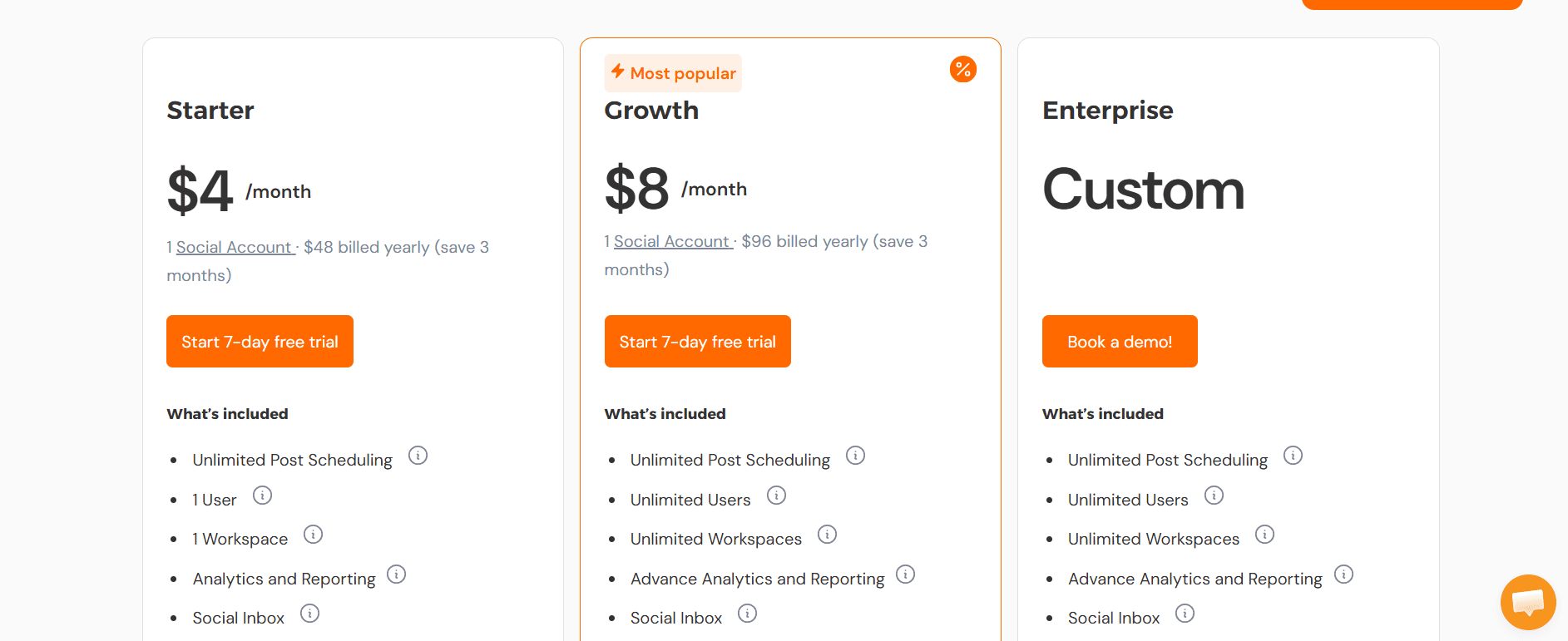
With its Starter Plan, which starts at just $4 per month, you get access to 1 social media account and unlimited post scheduling for up to 1 user. If you want to add more users, you don’t have to switch to the Growth plan; you can simply add users as per your needs, and it will slightly increase your cost.
Even the higher-tier plans like the Growth Plan at $8 per month offer a lot of bang for your buck, with unlimited users and team collaboration features.
Social Champ also includes unique features like social listening, competitor analysis, bulk upload, content curation, and tailored posts, making it an excellent choice for both small teams and individuals who want powerful tools without the hefty price tag.
Leverage a Social Media Management Tool Without Breaking the Bank!
Try Social Champ today and get access to advanced features like bulk uploads, content curation, and unlimited scheduling, all at an affordable price.
-
Buffer
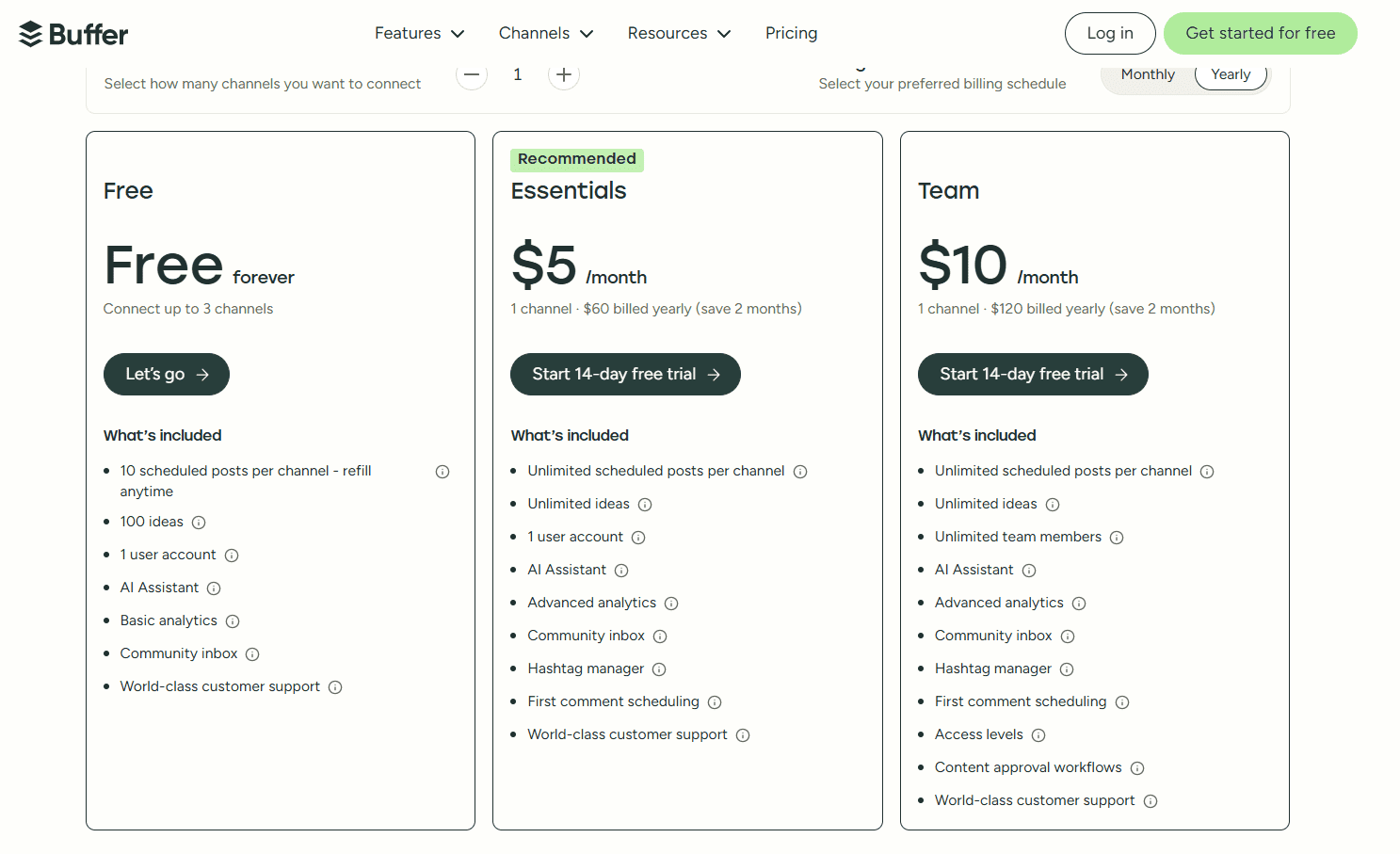
Buffer’s Pricing Plans Buffer is another strong contender in the affordable social media management space.
With its Essentials plan starting at $5 per month per social channel, Buffer allows you to manage multiple accounts, schedule posts, and access analytics at a fraction of the cost.
Just like Social Champ, it also offers a free plan with limited scheduling, which can be great if you’re just starting out and need basic functionality.
The platform is known for its user-friendly interface and focus on simplicity, making it a popular choice for freelancers and small businesses alike.
-
Later
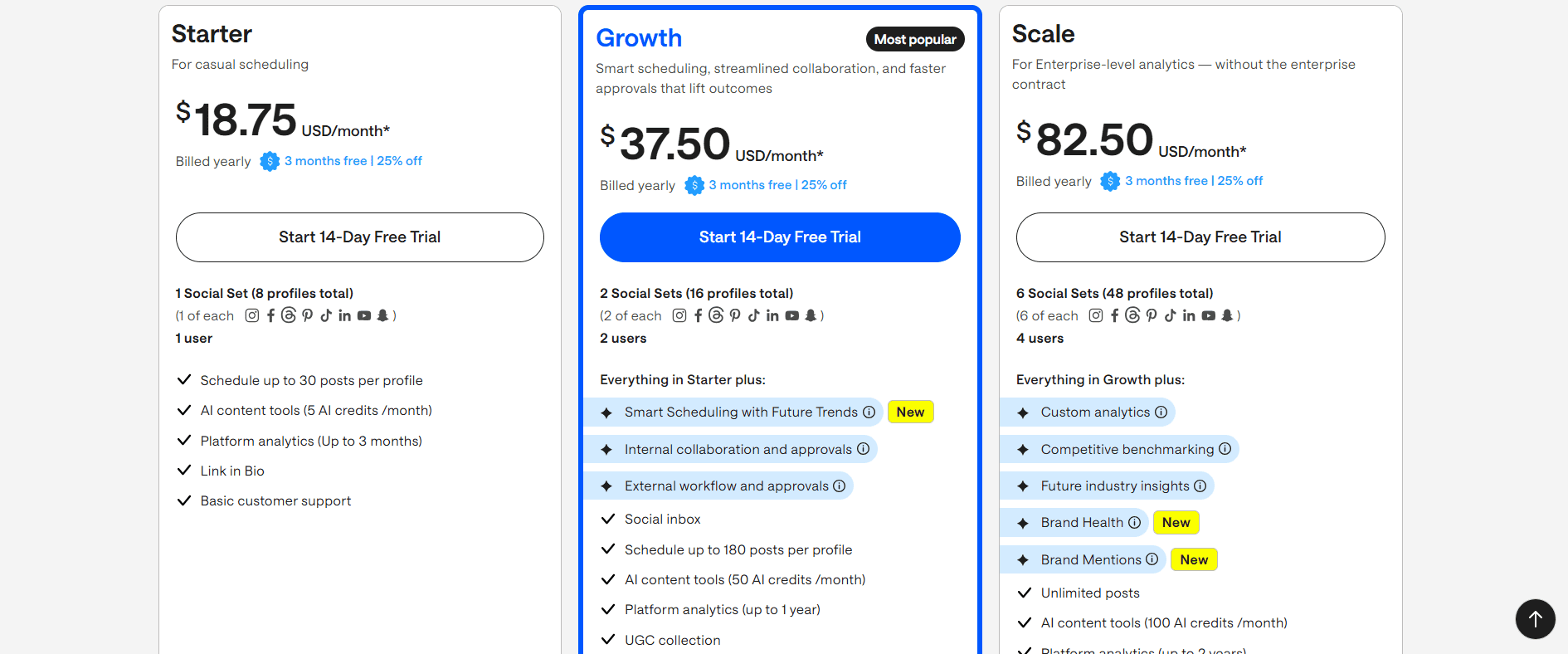
Later Pricing Later is another tool that offers transparent pricing. Later’s pricing starts with the Starter plan at $18.75 per month, which is perfect for individuals or small teams just getting started.
The Growth plan at $37.50 per month offers additional features like analytics and more scheduled posts.
Later’s focus on simplicity and visual scheduling makes it a great option, but it does come at a higher price point compared to Social Champ and Buffer.
Why Social Champ Stands Out
Among these alternatives, Social Champ really shines due to its balance of affordability, features, and ease of use.
It offers a wide range of tools, such as bulk upload, content curation, and tailored posts, that make social media management efficient and effective, all at a price that’s hard to beat.
If you want to know about more tools with transparent pricing, refer to the following resources!
Featured Article: Post to All Social Media at Once
Take Your Social Media Management to the Next Level!
Leverage Social Champ now and enjoy powerful features, seamless scheduling, and unbeatable value.
Conclusion
In the great showdown of social media management tools, it’s clear that both Loomly and Social Champ bring some serious value to the table.
Loomly shines with its comprehensive features, perfect for teams that need all the bells and whistles.
But let’s be honest. Sometimes, you don’t need a five-course meal when a well-made sandwich will do the trick.
If you’re not happy with Loomly pricing and are looking to get the job done without emptying your wallet, Social Champ gets you where you need to go without the fuss.
So, whether you’re managing multiple brands or just trying to keep up with your social media, Social Champ proves that you don’t have to sacrifice quality for affordability.
It’s a great alternative to Loomly, especially if you’re looking to stretch your budget while still hitting all your social media goals.