Disclaimer:
The information presented in this blog post is based on publicly available data from official sources at the time of writing. Our intention is solely to provide accurate and helpful information. If you notice any inaccuracies, please feel free to contact us for corrections.
You may have heard about Meltwater and know it as a platform for media monitoring, social listening, and managing multiple social media channels, right?
Short Summary
- Meltwater pricing is not listed publicly, which makes budgeting harder for teams.
- You must request a Meltwater demo to understand plans and potential costs.
- This lack of transparency can slow decisions for small businesses and agencies.
- Social Champ offers clear per-channel pricing with no sales calls required.
- Transparent pricing helps teams scale with confidence and fewer surprises.
It’s a great choice for businesses and agencies, especially when they want insights into their audience, competitors, and brand presence across social media.
But wait…I know what’s on your mind. Meltwater pricing! And you couldn’t find it on its website. Right?
If you’re a small team or growing agency, I can understand that you need straightforward pricing upfront to make better decisions before committing.
So, in this guide, I’ll break down the Meltwater pricing plans, explain what you can expect at each level, and compare them with other Meltwater alternatives so you can decide what’s best for your business.
![A Complete Guide to Meltwater Pricing and Plans in [current_year] 4](https://www.socialchamp.com/wp-content/uploads/2024/07/Calendar-v2.png "A Complete Guide to Meltwater Pricing and Plans in [current_year] 5")
Adding clients or accounts can quickly push costs higher on other platforms. Social Champ scales with your workflow to keep your growth affordable.
Why Teams Struggle to Know Meltwater Costs
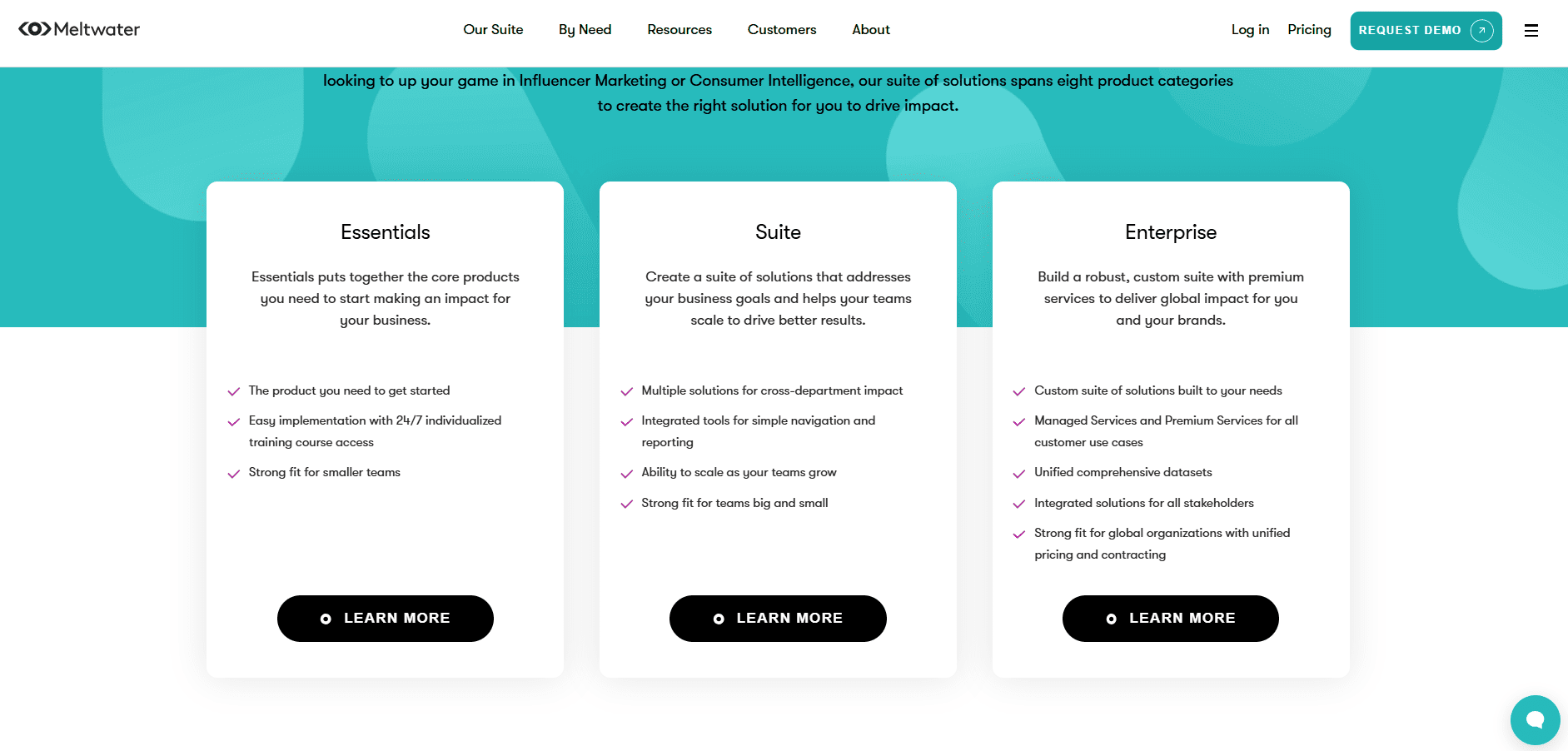
When you look for Meltwater pricing, you quickly notice that costs aren’t listed anywhere.
Unlike many other tools, where you can see transparent costs and plans, Meltwater keeps this information behind a demo.
Here’s why many teams struggle to know Meltware pricing:
Pricing Isn’t Publicly Listed
If you’re a small business or a solo creator, this lack of transparency can feel limiting.
As a business owner, you want to know what you’re signing up for and paying for before committing.
At Meltwater, all you get upfront is the promise of a demo where someone will walk you through potential plans.
Demos Are Required to Get a Quote
In my opinion, if you have to book a demo just to see pricing, it can slow down your processes.
Let’s say you manage social media channels for a small brand or an agency with a handful of clients.
You want to track mentions across platforms and monitor sentiments, but you can’t see the Meltwater cost until you talk to the sales representatives.
In this case, budgeting becomes a guessing game, and decisions get delayed.
Why This Can Be a Roadblock
If you have a team that’s trying to grow or plan ahead, this can be a real blocker.
You may not commit because you don’t know how costs will scale as you add clients, users, and channels.
It adds uncertainty to your workflow because every dollar matters.
P.S. If your main goal is brand tracking, it helps to compare different social media monitoring tools and see which ones offer clear pricing before committing to long contracts.
Featured Article: ZoomSphere Pricing Explained: What Every Plan Brings to the Table
Social Champ Pricing: Simple, Transparent, and Affordable
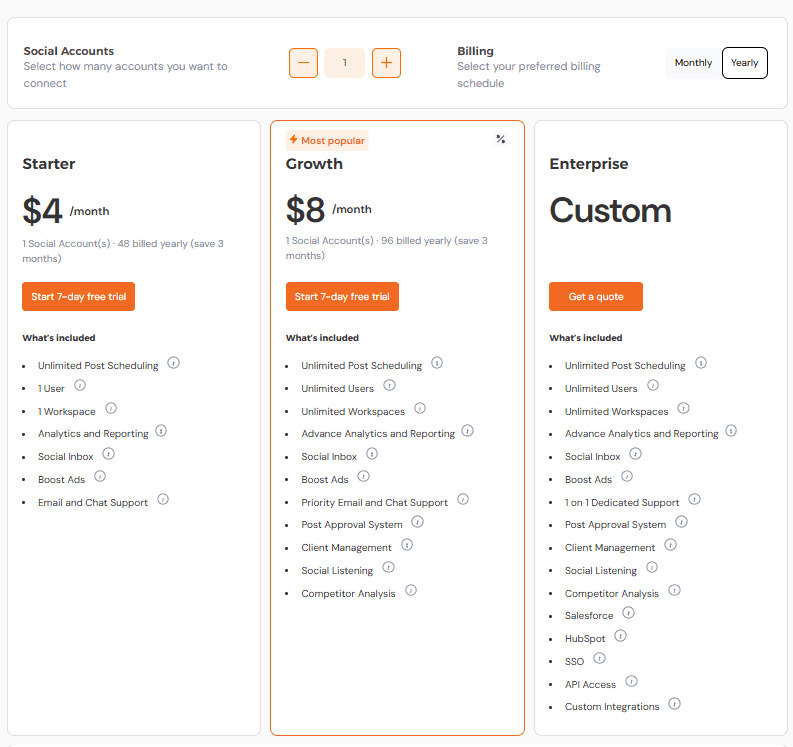
One of the things that I really love about Social Champ is its straightforward pricing.
Unlike Meltwater pricing plans, you get transparent pricing plans on its website, and you don’t have to book a demo or wait for a sales representative to give you a quote.
Everything is clear, which helps you decide your budget much more easily, no matter if you’re a solo creator or a small business.
Clear Plans That Fit Your Needs
When you visit the Social Champ’s website, you can easily see the plans that are easy to understand and scale as your needs grow.
You know exactly what each plan offers and how much it’ll cost.
And the best thing is that it offers per-channel pricing, which means you only have to pay for the accounts you use, not for unnecessary social sets.
Let’s take a look at a quick snapshot of Social Champ’s pricing plans:
| Plan | Starting Price | Features |
|---|---|---|
| Starter | $4/month per channel, billed annually | Unlimited posts, basic analytics, and scheduling |
| Growth | $8/month per channel, billed annually | Everything in Starter + bulk scheduling, RSS automation, and advanced analytics |
| Enterprise | Custom | All features, including team collaboration, client workflows, and API access |
Let me walk you through an example to make your concept more clear.
Imagine you run a small bakery and manage three social media accounts, let’s say Instagram, Facebook, and Pinterest. There is the Social Champ’s Starter plan.
Your monthly cost would be $12, which covers unlimited posts, basic scheduling, and social inbox.
Later, if your needs grow and you want unlimited users, advanced analytics, social listening, client management, and more features, you can upgrade to the Growth plan while knowing exactly how much each additional channel will cost.
Budget-Friendly and Scalable
I’ve told you above that the best thing about Social Champ is its per-channel pricing model, which makes it easy to scale for growing businesses.
Suppose your agency picks up two more clients, each with three social accounts.
On the Growth plan, that’s an additional $48 per month, and you can plan ahead without hidden charges.
Or imagine you’re a content creator managing multiple platforms.
You can add channels individually as your audience grows, and pay only for what you need, rather than committing to an expensive all-in-one package blindly.
Optional Free Trial
Now, another best thing about Social Champ is its Free plan for small business owners or solo creators.
If you’re not ready to commit, you can test scheduling, analytics, and team workflows without spending a dollar.
For example, a small marketing team could try automating posts for a week, see the results, and then decide if upgrading to Starter or Growth makes sense.
Why Transparency Matters
When you know your costs upfront, it can save stress and time. You can focus on creating content, running campaigns, or managing clients instead of constantly checking if the budget will hold.
For example, a freelancer managing multiple client brands can immediately calculate the monthly cost for additional accounts or team members and avoid unexpected spikes in expenses.
With per-channel pricing, you only pay for what you use. Add platforms when you’re ready, not when sales approves it. Try Social Champ today!
Feature Comparison: Meltwater vs. Social Champ
When you’re choosing a social media management tool, features are also important just as important as pricing.
Since Meltwater pricing isn’t transparent, the feature comparison of both platforms can also help you decide which tool fits your workflow.
Side-By-Side Feature Overview
Here’s a quick comparison to help you see where the platforms differ:
| Feature | Social Champ | Meltwater |
|---|---|---|
| Starting Price (billed yearly) | $4/month per channel | Custom |
| Supported Platforms | -Instagram
-X -YouTube -TikTok -Threads -Google Business Profile -Bluesky -Mastodon -WhatsApp Business |
-Facebook
-X -YouTube -TikTok |
| Supported Social Accounts/Sets | 1 Social Account | Custom |
| Free Forever Plan | ✅ | ❌ |
| Unlimited Post Scheduling | ✅ | ✅ |
| Calendar Planner | ✅ | ✅ |
| Bulk Scheduling / Upload | ✅ | ✅ |
| Post Approval System | ✅ | ✅ |
| Boost Ads / Post Boosting | ✅ | ✅ |
| Analytics and Reporting | ✅ | ✅ |
| Social Inbox | ✅ | ✅ |
| Canva Integration | ✅ | ❌ |
| Queue Management | ✅ | ❌ |
| First Comment Scheduling | ✅ | ✅ |
| Hashtag Manager | ✅ | ❌ |
| Smart Post Recycling | ✅ | ❌ |
| AI Assistant/Generators | ✅ | ✅ |
| Social Listening | ✅ | ✅ |
| Link in Bio | ✅ | ✅ |
| Client Management | ✅ | ✅ |
| CRM Integrations | ✅ | ✅ |
| SSO and API Access | ✅ | ✅ |
Test scheduling and analytics with Social Champ’s free plan. Upgrade only when it makes sense.
What This Means in Practice
Now there’s a direct feature comparison of both platforms; you can see both platforms cover basics like unlimited scheduling, content calendar, analytics, and social listening.
However, Social Champ offers some features like Canva integration, queue management, hashtag manager, and smart post recycling that Meltwater doesn’t.
For example, if you’re a small marketing agency running multiple campaigns, the queue management feature helps you keep posts organized across clients.
Or if you’re a content creator, smart post recycling ensures your top-performing posts get more visibility without manual effort.
Platform Coverage
Another key difference is platform support. Social Champ covers platforms like Bluesky, Mastodon, and WhatsApp Business, while Meltwater includes Reddit.
Depending on where your audience is, this can make a big difference.
Why Feature Transparency Matters
From my experience, knowing exactly which features come with your plan saves time and prevents surprises.
With Social Champ, everything is clear, so you can focus on posting, analytics, and engagement instead of trying to figure out what’s included or locked behind demos.
Quick Note!
Many teams focus on insights first, so evaluating sentiment analysis tools with transparent plans can make budgeting far less stressful.
Featured Article: A Complete Breakdown of Pallyy Pricing and Plans
Why Social Champ Is a Better Fit for Growing Teams
Before getting into the details, let me quickly set the context.
Social Champ is a social media management platform built for teams, agencies, creators, and businesses that want clear pricing and practical features without long sales cycles.
It supports multiple platforms, offers self-service access, and uses a per-channel pricing model, making scaling easier to plan.
Now, let’s look at why this approach tends to work well for growing teams.
Flexibility That Matches How Teams Actually Work
Growing teams rarely grow all at once. You might add one client, one platform, or one team member.
This is where Social Champ’s per-channel pricing model makes a difference. You pay based on the channels you manage, not vague bundles or locked packages.
For example, if you manage Instagram and LinkedIn today and add TikTok next month, you simply add that channel.
You don’t have to call sales representatives or wait like Meltwater demo process.
This flexibility helps teams stay in control of budgets as they grow.
Easy Onboarding Without Slowing the Team
I’ve noticed that tools with custom pricing often come with longer onboarding. That’s not always ideal when deadlines are tight.
With Social Champ, teams can sign up, connect accounts, and start scheduling within minutes.
Features like post approvals, shared calendars, and role-based access make it easier to collaborate.
A junior team member can draft posts. A manager can review them. Clients can stay informed without full access.
This setup works well for agencies, startups, and in-house teams that want clarity instead of complexity.
Budget Friendly Without Cutting Core Features
Budget matters, especially when you’re scaling. Social Champ offers a free forever plan and clear paid plans, starting at a fixed rate per channel.
That makes planning easier than with tools where Meltwater pricing plans require demos to understand the starting point.
I’ve seen small teams hesitate because they can’t answer simple questions like how much the tool costs or how much it costs over a year. When pricing isn’t visible, decision-making slows down.
With Social Champ, the numbers are clear. You can forecast costs and scale up or down. And you know what you’re paying for.
Built for Growth, Not Just Enterprise
Social Champ doesn’t try to be everything for everyone.
It focuses on what growing teams need most, such as scheduling, collaboration, reporting, client management, and support for modern platforms that teams actually use.
Avoid hidden surprises. Social Champ gives transparent pricing so you can focus on campaigns, not quotes.
P.S. Before You Decide:
When choosing social media listening tools, knowing the cost upfront often matters just as much as the depth of data you receive.
Conclusion
Now, you’ve probably noticed that the main challenge with Meltwater pricing is about clarity.
When pricing stays behind demos, it becomes harder to plan, budget, and move forward with confidence.
That uncertainty can slow teams down, especially when every new channel or client affects costs.
Social Champ keeps things simple with transparent plans and per-channel pricing, so you always know what you’re paying for as you grow.
At the end of the day, the best choice is the one that fits your workflow, budget, and need for visibility.