Disclaimer:
The information presented in this blog post is based on publicly available data from official sources at the time of writing. Our intention is solely to provide accurate and helpful information. If you notice any inaccuracies, please feel free to contact us for corrections.
Are you looking into Planable pricing because you want clear numbers before you commit? You are not alone.
Collaboration tools sit at the center of most content teams, and pricing decisions carry more weight than ever.
Short Summary
- Planable provides several pricing plans, starting at $33 per month, with a focus on visual content and collaboration, making it ideal for teams.
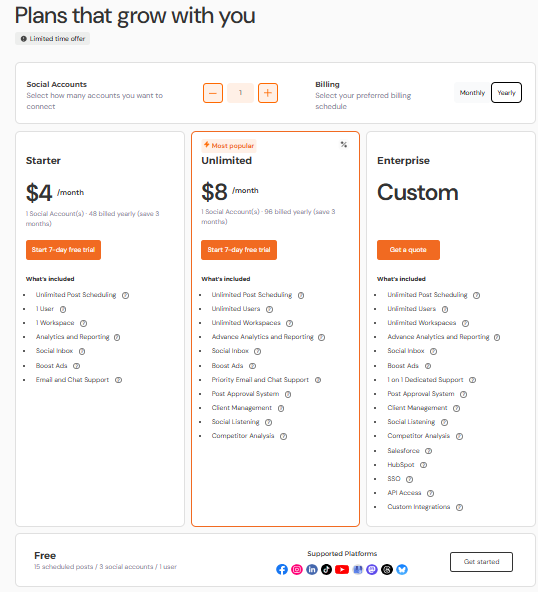
- Social Champ offers a variety of plans, starting at just $4, with features like unlimited scheduling and analytics at budget-friendly prices.
- Planable is particularly strong in managing multiple clients and social profiles, providing excellent value for small businesses and agencies.
- Social Champ emphasizes affordability and robust features, making it suitable for both small businesses and larger enterprises looking to manage social media effectively.
- Planable’s transparent pricing structure is great for teams needing strong collaboration tools, while Social Champ offers a broader range of features at lower costs, appealing to a wider audience.
You are not just choosing a tool. You are choosing how your team plans content, reviews drafts, and publishes without friction. You are probably here to understand what Planable actually charges, what you get at each level, and how well it fits your budget as your team grows.
This guide breaks down Planable pricing plans, how features line up with cost, and how it compares with other tools.
Let’s get started!

Avoid Paying Extra for Features You Don’t Need!
Many brands overspend on tools with hidden costs. Social Champ gives you the features you need, without surprises.
What Are Planable’s Current Pricing Plans?
If you are reviewing Planable pricing, this section breaks down what each plan includes and how costs change as your team grows. Planable bases its pricing on workspaces and users, which directly affects how much you pay once collaboration expands.
Free Plan
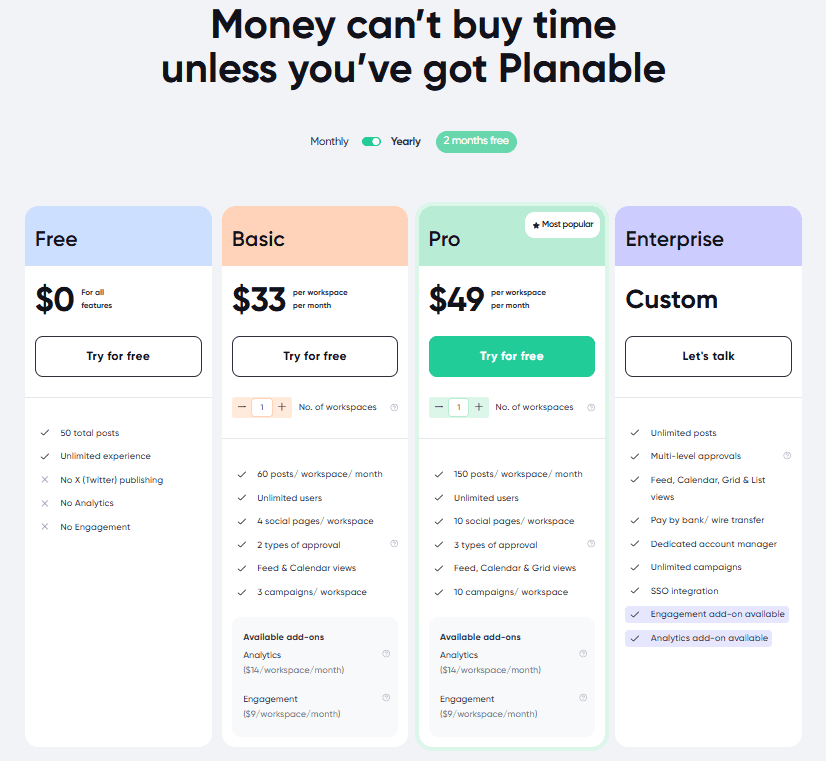
Planable’s Free plan costs $0 and works best for early testing.
- 1 workspace
- 50 total posts
- Basic publishing access
- No X publishing
- No analytics or engagement add-ons
It is useful for trying the interface, but it does not support active team workflows.
Basic Plan
The Basic plan starts at $33 per workspace per month.
- 60 posts per workspace each month
- 4 social pages per workspace
- 2 approval types
- Feed and Calendar views
- Optional analytics and engagement add-ons
This plan suits small teams, but add on costs can raise the total quickly.
Pro Plan (Most Popular)
The Pro plan costs $89 per workspace per month.
- 150 posts per workspace each month
- 10 social pages per workspace
- 3 approval types
- Feed, Calendar, and Grid views
- Add-ons available for analytics and engagement
This tier fits growing teams that need stronger approvals and visibility.
Enterprise Plan
Enterprise pricing is custom.
- Unlimited posts and campaigns
- Multi-level approvals
- All content views
- Dedicated account manager
- Bank or wire transfer payment options
| Feature | Free | Basic | Pro (Most Popular) | Enterprise |
|---|---|---|---|---|
| Price | $0 | $33/workspace/month | $89 /workspace/month | Custom |
| Posts | 50 total posts | 60 posts/workspace/month | 150 posts/workspace/month | Unlimited posts |
| Social Pages | Included | 4 social pages/workspace | 10 social pages/workspace | Included |
| Approval Types | – | 2 approval types | 3 approval types | Multi-level approvals |
| Views | – | Feed and Calendar views | Feed, Calendar, and Grid views | Feed, Calendar, Grid, and List views |
| Campaigns | – | 3 campaigns/workspace | 10 campaigns/workspace | Unlimited campaigns |
| Users | Unlimited experience | Unlimited users | Unlimited users | Dedicated account manager |
| Publishing | No X publishing | Included | Included | Included |
| Analytics Add-on | No | Available ($14/workspace/month) | Available ($14/workspace/month) | Included or available |
| Engagement Add-on | No | Available ($9/workspace/month) | Available ($9/workspace/month) | Available |
| Payment Options | – | – | – | Bank or wire transfer |
Featured Article: Sprout Social Pricing Revealed: Is It Worth the Cost?
How Does Planable Pricing Scale With Team Size and Usage?
Planable pricing changes based on how much your team uses the platform.
The more workspaces, social pages, and posts you add, the higher the monthly cost goes. This setup works fine at a small scale, but it becomes important to plan ahead once your team or client list grows.
How Workspaces and Usage Drive Costs
Planable prices its plans per workspace. Each workspace comes with its own post limits, social page caps, and campaign allowances. If you manage one brand, this structure feels simple. One workspace covers everything.
Things change when you add more brands or clients.
Each new workspace adds a separate monthly charge. Post limits reset per workspace, which sounds helpful at first, but higher publishing volume usually pushes teams into higher tiers.
Social pages also scale per workspace, so managing several platforms for one client can fill those limits quickly.
Users do not directly increase cost, which helps larger teams. However, usage limits often become the real pressure point. More posts, more campaigns, and more approvals usually mean upgrading sooner than expected.
Cost Growth by Team Type
- Solo creators or freelancers: Free or Basic can work short-term if posting volume stays low
- Small teams managing one brand: Basic or Pro offers enough room for steady publishing
- Agencies handling multiple clients: Enterprise pricing becomes the likely option due to workspace volume
At this stage, many agencies start reviewing Planable alternatives to avoid paying per workspace as client counts rise.
What Features Come With Each Plan?
Each tier adds controls based on scale rather than users.
- Free plan: One workspace, limited posts, no advanced approvals
- Basic plan: Approval types, calendar views, optional analytics, and engagement add-ons
- Pro plan: Higher post limits, more social pages, expanded content views
- Enterprise plan: Unlimited campaigns, multi-level approvals, and dedicated support
Considering this pricing model, Planable works best when your publishing volume stays predictable.
If content output or client count grows fast, costs can rise sooner than expected. Reviewing your current usage and future plans helps you choose the right tier before pricing becomes a blocker.
Pro Tip!
If your pricing starts climbing faster than your output, it’s time to review how many workspaces you actually need. Agencies often overpay by creating separate workspaces for internal projects that could live in one shared space.
How Does Planable Pricing Compare to Social Champ?
When you look at Planable pricing next to Social Champ, the differences become easier to understand once you apply real situations.
Both tools support content planning and collaboration, but they charge for growth in very different ways. That choice affects how much you pay as your content volume and client count increase.
Planable vs Social Champ: Pricing Overview (Yearly Billing)
| Category | Planable | Social Champ |
|---|---|---|
| Starting Price | $0 (Free plan) | $0 (Free plan) |
| Entry Paid Plan | $33 per workspace (Basic) | $4 per social account (Starter) |
| Mid Tier Plan | $49 per workspace (Pro) | $8 per social account (Growth) |
| Top Tier | Custom (Enterprise) | Custom (Enterprise) |
| Post Limits | 60 to 150 posts per workspace | Unlimited on all paid plans |
| User Limits | Unlimited users on paid plans | 1 to unlimited users |
| Core Focus | Approvals and collaboration | Publishing and automation |
Quick Tip!
Before committing to a higher tier, calculate how much you’re paying per client or per social profile. Comparing that number across tools can quickly reveal which productivity tools are truly saving you money, and which ones just look good on paper.
Managing One Brand Across Platforms
If you manage one brand with Facebook, Instagram, LinkedIn, and X, Planable keeps everything inside one workspace.
On the Basic plan, you pay $33 per month with a 60-post limit. Once posting increases, upgrading becomes necessary.
With Social Champ, each platform counts as one social account. Four platforms cost $16 per month on the Starter plan. Posting stays unlimited, so higher volume does not force an upgrade right away.
Supporting Multiple Clients
When you manage three clients, Planable usually requires three separate workspaces.
That pushes the monthly cost on the Basic plan close to $100 before add-ons. Analytics and engagement features add more cost per workspace.
Social Champ prices by account instead. If each client uses three platforms, you manage nine accounts total. On the Growth plan, pricing stays predictable, and analytics are included.
Where Each Tool Fits Best
Planable makes sense when structured approvals and visual planning matter most. It suits teams that review content carefully before publishing.
Social Champ fits teams that want to post frequently, manage several platforms, and avoid rising costs as usage grows.
Which Planable Tier Should You Choose for Your Use Case?
Picking the right Planable tier comes down to how you actually work. Not how the pricing page looks, but how many brands you manage, how often you post, and how many people review content before it goes live.
Since Planable pricing scales with workspaces and usage, choosing too small a plan can slow you down. Choosing too big can feel like wasted spend.
Freelancers and Solo Creators
If you manage content for yourself or a single brand, the Free or Basic plan can cover the basics. You get one workspace and enough structure to plan and review posts.
That works fine until posting becomes more frequent.
Once you start scheduling regularly or want to post to all social media at once, limits show up faster than expected.
Recommendation:
- Light posting and one brand: Free
- Consistent posting with simple reviews: Basic
Small Businesses and Growing Teams
Most small businesses sit in the middle. You manage several platforms, post weekly, and need visibility into what goes out and when.
Basic can work early on, but Pro usually feels more comfortable once more than one person reviews content.
Calendar and grid views help teams stay aligned. Keep in mind that analytics cost extra, which often catches teams off guard.
Recommendation:
- One brand with light approvals: Basic
- Multiple platforms and regular reviews: Pro
Agencies Managing Multiple Clients
Agencies feel the impact of Planable pricing plans the fastest. Each client often means a new workspace. That adds cost quickly, especially when clients expect frequent posting and fast approvals.
If you manage several brands and rely on performance data, add-ons or outside reporting tools become part of the setup.
Recommendation:
- A few clients with strict approvals: Pro
- Many clients and high content volume: Enterprise
Enterprise Teams
Large teams usually care most about structure. Multi-level approvals, access control, and dedicated support matter more than post limits. Enterprise fits that need, but pricing depends on scale and usage.
Quick Decision Check
More than one client or brand? Costs rise per workspace
- Posting often? Post limits matter
- Need reports? Add-ons apply
- Big team? Users do not raise cost; usage does
If you match your tier to how you work today and where you are headed, you avoid upgrades that feel forced later.
P.S. If you’re constantly checking usage caps or doing mental math before posting, that’s usually a sign your plan isn’t aligned with your workflow. The right tier should feel invisible—not restrictive.
What Are the Pros and Cons of Planable Pricing?
Deciding if Planable pricing fits your team gets easier when you look at both sides. Here’s a clear breakdown of where it works well and where it feels limiting.
| Pros | Cons |
|---|---|
| Clear tiered structure | Costs rise per workspace |
| Strong collaboration features | Add-ons increase total spend |
| Unlimited users on paid plans | Post limits can feel low |
| Visual planning views | Analytics not included in base plans |
| Works well for agencies | Less ideal for small teams with many accounts |
What This Means in Practice
Planable makes sense when workflow and review structure matter.
Its approval workflows and visual planning views help teams stay aligned before content goes live. Unlimited users on paid plans also means you can add teammates without paying per person.
However, your cost grows with the number of workspaces you need. Agencies often feel that quickly, because each client usually lives in their own workspace.
Posting limits further push teams toward higher tiers sooner than expected. Analytics and engagement features are useful, but they come as add-ons. That adds cost on top of your base plan.
How to Maximize Value From Your Planable Subscription
Getting real value from Planable pricing isn’t just about choosing a tier and moving on. It’s about how smartly you use the features you’re already paying for.
A few small tweaks in your workflow can save time, reduce waste, and make your subscription feel far more worthwhile.
Simple Ways to Stretch Your Plan
A few smart adjustments in how you plan, collaborate, and review content can help you get more done without upgrading your subscription.
-
Batch Your Scheduling Sessions
Instead of logging in daily, plan content in weekly or monthly batches. This helps you stay within post limits and keeps your content calendar consistent. It also makes it easier to spot gaps or overlaps before they become a problem.
-
Keep Your Team Lean
While Planable allows multiple users, adding everyone “just in case” can clutter workflows. Invite only people who actively review, approve, or publish content. Fewer users usually means faster approvals and less confusion.
-
Use Approval Workflows Intentionally
Approval tools work best when they’re structured. Decide which posts actually need sign-off and which don’t. This avoids delays and ensures your content doesn’t sit idle waiting for feedback.
-
Review Usage Every Month
A quick monthly check can prevent overpaying. Look at how many posts you’re publishing, how many social pages are active, and whether all workspaces are still needed. Downgrading or restructuring early can save a surprising amount over time.
Quick Wins Checklist
- Schedule content in batches
- Remove inactive team members
- Set clear approval rules
- Track usage monthly
- Match your plan to real needs
If you’re focused more on publishing efficiency, analytics, and automation, tools like Social Champ can complement your workflow, especially when paired with insights around the best time to post on TikTok and other platform-specific timing strategies.
Used thoughtfully, your Planable subscription can deliver strong value without stretching your budget. The key is reviewing, refining, and staying intentional with how you work.
Tip of the Day!
Batch your content at the start of the month. You’ll stay within post limits, reduce approval back-and-forth, and avoid last-minute upgrades just because you ran out of scheduled slots.
Top 3 Affordable Alternatives to Planable
Looking for budget-friendly options that still pack a punch? You’re not alone. In fact, most small businesses operate on tight marketing budgets, which means finding tools that offer great value without compromising on features is crucial.
If Planable’s pricing isn’t quite right for you, there are several affordable alternatives that offer robust social media management features without breaking the bank.
Let’s take a look at the top three Planable alternatives that deliver great value and functionality:
-
Social Champ
Social Champ’s Pricing Social Champ offers affordable tools for small businesses and entrepreneurs to streamline their social media.
It provides all the essential features and more at a competitive price.
One of the standout aspects of Social Champ is its Free Forever Plan, which is a rare gem in the world of social media management tools.
With the free social media scheduler, you can schedule and manage your social media accounts without spending a dime.
This makes it an ideal starting point for small businesses or solo entrepreneurs just starting.
As your needs grow, Social Champ continues to deliver great value with its paid plans, which are remarkably affordable compared to other options like Planable.
Whether you’re scheduling posts across multiple platforms, using bulk uploads to save time, or tapping into scheduling tools, Social Champ makes it easy to handle everything efficiently.
Automate Your Strategy, Engage Your Community, Save Your Sanity!
Simplify your social media management while keeping your budget intact only with Social Champ!
-
Later
Later’s Pricing Later is a strong alternative to Planable, particularly if your focus is on visual content, such as Instagram marketing.
It’s designed with simplicity and visual scheduling in mind, making it a breeze to plan and manage your social media posts.
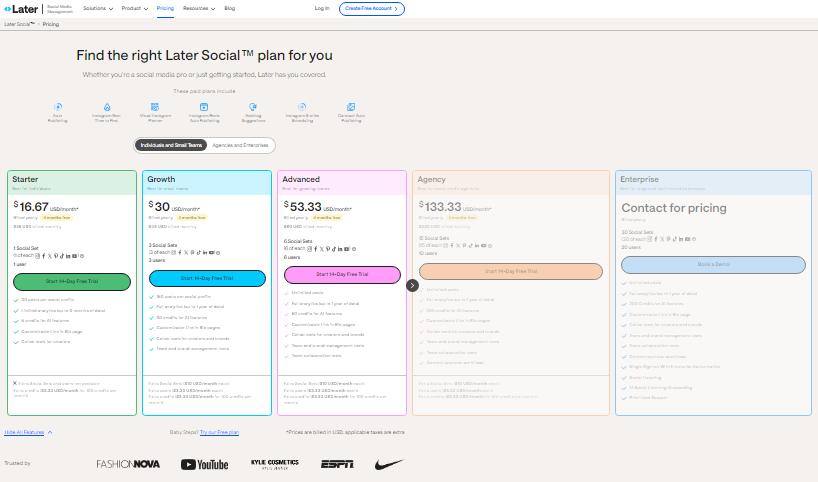
Starting with the Starter Plan at $18.75/month, Later is an excellent choice for individuals or small teams who are just beginning their social media journey.
As your needs grow, the Growth Plan at $37.50/month offers more robust features, including analytics and the ability to schedule more posts.
For businesses that require even more advanced tools, the Scale Plan at $82.50/month provides enhanced capabilities.
Later’s focus on visual content and ease of use makes it a compelling option for those prioritizing Instagram and other visually-driven platforms.
-
Loomly
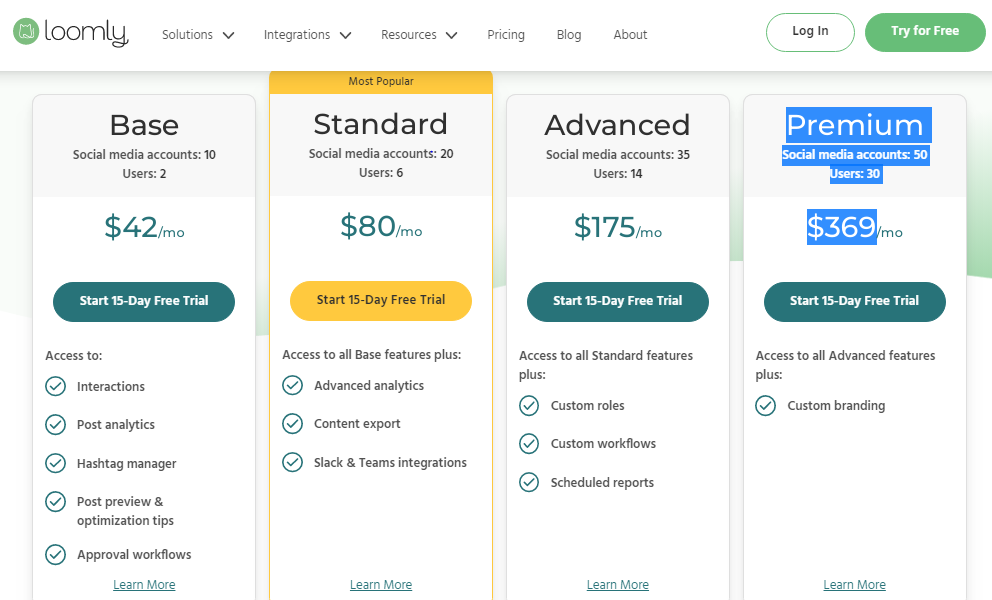
Loomly’s Pricing Loomly is a fantastic alternative to Planable, especially if you’re looking for a balance between affordability and features.
Their pricing plans offer a great mix of value and functionality. It offers a Free Plan with 1 user, 3 social accounts, and 5 posts per month, which is perfect for beginners.
With the Starter Plan at $49/month, you get up to 12 social media accounts and 3 users, which is perfect for smaller teams or businesses just getting started.
If you need more accounts or users, the Beyond Plan at $249/month offers 60 accounts and supports unlimited users, making it a solid choice for growing teams.
For larger teams or more extensive social media needs, the Enterprise Plan (custom pricing) accommodates more than 61 accounts and unlimited users.
Loomly’s tiered pricing ensures that as your needs grow, there’s a plan that can scale with you without breaking the bank.
Plus, Loomly’s user-friendly interface and features like post ideas and multiple content views make it a great fit for those who need a bit more than basic scheduling tools.
Featured Article: Hootsuite Pricing Explained: Is It Worth the Cost
Grow Your Brand Now Without Growing Your Budget!
Elevate your social media strategy today with Social Champ’s powerful features.
Conclusion
When it comes to deciding between Planable Pricing vs. Social Champ, both platforms offer compelling features, but they cater to different priorities.
Ultimately, the best value depends on your specific needs: if you’re seeking a comprehensive, organized approach and don’t mind a higher cost, Planable could be worth the investment.
However, if you’re looking to maximize your budget while still enjoying extensive features, Social Champ is hard to beat.