Disclaimer:
The information presented in this blog post is based on publicly available data from official sources at the time of writing. Our intention is solely to provide accurate and helpful information. If you notice any inaccuracies, please feel free to contact us for corrections.
Pricing pages have a funny way of looking simple… until you start reading the fine print.
One plan looks affordable, another promises more features, and suddenly you’re wondering which option actually fits your workflow and your budget.
That’s exactly where Publer pricing comes into the picture for 2026.
If you’re considering Publer this year, you’re probably weighing a few things at once: what each plan includes, where the limits kick in, and whether the cost still makes sense as your accounts or team grow.
Short Summary
- Publer pricing starts affordable but increases quickly as you add users and social accounts.
- Pricing Plans includes Free for basic use, Professional ($4/month) for creators, Business ($8/month) with analytics, and Enterprise (custom pricing) for large organizations.
- Comparing long-term needs helps avoid surprises as your social media grows.
With SaaS pricing steadily increasing across the industry, taking a closer look before committing is smart planning.
In this guide, I’ll walk you through Publer’s plans, features, and real costs in a clear way. And if you find yourself wondering about Publer alternatives along the way, we’ll touch on that too.
Stick around, this breakdown will help you decide with confidence.

Start Managing Social Media Without Spending a Dollar!
Try Social Champ’s free plan and get access to scheduling, analytics, and core features before committing to a paid plan.
Publer Pricing Table
Before jumping into numbers, it helps to quickly understand what Publer is built for.
Publer is a social media scheduling software designed to help individuals, creators, and teams plan, publish, and manage content across multiple platforms from one dashboard.
It covers the basics well, such as post scheduling, analytics, link-in-bio, and some AI-assisted writing features, which makes it a solid option for people who want structure without too much complexity.
Now, where things get interesting (and sometimes confusing) is Publer pricing.
Publer offers multiple plans aimed at different user needs, from solo creators to growing teams. On paper, the pricing looks straightforward. In practice, the value really depends on how many accounts you manage and which features you rely on day to day.
Publer Pricing Overview 2026
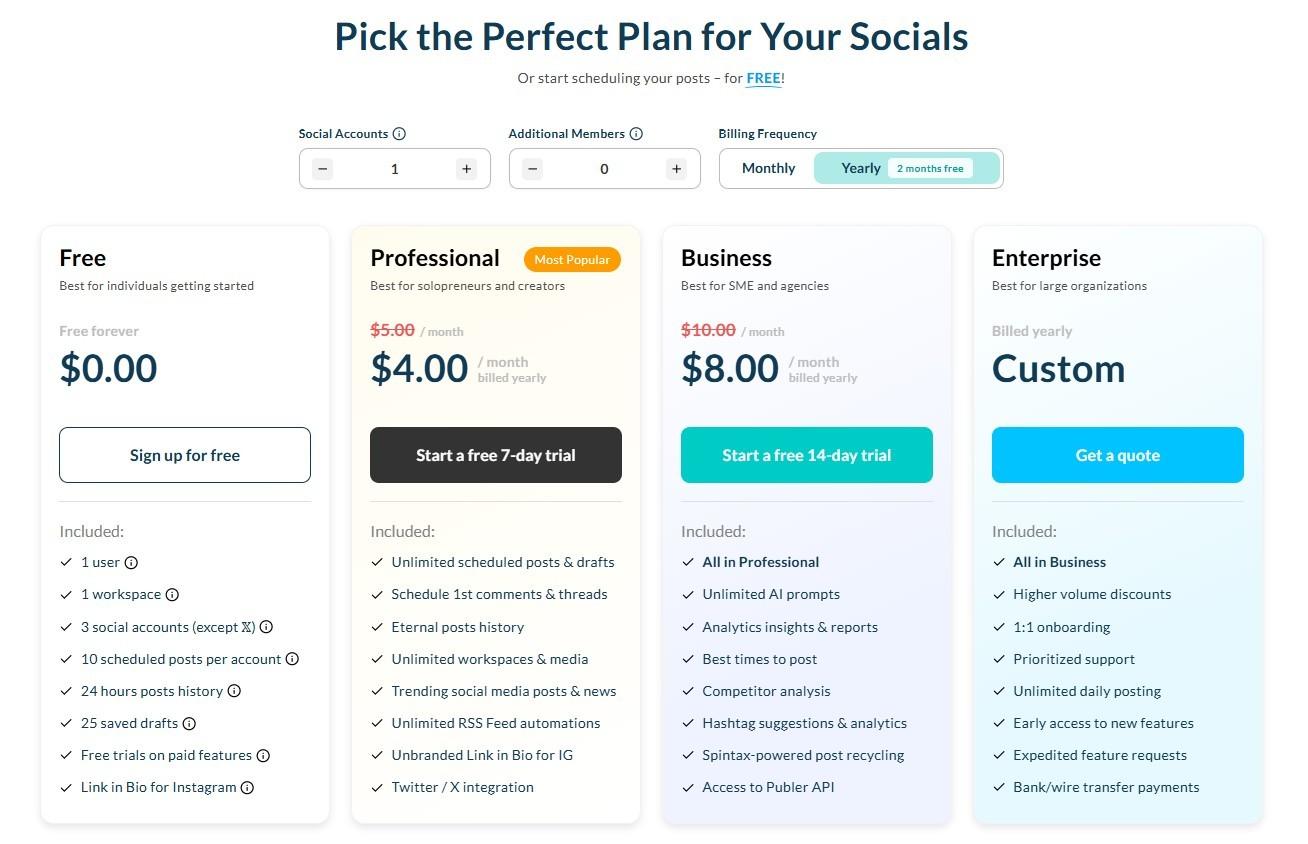
Here is the updated Publer pricing table based on the current yearly plans, so you can see everything at a glance.
| Feature | Free | Professional | Business | Enterprise |
|---|---|---|---|---|
| Price (Yearly) | $0.00 | $4.00 / mo | $8.00 / mo | Custom |
| Best For | Individuals starting out | Solopreneurs & creators | SMEs and agencies | Large organizations |
| Social Accounts | 3 (Excludes X) | 1 (Includes X) | 1 (Includes X) | Custom |
| Users / Members | 1 User | 1 User (add for extra) | 1 User (add for extra) | Custom |
| Scheduling | 10 posts per account | Unlimited | Unlimited | Unlimited daily |
| Post History | 24 hours | Eternal | Eternal | Eternal |
| AI Prompts | Limited credits | Limited prompts | Unlimited AI prompts | Unlimited AI prompts |
| Analytics | No | No | Insights & reports | Advanced reports |
| Support | Standard | Standard | Standard | Prioritized 1:1 |
What Each Publer Plan Is Really Designed For
Not every plan is meant for every kind of user, and that’s especially true when you look closely at Publer pricing. This section breaks down which plan actually works best for each user, based on real usage, not just feature lists.
Free Plan: Testing the Waters
The Free plan is a low-risk way to explore Publer pricing if you’re just starting out. It works for basic scheduling, but the post limits and short history window mean it’s more of a trial run than a long-term solution.
Professional Plan: Solo Workflows
This is where Publer plans start feeling usable for creators and solopreneurs. Unlimited scheduling helps, but the lack of analytics and AI prompts is something to keep in mind when comparing social media scheduling tools for business.
Business Plan: Small Teams and Agencies
For most teams, this is where Publer pricing makes the most sense. You unlock analytics, reporting, and AI prompts, features that matter once content planning becomes strategic. Still, user-based add-ons can impact overall Publer costs as teams grow.
Enterprise Plan: Custom Scale
The Enterprise tier is built for larger organizations with custom needs. Pricing isn’t public, which is common across social media tools, but advanced reporting and priority support are the main draws.
How to Think About Publer Costs Long-Term
At first glance, Publer pricing looks very affordable, and for many users, it genuinely is.
But long-term Publer costs depend heavily on how many users and accounts you add over time. This is why teams often compare AI depth and collaboration features, especially when evaluating options like Champ AI Suite vs Publer’s AI Assist.
Up next, I’ll break down each plan in more detail so you can see exactly where Publer plans shine and where they might feel limiting depending on your workflow.
Pricing Reality Check!
Publer’s base price looks affordable at first, but once you start adding users or social accounts, the monthly cost can climb faster than expected.
Featured Article: A Detailed Look at Postiz Pricing and Plans
What’s Included in Every Publer Plan
Picking the right plan isn’t just about the base price. It means that you’re understanding how costs actually add up as you grow.
One thing I noticed when looking at Publer’s pricing structure is that it’s a per-channel, per-user model. That means every extra account you add and every extra team member you bring on will increase your monthly cost.
It’s not huge for one extra user, but it can double quickly if you’re managing multiple accounts or growing your team.
In this section, I’ll walk you through the details of each plan, what features are included, their limitations, and some simple math examples so you know exactly what to expect.
Free Plan: Getting Your Feet Wet
Who It’s Best For
The Free plan is ideal for individuals just starting out. Think of it like dipping your toes into scheduling; you’ll get a sense of the platform without spending a dime.
Key Features
- Social Accounts: 3 accounts (X excluded). Enough for a few personal profiles.
- Scheduling: 10 posts per account. Good for testing, not for heavy posting.
- Post History: Only 24 hours. You won’t have long-term records of past posts.
- Support: Standard support is included.
Quick Take
It’s a nice way to explore Publer, but if you start posting regularly or manage more than 3 accounts, you’ll quickly hit the limits.
Professional Plan: Solo Creators
Who It’s Best For
The Professional plan is perfect for freelancers, solopreneurs, or creators who need flexibility. At $4/month (billed yearly), it’s affordable for one user managing a single account.
Key Features
- Social Accounts: 1 account and includes X (scalable).
- Scheduling: Unlimited posts so you can plan a proper content calendar.
- AI Assistant: Not included. You’ll still create captions manually.
- Post History: Eternal storage.
- Support: Standard support included.
How Costs Increase
Here’s the important part: because Publer pricing is per-channel and per-user, your monthly cost goes up with each addition. For example:
- Base plan: $4/month
- Add 1 extra member: $5.60/month
- Add 1 extra account: $7.20/month
So if you add one extra member and one extra account, your cost nearly doubles from $4 to $7.20/month. Small teams should definitely factor this in.
Business Plan: Small Teams and Agencies
Who It’s Best For
This plan is designed for small teams or agencies that need collaboration, analytics, and AI features. At $8/month (billed yearly), it starts to make sense for multi-account workflows.
Key Features
- Social Accounts: 1 account including X (scalable).
- Scheduling: Unlimited posts.
- AI Assistant: Unlimited AI prompts to speed up content creation.
- Post History: Stored eternally.
- Analytics and Reporting: Insights and reports to guide decisions.
- Support: Standard support.
How Costs Increase
Like Professional, the Business plan is also per-user and per-account. Here’s the math:
- Base plan: $8/month
- Add 1 extra member: $10.40/month
- Add 1 extra account: $13.60/month
Even just one additional user and one extra account nearly doubles your base cost from $8 to $13.60/month. So if you’re running a small agency, it’s easy to see how Publer costs can climb fast.
Enterprise Plan: Large Organizations
Who It’s Best For
For large teams, Enterprise is the go-to. Pricing is custom, but it’s built to scale with unlimited users, accounts, and advanced features. You don’t have to worry about limits, but keep in mind that cost grows based on the scale of your team and accounts.
Key Features
- Social Accounts: Fully customizable.
- Users / Members: Customizable.
- Scheduling: Unlimited daily posts.
- AI Assistant: Unlimited AI prompts.
- Post History: Eternal storage.
- Analytics and Reporting: Advanced reports.
- Support: Prioritized 1:1.
Quick Take
If you’re managing multiple brands or a large marketing team, this plan offers flexibility and support, but be aware of the pricing model: more accounts and members mean higher costs, even at Enterprise.
How to Decide Which Plan Fits You
Here’s my advice: look beyond the base Publer pricing. Think about your team size, number of accounts, and posting frequency.
Solo creators may stick with Professional, small agencies will likely find Business the sweet spot, and Enterprise works for large teams. The per-user, per-account model is simple once you understand it, and doing the math ahead of time prevents surprises.
And if you’re curious about other options, comparing other social media tools can help you see what fits your workflow best before committing.
One Tool. Fewer Limitations.
From analytics and AI support to post recycling and inbox management, Social Champ keeps everything in one place, so you don’t need extra tools.
Featured Article: A Complete Breakdown of Pallyy Pricing and Plans
Publer vs Social Champ: Detailed Pricing and Feature Comparison
The competition in social media management is fiercer than ever, and choosing the right tool can feel overwhelming.
Publer pricing might look attractive at first, but once you dig a little deeper, some limitations become obvious, especially if you need advanced analytics, team collaboration, or AI-powered content features.
Enter Social Champ. While Publer can handle basic scheduling, Social Champ provides a more complete toolkit for marketers, creators, and agencies. Its clean interface and intuitive dashboard make managing multiple accounts effortless without needing a PhD in social media.
Social Champ Pricing Plans – Transparent and Accessible
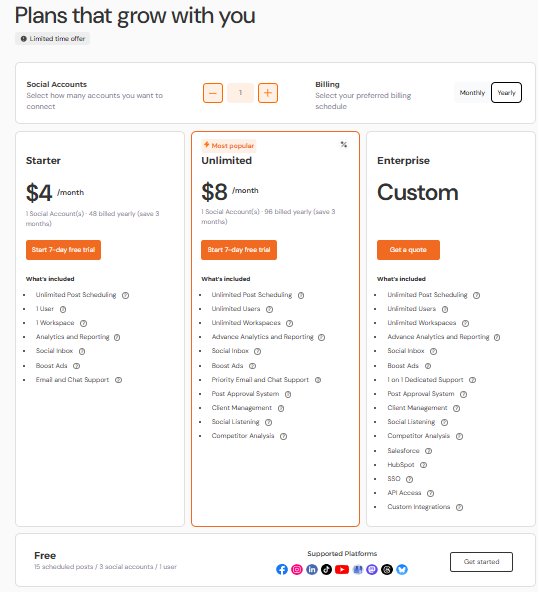
One thing to note is that both Publer and Social Champ use per-channel pricing, meaning each additional social account adds to your monthly cost.
Where they differ is in user access. Publer limits all plans to one user, so adding team members means extra costs per person.
For example:
- Publer Professional ($4/month yearly) – adding one extra member bumps the cost to $5.60/month, one extra account bumps the cost to $7.20/month.
- Publer Business ($8/month yearly) – adding one extra member will make you pay $10.40/month, and one extra account jumps to $13.60/month.
Social Champ’s Growth plan, on the other hand, includes unlimited users, so expanding your team doesn’t increase costs—though per-channel pricing still applies for new social accounts.
All paid plans include advanced features, and even the Free plan offers basic analytics, giving teams and creators clear visibility without surprises.
Publer’s Free Plan vs Social Champ’s Free Plan
When I look at free plans, I’m usually asking one simple question: Can I actually get real work done here, or is this just a trial in disguise? This comparison shows what you realistically get from both free plans.
| Feature | Publer Free | Social Champ Free |
|---|---|---|
| Price | $0 | $0 |
| Pricing Model | Per channel | Per channel |
| Users | 1 user | 1 user |
| Social Accounts | 3 accounts | 3 accounts |
| Post Scheduling | 10 posts per account | 15 scheduled posts |
| AI Assistance | Limited credits | Yes |
| Analytics | No | Basic analytics |
| Post Recycling | No | Yes |
| Social Inbox | No | Yes |
| Social Listening | No | No |
| Best For | Individuals testing basic scheduling | Individuals testing basic scheduling |
Publer’s Professional Plan vs Social Champ’s Starter Plan
This is where things start getting interesting. If you’re moving past the free plan and want better control, analytics, or automation, here’s how Social Champ’s Starter plan stacks up against Publer’s Professional plan.
| Feature | Publer Professional | Social Champ Starter |
|---|---|---|
| Base Price (Yearly) | $4/month | $4/month |
| Pricing Model | Per channel | Per channel |
| Users | 1 user (extra users cost more) | 1 user |
| Social Accounts | 1 (scalable) | 1 (scalable) |
| Post Scheduling | Unlimited | Unlimited |
| AI Assistance | Not included | Champ AI Suite included |
| Analytics | No | Advanced analytics |
| Post Recycling | No | Yes |
| Social Inbox | No | Yes |
| Social Listening | No | No |
| Best For | Solo creators with simple needs | Creators who want AI + insights |
Publer’s Business Plan vs Social Champ’s Growth Plan
This is the comparison most teams and agencies care about. Once scaling and reporting matter, the differences between Publer’s Business plan and Social Champ’s Growth plan become a lot more noticeable.
| Feature | Publer Business | Social Champ Growth |
|---|---|---|
| Base Price (Yearly) | $8/month | $8/month |
| Pricing Model | Per channel | Per channel |
| Users | 1 user (extra users cost more) | Unlimited users |
| Social Accounts | 1 (scalable) | 1 (scalable) |
| Post Scheduling | Unlimited | Unlimited |
| AI Assistance | Unlimited prompts | Champ AI Suite included |
| Analytics | Insights & reports | Advanced analytics |
| Post Recycling | Yes | Yes |
| Social Inbox | No | Yes |
| Social Listening | No | Yes |
| Best For | Small teams with limited needs | Growing teams & agencies |
Publer’s Enterprise Plan vs Social Champ’s Enterprise Plan
At the enterprise level, flexibility and support matter more than just pricing. Here’s how both tools approach large teams, custom needs, and long-term social media operations.
| Feature | Publer Enterprise | Social Champ Enterprise |
|---|---|---|
| Pricing | Custom | Custom |
| Pricing Model | Custom | Custom |
| Users | Custom | Unlimited users |
| Social Accounts | Custom | Custom |
| Post Scheduling | Unlimited daily | Unlimited |
| AI Assistance | Unlimited prompts | Champ AI Suite (Unlimited) |
| Analytics & Reports | Advanced reports | Advanced & custom reports |
| Post Recycling | Yes | Yes |
| Social Inbox | No | Yes |
| Social Listening | No | Yes |
| Support | Priority 1:1 | Dedicated account support |
| Best For | Large organizations with fixed workflows | Enterprises needing collaboration & insights |
Team Growth Tip!
Both Publer and Social Champ use per-channel pricing, so costs naturally increase as you add more profiles. That’s why it’s important to look beyond the base price and understand how each plan scales with team size, features, and long-term usage.
Exceptional Features – Why Social Champ Stands Out
-
AI Assistance Across Plans
Publer’s AI assistant is only available in higher-tier plans, and the free plan offers limited credits. Social Champ includes the Champ AI Suite across all plans, giving users consistent support for content creation, post ideas, and captions.
-
Advanced Analytics and Reporting
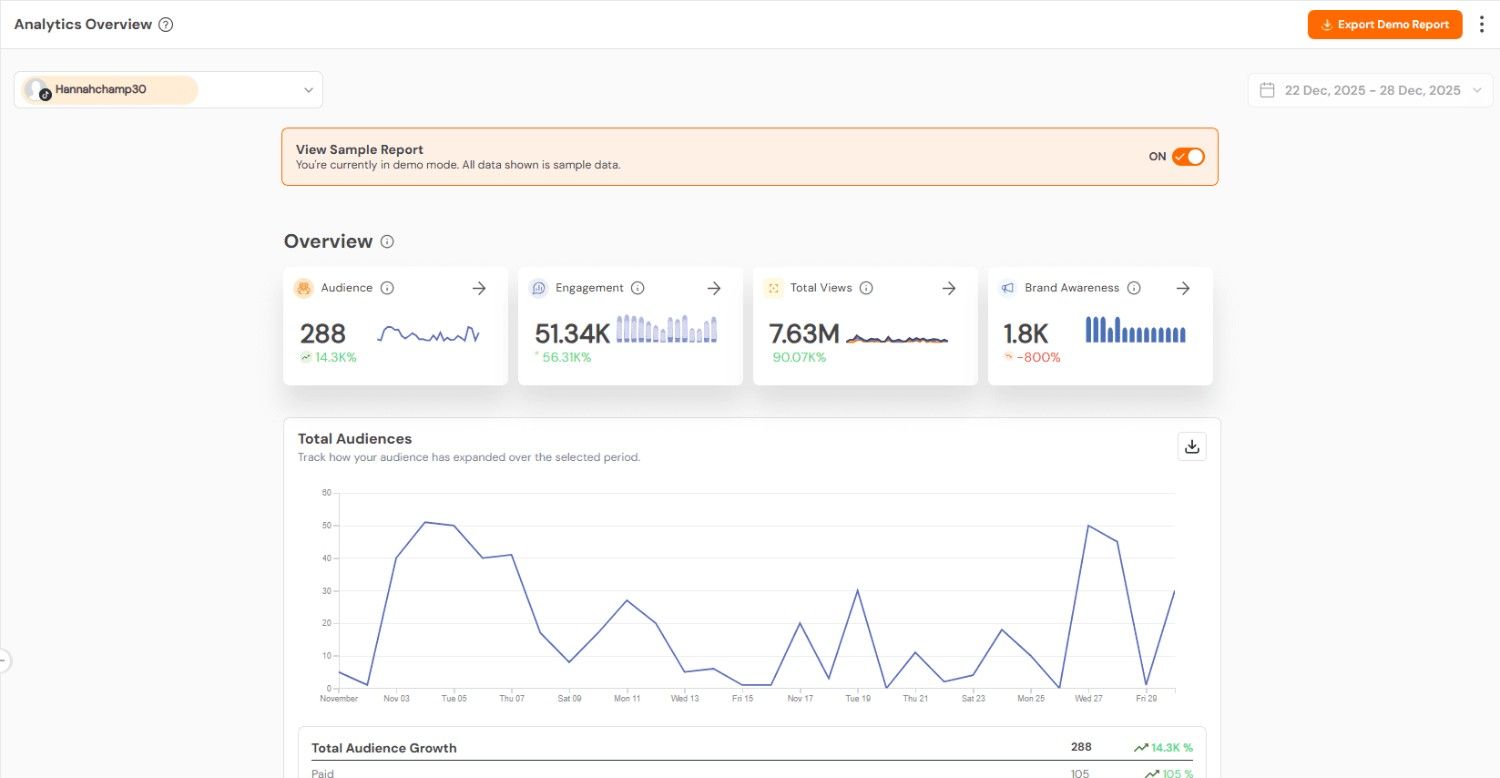
While Publer restricts advanced analytics to higher tiers, Social Champ offers detailed reporting in all plans, with even the Free plan providing basic insights. This means you can track engagement, audience growth, and performance from day one without paying extra.
Social Champ’s Analytics -
Social Inbox and Post Recycling
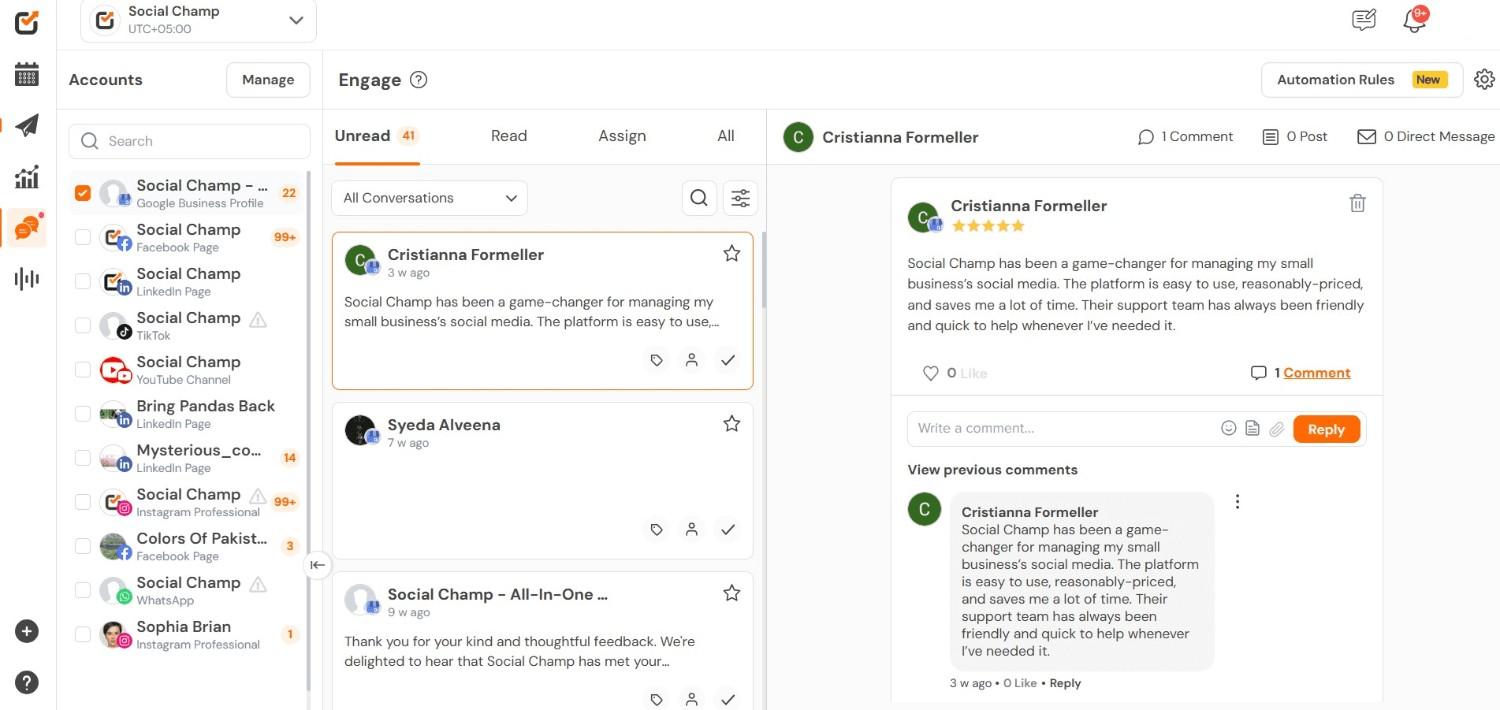
Social Champ offers a Social Inbox and post recycling in all plans, including the Free plan, helping you manage interactions and automate recurring content. Publer, by contrast, only provides post recycling in higher tiers and lacks a Social Inbox, which can slow down engagement tracking.
Social Champ’s Social Inbox -
Social Listening
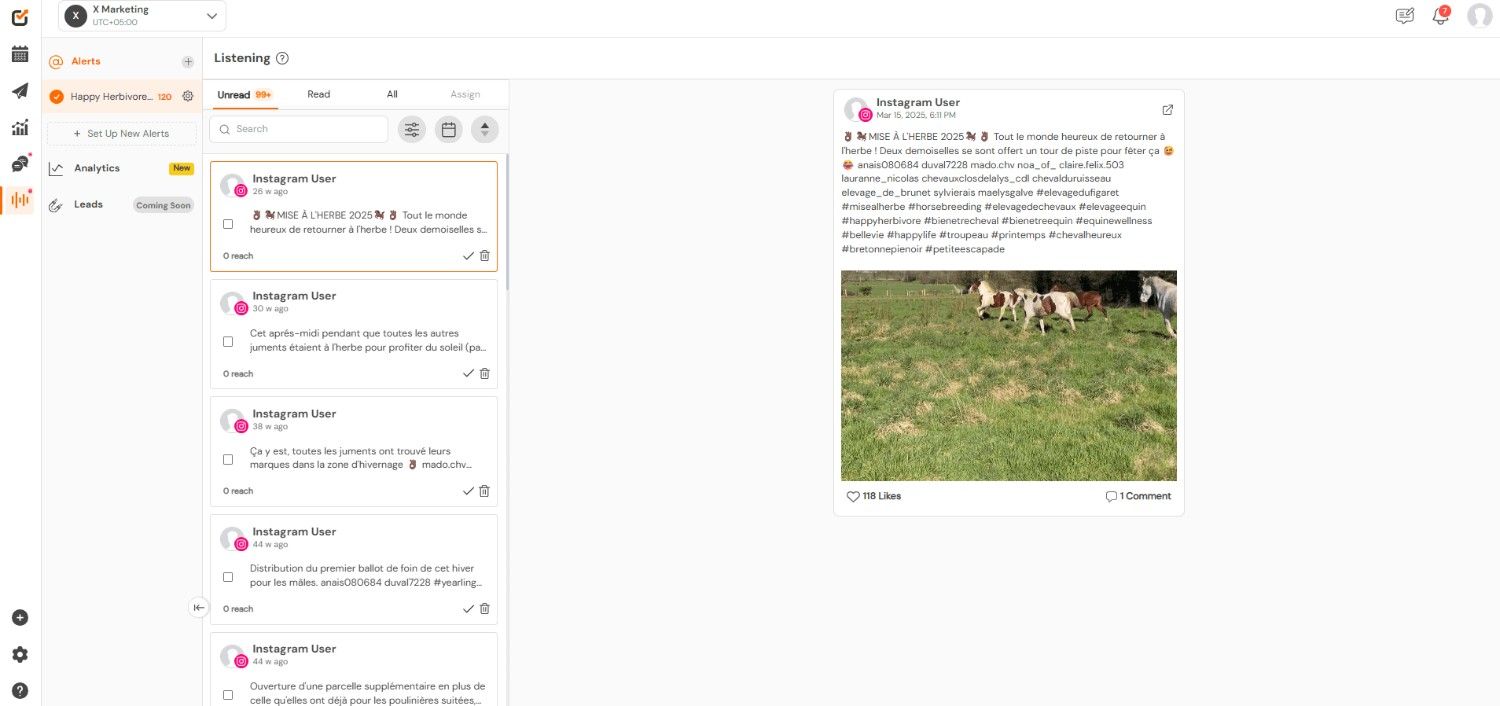
Social Champ’s social listening capabilities give you insights into trends, mentions, and sentiment, the features Publer doesn’t currently provide. This makes it easier to refine strategies and stay ahead of the competition.
Social Champ’s Social Listening Feature -
Unique Integrations – Go Beyond Standard Social Platforms
Both platforms cover the major social networks, but Social Champ pulls ahead with integrations that Publer doesn’t include. For example:
- Google Analytics: Connect your accounts to track web traffic and conversions alongside your social metrics.
- WhatsApp Business: Manage customer conversations and updates directly from Social Champ.
These integrations add a level of flexibility and actionable insights that are simply unavailable in Publer’s current setup.
Quick Take
At the end of the day, Publer pricing and its plans can work for solo creators or small teams, but scaling comes with additional costs for users and accounts, and some features, such as AI, analytics, social inbox, recycling, and social listening, are limited or unavailable.
Social Champ, on the other hand, provides a consistent, full-featured experience across all plans, with advanced analytics, AI, post recycling, social inbox, and unique integrations like Google Analytics and WhatsApp Business.
For marketers looking for an efficient, versatile social media management solution, it’s clear why Social Champ is often the preferred choice.

Still Comparing Tools? Take Social Champ for a Spin!
Test Social Champ at your own pace and see how it fits into your daily workflow before making a decision.
Featured Article: 15+ Best Buffer Alternatives for Smarter Social Media Management
In Conclusion
After walking through every plan, one thing is clear: Publer pricing can work well if you understand how it scales.
On the surface, the plans look affordable, especially for solo creators or small teams just getting started. But as soon as you add more users or social accounts, the costs can rise faster than expected.
That doesn’t make Publer a bad tool. It just means it’s better suited for people with fairly simple workflows or predictable needs.
If you’re planning to grow, collaborate, or rely heavily on analytics, AI, and engagement tools, it’s important to look beyond the base price and think long term.
Do the math early, compare features carefully, and choose the plan that fits how you actually work, not just what looks cheapest today.