

With new platforms popping up every other month and competition getting fiercer by the second, the pressure to be everywhere at once is exhausting.
To make matters tougher, marketing budgets are getting leaner, and agencies are feeling the squeeze to scale without breaking the bank. That’s exactly why your choice of a management tool matters more now than ever.
Short Summary
- SocialPilot remains the 2026 value king for agencies due to its flat-fee structure and high social account limits.
- The Essentials plan is the most affordable entry point at $25.50/mo (billed annually), covering up to 7 social profiles.
- Higher-tier plans like Premium and Ultimate justify their cost with agency-specific features like white-labeling, client approval workflows, and advanced analytics.
- While SocialPilot is a powerhouse for scaling, it lacks a free forever version, making it slightly pricier for solo users with only 1–2 accounts.
- Social Champ is the recommended alternative for those on a tighter budget, offering a free tier and lower-priced monthly options for smaller operations.
The data backs up that “all-over-the-place” feeling, too.
93.8 percent of the world’s internet users, regardless of age, now use social media each month.
That means you have a lot of potential customers to get to, and if your team is spending more time logging in and out of apps than actually creating content, you’re losing money.
For busy business owners (or any entrepreneur!), managing all that across multiple platforms can feel overwhelming. This is where free social media management tools come in!
So, where does SocialPilot fit into the mix? Is it still the budget-friendly powerhouse we’ve grown to love, or has the value shifted?
In this guide, we’re going to pull back the curtain on SocialPilot pricing. We’ll walk through a detailed breakdown of every plan, and help you figure out which one actually fits your needs.
Let’s compare SocialPilot’s pricing to the bigwigs and see if it lives up to the hype!

Create, Schedule, and publish within minutes with versatile features. Sign up today and get a fuss-free social media experience.
What Are SocialPilot’s Current Pricing Plans?
Navigating software costs shouldn’t feel like a math exam. In 2026, SocialPilot keeps things relatively straightforward with four main tiers designed to scale as your business grows. Whether you’re a solopreneur or a massive agency, there’s a bucket for you.
You can take any of these plans for a spin with a 14-day free trial, and the best part is, they don’t even ask for your credit card upfront.
The 2026 Pricing Breakdown
SocialPilot offers a significant discount if you’re ready to commit for the long haul. By choosing to be billed annually, you save 15% compared to the month-to-month rate.
Pro Tip: If you’re on a budget, the “Essentials” plan at $25.50/mo (billed annually) is one of the most competitive entry points in the industry for professional-grade tools.
| Plan | Price (Billed Annually) | Price (Billed Monthly) | Accounts Included | Users | Key Features |
|---|---|---|---|---|---|
| Essentials | $25.50/mo | $30/mo | 7 | 1 | 500 AI Credits, Content Library, Tags |
| Standard | $42.50/mo | $50/mo | 15 | 3 | 1000 AI Credits, Social Inbox, Analytics, Team Collab |
| Premium | $85.00/mo | $100/mo | 25 | 6 | 5000 AI Credits, Bulk Schedule, White Label Reports |
| Ultimate | $170.00/mo | $200/mo | 50 | Unlimited | Unlimited AI Credits, Advanced White Label, Concierge Onboarding |
How Does SocialPilot Pricing Scale With Business Size?
Choosing a plan isn’t just about the price tag; it’s about making sure the SocialPilot pricing features grow at the same pace as your workload. If you’re a solo creator, you don’t want to pay for agency-level white labeling. Conversely, if you’re a big agency, a “Premium” plan will feel like trying to fit an ocean into a bucket.
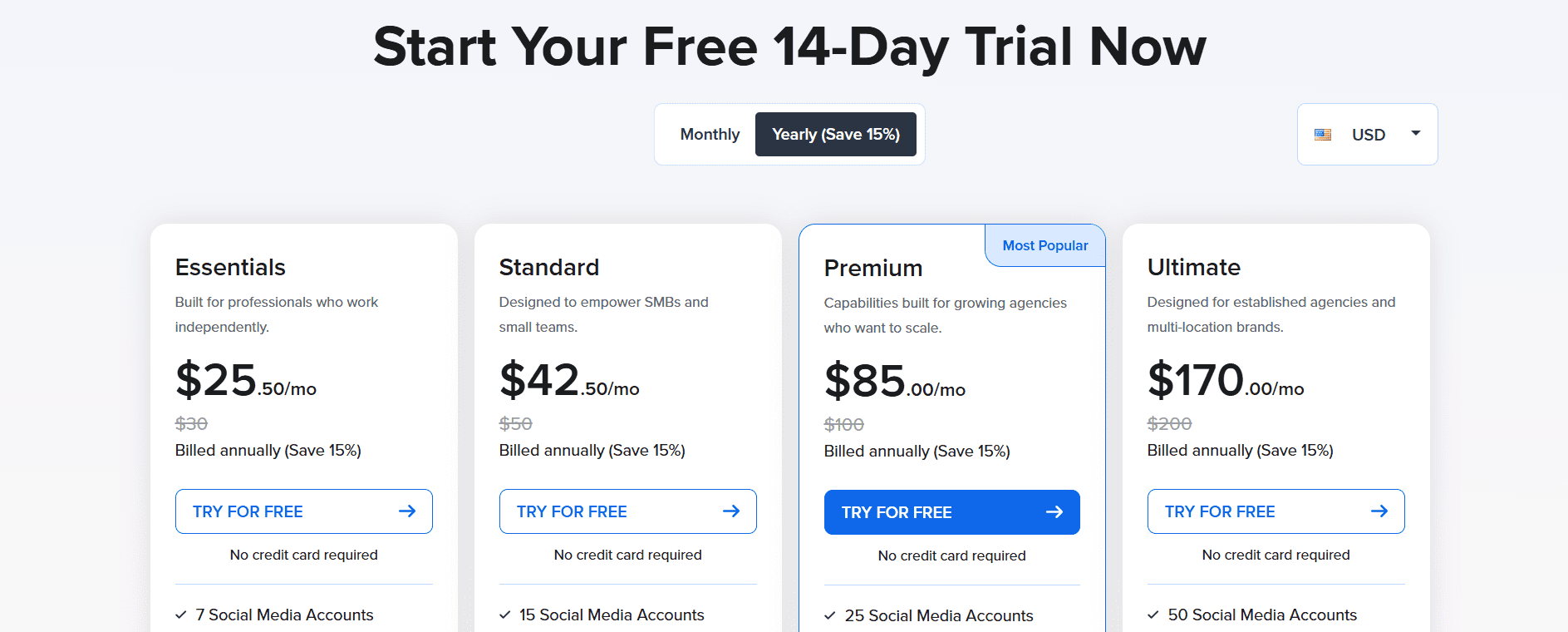
SocialPilot’s Pricing Page
Here is how the SocialPilot pricing plans generally map out for different business stages:
-
The Solo Hustler (Essentials Plan)
If you are an influencer, a freelancer, or a small business owner managing your own brand, this is your starting point.
- Scale Factor: You manage 7 or fewer accounts (e.g., 1 Instagram, 1 TikTok, 1 LinkedIn, etc.).
- Best For: Those who need basic scheduling and a little AI help but don’t need a team to approve their work.
-
The Growing Team (Standard Plan)
Once you hire a VA or a junior marketer, you need collaboration.
- Scale Factor: Up to 15 accounts and 3 team members.
- Best For: Small boutiques or internal marketing teams that need a Social Inbox to reply to comments without sharing passwords.
-
The Scaling Agency (Premium Plan)
This is SocialPilot’s sweet spot and their most popular tier.
- Scale Factor: Up to 25 accounts and 6 team members.
- Best For: Agencies managing 5–10 clients. This plan introduces White Label Reports, allowing you to send professional, branded analytics to clients that look like you built them from scratch.
-
The Powerhouse (Ultimate/Enterprise)
When your client list is into the dozens, you need limitless territory.
- Scale Factor: 50+ accounts and unlimited users.
- Best For: Large agencies or multi-location brands (like franchises). You get a dedicated account manager to ensure your massive volume of posts goes out without a hitch.
Comparison: Pricing vs. Scaling Potential
The chart below shows how the cost-per-account actually drops as you scale up, making the higher tiers surprisingly more economical for large operations.
| Business Size | Recommended Plan | Monthly Cost (Annual) | Cost Per Social Account |
|---|---|---|---|
| Solopreneur | Essentials | $25.50 | $3.64 |
| Small Team | Standard | $42.50 | $2.83 |
| Mid-Sized Agency | Premium | $85.00 | $3.40* |
| Large Agency | Ultimate | $170.00 | $3.40 |
Quick Guidance: Which one should you pick?
- If you manage < 7 profiles and work alone: Stick to Essentials.
- If you have a team and need to reply to messages, go with Standard.
- If you have clients who want to see your logo on reports, you need Premium.
- If you have 10+ clients or 50+ profiles: Save yourself the headache and get Ultimate.
What Features Do You Get at Each SocialPilot Plan?
When looking at SocialPilot pricing features, it’s easy to focus solely on the number of social media accounts. However, the real value, and the reason for the price jumps, lies in the workflow and agency tools that get unlocked as you move up.
While every plan includes the basics like the Canva integration, the AI Assistant, and a browser extension, the higher tiers are designed to save you time on the business side of social media (like chasing clients for approvals).
| Feature | Essentials | Standard | Premium | Ultimate |
|---|---|---|---|---|
| Social Accounts | 10 | 20 | 30 | 50 |
| Team Seats | 1 | 3 | 6 | Unlimited |
| AI Credits | 500 | 1,000 | 5,000 | Unlimited |
| Social Inbox | ❌ | ✅ | ✅ | ✅ |
| Bulk Scheduling | ❌ | ❌ | ✅ | ✅ |
| Analytics Reports | Basic | Standard | Advanced | Advanced |
| White-Labeling | ❌ | ❌ | Reports Only | Full Dashboard |
| Client Approvals | ❌ | ❌ | ✅ | ✅ |
Featured Article: Post to All Social Media at Once
How Does SocialPilot Pricing Compare to Social Champ?
When you’re looking at SocialPilot pricing plans, it’s easy to wonder if you’re getting the best deal. After all, the market is crowded with tools claiming to be the most affordable.
One of the most frequent comparisons we see is with Social Champ. While both tools aim to simplify your life, they cater to slightly different crowds. Social Champ often appeals to individuals and tiny teams with its lower entry-level price, while SocialPilot pricing is structured to offer massive value to scaling agencies that need heavy-duty features like white-labeling and client approval workflows.
| Tool | Starting Price (Monthly) | Accounts Included | Team Size | Notable Features |
|---|---|---|---|---|
| SocialPilot | $25.50 (billed annual) | 10 | 1 | White-label reports, bulk scheduling, AI Assistant |
| Social Champ | $29 (monthly) | 12 | 2 | Content recycling, Sentiment analysis, AI Imaginator |
| Zoho Social | $15 | 7 | 1 | CRM integration, Social listening, Smart Q |
| Buffer | $6 /channel | 1 | 1 | Simple interface, “Start Page” landing pages |
Why SocialPilot is Often the Better Value
For many, the slightly higher starting price of SocialPilot pays for itself in hidden savings:
- No Per-Seat Client Fees: Unlike many competitors, SocialPilot allows you to add unlimited clients on its Premium and Ultimate plans. You aren’t penalized for growing your business.
- Bulk Scheduling Power: If you manage hundreds of posts a month, SocialPilot’s bulk uploader is widely considered more robust and less glitchy than many budget alternatives.
- Professionalism: The white-labeling features in SocialPilot are superior. If you want to present yourself as a high-end agency, sending a report with your own logo (not the software’s) is a non-negotiable.
Why SocialPilot Might Not Be the Best Fit
If you are a solo creator only managing 2 or 3 profiles (like just a LinkedIn and a TikTok), a tool like Buffer or Social Champ’s lower-tier plans might save you a few dollars. SocialPilot is a pro tool; if you don’t need the agency-style reporting or the 10+ account capacity, you might be paying for more horsepower than you actually use.
You don’t need a $25 tool to publish content. Social Champ gives you the same firepower for a fraction of the cost, and you can try it today.
Which SocialPilot Plan Should You Choose? Decision Guide
Choosing the right plan is about finding the goldilocks zone: you don’t want to pay for features you’ll never touch, but you also don’t want to hit a ceiling right when your business starts to take off.
To help you decide, let’s look at a few common 2026 scenarios.
Scenario-Based Recommendations
-
The Solopreneur or Freelancer
If you’re a one-person show managing a handful of social profiles for yourself or 1–2 small clients, the Essentials Plan is your best bet. It’s budget-friendly and gives you enough AI credits to beat writer’s block without overcomplicating your workflow.
- Go for Essentials if: You manage ≤ 7 accounts and don’t need team collaboration.
-
The Small Marketing Team (SMB)
If you have a couple of colleagues helping with content, you need the Standard Plan. This is the first tier that unlocks the Social Inbox, which is a lifesaver for keeping track of conversations across Facebook, Instagram, and LinkedIn in one place.
- Go for Standard if: You have 2–3 team members and manage up to 15 accounts.
-
The Growing Agency
This is where SocialPilot really shines. The Premium Plan is built for agencies that are tired of sending “Does this look okay?” emails to clients. The Client Approval Workflow lets your clients log in (or use a secure link) to hit “Approve” on your drafts.
- Go for Premium if: You have 5+ clients, need White-Label Reports, and want a professional approval process.
-
The Established Agency or Franchise
If you are managing 50+ profiles or want the software to look like it belongs entirely to your agency (custom domain, custom colors, custom login), the Ultimate Plan is the way to go. You also get a Dedicated Account Manager, which is basically like having a SocialPilot expert on speed dial.
- Go for Ultimate if: You manage 30–50 accounts and want a Full White-Label Dashboard for your clients.
Comparison Checklist: Must-Have Features
| If you need… | Essentials | Standard | Premium | Ultimate |
|---|---|---|---|---|
| Social Media Inbox | ❌ | ✅ | ✅ | ✅ |
| Team Collaboration | ❌ | ✅ | ✅ | ✅ |
| Client Approval Tool | ❌ | ❌ | ✅ | ✅ |
| White-Label PDF Reports | ❌ | ❌ | ✅ | ✅ |
| Custom Branding/Domain | ❌ | ❌ | ❌ | ✅ |
Featured Article: Best Time to Post on TikTok
What Are the Pros and Cons of SocialPilot Pricing?
When weighing up SocialPilot pricing, it’s clear the platform has a very specific personality. It isn’t trying to be the cheapest tool on the planet, nor is it trying to be a high-end enterprise monster like Sprout Social. Instead, it lives in that just-right middle ground for serious marketers.
Here’s a quick look at the highs and lows of the SocialPilot investment:
| Pros (The Wins) | Cons (The Trade-offs) |
|---|---|
| High Account Limits: You get 10 accounts even on the entry tier, whereas competitors often limit you to 3 or 5. | No Free Plan: Unlike Buffer or Social Champ, there is no free forever tier—only a 14-day trial. |
| No Per-Client Fees: On Agency plans, you can add unlimited clients without your monthly bill exploding. | Steep Entry for Solo Users: At $25.50/mo, it’s a bit pricey if you only manage 1 or 2 social profiles. |
| Agency Ready: Includes white-labeling and client approval workflows that usually cost double elsewhere. | Basic Social Listening: It’s great for posting, but it lacks deep brand mention tracking or sentiment analysis. |
| Bulk Scheduling: One of the most stable bulk uploaders in the game (up to 500 posts at once). | Limited Platform Depth: While it covers the “Big 9,” it doesn’t offer advanced YouTube or Threads features yet. |
The Commentary: Is It Worth It?
The consensus for 2026 is simple: SocialPilot is a value king for agencies, but might be overkill for individuals.
If you are an agency owner, the SocialPilot pricing plans are essentially a dream. Most other tools will nickel and dime you for every new client or team member you add. SocialPilot’s flat-fee approach for unlimited clients means your profit margins actually increase as you scale.
However, if you’re a solo blogger or a small business with just a Facebook page and an Instagram, you might find yourself paying for 7 extra slots and agency workflows that you simply don’t need. In that case, the lack of a free version or a $25.50 “Essentials” plan can feel like a hurdle.
If you want to know more about social media management and productivity tools, refer to the following resources:
In Conclusion
If you’re running a growing agency or a busy marketing team, SocialPilot is absolutely worth the investment. It remains the value king for professional setups because it doesn’t punish you with per-seat fees as you scale, making it one of the most sustainable ways to manage dozens of clients without your costs spiraling out of control.
However, if you’re a solopreneur or a small business owner who only needs to manage a few accounts, SocialPilot might offer more horsepower than you actually need. In that case, Social Champ is a fantastic alternative to look into.
So, choose SocialPilot if you need high-level agency workflows and professional white-labeling. But if you want a sleek, affordable tool that gets the job done without the agency price tag, Social Champ is your best bet.





2 comments
Brett Parker
I’ve been considering SocialPilot for a while now, so stumbling upon this breakdown of the 2024 pricing model is incredibly timely! Keep it up!
Monica Brown
It’s so helpful to see how the various plans stack up against each other and whether the investment aligns with our needs and budget. Looking forward to giving SocialPilot a closer look based on your insights. Keep up the great work in helping us make informed decisions!