
Have you ever had the feeling of sitting at your desk with your coffee, your mind feeling empty?
That happened to me, too, and almost every social media manager goes through it.
I had posts due for three clients, and nothing felt right. And that was the moment that pushed me to build a social media content calendar, and literally, it changed everything for me.
Short Summary
- A social media content calendar is a tool to plan, schedule, and track social media posts.
- A content calendar makes campaign planning easy by organizing the content in one place.
- The calendar can be created using various platforms such as Excel, Google Sheets, or specialized tools.
- It helps ensure consistent posting, which is essential for growing an online presence and engaging with the audience.
- A content calendar minimizes errors by allowing time to review and adjust the content before posting.
- Tools like Google Drive, Trello, and Social Champ are commonly used for creating social media content calendars.
I saw a study that said accounts with steady posting get up to five times more engagement than accounts that post without a plan.
And that number hit me hard. I didn’t want my work to fall behind while others moved ahead.
So, in this guide, I’ll show you how to create your own social media posting calendar and how using a free social media scheduler can help you set your posts before the week starts.
Stick with me. You’ll walk away with a clear plan you can use right now.

Your Social Media Success Starts Here. Try Social Champ!
Social Champ’s content calendar is revolutionizing social media management. Sign up now and see the difference it makes!
What Is a Social Media Content Calendar and Why Does It Matter
I remember the days when I would scramble at the last minute, trying to figure out what to post on Instagram or LinkedIn.
It felt chaotic, and honestly, my engagement showed it. That’s when I realized I needed a social media content calendar.
In fact, brands that plan their content see up to 3 times more engagement than those posting randomly. That’s like showing up to a party prepared instead of walking in empty-handed.
A content calendar helps you organize every post, track campaigns, and stick to your social media schedule without feeling overwhelmed.
You can use Excel, Google Sheets, or even a visual content planner. The key is to have everything in one place and ready to go.
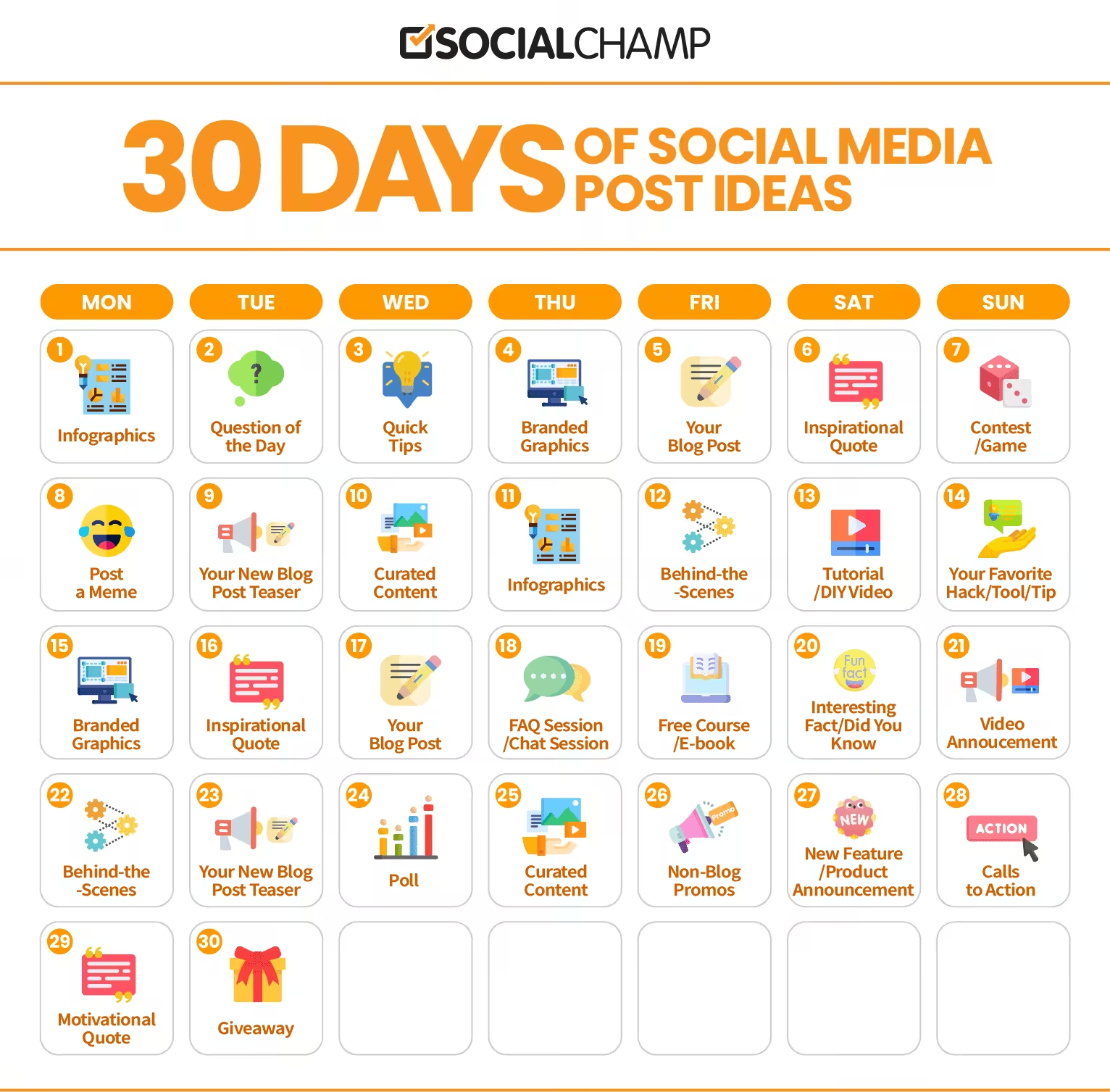
Here’s a snapshot of a content calendar for social media showing 30 days of post ideas. With something like this, you can plan ahead, reduce last-minute stress, and schedule and post to all social media at once.
Trust me, once you start using it, you’ll wonder how you ever managed without a calendar.
Who Should Use a Social Media Content Calendar
Everyone in the business uses social media channels to push their product to the masses.
Businesses apply different techniques and strategies, starting with social media outreach (to build connections), running ads (to sell a product), and ending with content promotion.
Consequently, using a social media content calendar is “a must” option for anyone who creates content.
Let’s review in more detail what can benefit from it:
- Bloggers: There are lots of people who make money blogging. Hence, they need to make their post highly promoted across social channels.
- Freelancers: If you manage multiple clients, it’s easy to lose track of deadlines. A social calendar provides clarity, keeps you organized, and ensures all your projects stay on schedule. For instance, you can plan client posts a month ahead to avoid last-minute stress.
- Business representatives: A social media calendar helps businesses stay organized with content promotion. Plus, if business owners have a tight budget, using calendars can save them money.
- Marketers: If you run marketing campaigns, you would know that it involves various steps. One of these steps is social promotion. Thus, by creating the calendar, your team will never miss a deadline for a specific post-promotion.
- Business/marketing consultants: These people work on many projects simultaneously. It is pretty easy to get into a mess with all this stuff. Likely, if you organize your projects with the calendar, you won’t have any difficulties at work.
- Media companies: Creating editorial content takes lots of time and effort. Also, it needs to be promoted on social channels. Create the calendar and promote your content on time,
To conclude, everyone in digital marketing must have a social media content calendar for multiple reasons.
Ready to Plan Your Social Media Strategy? Try Social Champ!
Plan, schedule, and publish all your content in one place. Create your content calendar with Social Champ and stay on track.
Featured Article: Pinterest Pin Size: The Ultimate Guide
What Should a Social Media Content Calendar Include?
When I first started planning posts, I would jot things down randomly and often forget key details.
That’s when I realized a social media content calendar is your workflow backbone.
Having a clear structure makes posting smoother and ensures nothing slips through the cracks, and keeps your team aligned.
Key Components of Your Social Calendar
Here’s a simple checklist of the key components every social calendar should have:
| Component | Why It Matters |
|---|---|
| Posting Schedule | Knowing the exact date your post goes live helps you plan ahead and keeps your social media schedule consistent. |
| Sales Cycle | Aligning content with your sales cycle ensures your posts support promotions, launches, and campaigns at the right time. |
| Post Topic | Defining the topic helps your audience understand your message and keeps your content focused. |
| Text / URL | Clear captions and links drive traffic and engagement. This is where you guide your audience to take action. |
| Image / Media URL | Visuals catch attention faster than text alone. Having the media ready prevents last-minute stress. |
| Goal of the Post | Every post should have a purpose: awareness, lead generation, or engagement. Tracking goals shows what works. |
| Social Media Channels | Knowing where each post goes ensures your content reaches the right audience on the right platform. |
Why These Components Matter
You can tweak this list based on your business needs, but having a structure like this keeps everything organized.
Personally, I use a mix of Excel for quick edits and a content planner tool for a more visual view. It feels like having a command center for all my posts.
You don’t need to overcomplicate things. Even a simple table like the one above can transform your workflow and make scheduling posts feel effortless.
Planning not only saves time but also keeps your content aligned with your overall strategy, so nothing gets lost in the shuffle.
How to Create a Social Media Content Calendar in 2026?
I still remember the time when I missed a major product launch because I had no plan for posting.
My posts went out at random times, engagement tanked, and I felt frustrated. That experience taught me one thing: you need a social media content calendar.
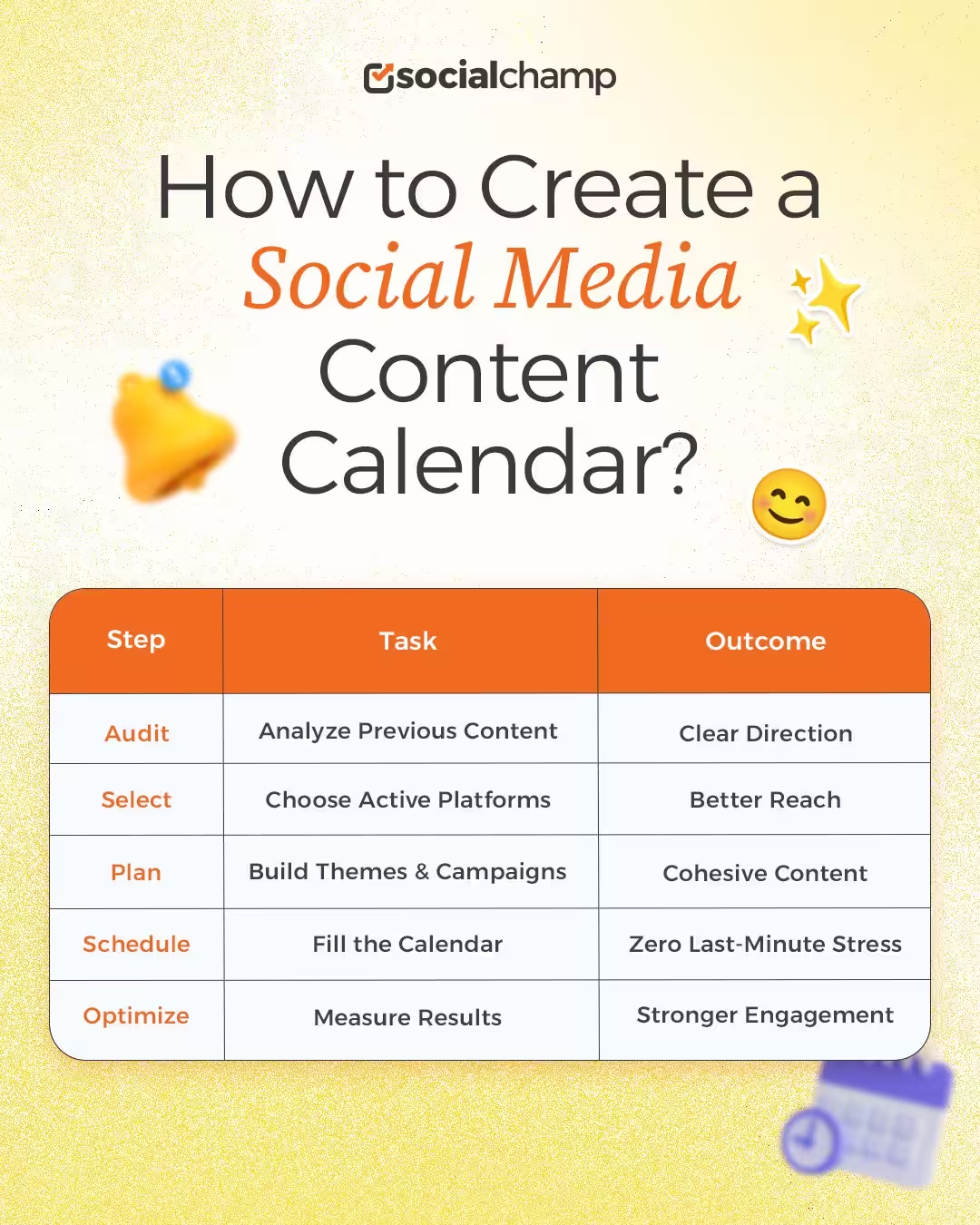
So, I’m breaking down some simple steps to create a content calendar so you won’t miss any deadlines again.
Step 1: Audit Existing Content and Define Goals
First, think back to your past posts. Which ones performed surprisingly well? Which ones barely got noticed?
I once discovered that short tutorial videos on Instagram outperformed long blog links by a huge margin.
If you do this kind of audit, it can help you spot what resonates and gives you a clear direction.
Define your goals, too. Maybe you want to increase engagement, drive traffic to your website, or grow your followers.
Clear goals make your social media schedule purposeful rather than random.
Step 2: Choose Platforms and Posting Frequency
At first, I tried posting everywhere, like Facebook, X, LinkedIn, TikTok, you name it. I quickly realized spreading myself too thin hurt my results.
You should focus on the channels where your audience is actually active.
Decide how often to post. It could be three times a week on Instagram or twice a week on LinkedIn.
Consistency beats volume. I’ve found that even a small, steady rhythm makes a huge difference in engagement.
Step 3: Plan Content Themes and Campaigns
Once you know your platforms, group your posts into themes or campaigns. I usually plan a mix of educational content, behind-the-scenes posts, and product highlights.
A tip I love is batching posts: write multiple posts at once for a single theme. It saves time and makes your content feel cohesive.
For example, I recently created all holiday-themed posts in one afternoon and scheduled them weeks ahead, and it was a huge relief.
Step 4: Fill in the Calendar and Assign Responsibilities
Now it’s time to populate your content calendar for social media.
Add dates, platforms, copy, images, links, and goals. Assign each post to a responsible team member so nothing slips through the cracks.
Using a social calendar tool makes this even easier. With the right scheduling tools, you can schedule posts across multiple platforms in minutes, and everyone knows exactly what to do.
Step 5: Track Performance and Adjust Strategy
Finally, monitor your posts. I remember the first month I tracked engagement and discovered my video posts were outperforming images.
Adjusting based on data allowed me to focus on what worked and cut content that didn’t.
A social media content calendar isn’t static. It evolves with your audience and campaigns. When you plan, track, and tweak regularly, your content feels intentional, your workflow becomes smooth, and your engagement grows naturally.
What Are Some Social Media Content Calendar Templates
When people ask for social media content calendar templates, what they usually want is not a fancy file. They want clarity.
What should go where? How much should I plan? And what does a real calendar look like in action?
The truth is, there is no single template that works for everyone. Your social media content calendar depends on your goals, platforms, and how often you post.
Still, most calendars follow a few proven formats. Let me walk you through them.
Weekly Social Media Content Calendar Template
This is the simplest format and a good starting point if you want control without pressure.
What it usually includes:
- Date and day
- Platform
- A Post idea or topic
- Caption space
- Visual reference
- Goal of the post
A weekly social calendar works well when you want flexibility. You can plan a few posts ahead, adjust quickly, and avoid overcommitting.
I often recommend this format to small teams and solo creators who want momentum without stress.
Monthly Social Media Content Calendar Template
If you run campaigns or manage multiple platforms, a monthly view gives you perspective. This version focuses less on captions and more on themes and intent.
You plan what each week stands for, such as education, promotion, or community content.
This approach turns your calendar into a lightweight content marketing calendar instead of a daily checklist.
It also makes it easier to balance content types and avoid repeating the same message.
Google Sheets or Drive-Based Calendar Example
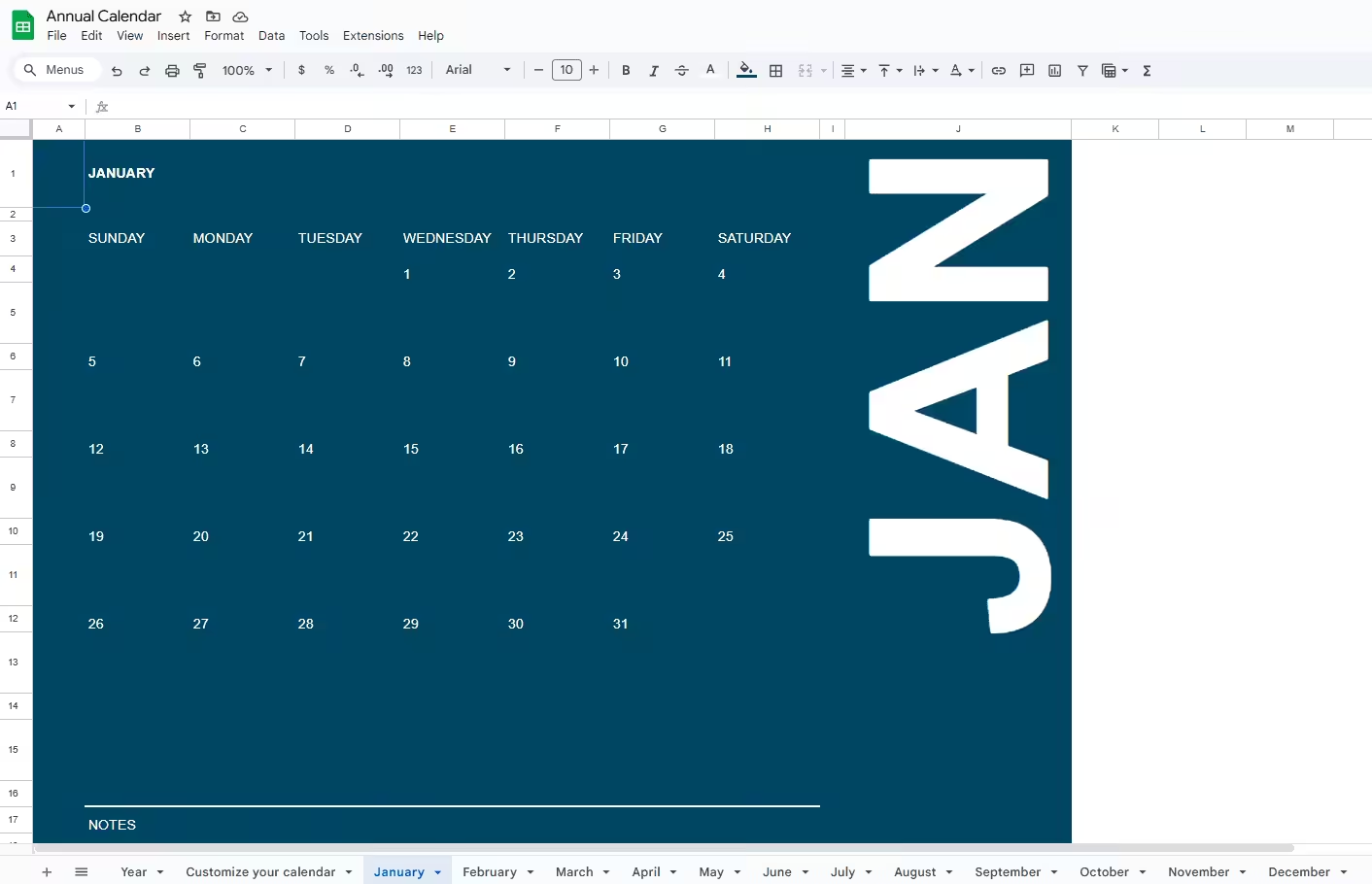
Many teams use Google Sheets because it’s easy to share and update.
One tab often holds the main social media posting calendar, while other tabs store ideas, captions, and visuals.
This setup creates a clear content planner that everyone can access. Once posts are approved, they move from planning into scheduling.
At that stage, tools like Social Champ help teams turn plans into an actual social media schedule without manual posting.
How These Templates Work in Real Life
Here’s a simple example of how one week might look once filled:
- Monday: Educational post on LinkedIn
- Wednesday: Short tip on Instagram
- Friday: Brand update on Facebook
Seeing examples like this helps you understand pacing and flow. That’s why social media calendar examples matter more than blank templates.
One Important Reminder
Templates are starting points, not rules. Adjust them based on your posting frequency, team size, and goals.
The best content calendar for social media is the one you keep updated and actually use.
P.S. A social media content calendar becomes far more effective when paired with the right productivity tools and backed by real social media statistics. Planning with data saves guesswork and helps you stay consistent.
What Are the Benefits of a Social Media Content Calendar
I used to think planning posts ahead was extra work. Then I experienced a week where everything was already planned, approved, and scheduled.
That’s when the value of a social media content calendar really clicked for me. It doesn’t just organize posts. It changes how you work.
Instead of reacting every day, you start working with intention. Here’s how that plays out in real life.
It Saves Time and Reduces Daily Stress
When your posts are planned, you stop wasting time deciding what to publish each day. You can batch content, schedule it once, and move on. That alone frees up hours every week.
A calendar also removes the pressure of last-minute ideas. You already know what’s coming next on your social calendar, so your focus shifts from panic to strategy.
It Keeps Your Posting Consistent
Consistency is hard when everything lives in your head. A calendar turns consistency into a habit.
When your posting rhythm stays steady, your audience starts to expect and recognize your content.
Over time, that regular presence builds trust and stronger engagement. You stop posting randomly and start showing up with purpose.
It Improves Content Quality
Planning ahead gives your content room to breathe. You can review copy, polish visuals, and align posts with your message instead of rushing them out.
When teams have time to collaborate, content improves. Writers, designers, and reviewers all know what’s coming and when.
That clarity leads to better results across your social media content calendar.
It Keeps Teams Aligned and Focused
A calendar acts like a shared roadmap. Everyone sees what’s planned, who owns what, and when approvals are needed. That visibility reduces confusion and back-and-forth.
This matters even more when multiple people work on content. A clear social calendar keeps everyone on the same page and moving in the same direction.
It Connects Social Posts to Bigger Goals
Social media should support launches, campaigns, and milestones. A calendar helps align posts with those moments instead of treating them as isolated updates.
When your calendar matches your marketing priorities, your message feels cohesive across platforms. Nothing feels random or disconnected.
It Helps You Learn What Actually Works
A planned calendar makes performance easier to track. You can spot patterns, test formats, and adjust your approach based on real results.
Instead of guessing, you refine your strategy with data. Over time, your social media content calendar becomes smarter and more effective.
What Are Some of the Best Practices for Creating a Social Media Calendar?
-
Check and Audit Your Social Media Situation
We have news if you do routine checks for typos and picture lags and think the audit is complete. There are many more things you can check to improve your brand situation on social.
The first thing to do in any project is to define the A-spot. This is the situation you are in at the moment.
By defining the A-spot, you’ll know which direction to move in, adjust the content calendar, and provide the best for the audience.
As a result, ROI will reach the maximum (if the content is good, of course).
Here are the things to look after:
- Imposters of your brand or old accounts people can mistake for the main one.
- Your password, two-factor authentication, and connected mobile numbers.
- Goals for every platform and how the progress is going.
- Posts that get the most attention and those with fewer likes. You can do the analysis later to adjust your tactics.
- Target audience metrics.
- Account managers and their performance.
- Budget for the promotion of every account.
- Fails and gaps for further analysis.
- Feedback from the audience.
-
Interlink the Social Media Calendar With SEO and Backlink Mentions
Social media isn’t only about consuming information and brand awareness.
Eventually, you want to get leads and convert them. That’s why it’s crucial to interlink your social media plan with SEO and a backlink outline.
-
Systemize Your Social Media Content Calendar
Make sure you can systemize your social media content calendar according to:
- The platform (Facebook, Instagram, Twitter, LinkedIn, etc.);
- The type of content (a post, a story, a tweet, a live stream, etc.);
- Whether it’s promotional or informative (so you can see the ratio);
- Brands and bloggers you promote/that promote you for money;
- A manager responsible for the content;
- Links to assets (publication drafts, visuals, etc.);
- Purpose of the post.
You can add more or delete the unnecessary points, of course.
-
Link It to the Content Depository
Have a database with content drafts, visuals, notes, brand contacts, and everything else needed for a proper content plan in a database. Use Google Drive, Dropbox, or any other secure cloud.
Also, if you order photos before publishing them, it is convenient to attach them as links.
Many beginners make mistakes by hosting all those files on their phones or laptops.
Isn’t it easier to have everything in one file? Just link to whatever text or visual information you need for a story, post, tweet, etc., in the social media content calendar.
Pros of Cloud Storage:- They offer a lot of space.
- You can access them from any device.
- Offline viewing is available in many options.
- It’s easy to get a link to any file and post it as a hyperlink in the calendar.
-
Include Specific Metrics
Every platform has the best time to post on social media for the most attention from the audience.
These are estimates because people have different lives, holidays when everyone’s off their phones, etc.
However, if you can boost content for free just by choosing dates, why not use it?
You can use colors to mark days in your social media content calendar, and then, if you want to adjust, you’ll see what date to move a promotional story or post.
-
The First Draft Doesn’t Have to Be the Best Ideal
While working in marketing, we’re sure you know that every specialist has their tactics and needs.
Create your calendar and see how it works. During the first couple of weeks, you’ll notice the difficulties, gaps, etc., that can be easily adjusted on the spot or in the next month’s sheet.
Shift categories, use color or text, link to assets in the same file, or create another one.
It’s all up to you. Soon, you will have a perfect template that works best for your marketing methods and the project.
Featured Article: TikTok Ideas: Boost Engagement and Creativity
What Are the Most Commonly Used Social Media Content Calendar Apps and Tools
-
Google Drive
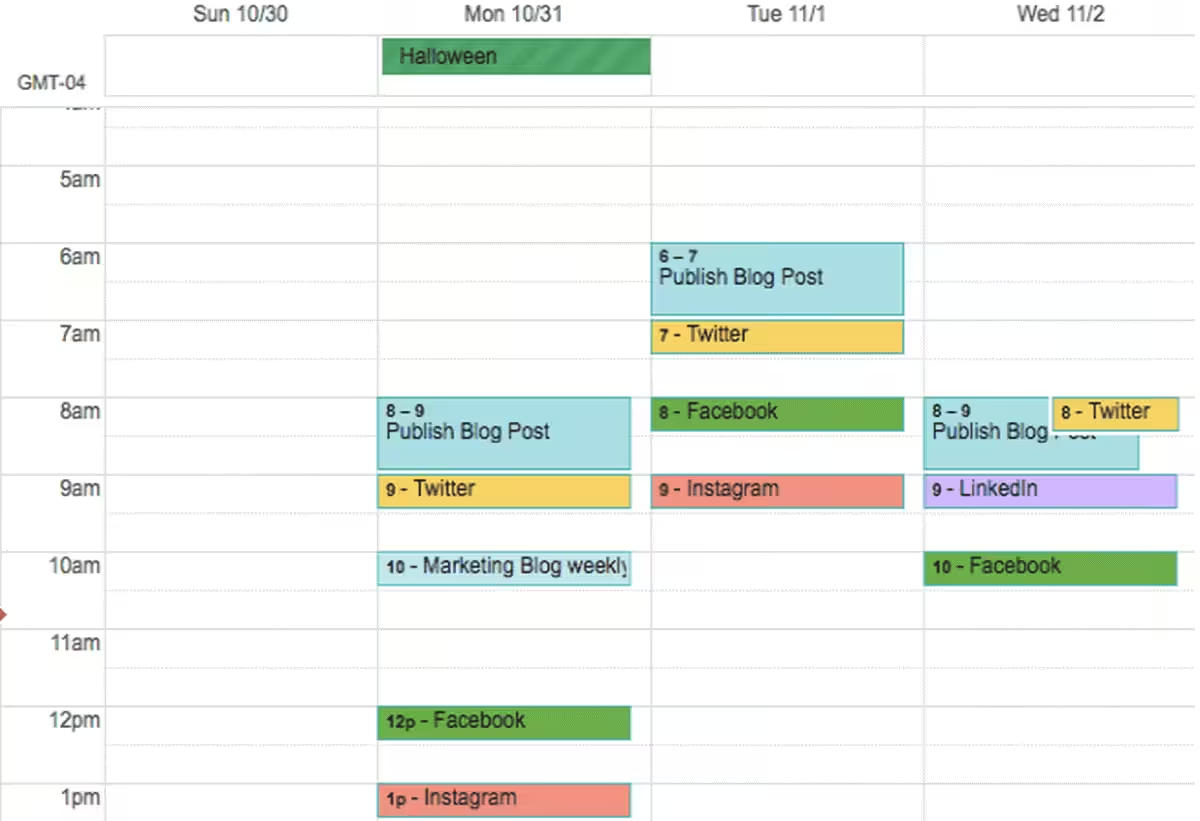
Social Media Content Calendar on Google Drive The first example is a social media content calendar you can create using Google Calendar.
It allows you to synchronize both editorial and social media activities in one place.
Plus, you can share this calendar with the team members quickly. This means everyone can work on their tasks.
You can also use Google Sheets to create one. It’s the most commonly used social media content calendar tool.
-
Social Champ
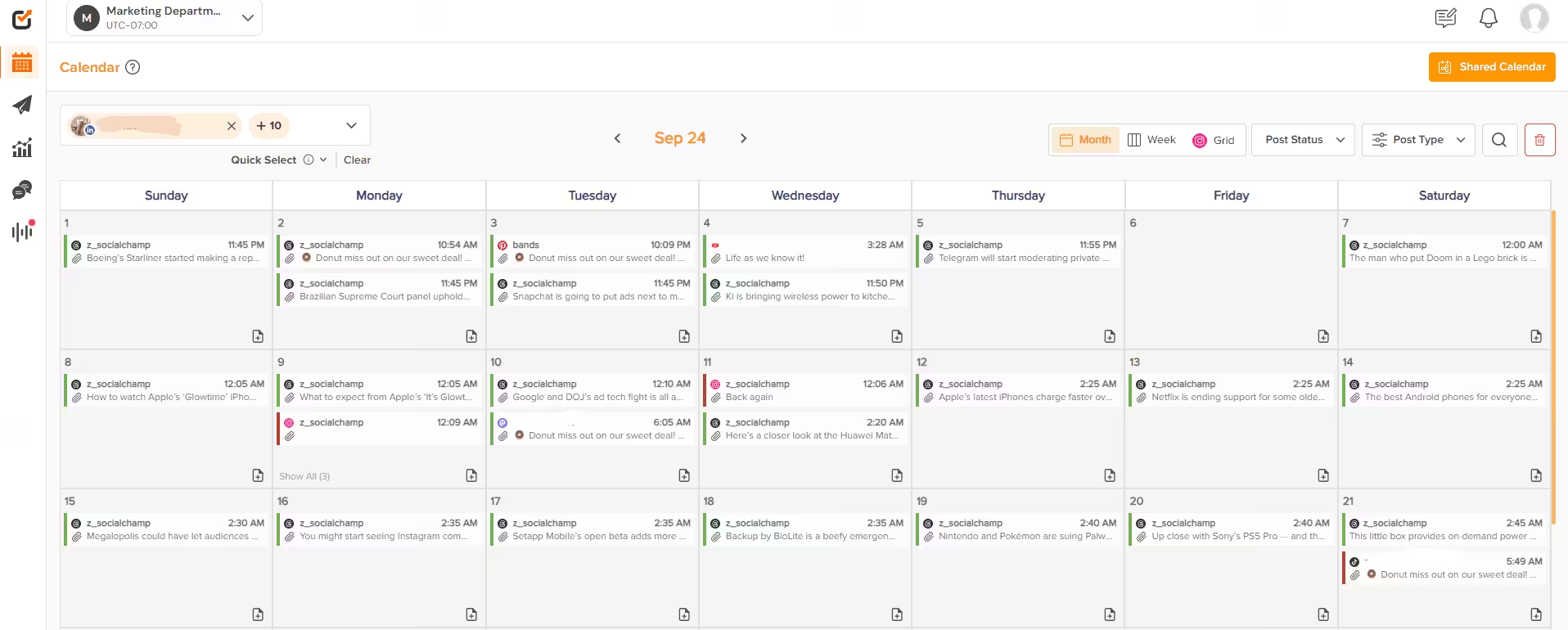
Social Champ’s Content Calendar Social Champ is an all-in-one content planning and publishing platform. It allows you to schedule posts, manage content assets, and collaborate with your team.
You will be able to schedule content publications on social channels automatically.
It also allows you to view, edit, delete, and reschedule your current and future social media posts in the all-in-one social media calendar.
It makes the entire process of social media content publication easier.
Note that Social Champ is a powerful social media marketing tool that offers all the features you need to create and execute digital marketing campaigns.
Your Calendar, Your Rules!
Customize your social calendar, organize campaigns, and stay ahead of deadlines with Social Champ.
-
Trello
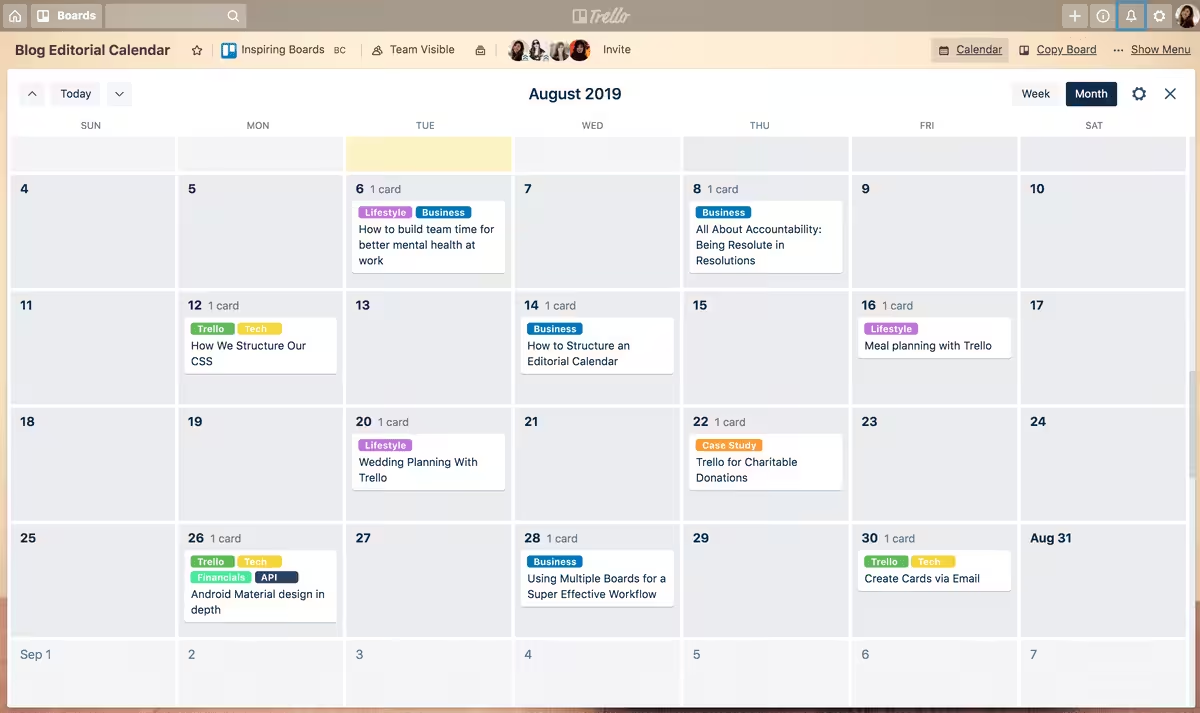
Trello’s Content Calendar Trello is one of the most popular tools for organizing teamwork.You can create a social media content calendar using Trello’s option called “Calendar Power-Up.”
Also, the tool allows you to create flexible boards, cards, and lists to keep all tasks under control.
-
Evernote
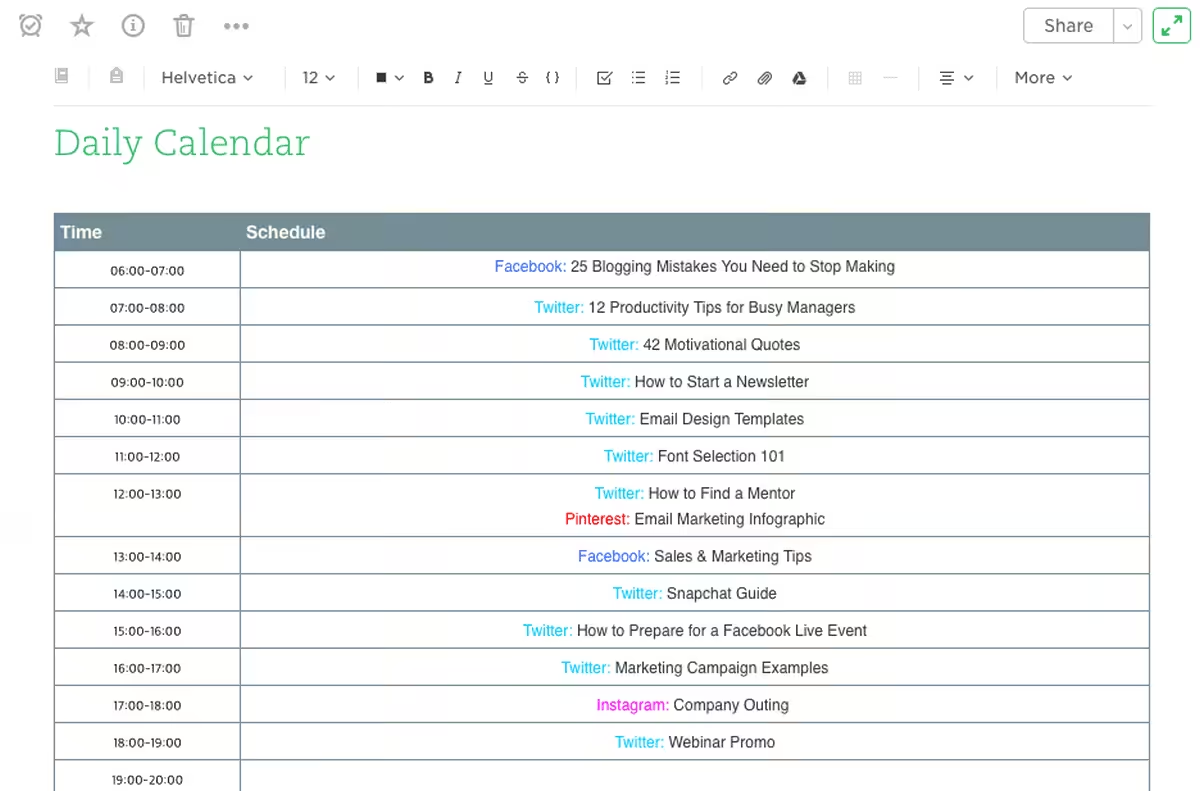
Evernote’s Content Calendar Evernote is a specific app that marketers use to note all their social media campaigns.
The tool has a feature that tracks logs hourly, weekly, monthly, and daily.
Thus, it helps you know when and who publishes content on socials and creates new content and other content management features.
Featured Article: A Complete Breakdown of Pallyy Pricing and Plans
Where Can I Find a Free Social Media Content Calendar Template
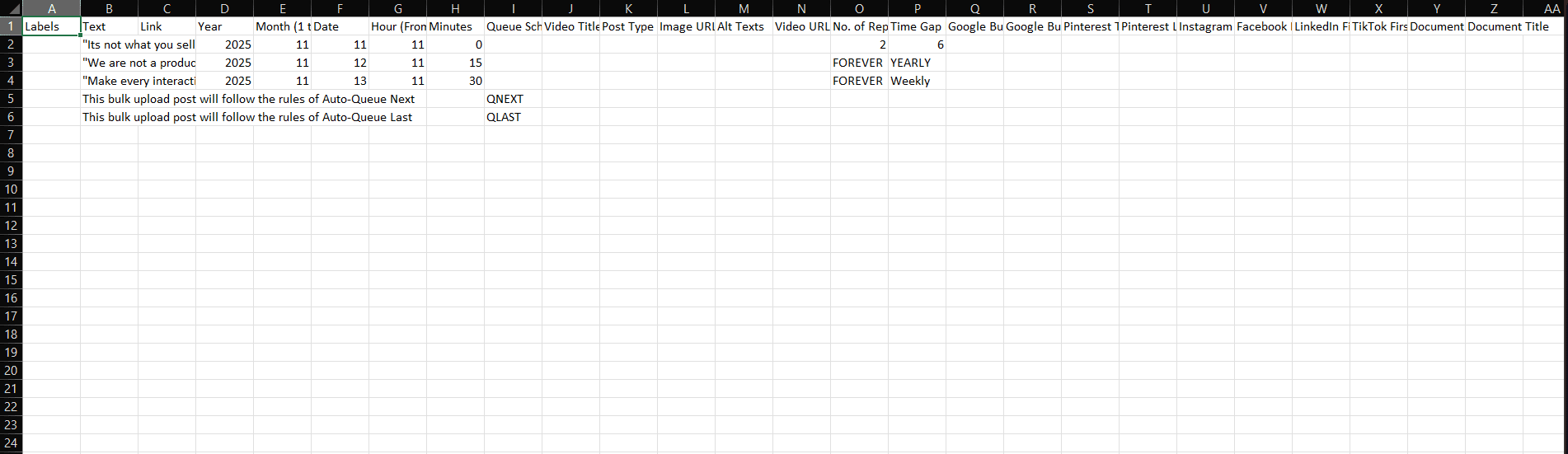
When I first looked for a template, I wanted something simple.
Just a social media content calendar I could open, edit, and actually use. The good news is you don’t need fancy software to get started.
You can find free templates in formats you already use, like Google Sheets or Excel. These work well if you want flexibility and easy sharing with your team.
Some platforms also offer in-tool templates, which help if you prefer to plan and schedule in the same place.
What a Free Template Usually Includes
Most free templates come with the basics already set up:
- Date and day of the week
- Platform name
- Post topic or theme
- Caption or copy space
- Media link
- Goal or campaign tag
This structure gives you a clear social calendar without overwhelming you.
Example of a Filled Weekly Calendar
To make things clearer, imagine a simple week laid out like this:
- Monday: Educational post on LinkedIn explaining a common industry problem
- Wednesday: Short tip or visual post on Instagram
- Friday: Promotional or behind-the-scenes update
Seeing a filled example helps you understand pacing, balance, and how different content types fit into one content calendar for social media.
Customize It to Fit Your Brand
No template should stay generic. Adjust posting frequency based on your goals. Add columns if you track approvals or campaigns. Remove anything you don’t use.
Your calendar should support your workflow, not slow it down.
If possible, include visuals or screenshots of your calendar in action. A quick snapshot of a week or month makes planning feel more real and easier to follow.
Once you personalize it, your social media content calendar becomes more than a template. It becomes a system you can rely on.
P.S. Timing and the right tools can make a big difference in your social media results. For more insights, check out:
Conclusion
Looking back, I can honestly say a social media content calendar changed the way I handle posting.
No matter if you’re a freelancer managing clients or a marketer running campaigns, having a clear plan saves time, reduces stress, and keeps your content consistent.
When you map out your posts, track goals, and stick to a schedule, everything feels more manageable and your audience notices.
Start using a calendar, plan ahead, and suddenly posting on socials isn’t a chore anymore; it’s part of a smart, intentional strategy.










Nestor Santos
I’ve been meaning to get more organized with my social media, and this article is exactly what I needed. The advice on using analytics to plan content is such a game-changer. Thanks for sharing these actionable tips!
Sam
I’m new to creating these social media calendars. Your article helped me in creating one for my client, & he approved it very soon. Thank you. 🙂