Imagine you’ve spent months building your brand’s presence or sharing your life on TikTok, only to wake up and find an account using your exact name, profile picture, and bio to scam your followers.
Or worse, you open the app to find a barrage of targeted harassment in your comments.
You aren’t alone in wanting a cleaner feed. In 2025, TikTok removed over 18,998,721 videos in just the MENA region for violating community guidelines.
Dealing with problematic accounts can be a roadblock to becoming a TikTok sensation. Learning how to report a TikTok account is the best way to get back control of your experience.
You can always up your content creation game with a social media management tool, but dealing with problematic accounts can be a roadblock to becoming a TikTok sensation.
In this complete guide, we’re breaking down exactly how to handle every situation, including:
- Reporting with Precision: Step-by-step instructions for flagging accounts, specific videos, comments, and even chaotic Lives.
- Impersonation and Brand Safety: How to use official forms to take down copycat accounts pretending to be you or your business.
- Privacy and Anonymity: Understanding what happens after you hit Submit (and yes, it’s completely anonymous).
- Advanced Actions: When to block, how to handle bans, and how to navigate the 2026 reporting interface like a pro.
Short Summary
- Valid reports cover serious violations like harassment, impersonation, hate speech, financial scams, and underage users rather than personal disagreements.
- Before reporting, confirm the specific guideline violated, gather screenshots as proof, and ensure you aren’t mass reporting, which can flag your own account for misuse.
- All reports are 100% anonymous, and the user being reported will never know who submitted the claim.
- TikTok uses a hybrid of Safety AI and human moderators to review reports; the severity of the content (monitored via the Creator Health Rating) matters more than the number of reports received.

Stay present in the feed even when life gets chaotic. Social Champ handles the timing, you handle the talent.
What Are the Valid Reasons to Report a TikTok Account?
While TikTok is a space for creativity, it isn’t a free-for-all. To keep the community healthy, TikTok’s moderation AI and human teams prioritize reports that cite specific violations of their community guidelines.
Reporting an account just because you don’t like their dance moves won’t get far. However, if an account falls into any of the following categories, you have a valid reason to flag it.
-
Harassment and Cyberbullying
TikTok has a zero-tolerance policy for targeted abuse. This includes coordinated attacks where one creator encourages their followers to harass another.
For example, a user creates a video mocking a person’s physical appearance and encourages their fans to flood the comments with insults.
-
Impersonation (Personal or Brand)
This is a major priority now. If an account uses your name, photos, or business assets to deceive others, it’s a violation.
An example of this can be finding an account named @official_[yourbrand]_support asking users for their login credentials or credit card info.
-
Hate Speech and Discriminatory Behavior
Any content that attacks, threatens, or dehumanizes individuals based on protected traits (race, religion, sexual orientation, disability, etc.) is a high-priority violation. This may include a video using slurs or promoting supremacist ideologies.
-
Intellectual Property (Copyright/IP) Abuse
Using someone else’s original content, logos, or trademarked music without permission, especially for commercial gain, is a valid reason for a TikTok ID report.
For example, if a clip channel re-uploads your entire 10-minute vlog without adding any commentary or transformative value, it can be counted as Copyright/ IP abuse.
-
Scams and Financial Fraud
With the expansion of TikTok Shop and in-app transactions, reporting financial get-rich-quick schemes or phishing attempts is crucial.
For instance, an account promoting a crypto-doubling bot or promising $500 gift cards in exchange for a small processing fee.
-
Misleading or Dangerous Content
This covers everything from deadly viral challenges to medical misinformation and deepfakes that aren’t clearly labeled as AI-generated. This may include a video promoting a life hack that involves a fire hazard, or a fake news clip using a celebrity’s AI-cloned voice to spread political lies.
-
Underage Accounts
TikTok requires users to be at least 13 years old. If you encounter an account clearly run by a child without parental oversight (or in violation of the TikTok Under 13 experience), it should be reported for their safety.
-
Personal Data Exposure
Sharing private information like home addresses, private phone numbers, or ID documents without consent.
Even if a user posts a callout video that includes a screenshot of someone’s private residential address, it could be counted as a personal data exposure.
Featured Article: Our Team Tested 70+ Productivity Tools
What Should You Review Before Reporting a TikTok Account?
Before you hit that report button, it’s important to take a breath and do a quick sanity check.
Here is your pre-report checklist to ensure your claim is valid and effective:
- Confirm a Specific Guideline Violation: TikTok differentiates between annoying content and violative content. For a report to be successful, it must align with one of the categories we discussed above, like hate speech, harassment, or dangerous activity.
- Gather Your Proof: If you are reporting for harassment, impersonation, or intellectual property theft, documentation is your best friend. Take high-resolution screenshots of the profile, save links to specific videos, and note timestamps of problematic moments in a Live stream. Having this evidence ready is crucial if you need to follow up via an official webform.
- Check the Context: Sometimes, content that looks dangerous is actually educational or a parody. TikTok’s AI looks for intent. Review the account’s bio and other videos. Is this a satirical account clearly labeled as a parody? If so, an impersonation report might be rejected.
- Understand Real Harm: TikTok prioritizes reports that demonstrate a risk of real-world harm. This includes physical safety threats, severe psychological distress (like doxxing or targeted bullying), and financial scams. If the account’s behavior could lead to someone getting hurt or losing money, it’s a high-priority report.
- Avoid Report Spaming: Don’t report the same video ten times in a row. One well-categorized report is much more effective than a dozen empty ones. TikTok’s system is designed to group reports on the same content, so quality always beats quantity.
Ace your TikTok game with the help of a reliable TikTok scheduler. We help you curate high-quality content and plan it for the best time to post so you get the highest engagement.
How to Report a TikTok Account (Mobile and Desktop Explained)
If you encounter an account that continuously posts harmful content or leaves hateful comments, you might want to take some action against them. Once you have a reason to learn how to report a TikTok and get it deleted, you can start with the following process:
Reporting via the TikTok Mobile App (iOS and Android)
The mobile app is the most common way to report, and it offers the most detailed sub-categories for things like Live violations or AI-generated misinformation.
- Navigate to the Profile: Open the TikTok app and go to the profile page of the account you wish to report.
- Tap the Share Icon: In the top right corner of the profile, tap the Arrow/Share icon (or the Three Dots on some versions).
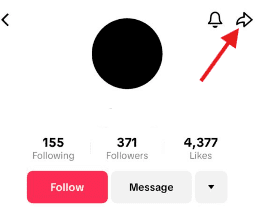
Share Icon on TikTok Profile - Select Report: A menu will slide up from the bottom. Tap the Flag icon labeled Report.
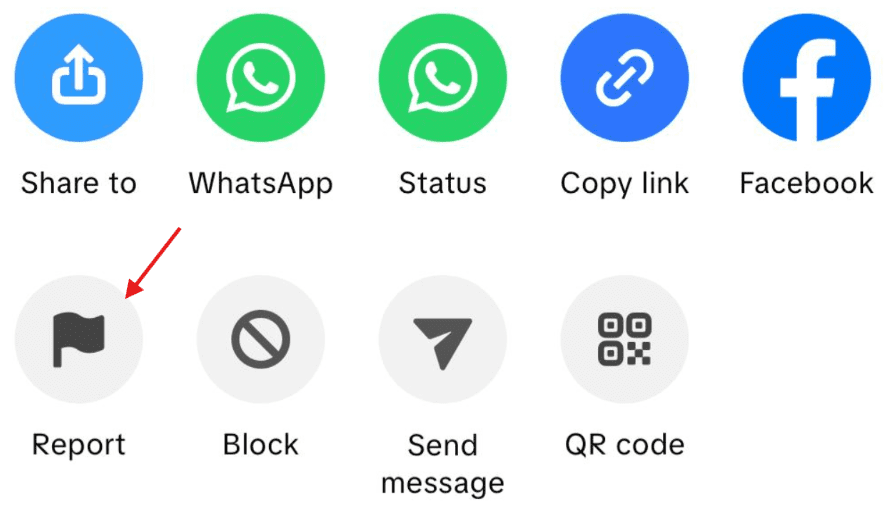
Click on Flag Icon - Choose Report Account: You will be asked if you want to report specific content or the entire account. Select the Report account.
- Select a Reason: A list of violations will appear (e.g., Impersonation, Harassment, Underage User). Choose the one that most accurately fits your situation.
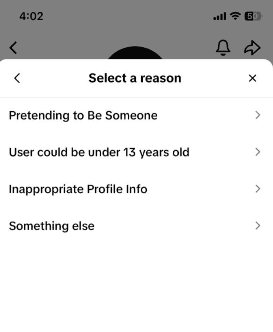
Choose the Reason to Report the Account - Provide Detail and Submit: Depending on the reason, TikTok may ask for screenshots or a brief description. Once filled out, tap Submit.
Reporting via TikTok Desktop (Web Browser)
If you are managing a brand or prefer using a larger screen, the desktop version is highly effective, especially for uploading documentation for Intellectual Property claims.
- Open the Profile: Go to tiktok.com and search for or click on the profile you want to flag.
- Click the More Options Icon: Look for the Three Dots (…) next to the Follow button at the top of their profile page.
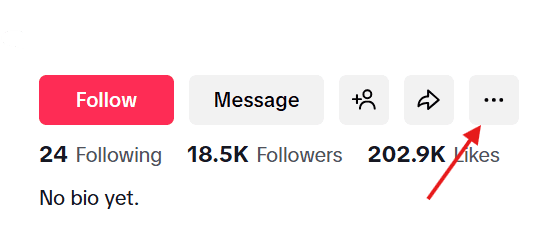
Click on Three Dots on TikTok Profile - Click Report: From the dropdown menu, select Report.
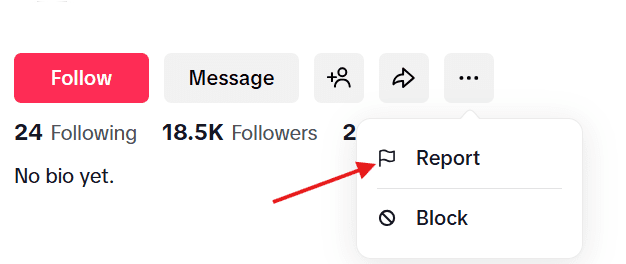
Click on Report - Choose Report Account: Just like on mobile, click Report account to flag the user’s entire presence.
- Follow the On-Screen Prompts: Select the primary violation category.

Select the Reason for Reporting - Finalize: Click Submit. You will receive a notification in your system notifications inbox once the report has been reviewed.
Featured Article: Must-Know TikTok Stats for Marketers, Creators, and Brands
How to Report a Fake or Impersonator TikTok Account?
Impersonation is one of the most common issues on TikTok, especially as scammers use AI to mirror creators and brands more convincingly.
TikTok defines impersonation as any account that intentionally poses as another person or entity to mislead or deceive the community.
Why TikTok Treats This Seriously
An impersonator isn’t just a fan account. These profiles often scrape your original videos and photos to:
- Scam Followers: Luring your fans into giveaways that are actually phishing links.
- Damage Reputation: Posting controversial or offensive content while wearing your face.
- Redirect Traffic: Stealing your hard-earned engagement to sell counterfeit products or promote external sites.
Step-by-Step: Reporting an Impersonator on Mobile
If you find someone pretending to be you, a friend, or a public figure, follow these steps within the app:
- Go to the Fake Profile: Tap on the username of the account that is mimicking you.
- Tap the Share Arrow: Hit the Share icon in the top right corner of their profile.
- Select Report: Choose the Flag icon from the pop-up menu.
- Choose Report Account: Select this option rather than reporting a specific video.
- Select Pretending to Be Someone: This is the specific category for identity theft.
- Specify the Target: You will be asked, “Who is this account impersonating?” Choose one of the following:
- Me: If the account is using your identity.
- A Friend: If you are reporting on behalf of someone else.
- A Celebrity/Public Figure: If it’s a known personality (you’ll be asked to search for the real account to help TikTok compare them).
- Submit Your Evidence: TikTok may ask you to confirm your identity or provide a few words about why the account is a fake. Hit Submit to finalize.
Pro Tip: This year, TikTok’s Identity Verification AI checks for subtle differences in usernames (like replacing an “L” with a “1”). When reporting, make sure to point out if the fake account has a slightly altered handle that could confuse your followers.
How to Use TikTok’s Official Identity and Copyright Forms?
While the in-app Report button is great for quick flags, it isn’t always enough for complex cases. If you are a business owner or a verified creator who needs someone reported asap, you need to use TikTok’s Official Webforms.
These forms are legal-grade tools that bypass the standard queue and go directly to TikTok’s specialized Intellectual Property (IP) and Safety teams.
When Should You Use These Forms?
- Business Impersonation: When an account is using your registered trademark or logo to sell fake products.
- Copyright Theft (DMCA): When another user has re-uploaded your original video, music, or artwork, and the in-app report was rejected.
- Severe Identity Theft: When an impersonator is engaging in high-stakes fraud or sharing deepfakes of you.
- Legal Compliance: When you need a formal paper trail for insurance or legal purposes.
Step-by-Step: Submitting an Official Form
TikTok has now unified these into a central Legal Report Portal. Here is how to navigate it:
- Access the Portal: Go to the TikTok Safety Center and select Report a Problem or go directly to the Intellectual Property section.
- Select Your Issue Type: Choose between Report an Impersonation Account or Report Copyright/Trademark Infringement.
- Define Your Relationship: You will be asked if you are the owner of the rights or an authorized representative (like a lawyer or manager).
- Provide Identification:
- For Identity: You may need to upload a photo of a government-issued ID.
- For Copyright: You must provide links to your original content (the source) and the infringing TikTok video.
- Describe the Violation: In the description box, be specific. For example: “The account @User123 has re-posted my original video from [Date] without permission and is using my brand logo in their profile picture.”
- Sign the Digital Affirmation: You must type your full legal name to confirm that you are acting in “good faith” and that the information is accurate.
- Submit and Monitor: You will receive a confirmation email with a ticket number. Save this! You can use it to follow up if the content isn’t removed within 24–48 hours.
How to Report a TikTok Video (Mobile and Desktop Explained)
Sometimes, you might not want to report a whole account, but a specific video seems problematic. It’s unfair to report someone just for one video, so there’s an option to report only that. Here’s how to report a TikTok video without affecting the entire account:
- Click the share icon at the lower right of the video
- Click on report, and it will ask you the reason for reporting.
- Select a reason or click on “Other”
- Click “Submit,” and your report will be sent to TikTok.
Related Article: How to Make a Playlist on TikTok to Increase Views
How to Report a TikTok Comment or Direct Message
TikTok has refined its safety algorithms to distinguish between public interactions and private conversations. While both are governed by the same Community Guidelines, the way you report them and how TikTok’s Safety AI prioritizes them differ slightly.
Comments vs. Direct Messages: What’s the Difference?
- Comments (Public): Violations here usually involve spam, public harassment, or “coordinated” hate speech. Because comments are visible to everyone, reports are often processed by automated systems that scan for banned keywords and sentiment.
- Direct Messages (Private): DM-related issues often involve more serious behind-the-scenes violations like grooming, sextortion, or persistent stalking. TikTok treats these with higher privacy sensitivity but higher priority for human review if a minor is involved.
How to Report a TikTok Comment
You can report a single comment or, in 2026, use the bulk management tool to flag multiple trolls at once.
To report a single comment:
- Press and Hold: Find the comment and long-press on it until the menu appears.
- Tap Report: Select the flag icon.
- Select a Reason: Choose the most relevant category (e.g., Harassment, Spam, or Hate Speech).
- Submit: Hit Submit to send the report for review.
To report comments in bulk (on your own video):
- Open Comments: Tap the comment icon on your video.
- Long-Press and Manage: Long-press any comment and select Manage multiple comments.
- Select and Flag: Tap up to 100 comments, then tap More > Report comments.
How to Report a Direct Message (DM)
Reporting a DM is crucial for stopping private harassment or scams before they escalate.
- Open the Chat: Go to your Inbox and tap on the conversation.
- To report a specific message: Press and hold the exact message bubble you want to flag and tap Report.
- To report the entire chat/user: Tap the More options (…) button in the top right corner of the chat screen.
- Select Report: Choose your reason.
- Report and Block: In 2026, TikTok recommends the Report and Block option for DMs to immediately sever the connection while the safety team reviews the transcript.
If you wish to learn how to stay relevant and consistent on TikTok, refer to our following guides!
How to Report a TikTok Live
TikTok also has live streaming, which is quite popular among content creators. It’s a great way to engage with the audience and make creators seem more approachable. Many TikTok creators regularly make live streams to interact with their followers. For those who join these live streams, communicating with their idols is like an exclusive benefit. However, you might come across something offensive there, too.
It could be anything from foul language to disturbing visuals, and in such cases, you should report the live stream so TikTok can stop it instantly. Here’s how to do it:
- Start the live video
- Click “Share”
- Click on “Report” and follow the instructions to submit the report.
How to Report a TikTok Account That Blocked You?
It is a common tactic for scammers or harassers to block their victims immediately after violating guidelines.
This is often done to prevent you from accessing their profile to hit the Report button, essentially trying to hide from accountability.
However, being blocked does not mean the user is untouchable. TikTok has provided several alternative pathways to ensure that users cannot use the block feature as a shield for misconduct.
Why You Should Still Report TikTok Accounts
When a violator blocks you, they are often still active and potentially targeting others.
By reporting them through alternative methods, you alert TikTok’s Safety AI to investigate the account’s history, even if you can no longer see their current posts.
How to Report a User Who Has Blocked You
If you cannot access the user’s profile directly, use these three primary workarounds:
-
Use the “Report a Problem” Menu (Best for General Violations)
This method allows you to report TikTok account by manually entering their username, even if you are blocked.
- Go to your Profile and tap the Menu (☰) in the top right.
- Select Settings and Privacy > Report a Problem.
- Scroll down and select Account and Profile.
- Choose Profile Page > Other.
- Tap “Need more help?” and type in the username of the account that blocked you, explaining the violation in detail.
-
Report via an Existing Interaction (Best for Harassment)
If the user previously commented on your video or sent you a DM before blocking you, the evidence is still there.
- Locate the Comment or Direct Message from that user.
- Even if their profile picture appears as a gray placeholder, you can still long-press the message or comment.
- Select Report and follow the prompts. TikTok’s system will pull the account data associated with that specific interaction, regardless of your blocked status.
-
Use the Official Webform (Best for Serious Issues)
If the account is impersonating you or stealing your content, the official webform is the most effective route because it doesn’t require you to be logged into the app.
- Open the TikTok Safety Center on a web browser.
- Navigate to the Intellectual Property or Impersonation webform.
- Enter the URL or the exact username of the offender.
- Provide your evidence (screenshots you took before being blocked are vital here).
Pro Tip: If you need to find the exact username of someone who blocked you, check your Blocked Accounts list in Settings > Privacy > Blocked Accounts. If they blocked you, they won’t appear there, but you can often find their handle in your Notification history from when they first interacted with your content.
How to Avoid Being Reported on TikTok?
You can report others on TikTok, but remember that people might also report you. Even with amazing content, some viewers might misunderstand or get offended, and haters could report your account out of spite. Here’s how you can avoid getting flagged on TikTok.
-
Don’t Create Violent Content
TikTok is strict when it comes to violence, so if you’re caught posting violent content, they’ll have no choice but to shut down your account. If your content contains any abuse or blood, it’ll be considered violent. Make sure you steer clear of that kind of stuff to keep your account safe.
-
Don’t Promote Self-Harm
Violence isn’t just about trying to harm others; TikTok also strongly prohibits self-harm. If you talk about self-harm or create content around such a sensitive topic, you might influence other people to have similar thoughts. That’s why posting self-harm content can also get you into trouble.
-
Don’t Threaten Users
As a TikTok influencer, you can’t control what your followers say about you. Whether they love or hate your content, it’s their prerogative, and you can’t threaten them. If you engage in threatening conversations with TikTok users, whether in comments, DMs, or live streams, they have every right to report you. If you’re found guilty, TikTok will take action. So, try to be kind to everyone on the platform, and if someone gets on your nerves, just ignore them.
-
Don’t Promote Illegal Activities
No platform supports illegal activities, and TikTok is no exception. If you attempt to instruct or guide users in illegal activities, TikTok can ban you. It’s best not to discuss any illegal activities, even if you’re not promoting them, because anything can be taken out of context and land you in trouble. Better safe than sorry!
-
Practice Compliance
Getting banned on TikTok feels like being kicked out of the coolest party, and who wants that? No one!
If you follow TikTok’s rules, no harm will come to your TikTok account. The platform has clearly shared its guidelines for content creation, so it’s pretty straightforward to avoid prohibited behavior. However, you’ll face the consequences if you intentionally or unintentionally break the rules. The easiest way to stay compliant is to read the TikTok guidelines thoroughly.
How Many Reports Does It Take to Get a TikTok Account Banned?
There is a long-standing myth that if you can get enough people to mass report an account at the same time, it will trigger an automatic ban.
But that’s not true!
-
Severity Overrides Quantity
A single report for a zero-tolerance violation can lead to an immediate, permanent ban.
If an account posts child safety violations, extreme violence, or promotes illegal acts, the Safety AI doesn’t wait for a second report. It acts instantly.
-
The Fallacy of Mass Reporting
If 100 people report an account for “Spam” just because they don’t like a creator’s opinion, TikTok’s system identifies this as a coordinated attack.
Instead of banning the creator, the system may actually ignore those reports or even flag the reporting accounts for “Malicious Reporting.”
-
The Strike System (Creator Health Rating)
For less severe violations (like minor copyright issues or borderline low-quality content), TikTok uses a strike system.
- Points and Thresholds: Creators start with a set number of health points.
- Deductions: Each validated report deducts points. Once the rating hits a certain threshold, the account faces restrictions (like being barred from the “For You” feed) before a final ban is issued.
- Expiry: Strikes typically expire after 90 days, provided the user doesn’t commit further violations.
-
Human Review for High-Impact Cases
For accounts with large followings or Public Interest status (like news outlets or verified brands), TikTok often routes reports to human moderators.
These experts look for intent and context, making it nearly impossible to bot a large account into a ban.
What Happens After You Report a TikTok Account or Content?
Once you hit Submit, your report enters TikTok’s multi-layered moderation pipeline. In 2026, this process is faster and more transparent, but it can still feel like a black box if you don’t know what to look for.
-
The 2026 Review Process
TikTok uses a hybrid approach to handle the millions of reports it receives daily:
- Initial AI Screening: Within seconds, an AI scans the reported content for obvious violations (like banned keywords, known scam links, or visual matches for dangerous activity). If the violation is clear-cut, the content is removed immediately.
- Specialized Human Review: If the AI is unsure, especially in cases of nuance like parody vs. impersonation or educational content vs. dangerous acts, the report is sent to a human moderator who speaks the local language and understands the cultural context.
- The Creator Health Rating (CHR) Check: The system looks at the reported account’s history. A first-time offender might get a warning, while a repeat offender with multiple active strikes is fast-tracked for a ban.
-
Expected Timelines
While every case is different, here are the general benchmarks for 2026:
- Obvious Violations (Pornography, Violence): Usually removed in minutes.
- Standard Reports (Harassment, Spam): Typically reviewed within 24 hours.
- Complex Cases (Copyright, Brand Impersonation): These may take 2–5 business days, as they often require manual verification of external documents or IDs.
-
Possible Outcomes
After the review, one of three things will happen:
- Content Removed / Account Banned: TikTok agrees with your report. The content is deleted, and the user receives a strike or a permanent ban.
- Ineligible for For You Feed (FYP): The content isn’t banned, but it’s flagged as borderline. It stays on the user’s profile but won’t be promoted to new viewers, effectively shadowbanning that specific post.
- No Action Taken: TikTok determines the content does not violate their current guidelines.
-
Why Some Reports Result in No Action
It can be frustrating to receive a notification saying no violation found for something you clearly find harmful. This usually happens because:
- Subjective Disagreement: The content is mean or annoying, but doesn’t cross the legal or safety threshold of targeted harassment.
- Contextual Exceptions: The content is flagged as educational, documentary, or satire, which are protected under TikTok’s guidelines.
- Insufficient Proof: In cases of impersonation, if the fake account hasn’t explicitly tried to scam anyone or claim they are the official version, TikTok may let it stand as a fan account.
How Creators and Brands Can Stay Safer on TikTok?
Reporting is a reactive measure, but for creators and brands, proactive safety is the secret to long-term growth.
Navigating a platform as fast-paced as TikTok requires more than just knowing how to block people; it requires a workflow that keeps you out of the line of fire.
-
Leverage Professional Management Tools
Managing a high-growth account directly in the app can expose you to constant comment noise, often including spam and negativity.
This is where a tool like Social Champ becomes a lifesaver. By using a centralized dashboard, you can:
- Safe Comment Management: Filter and respond to comments through a Social Inbox without getting bogged down in the toxic sections of your notifications.
- Multi-Layered Approval Workflows: If you have a team, you can ensure every video is reviewed for brand suitability before it goes live, preventing accidental guideline strikes.
- Consistent Posting: Use a content calendar to maintain your Creator Health Rating while avoiding the burnout of manual daily uploads.
Stop gambling with timing. Social Champ drops your posts when your audience is actually awake (and scrolling).
-
Activate Creator Care Mode
TikTok’s Creator Care Mode is a must-have. It automatically filters out comments that are similar to those previously reported or deleted. You can find this under Settings > Privacy > Comments.
-
Use Keyword Filters
Don’t wait for trolls to arrive. You can manually add up to 100 banned keywords in your comment settings.
If an impersonator is using a specific scam link or a harasser is using specific slurs, adding those words will instantly hide their comments from public view.
-
Secure Your Identity (2FA)
The safest account is the one that can’t be hacked. Always enable Two-Factor Authentication (2FA) via an authenticator app rather than just SMS, as SIM swapping is a common tactic used by account hijackers.
How Can You Cancel a Report?
Let’s say someone has already reported your content, and TikTok takes it down. That’s not the end of the story!
TikTok handles a lot of reports daily, so occasionally, content that doesn’t violate any guidelines might be mistakenly removed. In such cases, you can appeal to TikTok, explain that their decision is unjust, and prove that your content is harmless to the TikTok community.
Check out this video by @rtoyota45, where she shares her experience with being reported on TikTok and how she successfully got her content reinstated.
@rtoyota45 The correct way to deal with false reporting on tiktok#tiktoksappealprocess #learnhowtoscreenrecordyourtiktokvideosandlives #thecorrectwaytousetiktok #rtoyota45teacheseverythingtiktok #redheartsclub #bettermebettertiktok #fyp ♬ original sound – rtoyota45
In Conclusion
Reporting TikTok users, videos, comments, and live streams is a way to keep your TikTok feed clean. While you can’t control who joins and creates content on TikTok, you can choose what type of content you support on the platform. If something is bothering you, TikTok gives you the power to report or block that person so it comes to your attention.
But don’t go around reporting every account in sight without a good reason, as that would be a misuse of power. We hope that as you learn how to report a TikTok account, you also understand how to use this power responsibly because, as Uncle Ben said, ‘With great power comes great responsibility!‘