Disclaimer:
The information presented in this blog post is based on publicly available data from official sources at the time of writing. Our intention is solely to provide accurate and helpful information. If you notice any inaccuracies, please feel free to contact us for corrections.
Ever clicked on a pricing page and thought, “Okay… but is this actually worth it?” If that sounds familiar, you’re not alone.
When people look up CoSchedule pricing, they’re usually trying to answer one simple question: Does the value match the cost?
With content calendars, workflows, and team collaboration all rolled into one platform, CoSchedule often comes up in conversations around serious productivity tools for marketers.
Short Summary
- CoSchedule pricing includes Social Calendar ($19/user/month), Agency Calendar ($59/user/month), Content Calendar (custom), and Marketing Suite (custom).
- CoSchedule offers structured plans, but costs rise fast as you add users, profiles, or advanced features.
- Social Champ uses a per-profile model, making pricing easier to control as you scale.
- Both tools support content planning, but Social Champ includes more AI and automation at lower tiers.
- Agencies and growing teams get more flexibility with Social Champ’s unlimited users on higher plans.
- Comparing CoSchedule pricing side by side helps avoid paying for features you may not actually need.
But pricing can feel a bit confusing if you don’t know what you’re really paying for.
According to data, marketers who stay organized report success 674% more often. That’s exactly why tools like CoSchedule get so much attention.
In this blog, we’ll break down CoSchedule pricing in a clear, neutral way, what each plan offers, who it’s best for, and where it makes sense (or doesn’t) to help you decide if it fits your workflow.

Start now and easily manage all your social media posts without any restrictions.
CoSchedule Pricing Plans Overview
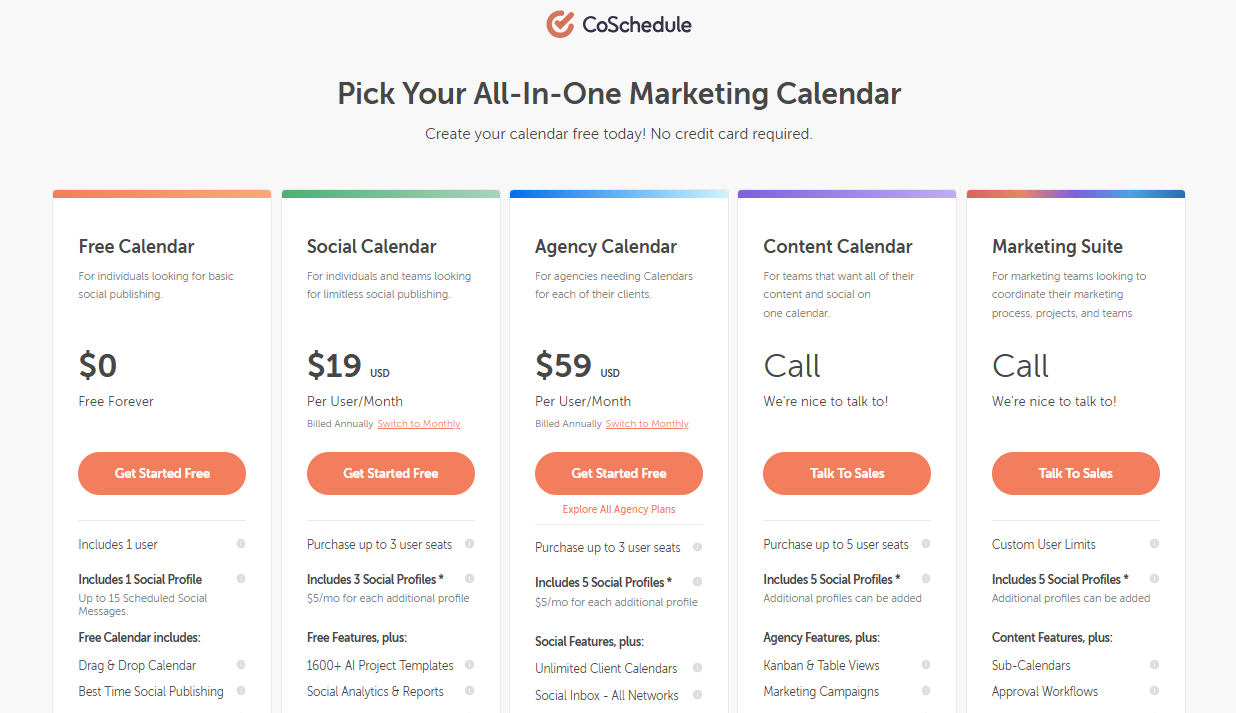
CoSchedule offers a variety of pricing plans designed to fit different needs, whether you’re a solo entrepreneur, a growing agency, or a large enterprise.
It starts with the Free Calendar, which, as the name suggests, is free forever. This option is perfect for those just dipping their toes into social media management.
If you need a bit more, the Social Calendar is available at $29 per month if billed monthly or $19 per month if billed yearly.
This plan is ideal for small businesses looking to manage their social media more effectively without breaking the bank.
For agencies, the Agency Calendar steps it up a notch at $69 per month billed monthly or $59 per month billed yearly. It offers more robust features tailored to team collaboration.
For those with more complex needs, CoSchedule also offers the Content Calendar and Marketing Suite, both of which require a call to inquire about pricing.
These plans are designed for larger enterprises or marketing teams needing a comprehensive solution to seamlessly manage their content and campaigns.
Detailed Breakdown of CoSchedule Plans
| Plan Name | Price (Starting) | Target Audience | Key Features |
|---|---|---|---|
| Free Calendar | $0 (Free Forever) | Individuals needing basic social publishing. | 1 user, 1 social profile, up to 15 scheduled messages, AI assistant, Drag & Drop calendar. |
| Social Calendar | $19 per user/month (billed annually) | Individuals/teams seeking limitless social publishing. | Up to 3 user seats, 3 social profiles, 1600+ AI templates, social analytics, and automation (ReQueue). |
| Agency Calendar | $59 per user/month (billed annually) | Agencies managing multiple client calendars. | Up to 3 user seats, 5 social profiles, unlimited client calendars, white-label features, and social approvals. |
| Content Calendar | Call for Pricing | Teams wanting content and social on one calendar. | Up to 5 user seats, 5 social profiles, Kanban/Table views, custom fields/project types, and guest user access. |
| Marketing Suite | Call for Pricing | Marketing teams coordinating projects and people. | Custom user limits, sub-calendars, approval workflows, digital asset management, SSO, dedicated account manager. |
To make sense of CoSchedule pricing, it helps to first understand what each plan includes. Here, each plan is explained clearly, followed by a cost example so you can easily estimate what you might pay.
Free Calendar Plan
The Free Calendar offers one user seat, limited social profiles, and basic calendar-based scheduling.
You can plan posts visually, move them around, and publish directly, but advanced automation, analytics, and collaboration tools are not included.
Within CoSchedule pricing, this plan is mainly designed for light usage. Let’s say you’re managing 1 brand, posting a few times a week, and working solo.
Your cost here stays at $0, but the moment you add another brand or need team access, this plan no longer fits. Compared to other free social media scheduling tools, it works more like a testing ground.
Social Calendar Plan
This plan adds 3 user seats, 3 social profiles, automation features, AI templates, and basic analytics. It’s where CoSchedule pricing starts supporting consistent publishing and small-team workflows.
Assume you have 2 users and manage 3 social profiles. At roughly $19–29 per user/month, your monthly cost could land around $38–58, billed annually.
If you add more profiles, your cost increases even if your team size stays the same.
Agency Calendar Plan
The Agency Calendar supports unlimited client calendars, inbox management, reporting, and better organization across brands. It’s built for structured client workflows within CoSchedule pricing.
Let’s say you’re an agency with 3 users managing 6 client profiles. At around $59–69 per user/month, your base cost could reach $177–207 monthly, before adding extra profiles. This pricing model often prompts teams to compare it with other social media scheduling tools for business.
Content Calendar & Marketing Suite
These plans focus on editorial planning, campaigns, approvals, and advanced coordination. Pricing is custom, which means costs depend on team size and usage.
If your team includes 5 or more users, multiple workflows, and long-term planning needs, your monthly cost can scale into four figures, depending on customization.
Teams moving from basic CoSchedule setups usually choose these plans only when structure matters more than flexibility.
Overall, CoSchedule pricing is predictable and scales quickly. Understanding how features convert into real costs is what helps you choose the right plan without surprises.
Pro Tip for Ecommerce:
Maximize your sales impact by checking out the top social media tools for ecommerce stores. They’re built to handle product promotions and campaigns seamlessly.
Featured Article: Planable Pricing Guide: Which Plan Fits Your Budget?
CoSchedule Pricing vs. Social Champ Pricing Comparison
When comparing CoSchedule and Social Champ, it’s essential to consider how each platform’s pricing aligns with its features and value.
Here’s a direct comparison of CoSchedule pricing plans with Social Champ’s.
-
Free Plan:
- CoSchedule: Their free Calendar offers 15 scheduled posts for 1 social media profile. This plan is valid for one user.
- Social Champ: Their free forever plan allows 15 scheduled posts for up to 3 social media accounts. This plan is valid for one user.
-
Entry-Level Plan:
- CoSchedule: Their Social Calendar at $29 per month (monthly billing) or $19 per month (yearly billing) is suitable for small businesses looking to manage social media more effectively.
- Social Champ: Their Starter Plan at $5 per month (monthly billing) or $4 per month (yearly billing) offers advanced scheduling, automation, and additional tools. The plan provides more value at the same price point.
-
Mid-Tier Plan:
- CoSchedule: Their Agency Calendar at $69 per month (monthly billing) or $59 per month (yearly billing) is aimed at agencies needing more collaboration features.
- Social Champ: Their Growth Plan at $8 per month includes more extensive analytics, content recycling, and support for larger teams. It’s ideal for businesses looking to scale.
-
High-Tier/Custom Plans:
- CoSchedule: Their Content Calendar and Marketing Suite plans are tailored for large enterprises needing comprehensive marketing and content management.
- Social Champ: Their Enterprise Plan, with custom pricing, offers advanced tools for managing multiple clients, bulk scheduling, and custom reporting. This plan caters to agencies and enterprises.
Social Champ vs. CoSchedule – Feature Comparison
Here’s a handy side-by-side comparison of the features that Social Champ and CoSchedule offer at each pricing tier so you can see how they stack up:
Free Plans:
- CoSchedule: Their Free Forever plan is a great starting point, giving you 1 user, 2 social profiles, and up to 15 scheduled social messages. You get a drag-and-drop calendar, Best Time Social Publishing, and basic support to help you get organized without spending a dime.
- Social Champ: The Free Forever Plan here offers a bit more flexibility with 3 social accounts and 15 scheduled posts per account. It includes bulk scheduling for up to 15 posts, along with analytics and reporting, which is perfect for getting a feel for how your social media is performing.
Social Calendar vs. Starter Plan:
- CoSchedule: Their Social Calendar plan is priced at $29 per month or $19 per month if billed annually. It supports up to 3 users and 3 social profiles (with a $5 fee per additional profile) and includes unlimited social media publishing, bulk scheduling, social media automation, and social analytics and reports.
- Social Champ: For $4 per month/channel, the Starter Plan gives you unlimited post scheduling. You also get a unified publishing calendar, ad boost, an all-in-one social inbox, and detailed analytics with unlimited reports.
Agency Calendar vs. Growth Plan:
- CoSchedule: The Agency Calendar plan, available for $59 per month or $69 per month with annual billing, supports up to 3 users and 5 social profiles (with the same $5 fee per additional profile). It includes unlimited client calendars, white-label reports, and an approval dashboard, which is great for agencies needing extensive client management features.
- Social Champ: The Growth Plan at $8 per month per channel covers unlimited post scheduling. It’s available to unlimited users, and you get annual analytics and reports, 5 shared calendars, social listening, and media library storage, plus email and chat support.
Content Calendar vs. Enterprise Plan:
- CoSchedule: The Content Calendar plan is custom-priced and offers up to 5 user seats, 5 social profiles (with options to add more), marketing campaigns, custom fields, custom project types, and detailed project and campaign reports. And its Marketing Suite offers more advanced features, such as approval workflows, a team management dashboard, and a dedicated account manager.
- Social Champ: The Enterprise Plan caters to businesses and agencies with greater needs. The price is tailored to the needs of each business.
In summary, both tools offer great features across their pricing tiers. However, Social Champ tends to provide more comprehensive features at lower price points,
CoSchedule offers deeper customization and advanced project management features, especially for larger teams and enterprises.
Is CoSchedule’s Pricing Restrictive in 2026? A Clear Breakdown
When people question CoSchedule pricing, it’s usually not about the feature list; it’s about flexibility.
Let’s break this down calmly and clearly, without jumping to conclusions.
How CoSchedule Pricing Is Structured
At first glance, CoSchedule pricing feels straightforward. You choose a plan, get access to a set of features, and build your workflow around it.
But once teams grow or needs change, that structure can start to feel a bit tight. This is something that often comes up in a CoSchedule review, especially from growing teams.
Unlike some social media calendar tools, CoSchedule works best when your process fits neatly into its system. If your workflow changes often, adjusting plans or upgrading may feel less flexible than expected.
Where Users Feel the Limits
One common assumption around CoSchedule pricing is that restrictions show up as your usage increases. Adding users, managing multiple brands, or expanding publishing channels can quickly push teams into higher tiers.
That’s usually the moment people start comparing options and looking at CoSchedule competitors to see how pricing scales elsewhere.
This doesn’t mean CoSchedule is overpriced. It just means it’s optimized for a specific type of user. Even users who’ve tested other alternatives often say the value depends heavily on team size and planning habits.
Is It Restrictive or Just Structured?
CoSchedule pricing isn’t necessarily restrictive, but it is structured. If your needs align with the plan you choose, it works smoothly. If not, it can feel limiting, especially in 2026, when teams expect pricing to adapt as fast as they do.
Quick Tip:
Not all platforms fit every workflow. Explore other social media content schedulers to find the one that matches your posting habits perfectly.
Top 3 Budget-Friendly Tools That Beat CoSchedule in Value
Looking for budget-friendly CoSchedule alternatives that won’t break the bank but still offer powerful social media management features?
Here are three standout options that provide great value without the hefty price tag:
-
Social Champ
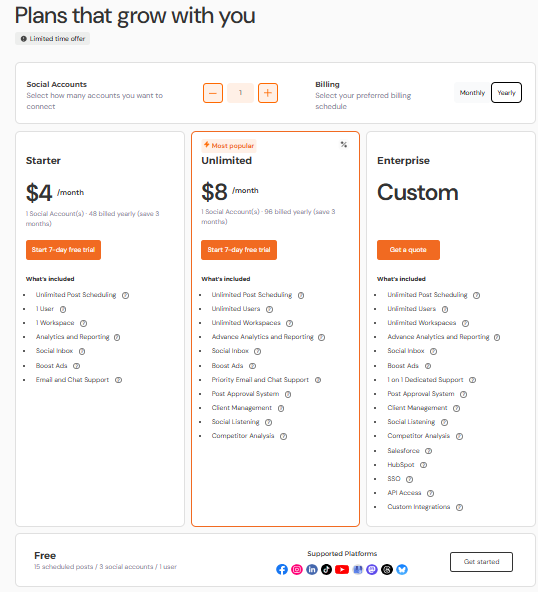
Social Champ’s Pricing Social Champ truly stands out for anyone seeking an affordable social media management tool that doesn’t compromise on features.
Starting with the Free Forever Plan, you get to manage 3 social accounts and 15 scheduled posts.
This entry-level plan is a great way to get your social media organized without making any financial commitments.
As your needs evolve, Social Champ’s paid plans are where the real magic happens.
The pricing remains incredibly budget-friendly as you scale, allowing you to manage more accounts and schedule an unlimited number of posts.On top of that, you gain access to detailed analytics that help you track your performance and refine your social media strategy.
As such, Social Champ is perfect for growing businesses and savvy social media managers alike.
CoSchedule vs. Social Champ: Price-To-Value Comparison (2026)
Category CoSchedule Social Champ Pricing (per month, annual savings) $19/user (annual), plus $5–$8 per extra social profile; costs rise quickly with team or profile growth. Flexible per-profile pricing: Free tier for individuals; Starter $4–$5/profile, Growth $8–$9/profile, Enterprise custom; annual billing saves 10–50%. Social Profiles (limits, additional costs) 3 base profiles; $5–$8 per extra; adding profiles quickly increases costs. Pay only for the profiles you use; Starter includes unlimited post scheduling for chosen profiles; Growth and Enterprise handle 100+ profiles. Users (team collaboration features) Up to 3 users with basic approvals and discussion features. Starter: 1 user; Growth: unlimited users and workspaces; Enterprise: custom user setup with advanced collaboration. Key Features (AI tools, analytics, unified inbox) Basic AI (image generation, prompts), analytics reports, limited inbox. Paid plans include Champ AI Suite (captions, image generation), analytics, social listening, competitor tracking, white-label reporting, API access, and integrations (Salesforce/HubSpot). Scalability and Cost Predictability Costs scale per user and per profile; higher tiers are custom and can be unpredictable. Scales predictably with per-profile pricing; Starter to Enterprise plans accommodate growth, large organizations, and multiple workspaces. Free Trial – 7-day free trial on all paid plans, no credit card required. Keeping Your Content Strategy on TrackTry Social Champ today to leverage powerful features at a price that fits your budget.
-
Planable
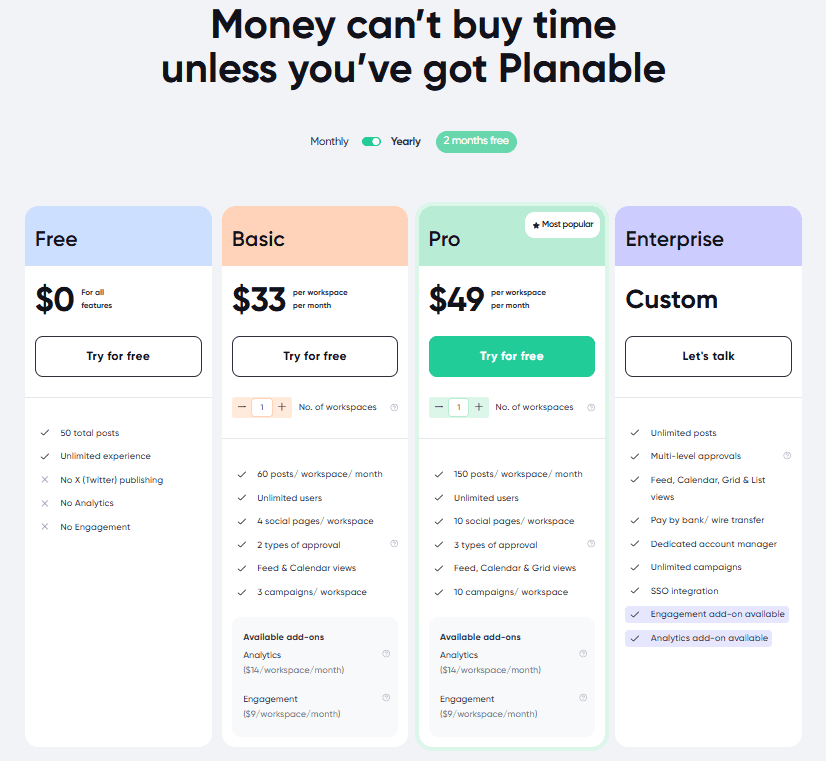
Planable’s Pricing Plans Planable is another standout choice if you’re looking for a social media management tool with a pricing structure that won’t stretch your budget.
Starting at just $33 per month, Planable delivers excellent value, especially if you’re focused on visual content and team collaboration.
This social media management tool is particularly well-suited for teams that need to work together on social media campaigns.
The platform’s intuitive design makes it easy to plan and review posts visually, which is a huge plus for creative teams.
Whether you’re managing multiple clients or juggling several social profiles, Planable’s transparent pricing and feature set make it a great option.
Plus, as you scale, you’ll find that Planable continues to offer good value, helping you stay organized and efficient as your social media presence grows.
Featured Article: 10+ Planable Alternatives to Consider
-
Sendible
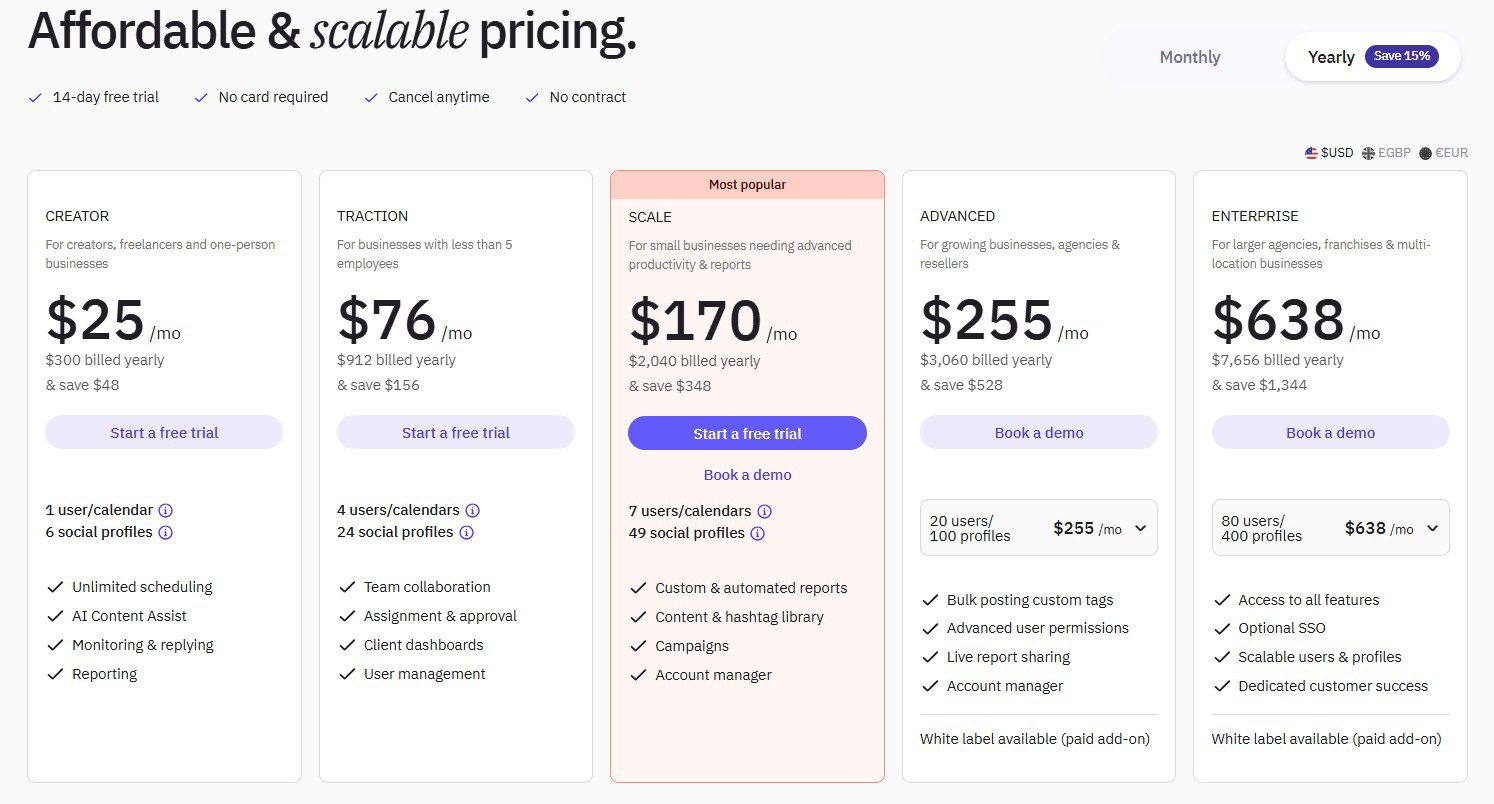
Sendible’s Pricing Plans Sendible is a fantastic option if you’re searching for an affordable social media management tool that combines ease of use with powerful features.
With plans starting at just $29 per month, Sendible offers a range of options to fit different needs and budgets. What sets Sendible apart is its user-friendly interface and robust integration capabilities.
It provides a comprehensive suite of tools that make managing your social media accounts straightforward and efficient. Plus, all this comes without the hefty price tag you might find with some of its more expensive competitors.
If you’re looking for a solution that balances affordability and functionality, Sendible is definitely worth considering.
Agency Tip of the Day:
If you manage multiple clients, invest in social media management tools for agencies to streamline approvals, reporting, and team collaboration.
Invest in Social Champ to streamline your social media efforts and boost your online presence.
Conclusion
When it comes to deciding if a social media tool is worth it, understanding CoSchedule pricing is key.
From the Free Calendar for solo users to the Marketing Suite for large teams, CoSchedule offers robust features, but costs can add up quickly as you scale.
On the flip side, Social Champ provides flexible, per-profile pricing with advanced features at a more budget-friendly rate.
Ultimately, the choice depends on your team size, content needs, and budget.
Whether you’re an individual, a growing business, or an agency, knowing how CoSchedule pricing stacks up helps you pick the plan that makes sense without overspending.