

I went fully unhinged and gently persuaded my team to test out 70+ productivity tools with me. Let me explain.
I live and breathe social media. And somewhere between managing client campaigns, planning content strategies, responding to DMs, and yes, obsessing over my protein intake (don’t ask), I found myself on the brink of complete insanity.
I needed something, anything, to help me get organized. So naturally, I went on a rampage to find productivity tools that could give me the confidence to feel that I was actually doing more with my day.
Unfortunately, I dragged my team down this rabbit hole with me. We tested a few productivity tools and then went a little crazy, and reviewed over 70 platforms.
In fact, we spent six months researching and testing the best apps for productivity. This included task managers, focus apps, AI assistants, planners, and even note-takers.
But before I start listing the names, I do want to clarify that these platforms are not there to do your work for you. Rather, you can use them to refine and perfect your work.
Let’s get started!

Over 50,000+ marketers use Social Champ to schedule, publish, and analyze content across 11+ platforms.
What are Productivity Tools and Why do You Need Them?
Productivity tools are software applications that help you work smarter by handling repetitive tasks, keeping your work organized, and making it easier to collaborate with your team. They’re useful for anything from writing documents and tracking tasks to managing projects and communicating across different departments.
What productivity tools are
- Software that supports everyday work: These tools help with things like creating documents, organizing data, planning projects, and staying connected with your team.
- Designed to simplify tasks: Whether it’s basic file management or more complex work like project timelines and shared workflows, productivity tools are built to make your day run smoother.
Why you need productivity tools
- They save time: Automating routine work means you spend less time on repetitive tasks and more time on meaningful work.
- Better organization: Everything stays in one place—tasks, files, notes, deadlines—making it easier to keep track of what needs to be done.
- Smoother teamwork: These tools make sharing updates, files, and feedback much easier, which is a huge help for remote and hybrid teams.
- Helps you stay focused: With fewer distractions and clearer priorities, it’s easier to get through your to-do list without feeling overwhelmed.
- Improves the quality of your work: When your process is cleaner and your tools do the heavy lifting, the final output naturally gets better.
How We Tested and Evaluated These Tools
Now, before you wonder what makes me qualified to judge these tools, let me break down my process.
Each tool was evaluated on the factors like:
- Is it easy to use without a manual?
- Does it integrate well with my go-to apps?
- Is it compatible with all devices?
- Are the automation features actually helpful?
- Are AI and productivity key features of these tools?
- How’s the pricing, overall?
Using this iron-clad criteria, I narrowed down 15 productivity tools that I (and my team) now swear by.
15 Best Tools To Maximize Your Productivity in 2026
Here’s the moment you’ve been waiting for. Let’s look at the top paid and free productivity apps this year. We have also tested some AI-powered productivity tools as well, which are listed separately below
-
Social Champ- All-In-One Social Media Management Tool
If you want a productivity tool solely for social media management, Social Champ is a great tool.
It meets the criteria for the 4Ps of Productivity: Planning, Prioritization, Process, and Performance, with features like:
- Automated scheduling and publishing for 11+ platforms
- Social inbox to organize and respond to all your comments, DMs, and mentions
- Calendar view to organize and plan your content
- Analytics to measure the impact of your posts
- Social listening to manage your brand’s reputation on your social media
- Team collaboration, with approval workflows, to manage your team
- Champ AI Suite to make content creation super easy
- AI posting recommendations, so you don’t have to manually check the posting time for each platform
- Integrations with OneDrive, Canva, Imgur, WordPress, and GA4, among others.
Pricing
Starts at $4/month/ channel, with a free plan available, making it a great tool for freelancers.
Our Verdict
This tool has great features for automating social media management. Its price-to-features ratio is also impeccable, which makes it a must-have for us. Plus, you can access Social Champ on a Web App, iOS, and Android devices.
Plan, schedule, and automate all your posts in one place, with Social Champ.
-
Notion-Organize, Plan, and Collaborate in One Workspace

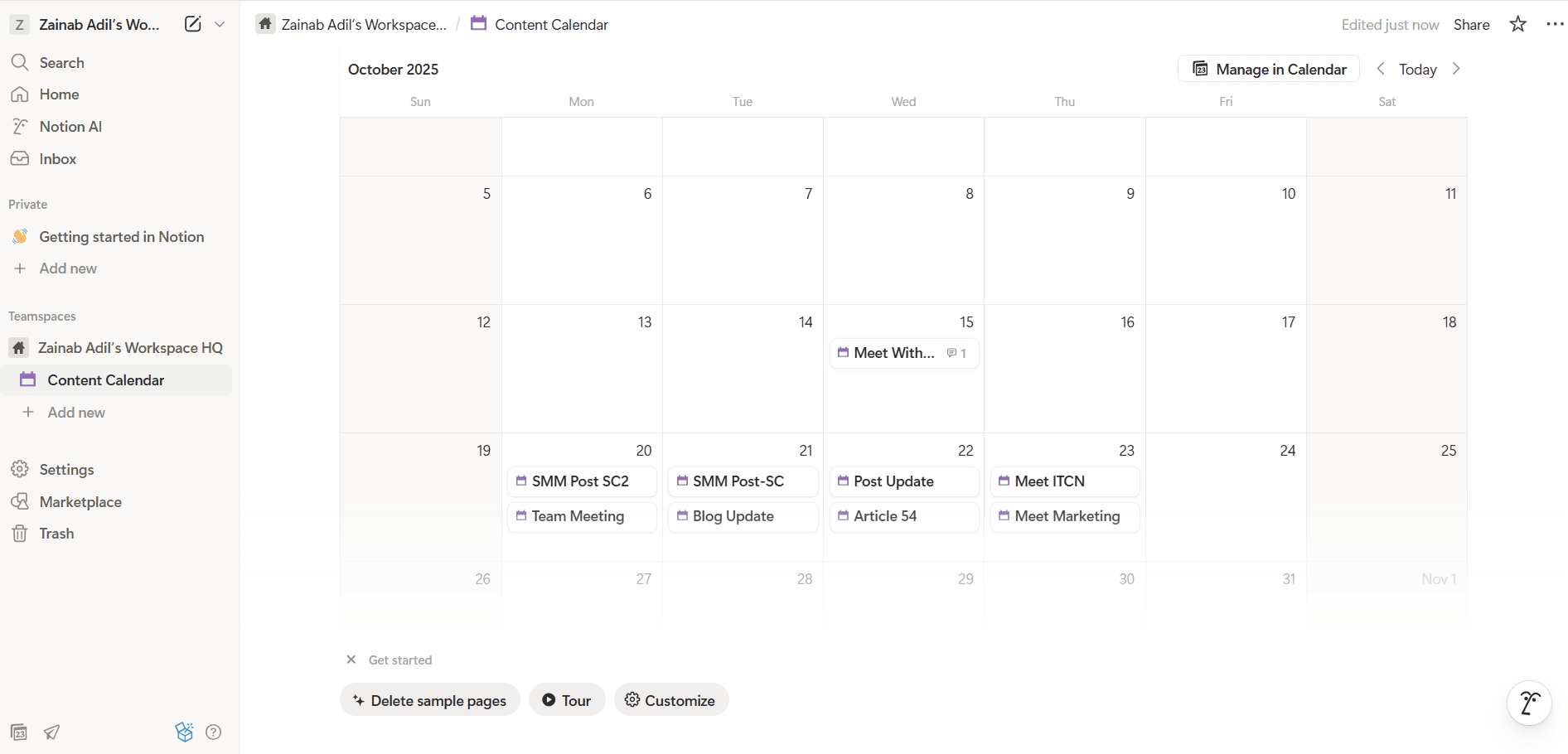
Notion’s Calendar Notion has become my all-time favorite, as it’s perfect for organization. It hits all the marks for productivity tools, as it offers collaboration, drag-and-drop builders, pre-made templates, and even an AI tool.
Here’s what I loved:
- The drag-and-drop blocks let me build dashboards, link pages, and shape the workspace exactly to my needs.
- Switching between table, calendar, Kanban, or gallery views made managing projects and tasks much easier with its databases and views.
- Working with a team was a breeze. We can easily share pages, add comments, and assign tasks. This is perfect, especially with client collaboration.
- Notion’s library of templates is super helpful. It saves so much time, especially when setting up new workflows.
- The AI assistant impressed me the most. It summarized meeting notes, drafted outlines, and even translated content instantly.
-
Todoist-Organize Your Tasks, Simplify Your Day
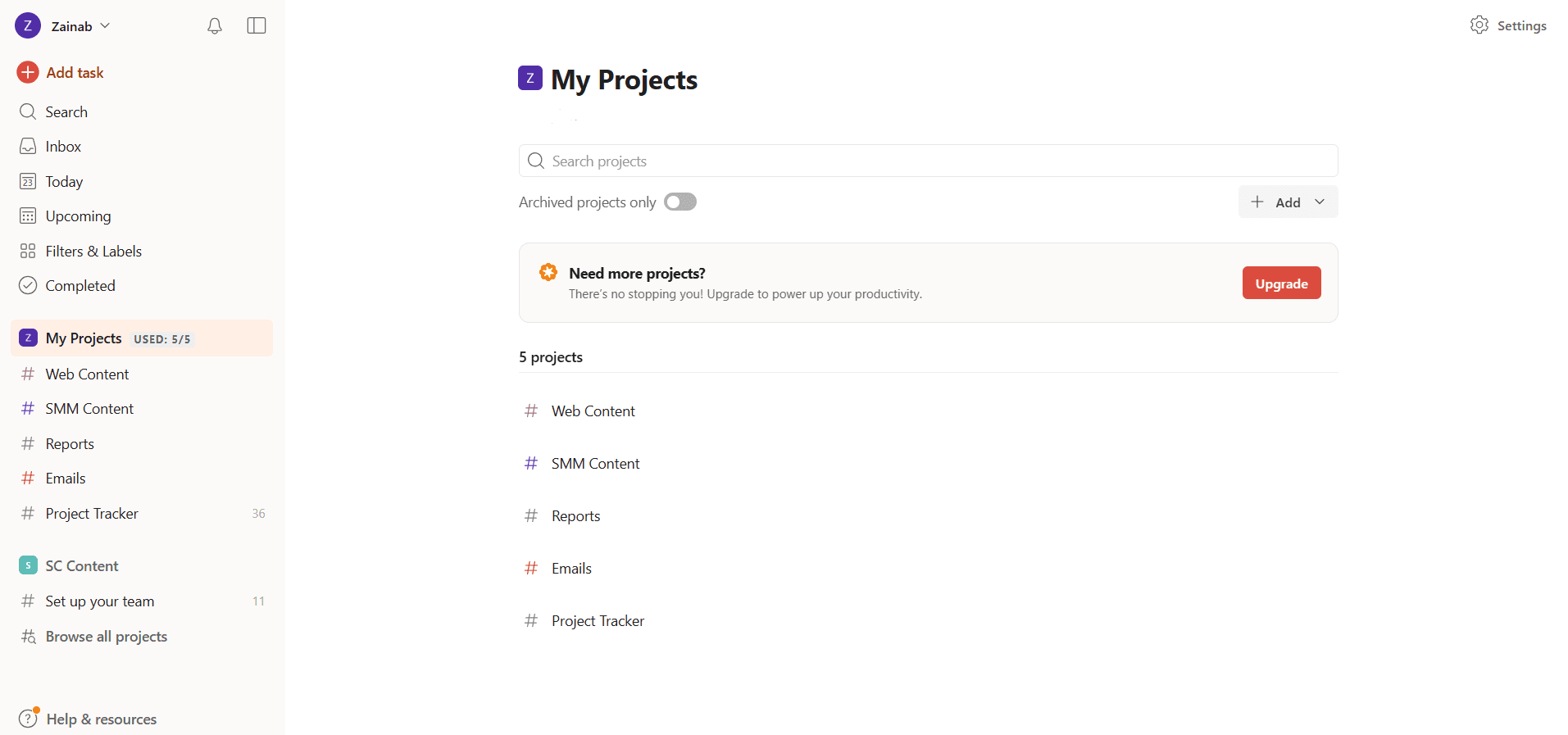
Todoist’s Dashboard When researching task management platforms, Todist stood out to us. The platform is super easy to use, and it comes with a simple and organized layout.
Here’s what I really liked:
- It came with a clean, distraction-free interface. Everything was organized into its little space.
- Adding tasks and subtasks was really simple. You can simply type, “Send a report next Monday at 10 am,” and instantly set up the task with the correct date and time.
- The tool is perfect for setting habits and routines. You can set recurring reminders for both personal and professional tasks.
- You can also connect your Google or Outlook Calendar to keep everything in one place.
- It comes with color-coded filtering, which I love. You can easily mark and filter high-priority tasks.
-
Motion-Tasks, Calendar, and Focus, All in One
If you need a productivity tool that also acts as your personal assistant, Motion is the way to go.
While it’s a little pricey, the platform provides good value for money by automatically planning, optimizing, and adapting your schedule so you don’t have to.
Here’s what stood out to us:
- Motion takes all your tasks, projects, deadlines, and meetings, then builds your perfect daily plan. If something changes, for example, like a meeting being added or a task taking longer than expected, the tool instantly re-prioritizes and reorganizes your schedule for you.
- It has amazing integrations. You can connect your Google Calendar, Outlook, and iCloud so you always have a holistic view of the day.
- The platform also lets you track all deadlines, but in a smart manner. For example, if you’re at risk of falling behind, it provides you with an alert in advance.
- It also helps you reserve meetings at the best time slot and updates your calendar instantly.
-
Sunsama-Plan Your Day With Intention
Sunsama’s Dashboard What I really like about Sunsama is that it’s different from all the other tools we’ve seen so far. It doesn’t push you to complete the grind.
Instead, it enforces a philosophy of creating a calm and intentional workday. Basically, the tool helps you plan your day, one at a time, so you can balance your workload and avoid burnout.
Here’s why this tool stood out to me:
- Every morning, Sunsama walks you through a planning ritual: review yesterday’s progress, choose your most important tasks, and schedule only what’s realistic. This helps prevent overwhelming to-do lists and encourages mindful prioritization.
- It has a “Planned Work Time” bar that tracks how many hours of tasks you’ve scheduled versus the hours available in your day. If you’re overbooked, Sunsama nudges you to re-evaluate and move tasks to another day.
- It comes with a built-in timer that allows you to go into focus mode. When this timer is on, you can engross in your tasks without distractions.
- It also integrates with a variety of tools like Asana, ClickUp, Gmail, Teams, Outlook, Notion, and more.
- At the end of the day, Sunsama guides you through a reflection process, where you can review progress, mark tasks as complete, and close your work. This creates a clear separation between work and personal life.
-
Trello-Simple, Flexible Project Management
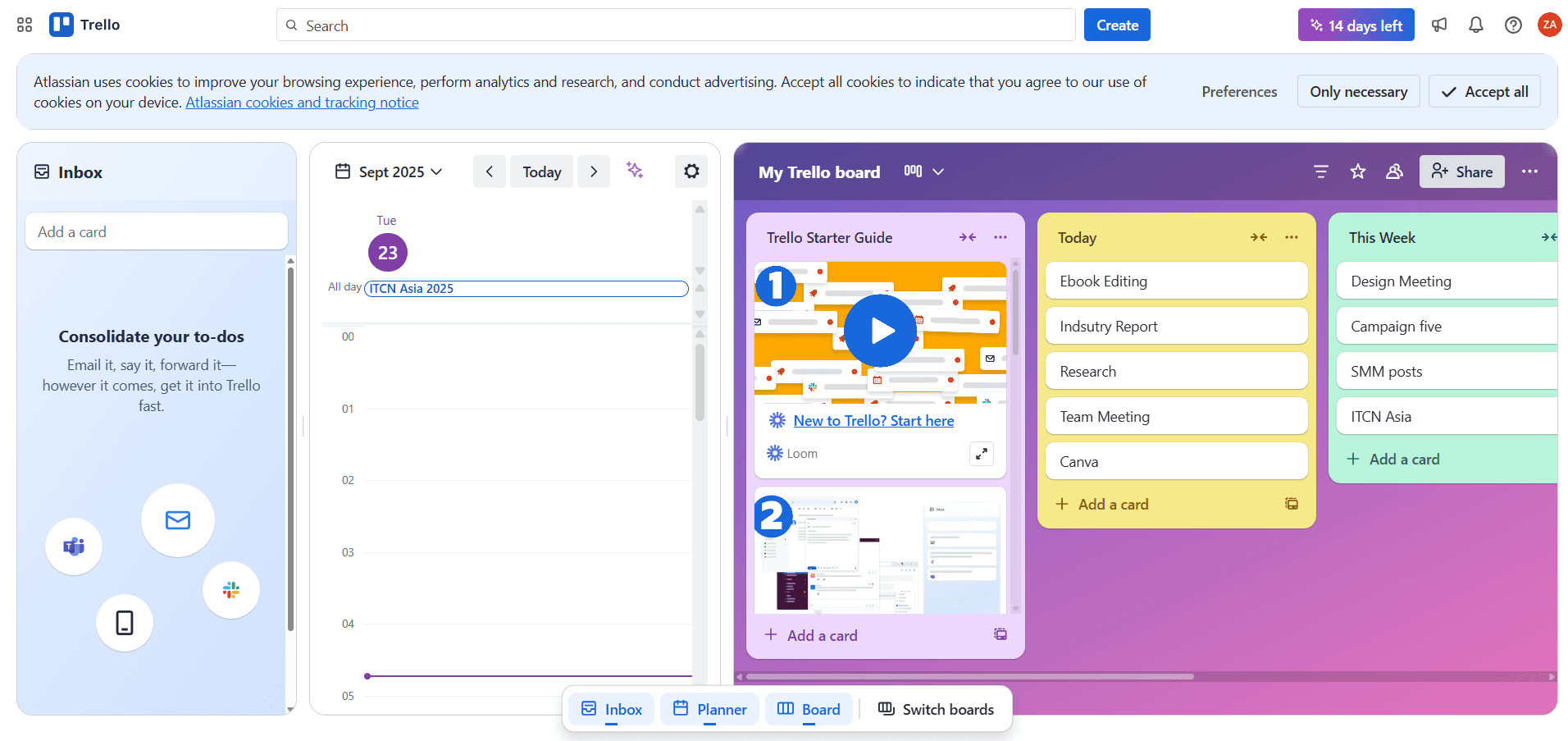
Trello’s Dashboard Trello is a popular name in the market, and rightly so. It’s super easy to use and is packed with features to help you get organized.
It comes with a Kanban board system that lets you see all your tasks at a glance. You can also track progress, work with your team, and mark your tasks complete.
Here’s what I really liked about Trello:
- The onboarding was super adorable and fun. Taco the cat provides you with step-by-step instructions to use the board.
- You can drag-and-drop cards across lists.
- Like Sunsama, you can connect your Google or Outlook Calendar, and integrate it with Slack for easier communication.
- It also integrates with Google Drive, Jira, and Salesforce.
-
ClickUp-All Your Work on One Platform
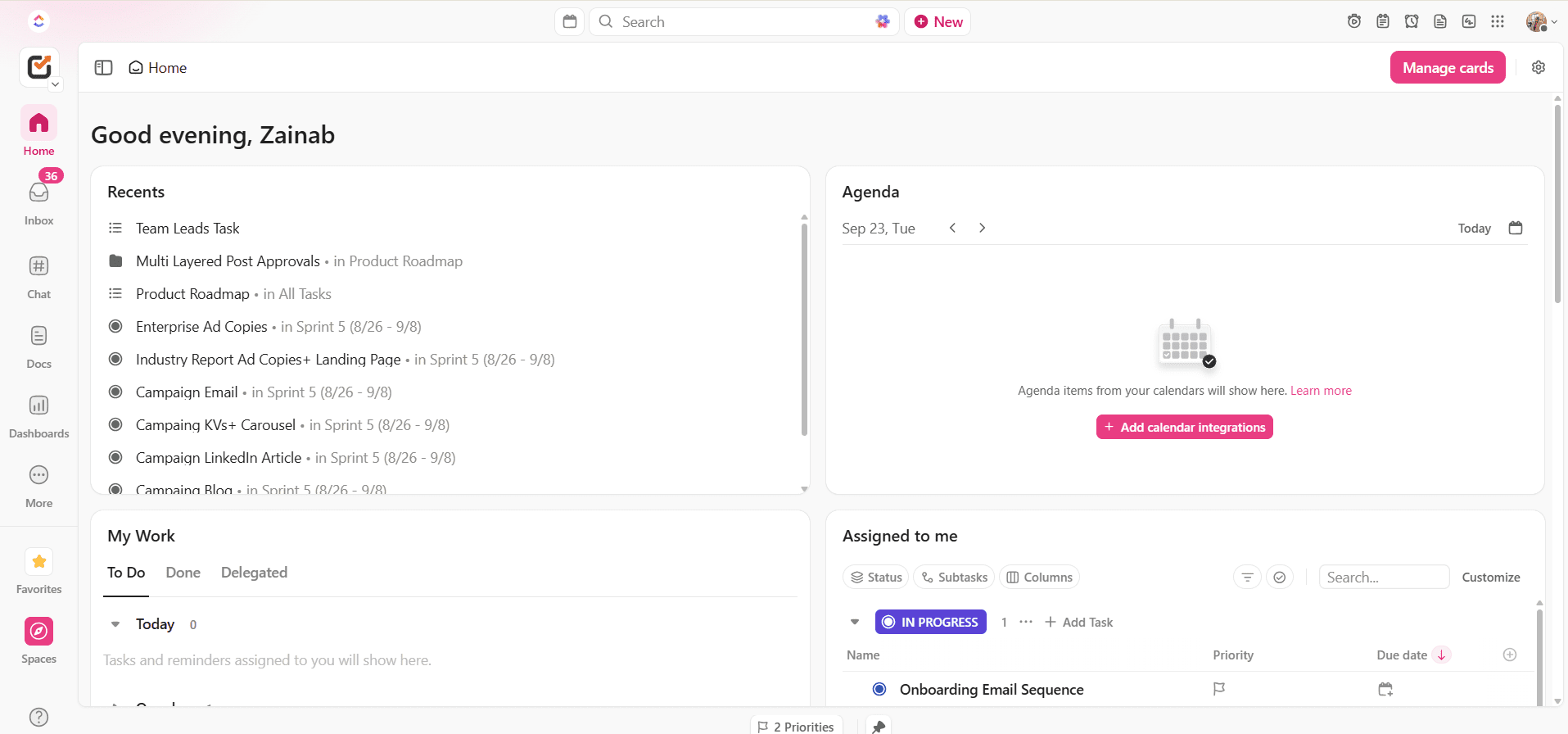
ClickUp’s Dashboard If you’ve ever wished you could manage tasks, documents, chat, and goals all in one place, that’s exactly what ClickUp is trying to do.
It’s full of features, but you can start simple and grow into it as your needs expand. Here’s what I like about this tool:
- You can keep everything like tasks, docs, chat, goals, and dashboards in one app.
- You have the option to pick the view that works best for you. The tool offers lists, boards, calendars, timelines, and even Gantt charts.
- It comes with automations and integrations (like Slack, Google Drive, or GitHub) that save you from repetitive busywork.
- It scales well, so it adapts to your workflow.
-
Akiflow-Focus, Scheudle, and Get Things Done
Akiflow is formed around the concept that the best way to get things done is to plan your day with time blocking.
Hence, this tool allows you to pull tasks from everywhere, drop them onto your calendar, and actually stick to your schedule.
Here’s what makes it great:
- You can consolidate tasks from email, Slack, Trello, and more into one inbox.
- It lets you drag tasks onto your calendar and time-block your day.
- It comes with smart commands and keyboard shortcuts that let you capture and schedule tasks quickly.
- You can enjoy a real-time sync with Google Calendar to keep everything in one place.
- It’s designed for focus.
-
Grammarly-Improve Your Writing
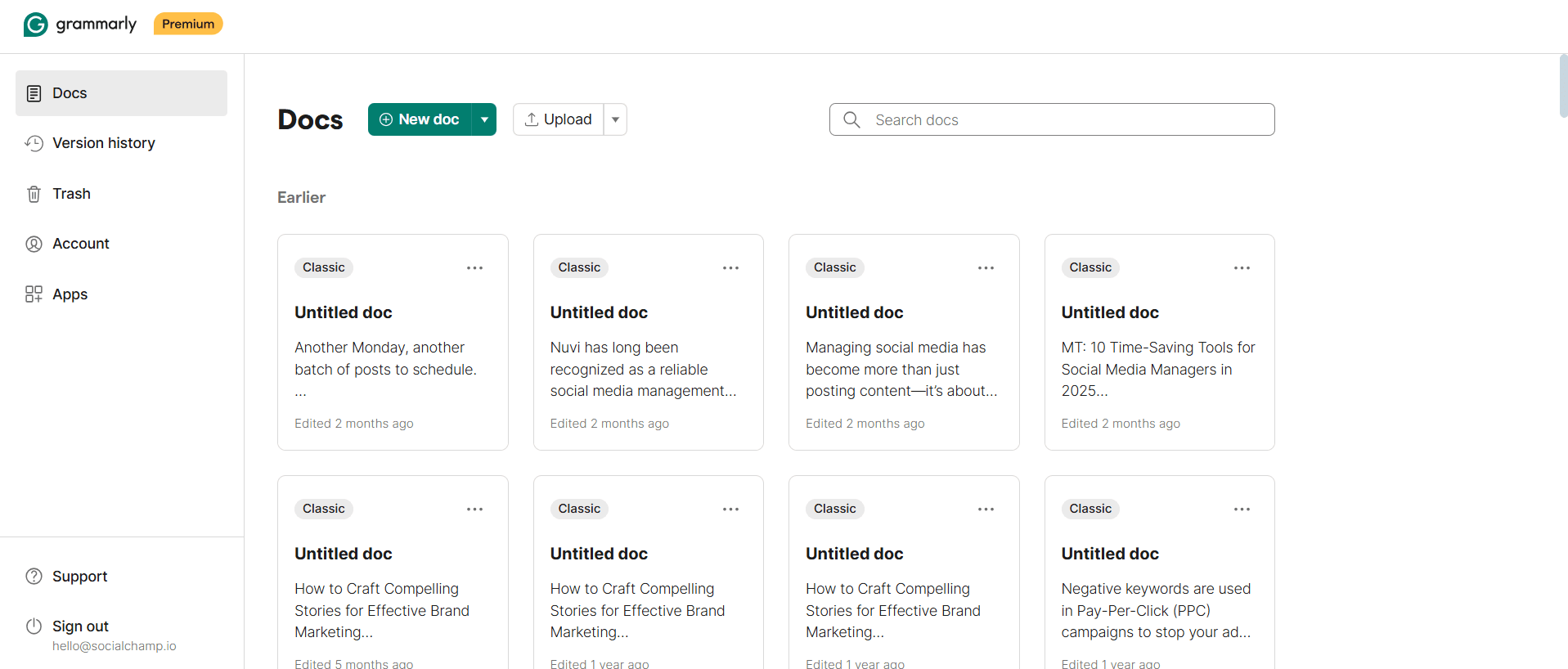
Grammarly’s Dashboard If English is not your Native language, Grammarly is a lifesaver. It’s a great tool for identifying errors in writing, adding clarity to your work, and making sure you sound professional.
Some of its best features include:
- It catches grammar, spelling, and punctuation mistakes as you write them.
- It also has an AI tool that helps you rewrite sentences for clarity, fluency, and impact.
- Grammarly comes with built-in tone suggestions to make sure your writing sounds the way you intend.
- You can also set the language to British, Australian, or American English.
- You can also access its plagiarism checker to ensure your work is 100% original.
- It has extensions for everything, your windows, browser, Word, and even your phone.
-
Slack- Best for Team Collaboration
Slack’s Dashboard Slack is the most commonly used communication software worldwide. But how does it work as a productivity tool?
Well, it helps by keeping your team on the same page and making sure all communication is quick, organized, and in one place.
With Slack, you can:
- Organize conversations into channels so discussions stay focused.
- Send direct messages for quick one-on-one chats.
- Share files, links, and updates without endless email threads.
- Connect other tools like Google Drive, Trello, and ClickUp, among others.
- Easily search for old conversations and documents.
-
Toggl Track- Track Your Progress
Social Champ’s Dashboard If you’ve ever wondered where all your time goes, you need to start using Toggl Track. It’s one of the best time tracking tools we’ve used so far.
Here’s what I love about it:
- You can start and stop timers with one click. The setup is super easy.
- You can track billable hours and generate reports for clients or teams.
- It works across web, desktop, and mobile, so you never miss logging time.
- You can easily connect it to tools like Asana, Trello, Slack, and Google Calendar.
- You can create reports to see how you spend your time, and therefore, improve productivity.
-
Zapier- Automate Your Workflow Across Apps
Zapier’s Dashboard If you want a tool that acts like your personal assistant, you need to try Zapier. You can easily connect it with all your favorite apps and run tasks in the background. It also doesn’t require any coding experience, and it’s super easy to use.
Here’s why it stands out:
- You can create “Zaps” that automatically move data between 5,000+ apps.
- It lets you save time by automating repetitive tasks like sending emails, updating spreadsheets, or posting to Slack.
- You can also use its simple drag-and-drop builder, which makes workflows easy to set up.
- It offers multi-step automations that let you chain together complex processes.
- It works 24/7, so your tasks will get done even when you’re offline.
-
Clockwise-Optimize Your Schedule for Focused Work
If you barely have time to focus on your work, Clockwise can help you out. This tool integrates with your Google or Outlook calendar to study your meeting behavior.
It then provides an uninterrupted time on your calendar, where you can focus solely on your tasks.
Here’s what we like about this tool:
- It automatically rearranges your calendar to create long blocks of focus time.
- It syncs with Google Calendar to optimize meetings around your priorities
- It allows teammates to see when you’re available without endless back-and-forth.0
- It comes with smart hold block time for lunch, breaks, or deep work.
- You can integrate it with tools like Slack and Asana so your schedule stays in sync.
-
Otter.ai- Transcribe Meeting Instantly
Otter.ai’s Dashboard Otter.ai was originally designed as a productivity tool for meetings. It turns your conversation into searchable and shareable notes.
We swear by this tool because:
- It records and transcribes meetings as they’re happening. It’s also super accurate.
- You can connect it with Zoom, Google Meet, and Microsoft Teams.
- It also highlights key messages and action items, along with who is speaking. This way, you can just skim over the notes without having to read through the whole thing.
- You can share live transcripts with teammates who couldn’t attend.
-
Brain.fm- Music Designed to Improve Focus and Relaxation
Brain.fm’s Dashboard Now, this one is kind of my favorite. Brain.fm provides you with music that’s scientifically designed to help you focus, relax, or even fall asleep.
Here’s what it does:
- You can start by selecting what you aim to achieve. For example, you can choose between focus modes, relaxation, or sleep. Just hit play and you’re good to go.
- The music is engineered with neuroscience to nudge your brain into the right state.
- It works great in the background, so you can really focus on work without distractions.
Pricing
Notion does offer a free plan, but its paid plans start at just $10/month/member.
Our Verdict
If you’re looking to get organized, this is the tool for you. Plus, it’s available on both desktop and mobile.
Pricing
Like Social Champ and Notion, Todist also comes with a free plan for individuals. Its paid plans start at $4/month.
Our Verdict
If you love task planners, Todoist is the perfect tool for you. It’s affordable, it has templates, and it is compatible with both mobile and PCs.
Pricing
Motion’s plans start at $29/month, which is slightly higher than all the other tools we’ve added this far.
Our Verdict
Motion is a great tool if you’re looking for a smart personal assistant. It’s also available for iOS, Android, and desktop.

Pricing
Sunsama starts at around $16/month, and comes with a 14-day free trial with no credit card required.
Our Verdict
If you’re pressured easily while working, this tool is perfect for you. It has a clean and minimalist interface, which can be soothing for some users. It also helps you disconnect, slow down, and focus on work without racing through endless checklists.
Pricing
You can start using Trello for free with limited features. Its paid plans start at $5/month.
Our Verdict
Trello works best for visually-oriented individuals. It’s great for organization, team collaboration, and multi-stage projects.
Featured Article: Top Free Social Media Scheduling Tools to Boost Your Productivity
Pricing
ClickUp also has a free forever plan for individuals. Its paid plans start at $7/month/user.
Our Verdict
If you have a large team with different departments, we’d recommend this tool to get organized. It’s relatively affordable, and you get to access numerous integrations and features.
Pricing
Akiflow is a little pricey. Its paid plans start at $34/month, and it does require you to fill in your credit card details to get started.
Our Verdict
If you’re working with a big team, we’d recommend this tool solely because of its organization capabilities.
Pricing
Grammarly does offer a free plan with limited features. But if you want advanced tools like plagiarism check, you’d need to use its paid plans, which start at $12/month.
Our Verdict
Grammarly is definitely a must-have, especially for your communication.

Pricing
Slack does have a free version. Its paid plans start at $8.75.
Our Verdict
If you’re managing a large team and need a platform that combines all your files and communication, Slack is a great tool.

Pricing
It offers a free plan for up to 5 users. Its paid plans start at $9/user/month.
Our Verdict
Toggl Track is a great tool if you work for clients and get paid by the hour. It provides tangible proof of the time you’ve put into each task.

Pricing
Zapier also has a free plan. Its paid plans begin at £15.06 /mo.
Our Verdict
We’d definitely recommend Zapier because it eliminates manual busywork.
Pricing
Clockwise comes with a free plan with limited features. Its paid plans start at $6.75.
Our Verdict
If you’re looking for a calendar that gives you more time to focus and get organized, this tool is recommended.

Pricing
This productivity tool also has a free plan. Its paid plans start at $8.33/month.
Our Verdict
If you’re like me and you zone out during critical work meetings, Otter.ai is the tool for you.

Pricing
Its plans start at $9.99/month, but it does offer a free 14-day trial.
Our Verdict
If you get easily distracted, you need this tool.
We Tested the Best AI-Powered Productivity Tools For You As Well…
If you came here looking for AI productivity tools, we’ve got you covered for that, too. Here are our top picks:
- ChatGPT: It’s great for brainstorming ideas, drafting copy, and even summarizing research. It cuts our writing and ideation time by half.
- Notion AI: We loved how it transformed scattered notes into clean summaries and action items. Perfect for organizing thoughts after meetings.
- Motion: Its AI scheduling is actually amazing. It automatically arranged tasks and meetings, which helped us stick to priorities.
- Reclaim.ai: This tool made time-blocking super easy. It adjusted our schedules dynamically, ensuring we still had focus time even on packed days.
- Champ AI Suite: For social media, it stood out. It helped us create post ideas, captions, and even visuals.
How to Choose the Right Productivity Tool for You
These 15 tools worked best for me because they cater to my pain points. If our workflows are different, you’ll need to narrow down these options and create your own list of the best AI productivity tools.
Here’s how you can do just that:
-
Identify Your Pain Points
Before picking out any tool, you need to take the time to understand what’s causing the delays in your workflows. Think about what you need the tool to do. Once you figure that out, you can consider the tools in this list to solve your problem for you.
-
Consider Your Team Size
Surprisingly, the best productivity tools for professionals cater to teams of different sizes. If you’re looking for a tool that works just for you, then you’ll have a plethora of options to sort through.
But if you’re working with a large team, you’ll need a platform that can accommodate collaboration between multiple users.
In this case, it is best to consider a platform that provides unique access, offers approval workflows, and simplifies collaboration.
-
Start Free Trials
Most of the productive tools in this list come with the option of free trials. This means you can actually test out the platform to see if it’s doing what you need it to do.
Why Social Champ Deserves a Spot in Your Productivity Toolkit
Now, I might be biased, but I genuinely believe that Social Champ deserves a spot in your productivity toolkit.
It’s one of the online productivity tools that comes with everything you need to grow your social media presence.
For starters, it comes with 5 primary features that help you plan and manage social media from A to Z.

Let’s take a look:
- Plan and schedule content easily with tools like the AI Content Wizard, AI Imaginator, and Canva integration
- Upload and schedule up to 300 posts in bulk, set up Auto RSS feeds, and post at AI-recommended times for better engagement
- Use a visual social media content calendar with weekly/monthly views, drag-and-drop rescheduling, and holiday reminders based on your timezone
- Track performance with detailed and cumulative analytics across platforms, and use Competitor Analysis to find content ideas
- Manage all your conversations from Facebook, Instagram, LinkedIn, WhatsApp Business, TikTok, and YouTube through one unified inbox
- Monitor brand perception with built-in social listening, which is perfect for staying on top of community feedback
- Collaborate with your team using features like approval workflows and automation to streamline your workflow
Plan, create, post, publish, engage, analyze, and grow- all from one dashboard!
Conclusion
Now that you’ve looked at our list of the top 15 productivity tools, the next step is to ask yourself if they’ll fit your workflow.
The best approach is to narrow down the list to platforms that solve your problems and then test them out through a free trial.
For instance, if you want to be productive with social media, Social Champ could be on your trial list. But if you want a tool to manage your work-life balance, you could give Sunsama a try.
At the end of the day, nothing beats trying a tool first-hand. Doing this will let you know pretty quickly if it’s the productivity booster you’ve been looking for.


