
If you’ve ever felt like your brilliant LinkedIn post didn’t get the engagement it deserved, you’re not alone.
It’s frustrating.
But don’t be too hard on yourself; sometimes it’s more about the timing of when you hit “post” than the content. This is the time when professionals are actively catching up on industry news.
I’ve created this guide to help you find the best time to post on LinkedIn based on Social Champ’s data. We analyzed 2.6M LinkedIn posts to figure out which time actually works best, so we don’t give you some generic information, but a highly credible timetable!
So if you’re ready, let’s start!
Short Summary
- Engagement on LinkedIn peaks mid-week, with Tuesday and Wednesday afternoons (1:00 PM to 4:00 PM) being the most active times as professionals catch up during or after lunch.
- Around 80% of LinkedIn’s active audience uses the platform on weekdays, whereas weekend engagement is significantly lower.
- Daily peak posting windows range from afternoon slots on weekdays (Mondays 2–4 PM, Tuesdays 1–3 PM, Wednesdays 2–4 PM) to a mix of early morning and evening hours later in the week (Thursdays at 9 AM, 10 AM, and 8 PM; Fridays at 9 AM and 4–6 PM).
- Weekend activity remains minimal, though testing early morning slots (3 AM to 4 AM and 8 AM to 10 AM) can help reach professionals preparing for the week with less content competition.
- Tuesdays are the overall best day to post, followed closely by Wednesdays, because users have finished initial weekly planning without yet shifting into weekend mode.
- Ideal posting times vary by industry, region, and target audience, making specific page analytics and timing tests crucial.
- Social media management tools like Social Champ help determine page-specific posting schedules by analyzing historical audience engagement data and offering AI-suggested scheduling.
Best Time to Post on LinkedIn: Global Trends for 2026
The best time to post on LinkedIn for engagement generally depends on your audience, but a few studies have shown that your content might perform better at certain time slots.
Overall Engagement Findings: Mid-Week Peak
At the end of the day, LinkedIn is a professional platform, and most people don’t want to search for job-related stuff on weekends. Our finding for the global best time to post says the same thing.
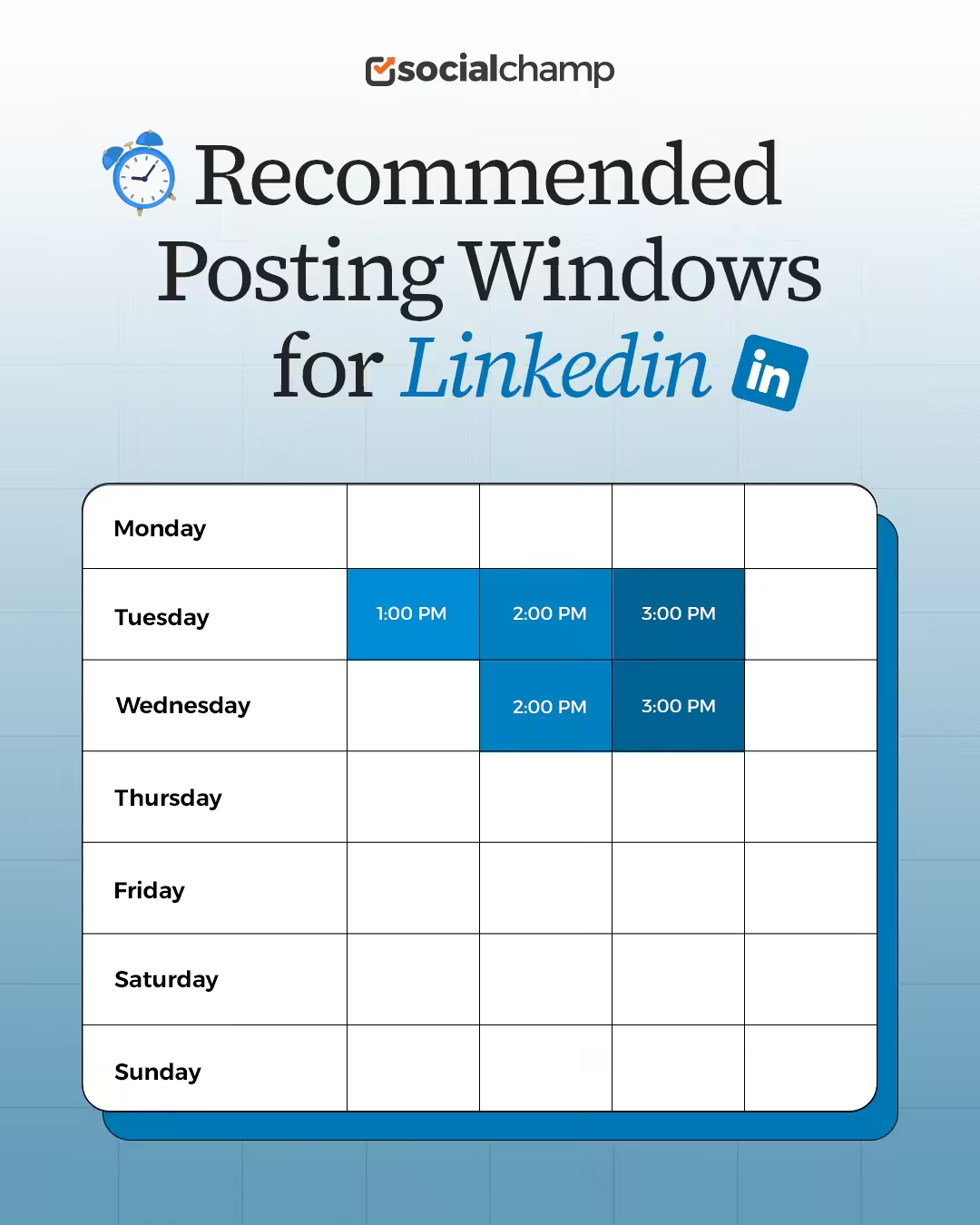
The overall engagement on LinkedIn peaks on Tuesdays and Wednesdays around 1:00 PM to 3:00 PM. This is the time when most people have their lunch, which is the perfect time for them to catch up with their LinkedIn network.
Approximately 80% of the LinkedIn audience stays active on the platform during weekdays.
Recommended Posting Windows
The most effective posting windows are strongly centered on the middle of the week, with slight variations by study:
- Best Days: Tuesday and Wednesday are consistently identified as the best days for high engagement.
- Peak Time Slots: On Tuesdays, the engagement peaks at 1:00 PM, 2:00 PM, and 3:00 PM, whereas on Wednesdays, the engagement peaks at 3:00 PM and 2:00 PM.
Posting during these times significantly increases the chance of catching your audience when they are active and receptive to professional content.
Featured Article: How to Beat LinkedIn Algorithm?
Best Time to Post on LinkedIn by Day (Data-Driven Schedule)
Every day has a different best time to post, so you cannot expect all days to have the same performance. Some days, your LinkedIn posts might perform well, while on other days they might tank because you posted at the same time. Hence, it is important to find the best time to post on LinkedIn by day!
Our Recommended Data-Driven Posting Schedule
The following table summarizes the key daily windows that consistently show high engagement across multiple data sources.
However, you should also use your own analytics to test and confirm these times for your specific audience’s time zone and behavior.
| Day | Best Time to Post (Based on 2.6M Posts) |
|---|---|
| Monday | 2:00 PM – 4:00 PM |
| Tuesday | 1:00 PM – 3:00 PM |
| Wednesday | 2:00 PM – 4:00 PM |
| Thursday | 9:00 AM – 10:00 AM, and 8:00 PM |
| Friday | 9:00 AM, and 4:00 PM – 6:00 PM |
| Saturday | 3:00 AM – 4:00 AM, and 8:00 AM |
| Sunday | 3:00 AM – 4:00 AM, and 10:00 AM |
Best Time to Post on LinkedIn on Monday
The best time to post on Monday is between 2:00 PM and 4:00 PM. During this time, professionals come back from their lunch and scroll to freshen up.
Best Time to Post on LinkedIn on Tuesday
Tuesday is considered one of the best days to post on LinkedIn, and the best time to post window opens between 1:00 PM and 3:00 PM. People prefer to scroll through LinkedIn over their lunch breaks.
Best Time to Post on LinkedIn on Wednesday
Wednesday is the second best day to be online on LinkedIn. The posting window opens between 2:00 PM and 4:00 PM, which is the best time to get rid of mid-day fatigue by connecting with the LinkedIn network.
Best Time to Post on LinkedIn on Thursday
The best times to post on Thursday are at 9:00 AM, 10:00 AM, and 8:00 PM. This timing allows users to capitalize on morning and lunch activity before the weekend focus begins.
Best Time to Post on LinkedIn on Friday
On Friday, a brief mid-morning window before the weekend mindset takes over. The best times to post on Friday are at 9:00 AM, 4:00 PM, and 6:00 PM.
Best Time to Post on LinkedIn on Saturday
Saturdays witness generally low engagement, but an early morning test can reach professionals catching up when competition is low. So the best time to post on Saturday is from 3:00 AM to 4:00 AM and then again at 8:00 AM.
Best Time to Post on LinkedIn on Sunday
On Sundays, LinkedIn has very low activity; try an early morning slot to catch the few users preparing for the week ahead. Posting at 3:00 AM, 4:00 AM, and 10:00 AM are the right choices for experimenting.
Featured Article: What to Post on LinkedIn?
Best Day to Post on LinkedIn
According to our data, the best day to post on LinkedIn is Tuesday, followed closely by Wednesday. These are the two days when the engagement is at its peak, and it makes complete sense. Mondays have a low engagement comparatively because that’s when everyone has a lot on their plate.
Tuesday, on the other hand, is much lighter than that! A lot of the week’s planning already happens on Monday, so people get time to scroll through LinkedIn on Tuesdays. Wednesdays are also similarly seen to have high engagement because by then, much of the work is already done and people are still not in the weekend mood.
This shows that LinkedIn actually performs better on weekdays instead of the weekends.
How to Find the Best Time to Post on LinkedIn for Your Audience?
One thing you should know about the best time to post is that there’s no single best time for any social media platform. You might get a lot of the information from data like ours, but that doesn’t mean that it will work for you. The best time to post on LinkedIn depends on many factors, including which industry you work in, what region you live in, and what your audience is like.
Which is why it is important to find the best time to post for your audience, so you can publish your content when they’re active. There are two ways you can do this! First is to A/B test your timing. This is manual effort; you need to create content and experiment with posting it at different times and see which time it performs the best. That might be your best time to post.
However, this first method requires a lot of time and trial and error. The easier and much more efficient way is to get a tool that tells you the best time to post for your audience. These tools have AI-suggested times that analyze your data from previous posts and, based on that, recommend the best time to post. This has much better chances of success, and it also saves you so much effort and time.
How Social Champ Helps You in Finding the Best Time to Post on LinkedIn
Social Champ is one such tool that gives you the option to let AI suggest the best time to post on LinkedIn. It analyzes your audience’s past behavior with your content and then suggests the right time to post. This is the single easiest way to get your posts live at the right time.
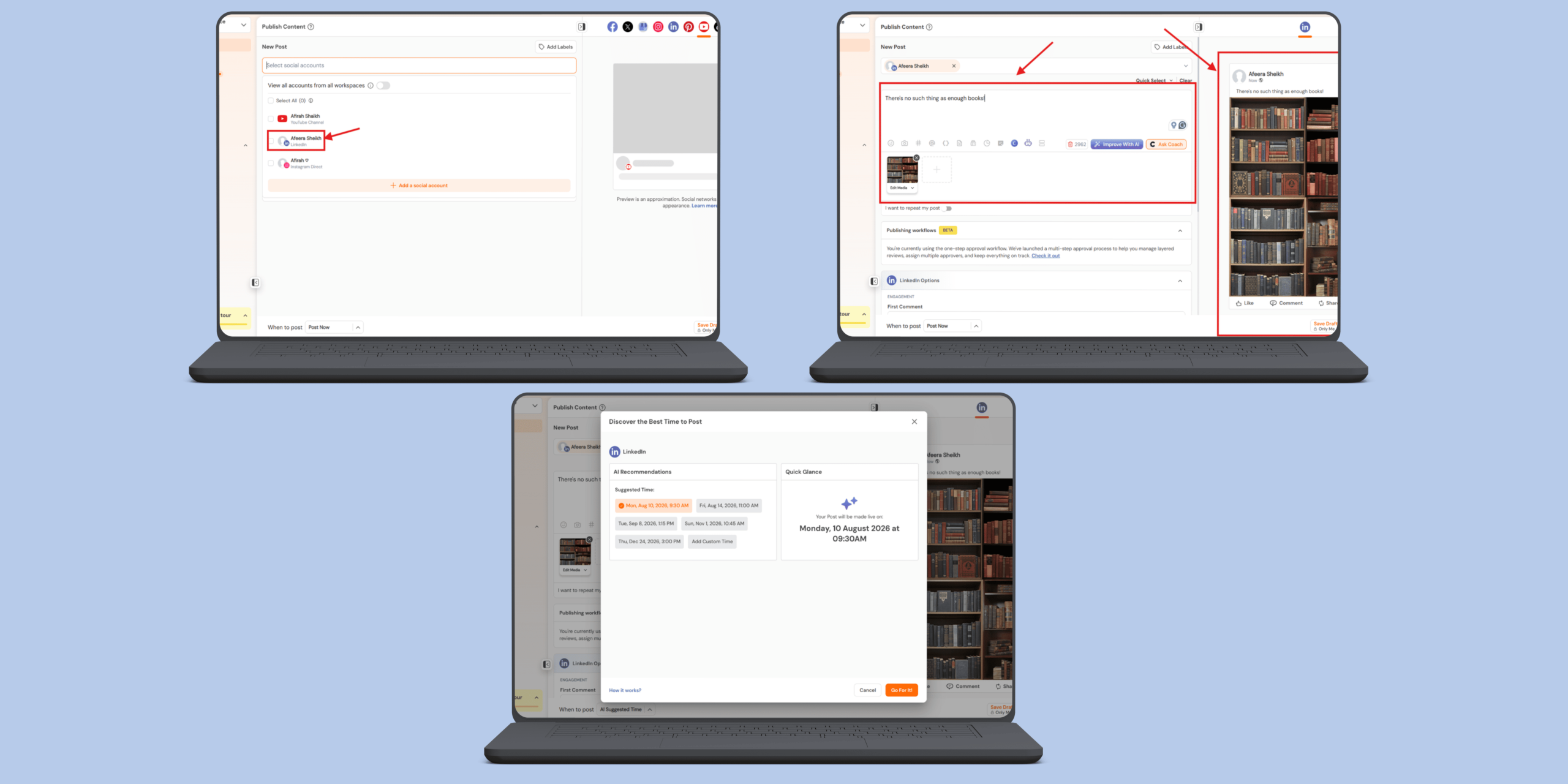
Here’s how you can schedule a LinkedIn post through Social Champ for the best time:
- Sign in to your Social Champ account; if you’re new, please sign up!
- Connect your LinkedIn profile and select LinkedIn from the “select social accounts” tab.
- Create your post and check the preview.
- Select “AI suggested time” at “when to post” tab at the bottom of the screen.
- Select “Go for it” and hit schedule.
Stop Guessing Your Best Time to Post!
Conclusion
Identifying the best day and time to post on LinkedIn is a critical factor in maximizing the reach and effectiveness of your content strategy.
Whether you’re a recruiter targeting early risers, a tech brand aiming for peak midweek engagement, or a global business adjusting across time zones, timing plays a crucial role in how well your content performs.
While general trends offer a helpful starting point, the real value comes from testing, analyzing, and adjusting based on your unique data.
Tools like Social Champ can simplify this process by automatically identifying optimal posting times and scheduling your content accordingly, so you stay consistent without losing precious time.
Remember, LinkedIn rewards relevance and consistency.
Just by aligning your posts with when your audience is most active, you not only boost visibility but also build stronger, more meaningful engagement over time.











Nicole Charles
Seems a great insight, had no idea best time is actually a concept. On my way to integrate so in my LinkedIn strategy.