
Everyone wants to know the best time to post Reels on Instagram because Reels have dominated the platform, and rightfully so!
They’re fun, short, and extremely engaging for today’s audience because who has the time to sit through long YouTube videos on a weekday? I know, I don’t!
Almost every influencer and business right now is depending on Instagram Reels for marketing, but to reach its full potential, they need to post their content at the right time!
There are a few ways you can do that, and we’re going to discuss them in this blog, including getting an Instagram scheduler!
So let’s not waste any more time and get started!
Short Summary
- Midweek (Tuesday–Thursday) yields the highest engagement, with Wednesday as the single best day.
- Midday lunch breaks (11:00 AM – 1:00 PM) and post-work evenings (6:00 PM – 9:00 PM) drive the most views across most days.
- Thursdays peak early in the morning (8:00 AM – 9:00 AM), while weekends see significant engagement drops.
- Always schedule posts based on your primary followers’ local time zone rather than your own.
- Retail, food, and B2B content perform best around lunch, while travel and lifestyle peak late afternoon near the weekend.
- Check Instagram Insights for your followers’ active hours and publish 30 minutes before their peak slot.
- Aim for 3 to 5 high-quality, short Reels (<60s) per week rather than daily low-effort videos.
- Use social media scheduling tools with AI timing recommendations to publish at peak hours automatically.
Best Time to Post Reels on Instagram at a Glance
If you are looking for a quick reference without digging into hours of analytics, timing your Reels around high-traffic routines is your best bet. Here is a consolidated look at the optimal posting windows throughout the week:
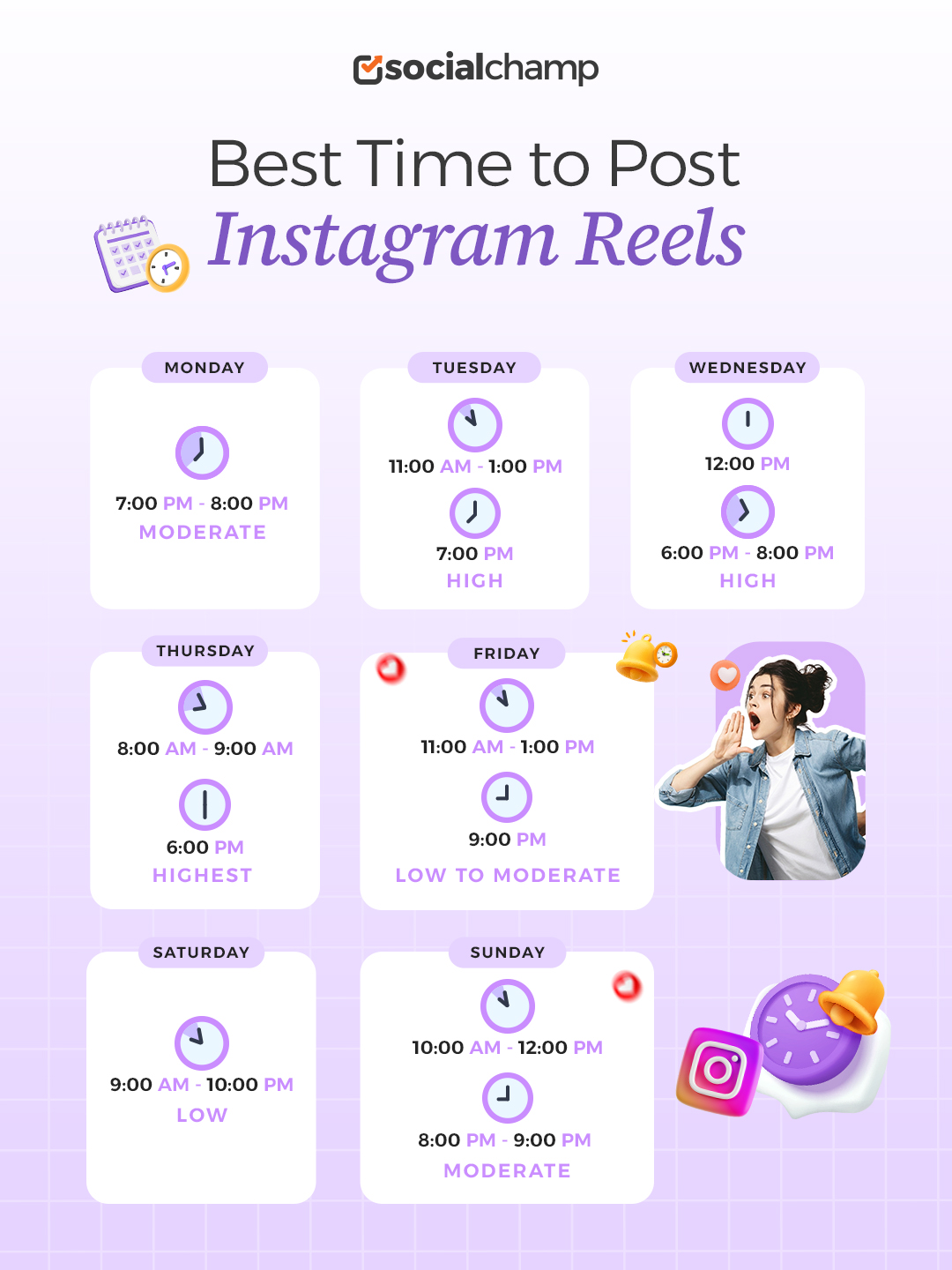
Best Time to Post Reels on Instagram For Every Day Of Week
To help you stay ahead of the algorithm, here is the day-by-day breakdown of when to publish your Reels—and why those windows work.
-
Monday: The Evening Wind-Down
- Primary Window: 7:00 PM – 8:00 PM
- Secondary Window: 8:00 AM – 9:00 AM
- Why it works: Mondays are notoriously fast-paced and mentally heavy. Most users treat their feeds as a quick escape during their morning commute or wait until the workday ends to catch up on video content. Saving your best Reels for the evening window captures viewers when they finally have time to settle in and watch videos with audio turned on.
-
Tuesday: Mid-Day Break & Late Evening
- Primary Window: 11:00 AM – 1:00 PM
- Secondary Window: 7:00 PM – 9:00 PM
- Why it works: By Tuesday, people settle into their weekly routines. The 11:00 AM to 1:00 PM window hits the classic “lunchtime scroll,” making short, punchy, or educational Reels perform exceptionally well here. The evening slot picks up secondary traction as work hours wrap up.
-
Wednesday: The Midweek Engagement Peak
- Primary Window: 12:00 PM
- Secondary Window: 6:00 PM – 8:00 PM
- Why it works: Wednesday is consistently the highest-performing day of the week for Reels. Midweek fatigue sets in, and users actively seek short-form entertainment to break up the day. Posting around noon catches users taking mid-day breaks, while an evening drop grabs scrollers relaxing after work. If you have high-effort content, launch it today.
-
Thursday: The Morning Anomaly
- Primary Window: 8:00 AM – 9:00 AM
- Secondary Window: 6:00 PM – 7:00 PM
- Why it works: Thursdays break the standard pattern. Unlike most weekdays where evenings dominate, Thursday mornings see a noticeable surge in activity. As people start mapping out their upcoming weekends, they check social media early. Capitalize on this morning window with inspiring, lifestyle, or actionable Reels.
-
Friday: Front-Load Before the Off-Grid Shift
- Primary Window: 11:00 AM – 1:00 PM
- Secondary Window: 3:00 PM – 5:00 PM
- Why it works: Friday engagement drops off sharply in the evening as people log off, head out, or socialize. Front-load your Friday content before 3:00 PM to catch people sliding out of work mode early. Keep Friday Reels light, entertaining, or weekend-themed.
-
Saturday: Late Night Relaxing
- Primary Window: 9:00 PM – 10:00 PM
- Secondary Window: 10:00 AM – 12:00 PM
- Why it works: Saturday is generally the lowest-engagement day across Instagram because users are out living their real lives. If you do post, target late morning or wait until late evening when scrollers check their phones before bed. Save heavy promotional content or major announcements for midweek instead.
-
Sunday: The Pre-Week Reset
- Primary Window: 8:00 PM – 10:00 PM
- Secondary Window: 10:00 AM – 12:00 PM
- Why it works: Sunday starts slow, but builds toward a major late-evening peak. Known as the “Sunday Scariest” phenomenon, people instinctively scroll through social media as they mentally prepare for the upcoming workweek. Content that focuses on inspiration, weekly planning, humor, or relaxing visuals performs best in this evening window.
Best Time to Post Reels on Instagram by Region and Time Zone
Global benchmark data is a great starting point, but there’s a catch: those times reflect when people are awake and active in their local time zones, not yours.
If you are based in London but 60% of your followers live in New York, publishing at 7:00 PM your time means your Reel drops at 2:00 PM EST—missing the prime evening window for your actual audience. To get real traction, you have to align your publishing schedule with the clocks of the people watching.
Here is how to navigate timing based on where your viewers live.
Regional Breakdown: Standard Peak Local Times
If your audience is concentrated in a specific global region, stick to these proven local time slots:
- North America (EST / PST): Aim for 9:00 AM – 11:00 AM EST or 7:00 PM – 9:00 PM EST. Posting around 9:00 AM Eastern Time catches East Coast scrollers during their morning routine while catching West Coast users right as they wake up (6:00 AM PST).
- Europe & UK (GMT / CET): Target 6:00 PM – 8:00 PM CET. European scrollers show particularly high engagement during the post-work evening wind-down.
- Asia-Pacific (GST / IST / SGT): Focus on 11:00 AM – 1:00 PM and 7:00 PM – 9:00 PM local time. Lunch breaks and late evenings yield the highest video retention across major APAC metro areas.
- Latin America (BRT / ART): Stick to 12:00 PM – 2:00 PM and 8:00 PM – 10:00 PM. Late-night engagement tends to run slightly later in Latin American markets compared to North America.
Featured Article: How the Instagram Reels Algorithm Works?
Best Time to Post Reels on Instagram by Industry & Niche
Every industry has a different best time to post, and why not! After all, you cannot expect a fashion audience to act the same way as a fitness audience. Hence, here are the best times to post Reels on Instagram by industry:
-
E-Commerce and Fashion Retail
Posting Tuesday through Thursday between 11:00 AM and 1:00 PM taps directly into shoppers looking for a quick retail therapy fix during their lunch breaks. Capitalize on this midday scroll by sharing fast, save-worthy content like try-on hauls, “3 ways to style” guides, and quick product demos.
-
Food and Beverage
Sharing food Reels Tuesday through Thursday between 10:00 AM and 1:00 PM puts your content right in front of viewers precisely when they are deciding what to eat, whereas posting mid-afternoon completely misses that crucial decision window. Catch their lunch-hour appetite with appetizing, action-oriented videos like daily specials, quick recipes, close-up shots, and behind-the-scenes prep.
-
Education and Online Coaching
Post Tuesday through Thursday between 11:00 AM and 2:00 PM when viewers are in “work mode” and ready to learn. Capitalize on these midday pauses by sharing quick, high-value content like 30-to-60-second tips, mistake fixes, and step-by-step tutorials worth saving.
-
Travel, Real Estate and Hospitality
Posting Wednesday through Friday between 12:00 PM and 3:00 PM reaches people right as they start mentally checking out of work and daydreaming about upcoming weekends. Tap into this late-week escapism by sharing inspiring, save-worthy content like aesthetic property tours, local itineraries, budget breakdowns, and hidden gem travel spots.
-
Finance, Business and B2B
Target Wednesday and Thursday between 11:00 AM and 2:00 PM when viewers are focused on productivity during office hours. Keep B2B and finance content strictly within these midweek windows, sharing simple numerical breakdowns, trend myth-busting, and actionable business advice.
-
Healthcare, Wellness and Fitness
Post Monday through Thursday from 7:00 AM to 9:00 AM or 11:00 AM to 1:00 PM to catch viewers when they are seeking early-morning motivation or a midday wellness break. Capitalize on these active windows with quick morning routines, myth-busting health advice, actionable workout tips, and gentle reminders to step away from the desk.
How to Determine Your Personal Best Time to Post Reels
Listen, I can only share what the data says about the best time to post Reels on Instagram, and the data is general. Every business can have a different audience, so blindly following the general best times to post can be an easy road to failure.
You should know that your best time to post can be different, and only you can find it out. I’ll tell you how!
- Go to your Instagram Reels insights and learn to understand them. Everything you need is in those insights. They will tell you when your audience is active and what type of demographics you have. Plan your next post according to that information.
- Don’t post at the exact peak time because your Reels will get lost in the noise. Wait for at least 30 minutes and then post to get maximum reach.
- Pick different time slots and test them over two weeks. This way, you will get to know which slot is working best for your account.
- Track metrics regularly and audit your content monthly to adjust your posting strategy.
How Often Should You Post Reels?
One of the biggest mistakes you can make as a creator is thinking that more content means more reach. I’m sure you must have seen those videos on Instagram that claim that if you post multiple times a day, you get good engagement. That can be true for some people, but mostly it doesn’t work that way!
Each format on Instagram requires a different posting frequency, and for Reels, it is highly recommended to post 3-5 Reels per week for maximum impact. However, make sure that you don’t compromise on the quality. If you can only manage 3 high-quality Reels per week, stick to that.
It’s better to post 3 good Reels than 5 rushed ones. You should also keep in mind that short Reels with a strong hook perform better than generic content. If you are in the growth phase (about 10k followers), stick to creating 15-20 second Reels.
As you grow, you can post longer Reels; however, even then, try to keep your Reels under 60 seconds, because audiences nowadays don’t have the attention span to sit through anything more than 1 minute long.
Schedule Your Reels for Maximum Impact With Social Champ
Social Champ is one such tool that gives you the option to let AI suggest the best time to post Reels on Instagram. It analyzes your audience’s past behavior with your content and then suggests the right time to post. This is the single easiest way to get your posts live at the right time.
Here’s how you can schedule an Instagram Reel through Social Champ for the best time:
- Sign in to your Social Champ account; if you’re new, please sign up!
- Connect your Instagram business profile and select Instagram from the “select social accounts” tab.
- Create your post and check the preview.
- Select “AI suggested time” at “when to post” tab at the bottom of the screen.
- Select “Go for it” and hit schedule.
“Social Champ’s features were essential to our purpose. We particularly value post-scheduling and the ability to import content from RSS feeds. We love innovation, and features like using AI to determine the best time to post are exactly what we look for.” — Paolo Carner, Founder, CTO at Bare Cybersecurity
Why Wait? Maximize Your Reels Impact NOW!
Conclusion
Understanding the best time to post Reels on Instagram is critical to building a stronger presence and maximizing engagement.
Throughout this guide, we explored how timing can transform your reach, how different industries and regions have unique peak hours, and how tools like Social Champ make scheduling effortless and strategic.
This strategic posting will ensure that your Reels reach more people when they are most likely to watch, interact, and share.
Whether you manage a personal brand or a business account, taking the time to refine your posting schedule will create better opportunities for consistent growth.
Use data, stay flexible with your approach, and use automation tools to maximize every Reel you publish.
Featured Article: Best Time to Post on Social Media









Kinsey Green
I’ve just decided to extend my blog marketing on Instagram and found your post. Thank you so much for publishing this timely post.
Maria Alvarez
This is going into favorites, I need to check out this a few more times to take some notes and try it.
Patrick Cooper
Thanks for the great piece of knowledge you shared with us. I agree with all the best tips you provide, will surely tweaking my scheduling times according to the timings mentioned. Hope it works for us as well.
James Nathan
Great insight, loved the suggestions!
Henry Brown
This is an important topic to discuss and very well written! I need to check out this a few more times to take some notes and try it & definitely its important to check out the analytics to know where your audience is from.