
Have you ever posted a pin that you were sure would go viral… only to check back later and see absolutely no engagement?
I know the feeling when you spend all that time creating aesthetic visuals and writing catchy descriptions, and your pin barely gets seen.
What I’ve learned is that it’s not always your content; sometimes it’s just when you post, and the best time to post on social media is different for every platform.
Short Summary
- The best time to post on Pinterest is between 8 PM and 11 PM, especially on weekends.
- Sundays and Saturdays bring the highest engagement as users plan and browse ideas.
- Posting times vary by region and niche, so test and adjust based on analytics.
- Videos and Idea Pins perform best during evenings and weekends when users are relaxed.
- Using Social Champ helps you schedule Pinterest posts consistently at optimal times.
So, when exactly should you post your pins to get them in front of the right audience?
In this guide, I’m going to show you the best time to post on Pinterest by day, region, and industry.
Plus, we’ll also look at how a Pinterest scheduler can help you nail your timing without lifting a finger.
What Is the Overall Best Time to Post on Pinterest?
A few months ago, I was posting one of my favorite design pins (a DIY wall decor idea), which I spent hours perfecting.
I published it around noon, but my post barely got any traction.
A week later, I tried again, same pin, but this time at night, and suddenly, the saves and clicks started rolling in.
So, timing really matters on Pinterest.
Even with all the updates to the Pinterest algorithm, timing still plays a big role in how far your pins travel. Watch this video to learn more!

Why Evenings and Weekends Work So Well
From these studies, the best time to post on Pinterest is between 8 PM and 11 PM, especially on weekends.
At this time, people are off work and scrolling through ideas for their next outfit, project, or recipe.
Featured Article: Best Time to Post on YouTube
What Are the Best Days to Post on Pinterest?
Now you may be wondering when is the best time to post on Pinterest.
On Pinterest, timing works a little differently than on other social platforms. It’s less about “real-time engagement” and more about “evergreen discovery.”
But if you post at the right time, it still gives your pins that initial boost they need to take off. Let’s talk about what works best based on engagement data and user activity trends.
The Best Days Ranked by Engagement
Here’s the engagement ranking from highest to lowest:
Sunday > Saturday > Friday > Tuesday > Monday > Thursday > Wednesday.
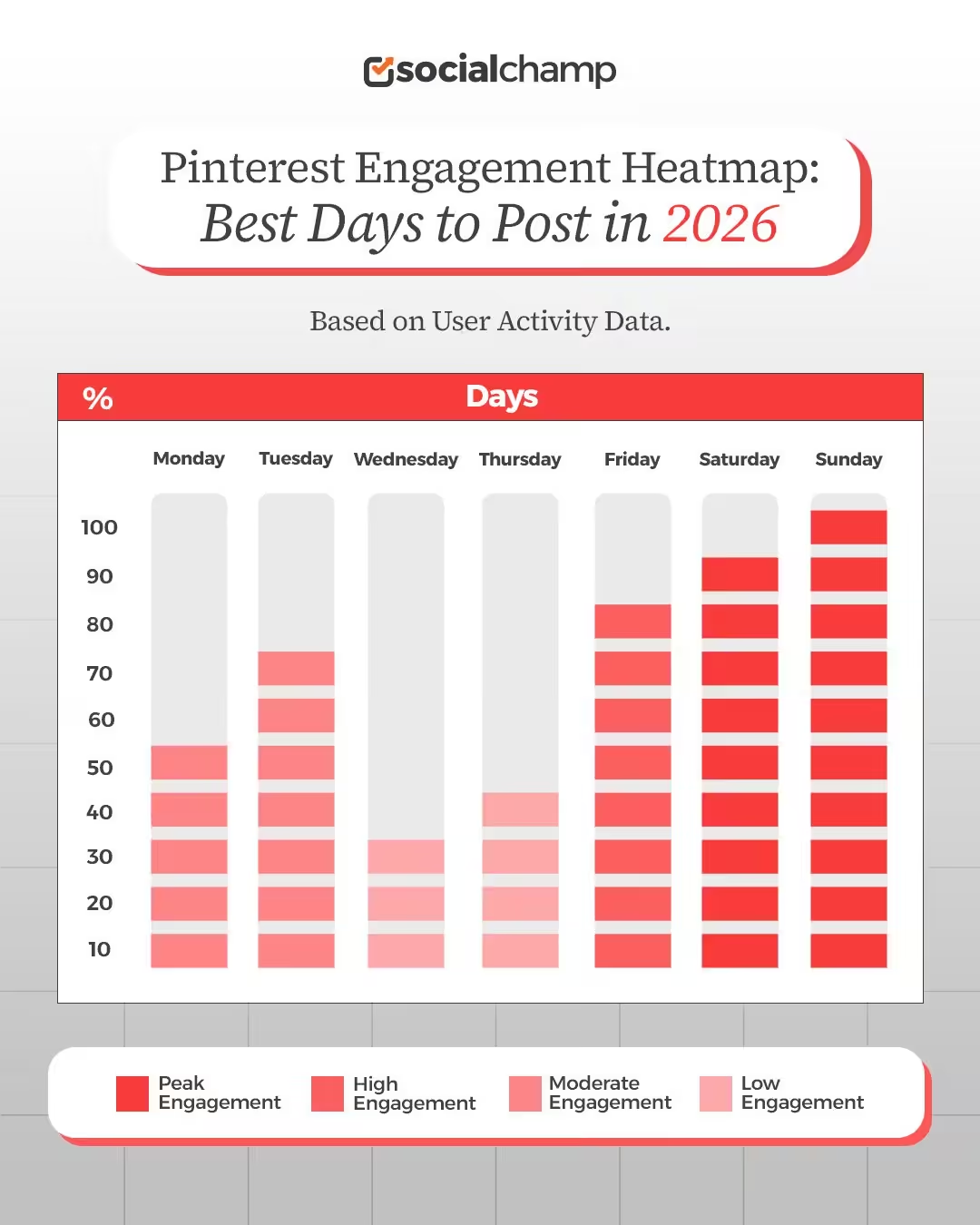
During weekends, users have more time to browse, seek inspiration, and plan projects, which is why they often enjoy scrolling through Pinterest on Saturdays and Sundays.
Sundays and Saturdays tend to perform the best because people are planning upcoming projects, events, and meals.
And Fridays also see strong engagement as users gear up for the weekend.
Why These Days Work So Well
Now let me tell you why weekends work so well.
Pinterest is a “planning” platform, and most users scroll through their feeds when they’re relaxed and thinking ahead, not when they’re buried in weekday chaos.
That’s the reason why weekends are perfect for them in that creative headspace.
However, if you’re in niches like business tips, education, or productivity, Mondays and Tuesdays may perform surprisingly well, as users often plan their week during this time.
Here, I’ve a pro tip for you:
If you really want to find your sweet spot, test 2 to 3 top days for your niche.
For this, you can schedule Pinterest posts at different times, so you can have a better idea of which day and time work for you.
What Are the Best Times to Post by Region or Time Zone?
Do you manage multiple Pinterest accounts for clients across different time zones?
If so, you may be searching for the best time to post on Pinterest by region and time zone.
What works for a New York-based audience doesn’t always click with followers in Sydney or London.
That’s why, here, I’ve explained regional posting patterns to achieve consistent engagement.
North America (EST and PST)
In North America, Pinterest users remain heavy night scrollers, but lunch-hour browsing and weekend mornings have become major engagement peaks. The overall best window to post is between 8 PM and 11 PM local time, alongside a secondary micro-peak between 12 PM and 2 PM.
If your audience spans both coasts, target 9 PM EST / 6 PM PST for evening content, or 1 PM EST / 10 AM PST to capture the East Coast lunch break alongside the West Coast mid-morning scroll.
Europe (GMT and CET)
Pinterest activity in Europe peaks earlier than late-night hours, running strongest from 8 PM to 10 PM, with a secondary spike during lunch hours (12 PM to 2 PM). Users frequently browse for travel inspiration, recipes, and lifestyle planning post-dinner or during midday breaks.
Because the region spans multiple time zones, scheduling around 8 PM CET (7 PM GMT) places your pins directly into the start of the evening browsing rush across the continent.
Asia-Pacific (IST, SGT, AEST)
Pinterest’s growth across the Asia-Pacific region highlights clear regional habits, with prime activity concentrating between 7 PM and 10 PM local time—especially on midweek and Sunday evenings.
Users in countries like India, Singapore, and Australia turn to Pinterest after work for personal visual planning, shopping inspiration, and DIY projects. To hit the ideal engagement window across multiple APAC time zones simultaneously, aim for 8 PM SGT / 5:30 PM IST / 10 PM AEST.
Regional Time Conversion Table
| Region | Primary Time Zone(s) | Peak Posting Hours (Local Time) | Secondary Peak Windows | Behavior Insight |
|---|---|---|---|---|
| North America | EST / CST / PST | 8 PM – 11 PM | 12 PM – 2 PM & Sat 8 AM – 11 AM |
Evening leisure, weekend project planning, and workday micro-breaks.
|
| Europe | GMT / CET | 8 PM – 10 PM | 12 PM – 2 PM |
Post-dinner wind-down and mid-day recipe/shopping inspiration.
|
| Asia-Pacific | SGT / AEST / IST | 7 PM – 10 PM | 1 PM – 3 PM |
After-work lifestyle browsing, travel planning, and evening shopping.
|
Here again, I’ve a pro tip for you:
If you find it difficult to manage multiple time zones, automate your workflow instead.
With Social Champ, you can schedule Pinterest posts at optimal hours for every region so your pins perform best even when you’re asleep.
Turn Timing Into Your Pinterest Growth Strategy!
What Are the Best Times to Post by Industry or Niche?
You may have heard it before that “timing is everything.” But when we talk about Pinterest, that statement couldn’t be more accurate.
The real challenge is that the best time to post on Pinterest isn’t universal. What works for one brand or niche might fall flat for another.
When I started experimenting with different industries, I noticed something fascinating.
My food content performed well from Mondays to Wednesdays, but my travel pins performed best on weekends.
That’s when I understood that every niche has its own rhythm.
So, instead of posting randomly, let’s break down when each industry gets the most traction and why.
Best Times to Post on Pinterest by Niche
| Industry / Niche | Peak Posting Hours (Local Time) | Peak Days | Why It Works |
|---|---|---|---|
| Fashion & Beauty | 7 PM – 10 PM, 12 PM – 2 PM | Thu – Sun |
Users save style ideas during lunch breaks and plan weekend or upcoming weekday outfits in the evening.
|
| Food & Recipes | 11 AM – 1 PM, 5 PM – 7 PM | Sun, Tue – Wed |
Captures midday meal planning and post-work “what to cook for dinner” searches, along with Sunday meal prep.
|
| DIY & Crafts | 8 PM – 11 PM, 8 AM – 11 AM | Wed, Sat |
Midweek evening project sourcing shifts into Saturday morning execution and material shopping.
|
| Travel & Lifestyle | 8 PM – 11 PM, 2 PM – 4 PM | Fri – Sun |
Post-lunch daydreaming gives way to late-evening dream-scrolling and trip planning over the weekend.
|
| B2B & Marketing | 10 AM – 2 PM, 8 AM – 10 AM | Tue – Thu |
Mid-morning to early afternoon aligns with professional research breaks, template sourcing, and workflow planning.
|
Fashion and Beauty
If your audience loves style and beauty, target 7 PM to 10 PM and 12 PM to 2 PM. Activity spikes toward the end of the week (Thursday through Sunday) as users look for weekend outfit inspiration, makeup tutorials, or browse wardrobe updates during their lunch breaks. Posting around 1 PM catches the quick midday scroll, while evening pins drive higher outbound e-commerce clicks.
Food and Recipes
Meal planners on Pinterest like to prepare ahead. The primary posting windows are 11 AM to 1 PM for quick lunch-hour browsing and 5 PM to 7 PM right as people decide what to cook for dinner. Sundays are exceptionally strong for meal-prep and weekly grocery ideas. Pinning early in these windows gives the algorithm time to index your recipes right before search queries surge.
DIY and Crafts
Crafters and DIY enthusiasts do their project planning at night, making 8 PM to 11 PM the prime window. However, Saturday mornings (8 AM to 11 AM) are a critical secondary peak when makers gather supplies and start building. Post your step-by-step guides on Wednesday or Thursday evenings so they rank in feed results just in time for weekend crafting.
Travel and Lifestyle
Travel inspiration peaks during the “afternoon slump” between 2 PM and 4 PM, followed by an evening surge from 8 PM to 11 PM. Friday through Sunday sees the highest engagement as pinners dream-scroll, organize itineraries, and save aesthetic destination boards. Sharing travel guides during these times captures users at their highest intent.
B2B and Marketing
For B2B content, infographics, and templates, stick to standard business hours—specifically 10 AM to 2 PM and 8 AM to 10 AM, Tuesday through Thursday. Marketers and business owners search for tools and strategy guides during work breaks and early morning planning sessions, making midday the optimal time for high-intent saves.
Keep It Dynamic
What I’ve learned is that Pinterest behavior changes with the seasons.
Travel content thrives in summer, fashion trends with every new collection drop, and recipes peak during the holidays.
I recommend checking your analytic every quarter, watching for timing shifts, and then adjusting accordingly.
Featured Article: Best Time to Post Instagram Reels: (Data-Driven Insights from 3 Million Posts)
What’s the Best Time to Post Pinterest Videos and Idea Pins?
Let me tell you my experience with posting videos on Pinterest.
When I first started posting videos on Pinterest, I thought I could post randomly and timing wouldn’t affect the engagement.
At that time, I used to think that if your content is great, it can perform well at any time, which turned out to be wrong.
Timing can make or break how your Idea Pins or videos perform, just like regular pins.
The best time to post on Pinterest for videos follows a slightly different pattern because people engage with motion content when they’re more relaxed, not rushed.
When Video Pins Perform Best
If I were to share my experiments (and Pinterest’s data), I would say that evenings between 7 PM and 10 PM are a sweet spot.
During this time, people are off work and scrolling casually to watch videos and tutorials.
Moreover, weekends are another goldmine for video content.
I once posted a “Pinterest growth tips” Idea Pin on a Saturday night, duplicate content I’d shared midweek, and it got twice the saves.
Do you know why? It’s because users finally had time to sit back and actually watch.
In case your audience includes professionals, evenings after 8 PM are ideal.
However, for lifestyle, fashion, or DIY content, it’s better to post on Saturday or Sunday mornings, when people are scrolling and savoring their morning coffee.
Weekdays vs. Weekends
Now, that doesn’t mean that weekdays don’t work.
On Tuesday and Thursday evenings, I had some good scores, particularly on short and snackable clips.
However, when it comes to deeper engagement, such as saves, replays, and comments, weekends remain victorious.
I would advise you not to stick to just one slot.
Experiment with different days over several weeks and let your analytics tell you which ones are most effective.
How Do You Find Your Best Time to Post on Pinterest?
There is no universal ideal moment to pin your content.
The best time to post on Pinterest may appear to be totally different to me, you, or any other person.
It actually depends on the target audience and location, as well as when you’re most likely to scroll through their boards for inspiration.
At the beginning, when I started posting regularly, I used to follow generic advice, such as Sundays are the best, or post in the evening!
But honestly, that didn’t always work. My engagement was hit or miss.
That’s when I thought to test things myself, and I found a significant difference.
Step 1: Begin With Pinterest Analytics
Go to your Pinterest Analytics and check the Audience Insights tab.
You will know when your followers are most active and which type of content they are most interested in.
For example, if your audience is passionate about home decor DIY and primarily from the U.S., you will notice that your activity tends to spike on weekends in the morning.
Step 2: Experiment With the Time Windows
Now select 2 to 3 time slots that make sense based on your audience insights. For example, try to post around 9 AM, 1 PM, and 8 PM for 3 weeks straight.
Keep everything else consistent, like your image quality, keywords, and pin designs, so the timing is the only variable.
Step 3: Track, Adjust, and Repeat
At the end of your three-week experiment, look at your numbers, such as saves, clicks, and impressions.
Which time frame gave you the best results? That’s your best time to post on Pinterest.
Now, don’t stop there, though. Continue adjusting your schedule after every few months as your audience changes.
Pinterest is entirely about testing and learning. The more you analyze your own data, the better you can reach.
How Tools Like Social Champ Help You Increase Engagement on Pinterest?
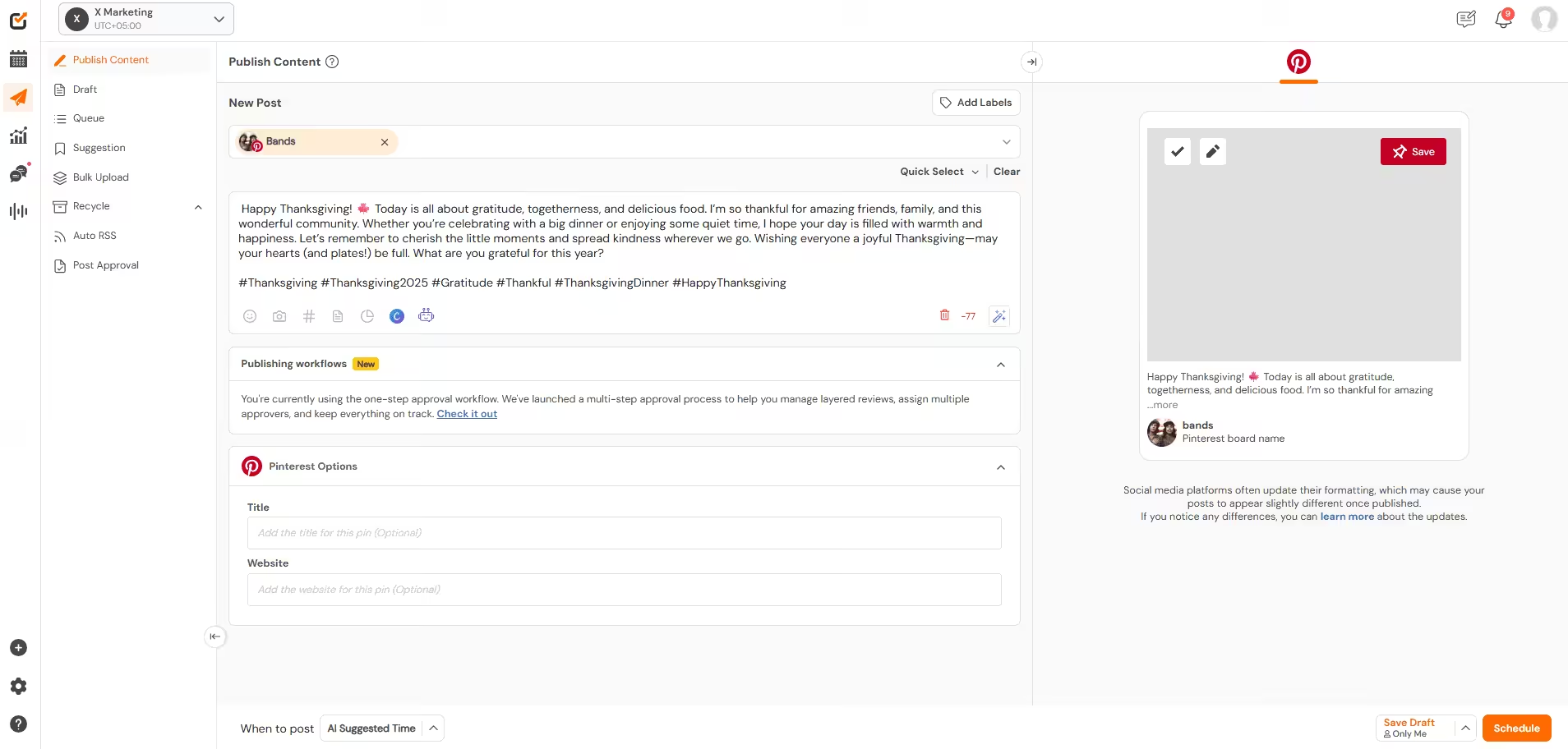
Figuring out the best time to post on Pinterest is only half the battle. But do you know what the real challenge is? It’s actually being consistent with it.
I used to remind myself, “Okay, I’ll post at 8 PM, that’s when my pins do best.”
On other days, I’d forget, miss the deadline, or not even show up, and my engagement would suffer as a result.
That’s where tools like Social Champ can help you.
Stay Consistent With Smart Automation
Social Champ takes the guesswork (and the stress) out of timing.
You can easily schedule your pins on Pinterest in advance and ensure they’ll go live at your best time to post on Pinterest.
No matter if you’re busy or in a different time zone, its time zone targeting feature makes it super easy to reach your audience wherever they are.
Manage More in Less Time
With Social Champ’s bulk scheduling feature, you can plan and upload my week’s worth of content in one sitting.
You don’t have to log in daily and hit the “publish” button.
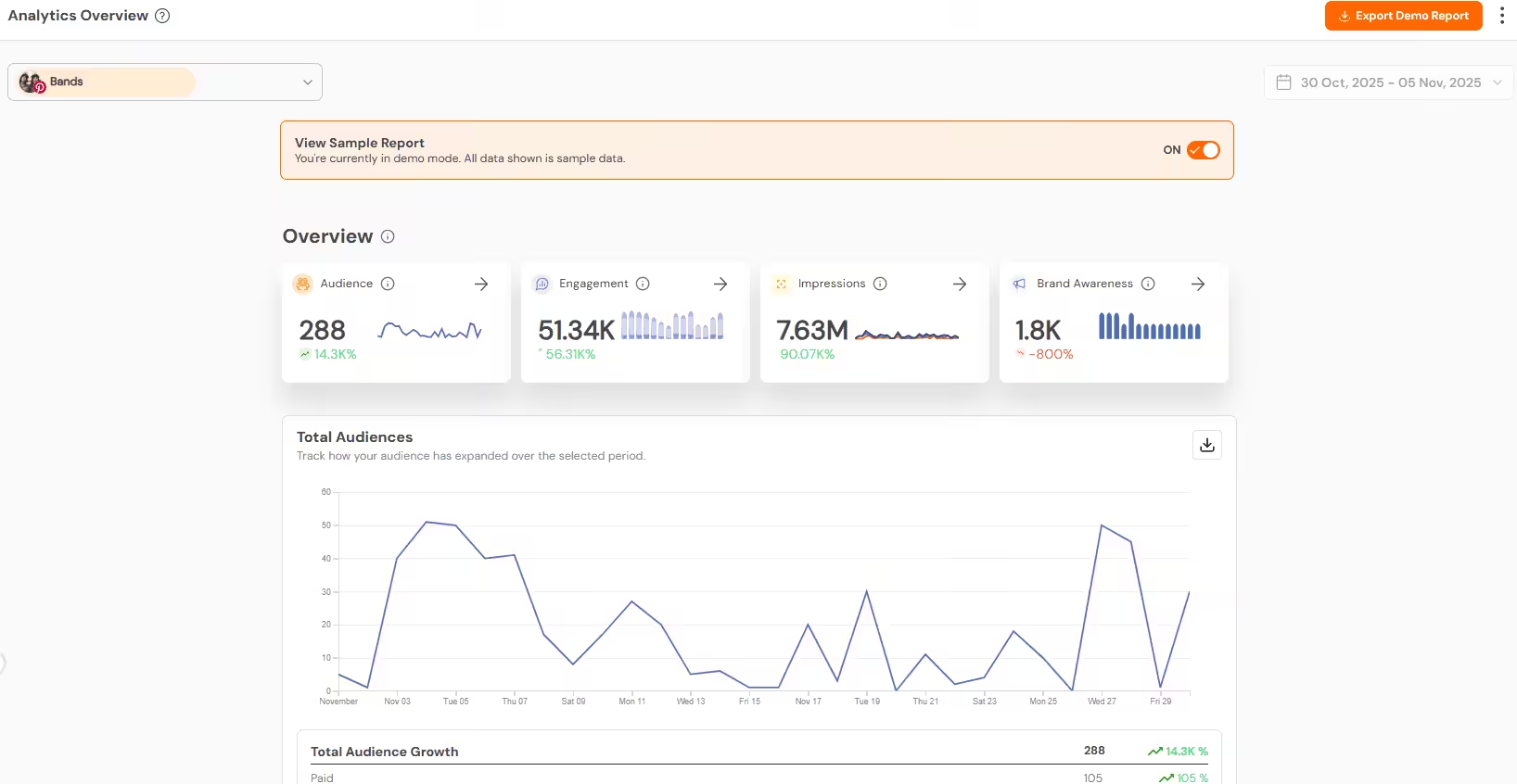
Additionally, Social Champ’s detailed analytics show exactly which pins work best, so you can adjust your posting schedule over time.
Manual Posting vs. Using Social Champ
| Aspect | Manual Posting | Using Social Champ |
|---|---|---|
| Posting Time | Often inconsistent | Always post at your best time to post on Pinterest |
| Time Management | Time-consuming | Schedule weeks of content at once |
| Analytics | Requires manual tracking | Built-in performance reports |
| Audience Reach | Missed time zones | Automatic time-zone targeting |
Once I switched to scheduling with Social Champ, my engagement started climbing, not because I posted more, but because I finally posted smarter.
Pin at the Right Time, Every Time!
Conclusion
So, after all my testing, trial, and a few late-night pinning sessions, I’ve learned one thing that the best time to post on Pinterest isn’t something you can randomly guess.
It’s about finding your audience’s rhythm.
No matter if your audience scrolls through recipes at breakfast or fashion boards after work, timing plays a significant role in increasing your engagement.
You can start small, analyze what works, and adjust as you go.
And if you find it challenging to stay consistent, tools like Social Champ can actually help you in scheduling your content at optimal times.
Because on Pinterest, showing up at the right time, every time, is what turns pins into performance.