I want to start with a confession, because I think it sets up everything else in this post.
For about two years, I was the person rolling my eyes at AI agents for social media.
Not because the tools were bad. They were fine! They wrote captions. They made images. But every single one of them handed the work back to me. I’d get a caption, then I’d still have to trim it, pick the platform, resize the image, find the slot in the calendar, and remember to check the comments the next morning. The AI did one step of a twelve-step job and called it a day.
Agents are the thing that finally changed my mind. And I don’t mean that in a “the future is here” way, because honestly, a lot of agent stuff is still rough. I mean it in a very boring, practical way: I gave one a goal instead of a prompt, walked away, and came back to a week of scheduled posts I mostly agreed with.
That’s the shift. So let’s talk about what it actually is, where it helps, and where I’d still keep my hands firmly on the wheel.
Short Summary
- AI agents differ from past AI tools by handling multi-step goals end-to-end (research, drafting, scheduling, monitoring, reporting), not just producing one piece for you to finish
- They fix the real bottlenecks in social media work: manual reformatting, fragmented analytics, slow reaction to trends/crises, and inconsistent brand voice
- Switch (Social Champ’s AI agent) runs on a Draft / Approve / Auto model, with plan limits, platform rules, and a kill switch that can override the user’s own settings
- Switch covers content creation, scheduling, calendar planning, analytics, listening, approvals, and paused-for-review ad campaigns, but a few tasks (file uploads, multi-stage workflows, new RSS feeds) still route back to the dashboard
- Agents can’t replace strategy, brand judgment, crisis communication, or creative risk-taking; they optimize within the frame you give them
- Rolling one out should start small: one repetitive task, written guardrails, a clear list of what stays human-approved, and tracking both time saved and output quality
- The likely shift: routine execution becomes invisible, and the social media manager’s role moves from production to direction and judgment
AI Agents vs. AI Assistants vs. Automation Rules
These three get mashed together constantly, and the difference genuinely matters when you’re deciding what to buy.
An automation rule is a tripwire. If a new blog post hits the RSS feed, post it to LinkedIn. It does exactly what you told it, forever, with zero judgment. Brilliant for repetitive plumbing. Useless the moment reality gets weird.
An AI assistant is a very good intern who only works when you’re standing over their shoulder. You ask, it answers. One question, one output. Your prompt, your context, your follow-through.
An AI agent gets a goal, not a prompt. “Fill next week’s calendar for our three channels using the product launch brief, and keep it in our voice.”
Then it goes and figures out the steps: read the brief, check what’s already scheduled, look at what performed well last month, draft, format per platform, slot it in. It uses tools, it checks its own work, and it comes back when it’s done or when it’s stuck.
Where Social Media Campaigns Actually Break Down
Before the “here’s how AI fixes it” part, I want to be specific about the problem. Because “social media is time-consuming” is too vague to be useful.
-
Manual Work That Eats the Calendar
The creative part of my job is maybe a fifth of my job. The rest is reformatting. Cropping the same image four ways. Rewriting the same idea for LinkedIn’s tone, then Instagram’s, then X’s character limit. Copy-pasting between a doc, a spreadsheet, and a scheduler. None of it is hard. All of it is time.
-
Fragmented Data Across Platforms
Every platform has its own analytics, its own definition of a “view,” its own export format. Building one honest picture of how a campaign performed means pulling five dashboards into a spreadsheet, and by the time you’ve done it, the campaign’s over.
-
Slow Reaction Time to Trends and Crises
The window on a trend is hours. The window on a brewing complaint thread is smaller. If nobody’s watching at 11 pm on a Saturday, you find out on Monday, and by Monday it’s a different problem.
-
Inconsistent Brand Voice Across Channels
This one sneaks up on you. Three people writing across six channels means six slightly different brands. Add a freelancer and a new hire, and you’ve got real drift, and nobody notices until a client points at two posts and asks if they came from the same company.
Run More Accounts Without More Chaos!
How AI Agents Fit Into the Campaign Lifecycle
Here’s the mental model I use. A campaign has five phases, and an agent slots into each one differently. In some, it’s genuinely doing the work. In others, it’s handing you a draft and getting out of the way.
| Phase | What the Agent Can Handle | What Stays With You |
|---|---|---|
| Research | Gathering trends, mining comments, competitor sweeps, drafting the brief | Deciding which insight is worth building a campaign on |
| Creation | First drafts, platform variants, hashtags, alt text, image options | The core idea, the risky joke, the final polish |
| Publishing | Slotting, timing, formatting, queue management, link handling | Approving the calendar before it goes live |
| Engagement | Triage, sentiment tagging, drafting replies, routing, flagging escalations | Anything emotional, legal, or from a real customer in pain |
| Reporting | Data pulls, cross-channel normalizing, first-pass analysis, client-ready export | Judging whether the campaign actually worked |
Key Use Cases for AI Agents in Campaign Management
Here are the use cases for AI agents that will help you manage campaigns better!
-
Planning a Full Content Calendar From a Single Brief
This is the one that made me a believer. You hand over a campaign brief, objective, key messages, dates, channels, and get back a populated calendar. Not perfect. I usually rewrite a quarter of it. But rewriting a quarter of something is a very different afternoon from starting at an empty grid.
-
Repurposing One Asset Into Platform-Native Formats
One webinar becomes a LinkedIn carousel outline, five X posts, two Instagram caption options, and a YouTube description. The trick is that “platform-native” has to mean more than character count. A good agent changes the structure, not just the length.
-
Monitoring Mentions and Sentiment in Real Time
Always-on listening, with sentiment scoring, and an alert when something crosses a threshold you set. This is the use case I’d argue is hardest to replace with human effort, because humans sleep.
-
Drafting Replies and Routing Conversations to the Right Person
A shared inbox with 200 unread items is a morale problem as much as a workflow problem. An agent that sorts it into needs you, needs support, and already drafted; just read and send changes- how the day feels.
-
Competitor and Trend Tracking
A weekly digest of what your three main competitors posted, what got traction, and what’s emerging in your niche. Low glamour, high value, and almost nobody does it consistently by hand.
Featured Article: 10 Best Brand Management Softwares
Meet Switch: Social Champ’s AI Agent for Social Media Campaigns
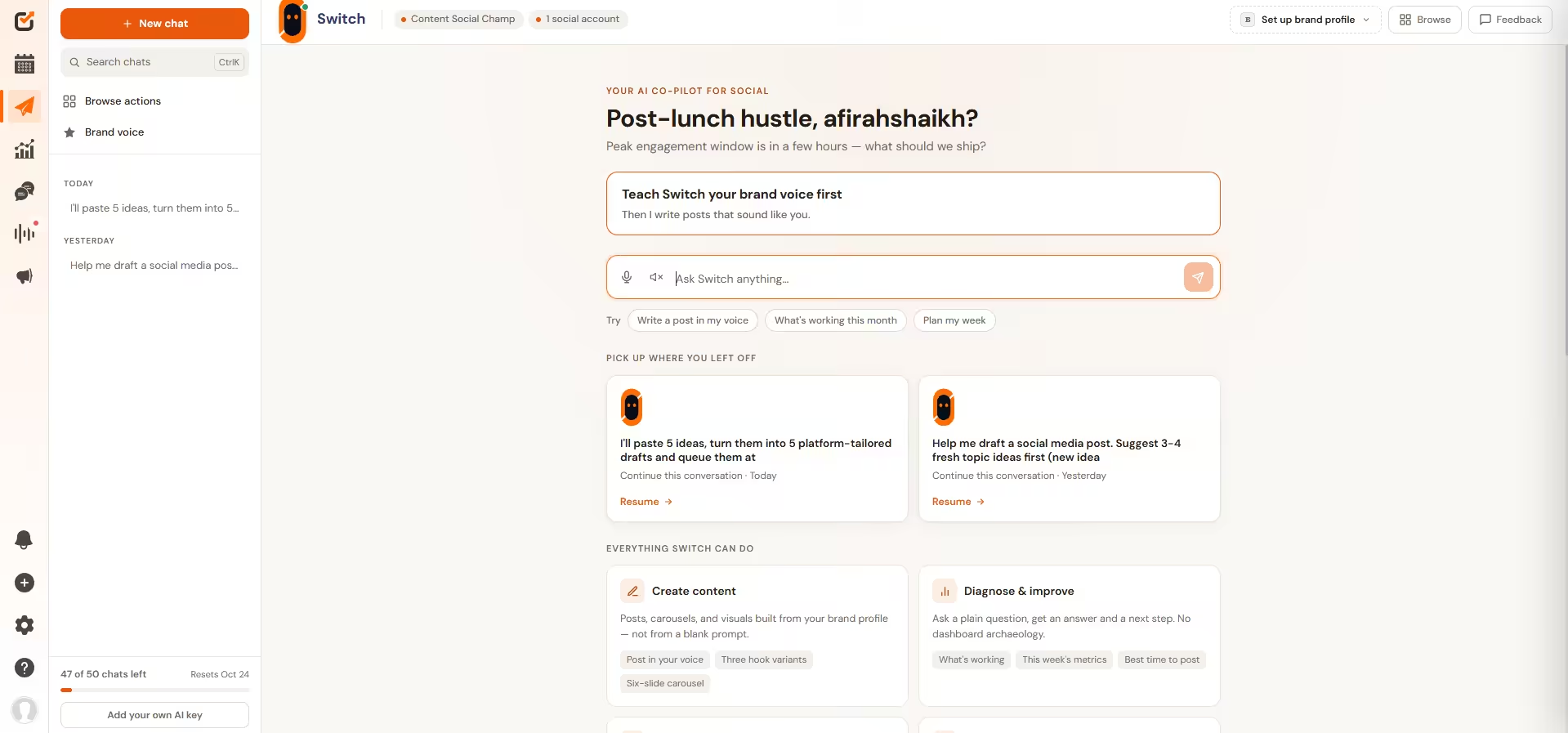
Everything above is the general case. Here’s the specific one, because it’s the tool I use, and it’d be strange to write 2,000 words about agents and pretend I don’t have a horse in the race.
Switch is Social Champ’s AI agent. The distinction I’d draw versus the AI features you’re used to: those help you make a post, and Switch takes a job off your plate. It sits inside the same dashboard where your accounts, calendar, inbox, and analytics already live, which matters more than it sounds like it should. An agent with no access to your data is just a chat window.
What Switch Can Do Inside Your Workflow
Rather than a feature list, here’s it by job: what you ask for and what comes back.
| You Want to… | What Switch Does |
|---|---|
| Make content | Captions, hooks, post drafts, images, carousels, and platform checks, using your brand voice and references. Images can go to Canva or the built-in editor for touch-ups. |
| Get it scheduled | Single and bulk scheduling with a preview, plus per-channel details for YouTube, Facebook, Instagram, and LinkedIn. |
| See the plan | Reads your calendar, finds the empty days, and adds dated color-coded notes so the team knows what’s going where. |
| Find old work | Pulls up saved drafts, lists and applies labels, filters posts by label, and searches your media library by type or name. |
| Know what worked | Channel performance charts, top-post rankings, best-time analysis, monthly reports, and brand voice or content-pillar breakdowns from your own posts. |
| Watch the conversation | Reads mentions, keywords, sentiment, and competitor posts. Creates, renames, updates, or deletes keyword alerts within your plan’s limits. |
| Run approvals | Lists workflows and approvers, creates a one-stage workflow with email approvers, sets the default, and handles approve, reject, and reminders. |
| Keep the small stuff tidy | Updates link-in-bio page details and visibility; lists, pauses, resumes, and deletes RSS feeds. |
Getting Started With Switch
Connect your accounts, give it your brand guidelines and a recent campaign brief, and ask it for next week’s content on one channel. Not all of them. One. Leave it on Draft. Compare what it produces to what you would’ve made, correct it a few times, and only then decide whether to move that task up to Approve.
See What Switch Would Do With Your Calendar!
How to Introduce AI Agents to Your Social Media Workflow
You cannot suddenly jump from manual work to AI agents on a whim! It is very important to understand the process of introducing AI agents to your social media workflow.
-
Start With One Repetitive Task
Don’t hand over a campaign. Hand over reporting, or repurposing, or inbox triage. Pick the task you hate most and that’s hardest to get wrong. You’ll learn more from two weeks of that than from a big-bang rollout you abandon in month two.
-
Set Guardrails, Approvals, and Brand Guidelines
Write the guardrails down properly. Not vibes, a real document. Voice, banned words, claims you’re not allowed to make, topics you never touch, which channels it can publish to unsupervised. An agent is only as well-behaved as its brief, and a vague brief produces exactly the mush you’d expect.
-
Decide What Stays Human-Approved
Make this an explicit list, not an instinct, because instincts don’t survive a busy week. My default: anything involving a named customer, anything making a claim about the product, anything responding to criticism, and anything going out on the channel where your biggest client watches.
-
Measure Time Saved and Output Quality
Time saved on its own is a trap; you can save ten hours a week and quietly tank your engagement. Track how often you’re rewriting the agent’s output. If it’s climbing, your guardrails need work.
Conclusion
I’ll end where I started. I spent two years annoyed at AI social tools because they kept handing the work back to me half-finished.
Agents are the first version of this that doesn’t. Not because they’re smarter than the assistants before them, necessarily, but because they’re allowed to actually touch your calendar, your inbox, and your reports instead of just talking about them.
That’s also exactly why the guardrails matter more than the capability list. The question worth asking about any agent, Switch included, isn’t “what can it do.” It’s “what happens when it’s wrong, and who finds out first.” Draft, Approve, and Auto exist because that second question has a real answer, not a hopeful one.
If you take one thing from this: don’t hand an agent your whole workflow on day one. Hand it the task you hate most, watch it for two weeks, and let your own results tell you how far to move the dial. That’s a slower start than the demo video promises. It’s also the version that actually sticks.