You post a video you’re proud of, check back an hour later, and it has 11 likes. Two of them are from your cousin and your best friend. Yeah, we’ve all been there.
The good news? Getting more likes on TikTok isn’t about luck or a huge following. It comes down to a few habits, like how you open your videos, when you post, and how the TikTok algorithm decides who sees your content.
TL;DR
To get more likes on TikTok, hook viewers in the first 3 seconds, stick to one niche, and ask them to double-tap. These signals tell the TikTok algorithm to push your video to more For You pages.
- Post 3 to 5 times a week when TikTok Analytics shows your followers are active.
- Use trending sounds, 3 to 5 hashtags, and keyword-rich captions.
- Reply to comments, use Duet and Stitch, and go LIVE.
In this guide, we’re sharing 20 ways to increase TikTok likes, plus the best time to post so your videos reach people when they’re actually scrolling. Let’s get into it.
Consistency Drives TikTok Growth!
Why TikTok Likes Matter (and How the Algorithm Uses Them)
Let’s start with the obvious question: why should you care about likes at all?
Because a like is the quickest way a viewer tells TikTok, “yep, I enjoyed that.” When enough people tap that heart, TikTok takes it as a sign your video is worth showing to more people, and it starts pushing it onto more For You pages, including ones that have never seen your account. That’s why TikTok video likes often show up right before a video takes off.
Likes also help you gain followers on TikTok. Someone who likes a video and enjoys it is far more likely to tap your profile and hit follow. More TikTok followers means more people seeing your next post, which means more chances to pick up likes again. It feeds itself.
Now, here’s the part many creators miss: likes are only one signal. TikTok also looks at how long people watch, whether they watch again, and whether they comment, share, or save. A video can have a decent number of likes and still stall if everyone swipes away after two seconds.
TikTok doesn’t publish exactly how much each signal counts, but the pattern is clear. The more of these signals your video earns, the further it travels. If you want the full picture, our guide to the TikTok algorithm goes deeper.
Here’s a quick breakdown of what each signal tells TikTok and how to improve it:
| Signal | What it tells TikTok | How to improve it |
|---|---|---|
| Likes | Viewers enjoyed the video | Open with a strong hook, keep the video focused on one idea, and ask people to like it at the end |
| Comments | The video got people talking | Ask a simple question, share a mild opinion, and reply to comments quickly |
| Shares | The video is worth sending to someone else | Make it funny, relatable or useful enough that a friend needs to see it |
| Saves | The video is worth coming back to | Share tips, steps, recipes or lists people will want to find later |
| Watch time | People stay until the end (or close to it) | Cut the slow intro, keep the pacing tight, and trim anything that drags |
| Rewatches | The video is interesting enough to watch twice | Add a surprise ending, a quick reveal, or a loop that flows back into the start |
The takeaway is simple. If you want to increase TikTok likes, don’t chase the like button alone. Make videos people watch, react to and pass along, and the likes tend to follow on their own.
Featured Article: Best Time to Post on TikTok
How to Get More Likes on TikTok: 20 Proven Ways
There’s no single trick behind a video that racks up likes. It’s a mix of small habits: a strong opening, a clear topic, a simple ask, good timing, and showing up for your audience. We’ve grouped 20 tips into six categories, so you can start with the one that fits where you are right now. Try a few, see what works, and keep what sticks. These same habits will also help you get followers on TikTok.
Hook Viewers in the First 3 Seconds
The first three seconds decide whether someone watches or swipes away, and watching is what leads to more likes.
-
Use Strong Openings
Start with a bold statement, a striking visual, or a question. Your opening has just one job: make someone stop scrolling. Say something a little surprising, show something unexpected, or ask a question your viewer can’t ignore. Skip the “hey guys, welcome back” intro and go straight to the good part. For example, a baking creator could open with a shot of a collapsed cake and say, “This is why your cake sinks.” People want the fix, so they keep watching, and that’s exactly where more likes on TikTok start.
-
Keep High Energy
Deliver with confident energy, clear lighting, and fast pacing. You don’t need to be loud, but you do need to sound like you care about what you’re saying. Face a window or lamp so you’re easy to see, speak clearly, and cut pauses and filler words. Quick cuts keep things moving. Picture a skincare tip video where the creator talks straight to the camera in bright, natural light, with a new cut for each point. It feels lively and easy to follow, which is the kind of video people like.
@jaskam_ @Chipotle Smoked Brisket is Back!!! Car was a Smokehouse😂 #chipotle #brisket #fastfood #foodreview #mukbang ♬ original sound – jaskam_ -
Put Text on Screen in the First Frame
Add a short line of text the moment the video starts. Plenty of people scroll with the sound off, so on-screen text gives them a reason to stay before they hear you. Use TikTok’s text tool, keep it to a few words, and place it where buttons and captions won’t cover it. For instance, a fitness creator could open with “3 mistakes killing your squat” on screen while demoing the first one. Viewers know what’s coming, so they stay, and more watch time means better odds of TikTok video likes.
Tailor Your Content Strategy
When TikTok knows who your videos are for, and viewers know what to expect, likes come a lot easier.
-
Niche Down
Pick one topic and stick with it. TikTok learns who to show your videos to by watching who enjoys them. If you post budgeting tips on Monday, dance trends on Tuesday, and recipes on Wednesday, it has no clear audience to match you with. Choose a topic you could talk about for months, then build around it. A creator who shares budgeting tips for students, for example, will attract people who want exactly that. Those viewers are more likely to like your videos and help you gain followers on TikTok.
-
Provide Value First
Give people something useful before you ask for anything. Nobody likes a video that jumps straight into “follow me” or “buy this.” Lead with a tip, a quick tutorial, or a story that teaches something, and save the ask for the end. Keep it practical enough that a viewer could use it today. A hairstylist, for instance, might show a 20-second trick for taming frizz and mention their salon right at the end. People like what helps them, and helpful videos are what bring in more TikTok followers over time.
@dr.althea_official 345 cream lovers, get excited for the perfect duo🤍🩶 #dralthea #345cream #345mist #skincare #kbeauty ♬ original sound – Dr.Althea US -
Spark Conversation
Make videos people want to react to. Relatable moments and “this vs. that” comparisons are easy to answer, so people jump into the comments, and an active comment section tells TikTok your video is worth showing. Pick a topic where everyone has an opinion and invite them to choose a side. A coffee creator could film two drinks side by side and ask, “Iced or hot, which camp are you in?” Then reply to the comments. A lively thread keeps your video moving, and it often brings extra likes too.
-
Tell a Story With a Clear Ending
Give your video a beginning, a middle, and a payoff. Stories keep people watching because they want to know how things turn out. Set up a problem, show what happened, then finish with something clear, like a result, a lesson, or a twist. Keep it tight so nobody drifts off halfway. Say you run a small shop: tell the story of your first order going wrong, show how you fixed it, and end with the happy customer’s message. People who stay until the end are more likely to tap like.
@tentreeReflecting on our (Canadian) roots, and how far we’ve come. But we’re still just getting started. Join us in our goal of planting 1 billion trees by 2030. Every item plants trees — just like always.♬ original sound – tentree
Use Clear Calls-to-Action (CTAs)
Many people enjoy a video and simply forget to like it, so a friendly nudge goes a long way.
-
Ask Directly
Tell viewers to double-tap or comment in the video or in the caption. If you’re wondering how to get more likes on TikTok, this is the easiest place to start, because most people won’t think to do it on their own. Say it out loud near the end, add it as on-screen text, or put it in your caption, whichever suits your style. Keep it short and friendly, like “Double-tap if this helped.” Don’t ask in every video, though, or it starts to feel pushy, and people tune it out.
-
Give a Reason
Tell people why they should like or comment. A reason makes the ask feel like a fair trade, not a demand. Tie the action to something they’ll get back, like a follow-up tip, an answer, or a shout-out. For example, “Like and comment your niche so I can share tips for it” gives viewers a payoff for joining. A baker might say, “Comment your favorite flavor and I’ll turn the top pick into next week’s video.” People love seeing their idea used, and every like helps your video travel further.
Optimize Timing and Consistency
Posting when your audience is online, and doing it regularly, gives every video a better shot at early likes.
-
Post When Your Audience Is Active
Check TikTok Analytics to see when your followers are online. Open your analytics, head to the Followers tab, and look at follower activity to see which days and hours are busiest. Aim to publish just before those peaks so your video catches attention when people start scrolling. Your own data beats any general advice. If your audience is most active around 8 p.m., try posting at 7:30 for a couple of weeks and compare results. Our guide on how to schedule TikTok videos shows how to lock those times in.
-
Stay Consistent
Aim for 3 to 5 videos a week. Regular posting keeps you on your audience’s radar and gives you more chances to land a hit. Pick a number you can keep up, because three solid videos a week beats seven rushed ones followed by a month of silence. Batch your filming on one day so you’re never scrambling. A TikTok scheduler makes this easier: film on Sunday, then schedule TikTok posts for the week and let them go out on their own. A busy Wednesday won’t mean a missed post.
-
Create a Content Series and Plan With a Calendar
Turn good ideas into a series and map them out on a calendar. A series gives people a reason to come back, since they’ll want part two. Pick a simple, repeatable format, like “Tip of the week” or “Day in my life,” and plan the next few weeks ahead so you’re never staring at a blank screen. A freelance designer, for example, could run “Logo fixes” every single Friday. Familiar formats are also quicker to film. Many social media content schedulers include a calendar view, which makes planning much easier.
-
Boost Top-Performing Posts With TikTok Promote
Put a little budget behind a video that’s already working. TikTok Promote is the in-app tool that turns your videos into ads, with goals like more video views, more followers, or more profile views. Pick a post that’s already getting good reactions, set a budget and a duration, and let it reach more people. It’s paid, so start small, like a few dollars on your best tutorial. If you’d like to handle this alongside your scheduling, take a look at our ad boost in TikTok feature. Check Promote’s availability first.
Ride Trends and Get Found in Search
Trends put you in front of new people, and search keeps your videos turning up long after you post.
-
Use Trending Sounds Early
Jump on a sound while it’s still climbing. Trending audio gets pushed to more viewers, and being early matters. Browse your For You page daily and note the sounds you keep hearing from creators in your niche. Then add your own twist so you don’t look like a copy. A travel creator could use a trending sound over a “what $50 gets you in Lisbon” video. Make sure the sound actually fits your idea, and when you’re ready to post on TikTok, do it while the trend is still fresh.
-
Use Duet and Stitch
React to other creators’ videos with Duet or Stitch. Both let you build on someone else’s content, which can put your video in front of their audience. Use Duet to play your video side by side with theirs, and Stitch to grab a short clip and add your spin. Pick videos from your niche and add something real, like a tip or an opinion. A personal trainer, for instance, could Stitch a workout myth and explain what’s true. Useful reactions earn likes and attract TikTok followers who enjoy your take.
-
Write Keyword-Rich Captions (TikTok SEO)
Use the words people actually search for. Lots of people use TikTok like a search engine, so the phrases in your caption, on-screen text, and spoken audio help your video get found. Think about what a viewer would type, then use that exact phrase naturally, and say it early in the video too. If you share study tips, “how to study for exams fast” will work better than “study vibes.” Search keeps sending viewers to your videos long after posting day, which helps you grow your TikTok account over time.
-
Use 3 to 5 Relevant Hashtags
Stick to 3 to 5 hashtags that match your video. Hashtags help TikTok understand your topic and show it to the right people, but twenty unrelated ones just muddy the message. Mix one broad tag with a couple of niche ones, and try typing in the caption box to see what TikTok suggests. Say you post a pasta recipe: use #easydinner, #pastarecipe, and #weeknightmeals instead of a random trending tag. Relevant hashtags put your video in front of people who actually enjoy that content, which helps you increase TikTok likes.
Build a Community
People like videos from creators who feel real, so show up for your audience and reply to them often.
-
Reply to Comments With Video Replies
Answer a comment by making a video about it. TikTok lets you reply to a comment with a video, and it makes the commenter feel seen while handing you a ready-made idea. Pick good questions that plenty of other people are probably wondering too. If someone asks, “What camera do you use?”, film a quick 20-second answer and show your setup. People who get a reply tend to come back, and they’re more likely to like your next video. It’s a small habit that helps you grow followers on TikTok.
-
Go Live
Go live to chat with your audience in real time. Live sessions let people ask questions and get answers on the spot, which builds trust fast. Pick a clear topic, tell your followers ahead of time, and greet people by name as they join. Keep the first few minutes lively so newcomers stay. A makeup artist, for example, could do a live “get ready with me” and answer questions live as she goes. Viewers who feel connected to you tend to like your videos more often and stick around longer.
-
Collaborate With Other Creators
Team up with creators who share your audience. A collab introduces you to people who already enjoy similar content. Look for creators in a similar niche and of a similar size, then pitch a simple idea like a duet, a joint challenge, or a “swap tips” video. Be clear about what each of you will do. If you’re a plant creator, team up with a home decor creator for a “style my shelf” video. Both audiences see something fresh, and new viewers often tap like on a video they enjoy.
Featured Article: 8 Best Social Media Content Schedulers
A 30-Day Plan to Grow Your TikTok Account
Knowing the tips is one thing. Actually using them is another. So here’s a simple four-week plan to help you grow followers on TikTok and pick up more likes on every video along the way. You don’t need to follow it perfectly. Just stick to each week’s focus and adjust as you learn what your audience enjoys.
| Week | Focus | What to do |
|---|---|---|
| Week 1 | Set up and research | Optimize your profile so it’s clear what you post about. Study the top creators in your niche and note their hooks, formats, and sounds. |
| Week 2 | Post and test hooks | Post 3 to 5 videos and try a different hook in each one. Note which openings keep people watching the longest. |
| Week 3 | Trends and series | Join 2 trends that fit your niche, and start a simple series with a repeatable format so people have a reason to come back. |
| Week 4 | Review and double down | Check your analytics, find your top videos, and make more of what worked. Drop the formats that didn’t. |
By day 30, you’ll have real data on what your audience likes, and that beats guessing every time.
Plan and Schedule Your 30 Days With Social Champ
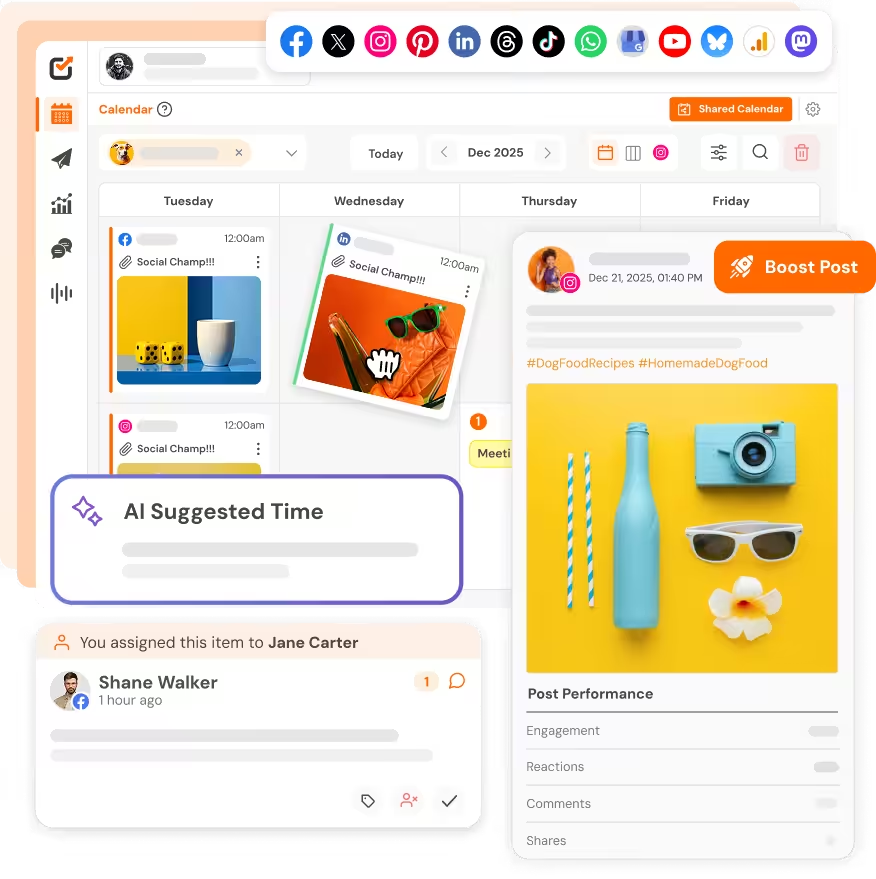
Planning a whole month of videos is a lot easier when everything lives in one place, and that’s where Social Champ comes in. Start by mapping out your 30 days in one content calendar, so you can see your hooks, trend posts, and series episodes side by side. Once your videos are ready, schedule TikTok videos to post automatically with the TikTok scheduler, so a busy day never means a missed post.
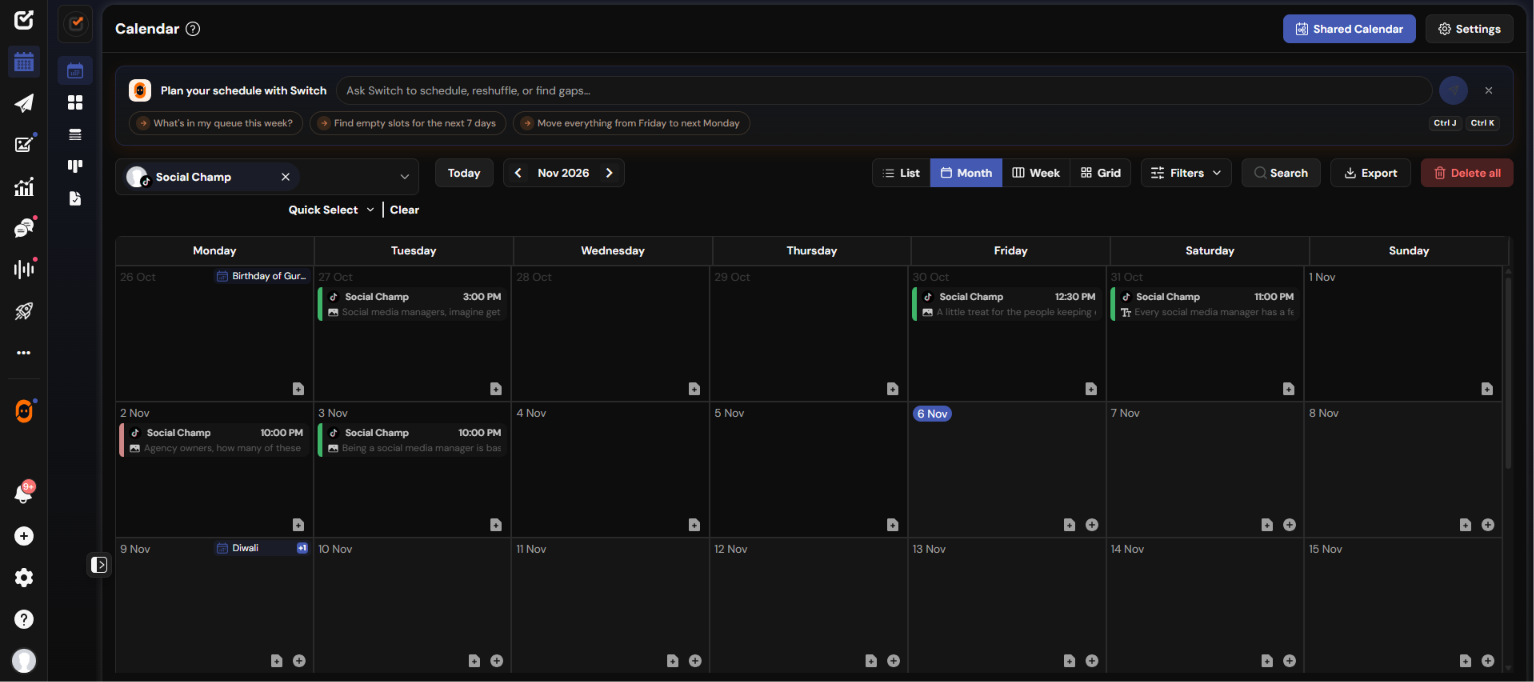
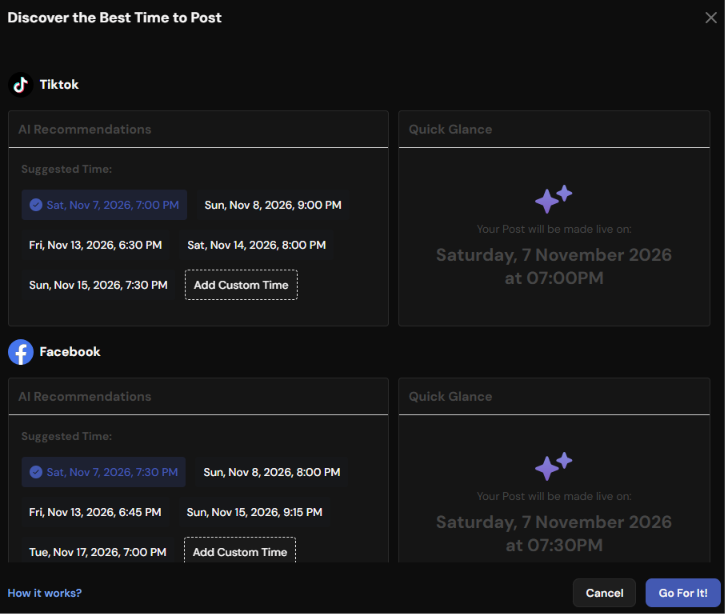
Timing is covered too. Best time to post suggestions show when your followers are most likely online, which means your videos go live right when people are scrolling. Stuck on what to write under a video? Social Champ’s AI helps you write captions faster, so you can spend your energy on filming instead of staring at a blank box.
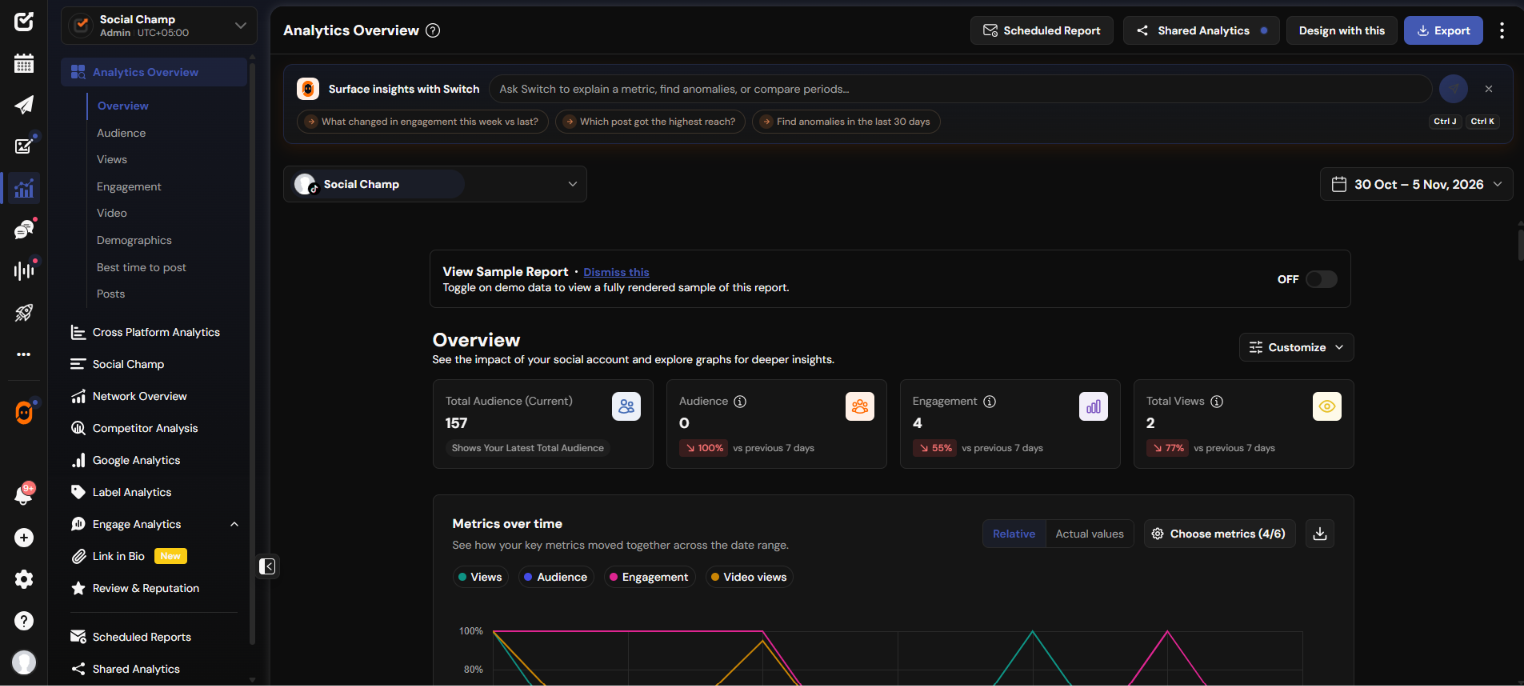
Social Champ’s analytics let you track how each video performs, so you can see which hooks and topics earned the most likes and double down on them. It’s a handy way to grow your TikTok account without juggling several tabs and a notes app.
Schedule Your TikToks and Skip the Daily Rush
Conclusion
Getting more likes on TikTok isn’t about luck or a viral fluke. It comes down to a handful of habits you can start today: a hook that stops the scroll, a clear niche, a friendly ask, smart timing, and showing up for the people who watch.
You don’t have to do all 20 tips at once. Pick two or three, follow the 30-day plan, and let your analytics tell you what’s working. Small, steady changes add up faster than you’d think, and they’ll help you get followers on TikTok along the way. Now go film that first video.