Disclaimer:
The information presented in this blog post is based on publicly available data from official sources at the time of writing. Our intention is solely to provide accurate and helpful information. If you notice any inaccuracies, please feel free to contact us for corrections.
If you’re looking into CoSchedule pricing, there’s a bit more to consider than just the plan you pick.
Here’s a quick example. Say your team has three people and eight social profiles. On CoSchedule’s pricing page, you’d expect to pay $49. Your real bill lands closer to $93 a month.
Where does the extra money go? Extra seats, extra profiles, and X (Twitter) profiles. Those small charges add up faster than most people expect.
Stay with me. I’ll show you what each CoSchedule plan costs, where the extra charges sit, and how other social media management tools compare, so you don’t overpay.
Short Summary
- CoSchedule pricing includes a Free plan, Starter ($29), Professional ($49), and Suite (custom plans start at $69/month).
- The sticker price is only the start. Extra profiles, extra seats, and X profiles raise your bill fast.
- Social Champ lets you pay per profile or pick a bundled plan with a fixed number of accounts, so your costs stay easier to predict as you grow.
- Both tools cover content planning, but Social Champ adds more AI and automation at lower tiers.
- Agencies and growing teams get unlimited users on Social Champ’s higher plans.
- Comparing both tools side by side helps you skip features you will never use.
But pricing pages can feel confusing, especially when the real cost hides behind add-ons.
Here’s one number that explains why this matters in 2026. HubSpot’s 2026 State of Marketing report found that 80% of marketers now use AI in some part of their workflow. CoSchedule includes its AI assistants in every paid plan. So seats and profiles drive your bill, not AI.
In this post, I’ll break down CoSchedule pricing plans. You’ll see what each plan offers, who it fits best, and where it makes sense (or doesn’t) for your workflow.
Unlock Unlimited Scheduling With Social Champ!
CoSchedule Pricing Plans Overview
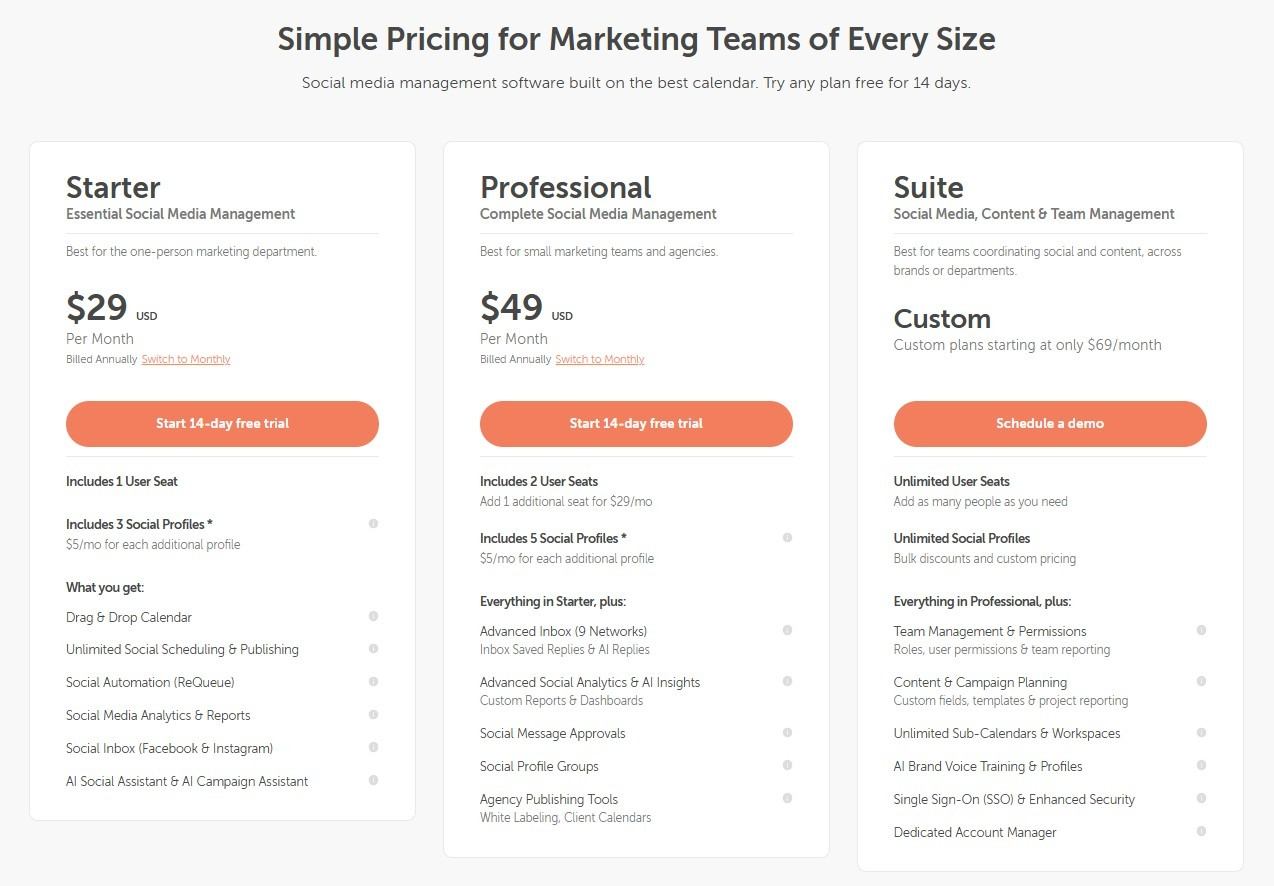
CoSchedule offers pricing plans for solo marketers, growing agencies, and large enterprises. Here’s the lineup: one free plan, two paid plans with a 14-day free trial, and a custom Suite plan.
Let’s start small. Free, which costs $0 and has 1 user. You can schedule up to 15 posts and manage 1 social account. Think of it as a test drive with a single profile.
Next comes the one-person marketing department. Starter, which costs $29 and has 1 user. In this plan, you can manage 3 social accounts.
Then you hit small teams and agencies. Professional, which costs $49 and has 2 users. In this plan, you can manage 5 social accounts.
Finally, the big one. Suite, which offers custom plans starting at $69/month and has Unlimited users. In this plan, you can manage Unlimited social accounts. It fits teams that coordinate social and content across brands or departments.
Every paid plan publishes to 11 networks, but X is billed as a separate add-on.
Now for the part most people miss. Paid plans cost less when you pay annually, and monthly billing adds $10 per month to each paid plan. Every extra social profile costs $5 per month. X profiles don’t count toward your base profiles, and each one costs $16 per month. Professional lets you add one more seat for $29 per month, up to 3 users in total.
Detailed Breakdown of CoSchedule Plans
Here’s the whole lineup in one table, so you can scan it fast.
| Plan Name | Price (Starting) | Target Audience | Key Features |
|---|---|---|---|
| Free | $0 | Individuals needing basic social publishing. | 1 user, 1 social profile, up to 15 scheduled posts at a time. |
| Starter | $29/month (billed annually) | Solo marketers who need unlimited social publishing. | 1 user, 3 social profiles, unlimited scheduling and publishing, ReQueue automation, analytics and reports, Facebook and Instagram inbox, AI Social Assistant, and AI Campaign Assistant. |
| Professional | $49/month (billed annually) | Small marketing teams and agencies. | 2 users, 5 social profiles, everything in the plan above, plus a 9 network inbox, AI replies, social message approvals, profile groups, white label client calendars, and AI insights. |
| Suite | Custom plans start at $69 | Teams that coordinate social and content across brands or departments. | Unlimited users, Unlimited social profiles, everything in the plan above, plus team management and permissions, content and campaign planning, unlimited sub calendars and workspaces, SSO, and add ons for AI brand voice training and a dedicated account manager. |
A price on a card never tells the full story. So let me walk you through each CoSchedule pricing plan and show you a real cost example.
Free Plan
The Free offers 1 user seat, 1 social profile, and up to 15 scheduled posts at a time.
You can plan posts visually, move them around, and publish directly. You won’t get advanced automation, analytics, or collaboration tools.
Let’s say you manage 1 brand, post a few times a week, and work solo. Your cost stays at $0. But the moment you add another brand or need teammates, this plan no longer fits. Compared to other free social media scheduling tools, it works more like a testing ground than a long-term home.
Starter Plan
The Starter plan gives you 1 user seat and 3 social profiles.
It adds unlimited scheduling and publishing, ReQueue automation, analytics and reports, a Facebook and Instagram inbox, and AI assistants. This is where CoSchedule pricing starts supporting steady publishing for one person. Starter is capped at one user, so you can’t add teammates on this plan.
Say you manage 5 social profiles. The plan covers 3, so you pay for 2 extra profiles at $5 each. Your monthly bill lands around $39, billed annually.
Add more profiles, and your cost climbs even when your team size stays the same.
Professional Plan
The Professional plan supports 2 users (3 at most) and 5 social profiles.
It adds white-label client calendars, approvals, profile groups, AI insights, and an inbox that covers 9 networks. CoSchedule built it for structured client workflows.
Let’s say you run an agency with 3 users and 8 client profiles. The plan includes 2 seats and 5 profiles. A third seat costs $29, and 3 extra profiles cost $15. Your monthly bill reaches around $93 ($49 + $29 + $15), billed annually.
That math often sends teams looking at other social media scheduling tools for business.
Suite
The Suite focuses on team management, content and campaign planning, approvals, and advanced security. It includes unlimited users and social profiles. Pricing is custom, with plans starting at $69 per month.
Your final cost depends on your team size and needs. Suite also adds priority support and a one-time onboarding session, while a dedicated account manager stays a paid add-on. Teams usually pick this plan when structure matters more than flexibility.
Overall, CoSchedule pricing is predictable, but it scales quickly. Once you see how features turn into real costs, you can pick a plan without surprises.
Pro Tip for Ecommerce:
Maximize your sales impact by checking out the top social media tools for ecommerce stores. They’re built to handle product promotions and campaigns seamlessly.
Featured Article: Planable Pricing Guide: Which Plan Fits Your Budget?
CoSchedule Pricing vs. Social Champ Pricing Comparison
Now let’s put the two tools side by side. I’ll match each CoSchedule Pricing plan with the closest Social Champ plan, so the comparison stays fair.
Social Champ offers two pricing models: Pay Per Profile, where you pay only for the accounts you connect, and Bundled Plans, which include a fixed number of accounts and users for one price.
-
Free Plan:
- CoSchedule: Their Free plan offers 15 scheduled posts at a time for 1 social media profile. It’s valid for 1 user.
- Social Champ: Their Free plan allows 15 scheduled posts for up to 3 social media accounts. It’s valid for 1 user.
-
Entry-Level Plan:
- CoSchedule: Their Starter costs $29 with annual billing, or $39 per month with monthly billing. It suits solo marketers who want to manage social media more effectively.
- Social Champ: Their Starter Plan costs $4 per social account per month with yearly billing ($48 per account per year), or $5 per account with monthly billing. You get 1 user, 1 workspace, unlimited post scheduling, analytics and reporting, a social inbox, and Boost Ads. If you prefer a fixed bundle, their Standard Plan costs $23 per month billed yearly ($29 monthly) for 6 social accounts and 2 users, with MCP access and the Champ AI Suite.
-
Mid-Tier Plan:
- CoSchedule: Their Professional costs $49 with annual billing, or $59 per month with monthly billing. It fits small teams and agencies that need more collaboration features.
- Social Champ: Their Growth Plan costs $8 per social account per month with yearly billing, or $9 with monthly billing. It includes unlimited users and workspaces, advanced analytics, a post approval system, client management, social listening, and competitor analysis. On bundles, their Professional Plan costs $47 per month billed yearly ($59 monthly) for 12 social accounts, 5 users, and 3 workspaces. That covers the same 5 users, 12 profiles, and agency from the CoSchedule example, which costs around $93 a month there.
-
High-Tier/Custom Plans:
- CoSchedule: Their Suite plan offers custom plans starting at $69 per month. It suits larger teams that need content, campaign, and team management in one place.
- Social Champ: Their Agency Plan costs $119 per month billed yearly ($149 monthly) for 30 social accounts, unlimited users and workspaces, white label reports, REST API access, and social listening. Their Enterprise Plan has custom pricing and adds a dedicated account manager, Salesforce, HubSpot, SSO, and custom integrations.
Social Champ vs. CoSchedule Feature Comparison
Here’s a quick side-by-side of what each tool gives you at every pricing tier.
Free Plans
- CoSchedule: Their Free plan is a good starting point. You get 1 user, 1 social profile, and up to 15 scheduled social messages at a time. It helps you get organized without spending a dime.
- Social Champ: Their Free Plan offers more flexibility, with 3 social accounts and 15 scheduled posts per account. It includes bulk scheduling for up to 15 posts, plus analytics and reporting, so you can see how your social media performs.
CoSchedule Starter vs. Social Champ Starter Plan
- CoSchedule: TThe Starter plan costs $29 when billed annually, or $39 per month when billed monthly. It supports 1 user and 3 social profiles, with a $5 fee for each extra profile. You get unlimited social media publishing, bulk scheduling of up to 365 messages, ReQueue automation, and social analytics and reports.
- Social Champ: For $4 per social account per month (billed yearly) or $5 (billed monthly), their Starter Plan gives you unlimited post scheduling for 1 user and 1 workspace. You also get a social inbox, Boost Ads, analytics and reporting, and email and chat support. Accounts get cheaper as you add more: $3 each from 11 to 20, $2 from 21 to 40, and $0.50 past 40 on yearly billing.
CoSchedule Professional vs. Social Champ Growth Plan
- CoSchedule: The Professional plan costs $49 when billed annually, or $59 per month when billed monthly. It includes 2 users (3 at most, with extra seats at $29 per month) and 5 social profiles, with the same $5 fee for each extra profile. You also get white-label client calendars, white-label reports, social message approvals, and an inbox that covers 9 networks.
- Social Champ: The Growth Plan costs $8 per social account per month (billed yearly) or $9 (billed monthly) and covers unlimited post scheduling. It includes unlimited users and workspaces, advanced analytics and reporting, a post approval system, client management, social listening, competitor analysis, and priority email and chat support. An X (Twitter) add-on is available too.
CoSchedule Suite vs. Social Champ Enterprise Plan
- CoSchedule: The Suite plan is available with custom plans starting at $69 per month. It includes Unlimited users and Unlimited social profiles. You also get team management and permissions, content and campaign planning, custom fields, unlimited sub calendars and workspaces, approval workflows, and single sign-on. A dedicated account manager comes as an add-on.
- Social Champ: The Enterprise Plan fits businesses and agencies with bigger needs. You get unlimited users and workspaces, 1-on-1 dedicated support, Salesforce and HubSpot integrations, SSO, API access, and custom integrations. They set the price based on what each business needs.
CoSchedule Plans vs. Social Champ Bundled Plans
If you prefer one fixed price over paying per profile, here’s how Social Champ’s Bundled Plans line up against each CoSchedule tier. Bundled prices below are billed yearly.
- CoSchedule Starter vs. Social Champ Standard: CoSchedule Starter costs $29 per month for 1 user and 3 profiles. Social Champ’s competitor name=”Social Champ” type=”Plan Name” label=”Name-Standard”] Plan costs $23 per month ($29 monthly) for 6 social accounts and 2 users. It includes unlimited post scheduling, bulk upload, analytics and reporting, a basic approval workflow, a social inbox, Boost Ads, MCP access, and the Champ AI Suite. Extra accounts cost $5 each.
- CoSchedule Professional vs. Social Champ Professional: CoSchedule Professional costs $49 per month for 2 users and 5 profiles, with a third seat at $29. Social Champ’s Professional Plan costs $47 per month ($59 monthly) for 12 social accounts, 5 users, and 3 workspaces. It adds advanced analytics, multi-layer approval workflows, client management, competitor analysis, automation rules, cross-platform analytics, and WhatsApp Business. Extra users cost $8 each, extra accounts cost $4 each, and social listening is a $29 per month add-on.
- CoSchedule Suite vs. Social Champ Agency: CoSchedule Suite is custom priced from $69 per month. Social Champ’s Agency Plan costs $119 per month ($149 monthly) for 30 social accounts with unlimited users and workspaces. It adds white-label reports, REST API access, social listening, and priority support. Extra accounts cost $3 each.
Every bundle also supports AI credit packs ($9 per 100) and an X (Twitter) add-on, and its Enterprise Plan sits above Agency with custom pricing.
In summary, both tools bring a lot to the table at every tier. Social Champ tends to give you more features at lower prices. CoSchedule goes deeper on customization and project management, especially for larger teams and enterprises.
Is CoSchedule’s Pricing Restrictive in 2026? A Clear Breakdown
When people question CoSchedule pricing, it’s rarely about the feature list. It’s about flexibility.
So let’s break this down calmly, without jumping to conclusions.
How CoSchedule Pricing Is Structured
At first glance, CoSchedule pricing looks straightforward. You pick a plan, get a set of features, and build your workflow around it.
But once your team grows or your needs change, that structure can feel tight. This comes up a lot in a CoSchedule review, especially from growing teams.
Unlike some social media calendar tools, CoSchedule works best when your process fits neatly into its system. If your workflow changes often, switching plans may feel less flexible than you expect.
Where Users Feel the Limits
Here’s the common pattern. Restrictions show up as your usage grows. Adding users, managing multiple brands, or expanding publishing channels can quickly push you into a higher tier.
The numbers add up fast. Each extra profile costs $5 per month on both paid plans, and each extra seat on Professional costs $29 per month. Professional also caps at 3 users, so a bigger team has to move to a custom Suite plan.
That’s usually the moment people start comparing CoSchedule Alternatives to see how pricing scales elsewhere.
This doesn’t mean CoSchedule is overpriced. It means CoSchedule fits a specific type of user. Even people who tested other tools often say the value depends on team size and planning habits.
Is It Restrictive or Just Structured?
CoSchedule pricing isn’t necessarily restrictive, but it is structured. If your needs match the plan you pick, it works smoothly. If they don’t, it can feel limiting, especially in 2026, when teams expect pricing to adapt as fast as they do.
Quick Tip:
Not all platforms fit every workflow. Explore other social media content schedulers to find the one that matches your posting habits perfectly.
Top 3 Budget-Friendly Tools That Beat CoSchedule in Value
If you’re looking for budget-friendly CoSchedule alternatives that won’t break the bank and still offer powerful social media management features, here are three standout options that provide great value without the hefty price tag:
-
Social Champ
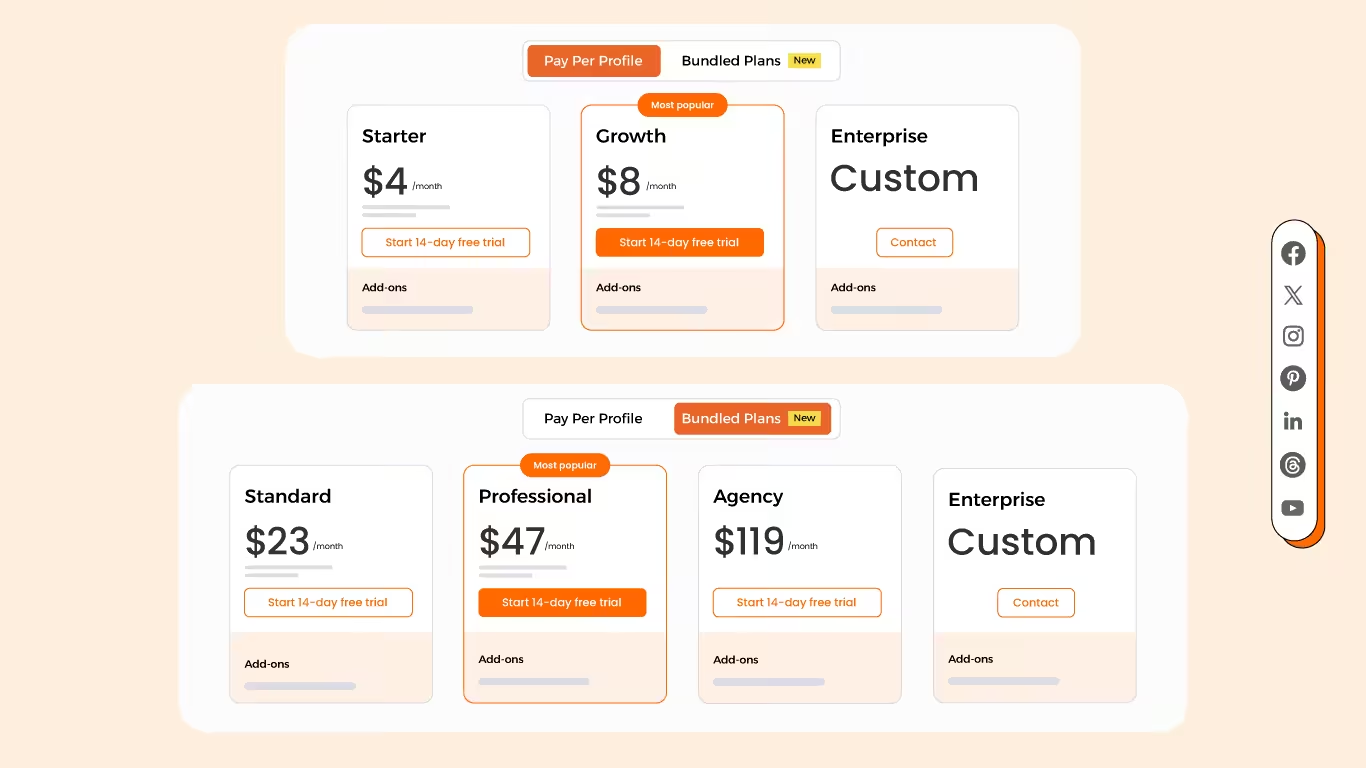
Social Champ’s Pricing Social Champ stands out if you want an affordable social media management tool without skimping on features.
You start with the Free Plan. It lets you manage 3 social accounts and schedule 15 posts, so you can get organized without any financial commitment.
As your needs grow, the paid plans take over. You can pay per profile from $4 per account per month, or pick a bundled plan from $23 per month for 6 accounts (both billed yearly). Pricing stays budget-friendly as you scale, and you can manage more accounts and schedule unlimited posts.
You also get detailed analytics that help you track performance and refine your social media strategy. That makes Social Champ a strong fit for growing businesses and savvy social media managers alike.
CoSchedule vs. Social Champ: Price-To-Value Comparison (2026)
Category CoSchedule Social Champ Pricing (per month, annual savings) $29 and $49 on annual billing for the two paid plans, plus $5 per extra social profile and $29 per extra seat on Professional. Costs climb fast as your team or profile count grows. Two models. Pay Per Profile: Starter $4 to $5 per account; Growth $8 to $9 per account. Bundled Plans: Standard $23 (6 accounts), Professional $47 (12 accounts), Agency $119 (30 accounts), billed yearly. Free plan for individuals; Enterprise custom. Annual billing saves up to 20%. Social Profiles (limits, additional costs) 3 profiles on the first paid plan and 5 on the second. Extra profiles cost $5 each, and X profiles cost $16 each. Pay only for the profiles you use, with no hard cap. Per-account prices drop past 10, 20, and 40 accounts (as low as $0.50 on Starter, billed yearly). Bundles add extra profiles at $5, $4, or $3 each. X (Twitter) is a paid add-on. Users (team collaboration features) 1 user on the first paid plan, 2 users on the second (3 at most), and Unlimited users on Suite. Starter: 1 user. Growth: unlimited users and workspaces. Standard: 2 users. Professional: 5 users (+$8 per extra user). Agency and Enterprise: unlimited users. Key Features (AI tools, analytics, unified inbox) Unlimited AI Social and Campaign Assistants on every paid plan, 1600+ AI prompts, analytics reports, and a social inbox (Facebook and Instagram on the first paid plan, 9 networks on the second). Champ AI Suite (AI captions and image generation), analytics, a social inbox, and Boost Ads on paid plans. Growth and Agency add social listening and competitor analysis. White-label reports and REST API access start on Agency. Enterprise includes Salesforce, HubSpot, and SSO. Scalability and Cost Predictability Costs scale per seat and per profile. The Suite is custom, so the final price can be hard to predict. Scales predictably either way: per-profile pricing with volume discounts, or a fixed bundle price. You can switch between the two models anytime. Free Trial 14-day free trial on any paid plan. 14-day free trial on all paid plans, no credit card required. Keeping Your Content Strategy on Track!
Try Social Champ today to leverage powerful features at a price that fits your budget. -
Planable
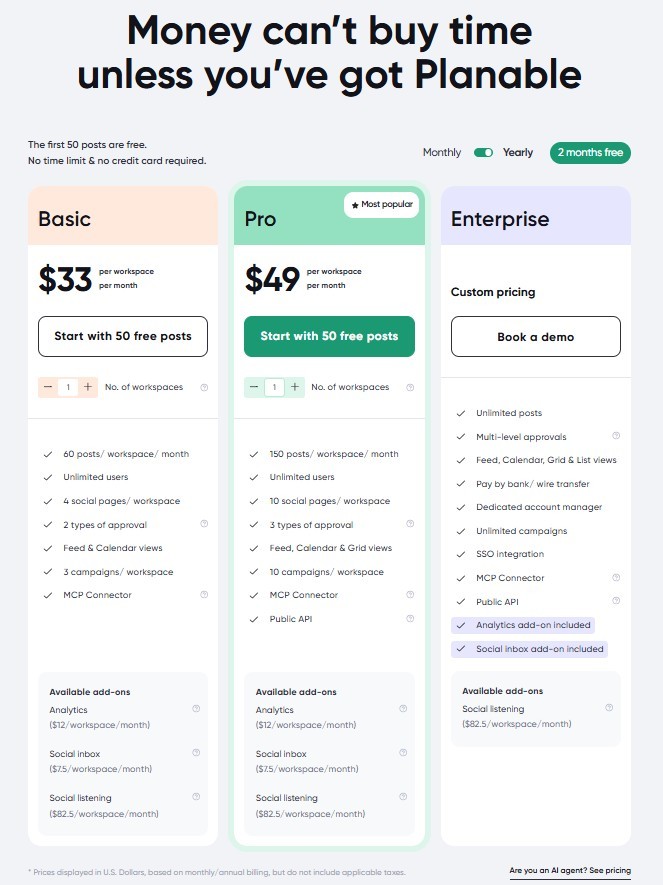
Planable’s Pricing Plans Planable is another solid pick if you want a social media management tool that won’t stretch your budget.
Plans start at $33 per workspace per month on yearly billing. The Basic plan includes Unlimited users, 4 pages/workspace social pages, and 60 posts per workspace each month, and you can try it with 50 free posts, no credit card needed. Analytics and the social inbox are paid add-ons. That’s great value, especially if you focus on visual content and team collaboration.
The tool fits teams that work together on social media campaigns. Its intuitive design makes it easy to plan and review posts visually, which creative teams love.
If you manage several clients or social profiles, Planable’s transparent pricing keeps budgeting simple. As you scale, it keeps offering good value and helps you stay organized while your social presence grows.
Featured Article: 10+ Planable Alternatives to Consider
-
Sendible
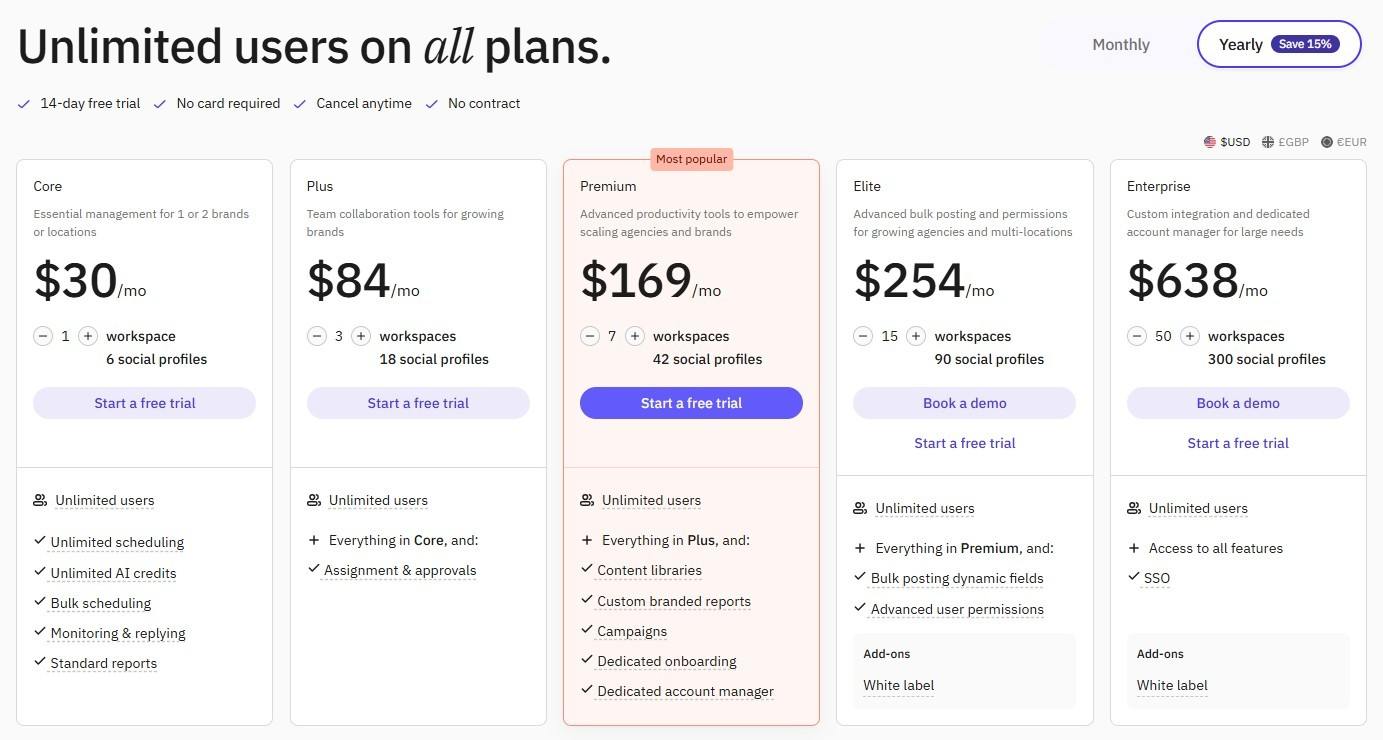
Sendible’s Pricing Plans Sendible is a smart option if you want an affordable tool that’s easy to use. Plans start at $35 per month for Core, which includes 1 workspace, 6 social profiles, and unlimited users. Annual billing saves 15%, and every plan comes with a 14-day free trial. The range covers different needs and budgets.
What sets Sendible apart is its simple interface and strong integrations. You get a full set of tools for managing your social media accounts, without the hefty price tag of its pricier competitors.
If you want a balance of affordability and functionality, Sendible deserves a look.
Agency Tip of the Day:
If you manage multiple clients, invest in social media management tools for agencies to streamline approvals, reporting, and team collaboration.
Get More Features in One Place
Conclusion
So, is a social media tool worth the money? Understanding CoSchedule pricing is the first step to answering that.
CoSchedule covers a lot of ground, from the Free plan for solo users to the Suite plan for large teams. Costs add up quickly as you scale, though.
Social Champ takes a different path. You can pay per profile or choose a bundled plan, and still get advanced features at a more budget-friendly rate.
In the end, your team size, content needs, and budget decide. Whether you’re a solo marketer, a growing business, or an agency, knowing how CoSchedule pricing stacks up helps you choose a plan without overspending.