
Let’s get one thing straight first: Twitter is now called X. The name has changed, but the biggest problem is still the same: your tweets disappear fast.
Have you ever posted something you were proud of, only to see it get zero likes? Or thought, “I’ll tweet later,” and then completely forgot?
I’ve been there more times than I can count. That’s exactly why learning how to schedule tweets matters so much.
Short Summary
- Scheduling tweets keeps your content consistent without having to post manually every day.
- You can plan tweets to reach your audience at the best times for higher engagement.
- Social Champ makes it easy to schedule tweets on both desktop and mobile.
- Using a mix of content types and timing your posts strategically boosts visibility.
- With the right tools, you can save time, reduce stress, and grow your presence on X.
I know it feels tiring when you post manually every day. And the biggest struggle is to guess the right time to post.
What if you could plan everything once and stop worrying about it daily? What if your tweets went live even when you were busy, asleep, or focused on work?
In this guide, I’ll show you simple, free ways to schedule social media posts on X without confusion or extra effort.
Let’s get started.

Social Champ makes tweet scheduling simple, even if it’s your first time. Try it today!
How to Schedule Tweets on Twitter (Natively)?
Planning your tweets in advance ensures your content reaches your audience at the optimal times for engagement.
Luckily, Twitter (X) now has a built-in scheduler, so you don’t need any extra tools to plan your posts. Here’s a simple, step-by-step guide to schedule tweets directly on Twitter.
Step 1: Log in on Desktop
Go to twitter.com on your computer and log in with your username and password. Make sure you’re using the desktop version, as the native scheduler is easiest to use there.
Step 2: Open the Tweet Composer
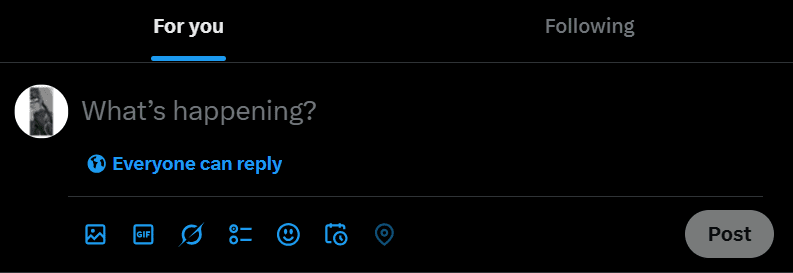
Click on the “What’s happening?” box at the top of your feed. This is where you’ll compose your tweet, such as text, images, GIFs, videos, or tagging people.
Step 3: Write Your Tweet
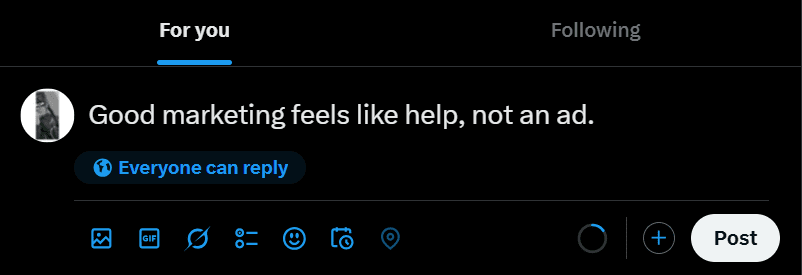
Type your content just like you normally would. Keep it concise, engaging, and relevant to your audience.
Step 4: Click the Schedule Icon
Instead of clicking “Post,” look for the calendar/schedule icon at the bottom of the composer box. This opens the scheduling options.

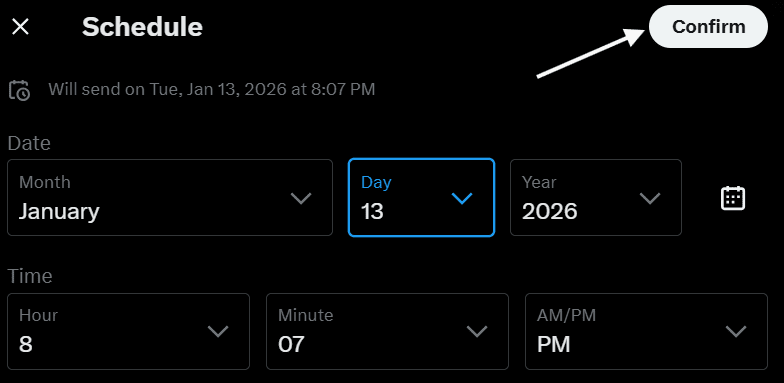
Step 5: Pick Date and Time
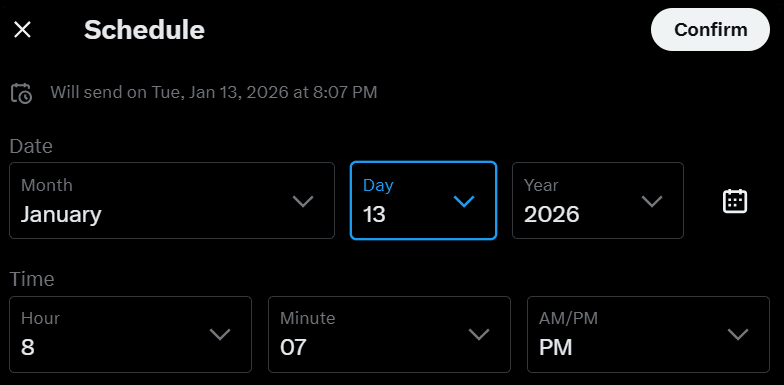
Choose the date and time you want your tweet to go live. You can schedule a few minutes, hours, or even days in advance.
Timing your tweets correctly can improve engagement. Consider checking the best time to post on Twitter for your audience.
Step 6: Confirm Your Schedule
After selecting the date and time, click the “Confirm” button. Make sure everything looks correct before finalizing.
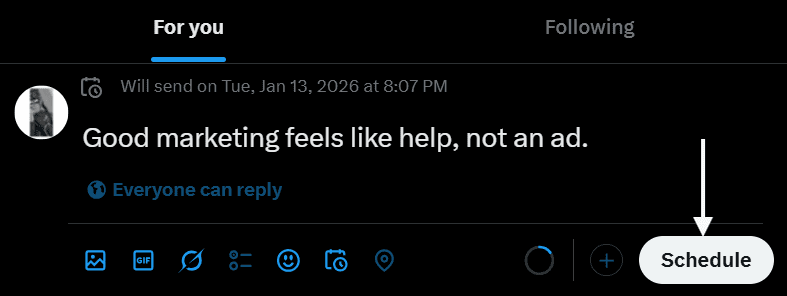
Step 7: Click “Schedule”
Finally, click “Schedule”, and your tweet is set! You can now focus on other tasks while your content posts automatically.
Whether you’re handling one brand or ten, Social Champ helps you plan, approve, and schedule tweets from one clean dashboard.
How to Schedule Tweets With Social Champ
Scheduling tweets with Social Champ is a breeze and can significantly streamline your social media strategy.
By following a few simple steps, you can plan your tweets in advance, ensuring they go live at the perfect times for maximum engagement.
Here are the steps to schedule tweets using Social Champ:
Step 1: Sign In or Sign Up
Visit the Social Champ website to log in to your Social Champ account if you already have one.
If you don’t have a Social Champ account, sign up for an account on the Social Champ website.
Step 2: Connect Your Twitter Account
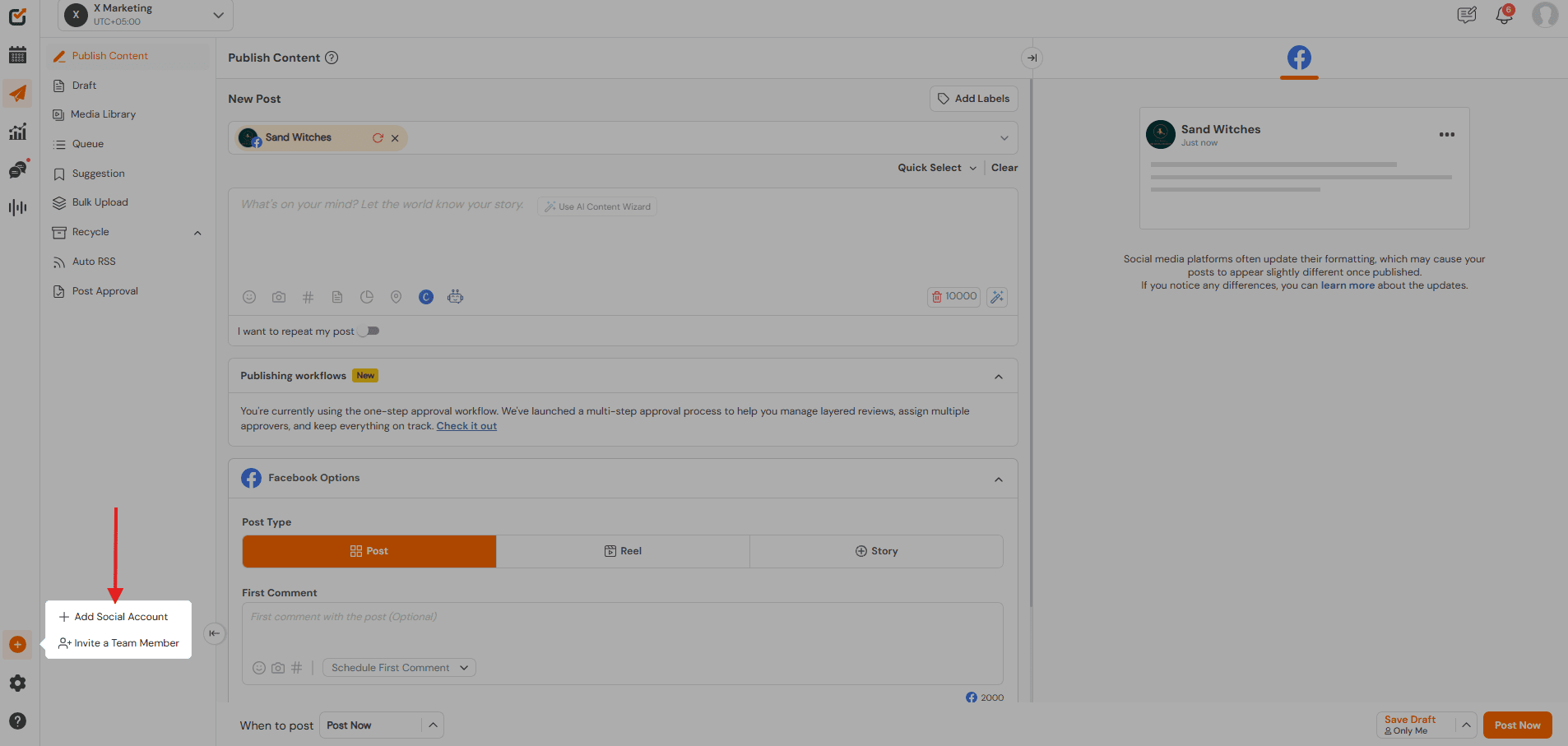
Once logged in, connect your Twitter account to Social Champ. Click on the “Add Social Account +” button.
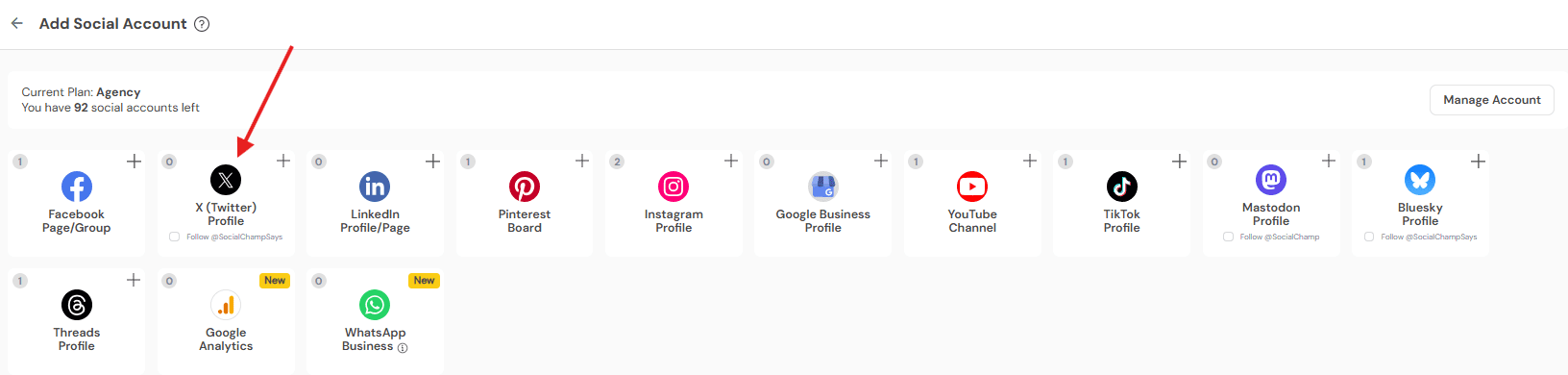
From the social networks displayed, choose “Twitter Profile.” This allows Social Champ to access your Twitter profile for scheduling tweets.
Step 3: Access the Composer
After connecting your Twitter account, navigate to the composer section within Social Champ. Here, you can compose and schedule your tweets.
Step 4: Compose Your Tweet
In the composer, write your tweet in the text box provided. You can also add images, GIFs, or videos to your tweet by clicking on the media icon.
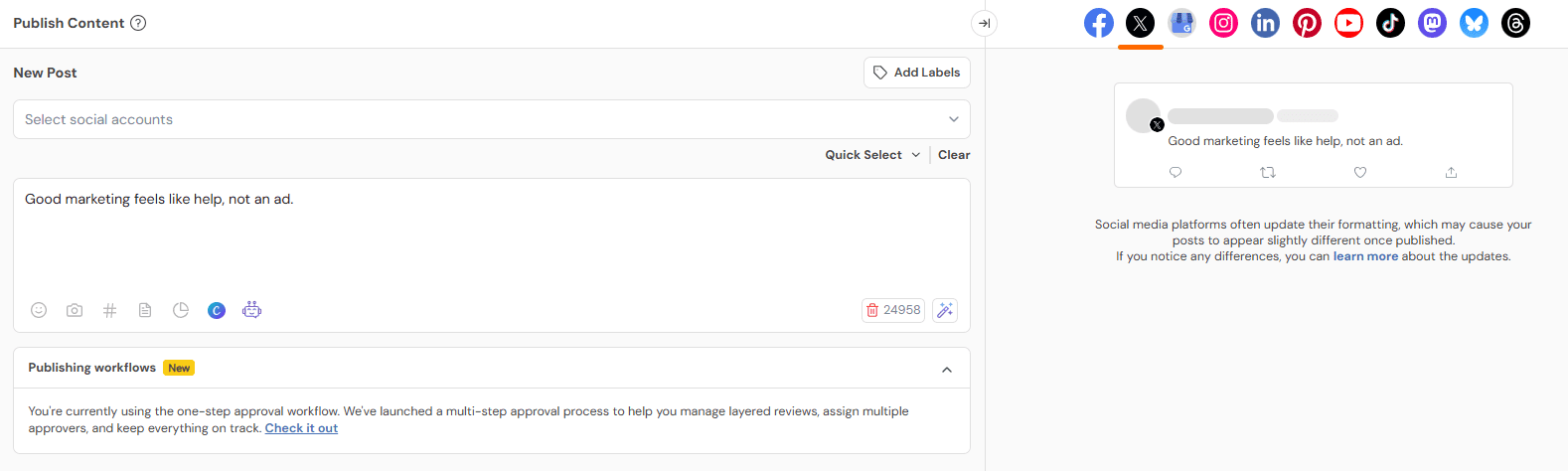
Step 5: Select Scheduling Options
Below the compose box, you’ll see scheduling options:
- Pick the date and time you want your tweet to go live.
- Choose whether it should post once, multiple times, or recur.
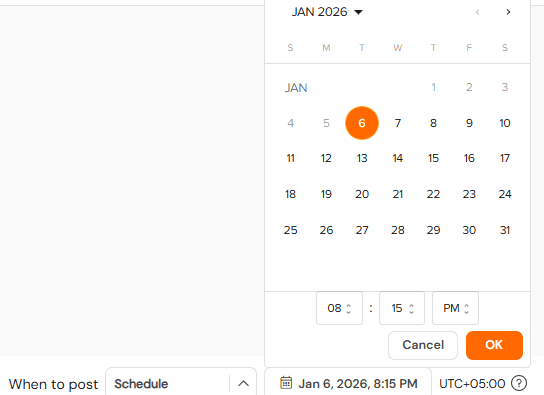
Step 6: Schedule Your Tweet
Once you’ve composed your tweet and selected the scheduling options, click on the “Schedule” button. This will queue your tweet for posting according to the specified schedule.

That’s how to schedule tweets on Twitter with Social Champ.
Step 7: Monitor Your Tweet Performance
After posting, Social Champ gives you detailed analytics. Track metrics like engagement, clicks, reach, and more to see which tweets perform best. Use this data to refine your future posts and optimize your strategy.
Pro Tip!
Social Champ makes it easy to manage multiple Twitter accounts from one dashboard. It’s perfect if you’re handling different brands or client accounts.
Featured Article: How To Schedule Multiple Posts On Social Media
How to Schedule Tweets on a Mobile Device?
Ever wondered how to schedule tweets while on the go?
With the Social Champ app, you can plan your posts, add media, and make sure your tweets go live at the right time, all from your mobile device. While Twitter’s official app doesn’t allow scheduling (you can still do it through the browser on mobile), Social Champ makes it super easy.
Step 1: Download and Open the Social Champ App
Head to the App Store (iOS) or Google Play Store (Android) and download the Social Champ app.
Open it and log in with your account. If you’re new, signing up is quick and free. This is the first step to learning how to schedule tweets from your phone.
Step 2: Connect Your Twitter Account
Once logged in, tap “Add Social Account” and choose Twitter Profile. This connects your account so Social Champ can post your tweets automatically.
Step 3: Open the Composer
Go to the Composer section in the app. This is where you’ll compose and schedule your tweets from your mobile device. Social Champ is one of the easiest Twitter tools for managing all your posts on the go.
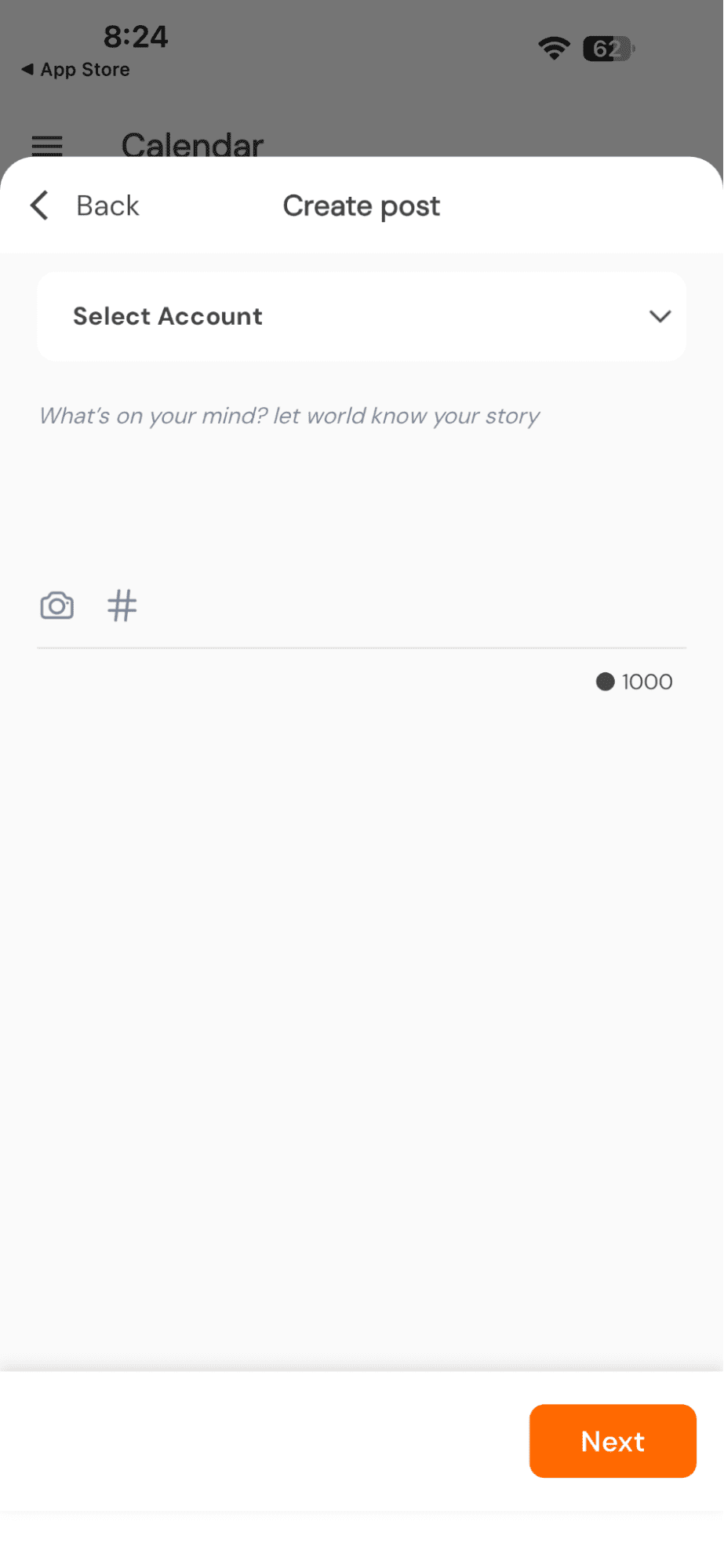
Step 4: Compose Your Tweet
Type your tweet in the text box. Add images, GIFs, or videos using the media icon. Keep your tweets engaging, clear, and simple. This is key if you’re learning how to schedule tweets effectively.
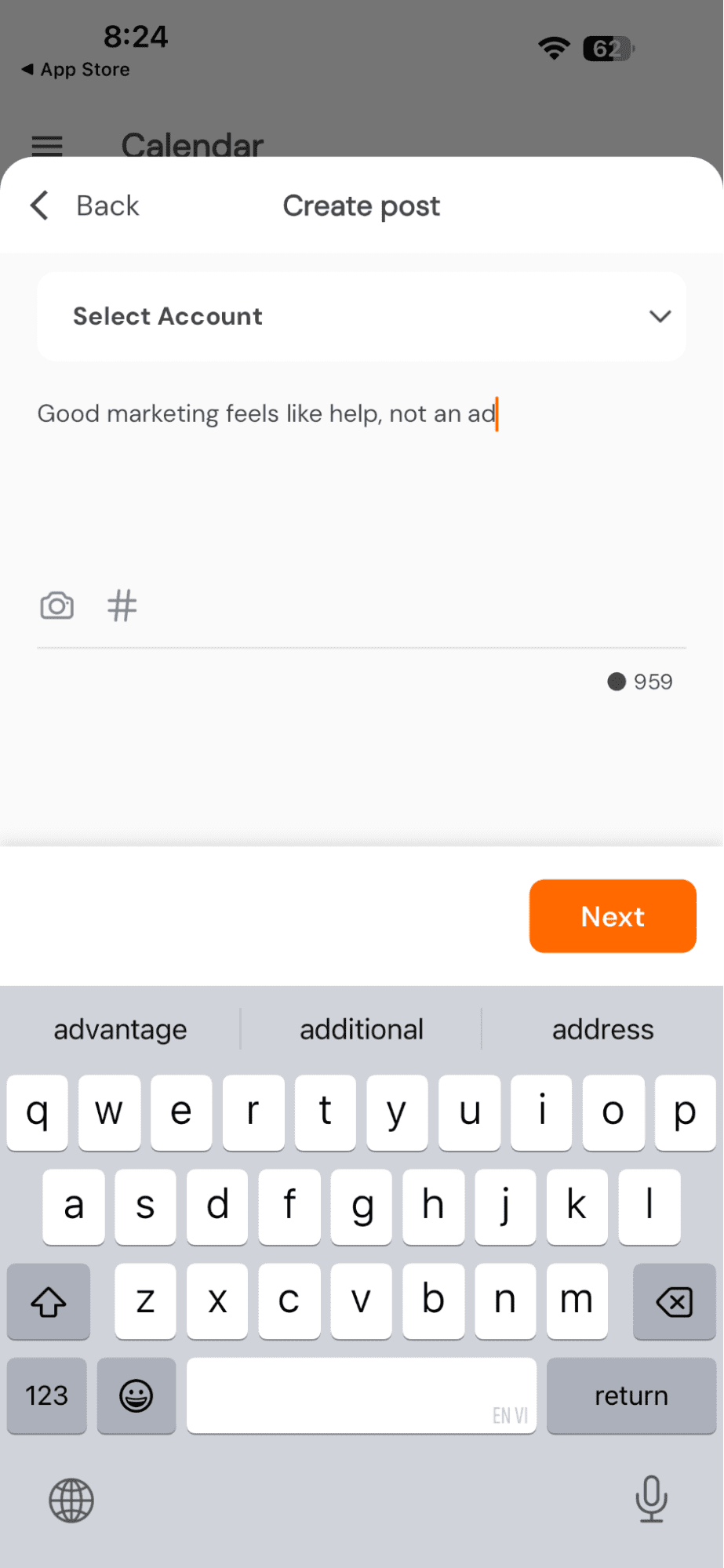
Step 5: Choose Scheduling Options
Tap the calendar icon to pick the date and time for your tweet. You can also select whether it posts once, multiple times, or on recurring intervals.
Scheduling this way helps you plan ahead and schedule tweets exactly how you want.

Step 6: Schedule Your Tweet
After everything looks good, tap “Schedule.” Your tweet is now queued and will go live automatically at your chosen time.
You don’t need to stay online or post manually. This is how you can schedule tweets on mobile.
Step 7: Manage and Monitor Scheduled Tweets
In the app, you can see all your scheduled tweets in the queue. Edit, reschedule, or track performance from anywhere.
Social Champ’s mobile app is perfect if you want to stay organized, save time, and manage your content easily.
On your phone, between meetings, or mid-commute, Social Champ’s mobile app makes tweet scheduling easy without needing a desktop workaround.
Quick Tips!
If you want better results without overthinking your strategy, keep these Twitter tips in mind when scheduling your content:
- Post when your audience is most active, not when it’s convenient for you
- Keep tweets short and skimmable. Hooks matter more than hashtags
- Mix formats like text-only, visuals, polls, and threads
- Revisit old high-performing tweets and reschedule them with a fresh angle
Why Schedule Tweets Ahead of Time?
Ever wondered how to schedule tweets in a way that actually makes a difference for your engagement and brand presence?
Posting randomly throughout the day might seem fine, but without a plan, your content can easily get lost in the fast-moving X feed.
Scheduling tweets ahead of time offers numerous advantages that save you stress, improve reach, and help you run a smarter Twitter strategy.
Let’s dive into why pre-scheduling your tweets is such a game-changer.
-
Maximize Engagement With Timing Precision
Have you noticed some tweets get more likes and retweets than others?
Timing plays a huge role. By scheduling tweets ahead of time, you can ensure your content reaches your audience when they are most active.
Posting during peak engagement hours increases visibility, interactions, and the chances of your tweet being shared. Tools like Social Champ make it easy to schedule tweets at optimal times without guessing.
-
Maintain Consistency for Brand Identity
Consistency is key on Twitter. When you schedule a tweet in advance, you can maintain a steady posting rhythm.
Regular posts help reinforce your brand identity, build trust, and create a recognizable style. Whether you’re tweeting tips, updates, or promotions, consistency ensures your followers know what to expect from your account.
Using a reliable Twitter scheduler ensures your content appears regularly, without gaps.
-
Reach Global Audiences
Do you have followers in different time zones?
Scheduling tweets allows you to reach them without staying up late or waking up early. By planning ahead, your content can appear at the right time for international audiences, helping you expand your reach far beyond your local network.
This is especially useful for global campaigns or accounts targeting multiple regions.
-
Execute Strategic Campaigns Efficiently
Planning tweets ahead of time helps you run campaigns smoothly. Whether it’s a product launch, contest, or event, you can coordinate messaging across multiple posts and platforms.
By scheduling tweets, you can ensure your campaign flows logically, with each message reaching your audience at the right moment.
If you want to stay ahead of the Twitter algorithm, pre-scheduling your tweets can improve engagement by posting when the algorithm favors visibility.
-
Save Time and Reduce Stress
Imagine creating a week’s worth of tweets in one sitting instead of posting in real-time all day.
Scheduling tweets saves hours by letting you focus on creating content in batches. Once queued, your posts go live automatically, freeing up time for other tasks.
-
Optimize Your Content Calendar
Scheduling tweets helps you manage your content calendar more effectively.
You can space out posts evenly, avoid overwhelming your audience, and maintain a balanced mix of topics and media types.
Planning ahead ensures variety, relevance, and engagement, instead of posting randomly without a strategy. Using X Twitter management tools like Social Champ makes managing multiple campaigns effortless.
-
Reduce Errors and Typos
When you pre-schedule tweets, you get the chance to review them carefully before they go live. This extra layer of editing reduces errors, prevents typos, and ensures professionalism.
Avoid the embarrassment of hastily posted mistakes and maintain a polished Twitter presence.
Pro Tip!
Scheduling is powerful, but insights make it effective. Using Twitter analytics tools helps you understand what’s driving clicks, replies, and impressions. When you regularly review your Twitter stats, you stop guessing and start posting with intention, especially when deciding what to schedule again (and what to skip).
Featured Article: Inside Twitter Marketing – A Powerful Guide
8 Best Practices for Scheduling Tweets
Before you schedule your tweets while vibing to your playlist, let’s explore some best practices. Here are our top five tips that have helped us in the past and continue to wow even today!
-
Leave Space in Your Schedule
Filling your social media calendar to the brim is not really that smart. Sure, you would have tweets for all days of the week, but what would you do if all the good slots were booked and you wanted to post something on the spot?
A new trend might blow up Twitter, Cloudflare services might go down again, or Internet Explorer could come back. And since your calendar would be full of previously scheduled tweets, you would miss out on the opportunity to cash on it.
So, what exactly should be your game plan? Fill up most of the spaces in your calendar and keep around 20% of slots empty. And if these trends pop up during filled slots, you can adjust them using the empty spaces.
-
Schedule a Mix of Content
With Twitter, short tweets work best, but images and videos are also super popular. So, what should you schedule for your business blog? The answer is simple: post stuff that covers it all.
Schedule some nice, witty (non-offensive) tweets, product pictures, short videos, and articles from your blog. When you experiment with different types of tweets, you can also figure out which one resonates the most with your audience.
-
Figure Out the Best Time to Post
Figuring out your best time to post on Twitter is really important to create engagement. You need to know exactly when your audience is active to make the most out of the tweets. The tweets you post at the right time gather the most engagement and have the maximum number of impressions!
With the Analytics feature, you can use Social Champ to find the best time to post. Location matters when it comes to identifying the best time to post on social media. Take into account the local or global location and the priorities of that group of people.
-
Know your Audience
So, once you have decided the best time to post, the next essential tip is to know your audience. You may be wondering how you would know your audience. Then here is the answer.
Monitor your posts’ results, see which type of content your audience usually likes, see their interests, and most importantly, when they are likely to be active. Wrap all the essential information and start creating the content based on your audience’s interest; you will definitely see a major change in your engagement levels.
-
Don’t Forget Analytics
Do you ever monitor the analytics of your posts? If not, then you have probably been missing out on how your posts sound to your audience. Tracking analytics will definitely help you to monitor key metrics, engagements, followers you gain or lose, and retweets, so that you can make data-driven decisions for your next Twitter strategies.
-
Engage With Your Audience in Real-Time
While scheduling tweets is convenient for maintaining a consistent presence, make sure to allocate time for real-time engagement with your audience. Monitor replies, mentions, and direct messages regularly to foster conversations, address inquiries, and build relationships.
-
Monitor and Adjust Performance
Regularly monitor the performance of your scheduled tweets using analytics tools to assess engagement metrics such as likes, retweets, clicks, and impressions. Analyze which types of content resonate most with your audience and adjust your scheduling strategy accordingly to optimize results.
-
Double-Check Links and Media Attachments
Before you schedule tweets on Twitter with links or media attachments, double-check that all URLs are correct and lead to the intended destination. Verify that images, videos, or GIFs are properly formatted and displayed correctly across different devices and platforms.
You already know how to schedule tweets. Now do it faster, cleaner, and with less stress. Try Social Champ and take tweet scheduling off your daily to-do list.
Featured Article: How to Schedule TikTok Videos: Tools, Tips & Practices
Top 4 Twitter Scheduling Tools to Consider
If you’ve ever opened Twitter (yes, Twitter is now X, but most marketers still call it Twitter) and thought, “I’ll post this later,” only to forget entirely, you already know why scheduling matters.
But here’s the real question:
Which tool actually makes Twitter scheduling easy, reliable, and worth your time?
Not all schedulers are built the same. Some are overpriced. Some look good on the surface but fall apart when you’re managing multiple accounts, clients, or campaigns.
Let’s break down four Twitter scheduling tools you should seriously consider and why Social Champ clearly stands out if your goal is stress-free growth.
-
Social Champ (Best Overall Twitter Scheduling Tool)
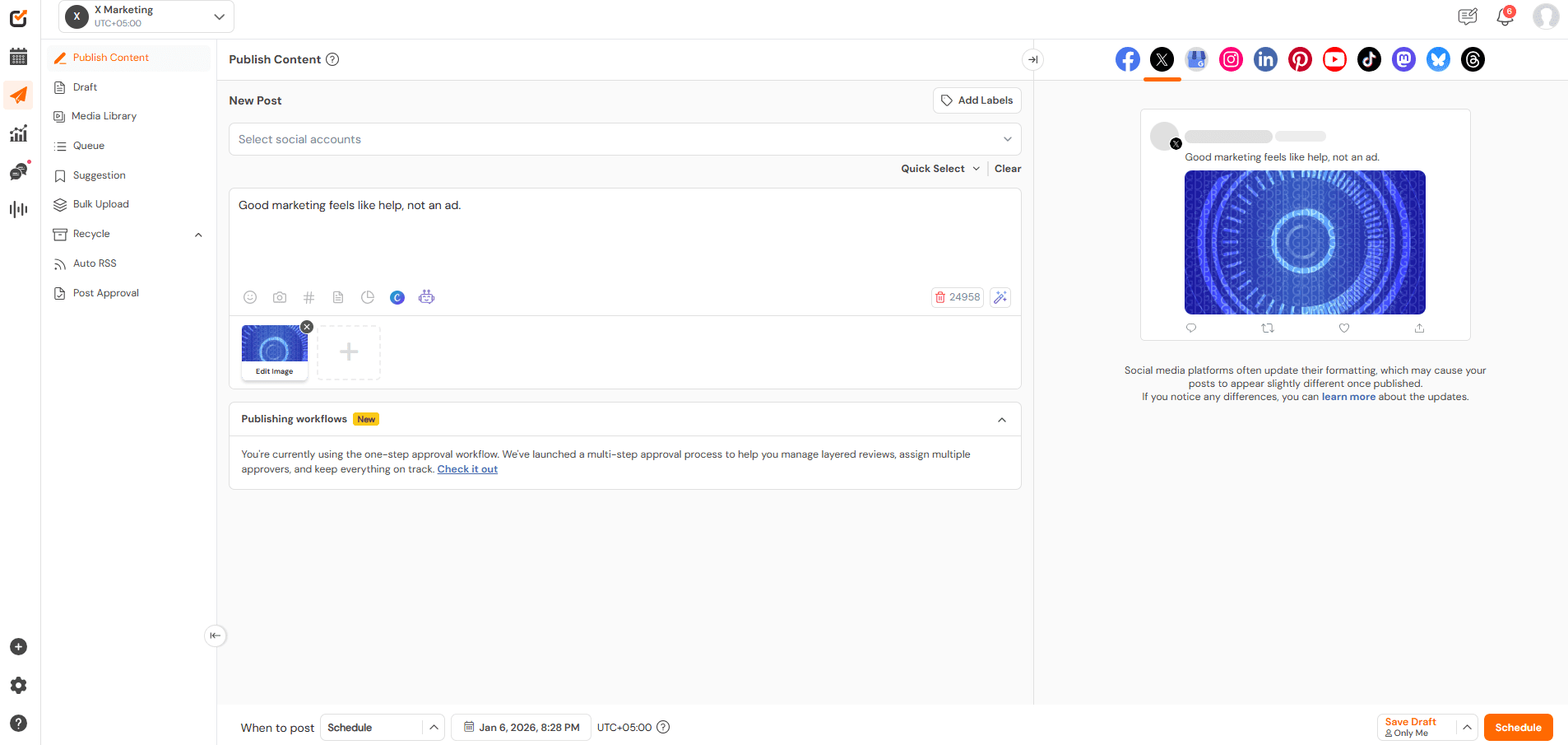
Social Champ’s Dashboard If you’re serious about learning how to schedule tweets without overcomplicating your workflow, Social Champ is hard to beat.
It’s built for people who value speed, control, and consistency; not endless dashboards and confusing menus.
Why Social Champ stands out:
- Schedule tweets, threads, and reposts from one clean composer
- Smart queues that keep your posting consistent (even on busy weeks)
- Bulk scheduling for campaigns and content batches
- First comment and recycling features to extend the tweet lifespan
- Works smoothly for individuals, teams, and agencies
What really sets Social Champ apart is how practical it feels. You’re not buried in features you’ll never use.
Everything is focused on helping you plan, schedule, and publish tweets faster, no matter if you’re managing one brand or ten.
Best for:
Creators, businesses, agencies, and marketers who want a powerful yet simple Twitter scheduler without paying enterprise-level prices.
Turn Scheduled Tweets Into Real Engagement!Posting isn’t enough. Social Champ helps you schedule tweets smarter, track what works, and repeat what gets clicks, replies, and shares.
-
Hootsuite (Well-Known, But Heavy)

Hootsuite’s Landing Page Hootsuite is often the first name people recognize when talking about Twitter scheduling. It’s been around for years, and that’s both a strength and a weakness.
Yes, it supports Twitter scheduling, monitoring, and analytics. But many users struggle with:
- A cluttered interface
- Steep pricing as accounts grow
- Features locked behind higher-tier plans
For someone just trying to figure out how to schedule tweets efficiently, Hootsuite can feel like using a Swiss Army knife to cut paper.
It works, but it’s not always enjoyable.
Best for:
Large teams that are already locked into the Hootsuite ecosystem.
-
Buffer (Simple, But Limited)
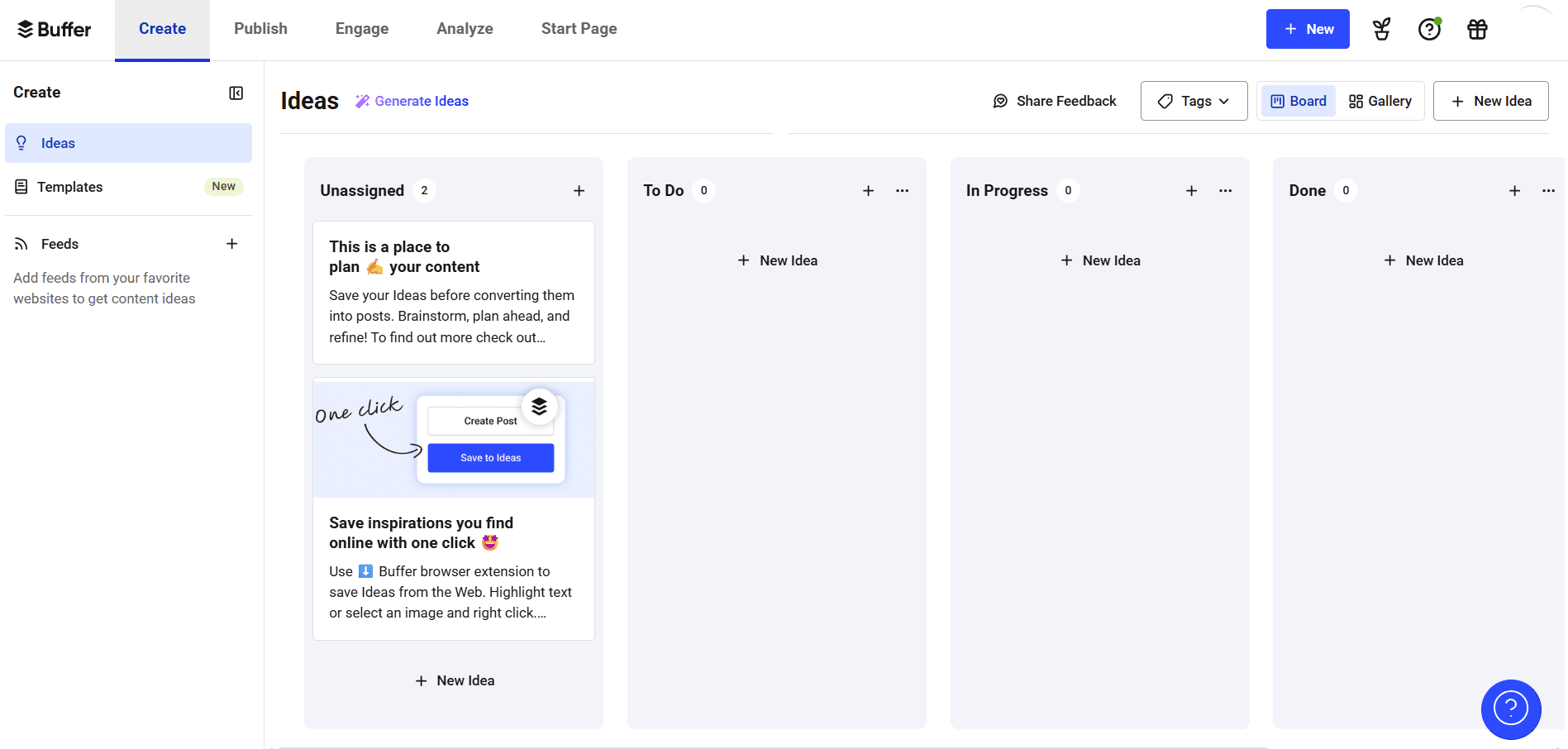
Buffer’s Dashboard Buffer is often praised for its clean design and beginner-friendly setup. If you’re scheduling a few tweets per week, it does the job.
However, as your Twitter strategy grows, the limitations show:
- Fewer automation options
- Limited recycling and queue flexibility
- Advanced features cost extra
Buffer is fine if you’re just starting out. But if you’re planning content weeks in advance or managing campaigns, you’ll likely outgrow it quickly.
Best for:
Solo creators with light scheduling needs.
-
TweetDeck (Native, But Restrictive)
TweetDeck (now integrated into X) feels like the “official” option, but it’s not really built for scheduling-heavy workflows.
While it’s great for real-time monitoring, it falls short when it comes to:
- Advanced scheduling
- Content recycling
- Team collaboration
- Campaign planning
If your goal is consistent, planned growth on Twitter, TweetDeck alone won’t get you there.
Best for:
Live monitoring and engagement, not long-term scheduling.
Why Social Champ Is the Smart Choice in 2026
Most people don’t fail at Twitter because of bad content. They fail because they can’t stay consistent.
Social Champ solves that problem better than the rest. It’s built around how people actually work:
- Batch content once
- Schedule tweets in minutes
- Let automation handle the rest
If you’re actively searching for how to schedule tweets without burning hours every week, Social Champ gives you exactly what you need, and nothing you don’t.
Quick Note!
As conversations around Bluesky vs Twitter X continue, brands still rely heavily on Twitter/X for reach and visibility. That’s why using the right Twitter marketing tools is key. They help you stay consistent, analyze performance, and adapt faster as the platform evolves.
Conclusion
If there’s one thing this guide should make clear, it’s this: learning how to schedule tweets isn’t about being fancy or “advanced.” It’s about making Twitter (yes, X) work for you, not the other way around.
Tweets move fast. Attention moves even faster. When you post randomly, your best ideas can disappear in minutes. But when you plan ahead, you stay visible, consistent, and stress-free.
No matter if you use Twitter’s native scheduler or a tool like Social Champ, scheduling gives you control over your time and your content.
You stop guessing. You stop forgetting. And you start showing up when your audience is actually listening.
So instead of asking, “Did I tweet today?” you can ask a better question: “What should I plan next?”
That shift alone can change how your entire Twitter strategy feels and performs in 2026.





7 comments
Wasla Zainab
Thanks a lot for this information on tweet scheduling, was actually puzzled how to do so.
Ahmed Ali
Great suggestion! The idea of creating a content calendar and scheduling tweets in advance can be an effective way to stay organized and consistent on Twitter. Your valuable insights and tips on boosting one’s Twitter presence are much appreciated. Thanks for generously sharing your expertise with us!
Lucas Brown
Nice! I appreciate the suggestion to create a content calendar and plan out tweets in advance. Thank you for sharing such incredible information with us.
Ewin Dsouza
A very compelling insight, will definitely try scheduling tweets with Social Champ.
Kinsey
Thank you for compiling such a great resource. I will definitely try out these!
Beyok Adel
Scheduling of tweets has become quite easy with your blog. Thanks.
tunise mo
I love scheduling tweets but retweeting via social champ has made things super easy for us.