Last week I opened Snapchat to send one snap. Twenty minutes later, I was still poking around its menus. That’s how I found out you can stack filters on a single snap, and I wondered how I had missed it for so long.
I had tapped the same three buttons for years. Chances are you have too. Snapchat averaged 977 million monthly active users in Q3 2026, and 495 million people used it daily.
TL;DR
The best Snapchat hacks start with layering filters, making custom stickers, and switching on dark mode. Data Saver, Ghost Mode, and Snapchat on your computer make the app easier to use. Brands can grow faster with exclusive drops, Snapcode QR codes, and tracked links.
Our Snapchat statistics guide has more numbers. But a huge audience doesn’t help if your snaps look like everyone else’s.
That’s the problem these Snapchat hacks fix. I stress-tested the app so you can skip the trial and error. You’ll learn how to design better snaps, find buried settings, and grow your brand.
We’ll begin with the design tricks that make your snaps stand out. You don’t want to be the last one to try them.
Creative and Design Snapchat Hacks to Make Your Snaps Stand Out
My first snaps looked flat. Same filter, same white text, same layout every time. These hidden design tricks help your snaps grab attention fast, and these Snapchat tips take about a minute each. I wish I had tried them sooner.
-
Find Hidden Color Palettes
I kept wondering why my text and doodles never looked right. The default color slider has no black or white, so my options felt limited.
Then I found one of those Snapchat secrets. Open the drawing tool, tap the Color Palette switcher, and you’ll see the extended palette. Tap twice or thrice, and black, white, and gray show up.
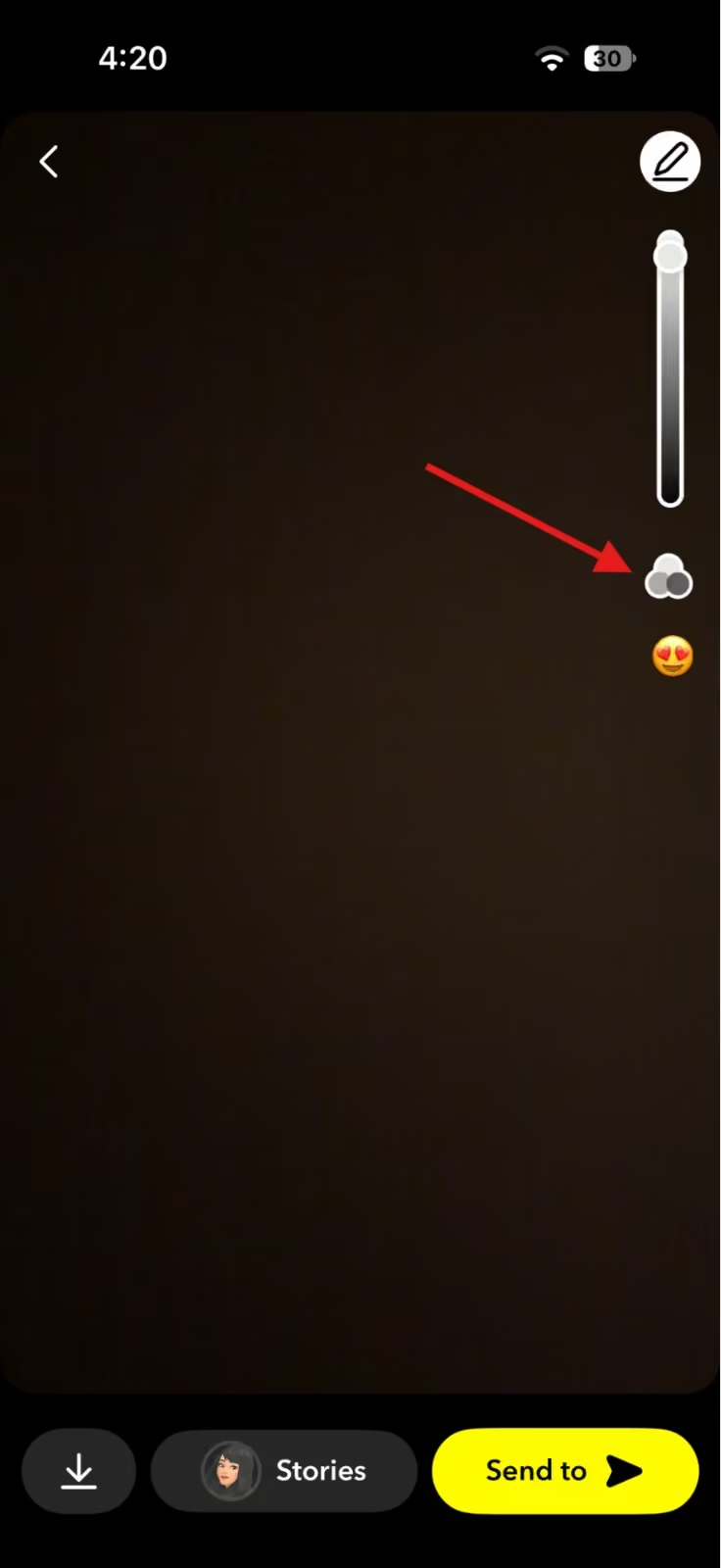
Snapchat’s Color Palette Switcher -
Erase Distractions With Magic Eraser
I once took a great photo, and a stranger stood right in the background. I almost deleted it. That felt like a waste.
Magic Eraser fixed it. Take your snap, then tap the eraser icon on the right toolbar. Brush over the person or object you want gone. Tap Done. You can also use it on a photo you add from your camera roll.
Keep the background simple. The tool can look blurry on busy scenes, so check the result before you post.
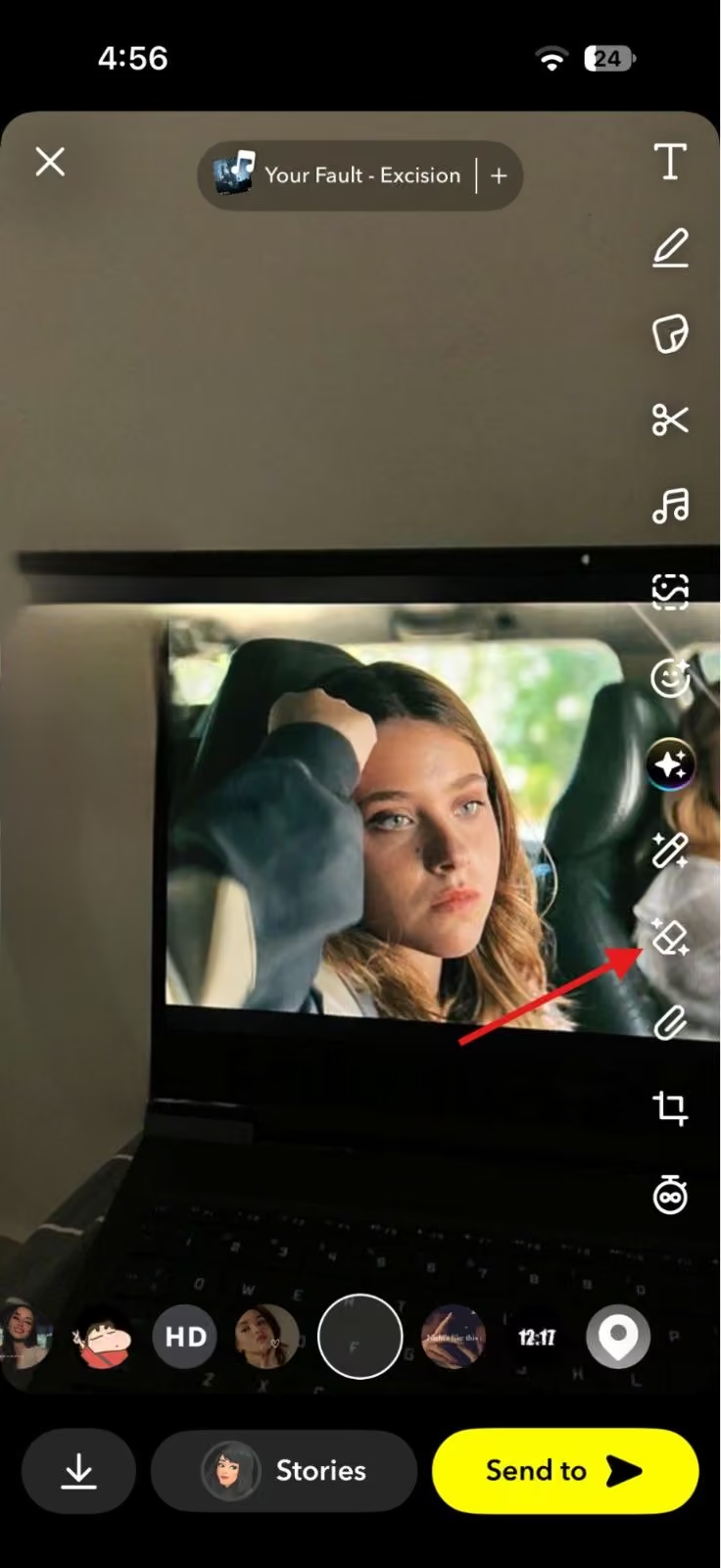
Snapchat’s Magic Eraser -
Make Your Own Stickers
Stock stickers bored me fast, and every account I followed used the same ones. So I tried the scissors tool.
Tap the scissors icon, select the part of the snap you want, and Snapchat saves it to your sticker menu. Open the scissors tab later to use it again. Brands can turn a product, a logo, or a team member into a sticker.
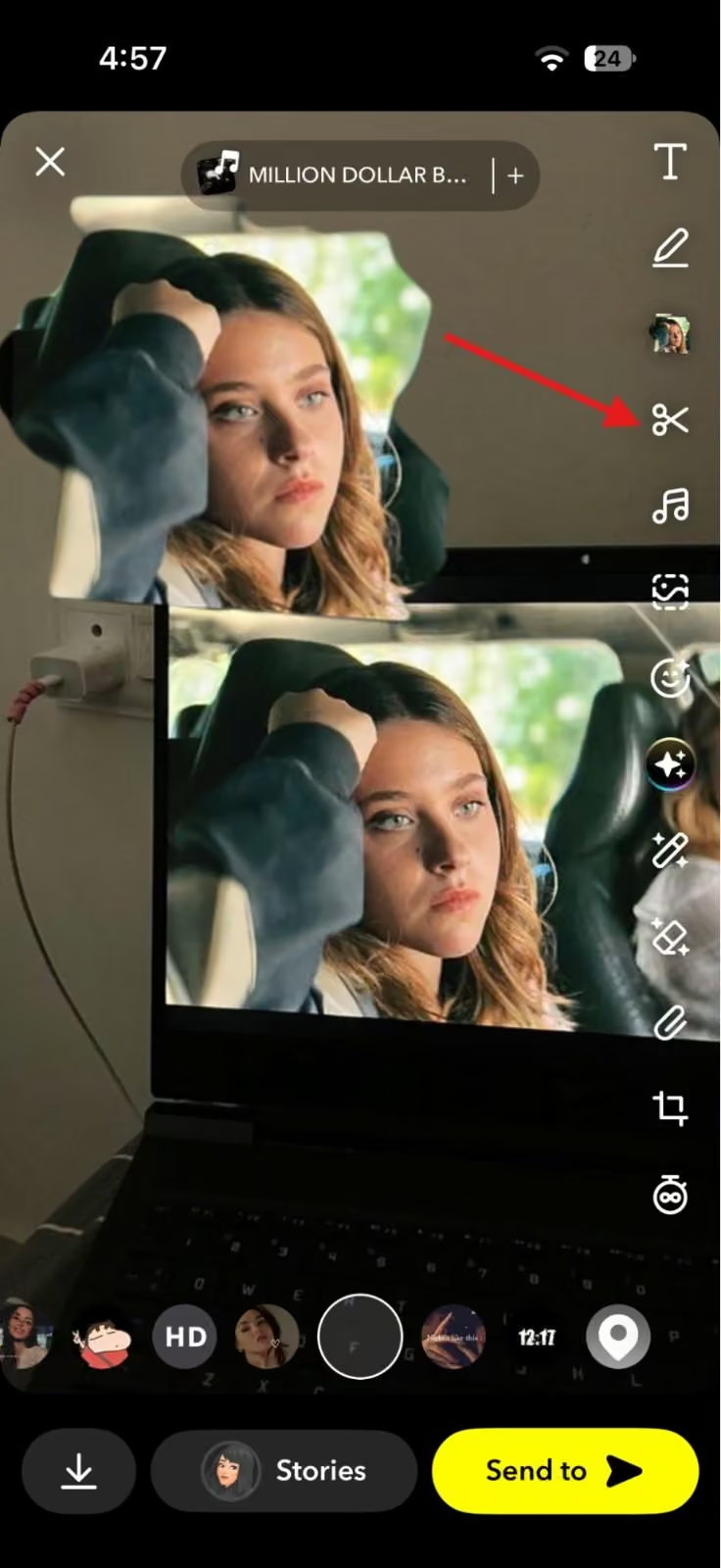
Snapchat’s Scissors Icon Good design catches the eye, but a story keeps people watching. If you want help with that part, read our guide on social media storytelling. Then pair your sharper snaps with these SMM hacks that boost sales.
Still Posting Promo by Promo?
Your next exclusive deserves a better rollout. Plan teasers, launch reminders, and follow-ups in Social Champ.Hidden Snapchat Features Most Users Miss
I used Snapchat the way it came out of the box for years. Then I opened the settings menu and found a few switches I should have flipped on day one.
Most lists of Snapchat hacks and tricks focus on filters, so these settings get less attention. They make Snapchat easier, faster, and more private.
-
Turn On Dark Mode
A bright white screen at midnight is rough on the eyes. Snapchat has a fix. Open Settings, tap App Appearance, and choose Always Dark.
You can also pick Match System, so Snapchat follows your phone’s theme. If you don’t see the option, update the app first.
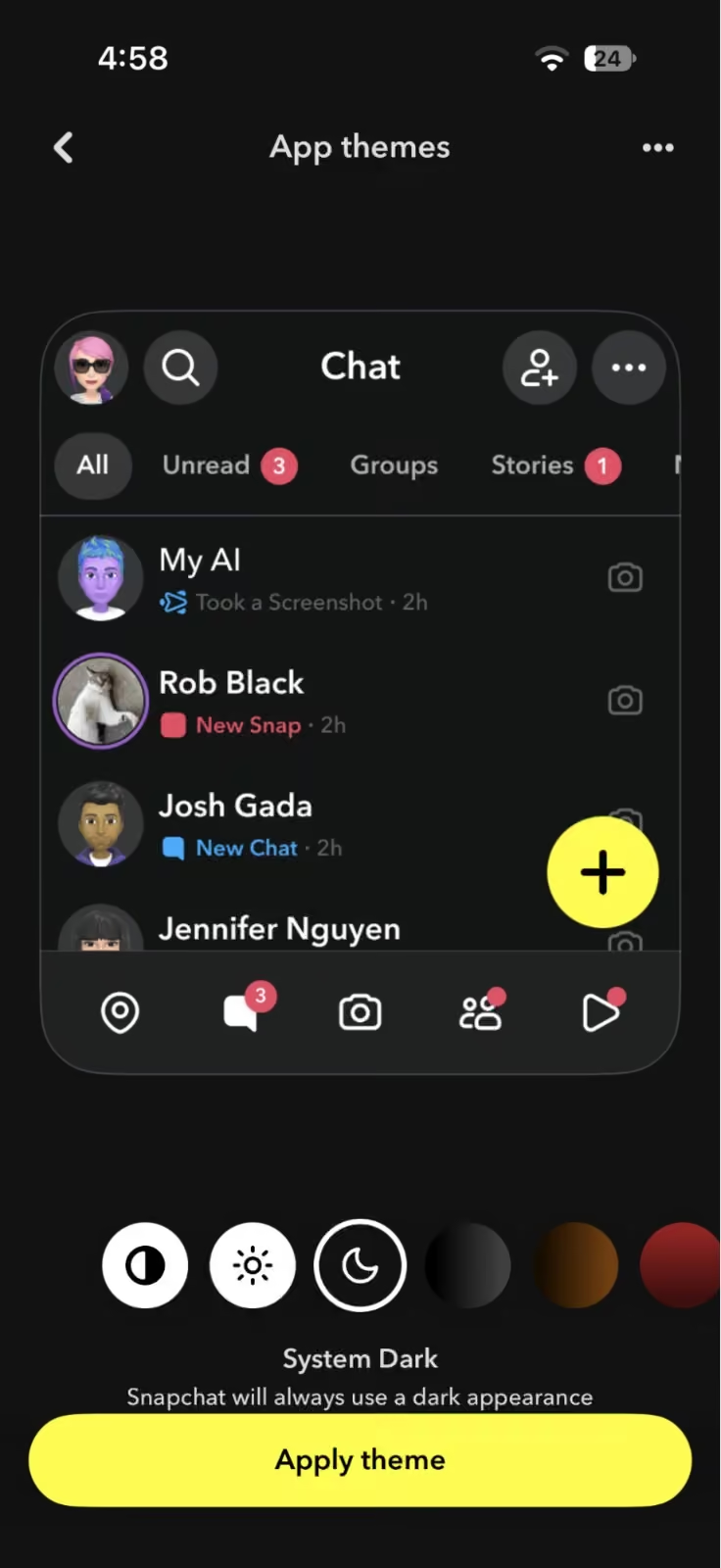
Snapchat’s Dark Mode -
Use Data Saver Mode
My mobile data used to vanish faster than I expected. Data Saver mode fixes part of that. When you turn it on, Snapchat stops loading Snaps and Stories in the background, so you tap only what you want to see.
Open Settings, find the Data Saver toggle, and switch it on. On some iPhones, it sits under Additional Services.
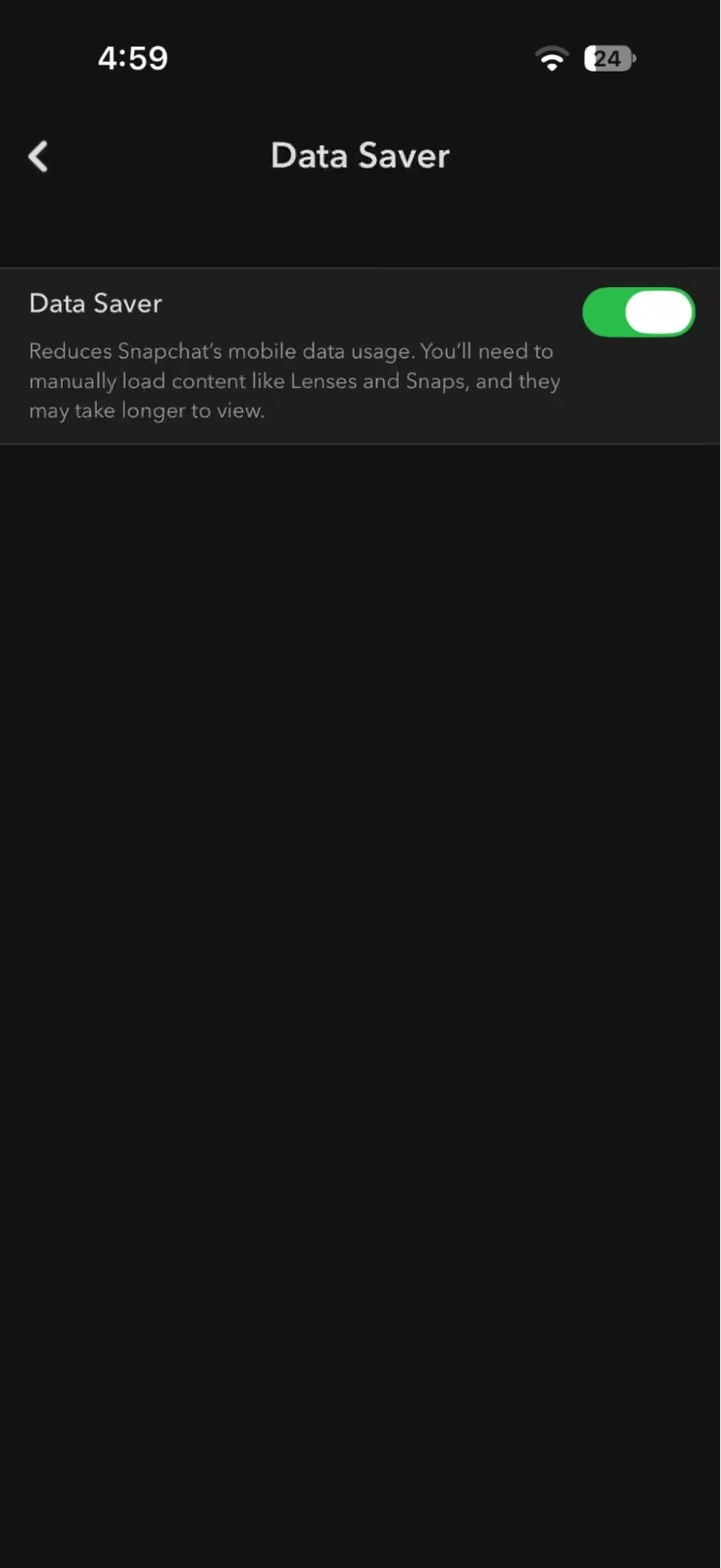
Snapchat’s Data Saver -
Use Snapchat on Your Computer
Long replies get tiring on a phone keyboard. Snapchat for Web lets you chat and call friends from your computer. Go to web.snapchat.com, log in, and use Chrome, Edge, or Safari.
You can also post from a desktop. Snapchat offers a separate web uploader for Stories and Spotlight, which helps when your content already lives on your laptop.
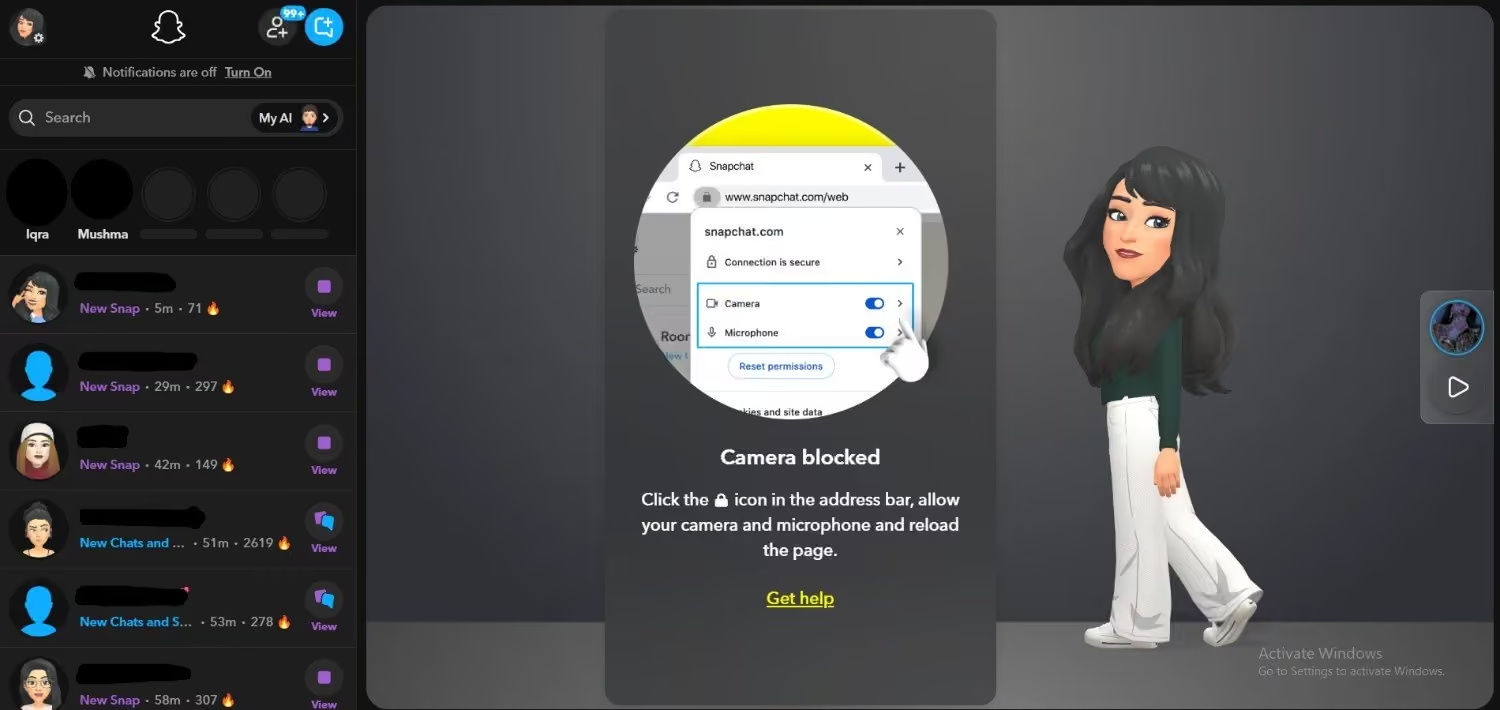
Snapchat for Web -
Turn On Ghost Mode
Snap Map shows your location to friends, which isn’t always what you want. Ghost Mode hides it. Open Snap Map, tap the gear icon, and switch on Ghost Mode.
Then pick 3 hours, 24 hours, or until you turn it off. Snapchat still receives your location, but other users can’t see it. Also, Snaps you submit to Snap Map can still appear there.
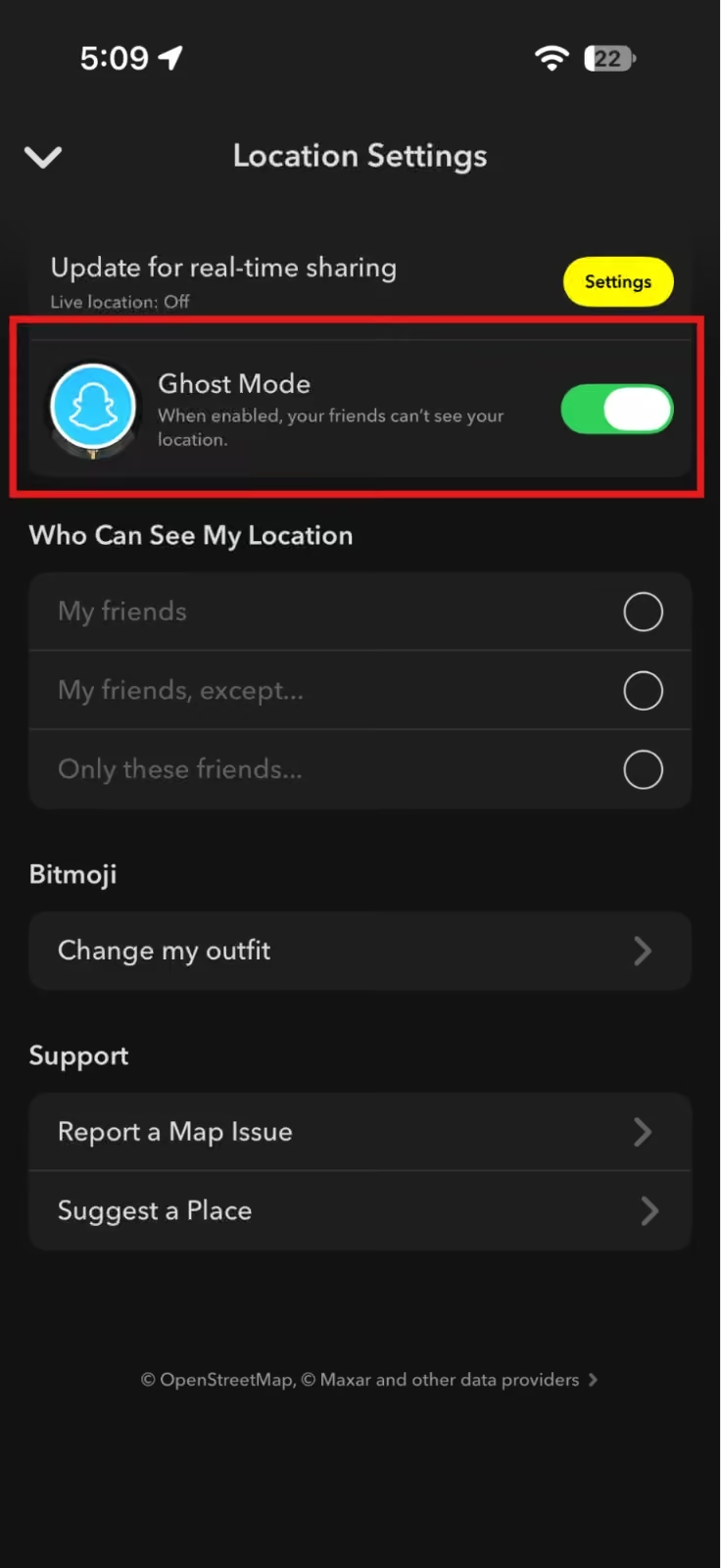
Snapchat’s Ghost Mode -
Scan a Song Without Leaving the App
I used to hear a great song, panic, and switch to another app. Snapchat has Shazam built in, so you don’t need to. Open the camera, press and hold the screen while the music plays, and the song shows up. You can also send it to a friend as a Snap.
I like these Snapchat tricks because they fix everyday annoyances in under a minute. Once the basics feel right, think about growth.
Featured Article: How to Run Effective Snapchat Ads
Engagement and Growth Snapchat Hacks for Brands
Design tricks and settings help, but brands want results. Most Snapchat hidden features serve everyday users. These four Snap hacks help businesses and creators grow on the platform.
-
Share “Reverse Snapchat” Content
Ads feel loud, but social proof feels honest. So flip the usual setup. Ask followers to message you, then share the best positive chats on your Story.
Get permission first, and hide names if the person prefers. Your audience sees real people liking your brand.
-
Run Exclusive Drops for Snapchat Followers
Copying your Instagram posts gives people no reason to follow you on Snapchat. Give them something they can’t get elsewhere.
Think coupon codes, sneak peeks, or staff takeovers. Brands often reuse the same content across platforms. If you want to strengthen those other channels too, our guide on Facebook SEO is a good place to start.
-
Promote Your Snapcode QR Code
Your Snapcode is a QR code that sends people straight to your profile. Open your profile, tap your Snapcode, and save it to your camera roll. Then add it to packaging, email signatures, your website, and flyers. Anyone who scans it can send you a friend request.
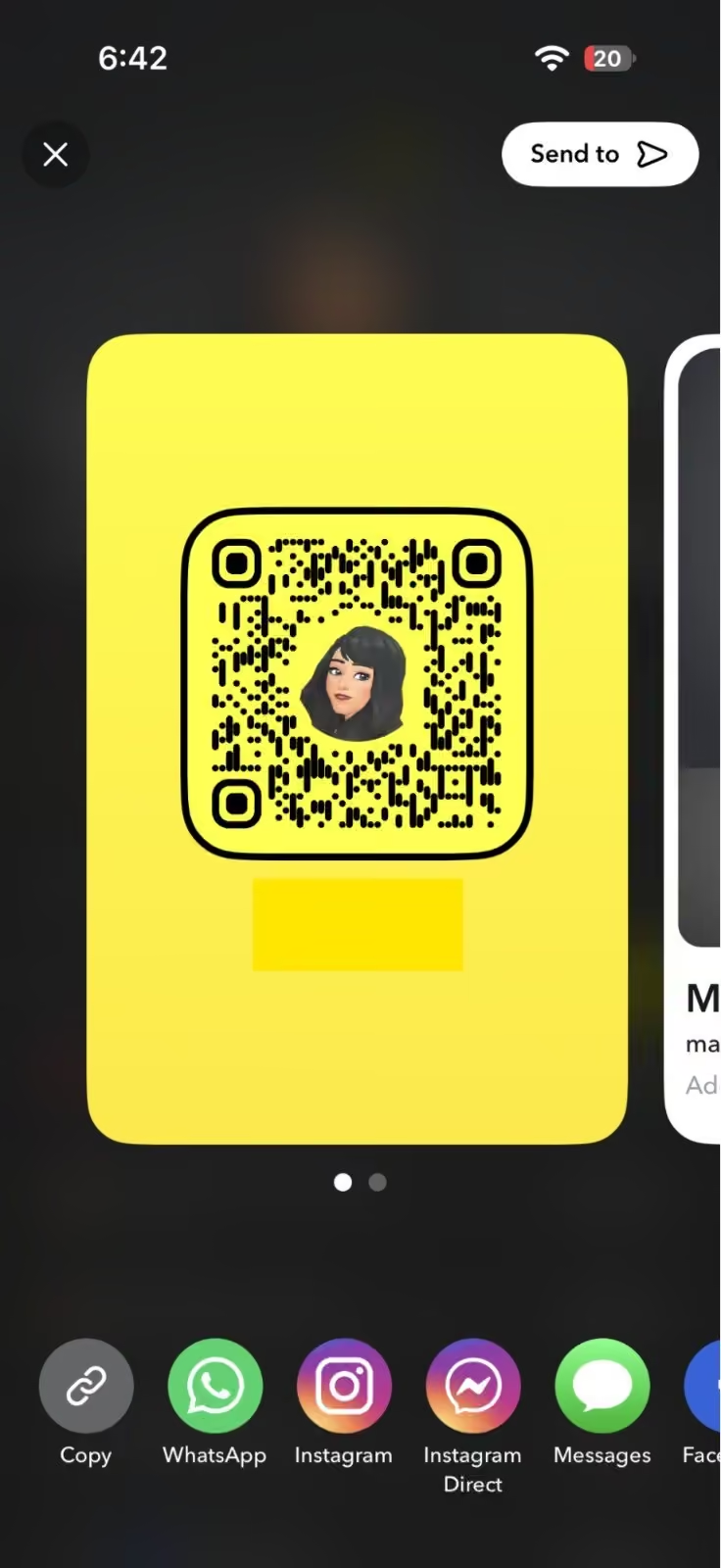
Snapchat’s Snapcode -
Add Tracked Links to Your Stories
A plain link tells you little about who clicked it. Add UTM tags, and your analytics tool shows how many visitors came from Snapchat.
Take a Snap, tap the paperclip icon, paste your tagged link, and tap Attach to Snap. A link like ?utm_source=snapchat&utm_medium=story works well. Those numbers then feed your wider online marketing strategy.
For more ways to make the platform work for your brand, read our guide on how to optimize Snapchat for business.
Featured Article: A Beginner’s Guide to Growth Hacking
How to Promote Your Snapchat on Other Social Media Platforms
The fastest way to grow on Snapchat is to bring in followers you already have on other platforms. They know your brand, so you only need to give them a reason to follow you here.
Starting from zero is slow. You may already have an audience on other apps who would enjoy your Snapchat content. They just don’t know you’re there yet. A clear, repeated nudge fixes that.
Many Snapchat tricks for streaks come down to one habit: show up daily. Promotion works the same way, so keep your teasers regular.
Add your Snapchat link or Snapcode to your Stories, then save them to a Highlight so new visitors can find them. Name the Highlight “Snapchat” so nobody has to guess what it is. Add the link to your bio too.
Place the link early in your Story sequence, so more viewers see it before they tap away.
Tease exclusive content too. A line like “Full behind the scenes on Snapchat” gives people a reason to follow. For more ideas, you can read our Instagram hacks guide.
TikTok
Post short teaser clips and point viewers to Snapchat for the full story or an exclusive drop. Mention Snapchat in your caption and bio, so people know where to go next.
Teasers work best when they leave one question open. Show the first step of a reveal, then say the rest lives on Snapchat. Say it out loud in the video, not only in the caption. Keep the clip short, because the goal is curiosity, not the whole story.
Facebook and X
Announce Snapchat exclusive coupon codes, giveaways, or takeovers, and add your Snapchat link. If your audience also lives on LinkedIn, our LinkedIn hacks guide can help you reach them there too.
Both platforms let you pin a post, so pin your Snapchat announcement to the top of your page or profile. New visitors see it first.
Put the reward in the first line, like the coupon or the giveaway prize. Then repeat the announcement a few days later with a new angle, since many followers miss the first post.
Track Which Platform Works Best
Use a different tracked link for each platform. A UTM link on a landing page you own, or a shortened link with click tracking, shows which platform sends the most people. Once you know, explore more social media hacks to build on what works.
Pick one clear goal for each link, such as coupon claims or new follows. Check the results after two weeks, then drop the weakest platform from your plan. That keeps your time on what works.
Build a Simple Weekly Promo Rhythm
I like a rhythm that fits in one week. Here’s an example you can adjust:
- Monday: Post a teaser clip on TikTok.
- Wednesday: Share your Snapchat link in your Instagram Stories.
- Friday: Announce the drop on Facebook and X.
- Weekend: Run the drop on Snapchat and thank the people who joined.
This pattern gives followers three reminders before the drop. It also stops you from posting the same message everywhere on the same day.
Mistakes That Waste Your Promo Effort
These mistakes are easy to avoid:
- Posting your link once and never again.
- Giving followers no reason to switch, like a coupon or a sneak peek.
- Copying the same caption on every platform.
- Skipping tracking, so you can’t tell what worked.
Fix these four, and your promos will work harder.
Plan Your Promos With Social Champ
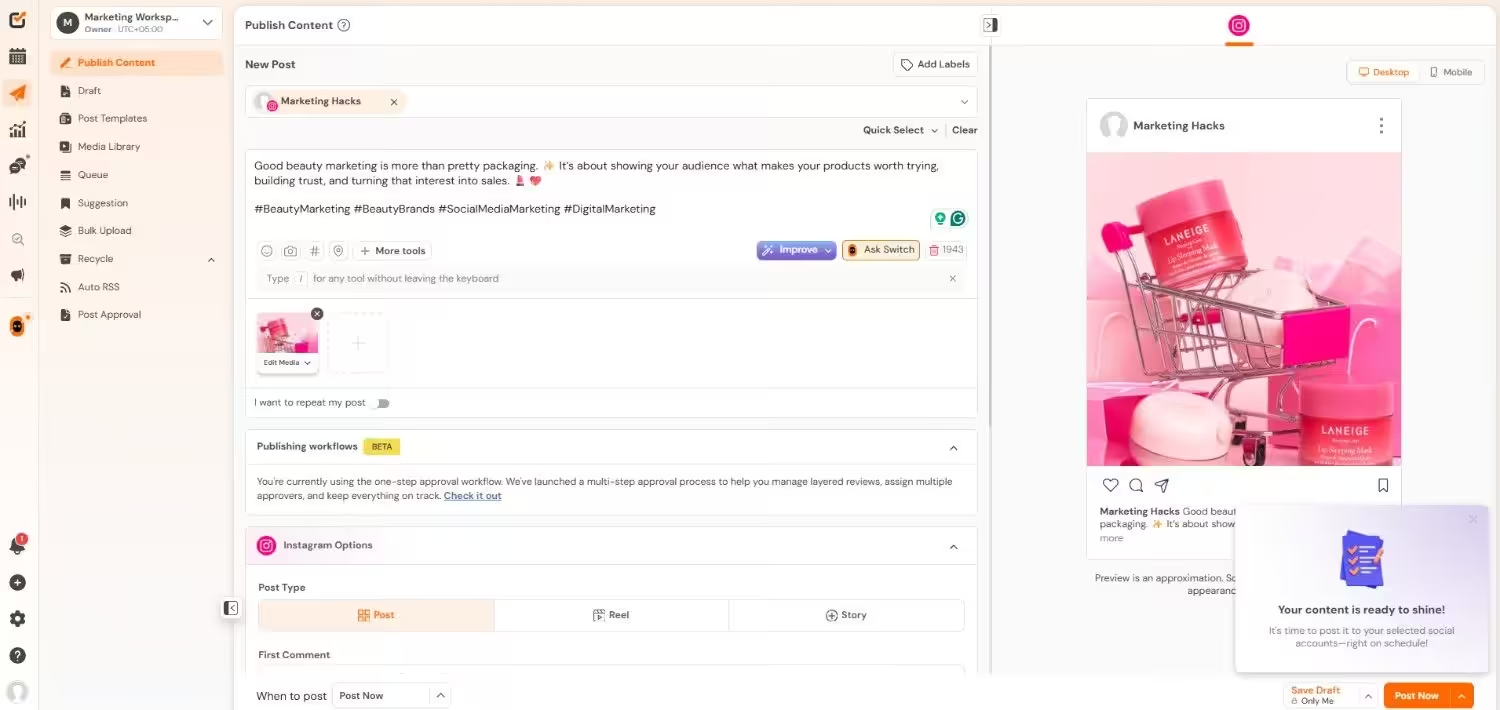
Social Champ makes it easier to promote your Snapchat on other platforms. It doesn’t post to Snapchat, so you promote from the platforms it supports. Here’s how it helps:
- Schedule your Snapchat promo posts to Instagram, TikTok, Facebook, X, and LinkedIn from one place.
- Plan a regular Snapchat drop promo in the content calendar, so you never forget it.
- Create promo graphics with your Snapcode using the built-in Canva integration.
- Check analytics to see which platform drives the most clicks.
I like this setup because one calendar replaces switching between apps. You write the teaser once, adjust it for each platform, and move on.
A steady promo schedule also helps Snapchat followers know when your next drop lands. Then your numbers show where new followers come from. Start with one week of teasers, then adjust based on what your numbers show. Small tests beat big guesses.
Your Next Promo Can't Wait
Conclusion
I admitted at the start that I tapped the same three buttons for years. Now I open Snapchat and look for something new. That small change made my snaps look better and my time in the app more useful.
You can do the same. You now have 12 hacks to test. These Snapchat hacks take minutes to try, yet they can change how your snaps look and how your audience responds.
The audience is there. As I’ve told you, Snapchat averaged 977 million monthly active users in Q3 2026. Small tweaks add up on a platform this big. Your followers on other platforms can join them if you give them a reason.
Pick one hack from each section and try it today. Then track what works and keep the ones that grow your audience. You don’t want your next snap to look like your last one.