Coupon codes can be a pretty handy tool to attract new and repeat customers. However, it’s important to make sure discounting fits into your overall brand strategy.
Racing to the bottom to become the “low-price” leader can have a disastrous effect if you’re not careful.
Sometimes, it’s better to not lower prices and wiser to devote your energy to providing outstanding service and overall unique brand experience.
In any case, running an e-commerce business is all about experimentation, social advertising and finding out what works best.
Social Champ, an all-in-one tool to create, post, schedule, and analyze all of your social media management efforts – eliminating the monotonous task of having to switch tabs between dozens of accounts.
With this tool, the users get a controlled stream of all your blogs, promotional/awareness campaigns, print advertisements and a lot more on different networking channels at the same time.
Learn how you can redeem your Coupon Codes at Social Champ to enjoy the promos introduced on special occasions!
Let’s show you an example!
- Log into Social Champ’s Website
- Go to Pricing tab under your accounts on the left side panel
- Scroll down to Pricing and Select your desired Plan
- Fill your card details, and Enter your Coupon Code
- Voila! Repeat and Schedule anything like peanuts!
First, Make Your Personal Social Champ Account
The first step is to sign up on Social Champ and make a personalized account on Social Champ by simply clicking on the sign-up option at the top-right corner of your screen. You can create your account easily by signing up with your email address.
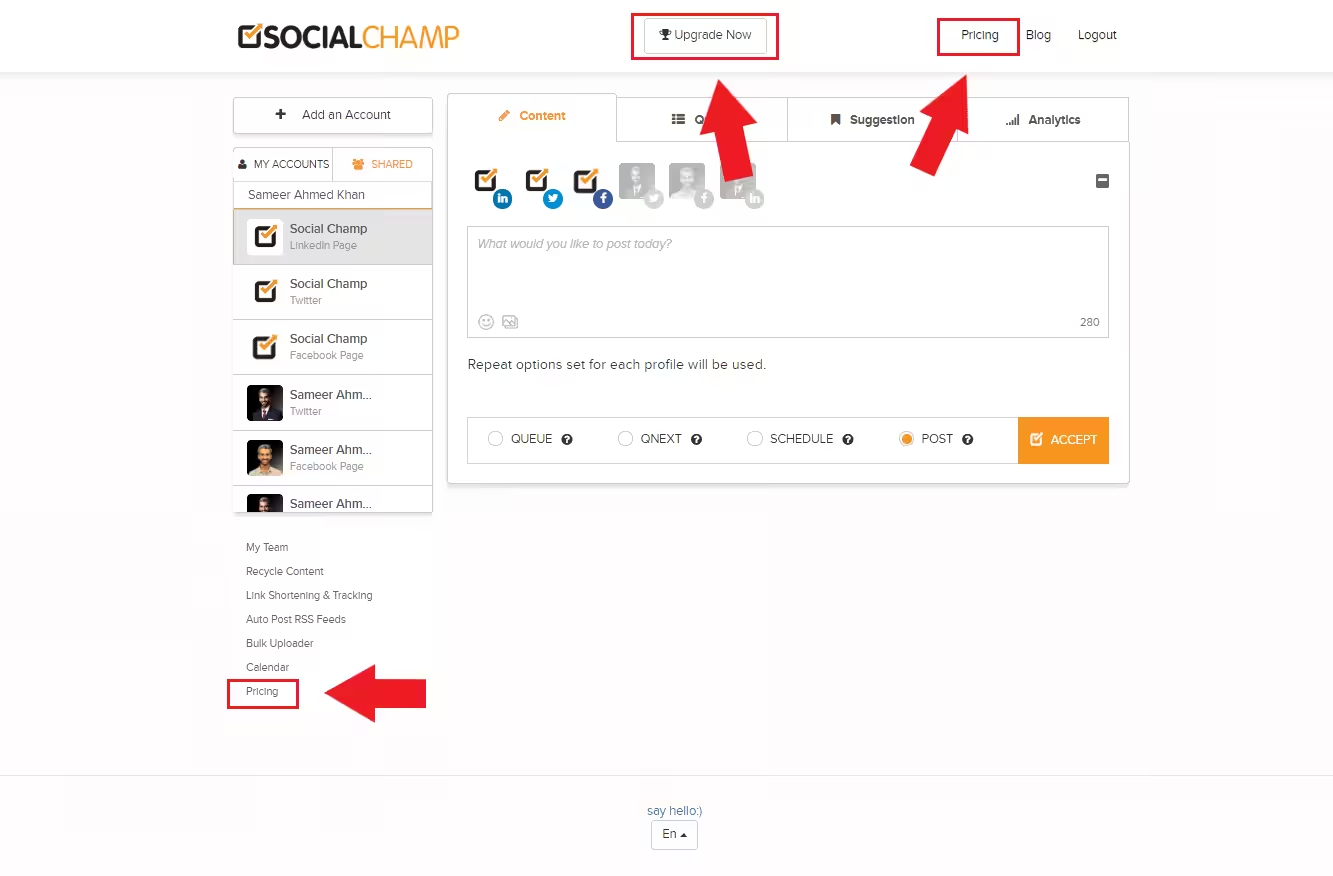
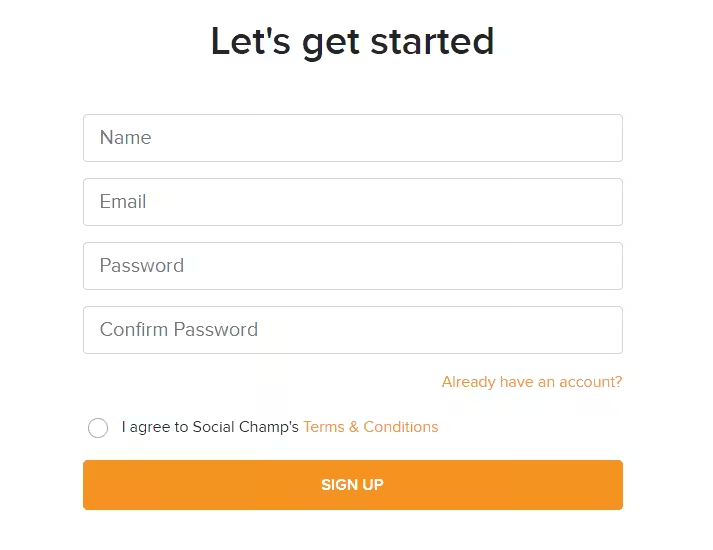 After that, you will see this screen (minus the social profiles)
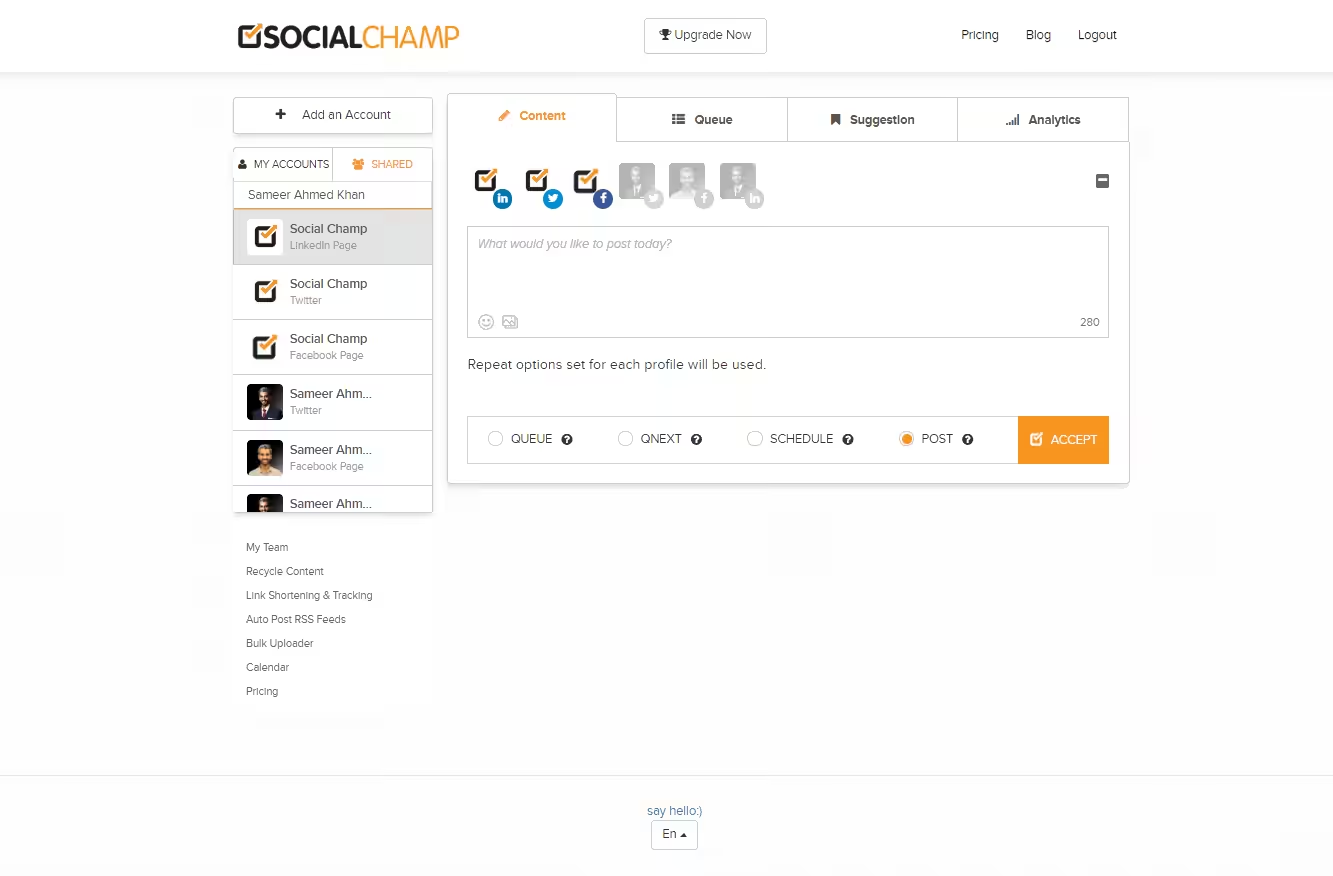
Head Over To Pricing Tab
Go to the Pricing tab, by clicking on Pricing under your social media accounts.
Or use the Pricing button in the top bar, or use the Upgrade button to upgrade your package.
Scroll Down to Pricing and Select Your Desired Plan
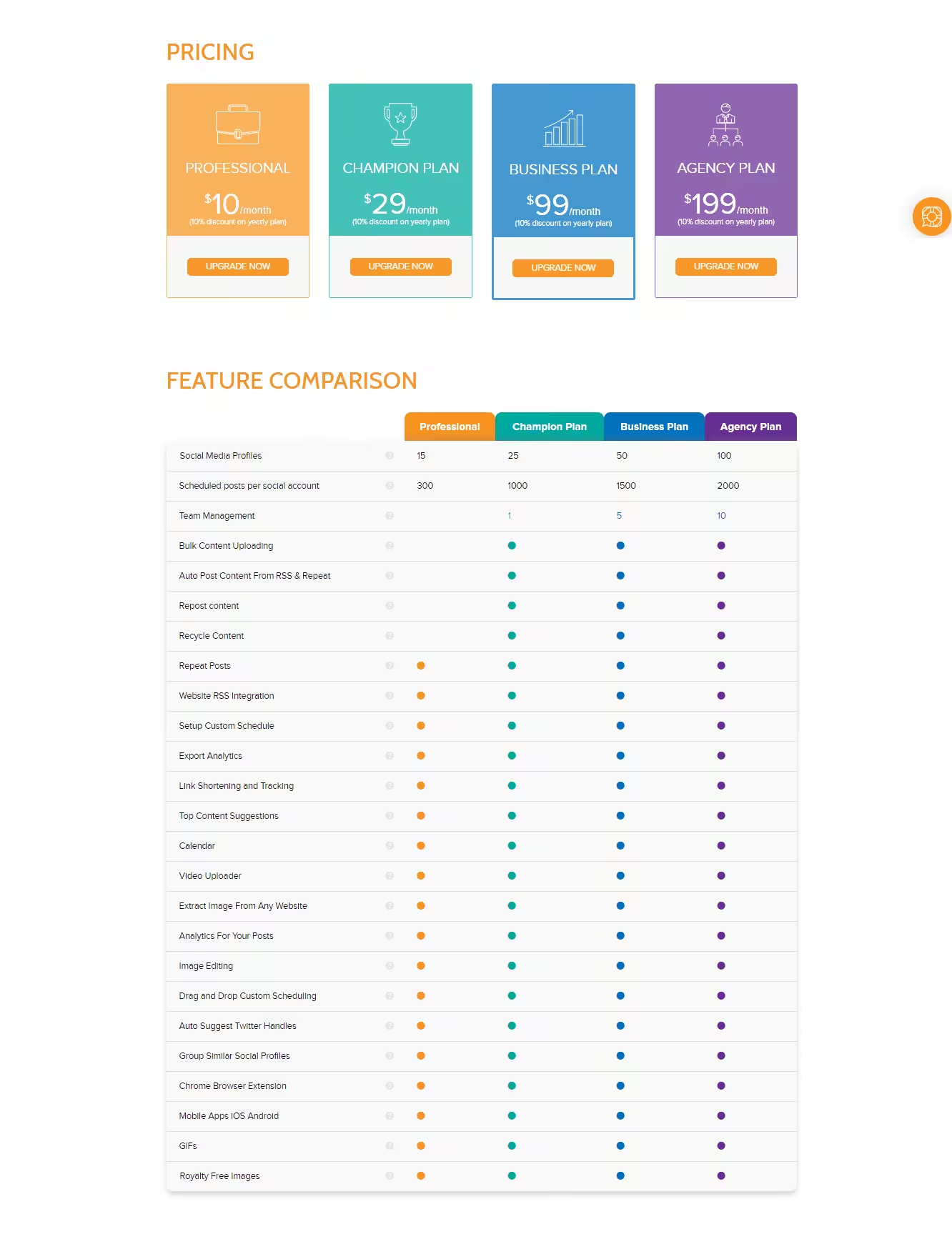
Head over to Pricing, Select the plan that you wish to subscribe and Click on Upgrade Now.
You can also go through the Features Comparison to get a better insight in choosing the plan.
Fill your card details, and Enter your Coupon Code
Fill in your Credit Card Details, followed by entering the Coupon Code, and click Apply.
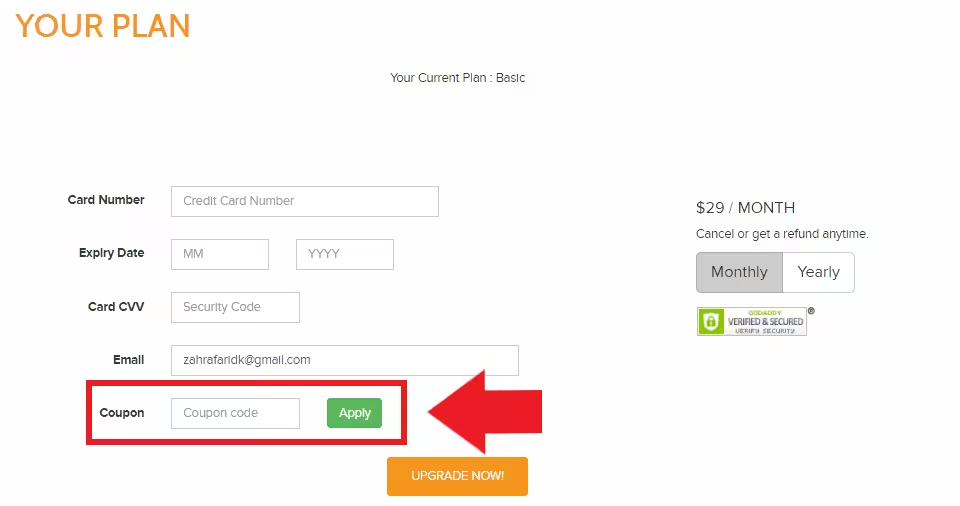
Once you click Apply, The Champ discount will be applied to your plan.
Voila, All Set to Schedule and Make Mark in Digital Marketing
Social Champ is proud to offer the kind of personalized service that seems to be lacking in social media scheduling tools these days.
Whatever the scope, from blogging and content marketing or content repurposing to new startups, social media reach analysis and effective scheduling, the distinguishing features at Social Champ will ensure users are given the correct platform, pricing, and service the first time.
<script>
document.addEventListener('DOMContentLoaded', function() {
    function transformTablesForMobile() {
        if (window.innerWidth > 767) return; // Only for mobile

        const tables = document.querySelectorAll('#brxe-kpxjkv table');

        tables.forEach(table => {
            if (table.classList.contains('transformed')) return;

            let headers = [];
            const thead = table.querySelector('thead');
            const tbody = table.querySelector('tbody');

            // Get headers - check for both th and td in thead
            if (thead) {
                const headerRow = thead.querySelector('tr');
                if (headerRow) {
                    // First try th, then td
                    let headerCells = headerRow.querySelectorAll('th');
                    if (headerCells.length === 0) {
                        headerCells = headerRow.querySelectorAll('td');
                    }
                    headers = Array.from(headerCells).map(cell => cell.textContent.trim());
                }
            } else if (tbody) {
                // If no thead, take first row
                const firstRow = tbody.querySelector('tr');
                if (firstRow) {
                    let headerCells = firstRow.querySelectorAll('th');
                    if (headerCells.length === 0) {
                        headerCells = firstRow.querySelectorAll('td');
                    }
                    headers = Array.from(headerCells).map(cell => cell.textContent.trim());
                }
            }

            // Return if no headers found
            if (headers.length === 0) return;

            // Get all data rows
            const rows = Array.from(tbody.querySelectorAll('tr'));
            const dataRows = rows; // All tbody rows are data rows when thead exists

            // Create new structure
            const newContainer = document.createElement('div');
            newContainer.className = 'mobile-table-container';

            // Create a section for each column
            headers.forEach((header, colIndex) => {
                const columnSection = document.createElement('div');
                columnSection.className = 'mobile-column-section';

                const columnHeader = document.createElement('div');
                columnHeader.className = 'mobile-column-header';
                columnHeader.innerHTML = header; // Use innerHTML to preserve formatting
                columnSection.appendChild(columnHeader);

                const columnList = document.createElement('div');
                columnList.className = 'mobile-column-list';

                dataRows.forEach(row => {
                    const cells = row.querySelectorAll('td');
                    if (cells[colIndex]) {
                        const item = document.createElement('div');
                        item.className = 'mobile-column-item';
                        item.innerHTML = cells[colIndex].innerHTML;
                        columnList.appendChild(item);
                    }
                });

                columnSection.appendChild(columnList);
                newContainer.appendChild(columnSection);
            });

            table.style.display = 'none';
            table.classList.add('transformed');
            table.parentNode.insertBefore(newContainer, table.nextSibling);
        });
    }

    transformTablesForMobile();

    // Handle window resize
    let resizeTimer;
    window.addEventListener('resize', function() {
        clearTimeout(resizeTimer);
        resizeTimer = setTimeout(function() {
            const containers = document.querySelectorAll('.mobile-table-container');
            const tables = document.querySelectorAll('#brxe-kpxjkv table.transformed');

            if (window.innerWidth > 767) {
                containers.forEach(c => c.style.display = 'none');
                tables.forEach(t => t.style.display = 'table');
            } else {
                containers.forEach(c => c.style.display = 'block');
                tables.forEach(t => t.style.display = 'none');
            }
        }, 250);
    });
});
</script>
/* Sticky header for tables WITH thead */
#brxe-kpxjkv table thead {
background-color: #f0ebf8;
position: sticky;
top: 0;
z-index: 2;
}
#brxe-kpxjkv table thead th {
background-color: #f0ebf8;
position: sticky;
top: 0;
}
/* Sticky header for tables WITHOUT thead (first row only) */
#brxe-kpxjkv table:not(:has(thead)) tbody tr:first-child {
background-color: #f0ebf8;
position: sticky;
top: 0;
z-index: 2;
}
#brxe-kpxjkv table:not(:has(thead)) tbody tr:first-child td,
#brxe-kpxjkv table:not(:has(thead)) tbody tr:first-child th {
background-color: #f0ebf8;
position: sticky;
top: 0;
}
/* Mobile Column Layout */
@media (max-width: 767px) {
#brxe-kpxjkv table{
max-height:2000px;
}
.mobile-table-container {
display: block;
margin: 20px 0;
border-radius: 12px;
overflow: hidden;
}
.mobile-column-section {
border: 1px solid #E0E0E0;
overflow: hidden;
background: white;
}
.mobile-column-header {
background-color: #E3DFF5;
padding: 15px;
font-weight: bold;
font-size: 16px;
color: #333;
}
.mobile-column-list {
padding: 0;
}
.mobile-column-item {
padding: 15px;
border-bottom: 1px solid #F0F0F0;
background: white;
font-size: 16px;
line-height: 1.6;
}
.mobile-column-item:last-child {
border-bottom: none;
}
.mobile-column-item:nth-child(odd) {
background-color: #F7F6FC;
}
.mobile-column-item:nth-child(even) {
background-color: #FAFAFA;
}
.mobile-column-item strong {
color: #333;
font-weight: 600;
}
}