
You know that feeling when you post something on Threads and… there’s no response?
This happens for many reasons, but one of them can be that you don’t know the best time to post on Threads! And it’s okay to be unaware! Even I didn’t know the best times until I did some research and 400k Threads posts for this blog!
Since Threads’ algorithm rewards recency and early engagement, timing really matters.
In this guide, I’ll show you the best times to post on Threads, break it down day by day, and explain how a Meta Threads scheduler can help you stay consistent.
Short Summary
- Analyzing millions of posts shows that early engagement and recency are key factors for visibility in Threads’ algorithm.
- Timing determines whether content builds strong connections and drives viral reach or gets buried by inactive audiences.
- Peak engagement windows generally cluster around early morning hours (3 AM to 6 AM) across the week, with secondary evening spikes.
- Midweek days—Wednesday, Thursday, and Tuesday—are the absolute best overall days for maximum reach.
- Weekends (Saturday and Sunday) and late evening slots (6 PM to 11 PM) yield the lowest engagement and should be avoided for key posts.
- Industry, geographic region, and specific target audience behaviors mean general best-time data acts only as a baseline.
- Finding an exact optimal schedule requires manual A/B testing or using AI-driven scheduling tools like Social Champ to analyze past audience behavior.
- Maximizing overall success requires pairing optimal timing with visual media, active comment replies, and conversational content like open questions.
Understanding the Importance of Timing on Threads

In this ever-evolving digital world, posting content on Threads goes beyond hitting the “publish” button.
Timing is valuable in determining whether your content gets engaged or disappears into obscurity.
Let’s discuss why timing is important and how it affects engagement and reach.
Why Timing Matters on Threads
Threads has become a popular platform for brands to grow their online presence. That’s why the posts are constantly updated in users’ feeds.
If you don’t follow the best time to post on Threads, you might be at risk of the following:
- Your Content May Get Buried: If your post is left unread, you may lose its visibility.
- Engagement Drops: Posts that don’t get likes and comments immediately have a lower chance of going viral.
- Missed Opportunities: If your target audience is inactive, your content may remain unnoticed.
Posting at the right time ensures your content goes live when your audience is most likely to engage.
Actionable Tips for Timing Success
Here is how you can make timing work for you:
- Analyze Your Audience: Use tools like Social Champ to find out when your audience is most active.
- Experiment With Time Slots: Try posting at different times to analyze when your audience responds the most.
- Schedule for Consistency: Use scheduling tools to make sure your posting is consistent during peak hours.
By understanding the importance of timing, you can easily find the best time to post on Threads.
When you post at the right time, you are more likely to build stronger connections with your audience and drive engagement on Threads.
Featured Article: Step-by-Step Guide to Creating Impactful Instagram Collab Posts
Quick Summary: Best Times to Post on Threads
No matter how engaging and valuable your content is, it may fail if not posted during the peak engagement hours. Hence, here’s a quick summary of the best time to post on Threads!
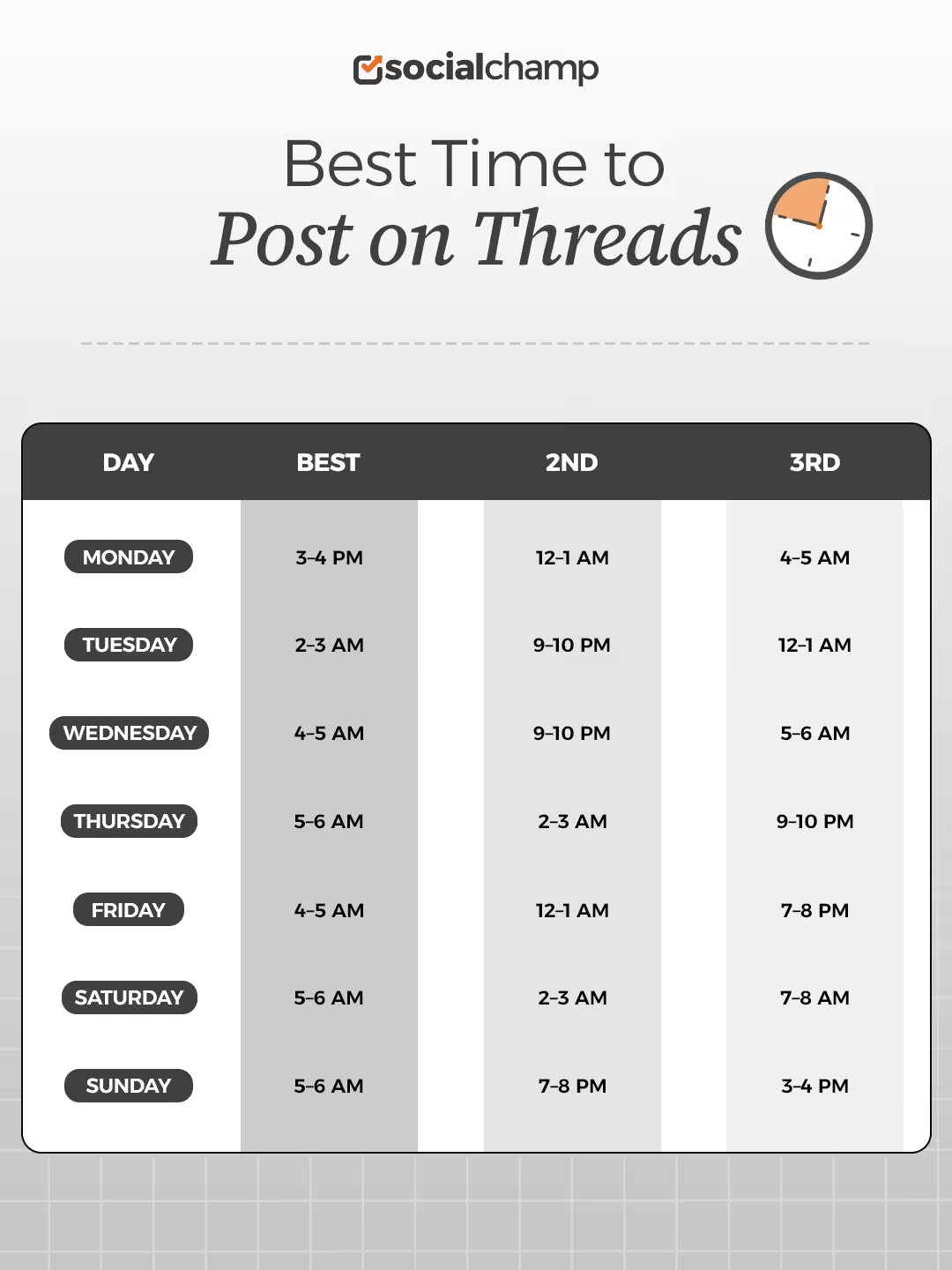
Best Time to Post on Threads Day by Day Breakdown
Here’s a breakdown of the best times to post on Threads by day.
| Day | Best | 2nd | 3rd |
|---|---|---|---|
| Monday | 3–4 AM | 12–1 AM | 4–5 AM |
| Tuesday | 2–3 AM | 9–10 PM | 12–1 AM |
| Wednesday | 4–5 AM | 9–10 PM | 5–6 AM |
| Thursday | 5–6 AM | 2–3 AM | 9–10 PM |
| Friday | 4–5 AM | 12–1 AM | 7–8 PM |
| Saturday | 5–6 AM | 2–3 AM | 7–8 AM |
| Sunday | 5–6 AM | 7–8 PM | 3–4 PM |
When Is the Best Time to Post on Monday?
The best time to post on Threads, according to the 400k posts that we analyzed, is 3-4 AM, followed by 12-1 AM and 4-5 AM as the second and third best windows.
When Is the Best Time to Post on Tuesday?
Engagement peaks at three different times on Tuesdays as well. 2-3 AM is the best, while 9-10 PM and 12-1 AM are the second and third best windows.
When Is the Best Time to Post on Wednesday?
Wednesdays also have the three peak windows that you shouldn’t miss. The first is between 4-5 AM, the second between 9-10 PM, and the third best window is 5-6 AM.
When Is the Best Time to Post on Thursday?
The best time to post on Thursday is between 5-6 AM, closely followed by 2-3 AM as the second-best time, and the third window opens at 9-10 PM.
When Is the Best Time to Post on Friday?
Fridays are no different! Like the other days, Fridays also have three peak windows. First, at 4-5 AM, second, at 12-1 AM, and third, at 7-8 PM.
When Is the Best Time to Post on Saturday?
On Saturdays, you can post between 5-6 AM and achieve the best engagement, but if you miss that window, you can also post between 2-3 AM or 7-8 AM.
When Is the Best Time to Post on Sunday?
The best window opens at 5-6 AM on Sundays, and then the next two windows open at 7-8 PM and 3-4 PM, so you have plenty of time to make the most of the platform.
Featured Article: Top Tools for Social Media Management for Agencies
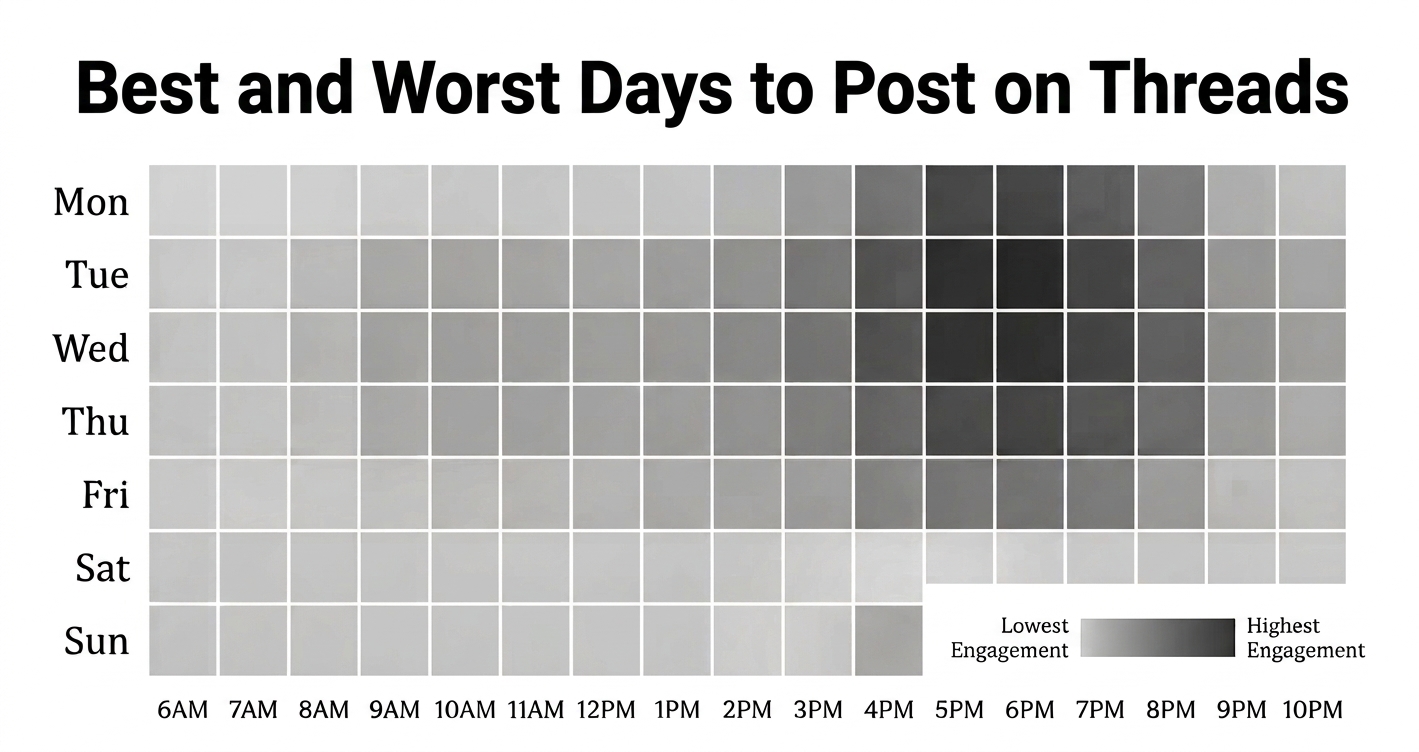
What Are the Worst Days and Timings to Post on Threads?
Based on overall daily engagement, Wednesday is the best day to post on Threads, followed closely by Thursday and Tuesday—midweek is clearly prime time for reach.
On the flip side, Saturday has the lowest overall engagement, with Sunday the second-worst day. Weekends and late evening hours (6 p.m. to 11 p.m.) consistently underperform. If you’re scheduling content, front-load your high-priority posts for midweek mornings and avoid late-night or weekend slots.
How to Find Your Own Absolute Best Times to Post on Threads
One thing you should know about the best time to post is that there’s no single best time for any social media platform. You might get a lot of the information from data like ours, but that doesn’t mean that it will work for you.
The best time to post on Threads depends on many factors, including which industry you work in, what region you live in, and what your audience is like.
Which is why it is important to find the best time to post for your audience, so you can publish your content when they’re active. There are two ways you can do this!
First is to A/B test your timing. This is manual effort; you need to create content and experiment with posting it at different times and see which time it performs best. That might be your best time to post.
However, this first method requires a lot of time and trial and error. The easier and much more efficient way is to get a tool that tells you the best time to post for your audience.
These tools have AI-suggested times that analyze your data from previous posts and, based on that, recommend the best time to post.
This has a much better chance of success, and it also saves you so much effort and time.
How Social Champ Helps You in Finding the Best Time to Post on Threads
Social Champ is one such tool that gives you the option to let AI suggest the best time to post on Threads. It analyzes your audience’s past behavior with your content and then suggests the right time to post. This is the single easiest way to get your posts live at the right time.
Here’s how you can schedule a Threads post through Social Champ for the best time:
- Sign in to your Social Champ account; if you’re new, please sign up!
- Connect your Threads profile and select Threads from the “select social accounts” tab.
- Create your post and check the preview.
- Select “AI suggested time” at “when to post” tab at the bottom of the screen.
- Select “Go for it” and hit schedule.
Ready to Post Smarter, Not Harder?
Additional Tips to Maximize Engagement on Threads
Getting the right time is essential, but it is just one aspect of the problem.
If you really want to boost your engagement on Threads, combine strategy, creativity, and consistency.
Here are some additional tips to help your posts stand out.
-
Create Content That Connects
- Start Conversations: Encourage your audience to react by asking questions and sharing opinions.
- Keep It Relatable: Use relevant humor, stories, and personal experiences that your followers can relate to.
- Be Visual: Use pictures, GIFs, and videos in your posts to attract your audience’s attention.
-
Engage With Your Audience
- Reply to Comments: Respond to your audience’s comments to make them feel valuable.
- Join Trending Discussions: Utilize hashtags and trending topics in your niche to stay relevant.
- Post Consistently: Maintain a regular posting schedule to keep your feed fresh and active.
Much like the best time to post on LinkedIn, posting when your professional audience is most active can help spark meaningful interactions on Threads.
-
Utilize Tools to Save Time
- Schedule Posts: Scheduling tools like Social Champ allow you to plan and schedule your posts in advance and help you stay consistent.
- Optimize Posting Times: Social Champ’s Best Time to Post feature suggests the optimal times for posting, ensuring your posts and updates go live during the peak engagement hours.
Conclusion
Understanding the best time to post on Threads is not just about expanding your audience; it is also essential to ensuring that your hard work and creativity receive the attention they deserve.
By determining the optimal times, experimenting with posting schedules, and utilizing tools like Social Champ, you can stay ahead of the game.
Posting your content at the right time increases visibility and boosts engagement.
Social Champ streamlines the entire process with its features like Best Time to Post, a well-organized content calendar, and robust analytics that give you insights.
Whether you’re a content creator, a brand, or just a beginner, Social Champ helps you stay focused on creating content that resonates with your audience.
Make your every post count, and let your audience hear your voice when it matters the most!











Emily
This article was super interesting and helpful.
Myron Ruiz
I love how you’ve included specific time frames to guide users. How would you suggest businesses with global audiences manage scheduling across multiple time zones to ensure consistent reach?
Goldie Gilbert
Figuring out the best times to post on new platforms is always a challenge, especially with Threads growing so quickly. I’m definitely bookmarking this for future reference!